Telegram ChartSnap MT5

5


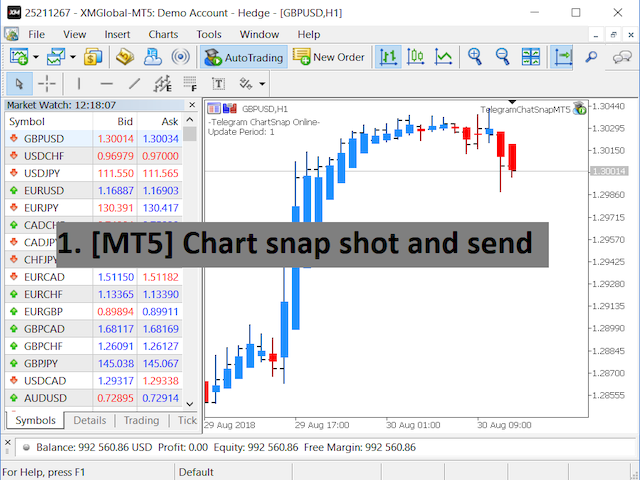
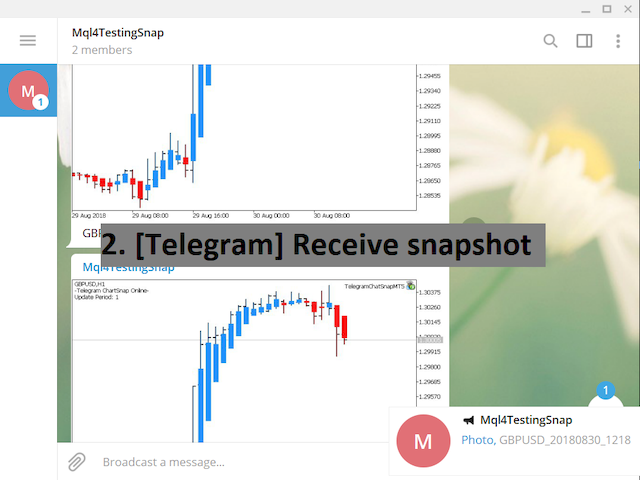
Telegram ChartSnap MT5 is an utility tool to bridge your MetaTrader 5 activities to your Telegram chat/group/channel. It will screen shot your MetaTrader 5 chart and send it to your dedicated Telegram chat/group/channel through a Telegram bot. The whole process will keep repeating based on a time cycle that predetermined by the user. It is a convenient tool for those who like to get access to their favorite system/dashboard that only available at MetaTrader Desktop. Beside that, trader can easily share their favorite system/dashboard to their Telegram group/channel members. This utility is very useful especially for those who like to trade using their mobile devices. 


*Special Setup

  • In case your chart is running an EA and you wish to run this utility EA at the same time:
  • Let's name the chart with the running EA = Chart_A.
  • Stop the EA on Chart_A and run the ChartSnap EA with option ShowChartIdOnly=true.
  • Copy the Chart_A's ChartID that show on the terminal window and remove the ChartSnap EA. DO NOT CLOSE the Chart_A window.
  • Re-attach the running EA and open another chart. Let's name the newly open chart = Chart_B.
  • Attach the ChartSnap EA on Chart_B and fill the ChartID for Chart_A.
  • The Chart_B ChartSnap EA will now screen shot your Chart_A and send it to your Telegram chat.


Parameters

  • Token="" - enter your bot API token.
  • ChatID=0 - enter your Telegram ChatID.
  • DisableNotification=false - screenshot will send to Telegram with or without notification.
  • UpdatePeriod=M1 - repeat cycle timer. (based on candle opening time)
  • CaptionOption=cCustom - option for screenshot caption.
  • CustomCaption="" - custom text for screenshot caption if CaptionOption=cCustom.
  • ChartID=0 - target chart to be screen shot. '0' indicate the attached chart will be the screen shot target.
  • Width=800 - screenshot file width.
  • Height=600 - screenshot file height.
  • ShowChartIdOnly=false - show the attached chart's ID on screen.


Telegram Bot Setup guideline

  1. Open your Telegram APP and search for "BotFather".
  2. Type /start and click/type /newbot to create a new bot.
  3. Give your bot a nickname and username (e.g., nickname: TestingABC and username: TestingABCbot <-- username has to be ended by 'bot').
  4. Congratulations! You have created your Telegram bot.
  5. Save your bot API token (e.g. 227330911:AAEWHnT9B9bAARDiKhESwXd7hk-G4nxmEpI) and click t.me/TestingABCbot to chat with it.
  6. Go back to Telegram APP and search for 'userinfobot'.
  7. Type /start and retrieve your personal Telegram Chat ID (e.g., 12345678).
  8. Back in MetaTrader 4, go to Tools > Options > Expert Advisors > tick 'Allowed WebRequest for listed URL' and add 'https://api.telegram.org'.
  9. Attach the utility into your MetaTrader 4 chart and fill up the Token (from step 5) and ChatID (from step 7).
  10. Hooray! Your ChartSnap utility is ready to work for you.
  11. Fill up the Chat ID with your Channel ID and set your bot as a channel administrator in order for your bot to work in the channel.

Avis 1
Виктор Крайнов
73
Виктор Крайнов 2023.09.20 13:36 

Очень полезное программное обеспечение. Респект автору что учёл его необходимость.

Produits recommandés
Trade Control Panel
Jerry Jilun Anak Liban
Trade Control Panel Function Normal One Click Function Close All Close All Profit Close All Loss Close All Pending Order Close All Sell Close All Buy Advance One Click Function 1.  Close Partial Lot Sell by Percent It will help you partial close for all open position by desire percent you wanted. No longer partial close one by one for every open position Manual input for desire percent 2. Close Partial Lot Buy by Percent It will help you partial close for all open position by desire percent
Synchronizer
PATRICK PAARSCH
This Expert Advisor monitors all open positions across all symbols in MetaTrader 5. Whenever a Stop Loss (SL) or Take Profit (TP) is manually set or adjusted on any position, the EA automatically applies that value to all other open positions , regardless of symbol or order type (Buy/Sell). This ensures consistent and synchronized SL and TP levels across your account. Perfect for mobile trading via tablet or smartphone!
FREE
One Click Trader  is a tool designed for MetaTrader 4 platform, which enables you to take your trading to the next level. It enables you to open, manage and close your trades in simple an efficient way by just one click of your mouse button. "-"   ,  "+"  change OCT window size  Up arrow minimizes the OCT panel Down arrow maximizes the OCT panel Right arrow displays the next panel with additional features Left arrow hides the panel with additional features Red  SELL  button enables you to open s
All In One Trade Manager is a trade manager and one-click trading panel for manual traders on MetaTrader 5. It works as a trading assistant, risk manager and position size calculator in one dashboard. It brings together everything below in one panel: order entry with risk sizing automatic trade management advanced order types account protection statistics Its entry checks run in the background and tell you, before you click BUY or SELL, when something speaks against the trade. Also available
The real‑time view of what is happening inside the market. Footprint Secrets brings detailed analysis directly into MetaTrader 5. It shows where volume is trading, how buyers and sellers are interacting, and how liquidity shifts as the market evolves. Designed for traders who want a precise, real‑time understanding of market behavior. Check out the free preview version here:  https://www.mql5.com/en/market/product/172398 Benefits for the Trader See the real activity behind price . Footprint ch
ApexForge Economic Calendar Safety Dashboard Calendrier économique MT5 | Calendrier économique Forex | News Filter | Alertes des annonces économiques majeures | Compte à rebours des événements économiques | Clôture d'urgence | Close All | Alertes jours fériés | Alertes de clôture anticipée | KTimer | Compte à rebours des bougies | Notifications Push mobiles | 12 langues + Auto ApexForge Economic Calendar Safety Dashboard est un tableau de bord complet pour MetaTrader 5 intégrant le calendrier éc
Cet outil peut vous aider à clôturer toutes les commandes ouvertes en un seul clic, cliquez simplement sur « Tout fermer ». Si vous souhaitez uniquement clôturer les ordres rentables, cliquez sur le bouton « Fermer les ordres rentables ». Après avoir cliqué, tous les ordres flottants seront fermés ; Si vous souhaitez uniquement clôturer les ordres avec des pertes flottantes, cliquez sur le bouton « Fermer les ordres perdants ». Après avoir cliqué, tous les ordres avec des pertes flottantes seron
Pro Trade Manager Panel réunit tout votre trading manuel sur un seul panneau sur le graphique MetaTrader 5 : planifiez le trade visuellement, laissez le panneau calculer la taille de position selon votre risque, envoyez les ordres, puis gérez-les et protégez-les. Fonctionne sur le Forex, les métaux, les indices et d'autres symboles. PLANIFICATION VISUELLE DES TRADES Zones d'entrée, de Stop Loss et de Take Profit tracées sur le graphique ; faites-les glisser pour les ajuster. 1, 2 ou 3 niveaux de
This script analyzes all symbols in Market Watch for a set timeframe. The result is displayed on the Experts tab and in the specified file. For more convenient viewing and editing, the result is displayed in a csv file. For the calculation, the Pearson formula is used. The value of the correlation coefficient of pairs close to 1 means that the pairs move almost identically. A value close to -1 means that the pairs move in the same way. This tool will be useful to those who use hedging due to the
Risk Basket Planner
Mohamed Qosyairy Bin Shamsuddin
Risk Basket Planner Risk Basket Planner est un outil de planification manuelle du risque pour MetaTrader 5. Il aide à planifier plusieurs niveaux d'entrée, définir un Stop Loss technique et calculer la taille de lot et le risque réel de chaque couche avant de trader manuellement. Fonctions principales Planification de 1 à 5 niveaux d'entrée . Direction BUY ou SELL . Risque défini en pourcentage de l'equity du compte . Prix L1-L5 modifiables ou déplaçables directement sur le graphique. Un Stop Lo
FREE
Neuron News Risk Manager MT5 Neuron News Risk Manager MT5 est un système de protection contre les actualités économiques, de gestion du risque et de contrôle à distance via Telegram pour MetaTrader 5. Il surveille le calendrier économique MT5 et affiche le prochain événement, la devise, l'heure, l'importance, l'impact et le temps restant. Les événements Low, Medium et High peuvent être filtrés et affichés sous forme de lignes sur le graphique. Le Global Algo Trading Guard peut désactiver automat
Position Prime
Mariana Cordeiro Neves Fernandes
Téléchargez dès maintenant la version de démonstration gratuite et testez toutes les fonctionnalités de gestion des risques de votre outil de test de stratégie avant d'acheter ! Position Prime est un assistant d'exécution visuelle et un gestionnaire de risques de niveau institutionnel pour MetaTrader 5. Conçu pour les traders qui exigent vitesse et précision, il élimine le besoin de calculs manuels de lots et transforme votre graphique en une véritable station de trading. Planifiez, exécutez et
Smart Basket Manager
Tamer Mohamed Montaser Mohamed Tawfik Moussa
Smart Basket Manager Overview Smart Basket Manager is a trade management utility for MetaTrader 5. It is designed for traders who open several positions on a symbol and want to manage them together as one basket. It does not open trades and does not generate entry signals. It manages positions that already exist, according to the rules below. What it does Basket profit protection. When the combined profit of the managed positions reaches a start level, the utility locks a percentage of the highe
Telegram to mt5 pro
Janet Abu Khalil
4 (4)
Telegram to MT5 Pro — Advanced Telegram Signal Copier with Auto-Fix, Multi-TP, Risk Control and Full Trade Management Telegram to MT5 Pro — Copieur de signaux Telegram professionnel Telegram to MT5 Pro est un copieur de trading haute performance qui exécute automatiquement les signaux de Telegram directement dans votre compte MetaTrader 5, avec un contrôle total du risque, de l’exécution et de la gestion des trades. Le système se compose de deux composants : • L’Expert Advisor (EA) exécuté dans
Trade Panel HotKey – MT5 Scalping Utility Fast Trade Panel HotKey is a lightweight MT5 trading utility designed for traders who need to open, manage, and close positions as quickly as possible . The main purpose of this tool is to reduce the time between a trading decision and execution. Instead of moving the mouse, opening order windows, or manually modifying multiple positions, most important actions can be performed instantly through customizable keyboard hotkeys or directly from the compact
T Manager for Price action Traders
Haidar Lionel Haj Ali
4.5 (10)
Maximisez votre succès en trading avec T Manager, la solution ultime de gestion du commerce conçue par des traders pour les traders. Avec son interface conviviale et ses fonctionnalités avancées, vous pouvez planifier, exécuter et gérer rapidement et facilement vos opérations de trading. Expérimentez un contrôle sans égal en ayant la possibilité de définir vos opérations de prix, vos stop loss et vos bénéfices avec facilité. Gérez votre risque avec précision et calculez la valeur monétaire de vo
Expert was built on the basis of Trap . EA can trade in automatic and semi-automatic mode. In automatic mode, it will place pending orders. However, in semi-automatic mode, it will wait for the first manually opened order. It will then go into automatic mode. Before starting work, the expert will download 28 currency pairs:         "AUDCAD","AUDCHF","AUDJPY","AUDNZD","AUDUSD","CADCHF","CADJPY",         "CHFJPY","EURAUD","EURCAD","EURCHF","EURGBP","EURJPY","EURNZD",         "EURUSD","GBPAUD","GBP
Launch price: $39 - increases to $49 once the first 10 copies sell. Message me after purchase and I'll help you set it up for your exact symbol/broker. Drag a line. Watch every chart update. Never break your risk plan by accident. Most risk panels stop at "drag SL, see lot size." This one goes further: move your Stop Loss and Take Profit follows automatically to hold your exact R:R — move your Entry and SL/TP travel with it, so your risk never silently drifts. And every level you plan appears
Session panel
Timo Mario Hoffmann
Session Panel for MT5 Session Panel is a free MT5 indicator that gives you a fast and convenient live overview of the major trading sessions directly from the chart. Monitor Tokyo, London, and New York session times, see which session is currently active, track countdowns to the next session, and view session overlap information in one compact dashboard. Built for traders who want better market timing, clearer session awareness, and a cleaner chart workflow in live market conditions. Session Pan
FREE
GS trade report
Aleksander Gladkov
5 (1)
3 in 1 : Report + monitoring + sending messages (Telegram, ...) to optimize trading and use of advisors. Monitoring: Panel on the chart Sending messages to Telegram Sending messages to Email Sending Notifications Sending pop-up messages Sound notifications when the established Profit/Loss levels are exceeded Monitoring is activated by pressing the Start button. Profit for the period by currency pairs, hours and Magic number for the current account. Forms four tables: by symbols, by magic number
Blade Position Manager Pro – MT5 Trade Management Utility Take Control of Your Trades with One Professional Dashboard Blade Position Manager Pro is a MetaTrader 5 trade management utility designed to help traders manage open positions, control risk, protect floating profits, and simplify everyday trading operations. Whether you trade Gold (XAUUSD), Forex, indices, or other supported instruments, Blade Position Manager Pro provides practical tools for managing your trades from a compact, easy-to-
Bonjour les Traders! Je suis votre assistant commercial. Pas beaucoup de mots, laissez - moi vous parler de ma spécialité: 1. Je suis bon dans la gestion de vos positions, peu importe à quelle extrémité vous passez une commande, je peux vous aider à ajouter une ligne de stop raisonnable et à déplacer le stop loss en premier. 2. Je peux vous aider à éviter la hausse et la baisse, à éradiquer les faiblesses humaines qui ne tiennent pas leurs principes à la racine. 3. Je vais vous envoyer un messa
Pending Orders Grid Complete System   opens any combination of Buy Stop, Sell Stop, Buy Limit and Sell Limit pending orders and closes all existing pending orders. Only one time of the pending order at the same time!!! You will have a possibility to put a legitimate   Open Price   for the first position in the grid. Usually it should in the area of Support/Resistance lines. You just need to drop this script on the chart of a desired currency pair. Input Parameters Before placing all pending ord
TC-Supportは手動取引とEA運用のために開発されたパネルになります。 このパネルでは、リスクリワード、リスク計算、リスク管理など資金管理、 トレーリングストップ機能、ブレークイーブンなどポジション管理が可能になります。 その他、便利な機能があります。 詳細な情報はこちらにサイトがあります。 デモ口座で動作するEAはこちらに置いてあります。   https://toushika.top/ mt5-tc-support / Disable Auto Trading  の 機能はMQL5では外部のDLLの利用は許可されませんので使用できません。 おもな機能一覧 資金管理 リスクリワード計算 ロット計算 損失金額計算 最大ロット数の設定 設定したリスクパーセンテージでヘッジポジション EA運用 最大損失金額またはパーセンテージによる強制クローズ EA運用 資金破綻回避  ポジション管理 成行、指値、Stop Limit注文に対応 ポジションを部分的にクローズ トレーリングストップ機能 一定の距離を超えてたらSLを移動 利確条件設定
Overview Breakout Meter is a price action tool that identifies key breakout zones based on recent daily price activity. It highlights areas where momentum is likely to trigger, helping traders anticipate breakouts or reversals with minimal configuration. How It Works The EA analyzes a user-defined number of recent daily candles and marks high and low zones where price has shown strong reactions. It automatically updates levels with new data and removes outdated zones to keep charts clear. Users
SureNAS100
Looi Kah Fung
WHAT IS SureNAS100 EA? SureNAS100 EA is a fully automated Expert Advisor built for the NAS100 index CFD on MetaTrader 5. It runs a single, fully documented strategy — the opening range breakout — rather than a basket of overlapping ideas. No martingale. No grid. No fixed-price averaging in. One trade per day, opened only on a confirmed breakout, closed by a predefined reward-to-risk target that the stop advances toward automatically as the trade proves itself. Every position is opened on signal
Simple Telegram Notification – Stay Informed on Your MT5 Trading Activity! Stay connected with your MetaTrader 5 trading activity using Simple Telegram Notification , the Expert Advisor that sends real-time notifications to your Telegram app whenever orders are opened, modified, or closed . Whether you're at your desk or on the move, you’ll always be up-to-date with critical trading information. Key Features: Order Notifications : Receive instant Telegram alerts whenever an order is opened, mod
Visual Trade Manager for MT5 is an interactive trade execution and position management tool designed for traders who want fast chart-based control over risk and execution. The panel provides a visual trade box with entry, stop and target lines directly on the chart. Position size is calculated from the selected risk percentage, and the tool supports both market execution and pending order placement. Main features - BUY and SELL switching directly from chart buttons - Draggable Entry, Stop and
Trade Guardian Risk Manager est un Expert Advisor utilitaire MT5 dédié à la maîtrise du risque et à la protection de l’equity. Beaucoup savent trader. Peu savent s’arrêter. Trade Guardian formalise la discipline et applique mécaniquement vos limites lorsque l’émotion ou la sur-exposition prend le dessus. Outil de gestion du risque Aucune logique de trading — Does NOT open trades : n’ouvre aucune position, ne fournit aucun signal, ne contient aucune stratégie, ne garantit aucun résultat. Prin
This EA help trader to manage his pending orders, when you place many Pending Orders this utility monitor them and when of them get filed (executed) the EA cancel and delete all rest of pending orders, to avoid  opening of all of pending orders at the same time , and lose your risk management. this utility is very useful for trader when he /she is not available on the desk.
Les acheteurs de ce produit ont également acheté
Farmed Hedge Yield Farming | All Markets (Manual - Hybrid - Semi/Automated EA) VERIFIED TRADING RESULTS - Farmed Hedge Yield Axi Copy:  https://www.mql5.com/en/signals/2356376 - Farmed Hedge Yield Exn Copy:   https://www.mql5.com/en/signals/2356404 - Farmed Hedge Yield V Copy:  https://www.mql5.com/en/signals/2357156 IMPORTANT NOTICE: FarmedHedge is a MANUAL-FOCUSED TRADING UTILITY ,not a fully automated EA. Results shown on this Signal include manual trades and overall strategic management.
News Trade EA MT5
Konstantin Kulikov
4.55 (11)
Je voudrais vous présenter un robot efficace que j'utilise depuis plusieurs années. Il peut être utilisé en mode semi-automatique, comme en mode totalement automatique. >>> Chat <<< Le programme comporte des paramètres souples pour le commerce sur les nouvelles du calendrier économique. Il est impossible de le vérifier dans le testeur des stratégies. Ce qu’il faut, c’est le travail réel. Il faut ajouter à la liste des URL autorisées, dans les paramètres du terminal, un site d'actualités. Cliqu
Master Your Trading Discipline   Stop losing your hard-earned gains to overtrading and emotional decisions. The Discipline Tool is your ultimate trading assistant, ensuring strict risk management in real-time. Key Protection Features: Advanced Drawdown Defense : Automatically halts trading if your daily drawdown exceeds a preset threshold (percentage or dollar amount). Real-Time Equity Lock : Safeguard profits by referencing peak equity, ensuring drawdown stays within control. Hard Profit Target
Dealer Panel
Mian Rameez Ali
Dealer's Panel No signal decides anything here — a hand does. One click, and the panel calculates what's underneath: lot size from risk, target from a 30-step balance ladder that remembers exactly how far an account has climbed. Toggle between market and pending without touching an input field. Set a stop, and the take-profit can write itself — a fixed share of the balance, translated into price with no arithmetic left for the trader to get wrong. One trade live at a time; it won't let a seco
The Patch
Mian Rameez Ali
The Patch It never opens a trade. It walks behind the ones that did. Every open position, every pending order — checked twice a second for the one thing that's easy to forget: a stop, a target. Found bare, it doesn't ask. It writes the missing number in, measured in points from wherever the position began, and moves on to the next. No strategy, no opinion on direction. Just the quiet assumption that nothing should ever sit on the market unprotected — not because someone decided it shouldn't,
Floor Watch
Syed Tauqeer Hussain Shah
Floor Watch One number, watched every thirty seconds: how far equity has fallen since the day began — or since its highest point, if it's told to trail the peak instead of the open. Cross the line and it doesn't argue. Every open position closes, every pending order vanishes, and anything that slips through afterward gets shut the moment it appears. Not asked. Removed. The floor holds until the clock turns 5 AM Pakistan time — then, and only then, does the day start over. One rule. No except
Un seul achat. Tous mes indicateurs MT4 et MT5, disponibles aujourd’hui et publiés à l’avenir, sans frais supplémentaires. Contactez-moi après l’achat pour connaître la procédure de réception. Il est prévu d’augmenter le prix de 50$ toutes les 10 ventes, jusqu’à 999$. Le prix du Market au moment du paiement fait foi. Gardez l’indicateur auquel vous faites confiance. Automatisez les tâches qui l’entourent. Votre signal. Vos règles. Votre exécution. Vous utilisez déjà un indicateur MT5 fiable, ma
Quant AI Agents
Ho Tuan Thang
5 (1)
Quant AI Agents are independent trading Expert Advisors. Instead of trading using a fixed strategy like other conventional EAs, Quant AI Agents   is a   multi-agent AI trading framework   that turns natural-language strategy prompts into live.  WANT THE SAME RESULTS AS MY LIVE SIGNAL?   Use the exact same brokers I do:   IC MARKETS , IC TRADING   .  Unlike the centralized stock market, Forex has no single, unified price feed.  Every broker sources liquidity from different providers, creating un
YuClusters
Yury Kulikov
4.93 (43)
Attention: You can view the program operation in the free version  YuClusters DEMO .  YuClusters is a professional market analysis system. The trader has unique opportunities to analyze the flow of orders, trade volumes, price movements using various charts, profiles, indicators, and graphical objects. YuClusters operates on data based on Time&Sales or ticks information, depending on what is available in the quotes of a financial instrument. YuClusters allows you to build graphs by combining da
Trading Chaos Expert
Hennadii Stanilevych
5 (11)
This software has no equals in the world and represents a universal trade "console" covering trading signals, automated market entry, setting of Stop Loss and Take Profit, as well as Trailing Profit for multiple trades at the same time in a single open window. Intuitive control of the Expert Advisor in "three clicks" ensures a comprehensive use of all its functions on different computers, including tablets PCs. Interacting with additional signal indicators that mark the chart to give a real mark
HINN Lazy Trader
ALGOFLOW OÜ
5 (1)
The core idea: using the user interface, you configure the parameters the chart must meet before entering a position (or positions), choose which entry models to use, and set the rules for when trading and planning should end. Lazy Trader  handles the rest: it  takes over all the routine chart watching and execution! full description  :: 3 key videos [1] ->  [2]   ->  [3] What can it do? - Understands Larry Williams market structure - Understands swing market structure by Michael Huddleston
AI Arbitron — an MT5 Spot vs Future Gold Arbitrage Bot designed to capture price discrepancies between correlated Spot and Future instruments through hedged, non-directional trading. Platform: MT5 Use Swap Free Accounts, many of the regulated broker gives swap free accounts for 7 days, make use of it by only buying lower price asset and selling higher price asset, hold your position for 2-3 days. Asset: Mainly Gold (XAUUSD) using Spot + Future/CFD price feeds. Core strategy: It monitors the p
Mentfx Mmanage mt5
Anton Jere Calmes
4.25 (8)
The added video will showcase all functionality, effectiveness, and uses of the trade manager. Drag and Drop Trade Manager. Draw your entry and have the tool calculate the rest. Advanced targeting and close portions of a trade directly available in tool (manage trades while you sleep). Market order or limit order on either side with factored spread. Just draw the entry, the tool does the rest. Hotkey setup to make it simple. Draw where you want to enter, and the stop loss, the tool calculates al
MT5 Trading Deck
Manuel Michiels
5 (2)
One button. One trade. MT5 Trading Deck is a hotkey trading panel for MetaTrader 5 that turns the platform into a keyboard-driven execution cockpit. Stop loss, take profit and lot size are pre-calculated for every key; the moment you press, a market order is live on the broker. A complete technical user manual is attached in the product Comments section. It documents every input parameter, the full hotkey map, the recommended Stream Deck XL layout, and the advanced workflows for Pre-Limit orders
Unlimited Trade Copier Pro MT5 is a tool to copy trade remotely to multiple MT4, MT5 and cTrader accounts at different computers/locations over internet. This is an ideal solution for you if you are a signal provider and want to copy your trades to other receivers globally on your own rules. One provider can copy trades to multiple receivers and one receiver can get trade from multiple providers as well. The provider can even set the subscription expiry for each receiver, so that receiver will n
Adam FTMO MT5
Vyacheslav Izvarin
5 (2)
ADAM EA Special Version for FTMO Please use ShowInfo= false for backtesting ! Our 1st EA created using ChatGPT technology Trade only GOOD and checked PROP FIRMS  Default parameters for Challenge $100,000 Tested on EURUSD and GBPUSD only  Use 15MIN Time Frame Close all deals and Auto-trading  before Weekend at 12:00 GMT+3  Friday For Prop Firms MUST use special Protector  https://www.mql5.com/en/market/product/94362 --------------------------------------------------------------------------------
QCML Assistant
Maxime Turcotte-lafreniere
QCML Assistant MT5 Votre Trading. Notre Assistant. Votre Avantage. Vous cherchez un outil qui transforme complètement votre expérience sur MetaTrader 5 ? QCML Assistant est la solution tout-en-un développée par des traders, pour des traders. Un seul outil installé sur votre graphique, et vous avez accès à une plateforme de trading ultra-complète, ultra-rapide et ultra-simple. Fini les heures perdues à configurer votre setup. Fini les prises de position compliquées. Avec QCML Assistant, tout devi
TradePad
Ruslan Khasanov
5 (1)
TradePad est un outil pour le trading manuel et algorithmique. Nous vous présentons une solution simple pour des opérations de trading rapides et le contrôle des positions sur plusieurs instruments de trading. Attention, l'application ne fonctionne pas dans le testeur de stratégie! Version d'essai de l'application pour un compte démo et une description de tous les outils L'interface de l'application est adaptée aux moniteurs haute résolution, simple et intuitive. Pour un travail confortable, le
Hedge Trimmer EA
Michael Sipho Bhiya
Hedge Trimmer & Roll-Over EA Managing a hedged position means carrying two opposing trades simultaneously. Over time, the losing side grows while the profitable side offsets it. The standard problem is that closing the loser costs money you may not have sitting in cash — it has to come from somewhere. Hedge Trimmer EA solves this by using the floating profit on your winning trades as the funding source to progressively close down the losing side. It identifies which trades are in profit, uses a
Gamma Edge Pro MT5
Xuan Nam Diep
1 (1)
Gamma Edge Pro MT5 — GexBot Classic API Integration Gamma Edge Pro brings institutional-grade Gamma Exposure (GEX) data directly onto your MetaTrader 5 chart — the same data used by professional options traders to anticipate price magnets, hedging flows, and dealer positioning. Powered by the GexBot Classic API, this indicator automatically maps options market data from US-listed instruments onto any MT5 CFD instrument — Forex pairs, Gold, indices, and more — with intelligent price conversion bu
News Trader Pro is a unique robot that allows you to trade the news by your predefined strategy. It loads every piece of news from several popular Forex websites. You can choose any news and preset the strategy to trade it, and then News Trader Pro will trade that news by selected strategy automatically when the news comes. News release gives opportunity to have pips since the price usually has big move at that time. Now, with this tool, trading news becomes easier, more flexible and more exciti
If you wish to draw Support and Resistance lines, view: daily market opening, classical pivot levels, Fibonacci pivot levels, trend lines, Fibonacci levels, the remaining time to candle closing, and current spread. If you seek to place your orders with the exact lot that meets your desired stop loss risk. If you wish to do all this and more with just one click, then this is the perfect tool to use. This tool will allow you to feel more relaxed when deciding to open orders, as well as predicting
The new version of  MirrorSoftware 2021  has been completely rewriten and optimized.  This version requires to be loaded only on a single chart because  it can detect all actions on every symbol and not only the actions of symbol where it is loaded. Even the  graphics and the configuration mode  have been completely redesigned. The MirrorSoftware is composed of two components (all components are required to work):  MirrorController  (free indicator): This component must be loaded into the MASTER
ClusterSecond
Rafil Nurmukhametov
4.78 (32)
The utility allows you to build different types of graphs: Seconds chart from 1 second to 86400 seconds Tick chart from 1 tick and above The volume chart Delta chart Renko chart Range chart Demo version of the utility https://www.mql5.com/ru/channels/clustersecond Built-in indicators for volumetric analysis: daily market profile and market profile of the selected timeframe, Cluster Search Imbalance VWAP Dynamic POC, VAH, VAL the profile depth of the market vertical volume with various display op
Corporate Report MT5
Pavel Verveyko
5 (1)
The script displays info about the share's corporate reports and dividends. The data is downloaded from   investing.com : Report date Profit per share (EPS) Revenue Market capitalization Amount of dividends Date of payment of dividends Dividend income The product cannot be tested in the tester (since it is not possible to receive data from the Internet). Before launching:  Add 2   URL   https://ru.investing.com/earnings-calendar/Service/getCalendarFilteredData  and   https://ru.investing.com/di
The  Easy Strategy Builder (ESB)  is a " Do It Yourself " solution that allows you to create a wide range of the automated trading strategies without any line of codes. This is the world’s easiest method to automate your strategies that can be used in STP, ECN and FIFO brokers. No drag and drop is needed. Just by set conditions of your trading strategy and change settings on desired values and let it work in your account. ESB has hundreds of modules to define unlimited possibilities of strategi
Quick operation, quick purchase, sale, empty operation. Provide three buttons: Buy, Sell, empty. Buy: Quickly place more orders after clicking, default 1 hand, profit point and stop-loss point are 110 points, after successful order can be manually modified. Sell: Quickly place an empty order after clicking, default 1 hand, profit point and stop-loss point are 110 points, can be manually modified after the order is successful. Empty: Quickly clear all orders, including purchase and s
1. Record the price data for each Tick transaction. Data file contents: "Tick time", "ASK price", "BID price", "SPREAD SPREAD", "Tick quoted quantity". 2. Meanwhile, generate a quotation data file with a 1-minute period. Content of 1min data file: "ASK time", "ASK OPEN price", "ASK HIGH price", "ASK LOW price", "ASK CLOSE price", "BID time", "BID OPEN price", "BID HIGH price", "BID LOW price", "BID CLOSE price", "Tick quoted quantity". 3. Save all quotation data in one file every day, which is c
Mt5BridgeBinary
Leandro Sanchez Marino
I automated its commercial strategies for use of binary in MT5 and with our Mt5BridgeBinary I sent the orders to its Binary account and I list: begin to operate this way of easy! The expert advisers are easy to form, to optimize and to realize hardiness tests; also in the test we can project its long-term profitability, that's why we have created Mt5BridgeBinary to connect its best strategies to Binary. Characteristics: - It can use so many strategies as I wished. (Expert Advisor). - He does
FiboPlusWaves MT5
Sergey Malysh
5 (1)
FiboPlusWave Series products Ready-made trading system based on Elliott waves and Fibonacci retracement levels . It is simple and affordable. Display of the marking of Elliott waves (main or alternative option) on the chart. Construction of horizontal levels, support and resistance lines, a channel. Superposition of Fibonacci levels on waves 1, 3, 5, A Alert system (on-screen, E-Mail, Push notifications).    Features: without delving into the Elliott wave theory, you can immediately open one of
Plus de l'auteur
Telegram Notify
Kin Hang Tan
1 (1)
Notify Telegram is a utility that bridge your MetaTrader4 trading activities to your Telegram chat/channel. It will help you to monitor your MetaTrader4 actions such as placing trade, modifying order's TP/SL, closing trades etc and send a notification message to your dedicated Telegram chat/channel. It does not execute any trade on your MetaTrader4 account. It can be useful for monitoring EA performance or providing signal to your Telegram channel/group subscribed. Parameters Token ="" - enter

Telegram ChartSnap is an utility tool to bridge your MetaTrader 4 activities to your Telegram chat/group/channel. It will screen shot your MetaTrader 4 chart and send it to your dedicated Telegram chat/group/channel through a Telegram bot. The whole process will keep repeating based on a time cycle that predetermined by the user. It is a convenient tool for those who like to get access to their favorite system/dashboard that only available at MetaTrader Desktop. Beside that, trader can easily s

Telegram Notify MT5 Telegram Notify MT5 is an utility tool to bridge your MetaTrader 5 activities to your Telegram chat/channel. It is useful for monitoring your MetaTrader 5 account by sending a notification to your particular Telegram chat/channel when someone/EA is placing trades, modifying order's TP/SL, closing trades and etc. This EA does not place any trade for your account. This EA also could be a convenient tool for monitoring other's EA trading activities or a tool for publishing your
Filtrer:
Виктор Крайнов
73
Виктор Крайнов 2023.09.20 13:36 

Очень полезное программное обеспечение. Респект автору что учёл его необходимость.

Répondre à l'avis