Telegram ChartSnap MT5

5


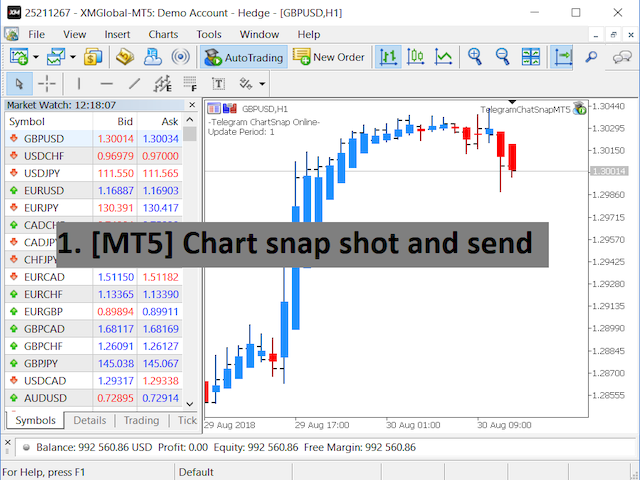
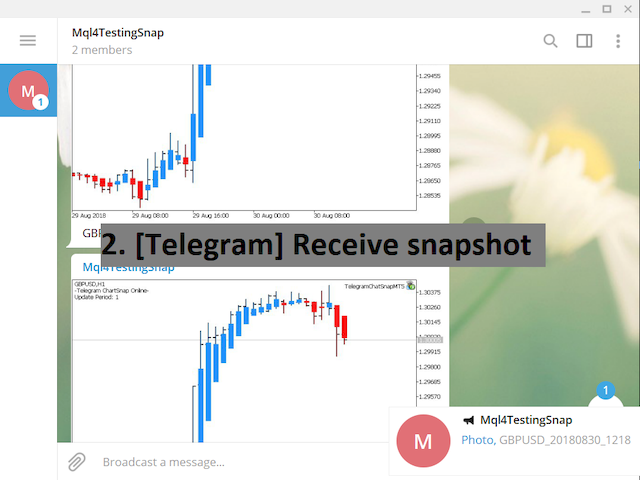
Telegram ChartSnap MT5 is an utility tool to bridge your MetaTrader 5 activities to your Telegram chat/group/channel. It will screen shot your MetaTrader 5 chart and send it to your dedicated Telegram chat/group/channel through a Telegram bot. The whole process will keep repeating based on a time cycle that predetermined by the user. It is a convenient tool for those who like to get access to their favorite system/dashboard that only available at MetaTrader Desktop. Beside that, trader can easily share their favorite system/dashboard to their Telegram group/channel members. This utility is very useful especially for those who like to trade using their mobile devices. 


*Special Setup

  • In case your chart is running an EA and you wish to run this utility EA at the same time:
  • Let's name the chart with the running EA = Chart_A.
  • Stop the EA on Chart_A and run the ChartSnap EA with option ShowChartIdOnly=true.
  • Copy the Chart_A's ChartID that show on the terminal window and remove the ChartSnap EA. DO NOT CLOSE the Chart_A window.
  • Re-attach the running EA and open another chart. Let's name the newly open chart = Chart_B.
  • Attach the ChartSnap EA on Chart_B and fill the ChartID for Chart_A.
  • The Chart_B ChartSnap EA will now screen shot your Chart_A and send it to your Telegram chat.


Parameters

  • Token="" - enter your bot API token.
  • ChatID=0 - enter your Telegram ChatID.
  • DisableNotification=false - screenshot will send to Telegram with or without notification.
  • UpdatePeriod=M1 - repeat cycle timer. (based on candle opening time)
  • CaptionOption=cCustom - option for screenshot caption.
  • CustomCaption="" - custom text for screenshot caption if CaptionOption=cCustom.
  • ChartID=0 - target chart to be screen shot. '0' indicate the attached chart will be the screen shot target.
  • Width=800 - screenshot file width.
  • Height=600 - screenshot file height.
  • ShowChartIdOnly=false - show the attached chart's ID on screen.


Telegram Bot Setup guideline

  1. Open your Telegram APP and search for "BotFather".
  2. Type /start and click/type /newbot to create a new bot.
  3. Give your bot a nickname and username (e.g., nickname: TestingABC and username: TestingABCbot <-- username has to be ended by 'bot').
  4. Congratulations! You have created your Telegram bot.
  5. Save your bot API token (e.g. 227330911:AAEWHnT9B9bAARDiKhESwXd7hk-G4nxmEpI) and click t.me/TestingABCbot to chat with it.
  6. Go back to Telegram APP and search for 'userinfobot'.
  7. Type /start and retrieve your personal Telegram Chat ID (e.g., 12345678).
  8. Back in MetaTrader 4, go to Tools > Options > Expert Advisors > tick 'Allowed WebRequest for listed URL' and add 'https://api.telegram.org'.
  9. Attach the utility into your MetaTrader 4 chart and fill up the Token (from step 5) and ChatID (from step 7).
  10. Hooray! Your ChartSnap utility is ready to work for you.
  11. Fill up the Chat ID with your Channel ID and set your bot as a channel administrator in order for your bot to work in the channel.

리뷰 1
Виктор Крайнов
73
Виктор Крайнов 2023.09.20 13:36 
 

Очень полезное программное обеспечение. Респект автору что учёл его необходимость.

추천 제품
Trade Control Panel
Jerry Jilun Anak Liban
Trade Control Panel Function Normal One Click Function Close All Close All Profit Close All Loss Close All Pending Order Close All Sell Close All Buy Advance One Click Function 1.  Close Partial Lot Sell by Percent It will help you partial close for all open position by desire percent you wanted. No longer partial close one by one for every open position Manual input for desire percent 2. Close Partial Lot Buy by Percent It will help you partial close for all open position by desire percent
This Expert Advisor monitors all open positions across all symbols in MetaTrader 5. Whenever a Stop Loss (SL) or Take Profit (TP) is manually set or adjusted on any position, the EA automatically applies that value to all other open positions , regardless of symbol or order type (Buy/Sell). This ensures consistent and synchronized SL and TP levels across your account. Perfect for mobile trading via tablet or smartphone!
One Click Trader  is a tool designed for MetaTrader 4 platform, which enables you to take your trading to the next level. It enables you to open, manage and close your trades in simple an efficient way by just one click of your mouse button. "-"   ,  "+"  change OCT window size  Up arrow minimizes the OCT panel Down arrow maximizes the OCT panel Right arrow displays the next panel with additional features Left arrow hides the panel with additional features Red  SELL  button enables you to open s
이 도구를 사용하면 한 번의 클릭으로 열려 있는 모든 주문을 닫을 수 있습니다. "모두 닫기"를 클릭하기만 하면 됩니다. 수익성 있는 주문만 청산하려면 "수익성 있는 청산" 버튼을 클릭하세요. 클릭한 후 모든 변동 주문이 청산됩니다. 변동 손실이 있는 주문만 종료하려면 "손실 가능 청산" 버튼을 클릭하세요. 클릭한 후 변동 손실이 있는 모든 주문이 종료됩니다. 이 도구는 1년 동안 테스트를 거쳤으며 원클릭 포지션 청산 기능이 매우 완벽합니다. 포지션 청산은 적시에 이루어지며 지연 범위는 작습니다. 물론 지연은 귀하가 속한 지역 및 네트워크 환경과도 관련이 있습니다. 이에 주의하시기 바랍니다. 과거 데이터의 백테스트 과정에서 도구는 더욱 완벽하게 작동했으며 100개의 주문을 모두 마감하는 데 최대 0.495초밖에 걸리지 않았습니다. 실제 거래 과정에서 나의 최대 포지션 주문 수는 26개에 불과했고, 모든 포지션이 청산되는 데 걸리는 시간은 1.28초였습니다.
거래원 여러분 안녕하세요!저는 당신의 거래 조수입니다.더 이상 말하지 말고, 내가 너에게 나의 특기를 알려줄게. 1.나는 당신의 창고를 관리하는 데 능숙하다, 당신이 어느 쪽에서 주문하든, 나는 가장 먼저 당신을 도와 합리적인 손실 방지선과 이동 손실 방지선을 추가할 수 있습니다. 2.나는 너를 도와 상승과 하락을 회피하고 원칙을 지키지 못하는 인간성의 약점을 근원적으로 근절할 수 있다. 3. 귀하가 참고할 수 있도록 최적 지점에서 귀하의 모바일 MT5 클라이언트에 알림 메시지를 보냅니다. 물론 귀하는 모바일 장치 내의 MetaTrader 5 APP의 MetaQuotes ID를 MetaTrader 5 클라이언트 --> 옵션 --> 알림 --> MetaQuotes ID의 편집 상자에 등록하고 알림 지점 확인을 눌러야 합니다. 4. 정책 테스트에서 수동 시뮬레이션 디스크 연습을 잘 지원합니다. 5. 저에게 연락하면 추가 AI 보조 클라이언트 슈퍼 보조 프로그램을 얻을 수 있습니다. 참
This script analyzes all symbols in Market Watch for a set timeframe. The result is displayed on the Experts tab and in the specified file. For more convenient viewing and editing, the result is displayed in a csv file. For the calculation, the Pearson formula is used. The value of the correlation coefficient of pairs close to 1 means that the pairs move almost identically. A value close to -1 means that the pairs move in the same way. This tool will be useful to those who use hedging due to the
HotKey Trade
Juan Pablo Sanchez Correa
HotKey Trade is a fast-execution panel that lets you trade with just the press of a key. Open BUY (C), SELL (V), or close all (X) orders instantly, without menus or clicks. Additionally, you can adjust the lot size with the ↑↓ arrows and view P&L, margin, and lot size in real time. Ideal for scalpers, manual traders, and those who value speed. Key-based operation - P&L and margin display - Dynamic lot size control - Compatible with any symbol and timeframe Key to BUY (Default: C) Key to SELL (De
T Manager for Price action Traders
Haidar, Lionel Haj Ali
4.5 (10)
T Manager, the ultimate trade management solution designed by traders for traders. If you are searching for a simple and efficient trade panel, trade manager, or trade assistant, you are at the right place.   The market contains a diverse number of those tools , but this one is designed by traders for traders . I designed this tool, and I am using it daily. Take my advice and stop buying tools blended with un-useful features that you will never use,   T Manager provides you with the essential y
Expert was built on the basis of Trap . EA can trade in automatic and semi-automatic mode. In automatic mode, it will place pending orders. However, in semi-automatic mode, it will wait for the first manually opened order. It will then go into automatic mode. Before starting work, the expert will download 28 currency pairs:         "AUDCAD","AUDCHF","AUDJPY","AUDNZD","AUDUSD","CADCHF","CADJPY",         "CHFJPY","EURAUD","EURCAD","EURCHF","EURGBP","EURJPY","EURNZD",         "EURUSD","GBPAUD","GBP
GS trade report
Aleksander Gladkov
5 (1)
3 in 1 : Report + monitoring + sending messages (Telegram, ...) to optimize trading and use of advisors. Monitoring: Panel on the chart Sending messages to Telegram Sending messages to Email Sending Notifications Sending pop-up messages Sound notifications when the established Profit/Loss levels are exceeded Monitoring is activated by pressing the Start button. Profit for the period by currency pairs, hours and Magic number for the current account. Forms four tables: by symbols, by magic number
Pending Orders Grid Complete System   opens any combination of Buy Stop, Sell Stop, Buy Limit and Sell Limit pending orders and closes all existing pending orders. Only one time of the pending order at the same time!!! You will have a possibility to put a legitimate   Open Price   for the first position in the grid. Usually it should in the area of Support/Resistance lines. You just need to drop this script on the chart of a desired currency pair. Input Parameters Before placing all pending ord
TC-Supportは手動取引とEA運用のために開発されたパネルになります。 このパネルでは、リスクリワード、リスク計算、リスク管理など資金管理、 トレーリングストップ機能、ブレークイーブンなどポジション管理が可能になります。 その他、便利な機能があります。 詳細な情報はこちらにサイトがあります。 デモ口座で動作するEAはこちらに置いてあります。   https://toushika.top/ mt5-tc-support / Disable Auto Trading  の 機能はMQL5では外部のDLLの利用は許可されませんので使用できません。 おもな機能一覧 資金管理 リスクリワード計算 ロット計算 損失金額計算 最大ロット数の設定 設定したリスクパーセンテージでヘッジポジション EA運用 最大損失金額またはパーセンテージによる強制クローズ EA運用 資金破綻回避  ポジション管理 成行、指値、Stop Limit注文に対応 ポジションを部分的にクローズ トレーリングストップ機能 一定の距離を超えてたらSLを移動 利確条件設定
Overview Breakout Meter is a price action tool that identifies key breakout zones based on recent daily price activity. It highlights areas where momentum is likely to trigger, helping traders anticipate breakouts or reversals with minimal configuration. How It Works The EA analyzes a user-defined number of recent daily candles and marks high and low zones where price has shown strong reactions. It automatically updates levels with new data and removes outdated zones to keep charts clear. Users
Simple Telegram Notification – Stay Informed on Your MT5 Trading Activity! Stay connected with your MetaTrader 5 trading activity using Simple Telegram Notification , the Expert Advisor that sends real-time notifications to your Telegram app whenever orders are opened, modified, or closed . Whether you're at your desk or on the move, you’ll always be up-to-date with critical trading information. Key Features: Order Notifications : Receive instant Telegram alerts whenever an order is opened, mod
This EA help trader to manage his pending orders, when you place many Pending Orders this utility monitor them and when of them get filed (executed) the EA cancel and delete all rest of pending orders, to avoid  opening of all of pending orders at the same time , and lose your risk management. this utility is very useful for trader when he /she is not available on the desk.
Global crosshair for spotting levels and positions on multiple chart (timeframes). Features: Toggle with middle click (replace default MT5 crosshair). Toggle with HotKey shortcut and on chart button. Multi instance feature. (every chart can draw separate instance). Customizable Display Style. (color / line style / ex.) Global crosshair for spotting levels and positions on multiple chart (timeframes).
This QuickClose help you to close all orders having profit immediately with only ONE CLICK, its work is very fast. You can choose which symbol you want or close all symbols so it will helpful for you in your trading to manage trading faster. This EA can quick close all Buy and Sell Orders by a selected symbol or total, And delete all pending orders. This SymbolButton is designed for closing orders. There is available Manual and Automatic closing functions. Automatic closing function will close t
Virtual TP SL TS
Andrei Sviatlichny
Make your Take Profit, Stop Loss, and Trailing Stop levels invisible to the broker! Main option: STEALTH MODE Virtual Trailing Stop Virtual Take Profit Virtual Breakeven Virtual Stop Loss Virtual Orders Lifetime WARNING: The Expert Advisor does not place orders by itself. You must open orders yourself (including through the Expert panel) or use a third-party Expert on another chart of the same currency pair. Please specify the Magic number "-1" in the Expert settings for the Expert to process th
AW Metatrader to Telegram MT5
AW Trading Software Limited
5 (1)
귀하의 구독자가 귀하의 거래 터미널에서 귀하의 거래 이벤트를 놓치지 않도록 알림을 보내는 자동화된 시스템. 계정의 모든 거래 작업에 대해 Telegram 메신저에 알림을 보내는 유틸리티입니다. Telegram ->   HERE   / MT4 ->   HERE   의 채널에 유틸리티를 연결하는 단계별 지침 장점: 쉬운 설정과 자세한 설명, 조정 가능한 스크린샷을 보낼 수 있습니다. 이모티콘을 사용하여 사용자 정의 가능한 알림 텍스트, 오픈, 전체 또는 부분 마감에 대한 알림 조정 및 주문 수정, 기본적으로 알림을 보낼 때 텍스트 파일이 자동으로 다운로드되며, 대기 중인 주문의 배치 또는 삭제에 대한 알림 조정, 기호 및 매직 넘버로 편리한 필터링. 입력 변수: TELEGRAM BOT AND CHAT SETTINGS Telegram bot token - Enter the token number received after registering the bot in "BotFather" Te
This utility sends notification to trader’s MT5 (for MT4 version, checkout this link ) mobile app, to remind traders about their open positions. Super useful for part time traders to keep track and not forget any positions. To turn on notification, please visit   this link   (https://www.metatrader4.com/en/trading-platform/help/setup/settings_notifications) Features Keep track on open orders (pending orders, running orders) Customize time to send notification Customize notification interval (se
This utility provides the ability to use hot keys in manual trading instantly responding to the current market situation. You can assign hot keys to open/close positions by their type, open/close all positions on the current chart and remove all orders on the current chart. You can also assign hot keys for five predefined trade volumes and switch between them if necessary with no need to change the volume manually from time to time. It is also possible to set the auto calculation of a trade volu
Spread and Swap monitor
Gennadiy Stanilevych
5 (1)
The indicator is intended for determining the spread and swap size, the distance for setting stop orders and stop losses from the current price allowed and the risk per 1 point in the deposit currency. The indicator informs a trader about possible additional expenses and profits connected with transferring a position to the next trade session of the financial instrument. It also informs about the spread size and the distance of pending orders, stop loss and trailing from the current price. In ad
반자동 마틴 시스템 소개하다 이 도구는 반자동 Martin 거래에 사용되며 패널을 클릭하여 주문하면 EA가 위치를 관리합니다. 거래의 방향만 정하고 나머지는 EA 경영진에 맡김 자동 마틴, 설정된 그리드에 따라 창고 추가, 이 기능을 비활성화할 수도 있습니다. 원클릭 청산 하나의 키 잠금 기능 시간 제어 경고음 안내 특성 거래 차트: 아무거나 거래 가능한 통화: 아무거나 자동 이익실현 마감 백테스트에 사용할 수 있습니다. 클리어 패널 디스플레이 매개변수 주요 설정 매개변수 로그 레벨 = LOG_LEVEL_INFO; //로그 작성 레벨 UseAutoMagic = true; //매직넘버 사용 여부 매직넘버 = 6; //매직 넘버 0-2000 설정 로트 = 0.01; //초기 거래량 UseMartin = 참; //마틴 함수 사용 여부 부스터 = 1.7; //증가의 배수 넷갭 = 10; //그리드의 거리(포인트) 테이크프로핏 = 13; //이익을 얻다(포인트) MaxBuyOr
이 어드바이저는 한 번의 클릭으로 여러 쌍을 거래할 수 있는 대시보드입니다. 딸깍 하는 소리       열려 있는       선택한 쌍에 대한 주문을 여는 버튼입니다. 딸깍 하는 소리       닫다       선택한 쌍의 주문을 마감하는 버튼입니다. 주문 로트는 사용자가 입력한 번호입니다. 양수는 매수 주문에 해당하고, 음수는 매도 주문에 해당합니다. 일부 주문이 아닌 전체 주문을 종료하려면   닫기 버튼을   클릭하세요. 최종 조치는 티켓 번호에 따라 달라지지 않습니다. 매직 입력을 0으로 설정하면 어드바이저가 수동 주문 마감을 동시에 도와줍니다. 다른 Advisor의 매직으로 Entry Magic을 구성함으로써 Advisor는 다른 Advisor가 개설한 주문을 동시에 마감할 수 있습니다. 삼각형 울타리       단 한 번의 클릭으로. 거래 기호는 사용자 정의 가능합니다. 시장 관찰에서 가져오거나 사용자가 입력합니다. 반: Magic – 조언자의 매직 넘버입니다. MaxLo
Trade Condition Logger MT5
AbelPM Enterprises Pty Ltd
The   Trade   Condition   Logger   is   an   essential   tool,   offering   crucial   insights   into: Current   swap   and   spread   values Automatic   logging   of   fluctuations   in   swap   values Logging spread   value   range over   time Optimise   spread   values for specific instrument Displays   a   comprehensive   summary   on   the   chart,   providing   traders   with   insights   into   trade   conditions.  Review trade conditions for your various   broker   accounts   enabling  
AKCAP Hotkey Tool
AK Capital Markets Limited
5 (3)
Special offer for the next 10 copies Are you tired of manually navigating through menus and inputting data every time you want to execute a trade or open an order on Meta Trader? Our hotkey tool is here to make your life easier and boost your trading efficiency. Our tool is natively coded for lightning-fast performance and comes loaded with all the features you could possibly want. From pending orders and OCO orders to trailing and multiple buckets, it has everything a scalper could need. And
Risk Controller Expert Advisor는 귀하의 계정에 있는 거래 고문의 전체 위험을 제어할 수 있는 프로그램입니다. 이 프로그램을 사용하면 모든 고문의 계정에 허용되는 최대 위험을 제어할 수 있습니다. 예를 들어, 최대 손실액의 30% 위험을 설정했습니다. 즉, 주식 거래 로봇이 30% 위험을 초과하면 위험 관리자가 고문의 모든 위치를 닫고 열려 있는 모든 차트를 닫을 수 있으므로 방지할 수 있습니다. 고문은 더 이상 일하지 않습니다. 전문가 고문은 평균적인 로봇을 마틴게일과 교환하고 불가항력 또는 기타 예상치 못한 상황에서 로봇의 최대 손실을 제한하려는 경우 "편안한 수면"에 필요합니다. 시장 반전. Советник Risk Controller, очень важная и по моему мнению необходимая программа для каждого трейдера который торгует роботами. 제어는 계정의 최대 손실에 해당하는 제한
Horizontal Line Trade Assistant EA  Semi-Automated Trading Assistant      IMPORTANT :     On the main/purchased program a user can click on the Horizontal line and change it to Buy or Sell, and drag by double clicking on it. Please keep in mind that this option is not available on demo version, due to some restrictions/limitations of Strategy Tester, some Object related operations are not available in the  Strategy Tester. But, it will not prevent you from Testing, please drop an Object to chart
Signal Provider Utility Pro (Telegram & Discord) The Professional Solution for Signal Providers. Automated Broadcasting | Smart GUI Panel | Performance Reports Stop managing your signals manually. Signal Provider Utility Pro is the realiable bridge between your MetaTrader 5 terminal and your community on Telegram and Discord. Designed for high-performance signal services, this tool gives you instant control over your broadcasts without ever needing to open the settings window. From real-time tr
키보드 트레이딩 MT5는 핫키 MT5 유틸리티입니다. 단축키로 거래하려면 EA가 로드된 차트가 활성 차트(마우스로 클릭)여야 합니다. 다수의 포지션이 오픈된 경우 이동한 손절매는 첫 번째 거래의 손절매가 되며 나머지는 마우스로 조정해야 합니다.   선택할 입력:   1. 왼쪽 상단에 표시할 메모 1과 2를 추가합니다. 1. 로트 크기(최소 0.01) 2. 포인트 단위 StopLoss 및 TakeProfit(0 = 비활성화됨): 모든 주문에 적용 3. 사전 정의된 거리(포인트): 지정가 및 중지 주문을 할 현재 가격으로부터의 거리입니다(시장 주문 아님: 단축키 1 및 2). 4. 이동 중지 손실까지의 거리(포인트)(틱 최소 이동의 배수여야 함) 기기가 25포인트 단위로 이동하는 경우 설정한 거리는 25의 배수여야 하며 그렇지 않으면 작동하지 않습니다. 5. 매직넘버 : 위의 모든 키보드 거래와 주문은 모두 동일한 매직넘버를 가집니다. 6. 키보드 단축키:
이 제품의 구매자들이 또한 구매함
YuClusters
Yury Kulikov
4.93 (43)
Attention: You can view the program operation in the free version  YuClusters DEMO .  YuClusters is a professional market analysis system. The trader has unique opportunities to analyze the flow of orders, trade volumes, price movements using various charts, profiles, indicators, and graphical objects. YuClusters operates on data based on Time&Sales or ticks information, depending on what is available in the quotes of a financial instrument. YuClusters allows you to build graphs by combining da
HINN Lazy Trader
ALGOFLOW OÜ
5 (2)
Lazy Trader is your personal risk management assistant that independently finds the best market entries, manages positions, and helps you extract maximum profit from every trading idea! It monitors charts from M1 to W1 , finds optimal entry points based on your parameters, and manages trades without your involvement: - Got an idea on the daily chart? No need to wait for lower timeframes to form a signal — Lazy Trader will check everything and open all necessary positions while you live your lif
Unlimited Trade Copier Pro MT5 is a tool to copy trade remotely to multiple MT4, MT5 and cTrader accounts at different computers/locations over internet. This is an ideal solution for you if you are a signal provider and want to copy your trades to other receivers globally on your own rules. One provider can copy trades to multiple receivers and one receiver can get trade from multiple providers as well. The provider can even set the subscription expiry for each receiver, so that receiver will n
Mentfx Mmanage mt5
Anton Jere Calmes
4.25 (8)
The added video will showcase all functionality, effectiveness, and uses of the trade manager. Drag and Drop Trade Manager. Draw your entry and have the tool calculate the rest. Advanced targeting and close portions of a trade directly available in tool (manage trades while you sleep). Market order or limit order on either side with factored spread. Just draw the entry, the tool does the rest. Hotkey setup to make it simple. Draw where you want to enter, and the stop loss, the tool calculates al
Live Forex Signals 사이트 신호에 거래를 위해 설계   https://live-forex-signals.com/en 그리고  https://foresignal.com/en . Live Forex Signal for MetaTrader 4   https://www.mql5.com/en/market/product/81445 매개 변수 사용자 이름 및 암호는 사이트에 가입 한 경우 live-forex-signals.com/foresignal.com 구독이 없으면 필드를 비워 둡니다; 댓글 개설 된 거래에 대한 댓글 위험 위험 거래에 대한 예금의 백분율로,위험=0 인 경우,다음 값 많이 사용됩니다 거래에 대한 많은 고정 볼륨 사이트에서 이익을 가져 가라 웹 사이트에서 정지 손실을 사용 빈도신호업데이트고문의 사이트 방문 빈도 분 최대 스프레드무역에 허용되는 최대 스프레드를 거래합니다.스프레드가 더 높으면 보류 중인 주문 세트가 취소됩니다 사용트레일링 사용 후행 정지 트레일링
The  Easy Strategy Builder (ESB)  is a " Do It Yourself " solution that allows you to create a wide range of the automated trading strategies without any line of codes. This is the world’s easiest method to automate your strategies that can be used in STP, ECN and FIFO brokers. No drag and drop is needed. Just by set conditions of your trading strategy and change settings on desired values and let it work in your account. ESB has hundreds of modules to define unlimited possibilities of strategi
Gold instrument scanner is the chart pattern scanner to detect the triangle pattern, falling wedge pattern, rising wedge pattern, channel pattern and so on. Gold instrument scanner uses highly sophisticated pattern detection algorithm. However, we have designed it in the easy to use and intuitive manner. Advanced Price Pattern Scanner will show all the patterns in your chart in the most efficient format for your trading. You do not have to do tedious manual pattern detection any more. Plus you
GRat Crypto
Ivan Titov
4.5 (2)
Trade on crypto exchanges in MT5! GRat_Crypto is a tool for manual and automated trading , including ANY available EA, ANY  cryptocurrency  on most popular crypto exchanges in the familiar MT5 environment 24/7. Features 1. ALL instruments of the 9 most popular crypto exchanges are available: Binance, BingX, Bybit, Coinbase, CoinEx, Kraken,   KuCoin, MEXC and OKX . 2. The ability to place ANY type of order available in MT5, both market and pending, to modify orders and positions, to delete order
FTMO Protector 8
Vyacheslav Izvarin
PROTECT YOUR FTMO Account in a simplest way Must-Have Account Protector for any Prop-trading Account and Challenge MT4 / MT5 Expert Advisor that protects your Forex Prop Trading account from an unexpected drawdown! FTMO Protector  is a Tool that lets you manage trades and control your profit and loss across multiple Robots and currency pairs using a simple parameters and settings. Use as many EAs and Instruments you need, the Protector will: 1.   Calculate your midnight (01:00 System time) Balan
Trading Chaos Expert
Gennadiy Stanilevych
5 (11)
This software has no equals in the world and represents a universal trade "console" covering trading signals, automated market entry, setting of Stop Loss and Take Profit, as well as Trailing Profit for multiple trades at the same time in a single open window. Intuitive control of the Expert Advisor in "three clicks" ensures a comprehensive use of all its functions on different computers, including tablets PCs. Interacting with additional signal indicators that mark the chart to give a real mark
Best Renko Chart Generator
Mohammad Taher Halimi Tabrizi
5 (1)
This is the Best Renko chart generator ever in the market you can set the box sizes based on ATR or Fixed Size: 1. Fixed Box Size 2. Current ATR Size 3. ATR size of the Chart Start Time. also you can set the Renko chart cut of date and time to start as reference of creating renko charts. you need to attach to a symbol chart that want the renko chart of it, then immediately a new chart will be opened which is based on renko, you can use this generated chart and attach your EA to trade on or you e
ClusterSecond
Rafil Nurmukhametov
4.78 (32)
The utility allows you to build different types of graphs: Seconds chart from 1 second to 86400 seconds Tick chart from 1 tick and above The volume chart Delta chart Renko chart Range chart Demo version of the utility https://www.mql5.com/ru/channels/clustersecond Built-in indicators for volumetric analysis: daily market profile and market profile of the selected timeframe, Cluster Search Imbalance VWAP Dynamic POC, VAH, VAL the profile depth of the market vertical volume with various display op
GT Trade Manager
Alexander Martin Koenig
This Utility is designed for price action strategies, trading flags and retests, such as Guerrilla Trading and similar strategies It allows to: place pending orders for retests (on the Retest line or x PIPs away from the retest line) place orders for flag formations calculate lotsizes based on account size, currency pair and risk percentage split trades and place multiple trades if lot size exceeds max lot size given by broker manage trades with a trailing SL/TP behind the most recent highs/lows
FiboPlusWaves MT5
Sergey Malysh
5 (1)
FiboPlusWave Series products Ready-made trading system based on Elliott waves and Fibonacci retracement levels . It is simple and affordable. Display of the marking of Elliott waves (main or alternative option) on the chart. Construction of horizontal levels, support and resistance lines, a channel. Superposition of Fibonacci levels on waves 1, 3, 5, A Alert system (on-screen, E-Mail, Push notifications).    Features: without delving into the Elliott wave theory, you can immediately open one of

TradePad
Ruslan Khasanov
5 (1)
TradePad는 수동 및 알고리즘 트레이딩을 위한 도구입니다. 여러 거래 상품에 대한 빠른 거래 작업과 포지션 제어를 위한 간단한 솔루션을 제공합니다. 주의, 이 애플리케이션은 전략 테스터에서 작동하지 않습니다! 데모 계정을 위한 애플리케이션의 평가판과 모든 도구에 대한 설명 애플리케이션 인터페이스는 고해상도 모니터에 맞게 조정되었으며 간단하고 직관적입니다. 편안한 작업을 위해 트레이더에게 다음과 같은 도구 세트가 제공됩니다. 거래 작업 관리, 메인 차트 기간 간 전환, TradePad 상품 간 전환을 위한 핫키 관리자; 포지션을 개설하거나 보류 주문을 설정할 때 하락 위험을 평가하고 잠재적 이익을 계산하기 위한 거래 수준 표시 도구; 여러 거래 심볼을 시각적으로 모니터링하고 알고리즘 트레이딩을 위한 거래 신호를 수신하기 위한 MultiCharts 도구. 편의를 위해 거래 쌍 세트를 구성하여 여러 시간대의 가격을 모니터링하고 다중 통화 거래를 수행할 수 있습니다. 확장된 HTML
News Trader Pro is a unique robot that allows you to trade the news by your predefined strategy. It loads every piece of news from several popular Forex websites. You can choose any news and preset the strategy to trade it, and then News Trader Pro will trade that news by selected strategy automatically when the news comes. News release gives opportunity to have pips since the price usually has big move at that time. Now, with this tool, trading news becomes easier, more flexible and more exciti
If you wish to draw Support and Resistance lines, view: daily market opening, classical pivot levels, Fibonacci pivot levels, trend lines, Fibonacci levels, the remaining time to candle closing, and current spread. If you seek to place your orders with the exact lot that meets your desired stop loss risk. If you wish to do all this and more with just one click, then this is the perfect tool to use. This tool will allow you to feel more relaxed when deciding to open orders, as well as predicting
The new version of  MirrorSoftware 2021  has been completely rewriten and optimized.  This version requires to be loaded only on a single chart because  it can detect all actions on every symbol and not only the actions of symbol where it is loaded. Even the  graphics and the configuration mode  have been completely redesigned. The MirrorSoftware is composed of two components (all components are required to work):  MirrorController  (free indicator): This component must be loaded into the MASTER
The script displays info about the share's corporate reports and dividends. The data is downloaded from   investing.com : Report date Profit per share (EPS) Revenue Market capitalization Amount of dividends Date of payment of dividends Dividend income The product cannot be tested in the tester (since it is not possible to receive data from the Internet). Before launching:  Add 2   URL   https://ru.investing.com/earnings-calendar/Service/getCalendarFilteredData  and   https://ru.investing.com/di
Virtual Grid MT5
Volodymyr Hrybachov
반자동 거래를 위한 유틸리티. 브로커에게 보이지 않는 스탑 오더, 손절매, 이익 실현 및 트레일링 스탑 설정을 위한 동적 수준을 적용합니다. FIFO 요구 사항이 있는 미국 중개인을 포함하여 모든 중개인과 작업하는 데 적합합니다. 어드바이저 링크의 MT4 버전 버튼이나 라인을 사용하여 거래를 열 수 있습니다. 어드바이저가 선을 따라 포지션을 열려면: 차트에 선을 그리고 이름을 바꿉니다. 가격이 이를 초과하면 EA가 해당 명령을 실행합니다. OPEN_SELL - 판매 주문 열기 CLOSE_SELL - 모든 판매 주문 마감 OPEN_BUY - 구매 주문 열기 CLOSE_BUY - 모든 구매 주문 마감 명령이 실행된 후 "OK"라는 주석이 작성되고 행은 명령을 한 번만 실행합니다. 차트는 수신된 이익, 현재 오픈 포지션(주문 수, 로트 수 및 이익), 오픈 주문 버튼, 실행 속도 및 슬리피지에 대한 정보를 표시합니다. 옵션: MAGIC_NUMBER - 매직 넘버; LOT_
Quick operation, quick purchase, sale, empty operation. Provide three buttons: Buy, Sell, empty. Buy: Quickly place more orders after clicking, default 1 hand, profit point and stop-loss point are 110 points, after successful order can be manually modified. Sell: Quickly place an empty order after clicking, default 1 hand, profit point and stop-loss point are 110 points, can be manually modified after the order is successful. Empty: Quickly clear all orders, including purchase and s
GRID for MT5
Volodymyr Hrybachov
GRID for MT5는 FOREX 금융 시장에서 빠르고 편안한 거래를 위해 설계된 주문 그리드로 거래하는 사람들을 위한 편리한 도구입니다. GRID for MT5에는 필요한 모든 매개변수가 포함된 사용자 정의 가능한 패널이 있습니다. 숙련된 트레이더와 초보자 모두에게 적합합니다. FIFO 요구 사항이 있는 미국 중개인을 포함한 모든 중개인과 협력하여 우선 이전에 열린 거래를 마감합니다. 주문 그리드는 고정되어 있을 수 있습니다. 주문은 고정된 단계로 열리거나 동적 오픈 수준을 가질 수 있습니다. 더 나은 가격으로 열리며 시장 주문에서만 작동합니다. GRID for MT5 트레이딩 패널은 오픈, 클로징, 오더 추적 기능을 갖추고 있습니다. 주문은 바스켓으로 마감되며, 단방향 - BUY 또는 SELL만 가능하거나 양방향 BUY 및 SELL을 함께 사용합니다. 포지션을 청산하기 위해 손절매, 이익실현, 손익분기점 및 추적 정지 기능을 사용할 수 있습니다. 손절매 및 이익실현은 잔액의
1. Record the price data for each Tick transaction. Data file contents: "Tick time", "ASK price", "BID price", "SPREAD SPREAD", "Tick quoted quantity". 2. Meanwhile, generate a quotation data file with a 1-minute period. Content of 1min data file: "ASK time", "ASK OPEN price", "ASK HIGH price", "ASK LOW price", "ASK CLOSE price", "BID time", "BID OPEN price", "BID HIGH price", "BID LOW price", "BID CLOSE price", "Tick quoted quantity". 3. Save all quotation data in one file every day, which is c
Mt5BridgeBinary
Leandro Sanchez Marino
I automated its commercial strategies for use of binary in MT5 and with our Mt5BridgeBinary I sent the orders to its Binary account and I list: begin to operate this way of easy! The expert advisers are easy to form, to optimize and to realize hardiness tests; also in the test we can project its long-term profitability, that's why we have created Mt5BridgeBinary to connect its best strategies to Binary. Characteristics: - It can use so many strategies as I wished. (Expert Advisor). - He does
Xrade EA
Yao Maxime Kayi
Xrade EA is an expert advisor as technical indicator. For short period trade it's the best for next previsions of the trend of the market. +--------------------------------------------------------------------------------------- Very Important Our robot(data anylizer) does'nt take a trade procedure. If using only our robot you must take positions by yoursels +--------------------------------------------------------------------------------------- The technical indiator provide for a given sma
Grid MT5
Volodymyr Hrybachov
5 (1)
반자동 거래 유틸리티인 주문 관리는 계정에서 수익성이 없는 위치를 복원하는 데에도 사용할 수 있습니다. 무익한 주문을 중복하여 계정의 손실을 줄이는 기능이 있습니다. 수동 주문, 패널에서 열린 주문 또는 다른 Expert Advisor가 연 주문과 함께 작동할 수 있습니다. 최소한의 매개 변수가 있고 구성하기 쉽고 주문 수에 관계없이 작동합니다. 테스트를 위해 전략 테스터에서 비주얼 모드를 사용하십시오. MT4 버전 https://www.mql5.com/en/market/product/56492 옵션: START_LOT - 초기 로트; LOT_MULTIPLIER - 주문 그리드의 로트 승수. MAX_LOT - 최대 로트 STEP_ORDERS - 주문 그리드 단계; STEP_MULTIPLIER - 순서 단계 곱셈 계수, = -1이면 사용되지 않습니다. MAX_STEP - 최대 주문 그리드 단계; OVERLAP_ORDERS - 주문 겹침 기능을 활성화하는 주문입니다. OVERL
News: IDEA 2.0 is out with lot of features, like telegram bot notifications and Limits order! Check the changelog at bottom of page (*). Hi all, here you can find my Expert Advisor, called IDEA  (Intelligent Detection & managEr Algorithm) . In short, with this software you can: Have   a clear view of market status , with an indication of current trend. Simply add symbols you want to monitor to your market watch, and IDEA will notify you if some of them are in trend; Have an   automatic lots ca
The stocks that make up the index are one of the drivers of the movement. Analyzing the financial performance of all elements of the index, we can assume further development of the situation. The program (script) displays corporate reports of shares that are part of the index selected in the settings.   "Indexes" cannot be tested in the tester (since there is no way to get information from the Internet). Information is downloaded from the site investing.com: Report Date Earnings per share (E
Oracle
Denis Sotnikov
5 (2)
Эксперт - торговый помощник, созданный по одноимённой торговой стратегии Оракул в сотрудничестве с ее автором Нео. Определяет на графиках в автоматическом режиме разворотные импульсные модели и строит по ним Вилки Нео - авторский инструмент, позволяющий определять циклы движения цены и указывающий на ожидаемую цель TakeProfit . Поиск ведется на всех заданных периодах графиков одновременно с фильтрацией совпадений. Осуществляется фильтрация неверных Вилок с указанием кода ошибки. Утилита имеет
SystemLiveMxPips
Harold Alonso Hernandez
Automatice sus estrategias comerciales con nuestra sencilla herramienta de creación de estrategias "similar a un rompecabezas".   Cree fácilmente estrategias que operen por usted en modo de piloto automático.   También puede cargar estrategias creadas por otras personas, como la clásica   Estrategia Martingala,   para usarla como muestra para su propia estrategia. Características clave Cree su estrategia a través de funciones simples de arrastrar y soltar, sin necesidad de conocimientos de pro
제작자의 제품 더 보기
Telegram ChartSnap MT5 is an utility tool to bridge your MetaTrader 5 activities to your Telegram chat/group/channel. It will screen shot your MetaTrader 5 chart and send it to your dedicated Telegram chat/group/channel through a Telegram bot. The whole process will keep repeating based on a time cycle that predetermined by the user. It is a convenient tool for those who like to get access to their favorite system/dashboard that only available at MetaTrader Desktop. Beside that, trader can easi
FREE
Telegram ChartSnap is an utility tool to bridge your MetaTrader 4 activities to your Telegram chat/group/channel. It will screen shot your MetaTrader 4 chart and send it to your dedicated Telegram chat/group/channel through a Telegram bot. The whole process will keep repeating based on a time cycle that predetermined by the user. It is a convenient tool for those who like to get access to their favorite system/dashboard that only available at MetaTrader Desktop. Beside that, trader can easily s

FREE
Telegram Notify
Kin Hang Tan
1 (1)
Notify Telegram is a utility that bridge your MetaTrader4 trading activities to your Telegram chat/channel. It will help you to monitor your MetaTrader4 actions such as placing trade, modifying order's TP/SL, closing trades etc and send a notification message to your dedicated Telegram chat/channel. It does not execute any trade on your MetaTrader4 account. It can be useful for monitoring EA performance or providing signal to your Telegram channel/group subscribed. Parameters Token ="" - enter
Telegram ChartSnap is an utility tool to bridge your MetaTrader 4 activities to your Telegram chat/group/channel. It will screen shot your MetaTrader 4 chart and send it to your dedicated Telegram chat/group/channel through a Telegram bot. The whole process will keep repeating based on a time cycle that predetermined by the user. It is a convenient tool for those who like to get access to their favorite system/dashboard that only available at MetaTrader Desktop. Beside that, trader can easily s
Telegram Notify MT5 Telegram Notify MT5 is an utility tool to bridge your MetaTrader 5 activities to your Telegram chat/channel. It is useful for monitoring your MetaTrader 5 account by sending a notification to your particular Telegram chat/channel when someone/EA is placing trades, modifying order's TP/SL, closing trades and etc. This EA does not place any trade for your account. This EA also could be a convenient tool for monitoring other's EA trading activities or a tool for publishing your
필터:
Виктор Крайнов
73
Виктор Крайнов 2023.09.20 13:36 
 

Очень полезное программное обеспечение. Респект автору что учёл его необходимость.

리뷰 답변