Telegram ChartSnap MT5

5


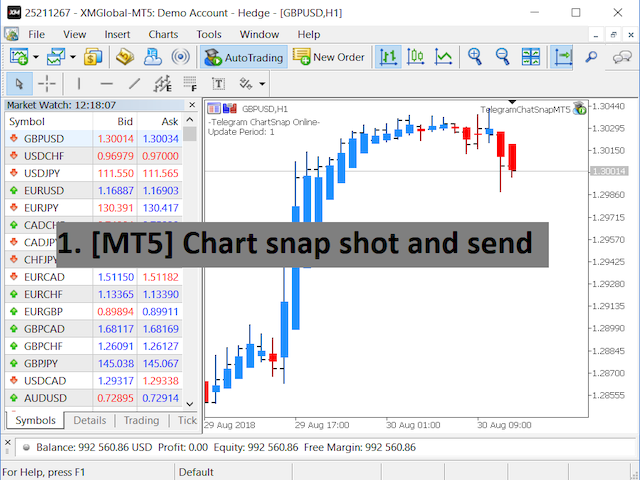
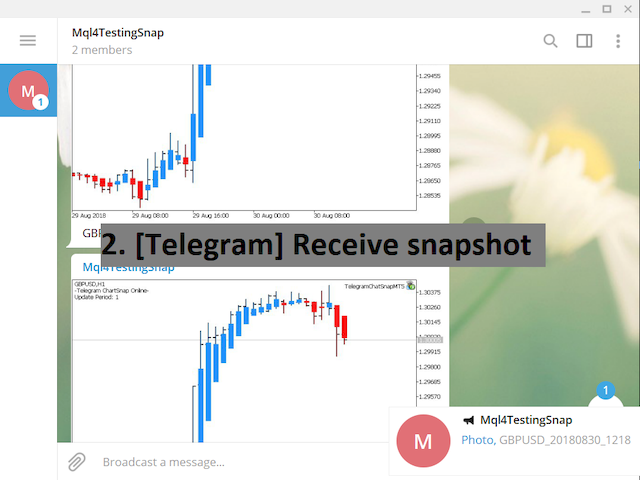
Telegram ChartSnap MT5 is an utility tool to bridge your MetaTrader 5 activities to your Telegram chat/group/channel. It will screen shot your MetaTrader 5 chart and send it to your dedicated Telegram chat/group/channel through a Telegram bot. The whole process will keep repeating based on a time cycle that predetermined by the user. It is a convenient tool for those who like to get access to their favorite system/dashboard that only available at MetaTrader Desktop. Beside that, trader can easily share their favorite system/dashboard to their Telegram group/channel members. This utility is very useful especially for those who like to trade using their mobile devices. 


*Special Setup

  • In case your chart is running an EA and you wish to run this utility EA at the same time:
  • Let's name the chart with the running EA = Chart_A.
  • Stop the EA on Chart_A and run the ChartSnap EA with option ShowChartIdOnly=true.
  • Copy the Chart_A's ChartID that show on the terminal window and remove the ChartSnap EA. DO NOT CLOSE the Chart_A window.
  • Re-attach the running EA and open another chart. Let's name the newly open chart = Chart_B.
  • Attach the ChartSnap EA on Chart_B and fill the ChartID for Chart_A.
  • The Chart_B ChartSnap EA will now screen shot your Chart_A and send it to your Telegram chat.


Parameters

  • Token="" - enter your bot API token.
  • ChatID=0 - enter your Telegram ChatID.
  • DisableNotification=false - screenshot will send to Telegram with or without notification.
  • UpdatePeriod=M1 - repeat cycle timer. (based on candle opening time)
  • CaptionOption=cCustom - option for screenshot caption.
  • CustomCaption="" - custom text for screenshot caption if CaptionOption=cCustom.
  • ChartID=0 - target chart to be screen shot. '0' indicate the attached chart will be the screen shot target.
  • Width=800 - screenshot file width.
  • Height=600 - screenshot file height.
  • ShowChartIdOnly=false - show the attached chart's ID on screen.


Telegram Bot Setup guideline

  1. Open your Telegram APP and search for "BotFather".
  2. Type /start and click/type /newbot to create a new bot.
  3. Give your bot a nickname and username (e.g., nickname: TestingABC and username: TestingABCbot <-- username has to be ended by 'bot').
  4. Congratulations! You have created your Telegram bot.
  5. Save your bot API token (e.g. 227330911:AAEWHnT9B9bAARDiKhESwXd7hk-G4nxmEpI) and click t.me/TestingABCbot to chat with it.
  6. Go back to Telegram APP and search for 'userinfobot'.
  7. Type /start and retrieve your personal Telegram Chat ID (e.g., 12345678).
  8. Back in MetaTrader 4, go to Tools > Options > Expert Advisors > tick 'Allowed WebRequest for listed URL' and add 'https://api.telegram.org'.
  9. Attach the utility into your MetaTrader 4 chart and fill up the Token (from step 5) and ChatID (from step 7).
  10. Hooray! Your ChartSnap utility is ready to work for you.
  11. Fill up the Chat ID with your Channel ID and set your bot as a channel administrator in order for your bot to work in the channel.

Recensioni 1
Виктор Крайнов
73
Виктор Крайнов 2023.09.20 13:36 
 

Очень полезное программное обеспечение. Респект автору что учёл его необходимость.

Prodotti consigliati
Trade Control Panel
Jerry Jilun Anak Liban
Trade Control Panel Function Normal One Click Function Close All Close All Profit Close All Loss Close All Pending Order Close All Sell Close All Buy Advance One Click Function 1.  Close Partial Lot Sell by Percent It will help you partial close for all open position by desire percent you wanted. No longer partial close one by one for every open position Manual input for desire percent 2. Close Partial Lot Buy by Percent It will help you partial close for all open position by desire percent
Synchronizer
PATRICK PAARSCH
This Expert Advisor monitors all open positions across all symbols in MetaTrader 5. Whenever a Stop Loss (SL) or Take Profit (TP) is manually set or adjusted on any position, the EA automatically applies that value to all other open positions , regardless of symbol or order type (Buy/Sell). This ensures consistent and synchronized SL and TP levels across your account. Perfect for mobile trading via tablet or smartphone!
One Click Trader  is a tool designed for MetaTrader 4 platform, which enables you to take your trading to the next level. It enables you to open, manage and close your trades in simple an efficient way by just one click of your mouse button. "-"   ,  "+"  change OCT window size  Up arrow minimizes the OCT panel Down arrow maximizes the OCT panel Right arrow displays the next panel with additional features Left arrow hides the panel with additional features Red  SELL  button enables you to open s
Questo strumento può aiutarti a chiudere tutti gli ordini aperti con un clic, basta fare clic su "Chiudi tutto". Se desideri chiudere solo gli ordini redditizi, fai clic sul pulsante "Chiudi redditizi" Dopo aver cliccato, tutti gli ordini fluttuanti verranno chiusi; Se desideri chiudere solo gli ordini con perdite fluttuanti, fai clic sul pulsante "Chiudi perdibili" Dopo aver cliccato, tutti gli ordini con perdite fluttuanti verranno chiusi. Questo strumento è stato testato per un anno. La funzi
This script analyzes all symbols in Market Watch for a set timeframe. The result is displayed on the Experts tab and in the specified file. For more convenient viewing and editing, the result is displayed in a csv file. For the calculation, the Pearson formula is used. The value of the correlation coefficient of pairs close to 1 means that the pairs move almost identically. A value close to -1 means that the pairs move in the same way. This tool will be useful to those who use hedging due to the
HotKey Trade
Juan Pablo Sanchez Correa
HotKey Trade ti permette di operare in modo rapido ed efficiente usando la tastiera, senza bisogno di usare il mouse. Ideale per scalper e trader che cercano velocità nelle loro entrate e uscite. Visualizzazione in tempo reale del P&L (Profitto/Perdita) Caratteristiche principali: Controllo da tastiera: Tasto C → Apre posizione di ACQUISTO (BUY) Tasto V → Apre la posizione di VENDITA (SELL) Tasto X → Chiude TUTTE le posizioni aperte Tasto P → Mostra/Nascondi il pannello informazioni Pannell
T Manager for Price action Traders
Haidar, Lionel Haj Ali
4.5 (10)
T Manager, the ultimate trade management solution designed by traders for traders. If you are searching for a simple and efficient trade panel, trade manager, or trade assistant, you are at the right place.   The market contains a diverse number of those tools , but this one is designed by traders for traders . I designed this tool, and I am using it daily. Take my advice and stop buying tools blended with un-useful features that you will never use,   T Manager provides you with the essential y
Expert was built on the basis of Trap . EA can trade in automatic and semi-automatic mode. In automatic mode, it will place pending orders. However, in semi-automatic mode, it will wait for the first manually opened order. It will then go into automatic mode. Before starting work, the expert will download 28 currency pairs:         "AUDCAD","AUDCHF","AUDJPY","AUDNZD","AUDUSD","CADCHF","CADJPY",         "CHFJPY","EURAUD","EURCAD","EURCHF","EURGBP","EURJPY","EURNZD",         "EURUSD","GBPAUD","GBP
GS trade report
Aleksander Gladkov
5 (1)
3 in 1 : Report + monitoring + sending messages (Telegram, ...) to optimize trading and use of advisors. Monitoring: Panel on the chart Sending messages to Telegram Sending messages to Email Sending Notifications Sending pop-up messages Sound notifications when the established Profit/Loss levels are exceeded Monitoring is activated by pressing the Start button. Profit for the period by currency pairs, hours and Magic number for the current account. Forms four tables: by symbols, by magic number
Pending Orders Grid Complete System   opens any combination of Buy Stop, Sell Stop, Buy Limit and Sell Limit pending orders and closes all existing pending orders. Only one time of the pending order at the same time!!! You will have a possibility to put a legitimate   Open Price   for the first position in the grid. Usually it should in the area of Support/Resistance lines. You just need to drop this script on the chart of a desired currency pair. Input Parameters Before placing all pending ord
TC-Supportは手動取引とEA運用のために開発されたパネルになります。 このパネルでは、リスクリワード、リスク計算、リスク管理など資金管理、 トレーリングストップ機能、ブレークイーブンなどポジション管理が可能になります。 その他、便利な機能があります。 詳細な情報はこちらにサイトがあります。 デモ口座で動作するEAはこちらに置いてあります。   https://toushika.top/ mt5-tc-support / Disable Auto Trading  の 機能はMQL5では外部のDLLの利用は許可されませんので使用できません。 おもな機能一覧 資金管理 リスクリワード計算 ロット計算 損失金額計算 最大ロット数の設定 設定したリスクパーセンテージでヘッジポジション EA運用 最大損失金額またはパーセンテージによる強制クローズ EA運用 資金破綻回避  ポジション管理 成行、指値、Stop Limit注文に対応 ポジションを部分的にクローズ トレーリングストップ機能 一定の距離を超えてたらSLを移動 利確条件設定
Overview Breakout Meter is a price action tool that identifies key breakout zones based on recent daily price activity. It highlights areas where momentum is likely to trigger, helping traders anticipate breakouts or reversals with minimal configuration. How It Works The EA analyzes a user-defined number of recent daily candles and marks high and low zones where price has shown strong reactions. It automatically updates levels with new data and removes outdated zones to keep charts clear. Users
Simple Telegram Notification – Stay Informed on Your MT5 Trading Activity! Stay connected with your MetaTrader 5 trading activity using Simple Telegram Notification , the Expert Advisor that sends real-time notifications to your Telegram app whenever orders are opened, modified, or closed . Whether you're at your desk or on the move, you’ll always be up-to-date with critical trading information. Key Features: Order Notifications : Receive instant Telegram alerts whenever an order is opened, mod
This EA help trader to manage his pending orders, when you place many Pending Orders this utility monitor them and when of them get filed (executed) the EA cancel and delete all rest of pending orders, to avoid  opening of all of pending orders at the same time , and lose your risk management. this utility is very useful for trader when he /she is not available on the desk.
Global crosshair for spotting levels and positions on multiple chart (timeframes). Features: Toggle with middle click (replace default MT5 crosshair). Toggle with HotKey shortcut and on chart button. Multi instance feature. (every chart can draw separate instance). Customizable Display Style. (color / line style / ex.) Global crosshair for spotting levels and positions on multiple chart (timeframes).
This QuickClose help you to close all orders having profit immediately with only ONE CLICK, its work is very fast. You can choose which symbol you want or close all symbols so it will helpful for you in your trading to manage trading faster. This EA can quick close all Buy and Sell Orders by a selected symbol or total, And delete all pending orders. This SymbolButton is designed for closing orders. There is available Manual and Automatic closing functions. Automatic closing function will close t
Virtual TP SL TS
Andrei Sviatlichny
Make your Take Profit, Stop Loss, and Trailing Stop levels invisible to the broker! Main option: STEALTH MODE Virtual Trailing Stop Virtual Take Profit Virtual Breakeven Virtual Stop Loss Virtual Orders Lifetime WARNING: The Expert Advisor does not place orders by itself. You must open orders yourself (including through the Expert panel) or use a third-party Expert on another chart of the same currency pair. Please specify the Magic number "-1" in the Expert settings for the Expert to process th
AW Metatrader to Telegram MT5
AW Trading Software Limited
5 (1)
Un sistema automatizzato per l'invio di notifiche in modo che nessuno dei tuoi abbonati perda i tuoi eventi di trading dal tuo terminale di trading. Un'utilità che invia notifiche al messenger di Telegram su qualsiasi operazione di trading sul tuo account. Istruzioni passo passo per collegare l'utility a un canale in Telegram ->   QUI   / MT4 ->   QUI vantaggi: Installazione semplice e istruzioni dettagliate, Possibilità di inviare screenshot regolabili, Testo di notifica personalizzabile tramit
This utility sends notification to trader’s MT5 (for MT4 version, checkout this link ) mobile app, to remind traders about their open positions. Super useful for part time traders to keep track and not forget any positions. To turn on notification, please visit   this link   (https://www.metatrader4.com/en/trading-platform/help/setup/settings_notifications) Features Keep track on open orders (pending orders, running orders) Customize time to send notification Customize notification interval (se
HotKeys MT5
Alexey Valeev
This utility provides the ability to use hot keys in manual trading instantly responding to the current market situation. You can assign hot keys to open/close positions by their type, open/close all positions on the current chart and remove all orders on the current chart. You can also assign hot keys for five predefined trade volumes and switch between them if necessary with no need to change the volume manually from time to time. It is also possible to set the auto calculation of a trade volu
Spread and Swap monitor
Gennadiy Stanilevych
5 (1)
The indicator is intended for determining the spread and swap size, the distance for setting stop orders and stop losses from the current price allowed and the risk per 1 point in the deposit currency. The indicator informs a trader about possible additional expenses and profits connected with transferring a position to the next trade session of the financial instrument. It also informs about the spread size and the distance of pending orders, stop loss and trailing from the current price. In ad
Sistema semiautomatico Martin introdurre Questo strumento viene utilizzato per il trading semiautomatico di Martin, fai clic sul pannello per effettuare un ordine e l'EA gestirà la posizione Basta decidere la direzione della transazione e lasciare il resto alla direzione di EA Martin automatico, aggiungi magazzino in base alla griglia impostata, puoi anche disabilitare questa funzione Liquidazione con un clic Una funzione di blocco dei tasti controllo del tempo Avviso sonoro caratteristica
Questo consulente è una dashboard che ti consente di scambiare più coppie con un solo clic. Clicca su       aprire       Questo pulsante apre un ordine per la coppia selezionata. Clicca su       chiudere       Questo pulsante chiude l'ordine per la coppia selezionata. Il lotto dell'ordine è il numero inserito dall'utente. I numeri positivi corrispondono agli ordini di acquisto, mentre i numeri negativi corrispondono agli ordini di vendita. Fare clic   sul pulsante Chiudi   per chiudere l'intero
Trade Condition Logger MT5
AbelPM Enterprises Pty Ltd
The   Trade   Condition   Logger   is   an   essential   tool,   offering   crucial   insights   into: Current   swap   and   spread   values Automatic   logging   of   fluctuations   in   swap   values Logging spread   value   range over   time Optimise   spread   values for specific instrument Displays   a   comprehensive   summary   on   the   chart,   providing   traders   with   insights   into   trade   conditions.  Review trade conditions for your various   broker   accounts   enabling  
AKCAP Hotkey Tool
AK Capital Markets Limited
5 (3)
Special offer for the next 10 copies Are you tired of manually navigating through menus and inputting data every time you want to execute a trade or open an order on Meta Trader? Our hotkey tool is here to make your life easier and boost your trading efficiency. Our tool is natively coded for lightning-fast performance and comes loaded with all the features you could possibly want. From pending orders and OCO orders to trailing and multiple buckets, it has everything a scalper could need. And
Risk Controller Expert Advisor, un programma che ti consente di controllare il rischio totale dei tuoi consulenti di trading sul tuo conto. Con questo programma, puoi controllare il rischio massimo che sarà consentito sul conto per tutti i consulenti. Ad esempio, imposti il rischio del 30% del drawdown massimo, il che significa che se i tuoi robot di trading azionario superano il rischio del 30%, il Risk Controller chiuderà tutte le posizioni dei consulenti e può anche chiudere tutti i grafici
Horizontal Line Trade Assistant EA  Semi-Automated Trading Assistant      IMPORTANT :     On the main/purchased program a user can click on the Horizontal line and change it to Buy or Sell, and drag by double clicking on it. Please keep in mind that this option is not available on demo version, due to some restrictions/limitations of Strategy Tester, some Object related operations are not available in the  Strategy Tester. But, it will not prevent you from Testing, please drop an Object to chart
Keyboard Trading MT5 è un'utilità MT5 con tasti di scelta rapida Il grafico su cui è caricato l'EA deve essere il grafico attivo (cliccato con il mouse) per poter operare con i tasti di scelta rapida. Se vengono aperte molte posizioni, lo stoploss spostato è quello del primo scambio, ma il resto deve essere regolato con il mouse.   Ingressi da scegliere:   1. Aggiungi le note 1 e 2 da visualizzare in alto a sinistra 1. Dimensione del lotto (minimo 0,01) 2. StopLoss e TakeProfit in pun
Colossus EA MT5
Juvenille Emperor Limited
5 (3)
Colossus EA ΜΤ5 è un Expert Advisor completamente automatizzato che scambierà notizie ad alto impatto, con il posizionamento di ordini Buy/Sell Stop in sospeso alcuni secondi prima di ogni nuova candela, al fine di catturare qualsiasi azione violenta su entrambi i lati del prezzo. Colossus EA MT5 annullerà questi ordini Stop Pending, alcuni secondi dopo la nascita della candela, se questi non sono stati attivati. Una serie di impostazioni uniche ti aiuterà a regolare tutti i potenziali aspetti
All Pending Orders with StopLoss opens any combination of Buy Stop, Sell Stop, Buy Limit and Sell Limit pending orders and closes all existing pending orders. If boolSL = true then this Script will calculate one common StopLoss value as the StopLoss for a first/last orders and put this value in all pending orders. Input Parameters Before placing all pending orders, the input window is opened allowing you to modify all input parameters: DeleteAllPendings : if true , then all pending orders (for
Gli utenti di questo prodotto hanno anche acquistato
HINN Lazy Trader
ALGOFLOW OÜ
5 (2)
Lazy Trader is your personal risk management assistant that independently finds the best market entries, manages positions, and helps you extract maximum profit from every trading idea! It monitors charts from M1 to W1 , finds optimal entry points based on your parameters, and manages trades without your involvement: - Got an idea on the daily chart? No need to wait for lower timeframes to form a signal — Lazy Trader will check everything and open all necessary positions while you live your lif
YuClusters
Yury Kulikov
4.93 (42)
Attention: You can view the program operation in the free version  YuClusters DEMO .  YuClusters is a professional market analysis system. The trader has unique opportunities to analyze the flow of orders, trade volumes, price movements using various charts, profiles, indicators, and graphical objects. YuClusters operates on data based on Time&Sales or ticks information, depending on what is available in the quotes of a financial instrument. YuClusters allows you to build graphs by combining da
Live Forex Signals è progettato per il trading sui segnali del sito   https://live-forex-signals.com/en e https://foresignal.com/en . Live Forex Signal for MetaTrader 4   https://www.mql5.com/en/market/product/81445 Parametri Username   e   Password   se si dispone di un abbonamento ai siti live-forex-signals.com/foresignal.com. quindi dovresti compilare questi parametri con le tue credenziali; se non c'è abbonamento, lascia i campi vuoti; Comment   Commento sulle offerte sbloccabili Risk   ri
Easy Strategy Builder 5
Gheis Mohammadi
5 (4)
The  Easy Strategy Builder (ESB)  is a " Do It Yourself " solution that allows you to create a wide range of the automated trading strategies without any line of codes. This is the world’s easiest method to automate your strategies that can be used in STP, ECN and FIFO brokers. No drag and drop is needed. Just by set conditions of your trading strategy and change settings on desired values and let it work in your account. ESB has hundreds of modules to define unlimited possibilities of strategi
Mentfx Mmanage mt5
Anton Jere Calmes
4.25 (8)
The added video will showcase all functionality, effectiveness, and uses of the trade manager. Drag and Drop Trade Manager. Draw your entry and have the tool calculate the rest. Advanced targeting and close portions of a trade directly available in tool (manage trades while you sleep). Market order or limit order on either side with factored spread. Just draw the entry, the tool does the rest. Hotkey setup to make it simple. Draw where you want to enter, and the stop loss, the tool calculates al
I present to your attention a powerful utility for predicting the future movement of an asset based on W.D. Ganna’s law of vibration. This utility analyzes the selected market model and provides codes for future possible market movement patterns. If you enter the selected code into the appropriate box, you will receive a forecast of the potential market movement. The utility has the ability to display several potential forecast models. The forecast is not yet tied to time and price and gives th
GRat Crypto
Ivan Titov
4.5 (2)
Trade on crypto exchanges in MT5! GRat_Crypto is a tool for manual and automated trading , including ANY available EA, ANY  cryptocurrency  on most popular crypto exchanges in the familiar MT5 environment 24/7. Features 1. ALL instruments of the 9 most popular crypto exchanges are available: Binance, BingX, Bybit, Coinbase, CoinEx, Kraken,   KuCoin, MEXC and OKX . 2. The ability to place ANY type of order available in MT5, both market and pending, to modify orders and positions, to delete order
FTMO Protector 8
Vyacheslav Izvarin
PROTECT YOUR FTMO Account in a simplest way Must-Have Account Protector for any Prop-trading Account and Challenge MT4 / MT5 Expert Advisor that protects your Forex Prop Trading account from an unexpected drawdown! FTMO Protector  is a Tool that lets you manage trades and control your profit and loss across multiple Robots and currency pairs using a simple parameters and settings. Use as many EAs and Instruments you need, the Protector will: 1.   Calculate your midnight (01:00 System time) Balan
Best Renko Chart Generator
Mohammad Taher Halimi Tabrizi
5 (1)
This is the Best Renko chart generator ever in the market you can set the box sizes based on ATR or Fixed Size: 1. Fixed Box Size 2. Current ATR Size 3. ATR size of the Chart Start Time. also you can set the Renko chart cut of date and time to start as reference of creating renko charts. you need to attach to a symbol chart that want the renko chart of it, then immediately a new chart will be opened which is based on renko, you can use this generated chart and attach your EA to trade on or you e
Unlimited Trade Copier Pro MT5 is a tool to copy trade remotely to multiple MT4, MT5 and cTrader accounts at different computers/locations over internet. This is an ideal solution for you if you are a signal provider and want to copy your trades to other receivers globally on your own rules. One provider can copy trades to multiple receivers and one receiver can get trade from multiple providers as well. The provider can even set the subscription expiry for each receiver, so that receiver will n
Autogrids
Guilherme Emiliao Ferreira
5 (3)
Autogrids Autogrids EA is a cutting-edge trading automation tool designed to give Forex traders an unparalleled edge in the market. Built on a powerful quantitative strategy, it analyzes the frequency distribution of daily price movements, leveraging historical data to create a highly optimized operational grid. ️ Key Features Dual Strategy Mode: Quantitative or Manual Grid: Choose between the Quantitative Mode, which automatically generates grids based on the statistical distribution of d
GT Trade Manager
Alexander Martin Koenig
This Utility is designed for price action strategies, trading flags and retests, such as Guerrilla Trading and similar strategies It allows to: place pending orders for retests (on the Retest line or x PIPs away from the retest line) place orders for flag formations calculate lotsizes based on account size, currency pair and risk percentage split trades and place multiple trades if lot size exceeds max lot size given by broker manage trades with a trailing SL/TP behind the most recent highs/lows
Trading Chaos Expert
Gennadiy Stanilevych
5 (11)
This software has no equals in the world and represents a universal trade "console" covering trading signals, automated market entry, setting of Stop Loss and Take Profit, as well as Trailing Profit for multiple trades at the same time in a single open window. Intuitive control of the Expert Advisor in "three clicks" ensures a comprehensive use of all its functions on different computers, including tablets PCs. Interacting with additional signal indicators that mark the chart to give a real mark
ClusterSecond
Rafil Nurmukhametov
4.78 (32)
The utility allows you to build different types of graphs: Seconds chart from 1 second to 86400 seconds Tick chart from 1 tick and above The volume chart Delta chart Renko chart Range chart Demo version of the utility https://www.mql5.com/ru/channels/clustersecond Built-in indicators for volumetric analysis: daily market profile and market profile of the selected timeframe, Cluster Search Imbalance VWAP Dynamic POC, VAH, VAL the profile depth of the market vertical volume with various display op
FiboPlusWaves MT5
Sergey Malysh
5 (1)
FiboPlusWave Series products Ready-made trading system based on Elliott waves and Fibonacci retracement levels . It is simple and affordable. Display of the marking of Elliott waves (main or alternative option) on the chart. Construction of horizontal levels, support and resistance lines, a channel. Superposition of Fibonacci levels on waves 1, 3, 5, A Alert system (on-screen, E-Mail, Push notifications).    Features: without delving into the Elliott wave theory, you can immediately open one of

News Trader Pro is a unique robot that allows you to trade the news by your predefined strategy. It loads every piece of news from several popular Forex websites. You can choose any news and preset the strategy to trade it, and then News Trader Pro will trade that news by selected strategy automatically when the news comes. News release gives opportunity to have pips since the price usually has big move at that time. Now, with this tool, trading news becomes easier, more flexible and more exciti
If you wish to draw Support and Resistance lines, view: daily market opening, classical pivot levels, Fibonacci pivot levels, trend lines, Fibonacci levels, the remaining time to candle closing, and current spread. If you seek to place your orders with the exact lot that meets your desired stop loss risk. If you wish to do all this and more with just one click, then this is the perfect tool to use. This tool will allow you to feel more relaxed when deciding to open orders, as well as predicting
Mirror EA for MT5
Eugenio Bravetti
The new version of  MirrorSoftware 2021  has been completely rewriten and optimized.  This version requires to be loaded only on a single chart because  it can detect all actions on every symbol and not only the actions of symbol where it is loaded. Even the  graphics and the configuration mode  have been completely redesigned. The MirrorSoftware is composed of two components (all components are required to work):  MirrorController  (free indicator): This component must be loaded into the MASTER
Corporate Report MT5
Pavel Verveyko
5 (1)
The script displays info about the share's corporate reports and dividends. The data is downloaded from   investing.com : Report date Profit per share (EPS) Revenue Market capitalization Amount of dividends Date of payment of dividends Dividend income The product cannot be tested in the tester (since it is not possible to receive data from the Internet). Before launching:  Add 2   URL   https://ru.investing.com/earnings-calendar/Service/getCalendarFilteredData  and   https://ru.investing.com/di
Virtual Grid MT5
Volodymyr Hrybachov
Utility for semi-automated trading. It uses invisible for broker dynamic setting levels for stop orders, stop loss, take profit and trailing stop. Suitable for working with any brokers, including American brokers with the requirement of FIFO. MT4 version of the adviser  link Transactions can be opened using buttons or lines. In order for the adviser to open a position along the line: draw a line on the chart and rename it. When crossing its price, the adviser will execute the appropriate comman
Quick operation, quick purchase, sale, empty operation. Provide three buttons: Buy, Sell, empty. Buy: Quickly place more orders after clicking, default 1 hand, profit point and stop-loss point are 110 points, after successful order can be manually modified. Sell: Quickly place an empty order after clicking, default 1 hand, profit point and stop-loss point are 110 points, can be manually modified after the order is successful. Empty: Quickly clear all orders, including purchase and s
GRID for MT5
Volodymyr Hrybachov
GRID for MT5 is a convenient tool for those who trade a grid of orders, designed for quick and comfortable trading in the FOREX financial markets. GRID for MT5 has a customizable panel with all the necessary parameters. Suitable for both experienced traders and beginners. It works with any brokers, including American brokers, requiring FIFO to close primarily previously opened transactions. The grid of orders can be either fixed - orders are opened with a fixed step, or have dynamic levels of op
1. Record the price data for each Tick transaction. Data file contents: "Tick time", "ASK price", "BID price", "SPREAD SPREAD", "Tick quoted quantity". 2. Meanwhile, generate a quotation data file with a 1-minute period. Content of 1min data file: "ASK time", "ASK OPEN price", "ASK HIGH price", "ASK LOW price", "ASK CLOSE price", "BID time", "BID OPEN price", "BID HIGH price", "BID LOW price", "BID CLOSE price", "Tick quoted quantity". 3. Save all quotation data in one file every day, which is c
Mt5BridgeBinary
Leandro Sanchez Marino
I automated its commercial strategies for use of binary in MT5 and with our Mt5BridgeBinary I sent the orders to its Binary account and I list: begin to operate this way of easy! The expert advisers are easy to form, to optimize and to realize hardiness tests; also in the test we can project its long-term profitability, that's why we have created Mt5BridgeBinary to connect its best strategies to Binary. Characteristics: - It can use so many strategies as I wished. (Expert Advisor). - He does
Xrade EA
Yao Maxime Kayi
Xrade EA is an expert advisor as technical indicator. For short period trade it's the best for next previsions of the trend of the market. +--------------------------------------------------------------------------------------- Very Important Our robot(data anylizer) does'nt take a trade procedure. If using only our robot you must take positions by yoursels +--------------------------------------------------------------------------------------- The technical indiator provide for a given sma
Grid MT5
Volodymyr Hrybachov
5 (1)
The utility for semi-automatic trading, order management, can also be used to restore unprofitable positions on the account. It has the function of reducing the drawdown on the account by overlapping unprofitable orders. It can work with manual orders, orders opened from the panel or orders opened by another Expert Advisor. It has a minimum of parameters, is easy to configure, works with any number of orders. For testing, use the visual mode in the strategy tester. MT4 version https://www.mql5
News: IDEA 2.0 is out with lot of features, like telegram bot notifications and Limits order! Check the changelog at bottom of page (*). Hi all, here you can find my Expert Advisor, called IDEA  (Intelligent Detection & managEr Algorithm) . In short, with this software you can: Have   a clear view of market status , with an indication of current trend. Simply add symbols you want to monitor to your market watch, and IDEA will notify you if some of them are in trend; Have an   automatic lots ca
Indexes MT5
Pavel Verveyko
The stocks that make up the index are one of the drivers of the movement. Analyzing the financial performance of all elements of the index, we can assume further development of the situation. The program (script) displays corporate reports of shares that are part of the index selected in the settings.   "Indexes" cannot be tested in the tester (since there is no way to get information from the Internet). Information is downloaded from the site investing.com: Report Date Earnings per share (E
Oracle
Denis Sotnikov
5 (2)
Эксперт - торговый помощник, созданный по одноимённой торговой стратегии Оракул в сотрудничестве с ее автором Нео. Определяет на графиках в автоматическом режиме разворотные импульсные модели и строит по ним Вилки Нео - авторский инструмент, позволяющий определять циклы движения цены и указывающий на ожидаемую цель TakeProfit . Поиск ведется на всех заданных периодах графиков одновременно с фильтрацией совпадений. Осуществляется фильтрация неверных Вилок с указанием кода ошибки. Утилита имеет
SystemLiveMxPips
Harold Alonso Hernandez
Automatice sus estrategias comerciales con nuestra sencilla herramienta de creación de estrategias "similar a un rompecabezas".   Cree fácilmente estrategias que operen por usted en modo de piloto automático.   También puede cargar estrategias creadas por otras personas, como la clásica   Estrategia Martingala,   para usarla como muestra para su propia estrategia. Características clave Cree su estrategia a través de funciones simples de arrastrar y soltar, sin necesidad de conocimientos de pro
Altri dall’autore
Telegram ChartSnap MT5 is an utility tool to bridge your MetaTrader 5 activities to your Telegram chat/group/channel. It will screen shot your MetaTrader 5 chart and send it to your dedicated Telegram chat/group/channel through a Telegram bot. The whole process will keep repeating based on a time cycle that predetermined by the user. It is a convenient tool for those who like to get access to their favorite system/dashboard that only available at MetaTrader Desktop. Beside that, trader can easi
FREE
Telegram ChartSnap is an utility tool to bridge your MetaTrader 4 activities to your Telegram chat/group/channel. It will screen shot your MetaTrader 4 chart and send it to your dedicated Telegram chat/group/channel through a Telegram bot. The whole process will keep repeating based on a time cycle that predetermined by the user. It is a convenient tool for those who like to get access to their favorite system/dashboard that only available at MetaTrader Desktop. Beside that, trader can easily s
FREE
Telegram Notify
Kin Hang Tan
1 (1)
Notify Telegram is a utility that bridge your MetaTrader4 trading activities to your Telegram chat/channel. It will help you to monitor your MetaTrader4 actions such as placing trade, modifying order's TP/SL, closing trades etc and send a notification message to your dedicated Telegram chat/channel. It does not execute any trade on your MetaTrader4 account. It can be useful for monitoring EA performance or providing signal to your Telegram channel/group subscribed. Parameters Token ="" - enter

Telegram ChartSnap is an utility tool to bridge your MetaTrader 4 activities to your Telegram chat/group/channel. It will screen shot your MetaTrader 4 chart and send it to your dedicated Telegram chat/group/channel through a Telegram bot. The whole process will keep repeating based on a time cycle that predetermined by the user. It is a convenient tool for those who like to get access to their favorite system/dashboard that only available at MetaTrader Desktop. Beside that, trader can easily s

Telegram Notify MT5 Telegram Notify MT5 is an utility tool to bridge your MetaTrader 5 activities to your Telegram chat/channel. It is useful for monitoring your MetaTrader 5 account by sending a notification to your particular Telegram chat/channel when someone/EA is placing trades, modifying order's TP/SL, closing trades and etc. This EA does not place any trade for your account. This EA also could be a convenient tool for monitoring other's EA trading activities or a tool for publishing your
Filtro:
Виктор Крайнов
73
Виктор Крайнов 2023.09.20 13:36 
 

Очень полезное программное обеспечение. Респект автору что учёл его необходимость.

Rispondi alla recensione