

Full version - https://www.mql5.com/en/market/product/182977?source=Site+Market+Product+Page#description
Please note: the demo version may differ slightly from the final version and may contain bugs. Its sole purpose is to demonstrate the functionality of the utility.
1) Download the demo version (the file is at the end of the article)
2) Open the MetaTrader 5 platform, select the ‘File’ tab from the top menu, then ‘Open Data Folder’; in the window that opens, navigate to the MQL5 folder. Copy the downloaded application into the ‘Experts’ folder
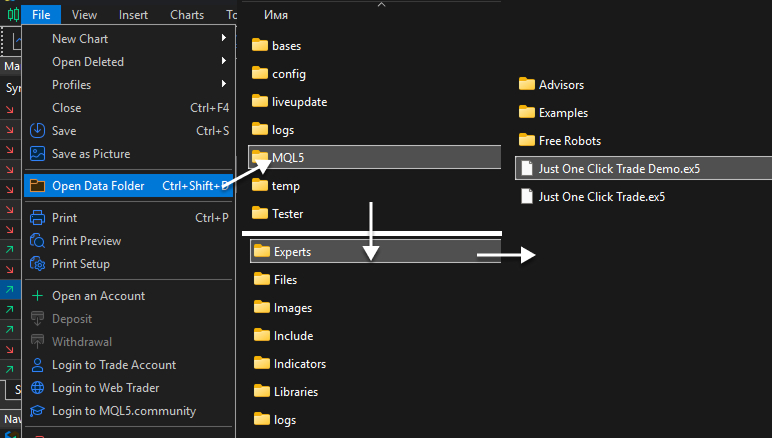
3) Next, refresh the list of advisors by right-clicking on the ‘Advisors’ tab and selecting ‘Refresh’, or restart MetaTrader 5

4) Drag and drop the Just One Click Trade Demo onto the chart
Файлы: