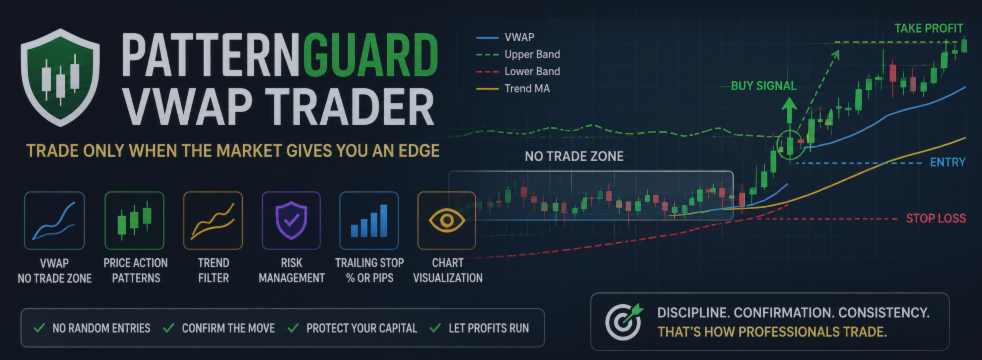

Markets are not always directional. A large part of market movement happens inside narrow ranges, consolidation zones, false breakouts, and low-quality price action. These conditions often lead to random entries, premature trades, and unstable results.
PatternGuard VWAP Trader was designed for a more selective approach. Instead of searching for trades all the time, the Expert Advisor focuses on filtering weak market conditions. It waits for price to leave the NO TRADE zone, confirms the movement with candlestick patterns, and checks the direction using a trend filter.
The main idea is simple: avoid trading when the market does not provide a clear advantage.
Core Concept
The foundation of PatternGuard VWAP Trader is the NO TRADE zone, built around VWAP and volatility-based bands. When price stays inside this area, the market is considered uncertain or range-bound. During this phase, the EA does not open trades and waits for a better market structure.
A trade signal is considered only after price exits the NO TRADE zone. This helps filter market noise and allows the EA to focus on situations where price begins to show stronger directional movement.
After the breakout, the EA checks for a valid candlestick pattern and trend confirmation. This multi-step logic makes the strategy more selective and disciplined.
How the EA Works
PatternGuard VWAP Trader analyzes the market through several key components.
The first component is the VWAP-based zone. It helps identify areas where price is close to its average market value and lacks strong direction. As long as price remains inside this zone, the EA avoids entries.
The second component is candlestick pattern confirmation. The advisor can detect several Price Action patterns, including Engulfing, Harami, Hammer, Inverted Hammer, Morning Star, Evening Star, Piercing Line, Dark Cloud Cover, Liquidity Sweep, Range Expansion Bar, and Body Dominance. These patterns act as additional confirmation that the market structure has changed after leaving the uncertainty zone.
The third component is the trend filter. PatternGuard VWAP Trader uses a moving average to determine the current market direction. This helps avoid opening trades against the prevailing market structure.
The fourth component is trade management. The EA includes Stop Loss, Take Profit, mandatory protective Stop Loss, and trailing stop logic. The trailing stop can work either in percentage mode or in pip mode, giving the trader more flexibility when adapting the system to different instruments.
Chart Visualization
One of the practical advantages of PatternGuard VWAP Trader is its built-in chart visualization. The EA can display the main elements of its logic directly on the chart:
VWAP, NO TRADE zone, upper and lower bands, trend moving average, Long and Short signals, trade opening marks, trade closing marks, Entry lines, Take Profit lines, and Stop Loss lines.
This makes the strategy easier to monitor and understand. The trader can see where a signal appeared, where the entry was made, how the position was protected, and how the trade was managed.
For faster backtesting, visualization can be disabled. For example:
InpShowVisuals = false — disable chart visualization to speed up backtesting. Set to true to display the EA’s visual elements on the chart.
Risk Management
PatternGuard VWAP Trader supports position sizing based on a selected risk percentage of account equity. This allows the EA to calculate trade volume more systematically instead of relying only on a fixed lot size.
The settings allow the user to configure risk per trade, Stop Loss, Take Profit, mandatory protective SL, and trailing stop parameters. This is especially important for volatile instruments, where uncontrolled lot sizing can create unstable account exposure.
The EA is not designed for aggressive trading without preparation. Its performance depends on the selected instrument, timeframe, spread, commission, quote quality, and broker conditions.
Recommended Market and Timeframe
PatternGuard VWAP Trader can work on different trading instruments available in MetaTrader 5, including forex pairs, metals, indices, commodities, and CFD symbols.
However, the preferred setup for initial testing and optimization is:
XAUUSD, H1 timeframe
Gold often provides strong volatility, clear directional movement, and active breakout behavior after consolidation periods. This makes XAUUSD on the 1-hour timeframe especially suitable for the EA’s logic based on VWAP-zone exits, candlestick confirmation, and trend filtering.
Still, each instrument requires individual optimization. One set of parameters cannot be expected to work equally well across all symbols, timeframes, and broker environments.
Why Optimization Is Important
PatternGuard VWAP Trader includes many adjustable parameters: NO TRADE zone settings, VWAP deviation period, moving average filter, candlestick pattern filters, risk percentage, Stop Loss, Take Profit, and trailing stop settings.
This flexibility is an advantage, but it also requires proper preparation. Before using the EA on a real account, optimization in the MetaTrader 5 Strategy Tester is strongly recommended.
Optimization helps adapt the EA to a specific symbol, timeframe, spread, commission structure, and broker execution conditions. After optimization, it is also important to test the selected parameters on a separate historical period to reduce the risk of overfitting.
Demo Testing Before Live Trading
After optimization and historical testing, the EA should be tested on a demo account. This is an essential step before using it with real funds.
Demo testing allows the trader to observe how the EA behaves in live market conditions, how orders are executed, how the trailing stop works, and whether the visual elements and trade management logic perform as expected.
Only after this stage should live trading be considered, and even then, it should begin with controlled risk and conservative settings.
Who Can Use PatternGuard VWAP Trader
PatternGuard VWAP Trader may be useful for traders who prefer a structured and systematic approach. It is designed for users who understand the importance of market filtering, risk control, optimization, and forward testing.
The EA may also be suitable for traders who focus on XAUUSD and want an automated strategy based on VWAP breakout logic, candlestick confirmation, and trend direction.
Conclusion
PatternGuard VWAP Trader is not an Expert Advisor that tries to enter the market constantly. Its purpose is to wait for a higher-quality trading condition: price leaving the NO TRADE zone, confirmation from a candlestick pattern, and alignment with the current trend.
The EA combines VWAP-based filtering, Price Action logic, trend analysis, flexible risk management, trailing stop functionality, and clear chart visualization.
It can work on different instruments, but special attention should be given to XAUUSD on the M15 timeframe.
Before using PatternGuard VWAP Trader on a real account, always perform optimization, test the settings on historical data, and run the EA on a demo account. This approach allows the product to be used not as a random trading tool, but as part of a structured and controlled trading system.