Grid Standard Deviation EA
- Experts
-
AL MOOSAWI ABDULLAH JAFFER BAQER
 To trade successfully we need to go through the proven path that others had gone and reached!
Here are 17 quotes from such successful investors:
1- Limit your size in any position so that fear does not become the prevailing instinct guiding your judgment.
Joe Vidich - Versão: 3.12
- Ativações: 5
WAIT FOR THE MARKET TO WAKE UP, THEN LADDER IN
Grid Standard Deviation EA keeps its first order in reserve until price dispersion breaks out above its own normal range, picks the side from where the close sits against its average, and then lets a careful ladder engine bank modest net gains while it shaves down its oldest exposure.
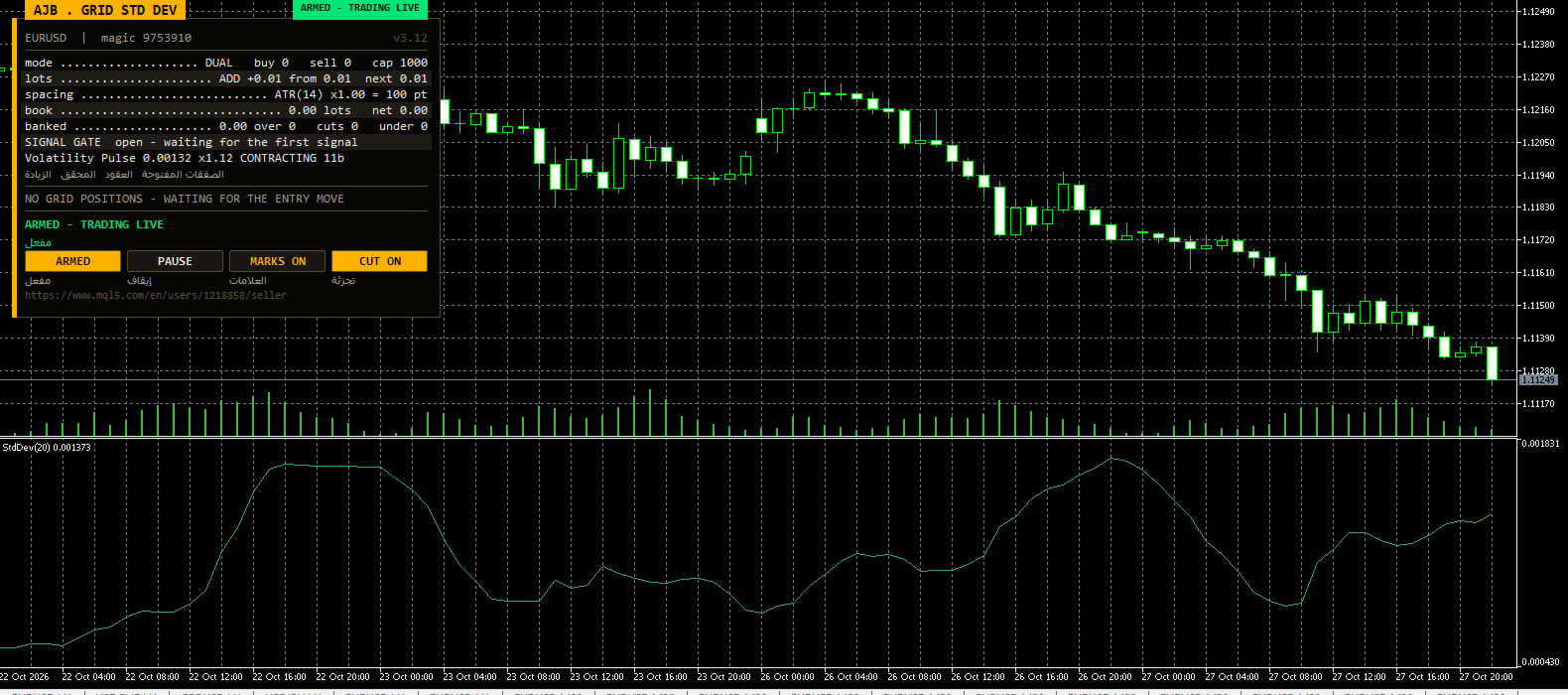
Check it yourself for free: launch the MetaTrader 5 Strategy Tester, choose an instrument, enable visualisation and start the run. A separate window plots the Standard Deviation line, small arrows tag each candle that opened a cycle, and the brand-new Volatility Pulse row reports whether the market is QUIET, CONTRACTING or EXPANDING. It costs nothing and uses the data of your own broker.
- Signal: iStdDev rises above its baseline average multiplied by an expansion factor on a completed bar; a close over the price average means buy, a close under it means sell.
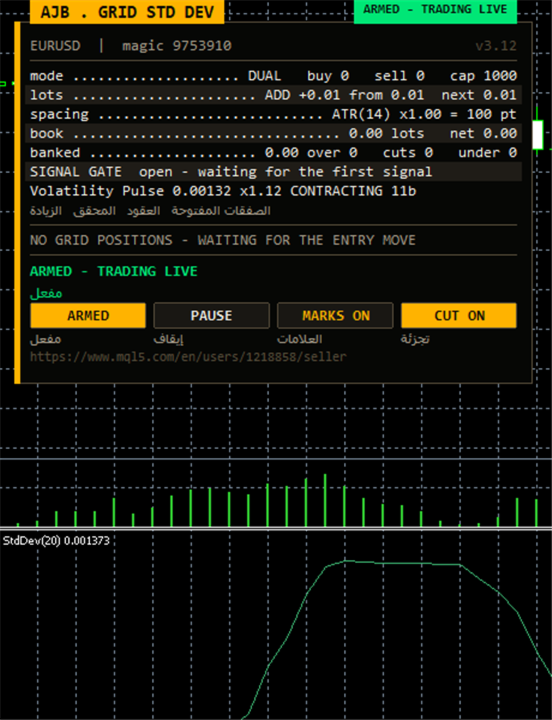
- Volatility Pulse: one panel line with the live StdDev reading, its ratio to the baseline, the current state and how many bars that state has lasted.
- Engine: twin buy and sell ladders, ATR-driven distances, net group closures that include swap and commission, and partial trimming of the heaviest position.
- Controls in plain sight: maximum lot, maximum levels, margin and floating-loss blocks, spread ceiling and a scan-only mode.
- Safe for several charts on one account, because every saved value is tied to the symbol and both magic numbers.
START HERE
- Chart: EURUSD H1 or XAUUSD H1 make easy first tests, though every symbol and period is supported.
- Settings: leave them as shipped at the beginning. The first order is 0.01, each new level adds 0.01, and no single order can exceed 1.0 lot.
- Capital: choose a deposit able to carry a long trend against an open ladder at the size you trade. On a small balance, 0.01 is the sensible choice.
- Day one: change RunMode to scan only (it ships armed), watch the plans appear without any order being sent, and press the panel button to go live once you understand them.
- Hedge cycle: leave it off until the plain grid feels routine.
WHY VOLATILITY EXPANSION MAKES A SENSIBLE TRIGGER
A grid that starts at a random moment often spends its first hours inside a sleepy range, collecting levels that never pay. Standard Deviation measures how widely recent prices are scattered around their moving average. When that spread is small, the market is resting; when it suddenly grows, fresh orders are arriving and price is starting to travel.
The EA calculates iStdDev with the period, method and applied price you select, then draws a simple moving average over the StdDev values themselves. That second line is the baseline, a picture of what "normal" volatility looks like on this symbol lately. A signal appears only on the bar where StdDev climbs above the baseline multiplied by your expansion factor (1.20 by default) after having been below that level on the previous bar. One cross, one event; a long volatile stretch does not keep firing.
Volatility by itself has no direction, so the EA asks a second question: did the signal candle close above or below a moving average of price built with the same period, method and price type? Above arms a buy cycle, below arms a sell cycle. The direction switches, the reverse option and the minimum bar distance between signals are then applied. Only finished candles are read, so arrows never move after they are drawn.
WHAT IS NEW
The Volatility Pulse row. Grid traders constantly wonder whether the market is waking up or calming down. This line answers in a few characters: the current StdDev value in price digits, the multiple of that value over its baseline (for example x1.35), the state EXPANDING when the multiple reaches your expansion factor, QUIET when it falls under the quiet factor (0.80 by default) and CONTRACTING in between, plus a bar counter showing how long the present state has held. It reads the very indicator handles that produce the signals, so what you see is what the EA uses.
Live StdDev subwindow and cycle arrows. On a running chart the Standard Deviation line is added below price and taken away again when you remove the EA, and each candle that launched a cycle carries an arrow.
Separate memory per chart. Saved state, retry lists and hedge accounting are stored under keys built from the account, symbol and both magic numbers. A start-up lock refuses a magic number already used by another chart, and every position scan filters by symbol and magic.
Realistic margin test. Before each level the terminal works out the true margin for that order and compares it, with a cushion, to the free margin you have. Big accounts are no longer blocked from valid trades.
Careful shipped values. The lot ceiling and the netting margin limit come set conservatively, so an untouched installation already behaves within reasonable bounds.
ONE CYCLE, FROM CALM TO CLOSED
1. Quiet watch. While dispersion stays near or under its baseline, nothing is opened. The Volatility Pulse row and the signal gate on the panel tell you the current state and how many bars must pass before another signal is allowed.
2. First level. The bar on which StdDev breaks over the expansion threshold, with a clear close on one side of the price average, opens the first order after your direction permissions and spacing gap are checked. The candle is marked.
3. Building the ladder. As price moves from the starting point, new levels join. Buy and sell ladders can run together, each with its own anchor and counter, or one side can trade alone. Distances follow ATR within a minimum and maximum, or stay at a fixed number of points.
4. Banking. A scanner pairs the oldest and newest orders of a side and closes the group the moment its combined net result, after swap and commission, passes your target. When the oldest order is too big to clear at once, only a portion is closed, financed by profit that newer orders already hold. Swing after swing, the largest position becomes smaller.
5. Keeping the book tidy. A reopen guard blocks any closure that would put the same level straight back on. Each closure is checked in the deal history, failed legs wait in a retry queue, and a plan is dropped if positions changed between scan and execution.
6. Hedge cycle, if you want it. Off by default. When switched on, it holds an equal pair on a symbol of your choice and retires it in matching slices paid for by a small extra on grid closures. Its purpose is turnover volume; it costs spread, commission and swap.
THE PANEL
The control panel sits at the left of the chart, so the price scale and the right side remain free. The main card shows symbol and magic, a status badge, grid mode, lot step, current spacing, banked result, the signal gate and the Volatility Pulse row. Plan cards present the next closure for each side with its own close button, and a table lists every open order. Buttons toggle armed and scan-only mode, pause, chart marks and slicing. You can drag or collapse the panel, it fits its own text on any screen, and during non-visual optimisation it is not drawn at all, which keeps test passes quick.
EVERY INPUT EXPLAINED
Grid - how levels are opened
- TradeMode - run buy and sell ladders together (default) or a single direction.
- GridSpacePoints - gap between levels in points when fixed spacing is chosen (25).
- GridSpaceMultiplier - widens each following gap by this factor; 1.0 means equal gaps.
- MaxGridLevels - most levels one ladder may hold.
- UpDirectionIsBuy - when true, a rising move belongs to the buy ladder; false swaps the roles.
- EAMagicNumber - identifier of grid orders, 9753910 by default; give each chart its own.
- GridOrderComment - text stored on every grid order.
- OneOrderPerBar - allows no more than one new level per candle.
Lot ladder
- InitialLotSize - volume of the first level (0.01).
- LotSizingMode - additive steps (default) or multiplication per level.
- LotMultiplier - growth factor, used only in multiply mode (1.25).
- LotAddStep - volume added per level in additive mode; 0 keeps every level at the starting size.
- MaxOrderVolume - ceiling for any one order (1.0).
- UseAutoLot - makes the starting size follow your balance.
- AutoLotBaseBalance - balance that corresponds to the starting size in auto mode.
- AutoLotAllowDecrease - lets auto sizing go below the starting size when the balance falls.
ATR spacing
- GridSpacingMode - distance from ATR (default) or from fixed points.
- ATRTimeframe, ATRPeriod, ATRBarShift - period, length (14) and candle used for ATR; shift 1 means the last finished candle.
- ATRSpacingFactor - converts ATR into a level distance.
- ATRMinSpacingPts, ATRMaxSpacingPts - narrowest (50) and widest (5000) allowed distance in points; 0 removes a limit.
- ATRFreezeOnStart - holds the first distance for the whole cycle.
Profit target
- DesiredProfitPerClosure - base money amount each closure aims to keep (2.0).
- ProfitMultiplier - final factor on that amount, between 1.00 and 2.00.
- ProfitTargetMode - fixed target or a target that grows with the book (scaled, default).
- ProfitVolumePower, ProfitDepthBonus, ProfitMaxMultiple - how a scaled target reacts to volume and number of levels, and its upper multiple.
- ProfitMaxReachFraction - safety limit keeping the target achievable inside a fraction of one step.
Fragment scanner
- UseMultiLegScan - tests combinations of several orders before the simple oldest/newest pair.
- MaxOldestLegs, MaxNewestLegs - how many orders a combination may take from the old end (3) and the new end (6).
- ScanPriority - ranking rule when more than one combination qualifies.
- NeverBankLessThanPair - a combination must also beat the target of the plain pair.
- RequireCloseVolumeExceedsTarget, MinCloseVolumeRatio - closing orders must be larger than the old order by at least this ratio (1.5).
Target slicing - partial closes
- EnableTargetSlicing - permits closing a piece of the oldest order when the full lot is out of reach.
- FragProfitWeightPower - weighting of profit per closing lot (1 is proportional).
- FragMinSlicePercent - smallest piece allowed, as a percent of the target order (20).
- FragAllowMultiCloser - lets several newer orders share the cost of one piece.
- FragPreferFullClosure - picks a complete closure whenever both options qualify.
Reopen guard
- ReopenGuard - blocks a closure that would instantly reopen a level.
- ReopenGuardCushion - safe distance as a share of one step (0.90).
Account protection
- MinMarginLevelPercent - no new levels below this margin level; 0 disables.
- MaxAccountRiskPercent - no new levels beyond this floating loss as a percent of balance; 0 disables.
- NetMaxMarginPercent - netting accounts: margin of the merged position capped at this percent of equity (5).
- MaxTotalOrders - absolute limit of grid orders per side.
Execution and verification
- RunMode - armed trading or scan only for observation.
- CloseSequence - which leg of a closure goes out first (oldest by default).
- MaxSlippagePoints - accepted slippage (30).
- MaxSpreadPoints - trading pauses when the spread is wider than this.
- MinSecondsBetweenClosures - waiting time between two closures on one side (5).
- CloseAttemptsPerLeg, VerifyTimeoutSeconds - send attempts per leg (3) and how long a stuck leg keeps being checked (90).
- DeferWhenMarketClosed, MarketClosedRetrySeconds - when quotes stop, wait for the session and retry at this interval rather than halt.
- AutoResumeAfterSeconds - lifts a halt by itself after this many seconds (300); 0 waits for the panel.
- AbortIfBookChanged - cancels a plan if any leg changed between scan and send.
- UseFullCommission, CommissionPerLot - count commission on both sides, with a manual per-lot figure when history does not report it.
- CloseOrderComment - text on closing deals.
Hedge cycle
- EnableHedgeCycle - switches the hedge engine on; off as shipped.
- HedgeSymbols - comma-separated symbols for the pair; listing one twice gives it more turns.
- HedgeSymbolRotation - rule for choosing the symbol of the next cycle.
- HedgeMaxSymbolsInTester - Strategy Tester only: limits the rotation to this many symbols.
- HedgeCycleLots, HedgeSliceLots - volume on each side and volume removed per slice.
- HedgeFragmentBonus, HedgeBonusIsPercent - extra added above slice cost, as a percent or a flat amount.
- HedgeMaxSurcharge, HedgeMaxSurchargePercent - money cap and percent cap on how much a closure target may be raised.
- HedgeMagicNumber - identifier of hedge legs, 9753911 by default; it must differ from the grid magic.
- HedgeReopenOnFinish - starts a new pair after one is completed.
- HedgeStartRequiresTrade - waits for grid activity before the first pair.
- HedgeIntegritySeconds, HedgeAutoRepair, HedgeNakedAction - how often both legs are compared and what happens if one side is missing.
- HedgeMaxSpreadPoints, HedgeSlippagePoints, HedgeAttemptsPerLeg, HedgeVerifyTimeout - spread, slippage, retry and verification limits for hedge orders.
- HedgeCommissionPerLot, HedgeOrderComment - commission fallback and label for hedge deals.
Weekly cash day
- WeeklyCashDay - stops new cycles and slices around your usual withdrawal time.
- CashDayOfWeek, CashCutoffHour - the weekday (0 = Sunday) and server hour after which no slice is fired.
Panel and chart
- ShowPanel - displays or hides the panel.
- PanelX, PanelY, PanelCorner - offsets from the chart edges and preferred corner.
- PanelFontSize - base text size (9).
- ShowArabic - prints an Arabic line beneath each English label.
- ShowChartMarks - draws levels and closure plans on price.
- MaxTableRows - rows of open orders listed per ladder (13).
Entry trigger
- EntryTriggerMode - what arms the first level; the Standard Deviation strategy by default.
- SignalBarShift - candle examined; 1 is the latest closed bar and lower values are refused.
- SignalBarsDelay - bars required between two accepted signals (30).
- SignalValidBars - how many bars a signal remains usable (3).
- SignalAllowBuy, SignalAllowSell - enable or disable each direction.
- SignalReverse - flips buy and sell.
Standard Deviation - the signal
- InpSDTF - timeframe on which StdDev, its baseline and the direction average are computed.
- StdDevPeriod - bars in the StdDev calculation and in the price average used for direction (20).
- StdDevShift - horizontal shift of StdDev and the direction average (0).
- StdDevMethod - averaging method inside StdDev and for the direction average (simple by default).
- StdDevPrice - price fed to the calculation (close by default).
- StdDevBasePeriod - length of the simple average drawn over StdDev that defines normal volatility (50).
- StdDevExpansion - StdDev must exceed baseline times this value to signal (1.20); also the EXPANDING threshold on the panel.
- StdDevQuietFactor - ratio under which the panel shows QUIET (0.80); display only.
- InpShowSDWindow - shows the StdDev line in a subwindow on live and visual charts.
- InpShowSignalArrows - places an arrow on each candle that armed a cycle.
Debug
- DebugMode - writes detailed reasoning to the Experts journal for troubleshooting.
QUICK ANSWERS
Why has nothing opened for hours? Look at Volatility Pulse. QUIET or CONTRACTING means the expansion has not happened yet; the EA is waiting on purpose. A lower StdDevExpansion makes signals more frequent, a higher one makes them rarer.
Can it run on several charts? Yes. Use a different pair of magic numbers on each; the start-up lock warns you about a clash.
Does it need extra files? No DLLs, no external indicators and no downloads; everything is built in. Hedging and netting accounts are both supported.
DAY-TO-DAY ROUTINE
Attach the EA, allow algorithmic trading and confirm that the panel appears. Glance at Volatility Pulse first: a long QUIET streak tells you why no cycle has started, while EXPANDING with a high multiple warns that price is moving fast and ladders may deepen quickly. The plan cards show what each side still needs for its next closure. Pause ahead of news you would rather avoid, use scan only to observe without risk, and keep magic numbers unique per chart.
AN HONEST PICTURE
Waiting for a volatility breakout improves the moment a cycle begins; it does not make trading safe. A strong trend against an open ladder can build a large floating loss, and this EA has no stop loss that closes everything for you; it protects itself by refusing new levels. Spread, swap, commission, the chosen symbol and your lot size all influence results, and backtests do not guarantee future returns. Test with your own settings first, start small and scale up only once you know how far your instrument tends to run.
If Grid Standard Deviation EA turns out to be useful in your testing or trading, please consider leaving an honest review of your real experience, good or bad. It helps fellow traders decide and shapes future improvements.