News Spike EA Auto Pro
- Experts
- Versão: 2.0
- Ativações: 5

News Spike EA Pro
Professional Automated Trading for High-Impact Economic News
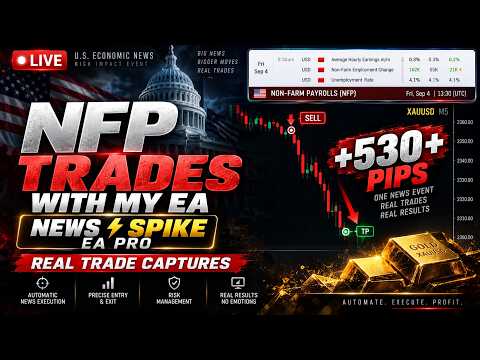
News Spike EA Pro is a professional Expert Advisor designed specifically for trading scheduled high-impact economic events. It continuously monitors a Real-Time Economic Calendar during live trading, prepares the market according to your configuration, executes trades automatically when predefined conditions are met, and manages open positions using advanced risk management tools.
For historical testing, the integrated Historical Event Replay Engine enables accurate Strategy Tester simulations using manually supplied historical event schedules, allowing traders to optimize and validate the same trading methodology before deploying it in live market conditions.
Whether your objective is to automate scheduled news trading, optimize execution speed, or reduce manual intervention during volatile market conditions, News Spike EA Pro provides a complete and configurable framework for professional macroeconomic event trading.
Professional Highlights🗓️ Real-Time Economic Calendar Integration
⚡ High-Impact Economic News Trading
📈 Automatic Pending Order Execution
🖥️ Historical Event Replay Engine
🛡️ Advanced Risk Management
📊 Fixed Lot & Risk Percentage Position Sizing
🎯 Automatic Break-even Protection
📌 Dynamic Trailing Stop
📉 Spread & Slippage Protection
⏱ Pending Order Expiration
🔄 Fully Configurable Trading Parameters
💻 VPS Ready
🧪 Strategy Tester Compatible
Why News Spike EA Pro?Unlike conventional news trading Expert Advisors that support only live execution or only historical testing, News Spike EA Pro combines both capabilities within a single integrated trading framework.
Live Trading
Automatically retrieves scheduled events from a Real-Time Economic Calendar and manages the complete execution process according to your predefined settings.
Historical Testing
Uses the Historical Event Replay Engine to reproduce past economic announcements inside the MetaTrader Strategy Tester for optimization and validation.
This allows traders to develop, test, optimize, and deploy a consistent trading methodology without changing workflows between historical testing and live execution.
Professional Trading Workflow
## 🧪 Ready-To-Use Backtesting Strings (UTC=0)To help you get started with the Strategy Tester immediately, here are the audited, chronologically verified high-impact historical schedules (NFP, CPI, FOMC) in UTC=0.
⚠️ Important Backtesting Note: Remember to manually shift these times to match your specific broker's server time offset (e.g., add +2 hours if your broker is GMT+2) inside your Strategy Tester settings!
## 📅 2023 – 2024 Historical String:
2023-01-06 13:30;2023-01-12 13:30;2023-02-01 19:00;2023-02-03 13:30;2023-02-14 13:30;2023-03-10 13:30;2023-03-14 13:30;2023-03-22 18:00;2023-04-07 12:30;2023-04-12 12:30;2023-05-03 18:00;2023-05-05 12:30;2023-05-10 12:30;2023-06-02 12:30;2023-06-13 12:30;2023-06-14 18:00;2023-07-07 12:30;2023-07-12 12:30;2023-07-26 18:00;2023-08-04 12:30;2023-08-10 12:30;2023-09-01 12:30;2023-09-13 12:30;2023-09-20 18:00;2023-10-06 12:30;2023-10-12 12:30;2023-11-01 18:00;2023-11-03 12:30;2023-11-14 13:30;2023-12-08 13:30;2023-12-12 13:30;2023-12-13 19:00;2024-01-05 13:30;2024-01-11 13:30;2024-01-31 19:00;2024-02-02 13:30;2024-02-13 13:30;2024-03-08 13:30;2024-03-12 13:30;2024-03-20 18:00;2024-04-05 12:30;2024-04-10 12:30;2024-05-01 18:00;2024-05-03 12:30;2024-05-15 12:30;2024-06-07 12:30;2024-06-12 12:30;2024-06-12 18:00;2024-07-05 12:30;2024-07-11 12:30;2024-07-31 18:00;2024-08-02 12:30;2024-08-14 12:30;2024-09-06 12:30;2024-09-11 12:30;2024-09-18 18:00;2024-10-04 12:30;2024-10-10 12:30;2024-11-01 12:30;2024-11-07 19:00;2024-11-13 13:30;2024-12-06 13:30;2024-12-11 13:30;2024-12-18 19:00
## 📅 2025 – 2026 (Up to Today) Historical String:
2025-01-10 13:30;2025-01-15 13:30;2025-01-29 19:00;2025-02-07 13:30;2025-02-12 13:30;2025-03-07 13:30;2025-03-12 13:30;2025-03-19 18:00;2025-04-04 12:30;2025-04-10 12:30;2025-05-02 12:30;2025-05-07 18:00;2025-05-13 12:30;2025-06-06 12:30;2025-06-11 12:30;2025-06-18 18:00;2025-07-03 12:30;2025-07-11 12:30;2025-07-30 18:00;2025-08-01 12:30;2025-08-13 12:30;2025-09-05 12:30;2025-09-11 12:30;2025-09-17 18:00;2025-09-17 18:00;2025-10-03 12:30;2025-10-10 12:30;2025-10-29 18:00;2025-11-07 13:30;2025-11-13 13:30;2025-12-10 19:00;2025-12-11 13:30;2025-12-16 13:30;2026-01-09 13:30;2026-01-13 13:30;2026-01-28 19:00;2026-02-13 13:30;2026-03-06 13:30;2026-03-11 13:30;2026-03-18 18:00;2026-04-03 12:30;2026-04-10 12:30;2026-04-29 18:00;2026-05-08 12:30;2026-05-13 12:30;2026-06-05 12:30;2026-06-10 12:30;2026-06-17 18:00;2026-07-02 12:30;2026-07-10 12:30;2026-07-14 12:30
Live Trading
Start Expert Advisor │ ▼ Connect to Real-Time Economic Calendar │ ▼ Monitor High-Impact News Events │ ▼ Wait for User-Defined Activation Time │ ▼ Prepare Pending Orders │ ▼ Execute Strategy │ ▼ Manage Position │ ▼ Close Trade │ ▼ Monitor Next Scheduled Event
Historical Backtesting
Load Historical Price Data │ ▼ Paste Historical Event Schedule │ ▼ Run Strategy Tester │ ▼ Replay Historical News Events │ ▼ Analyze Performance │ ▼ Optimize Parameters │ ▼ Deploy to Live Trading
Technical FeaturesEconomic Calendar Integration
-
Automatic Real-Time Economic Calendar monitoring
-
Automatic event recognition
-
Configurable activation timing
-
Scheduled event filtering
-
Automatic synchronization during live trading
Historical Event Replay Engine
-
Historical event schedule support
-
Accurate Strategy Tester replay
-
Repeatable optimization
-
Historical strategy validation
-
Consistent testing workflow
Trade Execution
-
Buy Stop pending orders
-
Sell Stop pending orders
-
Configurable pending order distance
-
Automatic order placement
-
Automatic pending order cancellation
-
Pending order expiration
-
Trading window control
Risk Management
-
Fixed Lot Size
-
Risk Percentage Position Sizing
-
Stop Loss
-
Take Profit
-
Break-even
-
Trailing Stop
-
Maximum Spread Filter
-
Slippage Protection
-
Magic Number Filtering
Platform Compatibility
-
ECN Accounts
-
Standard Accounts
-
Hedging Accounts
-
VPS Compatible
-
Low Latency Execution
-
Strategy Tester Compatible
| Economic Event | Supported |
|---|---|
| Non-Farm Payroll (NFP) | ✅ |
| Consumer Price Index (CPI) | ✅ |
| Core CPI | ✅ |
| Producer Price Index (PPI) | ✅ |
| FOMC Statement | ✅ |
| Federal Funds Rate Decision | ✅ |
| GDP | ✅ |
| Retail Sales | ✅ |
| Personal Consumption Expenditures (PCE) | ✅ |
| ADP Employment | ✅ |
| ISM Manufacturing PMI | ✅ |
| ISM Services PMI | ✅ |
| Unemployment Rate | ✅ |
| Average Hourly Earnings | ✅ |
News Settings
| Parameter | Description |
|---|---|
| News Source | Real-Time Economic Calendar |
| Event Schedule | Historical replay schedule for Strategy Tester |
| Activation Time | Time before the event to prepare trading |
| Event Filter | Select qualifying economic events |
Trade Execution
| Parameter | Description |
|---|---|
| Pending Distance | Distance for pending orders |
| Pending Expiration | Automatically remove unused pending orders |
| Maximum Spread | Prevent execution during excessive spreads |
| Slippage | Maximum acceptable execution slippage |
Risk Management
| Parameter | Description |
|---|---|
| Fixed Lot | Constant lot size |
| Risk Percentage | Dynamic position sizing based on account risk |
| Stop Loss | Initial protection level |
| Take Profit | Target level |
| Break-even | Automatic stop movement |
| Trailing Stop | Dynamic profit protection |
Conservative
-
Risk: 0.5%
-
Spread Filter: Strict
-
Break-even: Enabled
-
Trailing Stop: Enabled
-
ECN Broker Recommended
Moderate
-
Risk: 1%
-
Standard Spread Filter
-
Break-even Enabled
-
Trailing Stop Enabled
Aggressive
-
Risk: 2%
-
Wider Pending Distance
-
Optimized for experienced traders
-
VPS Strongly Recommended
Does the EA trade automatically?
Yes. During live trading, the EA monitors a Real-Time Economic Calendar, prepares trades, executes according to your settings, and manages open positions automatically.
Can the EA be backtested?
Yes. The Historical Event Replay Engine allows historical news events to be replayed inside the Strategy Tester.
Does it use Martingale?
No.
Does it use Grid Trading?
No.
Does it support Risk Percentage?
Yes.
Does it support Fixed Lot Size?
Yes.
Can it be used on Gold?
Yes. The EA can be configured for Gold, Forex, and other supported instruments.
Is VPS recommended?
Yes. A low-latency VPS is recommended for optimal execution during high-impact news events.
Does it require manual news entry?
No for live trading. Historical schedules are only required when using the Strategy Tester.
Broker & VPS RecommendationsRecommended Broker Features
-
ECN or Raw Spread Account
-
Low Latency Execution
-
Stable Pricing During News
-
Hedging Support
-
Reliable Order Execution
VPS Recommendations
-
24/7 Operation
-
Low Network Latency
-
Stable Internet Connection
-
Close proximity to broker servers
Version 1.00
-
Initial Release
-
Real-Time Economic Calendar Integration
-
Historical Event Replay Engine
-
Automatic Pending Order Execution
-
Risk Percentage Position Sizing
-
Fixed Lot Mode
-
Break-even Protection
-
Trailing Stop
-
Spread Filter
-
Slippage Protection
-
Strategy Tester Compatibility
Trading leveraged financial instruments involves substantial risk and may not be suitable for all investors. High-impact economic events can result in increased market volatility, wider spreads, slippage, and rapid price movements. Past performance, historical testing, or optimization results do not guarantee future performance. Users are responsible for selecting appropriate risk settings and ensuring the Expert Advisor is configured according to their trading objectives and broker conditions.
Support & ContactFor product support, technical questions, feature requests, or assistance with installation and configuration, please contact us through the MQL5 Messaging System
Product support is provided exclusively through the MQL5 Messaging System and the Product Comments section.
Support includes:
-
Installation Assistance
-
Configuration Guidance
-
Input Parameter Explanation
-
Product Updates
-
Bug Reports
-
General Technical Support
News Spike EA Pro provides a professional framework for automated trading around scheduled high-impact economic events by combining real-time event monitoring, historical replay, configurable execution, and comprehensive risk management within a single Expert Advisor.