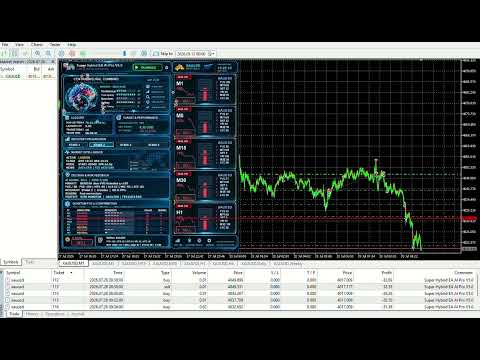
Super Hybrid EA AI Pro

Super Hybrid EA AI Basic – Professional XAUUSD Basket, Grid, Hedging and Risk-Control Expert Advisor

1. Product Overview

Super Hybrid EA AI Basic is a MetaTrader 5 Expert Advisor mainly designed for XAUUSD trading. The EA manages trades at basket level rather than treating every position as a separate isolated trade. Its structure combines grid logic, hedging behavior, staged lot progression, basket profit management, session timing, news filtering, Federal Reserve event filtering, drawdown control, and optional AI-style market risk defense.

The main purpose of this EA is not only to look for trading opportunities, but also to manage exposure in a more structured and defensive way during different market conditions. The EA includes several configurable protection layers that are designed to reduce unnecessary risk, avoid dangerous trading periods, and control basket expansion when price moves against the active cycle.

Super Hybrid EA AI Basic is especially focused on XAUUSD because gold can move aggressively during U.S. news, Federal Reserve events, low-liquidity periods, and high-volatility market conditions. For this reason, the EA includes multiple timing, risk, volatility, spread, and basket-management filters.

As with any automated trading system, results depend on broker execution, spread, slippage, leverage, account size, market behavior, and user-selected settings. Proper demo testing is strongly recommended before using the EA on a live account.

2. Main Trading Concept

Super Hybrid EA AI Basic uses a basket-based trading structure. Instead of opening a single trade and waiting for an individual Take Profit, the EA can manage multiple EA-controlled positions as one complete trading cycle.

The EA can open, manage, hedge, expand, reduce, trail, or close the basket depending on the selected settings.

The strategy structure may include:

  1. Initial trade entry

  2. Grid-distance confirmation

  3. Timeframe entry confirmation

  4. Stage-based trade progression

  5. Optional hedging behavior

  6. Optional martingale-style lot progression

  7. Basket profit target

  8. Basket trailing logic

  9. Partial close logic

  10. Drawdown and daily loss protection

This structure gives the user more control over how the EA enters, adds, protects, and exits trades.

3. XAUUSD-Focused Trading Design

Super Hybrid EA AI Basic is mainly designed for XAUUSD. The EA includes XAUUSD-specific logic and settings to support gold trading behavior.

The EA can work with:

  1. XAUUSD standard symbols

  2. XAUUSD symbols with broker suffixes

  3. Gold symbols with different contract specifications

  4. Lower timeframe basket trading

  5. Gold-focused indicator confirmation

  6. Gold-focused volatility behavior

  7. Gold-focused session timing

The EA also includes Market Watch and chart-management tools to help keep the trading environment organized.

4. Basket Profit Management

The EA is built around basket profit management. This means the EA monitors the total floating result of all EA-managed positions and can close the full basket once the configured basket target is reached.

Basket management options include:

  1. Basket target in deposit currency

  2. Optional basket target line on the chart

  3. Optional trailing basket target

  4. Optional partial close logic

  5. Full basket close when target is reached

  6. Basket-level monitoring instead of isolated trade management

This allows the EA to manage the full trading cycle as one combined structure.

5. Grid and Stage-Based Progression

Super Hybrid EA AI Basic includes a multi-stage grid framework. The EA can divide basket progression into different stages, allowing each stage to use its own logic, distance, multiplier, and confirmation structure.

The EA supports up to four grid stages. Each stage can include:

  1. Stage enable or disable setting

  2. Start trade number

  3. End trade number

  4. Grid step in USD

  5. Grid step in pips

  6. Lot multiplier

  7. Entry timeframe

  8. Start mode

  9. Indicator filter selection

  10. Stage carry logic

This staged structure gives the user more control than a simple fixed-grid system. The early stage can be more conservative, while later stages can use wider spacing or different multiplier behavior.

6. Dynamic Grid Step Expansion

One of the important defensive functions in this EA is the optional dynamic grid step expansion.

When price moves against the active basket and market risk increases, the EA can increase the grid distance for later stages. This is designed to reduce the speed of new entries during unfavorable market conditions.

The purpose of this function is to help reduce overtrading and slow down basket expansion when the market becomes more dangerous.

Dynamic grid expansion may help during:

  1. Strong adverse price movement

  2. High volatility

  3. Fast market acceleration

  4. Wider candle ranges

  5. Increased basket drawdown

  6. Elevated AI risk level

This function does not remove risk, but it adds another layer of control to help make the EA more defensive.

7. Lot and Exposure Management

The EA includes several lot and exposure controls. These settings allow the user to define how aggressively or conservatively the EA should build the basket.

Lot and exposure tools include:

  1. Fixed starting lot

  2. Balance-based lot calculation

  3. Stage multipliers

  4. Maximum lot per trade

  5. Basket total-lot cap

  6. Broker lot normalization

  7. Margin validation

  8. Volume validation

  9. Free-margin protection

  10. Stop-out safety checks

These tools are important because grid, martingale, and hedging systems can increase exposure. Conservative lot sizing is strongly recommended, especially on small accounts.

8. Drawdown and Daily Loss Protection

Super Hybrid EA AI Basic includes configurable drawdown and daily loss protection tools. These tools are designed to help the user define clear risk boundaries.

Drawdown protection may include:

  1. Floating drawdown limit in deposit currency

  2. Floating drawdown limit by percentage

  3. Option to stop new entries after drawdown breach

  4. Option to close EA-managed positions after drawdown breach

  5. Daily closed-loss protection

  6. Daily loss circuit breaker

  7. Basket lot cap

  8. Maximum lot cap per trade

These features are designed to help control risk. They do not guarantee protection from losses, especially during extreme volatility or strong one-directional market movement.

9. Federal Reserve Event Filter

The EA includes a dedicated USA Federal Reserve filter. This filter is designed to reduce exposure around major Federal Reserve events that can strongly affect XAUUSD.

The Federal Reserve filter may include:

  1. Same-day event blocking

  2. Day-before event blocking

  3. Day-after event blocking

  4. Blackout hours before the event

  5. Blackout hours after the event

  6. Fail-closed behavior

  7. Optional blocking of add-on trades

  8. Additional protection during Fed-sensitive periods

This filter is especially useful for gold trading because XAUUSD often reacts strongly to FOMC decisions, Federal Reserve speeches, inflation expectations, interest-rate outlooks, and U.S. dollar movement.

10. General News Filter

Super Hybrid EA AI Basic also includes a general news filter. This filter is designed to reduce new exposure around scheduled economic events.

The news filter can be configured by:

  1. Minutes before news

  2. Minutes after news

  3. Event importance level

  4. Selected currencies

  5. Calendar source

  6. Fail-closed behavior if news lookup fails

  7. Optional high-impact event blocking

The news filter is intended to help the EA avoid opening new trades during unstable market conditions. Calendar availability and Strategy Tester behavior may differ from live trading, so the user should test this function carefully.

11. Cooling-Down System Before Session End

The EA includes a cooling-down system before the end of each trading session. This function is designed to reduce unnecessary exposure near the end of active trading windows.

For example, the EA can stop opening new cycles or apply session-close logic before the session ends.

This feature can help during:

  1. Lower liquidity near session end

  2. Unstable spread conditions

  3. Market slowdown

  4. Unwanted overnight exposure

  5. Basket management before session close

The cooling-down system is configurable and can be adjusted based on the user’s preferred session structure.

12. End-of-Day Safety Function

Super Hybrid EA AI Basic includes an end-of-day safety function. This feature allows the EA to close EA-managed trades at a scheduled time if the floating drawdown is within the configured acceptable limit.

For example, the user can configure the EA to close pending or open baskets if the floating result is below a selected threshold such as USD 50. This is designed to help avoid leaving small or manageable baskets stuck in the market after the preferred trading period.

The end-of-day safety function may include:

  1. Daily scheduled close time

  2. Separate settings by trading day

  3. GMT-based timing

  4. Maximum floating drawdown threshold

  5. Basket close condition

  6. Session-end risk reduction

This feature is a defensive management tool. It does not guarantee that all baskets will close in profit or within the selected threshold.

13. Timeframe Entry Confirmation

The EA does not rely only on grid distance. It can also use timeframe entry confirmation before allowing additional trades.

This means the EA can require both:

  1. A valid price-distance movement

  2. A valid timeframe confirmation

This helps reduce random or too-frequent entries. It also gives the EA a more disciplined structure when adding trades to the basket.

Timeframe confirmation is useful because price distance alone can sometimes trigger entries too aggressively in unstable conditions.

14. First Hedge Step for Basket Protection

The EA includes hedge-based logic and a first hedge step designed to reduce basket stress during adverse price movement.

The first hedge step can help the EA manage drawdown by introducing opposite-side exposure according to the selected trading mode and settings.

Hedging logic may help during:

  1. Price movement against the basket

  2. Strong directional movement

  3. Temporary market imbalance

  4. Basket drawdown development

  5. Recovery structure management

A hedging-enabled MT5 account is required for hedge-based modes. Users must understand that hedging can reduce directional pressure, but it can also increase complexity and exposure if not configured properly.

15. AI-Style Market Risk Defense Module

Super Hybrid EA AI Basic includes an optional AI-style Market Intelligence and Risk Defense module. This module is rule-based and designed to monitor several risk conditions before allowing new exposure.

The AI-style risk module can monitor:

  1. Market volatility

  2. ATR acceleration

  3. Large candle movement

  4. Spread spikes

  5. Momentum strength

  6. Basket drawdown percentage

  7. Drawdown acceleration

  8. Margin level

  9. Number of open trades

  10. Total basket lots

  11. News-sensitive conditions

  12. Session risk

The EA can classify market conditions into risk levels and use this information to block new cycles, tighten filters, or increase grid spacing when risk increases.

This module is not a guarantee of safety. It is an additional defensive filter designed to support more controlled trading behavior.

16. Spread and Slippage Control

The EA includes spread and slippage control to help avoid poor trade execution.

Execution filters may include:

  1. Maximum spread control

  2. Requested deviation control

  3. Actual slippage validation

  4. Broker execution check

  5. Margin check before trade entry

  6. Lot-size validation

  7. Order-send safety validation

These tools are useful during high-volatility news events, rollover, market open, low-liquidity periods, or sudden spread widening.

17. Session and Time Control

Super Hybrid EA AI Basic includes GMT-based session control. The EA can be configured to trade only during selected market sessions.

Supported sessions may include:

  1. Sydney session

  2. Tokyo session

  3. London session

  4. New York session

  5. Custom trading windows

The EA can also manage active baskets during blocked periods while preventing new cycle starts depending on the selected settings.

Session control helps users avoid trading during unwanted market periods and keeps the strategy more disciplined.

18. Custom Trading Windows

The EA supports custom time windows in addition to the main session controls.

Each custom time window may include:

  1. Start time

  2. End time

  3. Enable or disable setting

  4. Force-close threshold

  5. Minimum open-trades condition

  6. Trading permission control

This gives the user flexibility to define specific trading periods according to broker conditions, preferred market sessions, or personal trading rules.

19. Indicator and Trend Confirmation

The EA includes several indicator-based confirmation tools that can be used depending on the selected mode and stage.

Indicator confirmation may include:

  1. Fast EMA

  2. Slow EMA

  3. ADX trend strength

  4. RSI confirmation

  5. ATR volatility filter

  6. Trend quality score

  7. XAUUSD indicator filter group

  8. Stage-specific indicator selection

These filters are designed to reduce weak or random entries. The EA can use indicator confirmation together with grid distance, timeframe confirmation, spread control, and risk filters.

20. On-Chart Control Panel

Super Hybrid EA AI Basic includes an on-chart monitoring panel and manual control buttons.

The panel may include:

  1. START / STOP button

  2. CLOSE ALL button

  3. Daily Metrics Panel

  4. Optional logo display

  5. Adjustable panel size

  6. Adjustable panel text size

  7. Indicator status display

  8. AI risk status display

  9. Session status display

  10. News and Fed filter status

The panel is designed to help users monitor the EA directly from the chart.

21. Daily Metrics Panel

The Daily Metrics Panel can display important trading and account information such as:

  1. EA status

  2. Current trading mode

  3. Daily drawdown

  4. Daily net result

  5. Trades opened today

  6. Largest lot traded today

  7. Basket target status

  8. Active grid stage

  9. Stage timeframe

  10. Stage multiplier

  11. Session status

  12. Force-close countdown

  13. Spread

  14. News filter status

  15. Federal Reserve filter status

  16. Broker time

  17. GMT time

  18. AI risk level

This panel helps the user follow what the EA is doing without needing to check multiple terminal windows.

22. Market Watch and Chart Tools

The EA includes chart and Market Watch workflow tools to make setup easier.

These tools may include:

  1. Automatic chart timeframe setting

  2. Market Watch symbol management

  3. XAUUSD base-symbol targeting

  4. Optional removal of unrelated symbols

  5. Broker suffix handling

  6. Cleaner chart environment

These tools are designed to keep the EA focused on the intended trading symbol and timeframe.

23. Main Features

Super Hybrid EA AI Basic includes:

  1. XAUUSD-focused MT5 trading framework

  2. Basket-level trade management

  3. Grid trading logic

  4. Hedging logic

  5. Martingale-style progression options

  6. Four independent grid stages

  7. Stage-specific grid step settings

  8. Stage-specific multipliers

  9. Stage-specific timeframe settings

  10. Stage-specific indicator filters

  11. Basket target in deposit currency

  12. Optional basket target chart line

  13. Optional trailing basket target

  14. Optional partial close

  15. Fixed lot and balance-based lot options

  16. Basket total-lot cap

  17. Maximum lot per trade

  18. Floating drawdown protection

  19. Daily loss protection

  20. General news filter

  21. Dedicated Federal Reserve filter

  22. Cooling-down system before session end

  23. End-of-day safety function

  24. Dynamic grid step expansion

  25. Timeframe entry confirmation

  26. First hedge step logic

  27. AI-style market risk module

  28. Spread and slippage filters

  29. GMT-based session control

  30. Custom trading windows

  31. On-chart control buttons

  32. Daily Metrics Panel

  33. Indicator status display

  34. Market Watch management tools

24. Recommended Use

Super Hybrid EA AI Basic may be suitable for traders who want:

  1. XAUUSD-focused automation

  2. Basket-based trade management

  3. Controlled grid progression

  4. Hedging-based protection structure

  5. Session-based trading control

  6. News and Federal Reserve event filtering

  7. Drawdown and daily loss control

  8. On-chart monitoring and manual control

  9. More defensive basket management during adverse conditions

Before using the EA on a live account, users should test it first in the MT5 Strategy Tester and then on a demo account. Settings should be adjusted according to symbol behavior, spread, commission, leverage, account size, broker execution, and personal risk tolerance.

Aggressive settings such as small grid distance, high multiplier, large starting lot, or multiple active grid stages can increase drawdown. Conservative risk settings are strongly recommended.

25. Important Notes

  1. The EA does not guarantee profit.

  2. The EA does not eliminate trading risk.

  3. Grid, martingale, and hedging systems can increase exposure.

  4. News filters depend on calendar availability and platform settings.

  5. WebRequest-based news tools require proper MT5 WebRequest configuration.

  6. Strategy Tester behavior may differ from live market behavior.

  7. Broker spread, slippage, commission, swap, execution speed, and contract size can affect results.

  8. Default settings are not a guarantee of future performance.

  9. Demo testing is strongly recommended before live trading.

  10. Users are responsible for selecting suitable risk settings.

26. FAQ

1. Is Super Hybrid EA AI Basic only for XAUUSD?
The EA is mainly designed for XAUUSD. It includes XAUUSD-focused logic, session behavior, grid spacing, and indicator filtering.

2. Does the EA support hedging?
Yes. The EA includes hedge-based logic. A hedging-enabled MT5 account is required for proper hedge operation.

3. Does the EA use grid and martingale logic?
Yes. The EA includes staged grid and martingale-style progression options. These features must be used carefully because they can increase exposure.

4. Can each grid stage use different settings?
Yes. Each grid stage can have its own grid distance, multiplier, timeframe, trading mode, and indicator filter.

5. Does the EA include news protection?
Yes. The EA includes a general news filter and a dedicated Federal Reserve filter.

6. Does the EA include drawdown control?
Yes. The EA includes floating drawdown protection, percentage drawdown protection, daily loss control, and exposure limits.

7. What is the dynamic grid step expansion function?
It is a defensive function that can increase grid spacing when market risk becomes higher or when price moves against the basket.

8. What is the cooling-down system?
It is a session-control function that can stop new exposure or manage baskets before the end of a trading session.

9. What is the end-of-day safety function?
It is a scheduled close function that can close EA-managed baskets at a specific time if the floating drawdown is within the configured limit.

10. Does the EA guarantee profit?
No. No Expert Advisor can guarantee profit or prevent losses. The EA includes risk-management tools, but trading risk always remains.

27. Risk Warning

Trading forex, metals, indices, and CFDs involves significant risk. XAUUSD can move very quickly during news events, Federal Reserve announcements, low-liquidity periods, spread widening, and high-volatility market conditions.

Grid, martingale, and hedging strategies can increase exposure and may lead to large drawdown or account loss if the market moves strongly against the active basket.

The protection tools included in this EA, such as drawdown control, news filtering, Federal Reserve filtering, cooling-down logic, dynamic grid expansion, hedge steps, and AI-style risk monitoring, are designed to support better risk management. They do not guarantee safety, recovery, or profit.

Past performance, Strategy Tester results, demo results, screenshots, or historical results do not guarantee future live performance.

Use the Strategy Tester and a demo account before live trading. Only trade with risk settings that match your account size, leverage, broker conditions, and personal risk tolerance.


Mais do autor
Super Hybrid EA
Bashar Taisir Saleh Al Zubaidi
4.69 (16)
Super Hybrid EA Basic – Modo Full Hedging para XAUUSD Super Hybrid EA Basic é um Expert Advisor para MetaTrader 5 desenvolvido para operar XAUUSD , utilizando uma abordagem integrada de gestão de cesta Full Hedging . O EA foi projetado para gerenciar as operações como uma única cesta combinada, em vez de tratar cada posição como uma ordem isolada. O conceito principal desta versão é simples: o EA inicia um ciclo de negociação com uma primeira entrada de mercado e, em seguida, gerencia a cesta po
FREE
BTC Hybrid EA
Bashar Taisir Saleh Al Zubaidi
BTC Hybrid EA é um Expert Advisor para MetaTrader 5 desenvolvido para traders que desejam uma abordagem estruturada e configurável para negociar BTCUSD . O EA é baseado em uma estrutura híbrida de negociação que combina entradas direcionais, lógica de hedge, gerenciamento de grid por estágios, controle de lucro por cesta de ordens e várias camadas de proteção. Ele foi projetado para monitorar as condições do mercado, a exposição das operações, o comportamento do spread, o drawdown flutuante e o
Major Pairs Hybrid EA
Bashar Taisir Saleh Al Zubaidi
Major Pairs Hybrid EA MT5 é um Expert Advisor multi-símbolo desenvolvido para MetaTrader 5. Ele foi criado para gerenciar os principais pares de Forex por meio de um sistema estruturado de gerenciamento por cestas, com Grid Stages flexíveis, controles de ativação por par, alvos individuais de TP e modos de entrada selecionáveis. Este EA é indicado para traders que preferem gerenciar vários pares de moedas a partir de um único sistema organizado, em vez de executar vários robôs independentes em d
SafePair Manual Trader Pro MultiPairs SafePair Manual Trader Pro MultiPairs é um Expert Advisor avançado para MetaTrader 5, desenvolvido para apoiar trading manual profissional, gestão semiautomática de operações, monitoramento multi-símbolo, planejamento de risco e análise inteligente de mercado através de um único painel de controle poderoso. Este EA foi criado para traders que precisam de execução manual rápida, controle estruturado de risco, assistência inteligente de trading e suporte claro
Filtro:
Sem comentários
Responder ao comentário