 MetaTrader 5
 Experts
 Indicadores
 Bibliotecas
 Utilitários
 Widgets
 Regras
Conheça o Mercado MQL5 no YouTube, assista aos vídeos tutoriais
Como comprar um robô de negociação ou indicador?
Execute seu EA na
hospedagem virtual
hospedagem virtual
Teste indicadores/robôs de negociação antes de comprá-los
Quer ganhar dinheiro no Mercado?
Como apresentar um produto para o consumidor final?
Novas ferramentas de negociação para MetaTrader 5 - 69
 Abaixo estão os programas de negociação que simplificam o trading no MetaTrader 5. Passe o mouse sobre um produto para ler uma descrição mostrando seu propósito.
This EA help trader to manage his pending orders, when you place many Pending Orders this utility monitor them and when of them get filed (executed) the EA cancel and delete all rest of pending orders, to avoid opening of all of pending orders at the same time , and lose your risk management. this utility is very useful for trader when he /she is not available on the desk.

The "InfoBox" utility is designed to display the presence of open orders, the number of lots, current profit and much more in one window. The version for the MT4 platform is here . You've probably encountered a situation where you have an advisor that works on a currency pair, but information about its operation: - orders and their number, the size of the spread for the instrument, the volume of lots on the market, drawdown and much more - are scattered in different places of the terminal an
FREE

Having a chart window that has multiple pairs (symbols), timeframes, and indicators displayed simultaneously can be quite advantageous. This indicator will allow traders to place multiple chart objects in a sub window of the main chart window. The indicator is capable of adding all available MT5 indicators and custom indicators to the existing chart. The list and parameters of the indicators are for reference at: https://www.mql5.com/en/docs/indicators
Input parameters Name
Example
Indicator
FREE
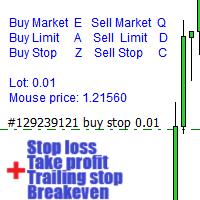
Aviso, este EA não funcionará no testador, apenas em contas demo ou reais, entre em contato comigo se quiser experimentar a demonstração https://www.mql5.com/en/users/abudabi MT4 version
"Enviar(colocar) ordens rápidas no MetaTrader 5 através do teclado e do mouse: Mova o cursor sobre o preço desejado, pressione a tecla: Compra a mercado: E Limite de compra: A Compra com ordem pendente: Z Venda a mercado: Q Limite de venda: D Venda com ordem pendente: C (Teclas personalizáveis) Quando a ordem

Rosy Trade Assistant A very easy to use EA, simple and friendly. Many features available to manage your trade. Compact panel with 4 sizes that can be selected according to your convenience. And trading in your local time has never been easier, using local timescale and clock. User Guide and Demo version Pages Trading Panel - Page to place an order and manage it's SL/TP Tools - Page to manage order: trailing, close on target, close all by categories Settings - Page to use custom time scale with s
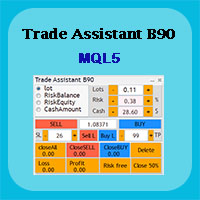
Trade Assistant B90 is designed for manual trading so that it helps us to manage capital and position well.
This expert has the ability to change the default inputs of the expert as desired before use.
You can see the expert entries in the photo below, each of which we explain below.
1. Background Color : With this entry, you can change the assistant's background
Color
2. Font size: You can change the size of the fonts used in the assistant.
3. Button color: Change the color of assis

Magic News Trade Assistant é uma ferramenta para negociar quando as notícias estão acontecendo, esta ferramenta é muito útil para gerar lucros para você, pois você pode definir seu próprio Stop Loss e Take Profit de forma clara. Esta ferramenta é perfeita para negociação em XAUUSD. Notícias que podemos usar para negociação, como JOLTS e NFP, são muito lucrativas. Você ficará tranquilo e aguardará seu pedido dar lucro, tudo depende das notícias geradas. Recomendação: • Par de moedas: XAUUSD • Pro

Copie os sinais de qualquer canal do qual você seja membro (incluindo privados e restritos) diretamente para o seu MT5. Esta ferramenta foi projetada com o usuário em mente, oferecendo muitos recursos que você precisa para gerenciar e monitorar as negociações. Este produto é apresentado em uma interface gráfica fácil de usar e visualmente atraente. Personalize suas configurações e comece a usar o produto em minutos!
Guia do usuário + Demo | Versão MT4 | Versão Discord Se deseja experimentar

Este consultor fornece os seguintes recursos: Abra uma posição: quando o preço cruzar a linha de tendência, abra uma ordem longa ou curta. Fechar: Quando o preço cruzar a linha de tendência, feche sua posição longa ou curta. Trailing Stop Loss – O EA continuará a aumentar o stop loss para pedidos longos ou reduzir o stop loss para pedidos curtos ao longo da linha de tendência. A linha pode ser uma linha de tendência ou uma linha horizontal, As linhas de tendência podem ser raios ou segment

Envie sinais totalmente personalizáveis do MT5 para o Telegram e torne-se um Provedor de Sinais! Este produto é apresentado em uma interface gráfica fácil de usar e visualmente atraente. Personalize suas configurações e comece a usar o produto em questão de minutos!
Guia do Usuário + Demonstração | Versão MT4 | Versão Discord Se deseja experimentar uma demonstração, por favor consulte o Guia do Usuário. O Remetente de MT5 para o Telegram NÃO funciona no testador de estratégias.
Recursos de M

Envie sinais totalmente personalizáveis do MT5 para o Discord e torne-se um provedor de sinais! Este produto é apresentado em uma interface gráfica fácil de usar e visualmente atraente. Personalize suas configurações e comece a usar o produto em minutos!
Guia do Usuário + Demo | Versão MT4 | Versão do Telegram Se quiser experimentar uma demonstração, vá para o Guia do Usuário. O remetente de MT5 para Discord NÃO funciona no testador de estratégias.
Recursos do MT5 para Discord Personalize t

Rhino Trade Manager é um gerenciador de operações para MetaTrader 5 que funciona em gráficos em tempo real e dentro do Testador de Estratégias no modo visual. Você envia e gerencia ordens no testador com o mesmo painel que usa em uma conta real, de modo que o backtesting manual em dados históricos e a negociação real são feitos com uma única ferramenta. Ele é destinado a traders discricionários que precisam calcular o tamanho da posição pelo risco, ver com clareza os níveis de Stop Loss e Take P

This tool can help you close all open orders with one click, just click "Close all". If you only want to close profitable orders, click the "Close profitable" button. After clicking, all floating orders will be closed; If you only want to close the orders with floating losses, click the "Close losable" button. After clicking, all orders with floating losses will be closed. This tool has been tested for a year. The one-click position closing function is very complete, the position closing is time

Easy and Smart Trade Manager. Take your trading to the next level with it. This assistant has everything you need to do that. MT4 version
Basic features: Works with any FX, Crypto, Indices, Futures etc Several volume calculations methods, included risk calculation based on StopLoss level Several BreakEven modes Time close, timeout close and orders expiration Cancel pending orders level (OCO) Real and virtual StopLoss and TakeProfit One Click open and close trades Screenshots of your trades Cust
FREE

Unlock the Power of Automated Trading with Cutting-Edge Moving Average Signals!
Are you looking for a reliable and efficient way to trade the markets?
Our automated trading system leverages the power of moving average signals to identify high-probability trading opportunities with precision and speed. Why Choose Our Trading Bot? Advanced Moving Average Strategies – Our algorithm dynamically adapts to market conditions using short-term and long-term moving averages to detect optimal entry and
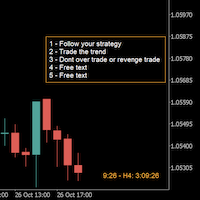
A good trader is a trader that respect his plan and keep the head cool. This indicator allow to display up to 5 lines of text for the things you always to see.
Congifuration 5 lines of text Text font, color, size Frame on/off, color, style, size Position of the text anchored Corners or anywhere on the screen Any questions or comments, send me a direct message here https://www.mql5.com/en/users/mvonline
FREE

Hello everyone, this is another utility that I wrote specifically for users using my profile with a large number of experts and sets ( https://www.mql5.com/en/blogs/post/750723 ) . This utility is useful for working with a profile using grid strategies (averaging and martingale). As we know, such strategies periodically fall into a large drawdown and you need to be careful when opening averaging positions (do not open too many). In my profile, I use a limit of 3 positions for each EA, if this w
FREE

The Maximun Minimun Strata (100 bars and any period) is used to identify key levels on a price chart, which can be useful in technical analysis and decision making in trading:
Identify Key Levels: They help identify support and resistance levels on a price chart. The support level represents a minimum floor at which the price tends to bounce upwards, while the resistance level represents a maximum ceiling at which the price tends to bounce downwards.
Decision Making: Traders use these key lev
FREE

The Linear Surfer (Works on 50 bars and any interval) is a valuable tool in technical analysis and trading, as it offers a series of qualities and advantages:
Trend Identification: The main quality of a trend line is its ability to identify and visualize trends on a graph. You can clearly see if the market is in an uptrend, downtrend or sideways trend.
Easy to use.
Predicting Supports and Resistances: Trend lines can also be used to identify support levels (in uptrends) and resistance (in do
FREE

Dieser Expert Advisor unterstützt Sie bei Ihrem Handel. Er setzt für Sie automatisch, nach denen von Ihnen vordefinierten Parametern den Stopp Loss, den Take Profit. des Weiteren hat dieser Expert Advisor eine Break Even Funktion, der Ihre Positionen glattstellt, so dass Sie bei einem Rücksetzer des Kursen noch mit ein wenig Plus schliessen. Auch besitzt er eine Trailling Funktion, welche des SL für Sie automatisch nachzieht.

A Trade Manager with automatic volume calculation
Automatic Volume Calculation can be done either by percentage (from the lowest between Equity and Balance) or by value (Money amount) Market Order with drag-and-drop feature for Stop Loss and Take Profit Limit and Stop Orders drag-and-drop feature for Entry , Stop Loss and Take Profit Review Order Details before placing orders ( Entry Price , SL , TP , and Volume ) Open Positions Management with Automatic Break-Even when profit reaches predefin
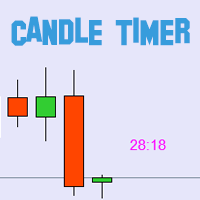
BLZ Candle Timer: Libertando o Futuro da Negociação
Entre no mundo vanguardista da negociação com o BLZ Candle Timer, um avançado contador regressivo de barras que revela o tempo que falta para que a barra atual termine e surja uma nova.
Experimente o poder da precisão, pois este indicador revela o tempo restante para a última barra no seu gráfico, garantindo que se mantém à frente do ritmo do mercado. Fique alerta com notificações oportunas para a chegada de uma nova barra, adicionando uma v
FREE
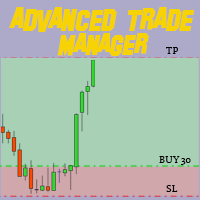
Revolucione seu trading com nosso Gerenciador de Operações Avançado para MT4 e MT5 Mt4 Version : https://www.mql5.com/en/market/product/107249
Impulsione sua estratégia de trading com a ferramenta definitiva de precisão e controle – nosso Gerenciador de Operações Avançado para MT4 e MT5. Diferente dos gerenciadores convencionais, o nosso não apenas se adapta dinamicamente às condições de mercado, mas também define automaticamente níveis de stop-loss e take-profit assim que você inicia uma oper
FREE

Precisa abrir múltiplas posições/negociações de uma só vez? Criamos sua solução fácil. Agora você pode inserir várias posições ao mesmo tempo. Você pode definir o tamanho do lote, o número de posições, obter lucro e parar a perda. Por exemplo: você deseja comprar 3, 5, 10 ou qualquer número de posições com um determinado tamanho de lote. Agora você pode fazer isso simplesmente tocando no botão "Comprar". Ou Por exemplo: você deseja vender 3, 5, 10 ou qualquer número de posições com um determina

Apresentamos o NAS100 Auto SL e TP Maker para MT5:
Nunca mais perca a definição de StopLoss e TakeProfit com o nosso NAS100 Auto SL e TP Maker, um assistente indispensável para os traders que navegam no mercado Nasdaq 100 no MetaTrader 5. Esta ferramenta foi concebida para aqueles que procuram uma solução perfeita para automatizar a gestão dos níveis de StopLoss e TakeProfit.
Caraterísticas principais:
Automação sem esforço:
Monitoriza automaticamente as transacções Nasdaq 100 sem StopLoss e/o
FREE

TP SL Bot - uma ferramenta que automaticamente estabelece o Stop Loss e Take Profit para novas ordens abertas de várias maneiras de acordo com suas instruções. Ele também tem a função de calcular o volume necessário para abrir uma negociação para atingir o lucro desejado com o tamanho de stop loss/take profit especificado. Existem várias formas de calcular o tamanho e configurar os parâmetros: 1. Configurações com base na quantidade especificada pelo usuário em percentagem do saldo atual da co

ASSISTENTE O PESCADOR O Assistente o Pescador é uma ferramenta poderosa para auxiliar nas operações em geral. STOP LOSS INTELIGENTE Com ele, podemos programar o stop loss, take profit, break even e stop móvel para que, em nossas operações manuais, sejam colocados automaticamente. ABRIR E GERENCIAR POSIÇÕES Podemos usar o Assistente o Pescador para abrir posições dentro dos parâmetros programados, fazer reentradas, fechar as posições por horário e muito mais. FUNÇÕES MULTI-MOEDAS Podemos progra

ASSISTENTE O PESCADOR O Assistente o Pescador é uma ferramenta poderosa para auxiliar nas operações em geral. STOP LOSS INTELIGENTE Com ele, podemos programar o stop loss, take profit, break even e stop móvel para que, em nossas operações manuais, sejam colocados automaticamente. ABRIR E GERENCIAR POSIÇÕES Podemos usar o Assistente o Pescador para abrir posições dentro dos parâmetros programados, fazer reentradas, fechar as posições por horário e muito mais. Com ele, podemos gerenciar todas as

The "Simple Trading Controller" for MetaTrader 5 sets a new standard for speed and efficiency in opening and closing market positions. Crafted with a clean and intuitive design, this tool is a response to the specific needs of traders, ensuring a seamless and rapid trading experience. All it provides is: Quick BUY and SELL Buttons Open multiple operations at the same time Set Trade Size Set Stop Loss Take Profit Points Close All Positions Let's go and see the advantages of using "Simple Trading
FREE

Trade Assistant Panel: Your Optimal Trading Ally "The Trade Assistant Panel" is a graphical tool for traders aiming to simplify and enhance their trading experience. It streamlines order execution and management, allowing you to focus on market analysis and decision-making. With just a few clicks, you can initiate various order types, ensuring that you always have full control over your trading strategy: Buy Orders Sell Orders Buy Stop Orders Buy Limit Orders Sell Stop Orders Sell Limit Orders Y
FREE

The timeline will be displayed according to the set time difference. (Time differences in 30-minute increments are not supported.) Additionally, price lines are displayed at round numbers such as 100.000, 100.010, and 100.020. The standard gridlines are displayed with the time and price by MT4, but they are very confusing as they become the broker's time and are displayed at the halfway point along with the price. It hides them and displays gridlines at user-defined time differences and prices i

GGP Trade Copier EA is an automatic trading bot that can help traders automatically replicate the trading strategies and operations from one trading terminal to others by experiencing exceptionally fast trade copying system. Its easy-to-use setup allows you to copy trades between multiple MetaTrader terminals on the same Windows computer or Windows VPS with lightning-fast copying speeds of under 0.5 seconds. The software supports multiple trading varieties, including Forex, commodities, stocks

Manage your prop firm challenges with Raba Challenge Manager EA (FTMO, Rocket21, etc...). Functionalities: Close all positions when the goal profit is reached. Close all positions before reaching the daily drawdown limit. Close all positions before reaching the total drawdown limit. Notes: Auto enabling/disabling algo trading is disabled due to MQL Market policies.
I you have any doubt you can leave it in comments and I will anwer it asap. If you found this tool helpful for you, a comment an
FREE

All utilities of my experts advisors included in a single one. Includes: Raba Time Scheduler EA Raba Challenge Manager EA Raba BreakEven and Trailing StopLoss EA Notes: Auto enabling/disabling algo trading is disabled due to MQL Market policies.
I you have any doubt you can leave it in comments and I will anwer it asap. If you found this tool helpful for you, a comment and a good rating will be appreciated. Also any proposal will be taken into account for future versions.
FREE

FREE! MT5 Trading Manager EA PRO / MT5 Trading Assistant EA PRO: Empowering Traders for Success! Are you ready to revolutionize your MetaTrader 5 trading experience? Our comprehensive trading assistant is meticulously crafted for efficiency, precision, and overall trading prowess. Discover what sets MT5 Trading Assistant EA PRO apart: Key Features: 1. Create Order Tab: Effortless trade execution: Seamlessly place market, pending, or stop orders with our user-friendly interface. Real-time market
FREE

Use for risk management and opening positions as per the user settings. The user is allowed to set the stop loss and take profits in pips. The user can also choose the risk percentage per trade that he/she wants to use while opening the trade. The volume of the trade that the user wants to sent shall be calculator according to the stoploss and the risk percentage that the user has selected.

This Dashboard is very useful . That will help us analyzing graph. In this dashboard has some functions. such as - Buy Stop - Sell Stop - Buy Limit Order - Sell Limit Order - Close All trade on this graph - Close All Profit - Delete Pending Order = Notify to enter an order - Percentage Calculation of chance to win an order On this strategy i calculated all Major EMA to find a higher chance and take more profits
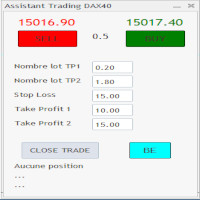
C'est un trade panel pour les indices 1 digit utilisé surtout sur le dax 40. Il y a 2 Take profit si TP1 atteint on passe en BE + 2 pt TP1 nbre lot et TP2 nbre : 2 positions sont ouverte ensemble ceci afin d'éviter si un problème connexion web. Attention c'est en nombre de points
Stop loss :15 (15 pts sur dax) Take Profit 1 : 10 Take Profit 2 : 15 Dans cet exemple si 10 pts atteint (spread prit en compte) on se met en BE + 1 pt Il y a un bouton BE qui met BE + 2 pt sur les trades et 1 bouton

O trabalho da concessionária é analisar o trabalho de outros consultores em todos os instrumentos para ajudar a evitar o saque do depósito. Ao ultrapassar os parâmetros especificados, “Equity Protection” pode bloquear, fechar uma posição e enviar uma notificação sobre isso. "Equity Protection " pode funcionar no símbolo atual, ou em todos os símbolos, a funcionalidade integrada permite remover posições pendentes e também fechar outros consultores que trabalham em sua conta. Oportunidades:
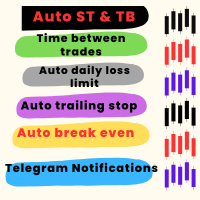
Ferramenta de Utilidade para Otimizar o Comércio e Gerenciamento de Riscos Esta ferramenta avançada foi projetada para melhorar o desempenho nas negociações e mitigar riscos. Ela evita decisões emocionais, como negociações impulsivas ou ações motivadas pela ganância, garantindo uma abordagem disciplinada aos mercados. Principais Recursos Stop-Loss e Take-Profit Automáticos Define automaticamente os níveis de stop-loss e take-profit ao executar uma operação, protegendo efetivamente as posições. I
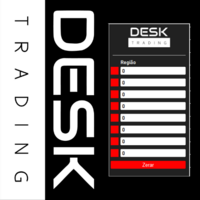
Potencializando Suas Operações com o Desk Trading - Notificador de Telegram Nos mercados financeiros, a informação oportuna é frequentemente a diferença entre o sucesso e a perda. É por isso que o Indicador Desk Trading se destaca como uma ferramenta essencial para traders em busca de uma vantagem competitiva. Este notificador inteligente está projetado para notificar, via Telegram, sobre as regiões críticas nos gráficos de diferentes intervalos de tempo, tornando-o um aliado valioso em sua jor

Adicione uma marca d'água aos seus gráficos, contendo o símbolo do ativo seguido do período atual, e a descrição do ativo logo abaixo.
Você já viu imagens de outras plataformas gráficas, ostentando aquelas belas marcas d'água, e se perguntou por que o seu MetaTrader5 não tem uma igual? Esse era o meu caso... então experimentei algumas das opções disponíveis no Mercado à época, mas eu ainda queria deixar tudo exatamente do meu jeito. Então desenvolvi a minha própria solução, e tenho orgulho de c
FREE

Automatically protect you positions with Raba BreakEven and Trailing StopLoss EA. Functionalities: Automatic break even. Automatic trailing stoploss
I you have any doubt you can leave it in comments and I will anwer it asap. If you found this tool helpful for you, a comment and a good rating will be appreciated. Also any proposal will be taken into account for future versions.
FREE

Manage your trading schedule with Raba Time Scheduler EA. Functionalities: Set up infinit time ranges. Choose between these actions when out of schedule. Close all positions. Close all negative positions and protect the positive ones. Notes: Auto enabling/disabling algo trading is disabled due to MQL Market policies.
I you have any doubt you can leave it in comments and I will anwer it asap. If you found this tool helpful for you, a comment and a good rating will be appreciated. Also any propos
FREE

***This is a MT5 version of ZigZag Breaout*** --------------------------------------------------------------------------------------------------------------------------------- ***** Unlocking the Expertise: EA Source Code for Dedicated Learners
***** Commencing from November 2021 , the "EA + source code" version is at your disposal,
***** allowing those who purchase (not rent) this EA to explore its inner workings.
*****T o acquire the source code, kindly direct your request, along with purchase

It is a utility that posts customized messages on Telegram based on account trading activity. Once the utility is on the chart, with each new position opened from the same chart symbol the utility is added, a customized message will be sent to the Telegram group defined in the input parameters. The utility will post to the Telegram group if a new position is opened and if it is the same symbol as the chart the utility is running on. If you are using an Expert Advisor for Buy and Sell and want to

Setting Up a Telegram Bot for MetaTrader 5 (MT5) MetaTrader 5 (MT5) is a powerful platform for trading, and integrating it with Telegram can help you receive trading updates and alerts efficiently. Follow these steps to set up a Telegram bot for MT5: Launch Telegram : Begin by opening the Telegram app on your device. Search for "BotFather" : In the Telegram search bar, type "BotFather" and select it from the search results. Create a New Bot : Send /start to BotFather. Next, send /newbot to initi

Risk-o-meter is a Risk calculator Panel designed to help people who are new to trading, better understand how much they are risking for potential profit or loss.
Inputs: 1. Enter your Risk in % or currency 2. Enter your Return Ratio 3. Enter your Lot Size
Results: 1. SL line 2. TP Line
Features: 1. By moving the SL line, lot size will adjust to keep Risk fixed. 2. By moving the TP line, Risk Ration will adjust to keep Risk fixed.

This EA is capable of sending transaction details to any Telegram channel passed as a parameter.
The format in which the text will be sent to the Telegram channel is shown below:
BUY EURUSD SL XXXX.XX TP XXXX.XX
In case of TP donation, it will be sent to the telegram channel after the transaction is executed in a separate message and the format will be...
SET TP XXXX.XX
To set the SL, it will be sent to the telegram channel after the transaction is executed in a separate message and the fo

Telegram Risk Exposure shows the risk exposure in total, by calculating the risk value of all the open positions that have stop loss orders, so you can clearly see the value being risked in dollar($) and percent(%).
Setup
A step by step user guide is available. No knowledge of Telegram API is required; all you need is provided by the developer.
Key Features Monitoring your risk exposure in real time Automatically get notified via telegram when your risk exposure changes Customize the

Visualização de eventos econômicos no gráfico Utilitário multifuncional: 66+ funções, incluindo este indicador | Entre em contato comigo se tiver alguma dúvida | Versão para MT4 O indicador desenha linhas verticais, mostrando quando as notícias econômicas estão chegando.
Nas configurações de entrada você pode ajustar: Somente para o símbolo atual : se verdadeiro, apenas eventos para o símbolo selecionado serão exibidos. Mostrar eventos passados : se verdadeiro, eventos passados pe
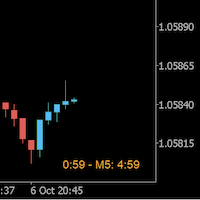
Always wanted to know when the M5 candle closes when you are in M1 ? This indicator allow to display a candle timer (countdown) on the current time frame as well as any higher time frame you have configured for this time frame. So this is easy now to see when the H4 candle closes when you are in H1.
Congifuration Label position, size, color HFT time frame per time frame Any questions or comments, send me a direct message here https://www.mql5.com/en/users/mvonline
FREE
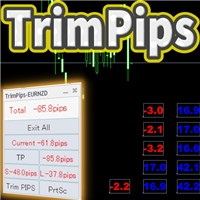
TrimPips solves the following problems at once. I want to know the total of current positions and total pips of current currency at a glance. I want to know the total pips display for plus positions, minus positions, short positions, and long positions at a glance. I want to close the position all at once. I want to close my current currency position all at once. I want to close short and long positions all at once. I want to close both positive and negative positions at once. I want to set TP/

Executor Trader Panel (Sta) - Standard Version is a multi-functional trading tool designed for traders. The trading panel integrates over 30 individual functions and more than 10 combined functions, providing traders with a highly flexible operational approach.
Adapted for DPI: 96, 192.
Main Features of the Executor: Instant Connection Status: Immediately know if the connection with the broker is lost. Time Synchronization: Instantly know the current local time and the time of the trad
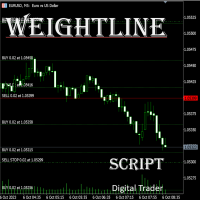
In multi-asset, multi-position trading environments—such as those involving forex, stocks, gold, and other instruments—traders often face a critical pain point: when holding multiple positions in the same instrument, it’s difficult to quickly and intuitively assess the current market price relative to all long and short positions. This makes it challenging to accurately determine the overall average entry cost, leading to delayed stop-loss and take-profit decisions. The problem worsens with mixe
FREE

Apart from psychology, another thing that makes traders successful is risk management. This utility helps the trader in risk management, order management, and monitoring the profits that are made within a certain period. The utility works on the forex market. inputs: The following are inputs that are required before an order is executed · Sl- this is the stop loss in pips. · Tip: this is the take profit in pips. · Risk%: the percentage of the equity that the user wants to ri
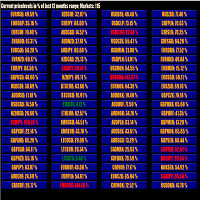
This tool scans up to 200 markets simultaneously and displays the current price level in a range specified by the user in a chart window.
By clicking on one of the buttons, a new chart window opens for the selected symbol. A template file can be specified as an input parameter, which is applied directly to the opened chart window.
The user can specify the font size of the buttons, the number of buttons per column and the level at which marking should take place in the input parameters. The upd
FREE
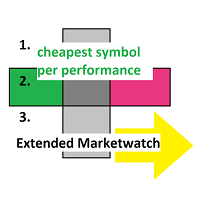
Extended MarketWatch calculates multiple numbers as a characterization of their symbols in addition to the default ones. They are often simple mathematics or just read for comparison. These are the percentual spread, also in comparison to the known daily change and with leverage, the leverage of each symbol and an example of the real profit.
BID, ASK, SPREAD, DCH: The prices, absolute spread and the last daily change of the price are repeated for overview. PRSPRED: This enables to view the spr
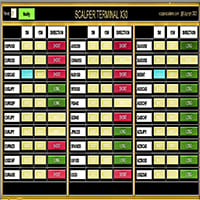
O software de interface Scalper Terminal é um indicador, ele não se envolve em transações automáticas de compra e venda. Este indicador mostra a zona de negociação atual onde as transações podem ser inseridas quando ocorre uma oportunidade de negociação de scalping. Quando há um sinal de scalping, no lado direito do par de negociação relevante, a luz turquesa acende e a direção exata da negociação está escrita acima dela. Depois disso, clique no botão Turquesa para entrar na transação. Uma nova

//--- indicator settings input string Custom_Symbol_SetName = "Nayuta"; Custom_Symbol_SetName O parâmetro servirá como o nome da variedade para o seu gráfico personalizado. O gráfico personalizado sob este nome irá registar as alterações no valor líquido da sua conta depois de activar o serviço, o que o ajuda a analisar as suas transacções e estatísticas das alterações nas suas participações. Será apresentado num gráfico de velas no seu gráfico de computador, tornando-o mais intuitivo e dir
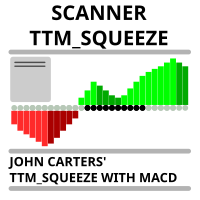
Market scanner based on the indicator published here Download the 'John Carters TTM Squeeze with MACD' Technical Indicator for MetaTrader 5 in MetaTrader Market (mql5.com) . Only the instruments that are in the Market Watch window are scanned. Maximum number of scanning tools up to 5000. The scan timeframe is selected from the timeframe panel of the terminal. To use it, open any chart and attach the Expert Advisor to the chart, the 'Search' button will appear in the upper left corner. When you
FREE
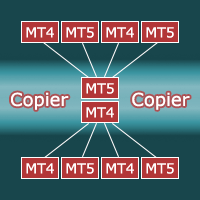
Copier for the MetaTrader5 terminal. Designed to copy trade from one terminal to another. Works both on netting and hedging accounts. Copying from a netting account can be performed simultaneously to both netting and hedging accounts. Also, from a hedging account, copying can be performed simultaneously to both netting and hedging accounts. Compatible with the version for the MetaTrader4 terminal; if available, copying can be performed between different terminals (also regardless of the type of
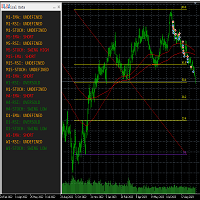
This tool helps to get a quick overview of a market. In one panel, indicators show trend, swing highs/lows and overbought/oversold information of various time frames (M1,M5,M15,H1,H4,D1,W1). Fibonacci can be used to identify different price levels. The input parameters of all indicators can be set by the user. The time frames can be changed as desired. The user can decide for himself which indicators he would like to see in the panel. Fibonacci appears on the chart at the next minute change at t
FREE

The Trades To Telegram is a powerful and customizable trading assistant designed to bridge the gap between the MetaTrader 5 platform and the popular messaging app, Telegram. This bot serves as a crucial tool for traders, providing them with timely and accurate trading signals, alerts, and updates directly to their Telegram accounts.
Key Features: Real-Time Signals: The bot monitors the MetaTrader 5 platform continuously, detecting trading signals, such as Opening/Closing of buy/sell orders , a
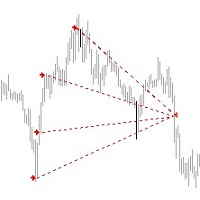
*** Introductory Offer! *** Ends soon - Price will increase - do not miss it!
This EA Closes ALL open trades (with the same magic number on the that pair) at a certain level of profit - either in money or in percentage of balance.
So if you have multiple trades open, you can choose to close them all as one "basket" using this EA. For spreads from a tiny 0.1 pips RAW/ECN Accounts, click here . Check out my Waka Esque EA signal here: >> High Risk Settings or Medium Risk Settings .
Setti

This program is a GUI for issuing orders that can be done more quickly. Faster TP SL setting This program is not an automated trading platform. Trading is risky, please manage your risk. We do not accept any responsibility. It should be tried with Demo before using it with Real. Normally, the setting sets the risk to 1:1 to shift manually or to enter the risk to x:1, where x can be entered and everything can move freely. Thank you to all customers who have purchased our products. We would like t
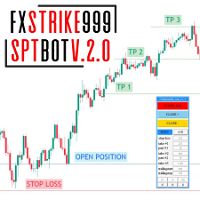
FxStrike999_SPT_bot prop helper é um bot único que é projetado especificamente para aqueles que têm problemas com psicologia, para aqueles que têm problemas com psicologia. Quem não para e não tem lucros, acabando por perder os seus depósitos. Mas com o nosso bot, todos esses problemas serão resolvidos! Com FxStrike999_SPT_bot você alcançará um novo nível de negociação, onde seu depósito crescerá constantemente e você vai parar de se preocupar com suas posições, o próprio bot vai definir um s

Você está procurando uma maneira de negociar no mercado cambial de forma mais eficiente e lucrativa? Temos a solução que você procura! Apresentando nosso inovador EA de Médias de Preço de Entrada, uma ferramenta revolucionária projetada para maximizar seus lucros e minimizar seus riscos. O que faz nosso EA se destacar da multidão? A resposta é simples: cálculo automático dos preços médios. Imagine ter a capacidade de gerenciar múltiplas negociações abertas com diferentes lotes e níveis de pr

Account Protector Meta Trader 5 This utility prevents risk of ruin per trading cycle. Retail forex trading accounts are designed with stop-out levels that make it nearly impossible to restore lost capital after a trader — human or algorithmic — blows an account . This is especially frustrating for traders who have grown their account to multiples of its starting value, only to suffer irreparable losses from a series of bad trade entries. The Account Protector solves this by enforcing a specified

This utility automatically places Stop Loss and Take Profit levels on newly opened positions. The Stop Loss and Take Profit values are specified in pips. The utility can also move Stop Loss to Break Even and trail the Stop Loss after a specified profit level is reached. Input Parameters SL and Trailing SL Stop Loss value in pips. If trailing is enabled, the same value is used as the trailing Stop Loss distance. Trailing Steps Distance in pips required before the Stop Loss is updated again while
Saiba como comprar um robô de negociação na AppStore do MetaTrader, a loja de aplicativos para a plataforma MetaTrader.
O Sistema de Pagamento MQL5.community permite transações através WebMoney, PayPay, ePayments e sistemas de pagamento populares. Nós recomendamos que você teste o robô de negociação antes de comprá-lo para uma melhor experiência como cliente.

Você está perdendo oportunidades de negociação:
- Aplicativos de negociação gratuitos
- 8 000+ sinais para cópia
- Notícias econômicas para análise dos mercados financeiros
Registro
Login
Você concorda com a política do site e com os termos de uso
Se você não tem uma conta, por favor registre-se