 MetaTrader 5
 Experts
 Indicadores
 Bibliotecas
 Utilitários
 Widgets
 Regras
Conheça o Mercado MQL5 no YouTube, assista aos vídeos tutoriais
Como comprar um robô de negociação ou indicador?
Execute seu EA na
hospedagem virtual
hospedagem virtual
Teste indicadores/robôs de negociação antes de comprá-los
Quer ganhar dinheiro no Mercado?
Como apresentar um produto para o consumidor final?
Utilitários de negociação para a plataforma MetaTrader 4 - 41
 Abaixo estão os programas de negociação que simplificam o trading no MetaTrader 4. Passe o mouse sobre um produto para ler uma descrição mostrando seu propósito.
Apresentando Zaap - Ferramenta de monitoramento de corretores MT4! Proteja sua conta com uma ferramenta de monitoramento de corretores obrigatória para traders que usam a plataforma Metatrader 4!
Detecte corretores não confiáveis e identifique os problemas do MetaTrader 4 de forma eficaz. Diga adeus às suposições e obtenha insights factuais para garantir um corretor confiável. Zaap é uma ferramenta especialmente criada para traders iniciantes e experientes, incorporando uma combinação única de

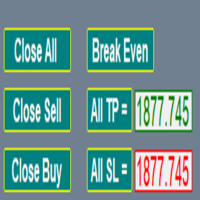
An MT4 Expert advisor for finding Break-Even point of open position, especially grid or hedge orders. also, you can close all open orders, or delete all pending orders , and set your desire Take Profit how far from Break Even point. All traders that using Grid strategy, or Hedge strategy should use this ea. it shows you break-even point by drawing a line and also automatically set your Take profit and stop loss.

Note: After installation, please go to Tools>Options>Expert Advisors and add https://porsaj.com to 'Allow WebRequest for listed URL'. Still Problem?! Please check Internet connection!
Unveiling the Porsaj Scalper: Your Cutting-Edge MetaTrader 4 Utility for Precision Scalping Are you ready to take your forex trading to the next level? Look no further than the revolutionary Porsaj Scalper – a MetaTrader 4 utility designed to empower scalpers with the tools they need to thrive in the fast-pac

This is MT4 Trade panel manager which use Automatic and Manual mode which can be selected in settings. With this you can determine how much can you profit from each trade and what is the profit to risk ratio? Before you set the lot size, you need to do the necessary calculations to get an answer to the question of what the lot size should be. This is based on RSI Signal and Candlesticks to determine volume currency strength and indicate the amount of percentage. Blue % is for buy trades and red
Just key in your equity target
step 1: drag/ Double click ''Auto Close EA for Prop Firm "
step 2: Allow modification of signals settings, Allow DLL imports, Allow import of external experts & Allow LiveTrading
step 3: Key in your equity target
step 4: Turn on AutoTrading
*you can add some buffer, example: 8% for 10,000 acc, key in 10805 / 10801 / 10810 and etc
"Disclaimer:
The information provided in this communication is for informational purposes only and does not constitute financial ad

Better Risk Management. Smart Limit Order will replace your limit order with the correct lot size.
Input Variables : Risk — The risk calculation function calculates the volume for the limit order based on entry price & stop loss price. T he percentage amount that will be. lost if hit by a stop loss Reward1 — Risk Reward Ratio 1; Reward2 — Risk Reward Ratio 2, set value to 0 if not used; Reward3 — Risk Reward Ratio 3, set value to 0 if not used; Reward4 — Risk Reward Ratio 4, set value to

Risk management primarily involves minimizing the potential losses without affecting the upside potential gain. The RandoFx Order Manager application is designed to help the trader achieve the minimum risk while trading. The trading panel has several buttons that allow the user to select and send orders to the broker. inputs: for the trader to be able to send orders there are various inputs that are required. The first input is the Risk%, which is the percentage of the equity of the account th

Openings of trades is one of the important thing in the market. The easiness of opening the order give the trader an easier way of trading especially in the high volatile market. The multiple trader opener can be used to make work easier in the forex market. The tool allows you to chose the percentage risk per trade, stop loss and the take profits in pips. The the rest is calculated automatically and the order is send to the broker server. it also allows the user to choose different kind of tps.
Olá, pessoal "Trader Assistant Mini" é uma ferramenta útil para calcular o risco por negociação com um painel R:R fluente. Taxa de risco para recompensa mais painel comercial: É útil para cada comerciante calcular o tamanho da perda em relação ao tamanho do lucro e também gerenciar o risco por comerciante para que ele possa julgar se é um bom negócio ou não. Além disso, mostra a perda e o lucro em pips e porcentagens e perda e lucro. Como instalar a versão demo + arquivo demo: Trader Assistant M

Mantenha seu patrimônio seguro com o Protetor de Patrimônio. Um EA desenvolvido propositalmente para aqueles que executam bots em seus Desafios de Contas Financiadas. Coloque este bot em um gráfico, insira seu alvo com total equidade e tenha conforto em saber que seus bots deixarão de negociar quando esse objetivo for alcançado. Dando-lhe a tranquilidade de saber que seu patrimônio está seguro, mesmo quando você dorme! Experimente o Equity Protector hoje!

"Time Sessions MT4" é outra ferramenta útil para traders forex que mostra os quatro principais pregões do mundo.
Sessões de tempo: A hora nesta ferramenta é definida automaticamente de acordo com a sua hora local. Possui uma bandeira de tempo móvel que se move segundo a segundo para a esquerda e mostra o tempo real. O painel contém belos gráficos que chamam a atenção.
Além disso, você pode mover o painel para qualquer lugar do gráfico.
Mais explicações...
Espero aproveitar.
Afinal:
Eu rec

ZIWOX TRADE LIST Description:
Feeling weary with your small screen? and you need to close your trade list tab to have a larger perspective of chart? Require better management of your trade list? such as win rate, risk/reward ratio? Its a simple tools, but usefull. consolidate your trade list, active positions, opened positions and pending orders onto a distinct chart embellished with refined visuals. It contains with a lots of usefull information.
Feautures: List your trades and positions sort

DOWNLOAD FREE DEMO VERSION FROM HERE
**TradeMonitorPro Expert Advisor**
The TradeMonitorPro Expert Advisor is a powerful tool designed to help you effectively monitor and manage your trading activities in the forex market. This EA offers a range of useful features that allow you to keep track of your open trades, floating daily gains and losses (floating drawdown), as well as margin levels and the volume of open lots. For a correct counting of the Trading Volume, enable the complete history in

This EA will automatically close all open and pending order when profit or loss is reached according to users setting. Profit or loss can be set by percentage or by amount. When inputting amount for loss make sure to put " - " (minus) sign before the amount. The color of text displayed on the chart can be change in the user input. The text position can also be changed: - left top corner - right top corner - left bottom corner - right bottom corner

DOWNLOAD FREE DEMO VERSION FROM HERE
The SmartCloseFX Expert Advisor, is a powerful tool designed for traders seeking efficient trade management in the MetaTrader platform. This EA is specifically built to manage trades by automatically closing all open positions except pending orders under specific conditions. The EA monitors the opening of a 0.01 lot pending order (eg. buy stop, sell stop, buy limit, sell limit) on a selected asset. When such an order is placed, SmartCloseFX takes action by c
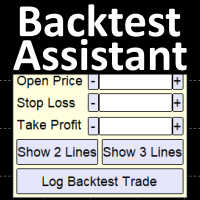
Simplify backtesting by automatically calculate trade outcomes (Profit or Loss) and estimated swap cost based on user-provided open, stop loss, and take profit prices, while also write the data into CSV file and capture before-and-after chart pictures automatically This Backtest Assistant tool is an Indicator, so it works well in coexistence with other expert advisor on the same chart
$30 for the next 25 downloaders, next price: $45 Try Free Trial Version Here: Download Free Trial
Features:

Market Position Manager
Um clique comerciante é Expert Advisor que faz com que as execuções muito rápida de encomendas.
Primeiro Tab permite-lhe:
Abrir ordem de compra
Ordem de venda aberto
Abrir venda stop
Limite de venda aberto
Abrir parada buy
Abrir limite de compra
Segundo Tab permite-lhe:
Coloque stop loss e ter lucro
Indicador abaixo mostra:
Flutuando lucro de posições abertas feitas por robô.
Características da aplicação:
Funciona com qualquer tipo de conta e corretor
Nã

DEMO VERSION DOWNLOAD HERE Update
In Version 1.4 it is possible to set the amount of profit or loss in currency for martingale trades, by setting the profit or loss value for 0.01 lots the expert advisor will automatically multiply it if the starting base lot of the martingale increases or decreases
youtube: https://youtu.be/xn6TG8tyEfM
**EquityGuardEA - Equity Management Expert Advisor**
EquityGuardEA is a powerful Expert Advisor (EA) developed for the MetaTrader 4 (MT4) platform, provid
Introducing Trade Assistant, your ultimate companion in the world of trading. Designed for traders, by traders, Trade Assistant is a cutting-edge tool that revolutionizes the way you manage your positions. Whether you're a seasoned pro or just starting out, our trade manager will empower you to make informed decisions and enhance your trading strategies.
Key Features:
Trade Manager Extraordinaire: Trade Assistant acts as your trusted trade manager, meticulously tracking all of your positions

A fundamental component to have within your trading arsenal is the ability to properly control and manage risk effectively. This tool offers a basic but comprehensive means to manage each and every trade position appropriately.
It can be used across different markets that require percentage-based calculations as opposed to simply measuring the difference in pip or point size i.e. the method for calculating take profit and stop loss in FX currency markets is usually a fixed point/pip size vs. p

The robot allows you to copy orders from different MT4 on a computer. It automatically open and close order that from master on clients. There are some options that allow you to customize your requests. Configuring server : Drag the robot on each pair you want then choose server in TypeOfCopy. Configuring Clients : As the same as server just choose client in TypeOfCopy then add the server account number in its field. AppendSymbolName: If a broker add extra letters after the pair name you can a

Coral Rescue will help save an account with trades in drawdown. Do you have losing trades that are just too large to deal with? They reduce your available margin and can be accumulating swap costs, but the loss would be too great to just accept closing the trades. Just hoping that price will eventually come back is not an effective strategy, you need a disciplined, consistent and preferably automatic way to dig yourself out of the hole. Coral Rescue is not an EA that places trades on its own.

News Protector Tool for Traders: As a trader, understanding the importance of microeconomic news is crucial. Passive traders face the challenge of managing news and pending orders efficiently. Repeatedly setting pending orders at the same price level after news events can be tedious. Introducing the News Protector Tool: News Protector is designed to simplify your trading experience. It removes pending orders before news events and automatically reopens them afterward. During news releases, if t

Telegram Alert for Universal Indicator serves as an automated trading tool. It takes screenshots of the current chart when buy or sell signals are generated by a custom indicator and sends these screenshots to a designated Telegram channel. This feature allows traders to visually monitor their trading signals, enhancing their decision-making process and overall trading experience.
Inputs: Telegram BOT API: Input your BOT API Telegram Telegram Chat ID: Input your CHAT ID (Telegram channel/g
A tool for logging personal and downloaded MQL5 trade history data between specified date range into a CSV file and capturing open trade and close trade chart pictures
This History Capturer and Writer tool is an Indicator, so it works well in coexistence with other expert advisor on the same chart
$30 for the next 25 downloaders, next price: $30 Try Free Trial Version Here: Download Free Trial
Features: Trade History Chart Screenshot : Capture the opening and closing charts for each hist

O indicador possui três ferramentas principais: Lupa (gráfico de zoom), Régua (escalas de tempo e preço) e Mira. Você pode mover tudo com o mouse e personalizar diferentes formatos de exibição, personalizar o tamanho e a cor de cada elemento.
A Lupa (gráfico de zoom) permite exibir velas de qualquer período de tempo e em diferentes escalas. Teclas de atalho padrão: 'Q' - período de tempo mais alto, 'A' - período de tempo mais baixo, 'W' - diminui o tamanho da vela, 'S' - aumenta o tamanho da

It is MoneyMaker from Morteza Soorakhi Strategy based on price and volume action. Fixed risdk per trade. Using Stoploss and Trailing.
100% automated trading Averaging+MARTINGALE money management (Using Fibonacci Increment) Recommended leverage 1:500 Min deposit $250 This signal trade GBPUSD only Target 0-3 Open position per day, 15%-30% per Month CUT LOSS AT 25% DRAW DOWN
Close Pending Active chart. Closing - Deleting, all pending orders For only the window you selected Please leave a review about this product to help other users benefit from it. Key Features: Effortless Order Management: This script streamlines your trading by allowing you to close all pending orders on the active chart with a single click. Comprehensive Order Handling: It's not just about market orders! Our script closes Buy Limit, Sell Limit, Buy Stop, and Sell Stop orders, ensuring a thorough

Overview:
Harness the power of automation and precision with our order manager for MetaTrader 4. This expert advisor is meticulously crafted to serve both seasoned traders and beginners. Its primary focus is to simplify, streamline, and supercharge your trading experience, especially when following signals. Key Features: Automatic Order Placement : No longer will you miss trading opportunities while trying to manually set up multiple orders. This EA will handle all of that for you. Just input

Close All Selected Chart Overview: This is one of the smart choices to help you make your trading management a lot easier. Especially when you have to manage a large number of orders. This utility will work like a helping hand to close all the unrelated order windows in less than no time, plus without making any kind of unwanted effects. :: 3 simple steps to use :: 1. Select your chart window. 2. Click "Close All" 3. Click "OK" Note: For the better understanding on how this utility works, plea

DEMO VERSION HERE
MagicGuard EA Description: MagicGuard is a sophisticated Expert Advisor designed to maximize your trading gains. This intuitive and powerful tool continually monitors your open positions on a specific asset pair and automatically closes orders when your desired profit is achieved, taking commissions and swaps into account. Let MagicGuard handle the details, allowing you to focus on your trading strategy. Key Features: Automatic Profit Closure: MagicGuard calculates the net pr
Modify TP SL Multi-Order Selected chart. Please leave a review about this product to help other users benefit from it. Looking for an easy-to-use multiple trading helper?
This is the right choice!
Why?
+ User-friendly utility
+ Help adjusting Stop Loss & Take Profit for all your running orders automatically
+ Compatible with orders Sell , Buy , Sell Limit , Buy Limit , Sell Stop , Buy Stop
+ Easily edit all orders with appropriate new P&L values
+ The indicator works only on the select

Trailing Stop_Steps EA is an expert advisor that can manage your order's stop-loss by moving at fixed steps. In particular, this expert advisor can use two parameters to increment the stop-loss according to your preferences. In many cases, you might want to increment the stop-loss by a specific value when the price is at specific distance from the current stop. This trailing stop-loss EA allow you to do exactly this: to trigger a stop-loss increment when the price reaches a specific threshold.

Live testing available. Please contact. This is a simple utility which will put Automatic Stop Loss and Take Profit. It also has Trailing Stop Loss and Break Even features. The input value of the Stop Loss and Take Profit is in Pips. Whenever you open a trade it will put stop loss and take profit in pips automatically.
*If you need a more practical stop loss and take profit for your trades then you may like our ATR based stop loss utility.
Inputs:
1. SL and Trailing SL - This is the Stop Los

Live testing available. Please contact.
ATR Auto Stop Loss & Take Profit Manager Automatically apply volatility-based Stop Loss and Take Profit levels to every new trade using the Average True Range (ATR). Unlike fixed-pip stop losses, ATR-based levels adapt to current market conditions. During high volatility, wider stops help prevent premature exits. During low volatility, tighter stops help improve risk efficiency. The utility automatically calculates and applies Stop Loss and Take Profit le
Indicador que sincroniza os gráficos, isto é, quando o ativo é substituído em um dos gráficos todos os que estiverem com o indicador sincronizado são alterados, com o mesmo timeframe (Same_Timeframe = true) ou com timeframes diferentes (Same_Timeframe = false). Os gráficos a serem sincronizados são identificados pela cor (Label). Para sincronizar os indicadores deve-se inserir o indicador em todos os gráficos a serem sincronizados, utilizado a mesma cor (Label). Uma caixa com a cor (Label) esco
O Trader Assistant MT4 ajuda cada trader a gerenciar o risco por negociação de acordo com seu saldo e possui algumas ferramentas úteis. Atenção. O aplicativo não funciona no testador de estratégia. Como baixar a demonstração. Assistente do comerciante: Ele usa um painel fluente especial - que não está na plataforma meta trader. Você pode ver a quantidade de lucros e perdas antes de configurar uma negociação. Ele também possui algumas ferramentas úteis, que são descritas a seguir. O painel Rec
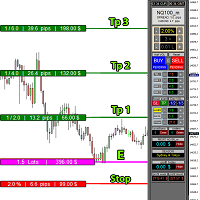
educational video https://www.youtube.com/watch?v=EHK_Z-9FvdM If you want to test the free version, you can download the file from the link below and test it in Alpari broker in demo accounts mt4. Download link free version: https://www.uplooder.net/files/199902052dcb318fb85a20262e8bd6b0/TPS-TradeManager-freeDemoFo-r-a-lpariBroker.ex4.html Download Metatrader 4 for free testing in demo accounts: https://www.uplooder.net/files/0e489a0794f5bf9130e149d0a8eb8f85/alpari4setup.exe.html Performance :
Modify TP SL Pending Orders Selected chart. Please leave a review about this product to help other users benefit from it. This script avoids modifying existing BUY and SELL ( TP & SL ) orders. + User-friendly utility + Help adjusting Take Profit and Stop Loss points for all your running orders automatically + Compatible with orders Sell Limit , Buy Limit , Sell Stop , Buy Stop + Easily edit all orders with appropriate new P&L values + The indicator works only on the selected window. There's no

The "Dagangduit EA Auto_SLTP" is an Expert Advisor (EA) developed by the Dagangduit Core Team for MetaTrader 5. This EA is designed to provide automated management of Stop Loss (SL) and Take Profit (TP) levels for your trades, as well as other advanced features to enhance your trading experience. Key Features: Automated SL and TP Management : The EA automatically manages the Stop Loss (SL) and Take Profit (TP) levels of your open positions, allowing you to protect your profits and limit pote

Utilities
This is an EA program to make it easier for traders to place open limit orders on the market. This program is equipped with: Set Lots Set BuyLimit, (this is the first price you must input to set up a BuyLimit order on the chart) Set SellLimit, (this is the first price you must input to set up a SellLimit order on the chart) SL and TP sets, Set Magic Number (I also matched it in the Order Comment) Set STEP By Point, Set Max Order, and Close all by Magic Number (you can close all order

Copier for the MetaTrader4 terminal. Designed to copy trade from one terminal to another. Compatible with the version for the MetaTrader5 terminal; if available, copying can be performed between different terminals (regardless of the type of accounts: hedging or netting). The number of accounts to which copying is possible is not limited (depends only on the computing power of your computer). Directions for copying the version for MetaTrader 4 together with the version for MetaTrader 5: MT5 Net

Break Even Trailing - A Simple Swing Trade & Scalp Trade Solution Break Even Trailing is an effective and simple program designed to enable a trader achieve break even and basic dynamic trailing stops on all positions. BET represents Break Even Trailing in the instructions below. (*) General Settings Overview: Trailing Mode : There are only two trailing modes. The Default Mode is set to Pip Based Dynamic, Mode One. This mode is the same as the typical Meta Trader Trailing feature that is
*** Introductory Offer! *** Ends soon - Price will increase - do not miss it!
This EA Closes ALL open trades ( with the same magic number on that same pair ) at a certain level of profit - either in money or in percentage of balance. So if you have multiple trades open, you can choose to close them all as one "basket" using this EA. For spreads from a tiny 0.1 pips RAW/ECN Accounts, click here . Check out my Waka Esque EA signal here: >> High Risk Settings or Medium Risk Settings .
Se
EA supports traders in order management. The operations to close partial and total orders are quick and convenient. You can move all profits and protect profits in $ or in points, automatically move losses and profits at will, and automatically place orders. take losses and profits. Easy-to-use interface. Streamlined design for professional investors!!!

O alerta Zone touch MT Telegram , um utilitário simples mas útil para negociação manual por zonas, informa o usuário com uma captura de tela e uma breve descrição no canal Telegram assim que o preço atinge uma determinada zona de interesse do trader. Ajuda o usuário a construir de forma fácil e conveniente seu plano de negócios para um dia ou um período mais longo usando zonas comerciais especiais e controlar totalmente alterações importantes no gráfico por meio de newsletters, sem
The product is used to trade base on any Alert signal in MT4 Easy to setup, simple format with custom keyword All option to management orders as trailing stop, breakeen, partial close, time filter, news filter ... Option to auto open grid orders How to setup and guide: Let read all details about setup and download indicator for auto get Alert Signal here Do not buy if you even can not install demo EA to your VPS ( some VPS block download EA from mql5 market)
We always bring customers high qua

Trading Advisor for margin currency pairs and metals. Conservative trading of 100,000 units per 0.01 lot. The standard trade is 10,000 units per 0.01 lot. Aggressive trading with high risks of 1000 units per 0.01 lot. You can always pick up your starting lot. The EA is fully automated, you only have to put up the initial lot depending on your initial deposit. The recommended timeframe is H1. 1. Test on any steam, iron and fuel oil 2. Try starting with convenient depots 3. When going into a dra
Price Action Supply/Demand, Support/Resistance, Swing Low, Swing High Scanner Indicator is a software designed to automatically draw and mark regions on price charts, making it easier for traders to identify potential reaction sites. The software can be used for various currency pairs and commodities such as AUDCAD, gold, and bitcoin. Highlights The software automatically marks regions on price charts, indicating past working areas and potential reaction sites. Traders can easily switch be
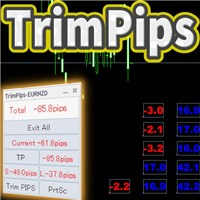
TrimPips solves the following problems at once. I want to know the total of current positions and total pips of current currency at a glance. I want to know the total pips display for plus positions, minus positions, short positions, and long positions at a glance. I want to close the position all at once. I want to close my current currency position all at once. I want to close short and long positions all at once. I want to close both positive and negative positions at once. I want to set TP/

Here's a step-by-step guide on how to create and set up a Telegram bot for MetaTrader 4, enabling you to receive trading updates and alerts on your Telegram channel or group. Open Telegram : Launch your Telegram app on your device. Search for "BotFather" : In the Telegram search bar, type "BotFather" and select it from the search results. Create a New Bot : Type /start and send it to BotFather. Then, type /newbot to initiate the bot creation process. Bot Nickname and Username : Give your bot a n

japanese gamle stick Changed Forex Order Fun Slot Machines for You. Come on, have fun and win. You can't feel the excitement without playing games with real money. Now the real game begins, are you ready?
The game is quite simple, you click on any of the boxes on the screen. Then, a box is selected based on the number formed according to the rule of randomness. If the selected box is below the price, buying is done automatically, if the price is above the box, selling is done automatically. Tp

GGP Trade Copier EA is an automatic trading bot that can help traders automatically replicate the trading strategies and operations from one trading terminal to others by experiencing exceptionally fast trade copying system. Its easy-to-use setup allows you to copy trades between multiple MetaTrader terminals on the same Windows computer or Windows VPS with lightning-fast copying speeds of under 0.5 seconds. The software supports multiple trading varieties, including Forex, commodities, stocks,

TradeWise EA is a compact yet powerful tool loaded with robust features. It offers a 30-trades compounding challenge , Risk-Management, Performance Tracking, Break-Even Calculation, Automated SR Zones, Trailing Stop-loss by ATR or PIPS, Automatic Risk-to Reward Ratio based on Stop-loss, Easy Order Adjustments, Calculates Total Stop Loss and Take Profit, Automatic buy and sell orders on manually placed SR Zones, and more. These features are designed to cater to both scalpers and long-term traders

Copie sinais de qualquer canal do qual seja membro (incluindo privados e restritos) diretamente para o seu MT4. Esta ferramenta foi projetada com o usuário em mente, oferecendo muitos recursos que você precisa para gerenciar e monitorar as negociações. Este produto é apresentado em uma interface gráfica fácil de usar e visualmente atraente. Personalize suas configurações e comece a usar o produto em minutos!
Guia do Usuário + Demonstração | Versão MT5 | Versão Discord Se você quiser experime

Envie sinais totalmente personalizáveis do MT4 para o Telegram e torne-se um Provedor de Sinais! Este produto é apresentado em uma interface gráfica fácil de usar e visualmente atraente. Personalize suas configurações e comece a usar o produto em minutos!
Guia do Usuário + Demonstração | Versão MT5 | Versão Discord Se deseja experimentar uma demonstração, por favor, consulte o Guia do Usuário. O Enviador de MT4 para o Telegram NÃO funciona no testador de estratégia.
Recursos do MT4 para o

Envie sinais totalmente personalizáveis do MT4 para o Discord e torne-se um provedor de sinais! Este produto é apresentado em uma interface gráfica fácil de usar e visualmente atraente. Personalize suas configurações e comece a usar o produto em minutos!
Guia do Usuário + Demonstração | Versão MT5 | Versão Telegram Se desejar testar uma demonstração, consulte o Guia do Usuário. O remetente de MT4 para Discord NÃO funciona no testador de estratégias.
Recursos de MT4 para Discord Personalize
DYJ vem comigo é um EA que rastreia os registros de transações virtuais de qualquer indicador dyj para abrir e colocar as posições reais.
Pode exibir o nome e o status do indicador de uma única fonte de sinal; Atualmente, apenas o indicador DYJ T3ModeMa está disponível, e mais indicadores serão expandidos no futuro.
Ele pode receber a direção da tendência em tempo real do indicador.
Pode receber a última hora de permissão do indicador.
Ele pode receber o preço de entrada mais recente do indi

This Dashboard displays signals in grid view for the 28 major fx currency pairs. It is Mainly used for forex scalping in between 10 to 20 pips maximum and can be used on major trend market decisions. It Uses mainly Moving average and does not give false signal. All you need to note is the point in the grid where the signal occurs. A beep sound is heard whenever there is a new signal and it will be displayedat the top of the chart.

This tool can help you close all open orders with one click, just click "Close all". If you only want to close the profitable orders, click the "Close profitable" button. After clicking, all the floating orders will be closed. All orders will be liquidated; if you only want to close the orders with floating losses, click the "Close losable" button. After clicking, all orders with floating losses will be liquidated.

Heaven Assistant: Simplify Your MT4 Management Simplify the management of the MetaTrader 4 (MT4) platform with the Heaven Assistant . This Expert Advisor (EA) is a robust tool that allows you to control and customize your trading environment in an efficient and user-friendly manner. Key Features: Multiple Pairs Opening: Quick access to most currency pairs, both major and minor, plus exotic pairs. The ability to open indices, metals, and cryptocurrencies with a single click. Template Change: Easi

All the buttons you need as a trader in just one interface No need to navigate between multiple interfaces and waste time and money Are you a forex or stock trader looking for a comprehensive tool to streamline your trading experience? Look no further! We're proud to present our latest product, an advanced trading expert advisor available on the MQL4 platform. This cutting-edge trading tool is designed to meet all your trading needs and more, offering an array of features and functionalities to
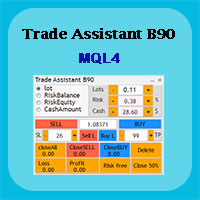
Trade Assistant B90 is designed for manual trading so that it helps us to manage capital and position well.
This expert has the ability to change the default inputs of the expert as desired before use.
You can see the expert entries in the photo below, each of which we explain below.
1. Background Color : With this entry, you can change the assistant's background
Color
2. Font size: You can change the size of the fonts used in the assistant.
3. Button color: Change the color of assis

Rosy Trade Assistant A very easy to use EA, simple and friendly. Many features available to manage your trade. Compact panel with 4 sizes that can be selected according to your convenience. And trading in your local time has never been easier, using local timescale and clock. User Guide and Demo version Pages Trading Panel - Page to place an order and manage it's SL/TP Tools - Page to manage order: trailing, close on target, close all by categories Settings - Page to use custom time scale with s
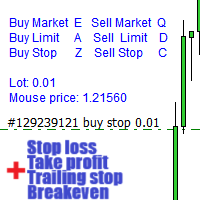
Aviso, este EA não funcionará no testador, apenas em contas demo ou reais, entre em contato comigo se quiser experimentar a demonstração https://www.mql5.com/en/users/abudabi MT5 Version
"Enviar(colocar) ordens rápidas no MetaTrader 4 através do teclado e do mouse: Mova o cursor sobre o preço desejado, pressione a tecla: Compra a mercado: E Limite de compra: A Compra com ordem pendente: Z Venda a mercado: Q Limite de venda: D Venda com ordem pendente: C (Teclas personalizáveis) Quando a ordem

Introdução A ferramenta utilitária de gerenciamento de pedidos Virtual TPSL Close M4 (consultor especialista) gerencia suas posições abertas existentes feitas por outro consultor especialista que você usa ou seus pedidos abertos manuais e os fecha com níveis virtuais de take-profit e stop loss. O consultor opera em modo virtual completo, nenhum nível visual apresenta mais do que um objeto de seta colorido desenhado quando a posição monitorada foi fechada, seja em lucro ou perda, para marcar sua

RSI Full View can show all the 29 major and minor pairs RSI indicator live value,traders can view all 29 pairs RSI indicator live value with all 9 timeframes on ONE Chart, traders can see all the 9 timeframes overbought signal and oversell signal RSI Full View show the overbought signal and oversell value with highlight background color and font color
How to start: Open any chart, attach this utility to it, keep this chart opened ,watch signals shows and take trades

CCI Full View can show the all 29 major and minor pairs CCI indicator live value,traders can view all 29 pairs CCI indicator live value with all 9 timeframes just attached it on ONE Chart, traders can see all the timeframes overbought signal and oversell signal on ONE Chart CCI Full View show the overbought signal and oversell value with highlight background color and font color, you can attach this utility on any pair chart and any timeframe, traders can see the overbought and ov

WPR Full View can show the all 29 major and minor pairs WPR indicator live value,traders can view all 29 pairs WPR indicator live value with all 9 timeframes just attached it on ONE Chart, traders can see all the timeframes overbought signal and oversell signal on ONE Chart WPR Full View show the overbought signal and oversell value with highlight background color and font color, you can attach this utility on any pair chart and any timeframe, traders can see the overbought and oversel

The utility is designed to send signals from MT4 to Telegram. It has several unique features, allowing not only the sending of trade signals but also the following functionalities: Send messages directly from the terminal to Telegram Send emojis along with custom text Send text and images from Telegram All of these features enable users to manage a signal channel while focusing on trading and finding quality signals. Customizable Signal Messages You can fully customize the signal message: Specif
O Mercado MetaTrader é a única loja onde você pode baixar um robô demonstração de negociação gratuitamente para testes e otimização usando dados históricos.
Leia a visão geral e opiniões de outros clientes sobre os aplicativos, faça o download para o seu terminal e teste um robô de negociação antes de comprá-lo. Apenas no Mercado MetaTrader você pode testar um aplicativo de forma absolutamente gratuita.

Você está perdendo oportunidades de negociação:
- Aplicativos de negociação gratuitos
- 8 000+ sinais para cópia
- Notícias econômicas para análise dos mercados financeiros
Registro
Login
Você concorda com a política do site e com os termos de uso
Se você não tem uma conta, por favor registre-se