
VR Orders History
- 유틸리티
-
Vladimir Pastushak
 👋 제 이름은 블라디미르 파스투샤크(Vladimir Pastushak)입니다. 저는 트레이더이자 프로그래머로서 20년 이상 금융시장과 트레이딩 자동화를 위한 소프트웨어 솔루션 개발에 종사해 왔습니다.
💻 그동안 MetaTrader 4 및 MetaTrader 5를 위한 다양한 트레이딩 알고리즘, Expert Advisor(EA) 및 도구를 개발했으며, 제가 구상한 아이디어를 지속적으로 실제 환경에서 테스트해 왔습니다. - 버전: 21.42
- 업데이트됨: 7 4월 2021
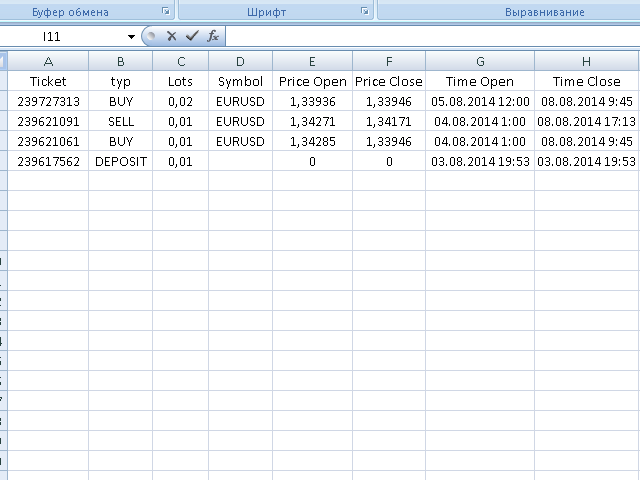
The VR Orders History script is designed to upload a trade report to a csv file. This format is intended for additional analysis of trading history in programs such as EXCEL, Openoffice, and Libreoffice. Thanks to the script, it is now much easier for a trader to analyze their trading history.
The program facilitates the analysis of the trading history for the MetaTrader 5 terminal. The trader sees structured trading. The entire report is based on the following principle: Position > Order on the basis of which the position was opened > Transaction on the basis of which the position was opened.
In the report created by the script, the trader can see the hidden fees, the prices at which the position was requested to open, and the real price at which the position was opened. The report also displays information about the replenishment of the balance and other non-trading transactions.
You can request technical support, settings and demo versions of programs in the author's profile.
The program settings allow you to filter trading operations by a financial instrument, by a Magic number, and by the period of a trading transaction.
The program was written to facilitate the understanding and analysis of the trading process in MetaTrader 5. This is why the report for MetaTrader 5 differs from the report for MetaTrader 4. The architecture of trading orders in MetaTrader 5 has a more complex structure than the architecture of MetaTrader 4.
Additional analysis of your trading history will help you:
- Avoid making blunders in the future
- Identify the most profitable trading instruments
- Create a heat map of the successful trading time
- Analyze the trading history in external analyzers
- Calculate profits, losses, and volumes for selected instruments, expert advisors, and trading tactics
Algorithm of operation
The program is placed in the Scripts folder. After restarting the terminal, the program will be displayed in the terminal navigator.
Run the script on the chart, specify the desired report settings, and click run.
The script will analyze the trading history and create a file with the name of the trading account in the files folder.
You can find the report by following these steps:
- In the terminal, click on "File"
- Next, "Open the data directory"
- Next, MQL4 or MQL5
- Next, the Files folder
Recommendations
- Use the script for additional analysis of the trading strategy in programs such as EXCEL, Openoffice, and Libreoffice.
- Use the script to get the trading history from managers.






















































































Excellent. Exactly what I need. Thanks.