Institutional Architect Heatmap
- 지표
- 버전: 1.10
- 활성화: 5

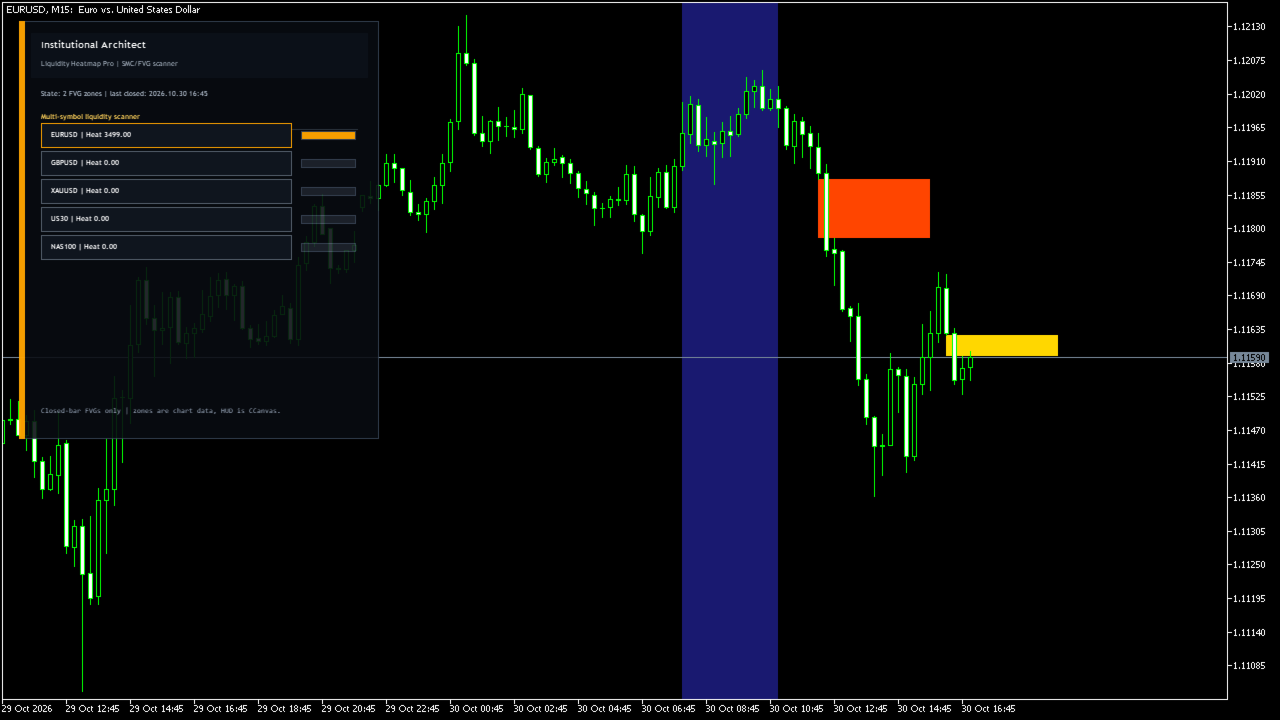
Institutional Architect Heatmap finds Fair Value Gaps (three-candle price imbalances) on closed bars and draws them as rectangles on the chart. Each zone is colored by how much activity the terminal's tick history shows inside the zone, so you can quickly see which gaps attracted more trading. A panel lists up to 10 symbols with an activity score, and clicking a symbol switches the chart to it.
How it works
- A bullish gap is detected when the high of a candle is below the low of the candle two bars later; a bearish gap is the opposite. Only closed bars are used.
- A zone is marked as mitigated when a later bar trades back into it. Mitigated zones are hidden by default or shown in gray.
- Intensity: ticks from the zone's start are read (capped at 50,000). On symbols with real volume, the average volume per tick inside the zone price range is used; on Forex/CFD symbols without volume, the number of ticks inside the zone is used.
- Colors are relative to the strongest zone on the chart: red-orange (top third), gold (middle), green or slate (lower).
- Zones are rebuilt once per new closed bar.
- The optional session band highlights a fixed hour range (server time) for the current day.
Main features
- Bullish and bearish FVG zones with tooltip (direction, intensity, active or mitigated)
- Heat coloring by tick activity
- Session (killzone) band with adjustable hours
- Multi-symbol scanner: sum of intensity of the most recent unmitigated zones per symbol; click a row to open that symbol
- In the Strategy Tester the scanner only uses the tested symbol
Inputs
- Scanner symbols (comma separated, up to 10)
- Lookback bars and maximum number of zones drawn
- Keep mitigated zones
- Session band on/off, start and end hour
- Scanner refresh interval
Notes and limitations
- Intensity depends on the tick history your broker provides; without tick data a zone gets zero intensity.
- Scores of different symbols are not directly comparable (volume units and tick counts differ).
- Scanner symbols must exist at your broker with the exact names entered.
- The indicator does not trade and does not send alerts.
Recommended use
Forex, metals and index CFDs on M5 to H1 for intraday zone work; higher timeframes work too but may need more tick history.