Astral Momentum
- 지표
-
Ottaviano De Cicco
 최고의 거래는 이미 차트에 있습니다.
단지 아직 보지 못할 뿐입니다.
Merkava Labs: 가격이 이미 드러낸 것을 해독하는
기관급 MT5 시스템.
🌐 merkavalabs.com → 구조를 보세요.
📧 contact@merkavalabs.com - 버전: 1.0
- 활성화: 10
Astral Momentum
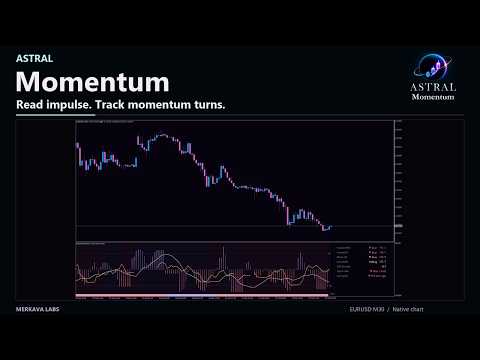
Separate the impulse from the momentum picture.
Launch Special — $78 · Save 35% · $120 after launch.
A fast price impulse and a momentum turn are different readings. For discretionary traders who want to understand their relationship, Astral Momentum separates them visually and brings higher-timeframe context into the same workspace.
- Understand what is changing. Compare the immediate impulse with the momentum curve's direction instead of treating them as one measurement.
- Set a consistent confirmation rule. Choose which readings and timeframe views must agree before a signal is accepted.
- Add another perspective when useful. Optional Instrument Strength provides separate instrument-versus-basket context without changing the signals.
Use Momentum when your method depends on comparing local impulse, momentum turns and the wider picture. Each reading keeps its own role, helping you inspect agreement and differences before making a decision.
Read the market in context
- Impulse: the current-timeframe histogram shows direction and oscillator magnitude.
- Context: the first higher timeframe supplies the background direction.
- Macro: a compact strip carries the second higher timeframe.
- Momentum curve: read turning direction through its slope, or use its position above or below zero as a regime reference.
- Info panel: current readings, higher-timeframe context, instrument strength when enabled, signal state and age of the last signal.
Instrument Strength: a separate layer of context.
The optional strength curve places the Forex base currency, or a referenced instrument, against an equal-weight basket of EUR, USD, GBP, JPY, AUD, NZD, CAD and CHF. Its default horizon is 60 minutes. It is independent of the impulse and momentum curve and is not an input to the signal methods.
Strength smoothing defaults to EMA 3. Choose Off for the unsmoothed reading or T3 as an alternative, with an adjustable smoothing period. This setting affects only Instrument Strength and does not change the signal methods.
On Forex the panel names the base currency; on other instruments it names the asset or broker symbol. A reference currency must be confirmed where broker metadata does not establish the instrument's denomination. Impulse, momentum and strength are different measures: equal display heights are not interchangeable readings.
Choose your confirmation
Signals can follow histogram agreement, momentum-curve agreement, or agreement between both. Choose current timeframe, current plus first higher, all three, or the two higher timeframes. Histogram and curve requirements are selected independently. Curve rules offer turning direction (slope) or above/below zero.
Signal calculations use completed bars from the required timeframes. Arrows mark accepted changes in signal state rather than every bullish or bearish reading. Display visibility is independent of confirmation: hiding a higher-timeframe plot does not remove it from your selected signal requirement.
Make the workspace yours
Pulse is the default layout. Overlay and separate Lanes are also available. Show or hide each impulse and each momentum curve independently. Choose automatic or manual higher timeframes, a Quantum Color theme, optional chart background, line widths and panel placement. Max Bars controls displayed history; the default is 3000. Enable Chart Shift and leave room on the right for the panel.
Choose arrow style, size and placement in the oscillator, on price or both. Both placements represent the same accepted event. Popup Alert, Sound Alert, Push Notification and Email Alert are independent and off by default. Alerts follow the selected signal method; attaching the indicator does not replay historical alerts. Push and email require the usual MetaTrader configuration.
Calculation and settings
Select RSI, RSIOMA, USI (Ultimate Strength Index) or CCI. RSIOMA is the default, with RSI lookback 2 and EMA price smoothing 3. RSI keeps the fast unsmoothed alternative; USI and CCI have separate adjustable lookbacks, both 14 by default. The momentum curve has its own lookback, 18 by default.
Compare current impulse with Context and Macro, then choose the confirmation required for your workflow. Use the momentum curve and optional strength as distinct context readings.
Data and support
Strength requires synchronized M1 history and exact calculation endpoints for the basket feeds and the instrument. Initial synchronization can show Loading. Missing endpoints produce Data N/A, not a zero reading. Forex session breaks, weekends, holidays or sparse quotes can leave strength unavailable even while a crypto or another instrument continues to trade. Broker history and reference-currency availability determine coverage.
Astral Momentum supports analysis and does not place orders. Changing settings, calculation history or corrected broker data can change historical readings. Indicator context and confirmed signals are not guarantees of future price movement. Support is available through MQL5 product comments and private messages.
Other Astral modules are separate products; Momentum can be used independently.
Welcome to Astral
Built on research. Designed to work together.
Astral by Merkava Labs combines established analytical methods with original research to create complementary market indicators. Each module has a distinct role and a shared visual language, so you can use it independently or alongside the others.