Trendora
- 지표
- 버전: 3.102
- 활성화: 5

Trendora is a multi-currency, multi-timeframe market analysis and signal indicator for MetaTrader 5.
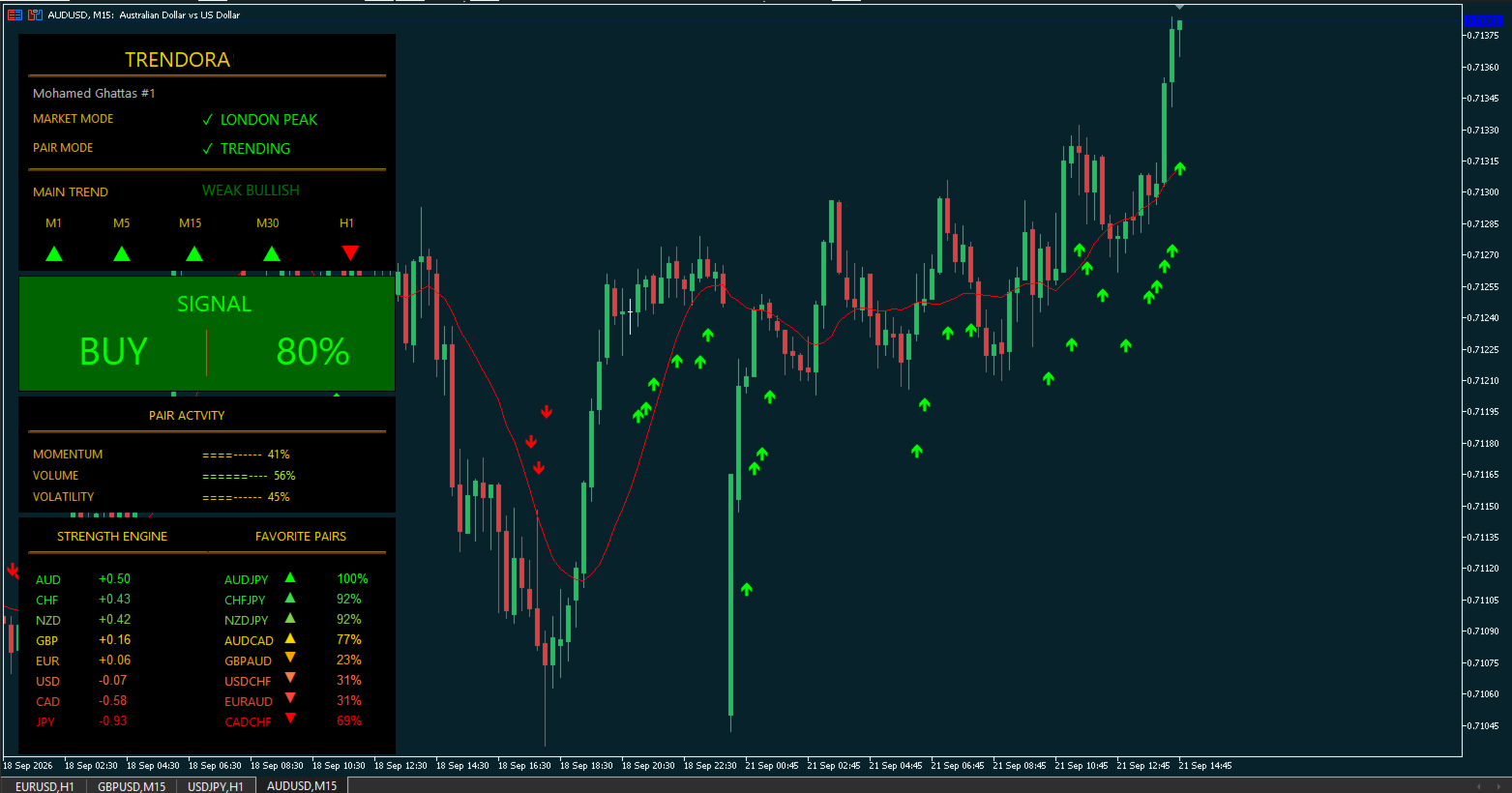
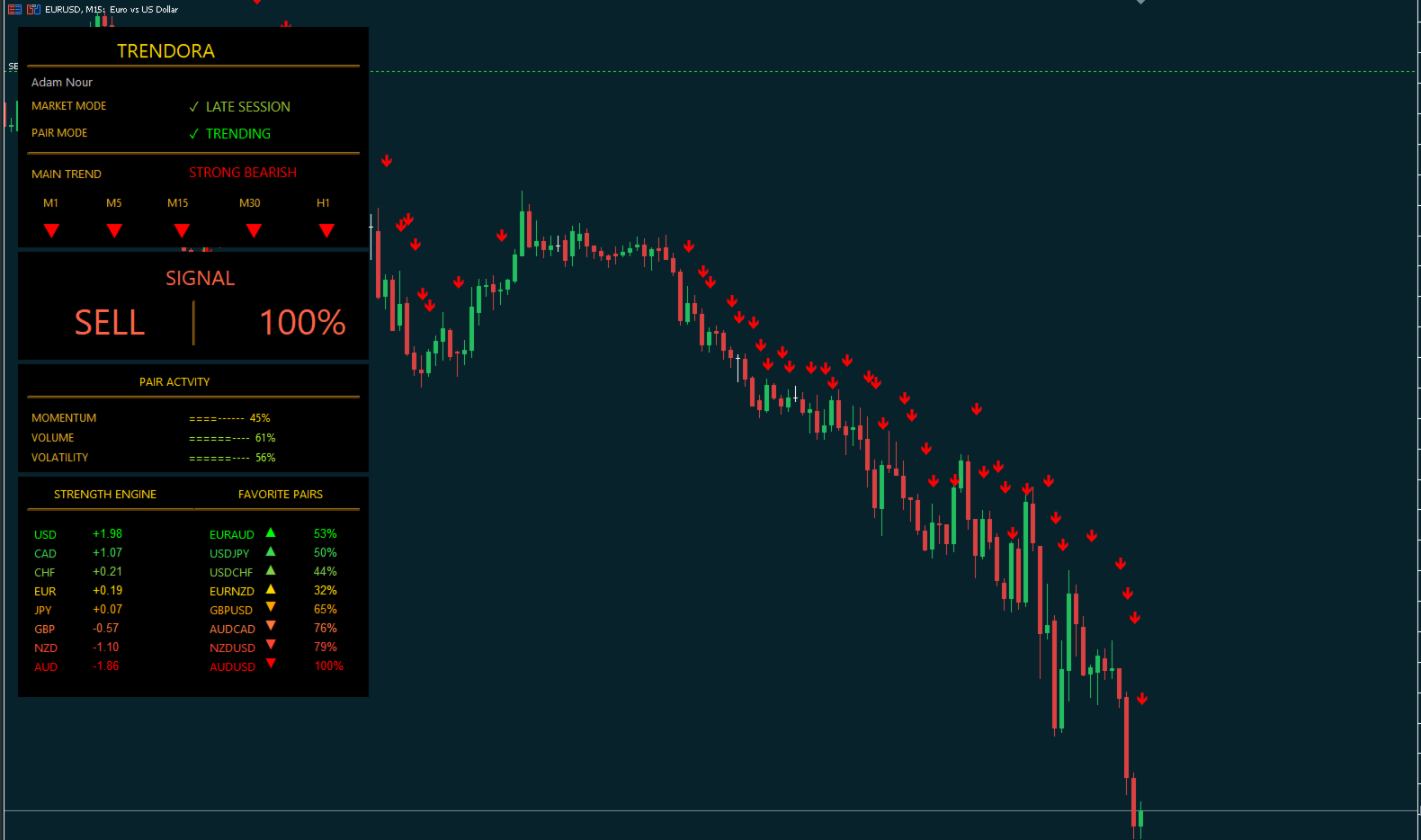
Instead of looking at a single chart in isolation, Trendora analyzes the broader Forex environment through its Currency Strength Engine, evaluates trend conditions across multiple timeframes, monitors the current pair's activity, and combines this information with its signal engine in one clear visual workspace.
The objective is simple: understand market direction, identify relative currency strength and weakness, and know when a confirmed signal appears.
Currency Strength Engine
Forex currencies do not move independently. Trendora analyzes multiple Forex pairs to calculate the relative strength and weakness of the major currencies.
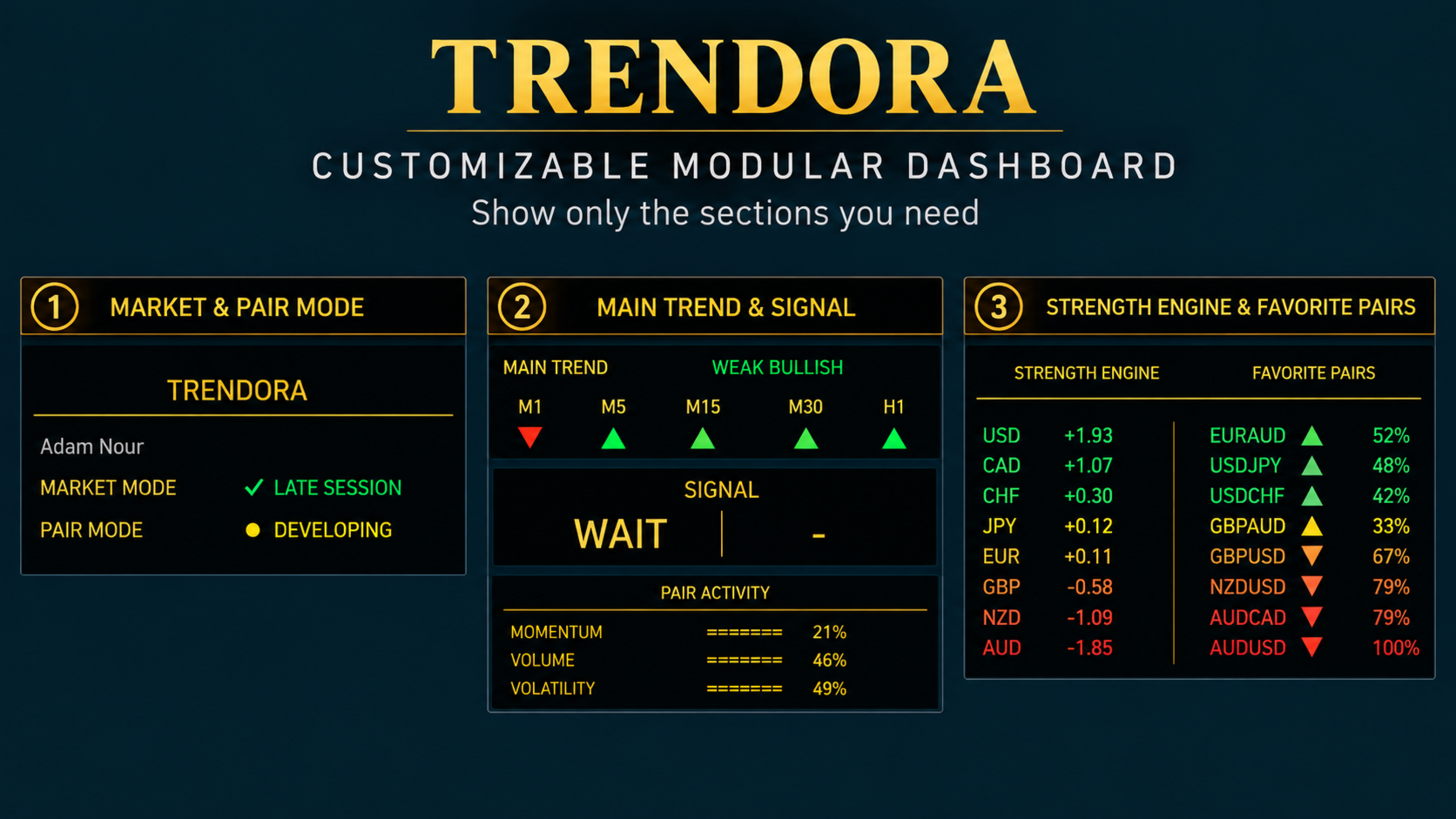
The Strength Engine continuously ranks currencies and presents their relative values in an easy-to-read color structure, helping the trader understand which currencies are currently stronger and which are weaker.
Alongside the Strength Engine, Favorite Pairs highlights selected currency combinations based on the current strength environment, providing an immediate view of potentially interesting bullish and bearish pairs.
Multi-Timeframe Main Trend
Trendora analyzes market direction across multiple timeframes:
M1 • M5 • M15 • M30 • H1
Each timeframe is displayed directly on the dashboard, while the Main Trend engine combines the available trend information to classify the broader directional environment.
Depending on market conditions, Trendora can display states such as Strong Bullish, Bullish, Weak Bullish, Weak Bearish, Bearish or Strong Bearish.
This allows the trader to see both the individual timeframe directions and the combined Main Trend at a glance.
Main Trend Signal Filter
Trendora includes an optional Main Trend Filter, enabled by default.
When enabled, BUY and SELL signals are filtered according to the detected Main Trend. A bullish environment permits compatible BUY signals, while a bearish environment permits compatible SELL signals.
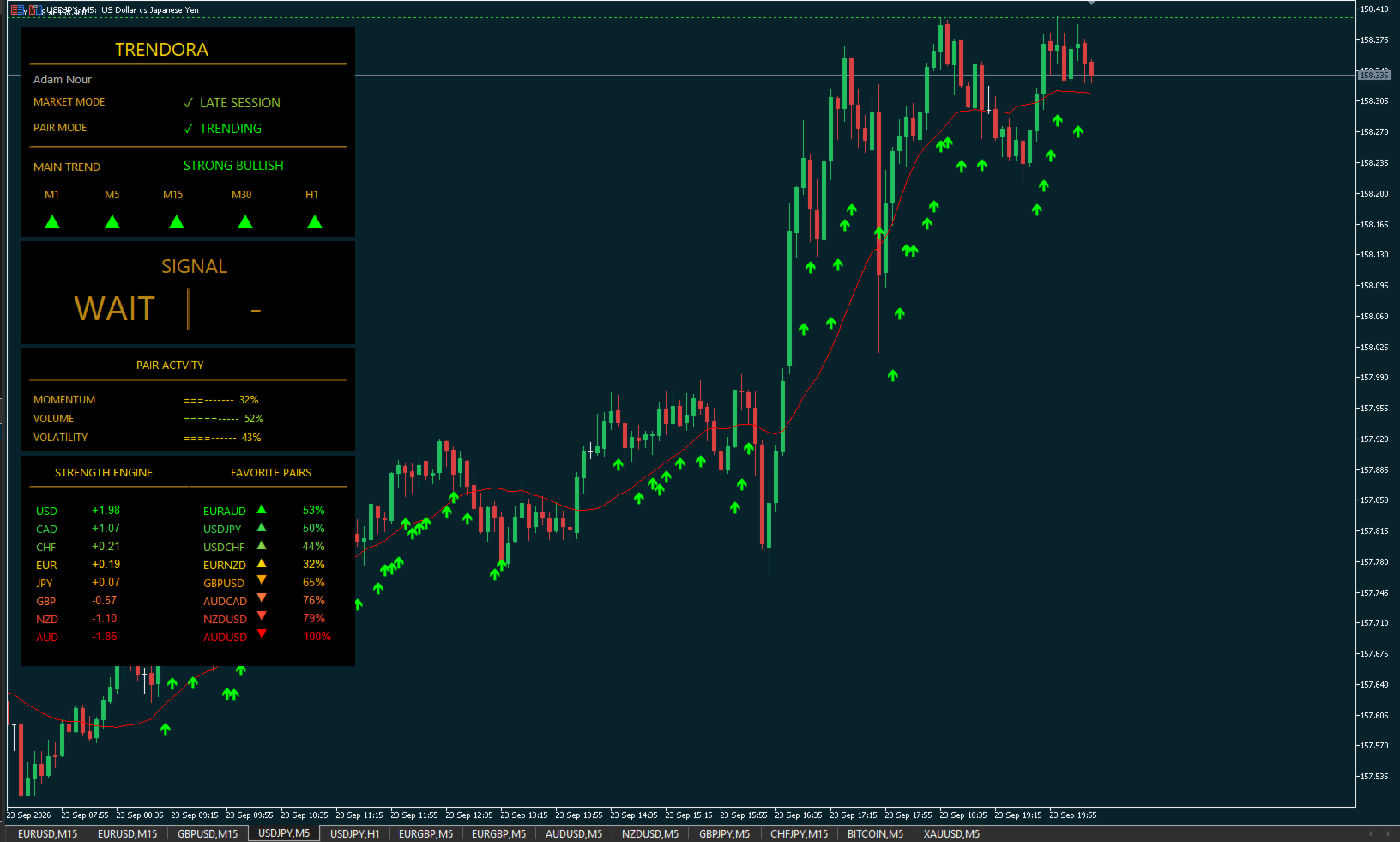
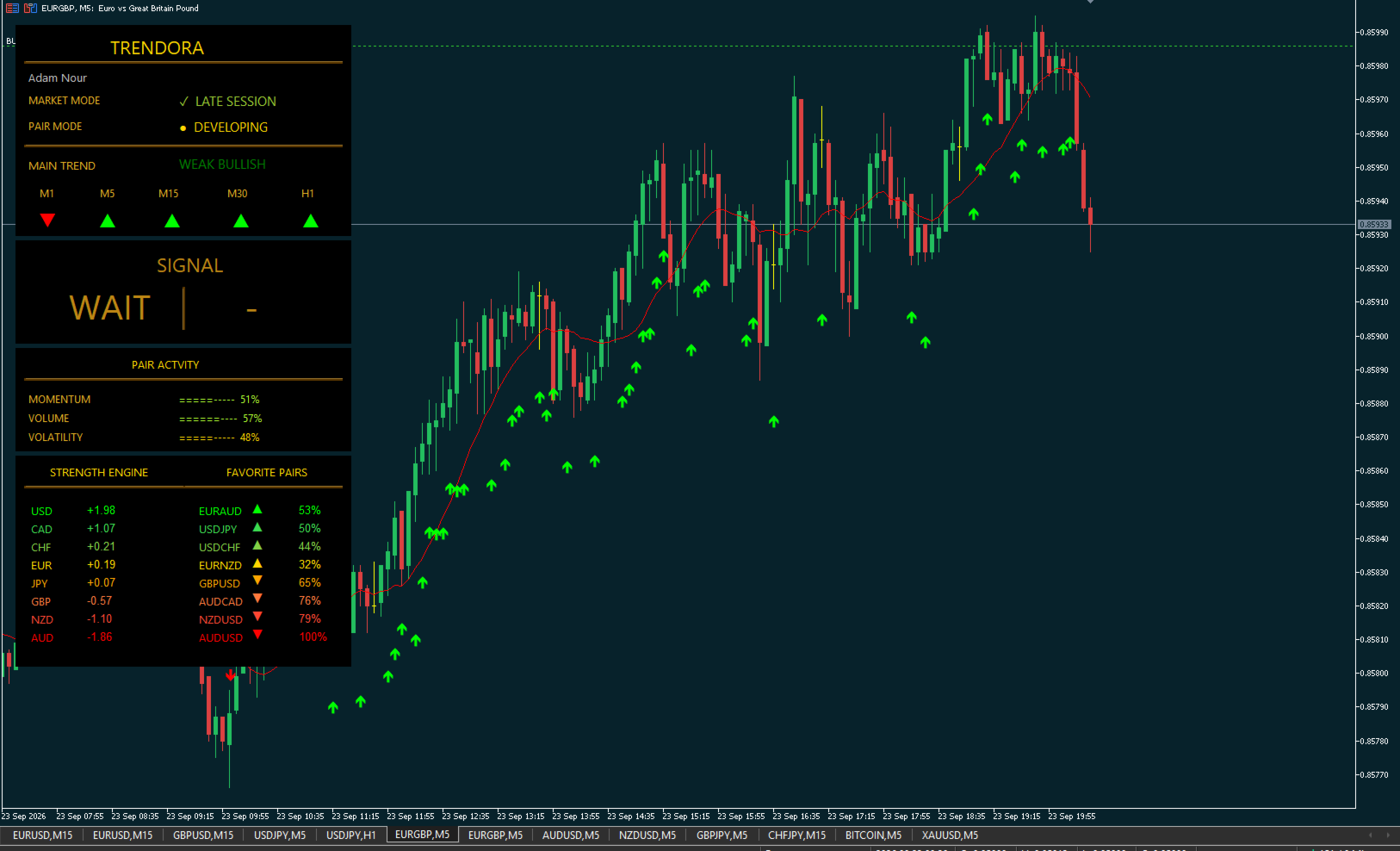
When the signal conditions are not satisfied, Trendora displays WAIT.
This is important: Trendora does not attempt to generate a trade signal continuously. A bullish trend does not automatically mean BUY, and a bearish trend does not automatically mean SELL. The signal engine waits for its entry conditions.
The Main Trend displayed on the dashboard and the trend used for live signal filtering are synchronized.
Confirmed Non-Repainting Signals
Trendora's confirmed signals are based on closed-candle information.
Once a confirmed signal has been generated, it is not moved or retrospectively changed simply to make historical signals appear more accurate.
BUY and SELL arrows remain visible on the chart, allowing traders to review how signals behaved during previous market movements.
This provides a transparent view of the indicator's signal history rather than a reconstructed representation of past market conditions.
Signal Timing
Trendora is designed not only to analyze direction, but also to identify when its entry conditions are confirmed.
When a new BUY or SELL signal is generated, the corresponding signal is displayed on the chart and reflected immediately on the dashboard.
The dashboard also displays the calculated signal strength, giving the trader additional context at the moment the signal appears.
Signal strength is an internal analytical measurement and should not be interpreted as a guaranteed probability of a profitable trade.
Visual & Sound Signal Alert
A newly confirmed signal immediately brings the dashboard to life.
A green visual flash for BUY or red visual flash for SELL highlights the Signal area for approximately five seconds, accompanied by an audible notification.
This makes it easier to recognize a newly generated signal without continuously watching every chart.
Market Mode & Pair Mode
Trendora provides additional context about the current trading environment.
Market Mode gives information about the active Forex trading session/environment, while Pair Mode helps describe the current behavior of the selected currency pair.
This additional layer helps the trader distinguish between different market conditions rather than treating every signal identically.
Pair Activity
The Pair Activity section provides a compact view of:
Momentum • Volume • Volatility
These measurements give additional information about the current activity of the selected pair and complement the Main Trend and Signal engines.
Customizable Modular Dashboard
Trendora's dashboard is divided into three controllable display sections.
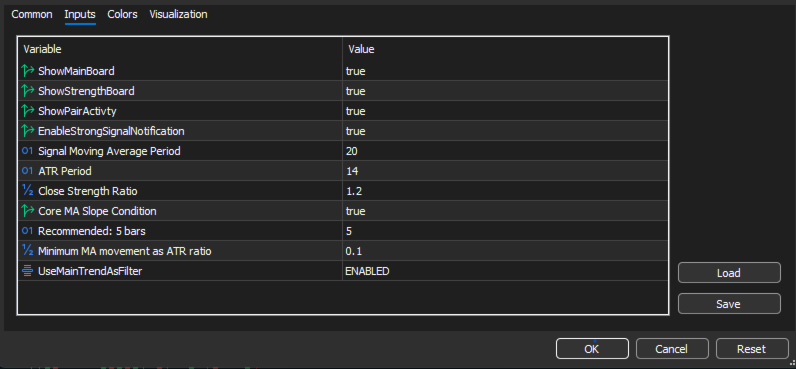
Each section can be shown or hidden from the indicator settings.
Traders can therefore use the complete analytical dashboard or display only the information they want, leaving more chart space available for price analysis.
The dashboard brings together:
Market and Pair Mode • Multi-Timeframe Main Trend • Signal Status • Pair Activity • Currency Strength Engine • Favorite Pairs
in one workspace.
Designed for Forex
Trendora's full analytical architecture is designed primarily for Forex, because its Currency Strength Engine depends on comparing relationships between multiple currency pairs.
Instead of evaluating EURUSD, GBPUSD or USDJPY as completely isolated markets, Trendora uses the broader currency environment to provide additional context for the pair being analyzed.
This multi-currency approach is one of the core elements of Trendora.
Directional Analysis for Binary Options
Trendora can also be used as a directional analysis and signal-confirmation tool for Binary Options on supported Forex instruments.
The combination of confirmed signals and Main Trend filtering can help traders focus on setups that agree with the detected market direction.
Trendora does not determine or guarantee the outcome of an option. Expiration time, broker selection, execution and risk remain the trader's responsibility.
A Complete Visual Workflow
Trendora brings several analytical layers together:
Currency Strength → Pair Selection → Market Condition → Multi-Timeframe Trend → Entry Signal → Visual & Sound Alert
Instead of filling the chart with multiple independent indicators, Trendora organizes this information into one integrated interface.
Key Features
- Multi-currency Currency Strength Engine
- Favorite bullish and bearish Forex pairs
- Multi-timeframe trend analysis
- M1, M5, M15, M30 and H1 directional view
- Weighted Main Trend analysis
- Optional Main Trend signal filtering
- Main Trend Filter enabled by default
- BUY, SELL and WAIT states
- Closed-candle confirmed signals
- Non-repainting confirmed signal history
- BUY/SELL arrows directly on the chart
- Signal-strength display
- Entry signal timing
- Green BUY and red SELL visual flash
- Audible new-signal notification
- Market Mode analysis
- Pair Mode analysis
- Momentum, Volume and Volatility activity display
- Modular three-section dashboard
- Individual dashboard sections can be shown or hidden
- Designed for multi-pair Forex analysis
- Can assist directional analysis for Binary Options
Important Information
Trendora is a market analysis and signal tool, not an automated trading system.
It does not open, manage or close trades automatically.
Signals, trend classifications, strength values and percentages are analytical outputs generated by the indicator and do not represent guaranteed trading results or guaranteed probabilities of success.
Trading Forex, CFDs and Binary Options involves risk. Users remain responsible for their own trading decisions, position sizing, risk management, broker selection and, where applicable, expiration time.
Trendora helps you see strength, direction and timing — the trading decision remains yours.