Fast Trade Assistant Panel
- 유틸리티
- 버전: 1.10
- 업데이트됨: 9 9월 2026

Fast Trade Assistant Panel
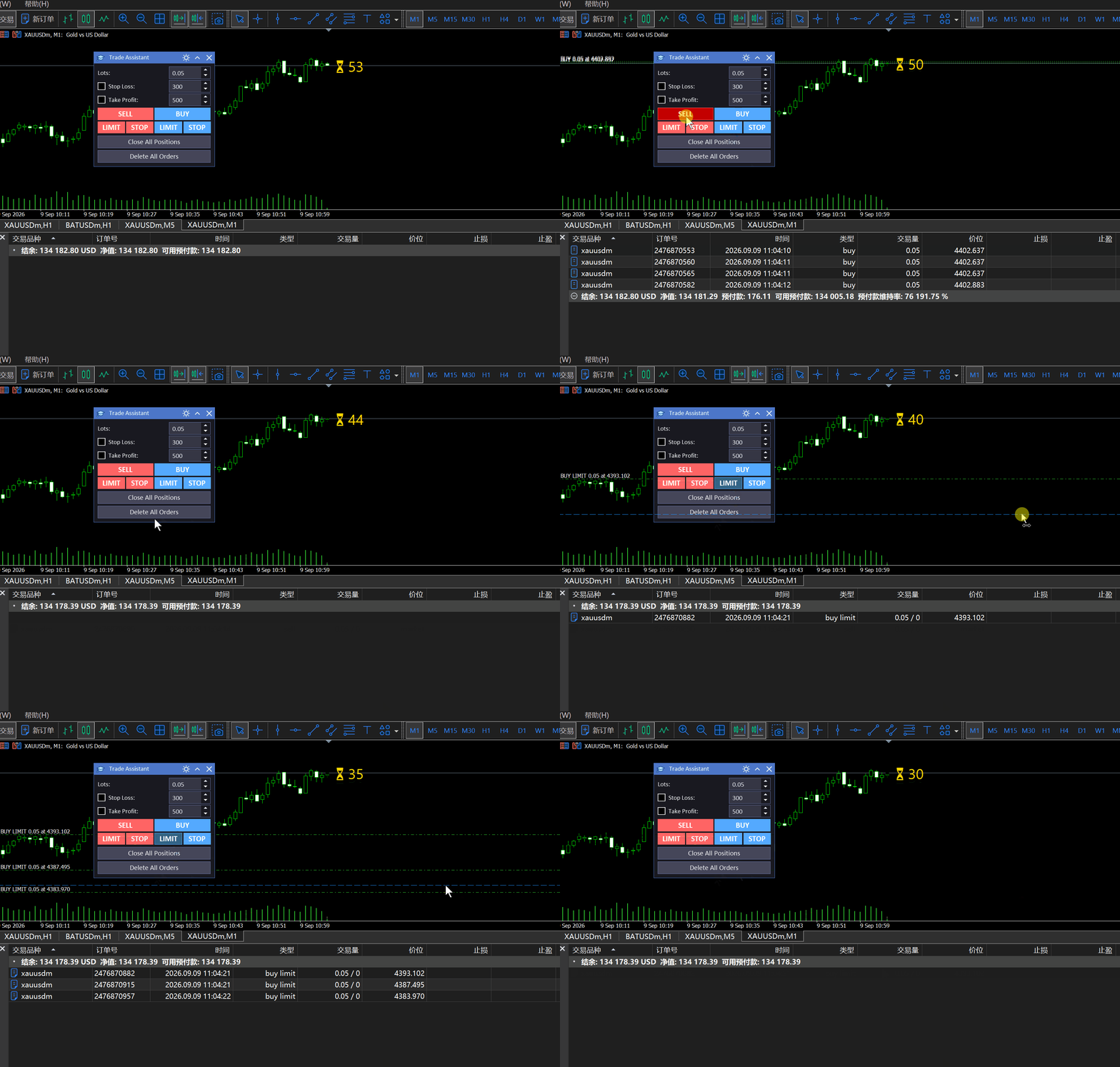
Fast Trade Assistant Panel is a MetaTrader 5 chart utility for manual trading. It provides a compact on-chart panel for market orders, pending orders, hotkeys, and common close/delete actions, plus a built-in bar close countdown on the chart.
This product is a trading utility. It does not promise profits. Trading results depend on the user, the broker, and market conditions.
Main features
- Market Buy / Sell with lot size, optional stop loss, and optional take profit
- Pending order modes: Sell Limit, Sell Stop, Buy Limit, Buy Stop
- Pending placement by chart interaction: select a pending mode, follow the price line, double-click the chart to place
- Hotkeys for buy, sell, close, and delete (optional, off by default)
- Close all positions and delete pending orders helpers
- Optional async close mode for faster mass close requests
- Filter by magic number and optional current-symbol-only scope
- Built-in Candle Timer: one-line chart label ⏳ mm:ss (or time only) for the current bar close countdown
- Placement: chart corners or Bar Right (follow the last candle; default)
- Optional hourglass emoji, gold color by default, DPI-aware font size
- Optional extra H1 countdown line when the chart period is below H1
- Optional sound in the last second of the bar
- English interface in the Market build
- No DLL calls
How to use
- Attach Trade Assistant Panel to a chart.
- Enable AutoTrading in the terminal.
- Set lot size. Optionally enable and set Stop Loss / Take Profit.
- Click Buy or Sell for a market order.
- For a pending order: press one of the LIMIT/STOP buttons, move the mouse on the chart, then double-click to place. Press Esc to cancel the pending mode.
- Use Close all positions or Delete all orders when needed.
- If hotkeys are enabled in Inputs, use the configured keys carefully while the chart is active.
- Adjust Candle Timer Inputs if you want a different corner, font, color, or to turn the emoji / sound on or off.
Input parameters
Keyboard hotkeys
- Enable hot keys — Turn keyboard shortcuts on or off (default: off)
- Buy / Sell / Close / Delete / Clear keys — Shortcut keys used when hotkeys are enabled
Trade parameters
- Fast trade mode — When enabled, mass close requests use asynchronous order sending
- Only current symbol — Limit close/delete helpers to the chart symbol
- Magic number — Order magic (-1 means no magic filter for helpers, depending on action)
- Order comment — Comment written into new orders (empty by default in the Market build)
Candle Timer
- Placement — Left/Right Upper/Lower, or Bar Right (default: Bar Right)
- X / Y distance — Offset from the chosen corner, or padding from the candle when Bar Right
- Font size — Default 10 (@96 DPI; scaled with terminal DPI)
- Font — Default Segoe UI Symbol (supports emoji + digits)
- Color — Default gold
- Show hourglass emoji — Prefix ⏳ in the same label line (default: on)
- Extra H1 timer — Second line when chart period < H1 (default: off; not used in Bar Right)
- Play sound in last second — Optional alert.wav (or your file under Sounds )
- Timer refresh (ms) — UI refresh interval (default: 100)
Notes
- Always verify lot size, stop loss, and take profit before sending an order.
- Pending order prices must be valid for the symbol stops level and freeze level.
- The countdown is a chart display helper only; it does not place or close orders by itself.
- Support is provided through the product comments on MQL5.com and the MQL5 messaging system.
- Do not use third-party messengers as the primary support channel for Market purchases.