Nostromo Navigator
- 유틸리티
-
Juan Miguel Alzugaray Galarregui
NOSTROMO develops professional Expert Advisors, multicurrency dashboards, advanced indicators and algorithmic tools engineered exclusively for MetaTrader 5. - 버전: 1.0
- 활성화: 5
NOSTROMO NAVIGATOR
Launch Price: $99 for the first 48 hours after publication.
Regular Price: $249 thereafter.
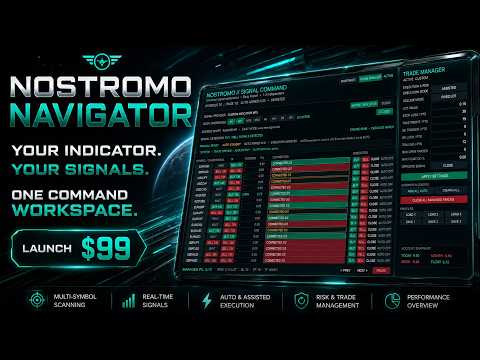
Nostromo Navigator is a multi-symbol signal dashboard and trade management panel for MetaTrader 5.
It is designed for traders who already use their own compatible MT5 signal indicator and want to monitor multiple symbols, receive signals and manage manual or automatic execution from one workspace.
Navigator does not provide or generate a trading strategy of its own.
Your signal logic comes from the compatible custom indicator selected by you.
MAIN FEATURES
• Multi-symbol signal monitoring from one dashboard
• Monitor up to 30 symbols
• 1 to 3 independent signal timeframes
• Manual, Assisted and Automatic execution modes
• Individual AUTO ON/OFF control for each symbol
• BUY and SELL signal detection
• Closed-bar or intrabar signal monitoring
• Fixed Lot or Risk % position sizing
• Real Stop Loss and Take Profit
• Break Even management
• Trailing Stop management
• Maximum open trades control
• Maximum floating drawdown protection
• Opposite signal management
• One managed position per symbol option
• Pause new entries while keeping trade management active
• Close all managed trades
• Three configurable management profiles
• Today / Week / Month / Floating P/L snapshot
• Direct BUY, SELL and CLOSE controls
• Multi-page symbol workspace
• Visual signal and connection status
• Built for MetaTrader 5
CUSTOM INDICATOR IMPORT
Navigator is designed to work with compatible MT5 custom signal indicators.
Easy Mode allows the user to attach one signal indicator to the same chart, configure it normally and import it into Navigator.
Navigator then attempts to detect and reproduce the indicator's BUY and SELL signal buffers across the selected symbols and timeframes.
For safety, automatic execution remains locked if the provider cannot be correctly detected or reproduced.
Important: not every MT5 indicator is technically compatible. Indicators must provide readable signal data that Navigator can identify and reproduce. Indicators based only on graphical objects or unsupported internal structures may not be compatible.
The custom indicator itself is not included with Navigator.
QUICK START
1. Open a MetaTrader 5 chart.

2. Load Nostromo Navigator.

3. Attach one compatible signal indicator to the same chart.
4. Configure your signal indicator as desired.
5. Press IMPORT INDICATOR in Navigator.
6. If requested, enter the exact EX5 file name of your indicator.
7. Select between 1 and 3 signal timeframes.
8. Configure trade management settings.
9. Choose Manual, Assisted or Auto execution.
For Easy Mode, keep only the signal indicator you want Navigator to import on the source chart.
If you change the indicator settings later, import the indicator again so Navigator can capture the updated configuration.
EXECUTION MODES
MANUAL
Trade directly from the dashboard using BUY, SELL and CLOSE.
Manual trades do not require an active signal.
ASSISTED
Navigator monitors signals and keeps all trading controls available, but does not automatically execute new signal entries.
AUTO
Automatic execution requires two permissions:
• The symbol must be set to AUTO ON
• Global Execution Mode must be set to AUTO
This two-level structure helps prevent accidental automatic execution.
Navigator only reacts to new eligible signals detected while automatic execution is active. Existing historical signals are not automatically executed when Auto mode is enabled.
TIMEFRAMES
Navigator can monitor between 1 and 3 independent timeframes.
Each selected timeframe is evaluated independently.
If conflicting BUY and SELL signals occur across active timeframes in the same scan cycle, Navigator can identify the conflict instead of arbitrarily opening a new position.
STOP LOSS AND TAKE PROFIT
Stop Loss and Take Profit are real trading levels submitted to the broker.
Values are entered in points.
The minimum valid distance depends on the trading symbol and broker specifications. Navigator checks symbol trading conditions before submitting an order.
BREAK EVEN
Break Even can move the Stop Loss after the position reaches the configured profit distance.
You can configure:
• Break Even Trigger
• Break Even Lock
Set the values to 0 when Break Even is not required.
TRAILING STOP
Trailing Stop dynamically manages the real Stop Loss after the configured trailing condition is reached.
Set the Trailing value to 0 when trailing management is not required.
POSITION SIZING
Two volume modes are available:
FIXED LOT
Uses the lot value selected by the user.
RISK %
Calculates the trading volume according to the configured account risk and Stop Loss distance.
If a valid risk calculation cannot be performed, Navigator does not silently replace Risk % with a fixed lot.
RISK CONTROLS
Navigator includes several protection controls:
• Maximum Open Trades
• Maximum Floating Drawdown
• One Position Per Symbol
• Stop Loss and Take Profit validation
• Broker minimum stop-distance checks
• Symbol volume validation
• Margin availability checks
• Symbol trading permission checks
These controls are designed to help manage execution conditions. They do not eliminate trading risk.
OPPOSITE SIGNAL
When an opposite signal appears while a managed position already exists, the configured Opposite Signal rule determines the action.
Available behavior can include:
• Ignore
• Close
• Reverse
Use the setting appropriate for your trading method.
PAUSE
PAUSE prevents new entries while existing managed positions can continue to receive Stop Loss, Take Profit, Break Even, Trailing Stop and risk-management handling.
PROFILES
Navigator includes three management profiles.
Profiles allow commonly used trade-management settings to be saved and loaded quickly.
ACCOUNT SNAPSHOT
The dashboard provides a compact overview of:
• Today
• Week
• Month
• Floating P/L
These values are informational and are not performance guarantees.
IMPORTANT INFORMATION
Nostromo Navigator is a trading and execution utility. It does not predict market direction and does not guarantee trading results.
Automatic execution depends on the signals supplied by the user's compatible custom indicator and on the trading conditions allowed by the broker.
Before using automatic execution on a live account, test your complete indicator, symbol list, timeframe configuration and risk settings on a demo account.
Trading financial instruments involves risk.