Click Close Manager for MT4

Click Close Manager — One-Click Close All Trades Panel for MT4


(Close All / Buy / Sell / Profit / Loss / Symbol • Partial Close • Break-Even • Delete Pending)


================================================================
OVERVIEW
================================================================
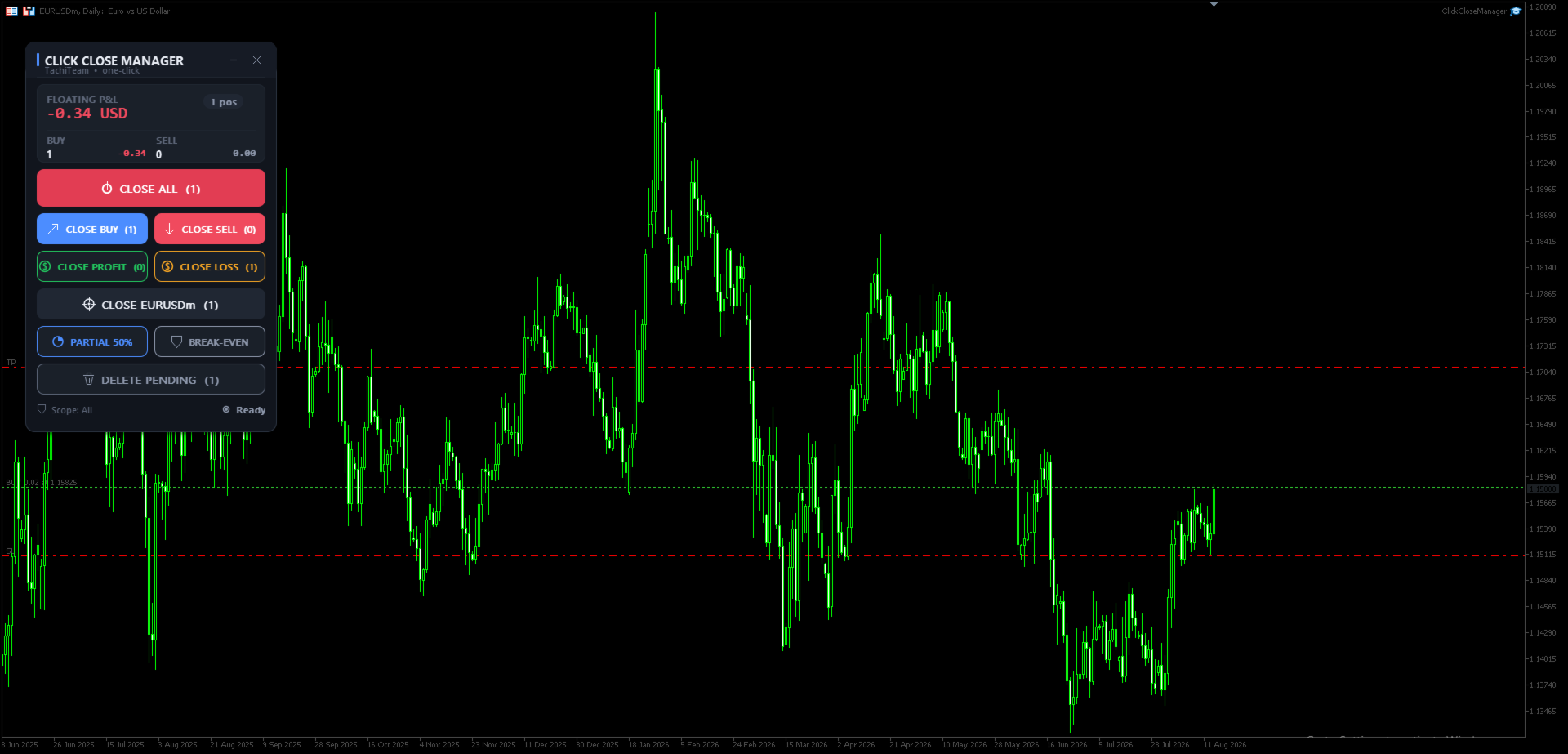
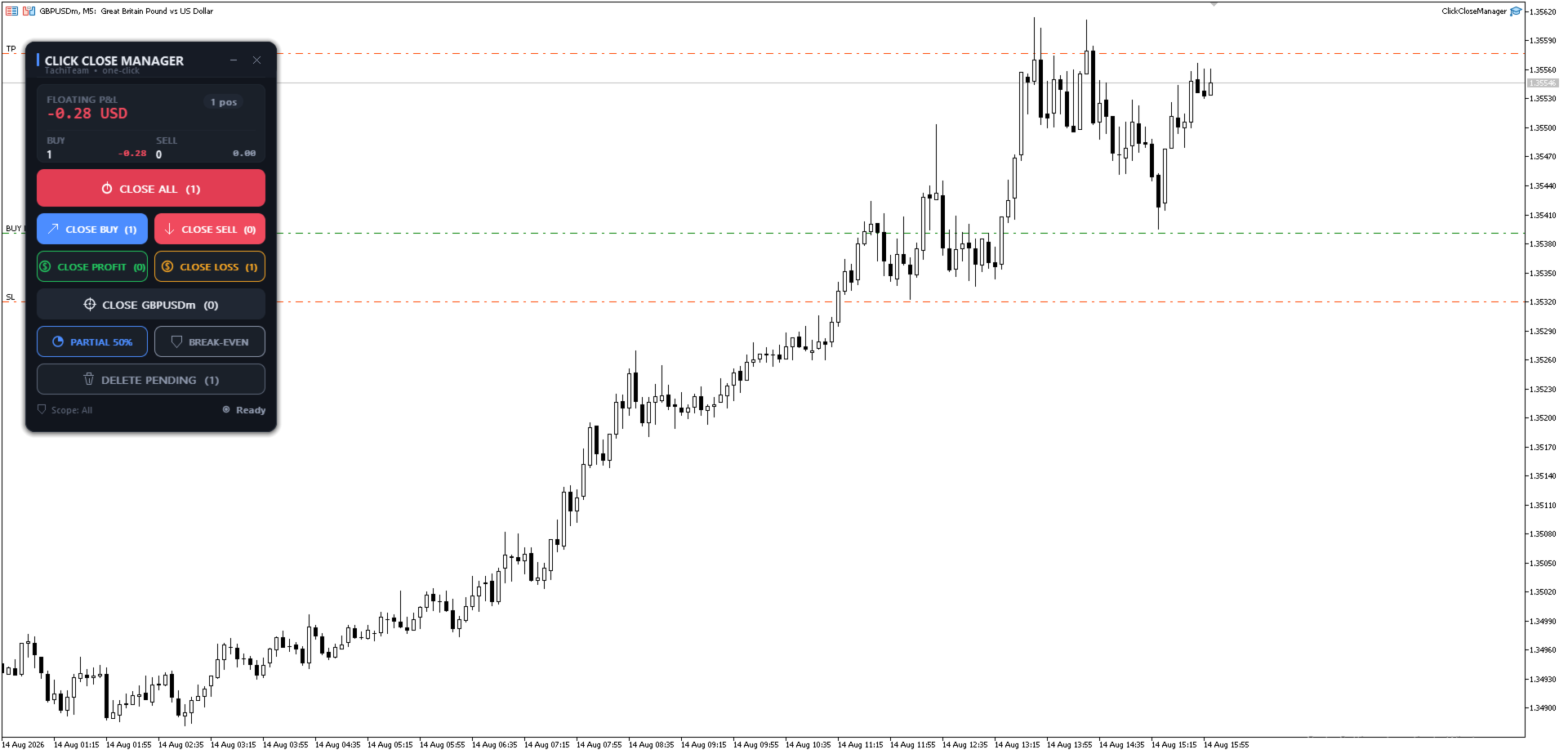
Click Close Manager is a lightweight on-chart trade panel that lets you close and manage your positions with a single click. When the market spikes, news hits, or you simply need to flatten the account fast, right-clicking every position one by one costs precious seconds. This panel turns every exit action into one click plus one confirmation.

Built on a modern, DPI-aware canvas interface — sharp on 4K screens, dark and light themes, draggable and collapsible — it stays out of your way until you need it.

No martingale, no grid, no hidden trading logic. It is a pure execution tool: it only does what you press.

================================================================
KEY FEATURES
================================================================
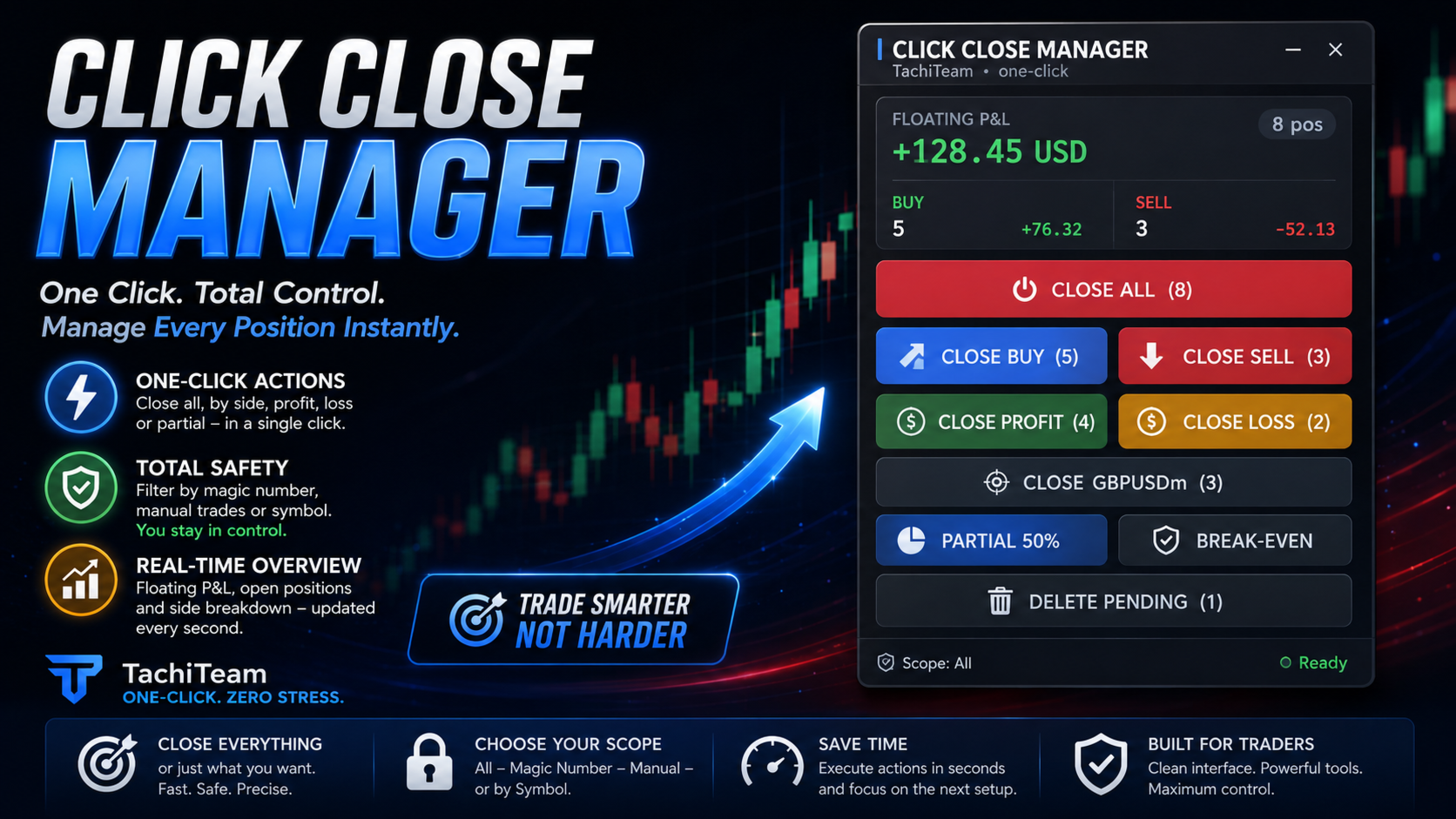
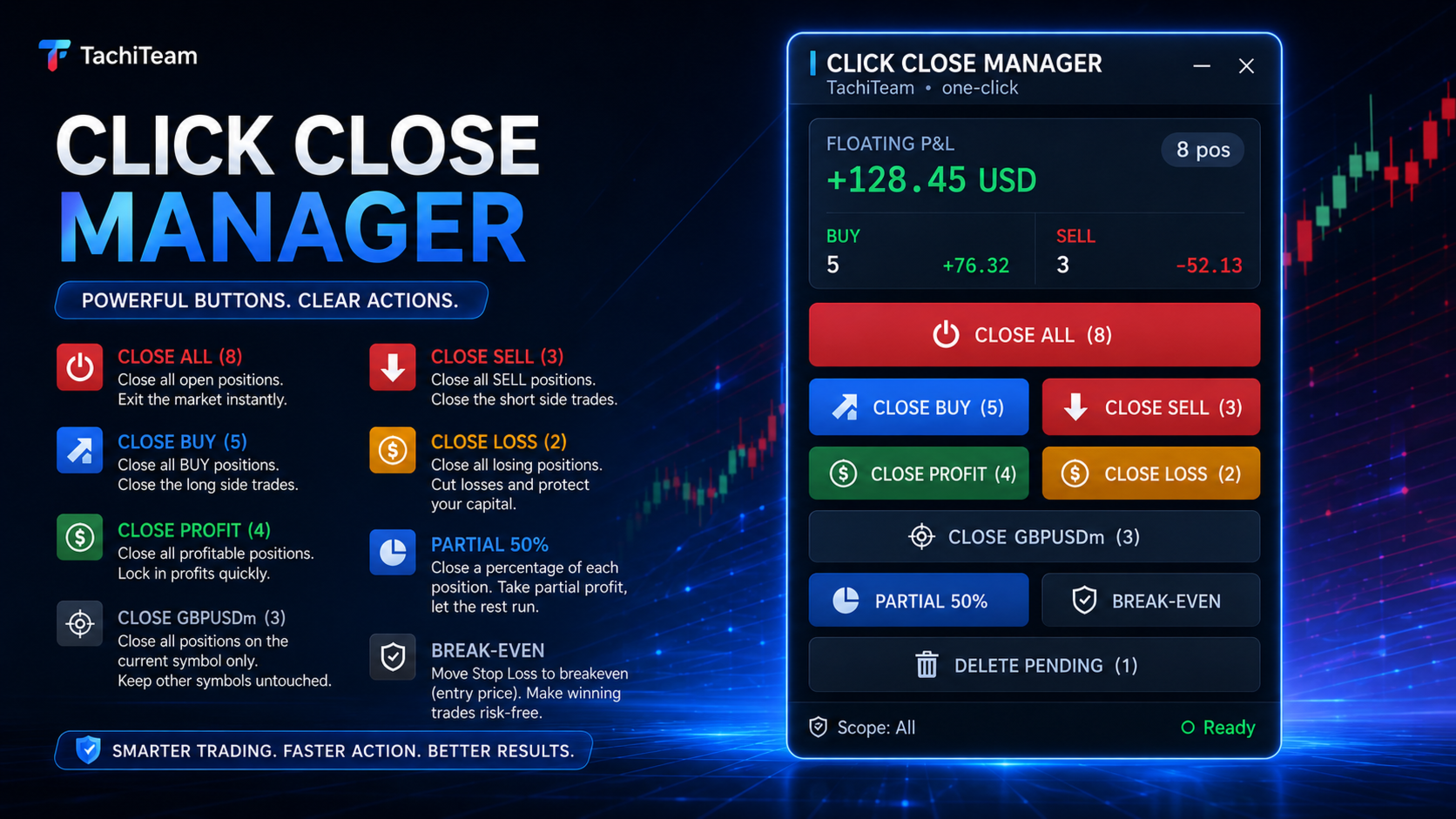
• One-click CLOSE ALL — flatten every open position instantly.
• Close by direction — close all BUY or all SELL trades separately.
• Close by result — close all trades in PROFIT, or cut all trades in LOSS.
• Close current symbol — clear the chart symbol without touching other pairs.
• Partial close — close a fixed % of every position (default 50%, adjustable).
• Break-even — move the stop-loss of profitable trades to entry in one click.
• Delete pending — cancel all pending orders at once.
• Live account panel — floating P&L, position count, and Buy/Sell breakdown, updated every second even in a quiet market.
• In-panel confirmation — every action shows the count and P&L and asks Confirm/Cancel (no more blocking Windows pop-ups). Can be turned off.

================================================================
BUILT-IN SAFETY: MAGIC & SYMBOL FILTER
================================================================
Most "close all" tools blindly close everything on the account. Click Close Manager lets you choose exactly what it is allowed to touch:

• All positions, or
• Only a specific Magic number (manage just one EA's trades), or
• Only manual trades (magic = 0).

You can also restrict EVERY action to the current chart symbol. Run it safely alongside other Expert Advisors — it will never close what you told it to leave alone.

================================================================
PROFESSIONAL, DPI-AWARE PANEL
================================================================
• Crisp canvas-rendered interface with anti-aliased buttons and hover states.
• Dark and Light themes.
• Automatic UI scaling from your screen DPI (or set it manually).
• Drag the header to reposition; minimize to a compact title bar.
• Chart scrolling is locked while you drag the panel, so nothing shifts underneath.

================================================================
INPUTS
================================================================
Appearance
  • Theme — Dark / Light
  • Anchor corner — where the panel is pinned
  • UI scale — 0 = auto from screen DPI
  • Panel X / Y — pixel offset

Scope
  • Which positions to manage — All / Only this magic / Manual
  • Magic number — used with "Only this magic"
  • Restrict every action to the chart symbol — on / off

Behaviour
  • Ask before executing (in-panel confirmation) — on / off
  • Partial-close size, % of each position (default 50)
  • Break-even offset, points (locked profit)
  • Max slippage, points
  • "Close All" also deletes pending orders — on / off

================================================================
HOW TO USE
================================================================
1. Attach Click Close Manager to any chart (one instance is enough).
2. Make sure AutoTrading is enabled.
3. Set the Scope (All / Magic / Manual) to match how you trade.
4. Click an action, review the confirmation, and press Confirm.

Works on all symbols: Forex, Metals, Indices, Crypto, Commodities.

================================================================
NOTES
================================================================
• This is a trade-management utility, not a signal or auto-trading system. It does not open trades on its own.
• Test on a demo account first to get familiar with the panel.
• Requires AutoTrading to be enabled to close or modify orders.

WARNING: No warranty. The product is offered "as is". Trading involves risk; use at your own risk.

================================================================
Search tags: close all, close all trades, one click close, close panel,
trade manager, position manager, partial close, break even, close by profit,
close by loss, delete pending orders, trade assistant, MT4 utility, panel.
추천 제품
Automate Risk Management with Smart Trailing Stop Manager for MetaTrader 4 Looking for MetaTrader 5 version? I t is available separately in the Market:   Smart Trailing Stop Manager MT5 Full User Guide    –  Public channel:   CLICK HERE Struggling with manually adjusting stops and securing profits? Smart Trailing Stop Manager MT4 is an intelligent utility for MetaTrader 4 that automates trailing stops, break-even management, partial closes, and auto SL. Optimized specifically for MT4 users, it e
The Best One Scalping Trade Panel functional manual trade panel with risk reward, auto SL by candle ( original solution), lot size calculation, one-click trading, scale in and out of trades (partial close),  Works with all symbols not just currency pairs, perfect works on DAX, NASDAQ, GOLD, ...... I earn every day during live stream on ZakopiecFX - join Me Risk by lot Risk by percent SL by points SL by Candle, Renko, RangeBar ( original solution) TP by point TP by Risk/Reward Auto Trailing by P
Rhino Backtest Manager - 실거래와 전략 테스터를 위한 거래 관리 패널 Rhino Backtest Manager는 실거래와 MetaTrader 4 전략 테스터에서 모두 작동하는 거래 관리 패널입니다. 실계좌에서 쓰는 것과 같은 인터페이스로 테스터 안에서 직접 주문을 내고 관리할 수 있으므로, 과거 데이터로 전략을 확인한 뒤 도구를 바꾸지 않고 그대로 거래할 수 있습니다. 패널은 설정한 리스크 조건으로 주문 수량을 계산하고, 주문을 보내기 전에 각 손절과 익절의 금액을 표시하며, 일간·주간·월간 및 계좌 전체 기간의 결과를 기록합니다. 사용 설명서: 제품 사용 방법 무료 데모 버전: 데모 내려받기 MetaTrader 5 버전: Rhino Backtest Manager MT5 버전 처음 실행하기 전에 설명서 페이지에서 제공하는 폰트를 설치해야 합니다. 폰트가 없으면 패널이 정상적으로 표시되지 않습니다. 기능 두 가지 모드. 같은 패널이 실거래와 전략 테스터 모드에서
It is so very disappointing when the price does not have enough points to achieve Take Profit and makes a reversal. This EA sets virtual levels near the TakeProfit levels. This EA sets virtual levels next to TakeProfit orders. If these levels are reached by price, breakeven or trailing stop is applied for an order. Features This EA does not set new orders. The aim of this EA is to manage stop losses of existing orders that are set by another EA or manually (magic number equals 0). For correct w
VN Trade Panel II
Vyacheslav Nekipelov
4 (1)
The new version of the trading panel, which now has the ability to separately close Buy and Sell orders, display targets for all orders on the chart, as well as the ability to use the panel to trade with brokers working on the FIFO rule. Also, the new version adds option buttons for separate management of open orders. It has a convenient visualized interface and intuitive control without a lot of additional tabs to which traders have to be distracted and switch their attention. Thanks to this,
SmartLot MT4
Nikita Chernyshov
데모 계정 무료 버전   |   MT4   버전 SmartLot   MT4  는 차트에서 직접 로트를 빠르게 계산하고, 보류 중 주문 및 시장가 주문을 설정할 수 있는 대화형 및 간단한 패널입니다. 전략 테스터에서는 작동하지 않습니다 . 유틸리티를 테스트하려면 데모 계정용 무료 버전을 다운로드하십시오. 지침과 파일은 설명 상단에 있습니다. 기능: 그래픽 인터페이스:   수익 및 손실 구역을 색상으로 표시한 대화형 진입, SL, TP 라인. 실시간 계산:   SL/TP 수준을 변경할 때 패널이 위험/이익 값(통화 / 핍 / %)을 자동으로 재계산합니다. 실행:   그래픽 라인의 버튼을 클릭하여 주문을 엽니다. 주요 주문 유형 지원. 위험 관리:   동적 로트(예금 비율) 또는 고정 볼륨 작업을 위한 내장 모듈. 개별 매직:   각 주문에 대해 개별적으로 매직 넘버를 지정할 수 있는 기능.
Ultimate Trailing Stop EA
BLAKE STEVEN RODGER
4.33 (15)
This EA Utility allows you to manage (with advanced filtering) unlimited open orders (manual or EA) with 16 trailing stop methods: fixed, percent, ATR Exit, Chandelier Exit, Moving Average, Candle High Low Exit, Bollinger Bands, Parabolic, Envelope, Fractal, Ichimoku Kijun-Sen, Alligator, Exit After X Minutes or Bars, RSI and Stochastic. The trailing stop can be either real or virtual, and you can exit fully or with a partial close percent on touch or bar close.  Moreover, you can add (overrid
Utility, which draws buy or sell trendlines, which can also become support or resistances able to close any position on the screen Algorithm that calculates the gain of the position, at the touch closure of the line.   The benefits you get: Works on forex and CFD, timeframe from M1 to Weekly. Easy to use screen control panel. Audible warning messages at the touch of the line. Easy to use.

NRP Risk Manager Pro Institutional-Grade Trade Management & Prop Firm Protection Get the MetaTrader 4 Version Here: https://www.mql5.com/en/market/product/179888 Get the MetaTrader 5 Version Here: https://www.mql5.com/en/market/product/179885 Trading isn't just about finding the right entry; it is about flawlessly executing your edge while fiercely protecting your capital. NRP Risk Manager Pro is not an automated trading robot—it is a comprehensive, institutional-grade trade terminal d
이것은 구매 및 판매 주문 네트워크를 배치하는 일반 패널입니다. 이 전문가 고문은 설정에 정의 된 이익 순서를 닫습니다. 그런 다음 사다리라는 매개 변수가 있습니다.이 매개 변수에는 사다리 매개 변수에 의해 표시된 점(여기서 주요 설정에서는 10 점)으로 주문 사이의 거리가 증가하기 시작하므로 두 번째 순서는 10 점,세 번째 순서는 20 점,네 번째 순서는 40 점 등이 포함됩니다. 그런 다음 설정에 있지 않기 때문에 이 고문에 무엇이 있는지 알아야 하지만 이 고문이 제안한 전략의 논리에 영향을 미칩니다.. 의이 고문이 다섯 개 주문을 엽니 다 여기 설정에서 가정 해 봅시다... 또는 구매... 또는 판매... 좋아.. 그러나,주문을 열 때,그것은 이전에 열린 주문의 절반으로 다음 오픈 주문의 로트를 증가시킬 것입니다. 즉,설정에서 0.1 로트를 설정하면 계획에 따라 5 개의 주문이 열리고 현재 가격에 가까운 첫 번째 주문은 0.1 로트의 가격으로 열립니다. 두 번째는 주어진
Risk Commander
Adisorn Soodkanueng
Product Name: Risk Commander: Trade Assistant & Strategy Simulator Risk Commander is more than just a trade panel—it is a complete Manual Trading Ecosystem . It serves two powerful purposes: Live Assistant: Helps you execute trades with speed, precision, and perfect risk management in real-time markets. Training Simulator: Fully compatible with the Strategy Tester (Visual Mode) , allowing you to practice manual trading on historical data without risking a cent. NEW! Built-in Simulator Mode Stop
Exp Swing
Vladislav Andruschenko
4.44 (64)
그것은 Swinger(Pendulum, Cheburashka)라고 하는 유명한 전략의 모델을 사용합니다. 전략은 두 개의 반대되는 보류 중인 주문을 배치하는 것입니다. 가격이 특정 방향으로 이동하면 하나의 보류 주문이 트리거되고 다른 주문의 로트 크기가 증가합니다. EA는 세 가지 유형의 개설 보류 주문(TypeofTrade)을 제공합니다. 배치 후 자동 개설(즉시 개설 AutoTrade) 수동 개봉 후 개봉 및 관리 (수동 개봉 ManualTrade) 높음/낮음 수준으로 열기(과거 막대 TFTrade의 경우 높음 낮음) OCO(One-Cancels-the-Other) 주문은 두 개의 주문으로 구성된 조건부 주문의 일종입니다. 두 번째 주문이 체결되면 첫 번째 주문은 자동으로 취소됩니다. 스윙 - 전체 설명 MT5 version 구입 방법 설치하는 방법     로그 파일을 얻는 방법     테스트 및 최적화 방법     Expforex의 모든 제품 작동 원리 시작 시 Expe
FREE
FREE UNTIL FEBRUARY 14, 2023 SPEND MORE TIME WITH YOUR FAMILY. ENJOY LIFE… DO NOTHING. This version is only auto set of Takeprofit and StopLoss Main Version  of  TropangFX:   MT4 Version  |  MT5 Version Recommended timeframe:   H1 Supported currency pairs:  GBPUSD, EURUSD, EURCHF ,   USDCAD, USDCHF ,  AUDCAD, EURCAD, EURAUD and many more... Requirements The EA requires good brokerage conditions:   low spread   and   slippage   during the rollover time. I advise using a really   good ECN brok
FREE
Easy Trade Executor는 MT4에서 빠른 포지션 크기 계산, 주문 실행 및 트레이드 관리를 위한 도구입니다. 차트에 Entry Price, Stop Loss, Take Profit 레벨을 직접 배치하고, 포지션 크기를 자동으로 계산한 후 몇 번의 클릭만으로 리스크가 관리된 트레이드를 실행할 수 있습니다. 왜 Easy Trade Executor를 선택해야 할까요? Easy Trade Executor는 단순한 리스크 계산 이상의 기능을 원하는 트레이더를 위해 설계되었습니다. 트레이더는 차트에서 직접 빠르고 효율적으로 트레이드를 관리하고 싶어 합니다. 이 도구는 포지션 크기 계산, 주문 실행 및 트레이드 관리를 하나의 워크플로우로 통합하여 수동 계산이나 여러 터미널 창 간 전환 대신 트레이딩에 집중할 수 있도록 해줍니다. Easy Trade Executor의 주요 기능: 리스크 기반 자동 포지션 크기 계산; 차트에서 직접 Market Order 및 Pending Order
Trade Manager MT4 DaneTrades
Levi Dane Benjamin
4.09 (11)
거래 관리자는 위험을 자동으로 계산하는 동시에 거래를 빠르게 시작하고 종료하는 데 도움을 줍니다. 과잉 거래, 복수 거래 및 감정 거래를 방지하는 데 도움이 되는 기능이 포함되어 있습니다. 거래를 자동으로 관리할 수 있으며 계정 성과 지표를 그래프로 시각화할 수 있습니다. 이러한 기능은 이 패널을 모든 수동 거래자에게 이상적으로 만들고 MetaTrader 4 플랫폼을 향상시키는 데 도움이 됩니다. 다중 언어 지원. MT5 버전  |  사용자 가이드 + 데모 트레이드 매니저는 전략 테스터에서 작동하지 않습니다. 데모를 보려면 사용자 가이드로 이동하세요. 위기 관리 % 또는 $를 기준으로 위험 자동 조정 고정 로트 크기 또는 거래량과 핍을 기반으로 한 자동 로트 크기 계산을 사용하는 옵션 RR, Pips 또는 Price를 사용한 손익분기점 손실 설정 추적 중지 손실 설정 목표 달성 시 모든 거래를 자동으로 마감하는 최대 일일 손실률(%)입니다. 과도한 손실로부터 계정을 보호하고 과도한
Program Overview: This program is a trading tool designed to monitor and analyze the 7 major currency pairs. It is a variant of a similar program used for tracking stock indices, but this version focuses on the seven major currency pairs. The program helps in identifying and calculating significant price movements (gaps) between the high and low prices of these currency pairs over a specified time frame. It then provides insights through comments and alerts based on the calculated gaps. Major Cu
Trade Manager G2 MT4
Ida Bagus Putu Mahardika
TRADE MANAGER G2 – PRODUCT DESCRIPTION By Ida Bagus Putu Mahardika Trade Manager G2 – All-in-One Trading Panel for Professional Execution & Risk Management Trade Manager G2 is a next-generation trading panel designed to give you full control over order execution, position management, and profit optimization in real time on MetaTrader 5. With a modern card-based user interface and individual TP actions per level, this panel elevates your trading experience to the next level. KEY ADVANTAGES OF
Equity Master Stop v2
Frank William Jr Colbert
Trading tool combining a sophisticated equity stop-loss, dynamic take-profit management (Breakeven & Trailing), and symbol-group-based closing logic. It is a complete risk management and trade supervision tool. Features: All features of `Equity Master Stop v1` (floating profit/loss limits, exit protection, skip hours). Take-Profit Override: Can force a TP on any order to lock in a `MAX_FLOATING_PROFIT`. Step Breakeven: Locks in increasing amounts of profit as a trade moves favorably (e.g., aft
This script is designed to automatically open charts for all available forex pairs on the MetaTrader 4 platform, as well as the gold (XAUUSD) chart. The script iterates through all symbols available on the platform, determines which of them are forex pairs, and opens their charts on the M1 (one minute) timeframe. Key Features: Gold Chart Opening: The script automatically opens the XAUUSD (gold/dollar) chart if this symbol is available from your broker. If the gold symbol is not found, an error m
Grid Trading
Waseem Raza
5 (3)
Grid Trading EA is a semi-automated one-click trading EA for both Normal Trading and Grid/Martingale Trading . Normal Trading Simply click Buy or Sell directly from the chart. The EA will automatically manage trades by: Setting Stop Loss and Take Profit Managing Trailing Stop Grid / Martingale Trading When Grid Trading mode is enabled, the EA will automatically open additional grid orders at specified distances while increasing the lot size based on your settings. Inputs & Settings Lots — Initia
RJDJ Trade Manager is a powerful all-in-one MetaTrader 4 trade management panel for traders who want faster chart-based execution, cleaner position control, and a more efficient manual trading workflow. With built-in tools for market orders, pending orders, trailing stop management, account monitoring, and a dedicated MANAGE dialog, it helps simplify daily trading operations directly on the chart. Product Description RJDJ Trade Manager is a professional chart-based trading panel for MetaTrader 4
The "Lot Size" button toggles between fixed and auto lot size modes. Fixed mode uses a predetermined lot size, while auto mode calculates lot size based on a customizable percentage of the account balance, displayed at the bottom. The "Trailing Stop" button enables the activation or deactivation of the trailing stop feature. Initially set to "No Trailing," clicking the button changes it to "Trailing ON" when the trailing stop is active, and "Trailing OFF" when it is inactive. Below the button,
Trade Manager 4 Lite is trading panel developed with a goal to make manual trading in some (routine) task easier. Trade Manager 4 Lite also works in Strategy Tester. Version for Meta Trader 5 is here: Trade Manager 5 Lite Main features of Trade Manager 4 Lite Trading for Forex and CFDs Support for 4 and 5 digit brokers 65 combinations to set order Set Take Profit, Stop Loss and entry level for Pending Order with lines positioned on the chart Break Even Trailing Stop Loss Multiple Orders at one
News Scalping Executor Pro is an utility which helps to trade high impact and huge volatility   news . This utility helps to create two opposite orders with risk management and profit protection. It moves automatically stop loss level to avoid losses as much as possible by using many different algorithms. It helps to avoid trading the news if spread suddenly becomes very huge. It can lock profit by moving stop loss or partially closing of orders. To be profitable with this type of trading you
안녕하세요 여러분 "Trader Assistant Mini"는 유창한 R:R 패널을 사용하여 거래당 위험을 계산하는 편리한 도구입니다. 보상 비율에 대한 위험 + 거래 패널: 모든 트레이더가 이익의 크기와 관련된 손실의 크기를 계산하고 트레이더별 위험을 관리하여 좋은 거래인지 여부를 판단할 수 있도록 하는 것이 편리합니다. 또한 손실과 이익을 핍과 백분율, 손실과 이익으로 표시합니다. 데모 버전 + 데모 파일 설치 방법: Trader Assistant Mini MT4 Demo "Trader Assistant Pro"를   볼 수 있습니다. 프로 위험 관리 패널 MT5 그것을 즐기시기 바랍니다. 마침내: 여러분의 생각과 피드백을 공유해 주시기 바랍니다. 거래자가 필요하다고 생각하는 정보를 제공하는 것이 중요합니다. 작가: 저는 MQL 언어 프로그래머로 3년 동안 다양한 프로젝트를 진행해 왔습니다. 저는 전기 엔지니어이고 어려운 문제를 해결하는 것을 좋아합니다.
Trade panel manual is a multifunctional trading assistant. It allows you to open market and pending orders in one click. Value is set via button menu edit or deleted by specific buttons pending orders and the value of take profit and stop loss in one click. Through the edit menu of the button, a value is set that can be easily changed by simply moving level_tp lines for take profit or stop loss levels and for pending orders. It is possible to select orders and determine for them and set the leve
소개 가상 TPSL 마감 M4 주문 관리 유틸리티 도구(전문 고문)는 귀하가 사용하는 다른 전문 고문이 만든 기존 오픈 포지션이나 수동으로 개설된 주문을 관리하고 가상 이익실현 및 손절매 수준으로 마감합니다. Adviser는 완전한 가상 모드에서 작동하며, 모니터링된 위치가 닫혀 있을 때 그려지는 색상 화살표 개체 이상의 시각적 레벨은 존재하지 않으며, 하나가 열려 있고 연결된 유틸리티와 함께 표시되는 경우 차트에 닫는 위치를 표시하기 위해 손익 여부에 관계없이 표시됩니다. 이 유틸리티를 사용하는 방법은 무엇입니까? 간단하고 차트를 엽니다. 하나의 단일 차트에서만 모니터링을 제어하므로 모든 차트와 기간이 괜찮습니다. 이 어드바이저를 부착하고 모니터링하려는 기호 및 매직 넘버(수동 주문의 경우 0)와 포지션 유형을 지정하세요. - 매수, 매도 또는 둘 다를 지정하고 포지션이 종료되지 않도록 원하는 가상 이익 실현 수준을 설정하세요. . 정지 손실 수준을 모니터링하는 것도 가능합니
This is a DEMO version of the Smarter Trade Manager Smarter Trade Manager  is an advanced trade management tool that can monitor and manage your manual and EA trades according to the settings you choose. It works as an Expert Advisor (EA), it does not open any trades but it closes trades as per the auto closing settings or when manually pressing any of the close buttons. FEATURES: Three-dimensional  interactive  view of your trades Trade Summary, P/L, Alerts, Closure by  Currency Trade Summary,
FREE
Details of each condition Type 1. Set no use Hedging Martingale, to open the order by yourself only through the push button. TP and SL follow setting. Set Setting_Hedging =false;     Use_Signal =false;  Type 2. Semi Auto Recovery Zone You have to open the order by yourself only through the push button. If in the wrong direction and Set true on Hedging Martingale, EA will fix the order with the zone system by use Hedging Martingale Set Setting_Hedging =true;     Use_Signal =false;  Type 3. Use
TP SL Bot
Ruslan Brezovskiy
TP SL Bot is a utility that automatically sets Stop Loss and Take Profit for newly opened orders in several ways. There is also a function for calculating the volume that you need to open the trade to get the desired amount with the specified Stop Loss / Take Profit size in points. There are several options for calculating the size and setting parameters TP and SL: 1. Setting based on the amount specified by the user as a percentage of the current deposit balance. 2. Setting as the amount entere
이 제품의 구매자들이 또한 구매함
Trade Manager EA에 오신 것을 환영합니다. 이 도구는 거래를 보다 직관적이고 정확하며 효율적으로 만들기 위해 설계된 궁극적인 리스크 관리 도구 입니다. 단순한 주문 실행 도구가 아닌, 원활한 거래 계획, 포지션 관리 및 리스크 제어를 위한 종합 솔루션입니다. 초보자부터 고급 트레이더, 빠른 실행이 필요한 스캘퍼에 이르기까지 Trade Manager EA는 외환, 지수, 상품, 암호화폐 등 다양한 시장에서 유연성을 제공합니다. Trade Manager EA를 사용하면 복잡한 계산은 이제 과거의 일이 됩니다. 시장을 분석하고 진입, 손절 및 익절 수준을 차트의 수평선으로 표시한 후 리스크를 설정하면, Trade Manager가 이상적인 포지션 크기를 즉시 계산하고 SL 및 TP 값을 실시간으로 표시합니다. 모든 거래가 간편하게 관리됩니다. 주요 기능: 포지션 크기 계산기 : 정의된 리스크에 따라 거래 크기를 즉시 결정합니다. 간단한 거래 계획 : 진입, 손절, 익절을 위한
Trade Indicator Assistant is a powerful MT4 utility designed to turn indicators into automated trading systems. Its main feature is the ability to automatically detect an indicator’s   BUY and SELL signal buffers , without requiring you to know the buffer numbers, search through indicator settings, or modify the indicator source code. Bonus Indicator: After purchasing Trade Indicator Assistant, contact me to receive Trade Signal Pro completely free as a bonus indicator. [Download Demo Version]
Local Trade Copier EA MT4
Juvenille Emperor Limited
4.96 (112)
Local Trade Copier EA MT4는 동일한 Windows 컴퓨터 또는 Windows VPS에서 여러 MetaTrader 4 계정 간에 거래를 복사하고 관리할 수 있는 빠르고 유연한 거래 복사기입니다. 로컬 거래 동기화 기능과 함께 Receiver 측에서 로트 크기, 리스크 관리, 거래 필터링, 심볼 매핑, 거래 관리 및 계정 보호를 독립적으로 설정할 수 있습니다. Transmitter와 Receiver 터미널을 약 1분 안에 설정하고, 동일한 브로커 또는 서로 다른 브로커의 계정 간에 수동 거래 또는 EA 거래를 복사할 수 있습니다. 적절한 조건에서는 로컬 MetaTrader 터미널 간의 거래 정보가 0.5초 이내 에 동기화될 수 있습니다. 실제 체결 속도는 브로커 지연 시간, 네트워크 상태, 컴퓨터/VPS 성능 및 터미널 부하에 따라 달라집니다. 구매 전에 무료 데모를 사용해 보세요 MT4 데모 계정에서 Local Trade Copier EA MT4의 모든 기능을
Exp COPYLOT CLIENT for MT4
Vladislav Andruschenko
4.69 (65)
MetaTrader 4용 전문 트레이드 복사기 MetaTrader 4 용 빠르고 안정적이며 전문적인 트레이드 복사기입니다. COPYLOT 은 MetaTrader 4 와 MetaTrader 5 터미널 간에 Forex 거래를 복사할 수 있으며, 다양한 계좌 유형과 운용 방식에 맞춰 유연한 동기화 환경을 제공합니다. COPYLOT MT4 버전 지원 방식: MetaTrader 4 → MetaTrader 4 MetaTrader 5 Hedge → MetaTrader 4 MetaTrader 5 Netting → MetaTrader 4   MT5 버전 상세 설명 + DEMO + PDF 구매 방법 설치 방법 로그 파일 확인 방법 테스트 및 최적화 방법 Expforex의 모든 제품 MetaTrader 5 버전 을 사용하면 MetaTrader 5 → MetaTrader 5 및 MetaTrader 4 → MetaTrader 5 복사도 지원됩니다: COPYLOT CLIENT for MT5 COPYLOT 은
Trade Assistant MT4
Evgeniy Kravchenko
4.43 (197)
거래당 위험 계산, 라인을 사용한 손쉬운 신규 주문, 부분 청산 기능을 통한 주문 관리, 7가지 유형의 트레일링 스탑 및 기타 유용한 기능을 제공합니다. 추가 자료 및 지침 설치 지침 - 애플리케이션 지침 - 데모 계정용 애플리케이션 평가판 라인 기능       - 차트에 개시선, 손절매, 차익실현을 표시합니다. 이 기능을 사용하면 새로운 주문을 쉽게 하고 개봉 전에 추가 특성을 볼 수 있습니다. 위기 관리       -       위험 계산 기능은 설정된 위험과 손절매 주문의 크기를 고려하여 새 주문의 볼륨을 계산합니다. 이를 통해 손절매 크기를 설정하고 동시에 설정된 위험을 존중할 수 있습니다. 로트 계산 버튼 - 위험 계산을 활성화/비활성화합니다. 필요한 위험 값은 위험 필드에 0에서 100 사이의 백분율 또는 예금 통화로 설정됩니다. 설정 탭에서 위험 계산 옵션을 선택합니다. $ 통화, % 잔액, % 지분, % 자유 마진, % 사용자 정의, % AB 이전 일, % AB
Telegram to MT4 Multi-Channel Copier   는 Telegram 채널의 트레이딩 시그널을 MetaTrader 4로 자동 복사합니다. 봇도, 브라우저 확장도, 수동 복사도 필요 없습니다. Telegram에 시그널이 도착하면 EA가 몇 초 안에 터미널에서 주문을 실행합니다. 그리고 채널을 복사하기 전에, 내장 백테스터가 그 채널이 내 계좌에서 어떤 결과를 냈을지 보여줍니다. 제품은 두 가지 구성 요소로 이루어집니다: Telegram 채널을 수신하는 Windows 애플리케이션과, MT4 터미널에서 시그널을 실행하는 본 EA입니다. MT5 버전도 제공됩니다   여기 . 설정 가이드와 앱 다운로드:   https://www.mql5.com/en/blogs/post/768988 현재 가격은 향후 인상될 예정입니다. 작동 방식 앱은 여러분 자신의 Telegram 계정으로 연결되므로, 팔로우하는 모든 채널, 그룹, 토픽, 봇(비공개 및 VIP 포함)을 볼 수 있습니다. 시
MT4 to Telegram Signal Provider 는 사용하기 쉽고 완전히 사용자 정의가 가능한 도구로, 텔레그램으로 신호를 보내어 계정을 신호 제공자로 변환할 수 있습니다. 메시지 형식은 완전히 사용자 정의가 가능합니다! 그러나 간단한 사용을 위해 미리 정의된 템플릿을 선택하고 메시지의 특정 부분을 활성화하거나 비활성화할 수도 있습니다. [ 데모 ]  [ 매뉴얼 ] [ MT5 버전 ] [ 디스코드 버전 ] [ 텔레그램 채널 ]  New: [ Telegram To MT5 ] 설정 단계별 사용자 가이드 가 제공됩니다. 텔레그램 API에 대한 지식이 필요 없으며, 개발자가 필요한 모든 것을 제공합니다. 주요 기능 구독자에게 보낸 주문 세부 정보를 사용자 정의할 수 있는 기능 예를 들어 브론즈, 실버, 골드와 같은 계층 구독 모델을 만들 수 있습니다. 골드 구독은 모든 신호 등을 받게 됩니다. ID, 심볼 또는 코멘트별 주문 필터링 주문이 실행된 차트의 스크린샷을 포함 보낸
Take a Break
Eric Emmrich
5 (31)
Take a Break pauses your Expert Advisors when trading is a bad idea: before news, after a daily loss, outside your trading hours, or when a rule you wrote yourself says so. When the pause is over, your EAs simply continue. Account protection for all your EAs in one tool: news filter, drawdown and equity protection, time filter and custom rules. One EA on one chart protects the whole account, the free indicator gives every chart its own rules on top. Free demo | What is new in 26.09 | Support Ass
VirtualTradePad mt4 Extra
Vladislav Andruschenko
4.85 (61)
한 번의 클릭으로 거래할 수 있는 거래 패널.   위치 및 주문 작업!   차트 또는 키보드에서 거래. 거래 패널을 사용하면 차트에서 클릭 한 번으로 거래하고 표준 MetaTrader 컨트롤보다 30배 빠르게 거래 작업을 수행할 수 있습니다. 거래자의 삶을 더 쉽게 만들고 거래자가 훨씬 빠르고 편리하게 거래 활동을 수행할 수 있도록 도와주는 매개변수 및 기능의 자동 계산. 차트의 무역 거래에 대한 그래픽 팁 및 전체 정보. 새로운 프리미엄 버전 출시:   VirtualTradePad PRO SE 로 트레이딩 워크플로를 업그레이드하세요.   MetaTrader 5   및   MetaTrader 4 를 위한 차세대 전문 트레이딩 패널입니다. MT5 버전 전체 설명   +DEMO +PDF 구입 방법 설치하는 방법     로그 파일을 얻는 방법     테스트 및 최적화 방법     Expforex의 모든 제품 열기 및 닫기, 반전 및 잠금, 부분 닫기/오토로트. 가상/실제 손절매/이익
Smart Copy Local MT4
Kyra Nickaline Watson-gordon
5 (7)
Smart Copy is an Easy-to-Use EA that supports Multi Copying Metatrader4 and Metatrader5 and Local/Remote Copying. (Remote Version is coming soon) Free version is available on Smart Copy Local Free MT4 Specifications :     Real Time, Multi Terminal - Multi Account - MT4/MT5 trade copying     Copy from netting to hedge and hedge to netting is supported.     Fast and instant copy     All settings are input visually.     Easy modifying symbol names, prefix, suffix     Enable/Disable copying s
Telegram to MT4 Coppy
Sergey Batudayev
4.09 (11)
Telegram에서 MT4로:   최고의 신호 복사 솔루션 최첨단 유틸리티인   Telegram to MT4를   사용하여 거래를 간소화하세요. DLL 없이도 Telegram 채널과 채팅에서 MetaTrader 4 플랫폼으로 거래 신호를 직접 복사할 수 있습니다. 이 강력한 솔루션은 탁월한 정밀도와 맞춤 설정 옵션을 통해 원활한 신호 실행을 보장하여 시간을 절약하고 효율성을 높여줍니다. [ Instructions and DEMO ] 주요 특징 직접 Telegram API 통합 전화번호와 보안 코드를 통해 인증하세요. 사용자 친화적인 EXE 브리지를 사용하여 채팅 ID를 손쉽게 가져오고 관리하세요. 여러 채널/채팅을 추가, 삭제, 새로 고침하여 동시에 신호를 복사합니다. 고급 필터를 사용한 신호 파싱 사용자 정의 예외 단어(예: "보고서", "요약")가 포함된 원치 않는 신호를 건너뜁니다. 유연한 SL 및 TP 형식을 지원합니다: 가격, 핍 또는 포인트. 신호가 가격 대신 지점을 지정
Want automatically to put the pending order, take profit and stop loss? This EA will do it on your behalf! The Fibo Heart EA strategy will place limit order after the ‘check point’ breakout. The position will be triggered when the price make a successful retest. If not, the pending order will automatically deleted after price hit certain level. You also have option to enable market order (instant execution) and custom take profit in the inputs setting. This EA must be attached with Fibo Heart In
작동 체험판 다운로드 Copy Cat More (카피캣) MT4 트레이드 카피어 (Trade Copier) 는 단순한 로컬 트레이드 카피어가 아닙니다. 오늘날의 트레이딩 과제를 위해 설계된 완전한 리스크 관리 및 실행 프레임워크 (risk management and execution framework) 입니다. 프롭 펌 (prop firm) 챌린지부터 개인 포트폴리오 관리까지, 견고한 실행, 자본 보호, 유연한 설정, 고급 트레이드 처리의 조합으로 모든 상황에 적응합니다. 이 카피어는   마스터 (Master, 송신측) 와 슬레이브 (Slave, 수신측)   두 모드 모두에서 작동하며, 시장가 주문과 대기 주문, 트레이드 수정, 부분 청산, 상호 청산 (Close By) 작업을 실시간으로 동기화합니다. 데모 및 실거래 계좌, 트레이딩 또는 인베스터 로그인 모두와 호환되며, EA·터미널·VPS가 재시작되더라도 영구 트레이드 메모리 (Persistent Trade Memory) 시
Partial Closure EA MT4
Juvenille Emperor Limited
5 (3)
Partial Closure EA MT4 는 계정의 모든 거래를 부분 청산할 수 있게 해줍니다. 로트 크기의 선택된 비율 및/또는 티켓 번호로 수동 청산하거나, TP/SL 수준의 지정된 비율에 따라 자동으로 초기 로트 크기의 일부를 최대 10개의 이익 실현 및 10개의 손절매 수준에 걸쳐 청산할 수 있습니다. 특정 매직 번호, 코멘트 또는 심볼을 지정하거나 제외하여 계정 내 모든 거래 또는 선택한 거래를 관리할 수 있습니다. 팁: 부분 폐쇄 EA MT4의 무료 데모 버전을 다운로드하고 데모 계정에서 사용해 보십시오: 여기 다운로드한 무료 데모 파일을 MT4 >> File >> Open Data Folder >> MQL4 >> Experts 폴더에 붙여넣고 터미널을 다시 시작합니다.   무료 데모 버전은 데모 계정에서만 한 번에 4시간 동안 모든 기능을 사용할 수 있습니다. 평가판 기간을 재설정하려면 MT4 >> 도구 >> 전역 변수 >> Control + A >> 삭제로 이동하세
TradePanel MT4
Alfiya Fazylova
4.84 (95)
Trade Panel은 다기능 거래 도우미입니다. 이 애플리케이션에는 50개 이상의 수동 거래 기능이 포함되어 있으며 대부분의 거래 작업을 자동화할 수 있습니다. 앱 사용 설명서 + 동영상 설명: https://www.mql5.com/en/blogs/post/772292 데모 계정용 앱 체험판: https://www.mql5.com/en/blogs/post/750865 앱 설치 방법: https://www.mql5.com/en/blogs/post/756239 시각 모드에서 앱 테스트 방법: https://www.mql5.com/en/blogs/post/770277 VPS MetaTrader에 앱 설치 방법: https://www.mql5.com/en/blogs/post/770190 거래. 한 번의 클릭으로 거래를 수행할 수 있습니다: 리스크 자동 계산과 함께 예약 주문 및 포지션 열기. 한 번의 클릭으로 여러 주문 및 포지션 열기. 주문 그리드 열기. 예약 주문 및 포지션을 그룹별로
King Trade Copier MT4
Mohammed Maher Al-sayed Mohammed Ahmed Saleh
5 (1)
King Trade Copier는 같은 컴퓨터나 VPS에서 실행되는 MetaTrader 터미널들을 연결합니다. 한 계좌에서 열린 거래는 다른 계좌에도 나타납니다. 이 파일에는 두 가지 역할이 모두 들어 있어서, 같은 다운로드 파일이 Mode에 무엇을 설정하느냐에 따라 송신 측이 되기도 하고 수신 측이 되기도 합니다. 모든 차트에서 패널은 이 터미널이 송신 중인지 수신 중인지 표시하고, 반대편 계좌의 이름을 알려 주며, 응답한 수신 측의 수를 세고, 마지막 신호가 얼마나 지났는지 보여 줍니다. 복사되지 않은 주문은 사라지지 않고 그 이유를 패널에 남깁니다. 복사되는 항목 시장가 주문, 진입과 청산 대기 주문: 생성, 수정, 삭제 Stop Loss와 Take Profit, 최초 값과 그 이후의 모든 변경 부분 청산과 추가된 거래량 각 변경이 개별적으로 추적되므로, 본전으로 옮겨진 뒤 트레일링되는 스톱도 주문이 열려 있는 동안 수신 계좌에 똑같은 방식으로 전달됩니다. 속도와 무인 운영
MetaTrader 4 통화 강도 지표 이 통화 강도 지표 는 최대 28개 주요 통화쌍을 읽어 USD, EUR, GBP, JPY, CHF, CAD, AUD, NZD 등 8개 주요 통화에 각각 하나의 값을 산출합니다. 어느 통화가 주도하는지 알아보려고 차트를 하나씩 열 필요 없이, MetaTrader 4 차트의 패널 하나만 보면 어떤 통화가 매수되고 어떤 통화가 매도되는지 알 수 있습니다. 패널에 표시되는 내용 8개 통화 각각의 강도 막대와 백분율, 강한 순으로 정렬 멀티 타임프레임 매트릭스: 통화별로 세 개의 시간대를 나란히 표시하여 진입 전에 M15, H1, H4가 일치하는지 확인 각 행의 강도 히스토리. 20에서 60으로 올라온 통화와 90에서 60으로 내려온 통화는 다릅니다 최적 통화쌍 : 강도 차이가 가장 큰 조합을 정렬해 표시. 클릭하면 해당 차트가 열립니다 피할 통화쌍 : 두 통화가 함께 움직이면 거래할 여지가 없으며, 숨기지 않고 표시합니다 클릭 한 번으로 열리는 28
This is a program in the form of an EA that attaches to a chart in MetaTrader 4. Then, by using API from Bittrex, Binance websites, it downloads the history of altcoins. By selecting a pair name, the EA automatically downloads all time frames history (Daily,H12,H4,H2,H1,M30,M15,M5,M3,M1) so there is no need to attach multiple EAs to different charts. You can select one pair from Bittrex and 4 pairs from Binance exchange with one running EA and create up to 15 timeframes for 5 different pairs. Th
복사기->편리하고 빠른 인터페이스 상호작용으로 사용자가 바로 사용 가능       ->>>> Windows 컴퓨터 또는 VPS Windows에서 사용하는 것이 좋습니다. 특징: 다양하고 개인화된 복사 거래 설정: 1. 다양한 신호 소스에 대해 다양한 로트 모드를 설정할 수 있습니다. 2. 다양한 신호 소스를 포워드 및 리버스 복사 거래에 대해 설정할 수 있습니다. 3. 신호는 주석으로 설정할 수 있습니다. 4. 계약 로트에 따라 로트를 교정할지 여부 다양하고 개인화된 복사 주문 설정 2: 1. 다양한 품종에 대해 다양한 로트 모드를 설정할 수 있습니다. 2. 정방향 및 역방향 복사 주문에 대해 다양한 품종을 설정할 수 있습니다. 3. 주석으로 신호를 설정할 수 있습니다. 4. 계약 로트에 따라 로트를 교정할지 여부 댓글 필터링, MAGIC 필터링, 시그널 로트 필터링, 로컬 제품 필터링 근무시간 설정 역동기화 SLAVE 닫힘 주문 바인딩 기능: 모든 주문은 설정된 신호 소스 주문
EA Local Trade Copier Pro MT4: 최고의 DLL 없는 거래 복사기 안전하지 않은 외부 DLL이 필요하거나 터미널을 충돌시키거나 별도의 "Master" 및 "Client" 파일로 혼란을 주는 복잡한 거래 복사기에 지치셨습니까? EA Local Trade Copier Pro MT4로 차세대 거래 복사를 경험하십시오. 최대의 안정성, 초고속 실행 및 궁극의 단순성을 위해 설계된 이 유틸리티를 사용하면 동일한 Windows PC 또는 VPS의 여러 MetaTrader 터미널 간에 거래를 원활하게 복사할 수 있습니다. 여러 프랍 펌(prop firm) 계정을 관리하든, 신호를 공유하든, 투자자 자금을 관리하든, EA Local Trade Copier Pro는 결함 없고 지연 없는 동기화를 제공합니다. LOCAL TRADE COPIER PRO의 장점(문제 해결) 시장에 나와 있는 대부분의 복사기와 달리 EA Local Trade Copier Pro는 100% 기본 MQL5
X2 Copy MT4
Liubov' Shkandrii
빠르게. 정확하게. 혁신적으로. 기술 기반. 혁신적인 X2 Copy MT4로 즉각적인 거래 복사를 경험해 보세요. 단 10초의 간단한 설정만으로 단일 컴퓨터 또는 Windows VPS에서 MetaTrader 터미널 간의 거래를 전례 없는 속도로 동기화하는 강력한 도구를 얻을 수 있습니다. 여러 계정을 관리하든, 신호를 따라 거래하든, 전략을 확장하든, X2 Copy MT4는 비교할 수 없는 정밀도와 제어력으로 작업 흐름에 적응합니다. 가장 기술 중심적인 거래 복사 솔루션으로 더 빠르고 안정적으로 작업하세요. 무료 평가판을 사용해 보고 시스템에서 속도를 확인해 보십시오. *중요: MT5 터미널 작업에는 별도의 X2 Copy MT5 버전이 필요합니다 X2 Copy MT4/5 설정 및 기능 설명 | X2 Copy 체험판 설치 방법 주요 기능 고속 복사 — 0.1초 이내 거래 전송 모든 복사 유형에 대한 범용 지원: MT4>MT4, MT4>MT5, MT5>MT4, MT5>MT5 직관적인 인
CloseIfProfitorLoss with Trailing
Vladislav Andruschenko
4.88 (32)
이익 추적 기능으로 총 이익/손실에 도달하면 MetaTrader 4에서 포지션을 청산합니다. 가상 정지 (별도 주문) 을 활성화할 수 있습니다. BUY 및 SELL 포지션을 별도로 계산하고 마감합니다 (BUY SELL 별도). 모든 심볼 또는 현재 심볼 만 닫고 계산합니다 (모든 심볼). 이익을 위해 후행 추적 을 활성화합니다 (후행 이익). 예금 통화, 포인트, 잔액의 %에 대한 총 손익을 마감합니다. 이 애플리케이션은 다른 EA와 함께 또는 수동 거래와 함께 모든 계정에서 사용하도록 설계되었습니다. MT5 버전 전체 설명 + DEMO + PDF 구입 방법 설치하는 방법 로그 파일을 얻는 방법 테스트 및 최적화 방법 Expforex의 모든 제품 일부 쌍 또는 모든 쌍의 총 거래 잔액이 설정에서 지정된 값보다 크거나 같으면 모든 포지션이 닫히고 주문이 삭제됩니다. 이 버전은 지정된 이익 수준에서 포지션을 마감할 수 있을 뿐만 아니라 더 나은 결과를 위해 이익을 추적할 수도 있습니다
Multi Copy
Kaijun Wang
5 (1)
복사기->편리하고 빠른 인터페이스 상호작용으로 사용자가 바로 사용 가능       ->>>> Windows 컴퓨터 또는 VPS Windows에서 사용하는 것이 좋습니다. 기본 기능: 복사 거래의 일반적인 상호작용 속도는 0.5초 미만입니다. 신호 소스를 자동으로 감지하고 신호 소스 계정 목록을 표시합니다. 심볼 자동 매칭, 다양한 플랫폼에서 일반적으로 사용되는 거래 심볼의 95%(다른 접미사와 같은 특수한 경우)가 자동으로 매칭되며, 기본적으로 수동 설정이 필요하지 않으며 심볼 매핑 테이블을 두 번 클릭하여 해당 심볼을 변경할 수 있습니다. (매핑 테이블에는 빠른 심볼 검색 기능이 있습니다) 4가지 lot 계산 모드(1. 승수 2. 고정 lot 3. 적응형 위험 4. 신호   적응형 위험   ) 특수 로트 모드: 로트 크기는 손절매 자본 위험에 따라 계산될 수 있습니다.(손절매가 너무 작을 수 있고 계산된 로트 크기가 너무 클 수 있으므로 주의해서 사용하세요) 다중 플랫폼, 다중 신
Trade Dashboard MT4
Fatemeh Ameri
4.96 (54)
Trade Dashboard simplifies how you open, manage, and control your trades, with built-in lot size calculation. It allows you to execute trades, manage risk, and control positions directly on the chart, with tools such as partial close, breakeven, and trailing stop. Designed to reduce manual work and help you stay focused on your trading decisions. A demo version is available for testing. Detailed explanations of features are provided within the MQL5 platform. Installation instructions are include
Risk manager Risk manager - it will simplify the tracking of drawdown and will notify you (alert) when the specified risk is reached, and close/lock orders when the critical DD risk level is reached. If the specified drawdown is exceeded, you can choose two options for actions: All orders will be closed that mean loss will be fixed on depo. The terminal also closes. Instead of fixing the loss on depo, the opposite order will be opened - orders locking will occure. Not a single order will be c
The product will copy all telegram signal to MT4   ( which you are member  ) , also it can work as remote copier.  Easy to set up, copy order instant, can work with almost signal formats, image signal, s upport to translate other language to English Work with all type of channel or group, even channel have "Restrict Saving Content", work with  multi channel, multi MT5 Work as remote copier: with signal have ticket number, it will copy exactly via ticket number. Support to backtest signal. How to
News Filter EA: Advanced Algo Trading Assistant News Filter EA is an advanced algo trading assistant designed to enhance your trading experience. By using the   News Filter EA , you can integrate a Forex economic news filter into your existing expert advisor, even if you do not have access to its source code. In addition to the news filter, you can also specify   trading days   and   hours   for your expert. The News Filter EA also includes   risk management   and   equity protection   features
Fast Trade MT4
Alexey Valeev
4.8 (5)
This trading panel has been developed for fast and comfortable operation of the financial markets. It is equipped with the necessary functions for manual and semi-automated trading. Due to the presence of the order trailing feature, trailing stop and automatic closure by equity, profit, time. You can use it to automate your trading system. All you have to do is open a position and set the parameters for maintenance, everything else will be handled by the EA. If you want to limit your losses, set
PZ Trade Pad Pro MT4
PZ TRADING SLU
3.67 (3)
Effortlessly calculate lot sizes and manage trades to save time and avoid costly errors The Trade Pad Pro EA is a tool for the Metatrader Platform that aims to help traders manage their trades more efficiently and effectively. It has a user-friendly visual interface that allows users to easily place and manage an unlimited number of trades, helping to avoid human errors and enhance their trading activity. [ Installation Guide | Update Guide | Troubleshooting | FAQ | All Products ] One of the k
Unlimited Trade Copier Pro is a tool to copy trade remotely to multiple MT4, MT5 and cTrader accounts at different computers/locations over internet. This is an ideal solution for you if you are a signal provider and want to copy your trades to other receivers globally on your own rules. One provider can copy trades to multiple receivers and one receiver can get trade from multiple providers as well. The provider can even set the subscription expiry for each receiver, so that receiver will not b
제작자의 제품 더 보기
Trail Architect MT5
Do Thi Phuong Anh
5 (1)
Trailing Stop and Breakeven Manager - Trail Architect Auto Trailing Stop and Breakeven Manager for MT5. Protect profit with automatic break even, then trail your stop loss using Classic, Step, ATR or Candle trailing - all from one professional panel. Every trader knows the pain: a winning trade turns into a loss because the stop loss was never moved. Watching the chart all day just to move your stop to break even and trail the stop loss by hand is exhausting - and one missed move can wipe out a

Trailing Stop and Breakeven Manager - Trail Architect MT4 Auto Trailing Stop and Breakeven Manager for MT4. Protect profit with automatic break even, then trail your stop loss using Classic, Step, ATR or Candle trailing - all from one professional panel. Every trader knows the pain: a winning trade turns into a loss because the stop loss was never moved. Watching the chart all day just to move your stop to break even and trail the stop loss by hand is exhausting - and one missed move can wipe o

M1 GoldSniper Pro MT5
Do Thi Phuong Anh
5 (1)
M1 GoldSniper Pro - MetaTrader 5 Triple Confirmation Scalping System for XAUUSD M1  M1 GoldSniper Pro generates non-repaint BUY and SELL signals on XAUUSD M1 using three independent filters that must all agree before any arrow appears on the chart. The result is a low-noise, high-clarity signal system designed for scalpers who need precision on the 1-minute chart.  All signals are locked to closed candle data. They do not repaint, move, or disappear.  MetaTrader 4 version:  https://www.mql5
Institutional Blueprint   (MT4) — Market Structure, Order Blocks & Risk/Reward Zones Institutional Blueprint reads the chart the way professional price-action traders do. On every closed bar it maps live market structure, marks the Order Block behind each move, and turns the most relevant block into a ready-to-read trade plan with a clear Entry, Stop Loss and three Take-Profit targets — drawn as a green reward zone and a red risk zone, so the trade geometry is obvious at a glance. Based on Sm
Click Close Manager FREE — Close All Trades Panel Click Close Manager FREE is a free, one-click close-all trade panel for MetaTrader. If you have ever needed to close all trades fast — during news, a spike, or a sudden reversal — you know a close all button on the chart is the difference between keeping a profit and watching it disappear. This close panel lets you close all positions, or close all Buy or all Sell trades, in a single click, with a live floating P&L right on your chart. WHY EVER
FREE
Lot Size Calculator, Risk Manager and Trade Panel for MetaTrader 5 Lot Size Calculator Risk Manager Panel MT5 (This is the free edition of Lot Architect PRO ) is a trading utility for MetaTrader 5 that combines a lot size calculator, position size calculator, risk manager and trade panel in one chart-based interface. The utility calculates position size from a selected risk value and displays the planned trade information before order execution. Entry, Stop Loss and Take Profit levels can be en
FREE
Lot Size Calculator, Risk Manager and Trade Panel for MetaTrader 4 Lot Size Calculator Risk Manager Panel MT4 (This is the free edition of   Lot Architect PRO ) is a trading utility for MetaTrader 4 that combines a lot size calculator, position size calculator, risk manager and trade panel in one chart-based interface. The utility calculates position size from a selected risk value and displays the planned trade information before order execution. Entry, Stop Loss and Take Profit levels can be
FREE
Auto Trailing Stop and Breakeven - Free - Free Trailing Stop and Break Even Manager - Trailing Stop EA Free - Auto Breakeven Free automatic trailing stop and breakeven manager for MT5. Moves your stop loss to break even and trails it for you - on every trade, hands-free. The free edition of Trail Architect. Stop letting winning trades turn into losers. This free automatic Trailing Stop and Breakeven manager watches your open positions and moves the stop loss for you - first to break even, then
FREE
Lot Architect — Trade Panel and Position Size Calculator for MT4 Lot Architect is a trade panel and risk-based position size calculator for MetaTrader 4. It helps calculate lot size from the selected risk, displays trade parameters before entry, and supports Market, Limit and Stop orders from the chart. The utility is designed for traders who want a structured workflow for position sizing, stop-loss placement, take-profit planning and order execution. Purpose Before opening a trade, a trader nee
Institutional Blueprint (MT5) — Market Structure, Order Blocks & Risk/Reward Zones Institutional Blueprint reads the chart the way professional price-action traders do. On every closed bar it maps live market structure, marks the Order Block behind each move, and turns the most relevant block into a ready-to-read trade plan with a clear Entry, Stop Loss and three Take-Profit targets — drawn as a green reward zone and a red risk zone, so the trade geometry is obvious at a glance. Based on Smar
Auto Trailing Stop and Breakeven - Free - Free Trailing Stop and Break Even Manager - Trailing Stop EA Free - Auto Breakeven Free automatic trailing stop and breakeven manager for MT4. Moves your stop loss to break even and trails it for you - on every trade, hands-free. The free edition of Trail Architect. Stop letting winning trades turn into losers. This free automatic Trailing Stop and Breakeven manager watches your open positions and moves the stop loss for you - first to break even, then
FREE
Supply and Demand Zones Indicator for MT5 Supply Demand Zone Confirm Pro is a supply and demand indicator for MetaTrader 5 that automatically detects and draws support and resistance zones on your chart. Instead of marking demand zones and supply zones by hand, you get objective supply and demand zones that are graded by strength, so you can focus on the levels that price actually respects. The Problem Drawing supply and demand zones manually is slow and subjective. Two traders mark the same
Waddah Attar Explosion MT4
Do Thi Phuong Anh
5 (1)
Waddah Attar Explosion Pro MT4 A momentum and volatility indicator for MetaTrader that shows trend strength and volatility expansion in one clean, color-coded histogram. Waddah Attar Explosion Pro MT4 is a momentum and volatility indicator for MetaTrader 4. It combines a MACD based momentum histogram with Bollinger Bands volatility and a Dead Zone filter, so you can read trend strength and volatility expansion at a glance. It is a modern, redesigned version of the classic Waddah Attar Explosio
Click Close Manager FREE — Close All Trades Panel MT4 Click Close Manager FREE is a free, one-click close-all trade panel for MetaTrader. If you have ever needed to close all trades fast — during news, a spike, or a sudden reversal — you know a close all button on the chart is the difference between keeping a profit and watching it disappear. This close panel lets you close all positions, or close all Buy or all Sell trades, in a single click, with a live floating P&L right on your chart. WHY
FREE
Passband Filter Pro Passband Filter Pro is a trend and cycle oscillator for MetaTrader 4. It is built on the Ehlers Super Passband Filter, a band pass filter that removes long term trend drift and short term noise so that only the dominant market cycle remains. The result is a clean oscillator with a color cloud that shows overbought and oversold conditions, cycle turns, and momentum on forex, gold, indices, stocks and crypto. Most traders enter too early or too late. Simple moving averages l
ZigZag Extras Display BreakOut points ZigZag Extras Display BreakOut points is a MetaTrader 4 indicator for traders who use ZigZag, breakout points, market structure, BOS, CHoCH, swing high, swing low, support and resistance, and higher timeframe bias in their trading analysis. Main Benefits Displays confirmed ZigZag swing highs and swing lows Marks BOS Up, BOS Down, CHoCH Up and CHoCH Down Shows Depth Highest High and Depth Lowest Low lines Adds HH, HL, LH and LL structure labels Includes HTF b
Heiken Ashi Smoothed Signals Pro MT4 is a MetaTrader 4 indicator designed for traders who want a cleaner way to read trend direction, momentum shifts, and buy sell signals on the chart. The indicator is based on Heiken Ashi Smoothed candles and adds a higher timeframe filter, confirmed buy sell arrows, momentum circles, alerts, and a compact trading dashboard. Many forex traders struggle with noisy candles, frequent false reversals, and signals that appear against the main market direction. This
Standard Deviation Channel -  SDC Pro MT4 Linear regression channel with standard deviation bands. Multi-timeframe, shaded deviation zones, price labels and an information panel for MetaTrader 4. SDC Pro draws a linear regression channel with standard deviation bands on the price chart. It is a visual tool for reading trend direction, price structure, and how far price is stretched from its regression mean. The indicator works on any symbol and any timeframe. The center line is a least-squares
SDL Pro - Slope Direction Line Trend Indicator Non-repaint Hull trend line with MTF panel and slope momentum — for MT4 & MT5 SDL Pro is a non-repaint trend indicator based on the Slope Direction Line (a Hull moving average). It colors the trend on the price chart and adds a multi-timeframe panel with a built-in slope momentum histogram. Color-Coded Trend Direction Non-Repaint Signals Multi-Timeframe Panel (M1–D1) Built-In Momentum Histogram Early Slow-Down Warning Smart Whipsaw Filter Popup ·
ADX MA: The Ultimate Trend Strength Guide In forex trading, the Average Directional Index (ADX) is a vital indicator for gauging trend strength. Here's a streamlined approach to using ADX for effective trading: 1. Add ADX to your forex chart. 2. Interpret ADX values: <20 is weak, >40 is strong. 3. Identify trend direction: +DI above -DI indicates an upward trend, and vice versa. 4. Execute trades based on ADX and trend: Strong up trend, consider buying; strong down trend, consider selling; we
Dot Histogram Trend for Buy Sell (or) Squeeze Momentum Pro — TTM Squeeze Momentum Indicator for MT4 Squeeze Momentum Pro is a professional Squeeze Momentum indicator for MT4 that combines a volatility squeeze detector with a color‑coded momentum oscillator in a single window. Built on the well‑known TTM Squeeze concept (Bollinger Bands inside Keltner Channels), this MT4 momentum indicator helps forex, indices, metals and crypto traders spot low‑volatility compression before a potential breakout
M1 Gold Sniper Pro
Do Thi Phuong Anh
M1 GoldSniper Pro:  The sniper-precision scalping system built for Gold traders. Most M1 indicators flood your chart with false signals. M1 GoldSniper Pro is different — it uses a Triple Confirmation System that requires three independent filters to agree before printing a single arrow. The result: fewer signals, higher quality, and the confidence to actually pull the trigger. Signals are calculated on closed candles only. They never repaint. Never move. Never disappear. MetaTrader 5 ve rsion: 
TrendPulse Pro MT4
Do Thi Phuong Anh
TrendPulse Pro MT4 identifies trend direction and reversals on any symbol and timeframe. It colors each candle by trend, marks reversal bars with clear arrow signals, and instantly draws ATR-based Stop Loss and Take Profit levels — so you always know where to enter, where to protect capital, and where to take profits, without any manual calculation. Every signal is based on closed bars and does not repaint.  MT5:  https://www.mql5.com/en/market/product/179548 How It Works Each closed bar is scor
ICT Kill Zones   marks the four main intraday sessions on your chart and the high and low of each session. It is an analytical tool for traders who follow the ICT and Smart Money approach. It does not place orders and does not give automatic buy or sell signals. It shows when the active sessions occur and where session liquidity rests, so you can make your own trading decisions.  Session high and low levels and sweep events are confirmed on closed candles only. Past levels are not redrawn. The M
Order Block Pro MT4
Do Thi Phuong Anh
Order Block Pro — Institutional Order Blocks with Entry, SL & 3 Take-Profits (ICT / SMC) See where smart money entered and trade the retest with a complete Entry, Stop-Loss and TP1/TP2/TP3 plan — automatically, on closed candles only. Non-repaint. FULL DESCRIPTION Order Block Pro maps the institutional Order Blocks that drive price in the ICT / Smart Money Concepts framework and turns every valid one into a clean, ready-to-trade plan. No more guessing where to draw your zones: it finds the last
FVG Hunter MT4
Do Thi Phuong Anh
FVG Hunter is a context and entry-refinement tool based on ICT / Smart Money Concepts. It detects three-candle Fair Value Gaps (price imbalances) and their inversions, then displays them as clean zones on the chart. It does not place trades and does not give buy/sell promises; it is built to help you read where price is likely to react. WHAT IT MARKS - Fair Value Gap (FVG): the imbalance left when price moves away quickly, often acting as a magnet and a later reaction zone. - Inversion FVG (IF
Volatility Apex Pro Know the trend. Time the turn. Trade with confidence. Volatility Apex Pro turns raw price volatility into clear, actionable decisions. Built on an adaptive ATR trailing-stop engine and confirmed by a higher-timeframe trend filter, it tells you where the trend is, where your stop belongs, and exactly when momentum flips - all on the closed bar, with no repainting. Stop staring at messy charts. Get one clean trend line, precise entry arrows, and a live dashboard that answers
Edge Radar Pro MT4
Do Thi Phuong Anh
Edge Radar Pro MT4 — every pair, scored by edge. Edge Radar Pro scans your entire Market Watch and, for every symbol, auto-optimizes three price-action strategies — Momentum, Reversal and Breakout — across a grid of signal strengths and ATR-based SL/TP pairs. Each combination is backtested on closed bars only (non-repaint), and the winner is ranked by a single honest number: the Edge Score. Most scanners rank by raw Profit Factor — which flatters tiny samples. The Edge Score is a confidence-adju
Think of this EA as an "order management assistant" rather than a robot that automatically finds entry points. The EA helps you automatically set or hide Stop Loss (SL) and Take Profit (TP) levels, move the stop-loss to break-even, lock in profits, and apply trailing stops to open orders. =============== Simple Explanation You open a Buy or Sell order first. Then, the EA manages that order based on your configured settings. Example: - StopLossPoints = 250: Exit or set SL if the loss reaches 250
Passband Filter Pro Passband Filter Pro is a trend and cycle oscillator for MetaTrader 5. It is built on the Ehlers Super Passband Filter, a band pass filter that removes long term trend drift and short term noise so that only the dominant market cycle remains. The result is a clean oscillator with a color cloud that shows overbought and oversold conditions, cycle turns, and momentum on forex, gold, indices, stocks and crypto. Most traders enter too early or too late. Simple moving averages la
필터:
리뷰 없음
리뷰 답변