Signalator Local Trade Copier MT4

  • 유틸리티
  • SIGNALATOR LIMITED
    SIGNALATOR LIMITED
    5 (10)
    저는 Signalator의 창립자이며, 약 20년 동안 트레이딩 소프트웨어, 자동화, 모니터링 도구 및 거래 시스템 분야에서 일해 왔습니다.
    주요 전문 분야는 트레이더와 트레이딩 비즈니스를 위한 실용적인 소프트웨어 개발입니다. 특히 MT4, MT5, cTrader, 거래 실행, 모니터링, 리스크 관리 및 웹 연동 분야에 집중하고 있습니다.
    다음과 같은 작업을 도와드릴 수 있습니다:
    기존 EA 및 인디케이터의 개선, 정리 및 최적화;
    불안정하거나 무겁거나 지나치게 복잡한 MQL4/MQL5 코드 수정;
  • 버전: 1.1
  • 활성화: 20

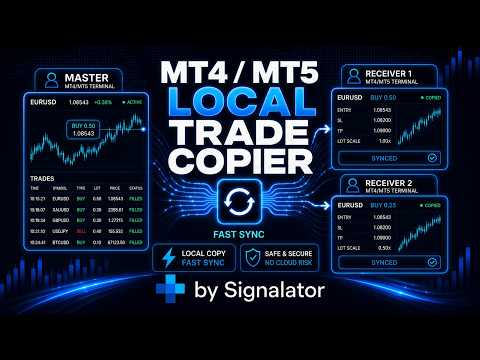
Signalator Local Trade Copier MT4 is a fast local trade copier for running Master and Receiver terminals on the same computer or VPS. It supports cross-platform copying between MT4, MT5 and cTrader terminals in any direction: MT4 ↔ MT5 ↔ cTrader, and all other combinations.

Copy trades locally without an external cloud relay. The Master publishes trade activity into a local bridge, and each Receiver controls what to copy, which Master accounts to accept, how to map symbols, how to size lots, and how to handle SL/TP, partial closes, pending orders, Telegram alerts, logs and export.

The local bridge can work with fast polling, configurable down to 0.1 seconds where supported by your setup. Actual execution speed still depends on terminal load, VPS performance, broker execution and market conditions.

MT5 Local CopierSetup guides and practical instructions

Main features

  • Local MT4/5 copying - copy trades between your own MT4 / MT5  terminals on one computer or VPS.
  • Fast local bridge - configurable polling down to 0.1 seconds, depending on settings and environment.
  • Master and Receiver roles - use one source account and one or more receiver accounts.
  • Multi-receiver setups - copy one Master account to several Receiver accounts.
  • Multi-master structure - organize different Masters through separate BridgeName values or receiver-side account filters.
  • Selected Master accounts - allow Receivers to accept only the source accounts you specify.
  • Read-only Master support - the Master can publish activity even when trading is disabled on that terminal. Receiver accounts still need trading permission.


Copying control

  • Market orders - copy BUY and SELL trades.
  • Full close synchronization - close linked receiver trades when the Master closes.
  • Partial close copying - keep receiver exposure aligned after partial closes.
  • SL/TP synchronization - copy initial SL/TP and later SL/TP changes when enabled.
  • Pending order management - copy pending order placement, modification, cancellation and execution follow-up.
  • Buy/Sell filter - accept both directions, BUY only or SELL only.
  • Reverse mode - intentionally copy opposite direction when required.


Symbol mapping and lot sizing

  • Automatic symbol mapping - handle common broker suffixes, prefixes and symbol variants.
  • Manual mapping - override mapping when a custom match is needed, for example XAUUSD=GOLD.
  • Mapping dashboard - review active, pending and accepted mappings from the interface.
  • Same, Fixed and Multiplier lot modes - choose simple receiver-side sizing.
  • Balance and equity scaling - scale receiver lots according to account size.
  • Lot limits - apply minimum and maximum receiver lot controls.


Protection and diagnostics

  • Same-account protection - block copying when Master and Receiver are the same trading account.
  • Loop protection - prevent receiver-copied trades from being republished as new Master trades.
  • Receiver validation - check bridge, source account, symbol, lot size and broker trading conditions.
  • Reconnect handling - after restart or connection loss, the Receiver checks current Master status before acting on old data.
  • Execution reporting - show skipped trades, rejected orders, invalid symbols, disabled trading, market closed errors, volume errors and broker retcodes.


Monitoring, alerts and export

  • Telegram alerts - receive Master events, copy results, skipped actions, errors and warnings.
  • Privacy options - hide lot size or account details in Telegram messages when needed.
  • Copier log - review copied, skipped, warning, error and system events.
  • CSV and HTML export - export copier activity for review, reporting and account comparison.


Interface

  • Chart dashboard - monitor Master status, Receiver status, mappings, copied activity, Telegram status and errors.
  • Movable dashboard panels - arrange modules side by side on the chart.
  • Switch view - use one active module or dashboard layout with several visible panels.
  • Trade Panel - open and manage trades directly from the copier interface.
  • Tiny mode - compact monitoring view for small VPS screens or multi-terminal layouts.
  • UI scaling - adjust panel size for laptops, VPS windows and high-resolution monitors.
  • Themes and languages - Dark, Light and Dune themes with English, Spanish, Russian interface options.


Customer support

If you encounter any issue during setup or use, please contact us directly. Most copier issues are caused by simple configuration details such as BridgeName mismatch, symbol mapping, broker lot limits, disabled trading, missing WebRequest permission or invalid stop levels. These are usually solved quickly after checking the copier log and setup details.


Signalator ecosystem

Signalator Local Trade Copier MT4 is part of the Signalator trading utility ecosystem, which includes tools for instant trade notifications, summaries, Telegram reporting, multi-terminal execution workflows, licensing, access control and user management software.

You may also be interested in Multi TF Trade Symbol Scanner Alerts, a Signalator tool for scanning selected symbols, comparing trend direction across multiple timeframes and receiving market-condition alerts.
추천 제품
Trade Copier Global
Laszlo Tormasi
5 (15)
Trade Copier Global: The name speaks for itself. This copier allows you to copy orders between MT4 terminals even if they are not installed on the same computer. Features Copying trades between MT4 terminals around the world with a short delay. Automatically recognizes symbol prefixes. Can connect many Slaves to the same Master. Supports pending and market orders. Supports partial order close (with limitations, see below) Can send messages and notifications to the Slaves from the Master Several
close all profitable orders The set contains scripts for different purposes, facilitating work in the MetaTrader 4 terminal. If necessary, a screen is provided for some scripts. Before working on a real account, check (on a demo account) whether the required script responds to your tasks (for example, there is a script for opening five orders at the same time, by default the lot is set to 10; so that you do not accidentally open five positions with a total volume of 50 lots - be attentive))) Use

BEP (Break Even Point) for MT4 script   - closes absolutely all orders, whether pending or market ones. Orders are closed at the current profit/loss indicators at the time of closing. The script is suitable for moments when you need to quickly close all orders at the current indicators. The script is very easy to use, just drag the script onto the chart and it will do its job. Add me as a friend, I have many other useful products.


MQL5 블로그: https://www.mql5.com/en/blogs/post/761446 MT4 버전: https://www.mql5.com/en/market/product/136790 MT5 버전: https://www.mql5.com/en/market/product/136791 Time Wizard는 속도, 타이밍, 실행 제어 기능을 하나의 깔끔한 대시보드에서 필요로 하는 트레이더를 위해 설계된 전문 트레이딩 어시스턴트입니다. 이 Expert Advisor는 이벤트 기반 트레이딩, 예약 실행, 빠른 반자동 주문 관리 기능을 제공합니다. 주문을 미리 준비하고, 정확한 실행 시간을 지정하고, 계층형 대기 주문을 설정하고, 손절매 및 이익 실현으로 위험을 관리하고, 차트의 간편한 인터페이스에서 모든 것을 모니터링할 수 있습니다. 경제 이벤트, 개장 시간, 돌파 시점 또는 사용자 지정 일정 등 어떤 시점을 기준으로 거래하든 Time Wizard는 체계적이고 규율 있는 실행을
A tool for logging personal and downloaded MQL5 trade history data  between specified date range into a CSV file and capturing open trade and close trade chart pictures This History Capturer and Writer tool is an Indicator, so it works well in coexistence with other expert advisor on the same chart $30  for the next 25 downloaders, next price: $30 Try Free Trial Version Here:   Download Free Trial Features: Trade History Chart Screenshot : Capture the opening and closing charts for each hist
Just Copier MT4
Agung Imaduddin
5 (5)
"Just copier" is designed to copy trading without any complicated settings. The copy can be done in one PC. One EA can be set as master (provider) or slave (receiver). The receiver lot can be set to multiple providers lots. Please also check this product at fxina.hostingerapp.com.  Any type of copy is available. MT4 -> MT5 MT4 -> MT4 MT5 -> MT5 MT5 -> MT4 If you want to copy MT4 -> MT5 or MT5 -> MT4, please purchase "Just copier" for MT4 and "Just copier" for MT5 separately. Just Copier can copy
Script CloseAll SELL
Raudhah Hayatun Nufus
Close All SELL Orders for MT4 script   - closes absolutely all orders, whether pending or market ones. Orders are closed at the current profit/loss indicators at the time of closing. The script is suitable for moments when you need to quickly close all orders at the current indicators. The script is very easy to use, just drag the script onto the chart and it will do its job. Add me as a friend, I have many other useful products.
FREE
This tool working You can buy or sell from the button of this tool, the lot size can be filled manually, as for the close all buy button to end all buy positions, close all sell button to end all sell positions, Close All profit button to end  All  profit position, Close All Loss button to end all loss position, Delete Pending button to delete all Pending order, close all orders to end all orders. The variable, you can use close all percent for close all orders when profit in percent, if close
Script CloseAll BUY
Raudhah Hayatun Nufus
Close All BUY Orders for MT4 script   - closes absolutely all orders, whether pending or market ones. Orders are closed at the current profit/loss indicators at the time of closing. The script is suitable for moments when you need to quickly close all orders at the current indicators. The script is very easy to use, just drag the script onto the chart and it will do its job. Add me as a friend, I have many other useful products.
FREE
Скрипт собирает статистику по размерам свечей и сохраняет данные в файл CSV. Каждая строка таблицы - это отдельная свеча с ее характеристиками: время, направление (1 - бычья/доджи, -1 - медвежья), размер верхней и нижней тени, размер тела и полный размер свечи. Индикатор, который отбражает размеры свечей, а также построенные по этим размерам скользящие средние, можно скачать здесь . ПАРАМЕТРЫ FileName:  имя файла, в который экспортируются данные. Если оставить поле пустым, то имя файла - "Cand
Crystal CopyCat Ultimate MT4
Muhammad Jawad Shabir
5 (1)
Crystal CopyCat Ultimate Ultra-Fast Master–Slave Copier with Zero-Delay Execution and Cross-Platform MT5 Compatibility Architecture: MT4 → MT4 and MT4 → MT5 Full Compatibility MT4 Pro :- https://www.mql5.com/en/market/product/165057 MT5  Free Version: https://www.mql5.com/en/market/product/144569 Complete User Setup Guide:-  https://www.mql5.com/en/blogs/post/764222   1. Overview Crystal CopyCat Ultimate 5.0 is a next-generation trade copy engine engineered for professional traders, portfo
FREE
SETTINGS: Setting 1-  Will I act as server or client? : As you see, this setting for choice working mode as client or server.  ( server or client ) Setting 2-  Will I copy stoploss and takeprofit? : If true they will be copy, if false they will not be copy.  ( true or false ) Setting 3-  If I am client I multiply lots with this value: Multiplier value for transaction lots on client mode only.  ( 0.01 - 100 ) Setting 4-  If I am client I don't copy if lots greater than value: It is working on whe
THIS PRODUCT CAN NOT BE TEST IN STRATEGY TESTER. PLEASE TRY DEMO VERSION: https: //www.mql5.com/en/market/product/58082 FIRST 10 COPIES AT 30 USD, NEXT PRICE WOULD BE 50 USD RISK AND TRADE MANAGER RISK AND TRADE MANAGER   is an advanced trading panel designed for manual trading.   Utility helps to manage trades effectively and efficiently with a single click. MAIN FEATURES Convert and display Stop Loss (SL)   Pips into % and amount to view the clear picture of the trades if SL hits. Fund alloca
Heaven Assistant: MT4 관리 단순화 Heaven Assistant를 통해 MetaTrader 4 (MT4) 플랫폼 관리를 단순화하세요. 이 전문가 어드바이저(EA)는 효과적이고 사용자 친화적인 방식으로 거래 환경을 제어하고 사용자 정의 할 수 있게 해주는 견고한 도구입니다. 핵심 기능: 다수의 페어 열기: 주요 및 마이너 통화 쌍뿐만 아니라 이국적인 통화 쌍에 대한 빠른 액세스. 한 번의 클릭으로 지수, 금속 및 암호화폐를 열 수 있습니다. 템플릿 변경: 모든 열린 페어에 대해 좋아하는 템플릿을 적용하여 차트 뷰를 쉽게 사용자 정의 할 수 있습니다. 시간프레임 변경: 모든 열린 차트의 시간프레임을 변경하여 거래 스타일에 적응하십시오. 이점: 쉬운 사용: 입력 패널을 통한 쉬우면서 빠른 설정. 특정 차트에만 동작을 적용하는 필터링 옵션. 시간 절약: 여러 페어와 설정을 쉽게 관리하여 소중한 시간을 절약하십시오. 사용자 정의 가능: 주요, 마이너, 이국적인 페어, 지수,
The professional utilities "Ichimoku Waves Meter" to analyse graphs using the correct interpretation of Ichimoku kinkōhyō! Is a graphic program that allows traders to quickly and easily measure the proportions between the indicated points on the price graph. This time and price indicator is a basic tool for analysing the chart according to the Ichimoku strategy on the MT4 platform. Using this tool allows an insightful and complete analysis of time waves as well as price waves in a very short ti
This tool can help you close all open orders with one click, just click "Close all". If you only want to close the profitable orders, click the "Close profitable" button. After clicking, all the floating orders will be closed. All orders will be liquidated; if you only want to close the orders with floating losses, click the "Close losable" button. After clicking, all orders with floating losses will be liquidated.
Скрипт используется для сбора статистики по переходам цены между уровнями сетки, размер которой задается в настройках (смотрите индикатор Transitions between levels ). Данные записываются в CSV файл. Есть два режима сбора статистики: SeparateTransition - учитывается каждый отдельный переход (смотрите скриншот 2). Время перехода - время, когда цена коснулась нового уровня. Accumulation - в файл записывается количество однонаправленных переходов  (смотрите скриншот 4). Например, -7 - семь пеерех
Market Monitor
Rodrigo Rethka Goncalves
Market Monitor – Smart Asset Performance Dashboard for MT4 Turn your MetaTrader 4 into a professional trading intelligence center! Market Monitor is a powerful monitoring tool that displays, in real time, the most relevant performance metrics of each symbol being traded — helping you make faster, smarter, and more strategic decisions. What Does This Indicator Do? Market Monitor scans all open and historical orders, consolidates the data by symbol, and displays everything in visual pa
Introducing the OrderManager: A Revolutionary Utility for MT4 Manage your trades like a pro with the all-new Order Manager utility for MetaTrader 4. Designed with simplicity and ease-of-use in mind, the Order Manager allows you to effortlessly define and visualize the risk associated with each trade, enabling you to make informed decisions and optimize your trading strategy.  Key Features: Risk Management: Define the risk of your trades quickly and easily, allowing you to make better decisio
자동 브레이크이븐 레벨 이   유틸리티를   사용하면 ,   거래가   원하는 수익에 도달했을 때 자동으로 SL을 이동하는 기능을 활성화할 수 있습니다.  특히   단기   거래자에게   중요합니다.   오프셋 옵션도 사용 가능합니다: 일부 수익을 보호할 수 있습니다. 다기능 유틸리티 : 66개 이상의 기능, 이 도구 포함  |   질문이 있으면 연락주세요   |   MT5 버전 자동 브레이크이븐 기능 활성화 과정: 1.   심볼 또는 거래 선택   Auto BE 기능이 활성화될 대상: 현재   [Symbol]   / 모든 거래   [ALL]   / 또는 특정 거래   [Ticket] . [Symbol] 또는 [ALL] 규칙 외에 - 특정 거래에 대해 별도의 규칙을 설정할 수 있습니다, 티켓 번호로: 개별 [Ticket] 규칙이 우선순위를 가집니다. 2. Auto BE를 활성화할   거래 유형   선택: [ALL]: 모든 활성 거래; [Longs]: 매수 거래만; [Shorts]:
This Dashboard displays signals in grid view for the 28 major fx currency pairs. It is Mainly used for forex scalping in between 10 to 20 pips maximum and can be used on major trend market decisions. It Uses mainly Moving average and does not give false signal. All you need to note is the point in the grid where the signal occurs.  A beep sound is heard whenever there is a new signal and it will be displayedat the top of the chart.
AW Metatrader to Telegram
AW Trading Software Limited
귀하의 구독자가 귀하의 거래 터미널에서 귀하의 거래 이벤트를 놓치지 않도록 알림을 보내는 자동화된 시스템. 계정의 모든 거래 작업에 대해 Telegram 메신저에 알림을 보내는 유틸리티입니다. Telegram ->   HERE   / MT5 ->   HERE   의 채널에 유틸리티를 연결하는 단계별 지침 장점: 쉬운 설정과 자세한 설명, 조정 가능한 스크린샷을 보낼 수 있습니다. 이모티콘을 사용하여 사용자 정의 가능한 알림 텍스트, 오픈, 전체 또는 부분 마감에 대한 알림 조정 및 주문 수정, 기본적으로 알림을 보낼 때 텍스트 파일이 자동으로 다운로드되며, 대기 중인 주문의 배치 또는 삭제에 대한 알림 조정, 기호 및 매직 넘버로 편리한 필터링. 입력 변수: TELEGRAM BOT AND CHAT SETTINGS Telegram bot token - Enter the token number received after registering the bot in "BotFather" T
Universal copier of deals from MetaTrader 4 to MetaTrader 4 ( MT5<->MT5 version is available ; with both versions, you can copy MetaTrader 5<->MetaTrader 4, MetaTrader 4<->MetaTrader 5, MetaTrader 5<->MetaTrader 5, MetaTrader 4<->MetaTrader 4). Spread filter. Select the best price (start copying positions with a profit or loss). Configure the lot size, fixed or ratio-based (provider signals can be copied with an increased lot). Configure order copying (include pending orders or copy only open po
Telegram Signal pro
Sara Sabaghi
4.86 (7)
What is it? Think about it, you can send all the orders/positions info to your telegram channel or group to create your community or VIP signals on telegram. Position info means this EA forward all of your new positions open details (Open price, Open time, Position Type, position Symbol and volume), positions changes ( SL or TP modifying or pending price changes) and position close (Close price, profit or loss, position duration time) and also EA Send NEWS alert (Economic calendar event) on you
Trade Copy
Shao Chen
3.5 (2)
TradeCopy is an efficient MT4, MT5 trade copy software,using as EA on MT4 real account. You can download the Demo unlimit version to test on Demo account: Trade Copy MT4 Demo Free Trade Copy MT5 Demo Free Features: 1.Can achieve cross-MT4 and MT5 trade copy . 2. The Sender and the receiver are in the same file, which is convenient to use. 3.Can achieve cross-broker trade copy. 4.More trade copy style, you can copy by balance,equity, lot ratio or fixed lot . 5.Can enlarge or reduce the amount o
A   rocket   (from   Italian :   rocchetto ,   lit. 'bobbin/spool') [nb 1] [1]   is a   projectile   that   spacecraft ,   aircraft   or other   vehicles   use to obtain   thrust   from a   rocket engine . Rocket engine exhaust is formed entirely from   propellant   carried within the rocket. [2]   Rocket engines work by   action and reaction   and push rockets forward simply by expelling their exhaust in the opposite direction at high speed, and can therefore work in the   vacuum   of space. In
The professional utilities "Ichimoku Waves Meter" to analyse graphs using the correct interpretation of Ichimoku kinkōhyō! Is a graphic program that allows traders to quickly and easily measure the proportions between the indicated points on the price graph. This time and price indicator is a basic tool for analysing the chart according to the Ichimoku strategy on the MT4 platform. Using this tool allows an insightful and complete analysis of time waves as well as price waves in a very short ti
Trade History Exporter automatically exports trade history to a CSV (comma separated values) file. Trade History Exporter: - automatically exports trade history every time a trade is closed - allows you to manually force an export by using the "W" key on your keyboard - can use Order Comments as Magic Numbers - useful for instance when using a Trade Copier - calculates the Net Profit per trade
Information is a subject of the market mood. Information is objective when it comes from different sources. If information is identical then we may speak about its convergence. Otherwise, we may speak about its conflict (divergence). Indicators and oscillators are the sources of information of the technical analysis. Bullish CD LBT   Osc  (Bullish Convergence/Divergence Low Bottom Top Oscillator) is a universal analytical bulls convergence/divergence indicator between any of the twenty three sta
ExPad
Igor Semyonov
ExPad  - a trade panel for comfortable trading on financial markets. Suitable for trading any financial instruments. In general, the panel is able to perform the following functions: Open and reverse of deals Operation with visible and hidden StopLoss and TakeProfit Independent management of visible and hidden StopLosses Profit protection due to Breakeven and Trailing Stop  Choice of technique for Trailing Stop Distance from market price Moving Average Bolinger Bands Middle Line High and Low pri
이 제품의 구매자들이 또한 구매함
Trade Manager EA에 오신 것을 환영합니다. 이 도구는 거래를 보다 직관적이고 정확하며 효율적으로 만들기 위해 설계된 궁극적인 리스크 관리 도구 입니다. 단순한 주문 실행 도구가 아닌, 원활한 거래 계획, 포지션 관리 및 리스크 제어를 위한 종합 솔루션입니다. 초보자부터 고급 트레이더, 빠른 실행이 필요한 스캘퍼에 이르기까지 Trade Manager EA는 외환, 지수, 상품, 암호화폐 등 다양한 시장에서 유연성을 제공합니다. Trade Manager EA를 사용하면 복잡한 계산은 이제 과거의 일이 됩니다. 시장을 분석하고 진입, 손절 및 익절 수준을 차트의 수평선으로 표시한 후 리스크를 설정하면, Trade Manager가 이상적인 포지션 크기를 즉시 계산하고 SL 및 TP 값을 실시간으로 표시합니다. 모든 거래가 간편하게 관리됩니다. 주요 기능: 포지션 크기 계산기 : 정의된 리스크에 따라 거래 크기를 즉시 결정합니다. 간단한 거래 계획 : 진입, 손절, 익절을 위한
Local Trade Copier EA MT4
Juvenille Emperor Limited
4.96 (110)
Local Trade Copier EA MT4 를 사용하여 매우 빠른 거래 복사 경험을 해보세요. 1분 안에 간편하게 설정할 수 있으며, 이 거래 복사기를 사용하면 Windows 컴퓨터 또는 Windows VPS에서 여러 개의 MetaTrader 터미널 간에 거래를 0.5초 미만의 초고속 복사 속도로 복사할 수 있습니다. 초보자든 전문가든 Local Trade Copier EA MT4 는 다양한 옵션을 제공하여 사용자의 특정 요구에 맞게 맞춤 설정할 수 있습니다. 이는 수익 잠재력을 높이려는 모든 사람을 위한 최고의 솔루션입니다. 지금 사용해보시고 이것이 왜 시장에서 가장 빠르고 쉬운 무역용 복사기인지 알아보세요! 팁: 여기 에서 데모 계정에서 Local Trade Copier EA MT4 데모 버전을 다운로드하여 사용해 볼 수 있습니다. 다운로드한 무료 데모 파일을 MT4 >> File >> Open Data Folder >> MQL4 >> Experts 폴더에 붙여넣고 터미널
Trade Assistant MT4
Evgeniy Kravchenko
4.43 (197)
거래당 위험 계산, 라인을 사용한 손쉬운 신규 주문, 부분 청산 기능을 통한 주문 관리, 7가지 유형의 트레일링 스탑 및 기타 유용한 기능을 제공합니다. 추가 자료 및 지침 설치 지침 - 애플리케이션 지침 - 데모 계정용 애플리케이션 평가판 라인 기능       - 차트에 개시선, 손절매, 차익실현을 표시합니다. 이 기능을 사용하면 새로운 주문을 쉽게 하고 개봉 전에 추가 특성을 볼 수 있습니다. 위기 관리       -       위험 계산 기능은 설정된 위험과 손절매 주문의 크기를 고려하여 새 주문의 볼륨을 계산합니다. 이를 통해 손절매 크기를 설정하고 동시에 설정된 위험을 존중할 수 있습니다. 로트 계산 버튼 - 위험 계산을 활성화/비활성화합니다. 필요한 위험 값은 위험 필드에 0에서 100 사이의 백분율 또는 예금 통화로 설정됩니다. 설정 탭에서 위험 계산 옵션을 선택합니다. $ 통화, % 잔액, % 지분, % 자유 마진, % 사용자 정의, % AB 이전 일, % AB
Exp COPYLOT CLIENT for MT4
Vladislav Andruschenko
4.69 (65)
MetaTrader 4용 전문 트레이드 복사기 MetaTrader 4 용 빠르고 안정적이며 전문적인 트레이드 복사기입니다. COPYLOT 은 MetaTrader 4 와 MetaTrader 5 터미널 간에 Forex 거래를 복사할 수 있으며, 다양한 계좌 유형과 운용 방식에 맞춰 유연한 동기화 환경을 제공합니다. COPYLOT MT4 버전 지원 방식: MetaTrader 4 → MetaTrader 4 MetaTrader 5 Hedge → MetaTrader 4 MetaTrader 5 Netting → MetaTrader 4   MT5 버전 상세 설명 + DEMO + PDF 구매 방법 설치 방법 로그 파일 확인 방법 테스트 및 최적화 방법 Expforex의 모든 제품 MetaTrader 5 버전 을 사용하면 MetaTrader 5 → MetaTrader 5 및 MetaTrader 4 → MetaTrader 5 복사도 지원됩니다: COPYLOT CLIENT for MT5 COPYLOT 은
Unlimited Trade Copier Pro is a tool to copy trade remotely to multiple MT4, MT5 and cTrader accounts at different computers/locations over internet. This is an ideal solution for you if you are a signal provider and want to copy your trades to other receivers globally on your own rules. One provider can copy trades to multiple receivers and one receiver can get trade from multiple providers as well. The provider can even set the subscription expiry for each receiver, so that receiver will not b
TradePanel MT4
Alfiya Fazylova
4.84 (95)
Trade Panel은 다기능 거래 도우미입니다. 이 애플리케이션에는 50개 이상의 수동 거래 기능이 포함되어 있으며 대부분의 거래 작업을 자동화할 수 있습니다. 구매하기 전에 데모 계정에서 데모 버전을 테스트할 수 있습니다. 데모 계정용 애플리케이션 체험판 다운로드: https://www.mql5.com/en/blogs/post/750865 . 전체 지침 여기 . 거래. 한 번의 클릭으로 거래를 수행할 수 있습니다: 리스크 자동 계산과 함께 예약 주문 및 포지션 열기. 한 번의 클릭으로 여러 주문 및 포지션 열기. 주문 그리드 열기. 예약 주문 및 포지션을 그룹별로 닫기. 포지션 방향 전환 (Buy 닫기 > Sell 열기, Sell 닫기 > Buy 열기). 포지션 잠금 (부족한 포지션을 열어 Buy와 Sell 포지션의 수량을 동일하게 만들기). 모든 포지션 한 번의 클릭으로 부분적으로 닫기. 모든 포지션의 테이크 프로핏과 스톱로스를 같은 가격 수준에 설정. 모든 포지션의 스톱로스를
News Filter EA: Advanced Algo Trading Assistant News Filter EA is an advanced algo trading assistant designed to enhance your trading experience. By using the   News Filter EA , you can integrate a Forex economic news filter into your existing expert advisor, even if you do not have access to its source code. In addition to the news filter, you can also specify   trading days   and   hours   for your expert. The News Filter EA also includes   risk management   and   equity protection   features
Trade copier MT4
Alfiya Fazylova
4.59 (34)
Trade Copier는 거래 계정 간의 거래를 복사하고 동기화하도록 설계된 전문 유틸리티입니다. 복사는 공급자의 계정/단말기에서 동일한 컴퓨터 또는 vps에 설치된 수신자의 계정/단말기로 발생합니다. 프로모션 - 이미 "Trade copier MT4"를 구매하셨다면, "Trade copier MT5"를 무료로 받으실 수 있습니다 (MT4 → MT5 및 MT4 ← MT5 복사용). 조건에 대한 자세한 정보를 원하시면, 개인 메시지를 통해 저희에게 문의해 주시기 바랍니다! 구매하기 전에 데모 계정에서 데모 버전을 테스트할 수 있습니다. 데모 버전 여기 . 전체 지침 여기 . 주요 기능 및 이점: 복사기는 "МТ4> МТ4", "МТ4> МТ5", "МТ5> МТ4" 복사를 지원합니다. 복사기는 데모 계정 > 실 계정, 실 계정 > 데모 계정, 데모 계정 > 데모 계정 및 실제 계정 > 실 계정 복사를 지원합니다. 복사기는 읽기 전용 암호가 적용된 투자자 계정에서 복사를 지원합니다. 하
거래하고자 하는 주요 영역을 파악한 후 자동으로 거래 지원 및 저항 또는 공급 및 수요 구역을 설정합니다. 이 EA를 사용하면 한 번의 클릭으로 매수 및 매도 구역을 그린 다음 가격이 바뀔 것으로 예상되는 정확한 위치에 배치할 수 있습니다. 그런 다음 EA는 해당 구역을 모니터링하고 구역에 대해 지정한 가격 액션에 따라 자동으로 거래를 수행합니다. 초기 거래가 수행되면 EA는 대상 구역이 되는 반대 구역에서 이익을 얻습니다. 그런 다음 거래를 종료하고 진입할 새 구역을 그리거나 이익을 얻고 즉시 반대 방향으로 거래를 역전하여 "항상 시장" 스타일 전략을 만드는 두 가지 선택이 있습니다. 입력 및 전략이 포함된 전체 매뉴얼은 여기에 있습니다: https://www.mql5.com/en/blogs/post/760256 이 EA는 시장에서 고정 또는 하드 스톱 로스를 사용하지 않는 포지션 트레이더 또는 달러 비용 평균 거래 전략을 위해 설계되었습니다. 대신, 다음에 가능한 지지 또는
작동 체험판 다운로드 Copy Cat More (카피캣) MT4 트레이드 카피어 (Trade Copier) 는 단순한 로컬 트레이드 카피어가 아닙니다. 오늘날의 트레이딩 과제를 위해 설계된 완전한 리스크 관리 및 실행 프레임워크 (risk management and execution framework) 입니다. 프롭 펌 (prop firm) 챌린지부터 개인 포트폴리오 관리까지, 견고한 실행, 자본 보호, 유연한 설정, 고급 트레이드 처리의 조합으로 모든 상황에 적응합니다. 이 카피어는   마스터 (Master, 송신측) 와 슬레이브 (Slave, 수신측)   두 모드 모두에서 작동하며, 시장가 주문과 대기 주문, 트레이드 수정, 부분 청산, 상호 청산 (Close By) 작업을 실시간으로 동기화합니다. 데모 및 실거래 계좌, 트레이딩 또는 인베스터 로그인 모두와 호환되며, EA·터미널·VPS가 재시작되더라도 영구 트레이드 메모리 (Persistent Trade Memory) 시
The News Filter
Leolouiski Gan
5 (25)
이 제품은 뉴스 시간 동안 모든 전문가 어드바이저 및 수동 차트를 필터링하여 수동 거래 설정이나 다른 전문가 어드바이저가 입력한 거래가 파괴될 수 있는 급격한 가격 상승으로부터 걱정하지 않아도 됩니다. 이 제품은 또한 뉴스 발표 전에 열린 포지션과 대기 주문을 처리할 수 있는 완전한 주문 관리 시스템이 함께 제공됩니다. The News Filter  를 구매하면 더 이상 내장 뉴스 필터에 의존할 필요가 없으며 이제부터 모든 전문가 어드바이저를 여기서 필터링할 수 있습니다. 뉴스 선택 뉴스 소스는 Forex Factory의 경제 캘린더에서 얻어집니다. USD, EUR, GBP, JPY, AUD, CAD, CHF, NZD 및 CNY와 같은 어떤 통화 기준으로 선택할 수 있습니다. Non-Farm (NFP), FOMC, CPI 등과 같은 키워드 식별을 기준으로 선택할 수도 있습니다. 저, 중, 고 영향을 가지는 뉴스를 필터링할 수 있도록 선택할 수 있습니다. 차트와 관련된 뉴스만 선택하
Riskless Pyramid
Snapdragon Systems Ltd
5 (1)
Introduction This powerful MT4 trade mangement EA offers a way potentially to aggressively multiply trade profits in a riskfree manner. Once a trade has been entered with a defined stoploss and take profit target then the EA will add three pyramid add-on trades in order to increase the overall level of profit. The user sets the total combined profit target to be gained if everything works out. This can be specified either as a multiple of the original trade profit or as a total dollar amount. Fo
Crystal CopyCat Pro Trade Copier Ultra-Fast Master–Slave Copier with Zero-Delay Execution and Cross-Platform MT5 Compatibility Architecture:   MT4 → MT4 and MT4 → MT5 Full Compatibility MT5 Version Free :   https://www.mql5.com/en/market/product/144569 MT5 Version Pro :  https://www.mql5.com/en/market/product/165051 Complete User Setup Guide:-  https://www.mql5.com/en/blogs/post/764222   1. Overview Crystal CopyCat Ultimate 5.0 is a next-generation trade copy engine engineered for professi
The product will copy all telegram signal to MT4   ( which you are member  ) , also it can work as remote copier.  Easy to set up, copy order instant, can work with almost signal formats, image signal, s upport to translate other language to English Work with all type of channel or group, even channel have "Restrict Saving Content", work with  multi channel, multi MT5 Work as remote copier: with signal have ticket number, it will copy exactly via ticket number. Support to backtest signal. How to
Grid Manual MT4
Alfiya Fazylova
4.71 (17)
"Grid Manual"은 주문 그리드 작업을 위한 거래 패널입니다. 이 유틸리티는 보편적이며 유연한 설정과 직관적인 인터페이스를 제공합니다. 그것은 손실을 평균화하는 방향뿐만 아니라 이익을 증가시키는 방향으로 주문 그리드와 함께 작동합니다. 거래자는 주문 그리드를 만들고 유지할 필요가 없으며 유틸리티에서 수행합니다. 거래자가 주문을 시작하는 것으로 충분하며 "Grid Manual"는 자동으로 그를 위한 주문 그리드를 생성하고 거래가 마감될 때까지 그와 동행할 것입니다. 전체 설명 및 데모 버전 여기 . 유틸리티의 주요 기능: 모바일 터미널을 포함하여 어떤 방식으로든 열린 주문과 함께 작동합니다. "제한" 및 "중지"의 두 가지 유형의 그리드와 함께 작동합니다. 고정 및 동적(ATR 표시기 기반)의 두 가지 유형의 그리드 간격 계산과 함께 작동합니다. 오픈 오더 그리드의 설정을 변경할 수 있습니다. 차트에서 각 주문 그리드의 손익분기점 수준을 표시합니다. 각 주문 그리드에 대한 이익
DrawDown Limiter MT4
Haidar Lionel Haj Ali
5 (8)
Drawdown Limiter EA You are in the right place if you were searching for Drawdown control, Drawdown limiter, Balance protection, Equity Protection or Daily Drawdown Limit related to Prop Firm, FTMO, or Funded account trading, or if you want to protect your trading account. Have you suffered from controlling your drawdown when trading funded accounts? This EA is meant for you. Prop firms usually set a rule called “Trader Daily Drawdown”, and if it is not respected, you are disqualified.  I am an
Trade Copier Professional — 로컬 복사 솔루션   Trade Copier Professional 은 MetaTrader 4/5 용 신뢰성 높은 로컬 거래 복사 시스템입니다. 동일한 컴퓨터 내 여러 계좌에서 포지션을 즉시 복제할 수 있으며, 내장된 안전 제어 기능과 전문적인 대시보드를 제공합니다.   개요   이 EA는 단일 파일에서 Master 모드와 Slave 모드 모두로 작동하며, 매끄럽게 전환할 수 있습니다. MT4 와 MT5 터미널 간 거래를 인터넷에 의존하지 않고 복사할 수 있으며, 로컬 파일 기반 통신을 통해 최대 속도와 안정성을 보장합니다. 실시간 대시보드는 연결 상태, 복사 통계, 일일 성과를 표시합니다.   로트 및 리스크 관리   네 가지 로트 계산 모드가 제공됩니다: 고정 로트, 배수, 리스크 비율, 잔액 비율. 손절매와 익절은 조정 또는 스케일링이 가능하며, 필요 시 신호를 반대로 복사할 수 있습니다. 안전 기능에는 일일 손실 및 거래
VirtualTradePad PRO SE MT4 — MetaTrader 4용 고급 트레이딩 패널 및 차트 워크스페이스 VirtualTradePad PRO SE 는 MetaTrader 4 용 전문 트레이딩 패널이자 거래 관리 워크스페이스입니다. 하나의 차트 기반 인터페이스에서 거래를 더 빠르게 열고, 관리하고, 보호하고, 닫고, 분석할 수 있도록 도와줍니다. 이 제품은 단순한 버튼 모음 이상의 기능이 필요한 적극적인 수동 트레이더를 위해 만들어졌습니다. PRO SE는 원클릭 실행, 예약 주문, 포지션 제어, 부분 청산, 바스켓 손익 로직, 평균가 레벨, ATM 규칙, 신호 모니터링, 시장 정보, 전략 테스터 워크플로, VPS 중심 준비를 하나의 구조화된 워크스페이스로 통합합니다. MT5 버전 | 전체 설명 및 스크린샷 | 구입 방법 | 설치 방법 | 로그 파일을 얻는 방법 | 테스트 및 최적화 방법 | Expforex의 모든 제품 일반 수동 트레이딩 대비 장점 여러 창 대신 하나의 워
VirtualTradePad mt4 Extra
Vladislav Andruschenko
4.85 (61)
한 번의 클릭으로 거래할 수 있는 거래 패널.   위치 및 주문 작업!   차트 또는 키보드에서 거래. 거래 패널을 사용하면 차트에서 클릭 한 번으로 거래하고 표준 MetaTrader 컨트롤보다 30배 빠르게 거래 작업을 수행할 수 있습니다. 거래자의 삶을 더 쉽게 만들고 거래자가 훨씬 빠르고 편리하게 거래 활동을 수행할 수 있도록 도와주는 매개변수 및 기능의 자동 계산. 차트의 무역 거래에 대한 그래픽 팁 및 전체 정보. 새로운 프리미엄 버전 출시:   VirtualTradePad PRO SE 로 트레이딩 워크플로를 업그레이드하세요.   MetaTrader 5   및   MetaTrader 4 를 위한 차세대 전문 트레이딩 패널입니다. MT5 버전 전체 설명   +DEMO +PDF 구입 방법 설치하는 방법     로그 파일을 얻는 방법     테스트 및 최적화 방법     Expforex의 모든 제품 열기 및 닫기, 반전 및 잠금, 부분 닫기/오토로트. 가상/실제 손절매/이익
Trading History MT4
Siarhei Vashchylka
5 (9)
Trading History - A program for trading and money management on the history of quotes in stratagy tester. It can work with pending and immediate orders, and is equipped with trailing stop, breakeven and take profit functions. Very good for training and testing different strategies. Manual (Be sure to read before purchasing) Advantages 1. Allows you to test any trading strategy in the shortest possible time 2. An excellent simulator for trading training. You can gain months of trading experience
Custom Alerts AIO: 다중 시장을 동시에 모니터링 – 설정 없이 즉시 사용 가능 개요 Custom Alerts AIO 는 복잡한 설정 없이 즉시 사용할 수 있는 통합 시장 모니터링 도구입니다. FX Power, FX Volume, FX Dynamic, FX Levels, IX Power 등 필요한 모든 지표가 내장되어 있어 별도의 설치나 구성 없이 알림 기능을 바로 사용할 수 있습니다. 차트 그래픽 없이 작동하며, Forex, 금속, 지수, 암호화폐 등 주요 자산군을 모두 지원합니다. 주식(Symbols)은 별도로 입력하여 추가할 수 있으나, MetaTrader에서는 일반적으로 제한적으로만 사용됩니다. 1. 왜 Custom Alerts AIO를 선택해야 하나요? 추가 라이선스가 필요 없습니다 • 모든 Stein Investments 지표가 내장되어 있어 별도 구매가 필요 없습니다. • 즉시 알림 기능을 시작할 수 있어 빠르고 간편합니다. 모든 시장을 하나의 도구로
Trade Manager MT4 DaneTrades
Levi Dane Benjamin
4.09 (11)
거래 관리자는 위험을 자동으로 계산하는 동시에 거래를 빠르게 시작하고 종료하는 데 도움을 줍니다. 과잉 거래, 복수 거래 및 감정 거래를 방지하는 데 도움이 되는 기능이 포함되어 있습니다. 거래를 자동으로 관리할 수 있으며 계정 성과 지표를 그래프로 시각화할 수 있습니다. 이러한 기능은 이 패널을 모든 수동 거래자에게 이상적으로 만들고 MetaTrader 4 플랫폼을 향상시키는 데 도움이 됩니다. 다중 언어 지원. MT5 버전  |  사용자 가이드 + 데모 트레이드 매니저는 전략 테스터에서 작동하지 않습니다. 데모를 보려면 사용자 가이드로 이동하세요. 위기 관리 % 또는 $를 기준으로 위험 자동 조정 고정 로트 크기 또는 거래량과 핍을 기반으로 한 자동 로트 크기 계산을 사용하는 옵션 RR, Pips 또는 Price를 사용한 손익분기점 손실 설정 추적 중지 손실 설정 목표 달성 시 모든 거래를 자동으로 마감하는 최대 일일 손실률(%)입니다. 과도한 손실로부터 계정을 보호하고 과도한
MT4 to Telegram Signal Provider 는 사용하기 쉽고 완전히 사용자 정의가 가능한 도구로, 텔레그램으로 신호를 보내어 계정을 신호 제공자로 변환할 수 있습니다. 메시지 형식은 완전히 사용자 정의가 가능합니다! 그러나 간단한 사용을 위해 미리 정의된 템플릿을 선택하고 메시지의 특정 부분을 활성화하거나 비활성화할 수도 있습니다. [ 데모 ]  [ 매뉴얼 ] [ MT5 버전 ] [ 디스코드 버전 ] [ 텔레그램 채널 ]  New: [ Telegram To MT5 ] 설정 단계별 사용자 가이드 가 제공됩니다. 텔레그램 API에 대한 지식이 필요 없으며, 개발자가 필요한 모든 것을 제공합니다. 주요 기능 구독자에게 보낸 주문 세부 정보를 사용자 정의할 수 있는 기능 예를 들어 브론즈, 실버, 골드와 같은 계층 구독 모델을 만들 수 있습니다. 골드 구독은 모든 신호 등을 받게 됩니다. ID, 심볼 또는 코멘트별 주문 필터링 주문이 실행된 차트의 스크린샷을 포함 보낸
Support and Resistance Dashboard for MT4 is a multi-timeframe and multi-symbol scanner and alert system that finds S/R zones and pivot points for all timeframes and symbols and alerts when price has interaction with them. If you are using support and resistance (or supply and demand) zones in your trading strategy, this dashboard and its alert and filtering system is a big time saver for you. Download demo version   (works on M 1,M5,M30,W1   timeframes) Full description of scanner parameters ->
Trade Reverse Copie4
Chukwuemeka Kingsley Anyanwu
Feel free to contact me for any extra features :) [SEE MT5 VERSION  https://www.mql5.com/en/market/product/128846 The Local Reverse Copier is an Expert Advisor designed to synchronize positions between a Master account and a Slave account with a twist: it reverses the trades. When a buy position is opened on the Master account, the EA opens a sell position on the Slave account, and vice versa. This allows for a unique form of trade copying where positions are mirrored in opposite directions bet
Telegram to MT4 Multi-Channel Copier 는 Telegram 채널의 트레이딩 신호를 자동으로 MetaTrader 4로 직접 복사합니다. 봇도, 브라우저 확장 프로그램도, 수동 복사도 필요 없습니다. Telegram에서 신호를 받으면 EA가 몇 초 안에 터미널에서 거래를 엽니다. 본 제품은 두 가지 구성 요소로 구성되어 있습니다: Telegram 채널을 감시하는 Windows 애플리케이션과 MT4 터미널에서 신호를 실행하는 이 Expert Advisor입니다. MT5 버전도 제공됩니다. 설정 가이드 및 애플리케이션 다운로드: https://www.mql5.com/en/blogs/post/768988 작동 방식 Windows 애플리케이션은 봇이 아닌 사용자 자신의 API 자격 증명을 사용하여 Telegram에 연결됩니다. 이는 프라이빗 및 VIP 채널을 포함하여 구독 중인 모든 채널, 그룹 또는 주제를 읽을 수 있음을 의미합니다. 신호를 감지하면 이를 파싱하여
Master Close via Telegram can help you perform some management tasks on MT4/MT5 remotely via your Telegram by one click, easy to set up & use. Demo here (see more Master Notify   Master Control  ) ************************************************************************************ LIST OF COMMANDS: info_acc -  Get account info info_pen -   Get pending orders details info_pos -   Get positions details info_pos_sum -   Get positions summary close_pen -   Delete all pending orders close_pos_all -
Telegram to MT4 Coppy
Sergey Batudayev
4.09 (11)
Telegram에서 MT4로:   최고의 신호 복사 솔루션 최첨단 유틸리티인   Telegram to MT4를   사용하여 거래를 간소화하세요. DLL 없이도 Telegram 채널과 채팅에서 MetaTrader 4 플랫폼으로 거래 신호를 직접 복사할 수 있습니다. 이 강력한 솔루션은 탁월한 정밀도와 맞춤 설정 옵션을 통해 원활한 신호 실행을 보장하여 시간을 절약하고 효율성을 높여줍니다. [ Instructions and DEMO ] 주요 특징 직접 Telegram API 통합 전화번호와 보안 코드를 통해 인증하세요. 사용자 친화적인 EXE 브리지를 사용하여 채팅 ID를 손쉽게 가져오고 관리하세요. 여러 채널/채팅을 추가, 삭제, 새로 고침하여 동시에 신호를 복사합니다. 고급 필터를 사용한 신호 파싱 사용자 정의 예외 단어(예: "보고서", "요약")가 포함된 원치 않는 신호를 건너뜁니다. 유연한 SL 및 TP 형식을 지원합니다: 가격, 핍 또는 포인트. 신호가 가격 대신 지점을 지정
Exp Averager
Vladislav Andruschenko
4.82 (22)
MetaTrader 4용 Averager — 전문적인 평균 단가 조정 및 포지션 시리즈 관리 시스템 드로우다운에 들어간 포지션을 더 체계적으로 복구하고, 평균 진입가를 개선하며, 전체 포지션 바스켓을 하나의 전략적 구조로 관리하기 위해 설계된 Expert Advisor입니다. 이것은 단순한 물타기 도구가 아니라, 손실 구간의 포지션을 더 효율적으로 재구성하고, 공통 청산 지점까지 더 현실적으로 접근하도록 돕는 실전형 관리 시스템입니다. Averager는 독립적인 자동매매 시스템이 아닙니다. 스스로 진입 신호를 찾는 전략이 아니라, 이미 열려 있는 거래를 추적하면서 평균화, 추가 진입, 공통 트레일링 스톱을 통해 포지션 시리즈 전체를 더 정교하게 관리하는 데 목적이 있습니다. 수동 매매를 하는 트레이더, 자신만의 진입 신호를 사용하는 트레이더, 또는 다른 거래 시스템과 함께 운용하려는 사용자에게 적합합니다. 단일 포지션이 아니라 여러 포지션을 하나의 바스켓으로 운영하고 싶은 경우 특
Ultimate Partial Profit EA
BLAKE STEVEN RODGER
4.67 (3)
This EA Utility delivers a robust solution for managing an unlimited array of open orders, both manual and automated. It enables customizable partial profit levels utilizing metrics such as pips, ratios, ATR (Average True Range), and profit amounts for precise trade management. The utility features an advanced on-screen display, offering clear visualization of all orders and their profit levels to enhance strategic decision-making and control. To evaluate its performance and interface, the EA s
제작자의 제품 더 보기
Signalator Trade Summary Panel MT5 is a free local MetaTrader 5 utility that gives traders a clear account and open-trade overview directly on the chart. It is part of the Signalator Trading and Analysis Ecosystem — a growing set of practical MetaTrader tools for account monitoring, market analysis, symbol scanning, alerts and trader workflow improvement. This panel focuses on the account and position side of the workflow. It helps you quickly understand floating profit or loss, account status,
FREE
Signalator Lot Size Evaluator MT5 Overview Signalator Lot Size Evaluator MT5 is a free local MetaTrader 5 utility for manual traders who want to estimate position size before placing a trade. It calculates a suggested lot size from the selected symbol, BUY or SELL direction, planned entry price, stop loss, risk percentage, account size and broker symbol settings. The workflow is simple: enter the trade setup, define the risk and check the suggested lot size before opening the trade manually. Pa
FREE
Signalator Trade Summary Panel MT4 is a free local MetaTrader 4 utility that gives traders a clear account and open-trade overview directly on the chart. The standard Trade tab shows individual positions, but it can be difficult to quickly understand the whole account situation when several trades or symbols are open. This panel summarizes the most important information in one compact dashboard. The panel shows current floating profit or loss, floating P/L as a percentage of account balance,
FREE
Signalator Lot Size Evaluator MT4 is a free local MetaTrader 4 utility for manual traders. It helps calculate an estimated lot size before opening a trade manually. The calculation is based on account size, trade direction, entry price, stop loss, risk percentage or fixed money risk, and broker symbol settings. The main purpose is simple: Enter your setup → define your risk → get the suggested lot size. The panel also shows useful pre-trade information such as spread, risk amount, SL/TP distance
FREE
Signalator Symbol Inspector is a local MetaTrader 5 utility that displays practical symbol and broker conditions directly on the chart. It helps traders inspect the real trading parameters of the current symbol before using manual trades, Expert Advisors, panels, scripts, or other trading tools. The utility does not open, modify, or close trades. It does not provide trading signals. It does not connect to any external server. Main features: • Current Bid / Ask and spread • Spread cost estim
FREE
Signalator Symbol Inspector is a local MetaTrader 4 utility that displays practical symbol and broker conditions directly on the chart. It helps traders inspect the real trading parameters of the current symbol before using manual trades, Expert Advisors, panels, scripts, or other trading tools. The utility does not open, modify, or close trades. It does not provide trading signals. It does not connect to any external server. Main features: • Current Bid / Ask and spread • Spread cost estim
FREE
GoldVectorEA
SIGNALATOR LIMITED
GoldVectorEA GoldVectorEA is a specialized automated trading system developed specifically for Gold / XAUUSD . It is built around disciplined execution and structured risk control, with no martingale, no grid system, one trade at a time, and stop loss protection on every position. The EA includes a built-in user-adjustable risk management module, allowing traders to configure operation more conservatively or more aggressively depending on account size, capital allocation, and drawdown tolerance
Signalator Notify MT4 MetaTrader 4용 거래, 연결, 가격선 및 Telegram 알림 Signalator Notify MT4는 MetaTrader 4용 유틸리티 Expert Advisor로, 중요한 거래 이벤트와 터미널 이벤트를 모니터링하고 변경 사항이 발생하면 명확한 알림을 보냅니다. 이 도구는 터미널을 계속 지켜보지 않아도 거래 활동, 지정가/예약 주문 변경, Stop Loss / Take Profit 업데이트, 수익 목표, 가격선 이벤트, 연결 상태, 호환 가능한 로컬 인디케이터의 외부 신호를 빠르게 파악하고 싶은 트레이더를 위해 설계되었습니다. 자세한 사용 방법은 여기에서 확인할 수 있습니다: https://www.mql5.com/en/blogs/post/770528 주요 기능 Signalator Notify MT4는 다음 이벤트에 대해 알림을 보낼 수 있습니다: 거래 진입 알림 거래 청산 알림 부분 청산 알림 지정가/예약 주문 생성 /
Trade Export Manager MT4 is an advanced MetaTrader 4 utility for highly customizable trade and account exports, structured CSV/HTML/TSV/JSON/XML reports, Telegram report delivery, live trade notifications, and scheduled daily, weekly, or monthly trading reports from one dashboard. Setup guides and practical instructions Installation guide - Telegram setup guide  - Trade Export Manager MT5 Export features and options Highly customizable exports - choose the report type, required fields, columns,
GoldVectorEA MT5
SIGNALATOR LIMITED
GoldVectorEA MT5   is a specialized automated trading system developed specifically for   Gold / XAUUSD . It is built around disciplined execution and structured risk control, with no martingale, no grid system, one trade at a time, and stop loss protection on every position. The EA includes a built-in user-adjustable risk management module, allowing traders to configure operation more conservatively or more aggressively depending on account size, capital allocation, and drawdown tolerance. Gold
Multi TF Symbol Trend Scanner Alerts helps you scan selected symbols, compare trend direction across multiple timeframes, and receive alerts when important market conditions appear. You attach it to a MetaTrader chart and get a clean dashboard where you can see the current symbol trend, monitor a symbol watchlist, check cross-timeframe confirmation, and control alert delivery from one place. The goal is simple: less manual chart switching, faster market overview, and a clearer notification work
Trade Export Manager MT5 is an advanced MetaTrader 5 utility for highly customizable trade and account exports, structured CSV/HTML/TSV/JSON/XML reports, Telegram report delivery, live trade notifications, and scheduled daily, weekly, or monthly trading summaries from one dashboard. Setup guides and practical instructions Installation guide - Telegram setup guide   Export features and options Highly customizable exports - choose the report type, required fields, columns, filters, formats, file l
Signalator Local Trade Copier MT5 is a fast local trade copier for running Master and Receiver terminals on the same computer or VPS. It supports cross-platform copying between MT4, MT5 and cTrader terminals in any direction: MT4 ↔ MT5 ↔ cTrader , and all other combinations. Copy trades locally without an external cloud relay. The Master publishes trade activity into a local bridge, and each Receiver controls what to copy, which Master accounts to accept, how to map symbols, how to size lots, an
필터:
리뷰 없음
리뷰 답변