Trade and Risk Manager MT5
- 유틸리티
- 버전: 1.0
- 활성화: 10

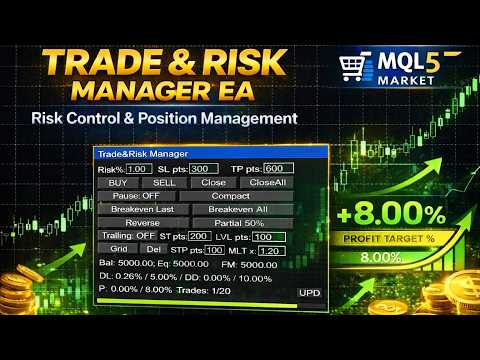
Trade & Risk Manager is a trading utility panel for MetaTrader 5 designed for manual trading and risk control. The program does not include a trading strategy and does not open trades automatically — all trading actions are performed only by pressing buttons on the panel.
The utility helps you to:
-
quickly open/close positions;
-
calculate position size (lot) based on a predefined risk;
-
enforce trading plan limits: daily loss, maximum drawdown, trade limit, profit target;
-
manage positions: breakeven, partial close, reverse, trailing stop;
-
use a grid of pending STOP orders (Grid) and delete pending orders.
Main Features
1) Trading Panel (manual actions)
-
BUY / SELL — market entry.
-
Close — close the last position on the symbol.
-
CloseAll — close all positions on the symbol.
-
Pause — manual pause (blocks trading actions from the panel).
-
Compact / Full — compact or full panel mode.
2) Risk Management & Trade Parameters
-
Risk% — risk-based lot calculation (in percent) using SL in points.
-
Alternative: fixed lot.
-
SL pts / TP pts — stop loss and take profit in points.
-
Volume limit: MaxLotPerTrade.
3) Trading Plan Limits (Rules)
-
Max trades/day — maximum number of trades per day.
-
Max daily loss % — daily loss limit based on equity.
-
Max total drawdown % — total drawdown limit:
-
from the initial value (Initial), or
-
trailing from the equity peak (Trailing equity).
-
-
Profit target % — profit target (once reached, trading is blocked).
Behavior on breach:
-
Pause on breach — automatically pauses trading,
-
Auto close all on breach — optionally closes positions on breach.
4) Position Management (Full mode)
-
Breakeven Last / All — move SL to breakeven (for the last/all positions on the symbol).
-
Reverse — close the last position and open the opposite direction.
-
Partial 50% — close 50% of the last position volume.
-
Trailing — toggleable trailing stop:
-
ST pts — start level (profit required to activate),
-
LVL pts — trailing distance.
-
-
Grid — place a series of STOP orders in the direction of the last position:
-
number of orders is set in inputs,
-
STP pts — step between orders,
-
MLT x — volume multiplier for each next order.
-
-
Del — delete all pending orders on the symbol (filtered by Magic when enabled).
-
UPD (lower right corner of the info panel) — reset the Max total drawdown % and Profit target % values (relevant for intraday traders, when the total account drawdown and profit target values can block trading).
Interface & Input Control
The fields Risk/SL/TP/ST/LVL/STP/MLT are editable directly on the panel:
-
click the field → type from keyboard,
-
Enter — confirm,
-
Esc — cancel,
-
Backspace/Delete — delete characters.
The panel can be dragged with the mouse by the top header.
Panel settings and entered values are saved (after terminal restart / chart reattach).
Input Parameters (Inputs)
Main
-
InpMagic — Magic number.
-
InpRiskMode — risk mode: percent or fixed lot.
-
InpRiskBase — risk base: Equity or Balance.
-
InpRiskPercentDefault — default risk (%).
-
InpFixedLotDefault — fixed lot (if fixed mode is selected).
-
InpSLPointsDefault — default SL (points).
-
InpTPPointsDefault — default TP (points).
-
InpUseTP — enable TP.
Trailing (defaults)
-
InpTrailStartPtsDefault — ST pts.
-
InpTrailLevelPtsDefault — LVL pts.
Grid
-
InpGridOrdersCount — number of STOP orders in the grid.
-
InpGridStepPtsDefault — STP pts (grid step).
-
InpGridMultDefault — MLT x (volume multiplier).
Limits
-
InpMaxLotPerTrade — maximum lot per trade.
-
InpMaxTradesPerDay — daily trade limit.
-
InpCountOnlyThisEA — count “trades per day” only by Magic.
-
InpManageOnlyThisEA — manage (Close/BE/Del/Grid) only by Magic.
Rules (Limits/Rules)
-
InpMaxDailyLossPct — daily loss (%).
-
InpMaxTotalDDPct — maximum drawdown (%).
-
InpDDMode — drawdown mode: from initial or trailing equity.
-
InpProfitTargetPct — profit target (%).
-
InpPauseOnBreach — pause on breach.
-
InpAutoCloseAllOnBreach — close positions on breach.
Trading Schedule
-
InpTradeStartHour / InpTradeEndHour — hours (0..24).
-
InpAllowMon..InpAllowSun — allowed weekdays.
Panel Position
-
InpPanelX / InpPanelY — initial panel position.
Important Notes
-
All SL/TP/ST/LVL/STP values are in points (not pips).
-
Broker restrictions apply (e.g., Stops Level). If SL/TP/pending price is too close to the market, the action will be rejected.
-
To use the buttons, enable Algo Trading and allow trading in the EA settings.
-
It is recommended to test on a demo account before using on a live account.
FAQ
1) Why does BUY/SELL not open a trade?
Check:
-
Algo Trading is enabled in the terminal;
-
trading is allowed in the EA settings;
-
there is a server connection (Terminal connected);
-
the Pause button is not enabled;
-
rule limits were not triggered (Trades/day, Daily Loss, Max DD, Profit Target) — the status line will show the reason.
2) Why can’t SL/TP be set or why does it say “SL/TP too close”?
Your broker may require a minimum distance (Stops Level) from the current price.
-
Increase SL pts / TP pts.
-
Remember values are in points (not pips).
-
Some symbols may have additional constraints (spread, freeze level).
3) Why doesn’t Breakeven work?
Breakeven is applied only if:
-
the position is in profit;
-
the new SL does not violate Stops Level (too close → rejected);
-
SL is not already “better” (e.g., for BUY, SL already at/above BE).
4) Why doesn’t Partial 50% work?
Partial close is possible only if:
-
50% of the volume, after normalization to the volume step (SYMBOL_VOLUME_STEP), is not less than the minimum lot (SYMBOL_VOLUME_MIN);
-
the calculated close volume is less than the current position volume.
For very small positions (e.g., 0.01), “half” may be impossible.
5) Why doesn’t Reverse open the opposite trade?
Reverse does:
-
close the last position;
-
attempt to open the opposite direction.
If rules/limits are triggered or trading is unavailable (no quotes, market closed, restrictions, insufficient margin), the new order may fail.
6) How is “Daily Loss” calculated?
Equity-based logic:
-
equity is fixed at day start (server midnight);
-
the minimum equity during the day is tracked;
-
Daily Loss % = (EquityStart − EquityLow) / EquityStart × 100%.
This includes floating drawdown on open positions.
7) How is “Total Drawdown” calculated?
Depends on the mode:
-
From Initial: base = initial equity/balance saved at first run.
-
Trailing Equity: base = maximum equity reached after start (high-water mark).
DD% = (Base − CurrentEquity) / Base × 100%.
8) Why is Grid not placed?
Common reasons:
-
no last position on the symbol (Grid uses the last position direction);
-
InpGridOrdersCount <= 0 or STP pts <= 0 or MLT <= 0 ;
-
STOP price is too close to the market (Stops Level restriction);
-
calculated lot is 0 or below minimum (SYMBOL_VOLUME_MIN);
-
“Manage only this EA” is enabled and the last position does not match Magic.
9) Why doesn’t Del delete pending orders?
Only pending orders on the current symbol are deleted.
If InpManageOnlyThisEA=true , only orders with your InpMagic are deleted.
10) The panel disappeared / cannot be clicked / cannot be moved
-
Switch Compact/Full mode.
-
Make sure the panel is not covered by other chart objects.
-
Drag the panel by the top header.