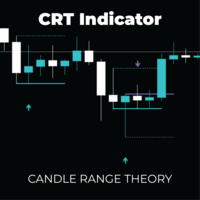
Candle Range Theory CRT
- 지표
- 버전: 1.4
- 업데이트됨: 23 3월 2026
- 활성화: 5

CRT Pro: Multi-Timeframe Reversal System Trade the Trap. Follow the Flow. Front-Run the Institutions.
Most retail traders lose money chasing breakouts. The CRT Pro Multi-Timeframe Reversal System is built on one powerful truth: the best trades happen right after the trap is sprung.
Candle Range Theory (CRT) identifies the precise moment price sweeps liquidity luring breakout traders in then violently reverses. Combined with a multi-timeframe DSL trend engine, this indicator doesn't just find reversals. It finds the right reversals, in the right direction, at the right time.
This is not a signal indicator. It is a complete institutional-grade trading framework.
What Makes CRT Pro Different
Most reversal tools react to price. CRT Pro anticipates it.
By combining Candle Range Theory pattern recognition with Discontinued Signal Line (DSL) trend filtering across up to 3 higher timeframes, the system only surfaces signals where structure, momentum, and trend all agree — the exact conditions that produce high-probability, low-risk entries.
Core Features
Automated CRT Pattern Detection Scans every bar for Bullish and Bearish Candle Range Theory setups — defined by precise open/close relationships relative to recent swing highs and lows. No subjectivity. No lag. No repainting.
Advanced DSL Trend Engine Forget simple moving averages. The Discontinued Signal Line algorithm evaluates true market bias across multiple timeframes, classifying conditions as Strong Bull, Weak Bull, Neutral, Weak Bear, or Strong Bear — giving you a nuanced picture of where price wants to go.
Multi-Timeframe Confluence Filter Configure up to 3 higher timeframes (e.g. H1, H4, D1). Set how many must align before a signal fires. More agreement = fewer signals, higher quality. You control the balance between sensitivity and selectivity.
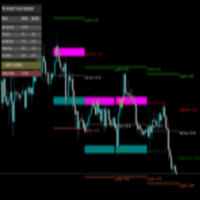
Live Smart Dashboard A clean, professional on-chart panel updated in real time, showing:
- Trend bias for the CRT timeframe + your 3 HTFs
- Multi-Timeframe Alignment status (Long / Short)
- ATR, Volatility (%), and Volume Delta — the three market context metrics that separate good setups from great ones
Dynamic Reaction Levels Every signal automatically draws projected support/resistance lines derived from the pattern candle — giving you instant reference points for entries, targets, and stops. No manual drawing required.
Full Alert Suite Native MT5 pop-up alerts and push notifications to your mobile device, so you never miss a setup — even away from your desk.
The Logic Behind Every Signal
Step 1 — The Trap Price breaks above a recent high (or below a recent low), triggering stop orders and pulling in breakout traders. Volume spikes. Momentum looks strong.
Step 2 — The Close The candle closes back inside the previous range. The breakout was fake. Liquidity has been harvested. Smart money is now positioned in the opposite direction.
Step 3 — The Filter Before generating a signal, the DSL engine checks your selected higher timeframes. Is the H4 bullish? Is the Daily trend confirming? The signal only fires if the reversal aligns with the dominant HTF flow.
Step 4 — The Signal A clean arrow appears on the chart — above the bar for bearish setups, below for bullish — with reaction levels already drawn. Your trade is structured before you even place the order.
Input Parameters
Pattern Settings
- Bars Between Pattern — Define swing sensitivity
- CRT Analysis Timeframe — The timeframe scanned for entry signals (e.g. M5, H1)
- ATR Period — Controls dynamic arrow placement and stop reference distance
Trend & Filter Settings
- DSL Length / Offset / Width — Fine-tune the sensitivity of the global trend algorithm
- Timeframes 1–3 — Select your higher timeframe hierarchy
- Use T1 / T2 / T3 Filter — Toggle each timeframe filter independently
- Min Aligned Timeframes — Set the minimum number of agreeing timeframes required (1–3)
Display & Alerts
- Fully customizable bullish/bearish colors
- Dashboard position, background, opacity
- Arrow size and distance from bar
- Pop-up alerts + push notifications
Recommended Configurations
| Style | CRT Timeframe | Filter Timeframes |
|---|---|---|
| Scalping | M5 | M15 · M30 · H1 |
| Intraday | M15 | H1 · H4 · D1 |
| Swing | H1 | H4 · D1 · W1 |
| Position | H4 | D1 · W1 · MN |
Pro Tips
- Volume Delta is your confirmation. A CRT signal with a high positive or negative Volume Δ on the dashboard means aggressive order flow agrees with the reversal. Prioritize these setups.
- Start with Min Aligned = 2. This balances signal frequency with quality. Increase to 3 for sniper-grade entries on swing trades; reduce to 1 only during ranging, low-volatility sessions.
- Watch the DSL classification, not just the arrow. A signal in a Strong Bull environment on H4 is structurally more reliable than one in a Weak Bull environment. Use the dashboard to qualify, not just the arrow.
- The reaction levels are your roadmap. The solid line = entry zone. The dotted line = invalidation / stop reference. The dash-dot line = the current bar's extreme and a secondary reaction level.
CRT Pro does not repaint signals. Arrows are confirmed on bar close. Past performance of any indicator does not guarantee future results. Always apply proper risk management.










































Great indicator! Easy to use and really boosts confidence in trading