Open Order TImer

1

Introducing the Open Order Timer EA

Are you tired of manually opening trades at specific times? 

Are you longing for a trading tool that can execute orders with pinpoint precision?

Are you struggling to time your trades accurately in a fast-paced market environment?

Introducing Open Order Timer, an Expert Advisor that automatically opens positions at your desired times with just a few clicks. This powerful tool takes the guesswork out of timed trading, allowing you to focus on your strategy while the EA handles the execution.


Key Features:

  • Open trades at specific time per day
  • Specify buy or/ and sell orders for each time slot
  • Adjust lot size, stop loss, and take profit for each order
  • Configure trades based on the open transaction conditions
  • Fully customizable to fit your trading style
  • Recursive function allows you to overwrite timer function and open order any time if there is no open transaction 
  • You may also specify the EA start and end time 


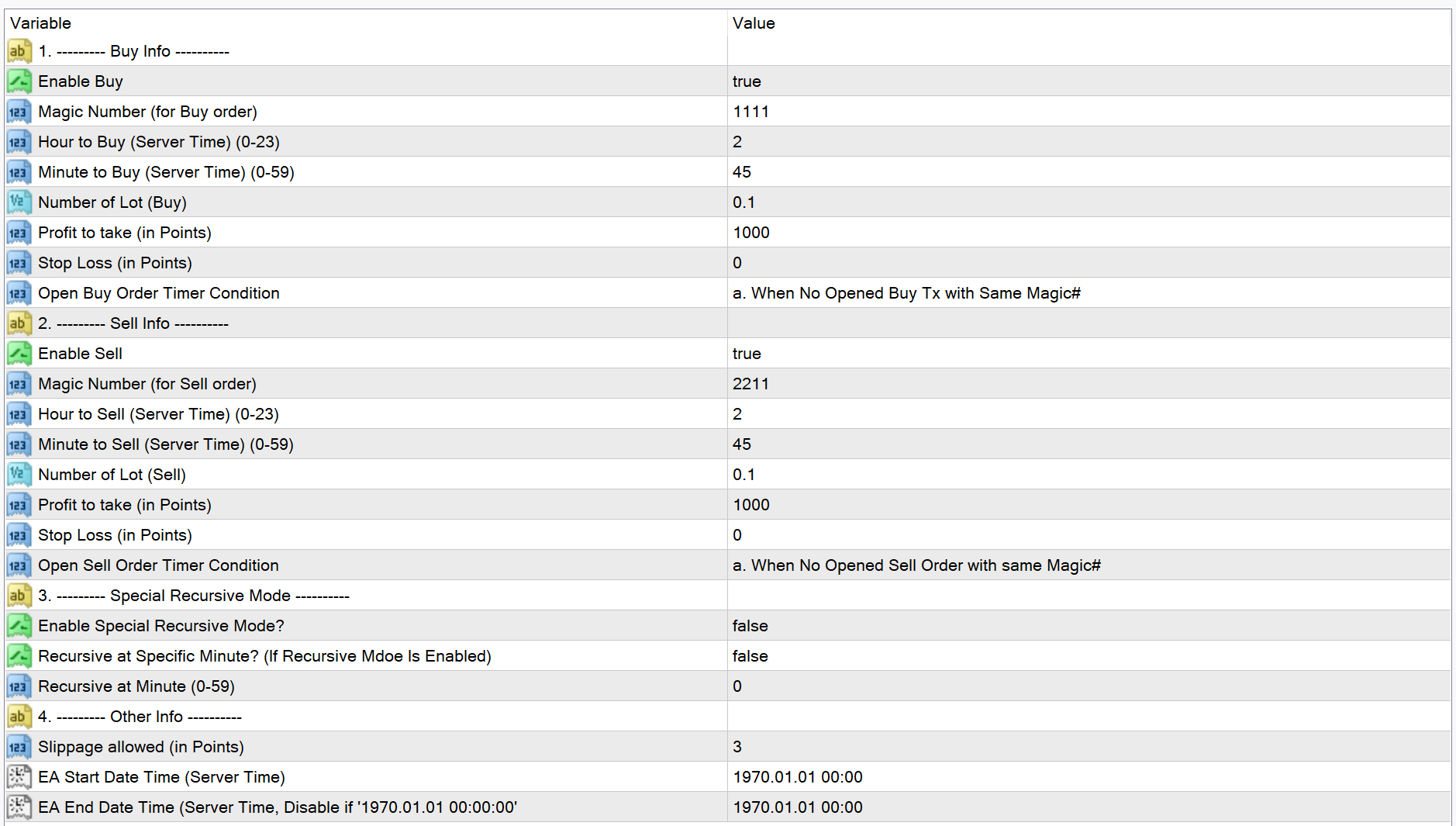
Input Parameters:

1. Buy Info

  • Enable Buy
  • Magic Number (for Buy order)
  • Hour to Buy (Server Time) (0-23)
  • Minute to Buy (Server Time) (0-59)
  • Profits to take (in Points) 
  • Stop Loss (in Points)
  • Open Buy Order Timer Condition
    • a. When No Opened Buy Transaction with the Same Magic Number
    • b. When No Opened Buy/ Sell Transaction with Same Magic Numbers
    • c. When No Opened Transaction
    • d. Just Open When Time's Up

2. Sell Info

  • Enable Sell
  • Magic Number (for Buy order)
  • Hour to Buy (Server Time) (0-23)
  • Minute to Buy (Server Time) (0-59)
  • Profits to take (in Points) 
  • Stop Loss (in Points)
  • Open Sell Order Timer Condition
    • a. When No Opened Sell Order with Same Magic Number
    • b. When No Opened Buy/ Sell Order with Same Magic Numbers
    • c. When No Any Opened Transaction
    • d. Just Open When Time's Up


3. Special Recursive Mode 

  • Enable Special Recursive Mode so that: 
    • the Hour/ Minutes to Buy/ Sell in the Buy Info/ Sell Info sessions will be set as invalid.
    • the Open Buy/ Sell Order Timer Condition in the Buy Info/ Sell Info sessions will be set as invalid. 
    • it will open Buy/ Sell orders immediately if there is no open transaction in the MT4 account. 
    • once the orders closed, it will open orders immediately (if not specify Minute below).
  • Recursive at Specific Minute: only for recursive mode. If next cycle starts, it will not start immediately but with specific minute. 
  • Recursive at Minute (0-59) 


4. Other Info

  • Slippage allowed (in Points)
  • EA Start Date Time (Server Time)
  • EA End Date Time (Server Time, Disable if '1970.01.01 00:00:00')


Get Started Today! 


By using Open Order Timer, you may leverage the EA's adaptability to experiment with different trading approaches and strategies.
Download the Open Order Timer EA today and take your trading to the next level. With its user-friendly interface and powerful features, you'll be able to execute your strategy with precision and confidence.
Start trading smarter, not harder. Happy trading!


추천 제품
Damascus Dagger
Yu Pang Chan
3 (1)
This Expert Advisor uses scalping as its main strategy based on a statistical model called Bollinger Band. It embedded with two exit market strategies called 1st and 2nd dagger. The 1st dagger exits on the mid line of the band and the 2nd dagger exits by trailing until the maximum profit. It is recommended to use both strategies to lower the risk since it would split the lot into half for each dagger. Recommended: M5/M15, EURAUD/GBPAUD, ECN account Please add the news link ( http://ec.forexprost
CHF Portal
Ngo Yung Lau
CHF Portal is designed for Trading USDCHF specifically. Trading Concept The operation concept of CHF Portal is based on an algorithm which tries to determine the Trend. To be more specific, CHF Portal works with its own calculation logic according to historical volatility and price movement. It is trying to find out the Top or Bottom in a Trend, and open the Short or Long Position accordingly. Don't expect CHF Portal can be able to open the trade on the highest or lowest level, because CHF Port
Mongol Indicator2
Sumiyabazar Buyanjargal
It's a variation of mid of HH and LL since it compares the higher of HH or LL against a period and twice the number of bars back to avoid whipsaws. I used to display this against lines on a chart, but made a histogram out of it and it looks interesting. It looks good at gauging trend strength and general turns (see image below). The name of the indicator is BAM, which is an acronym for "Below and Above Mid". Ways to use it: 1. To see general trend on longer TFs (more than 30 bars back).
Time Closer can help you closing all the open position at the specified time "Everyday". Mainly for Day trader that don't want to hold position overnight, or over different session, or over a specific time. Simple Parameter to use. Usage Download and drag Time Closer on the chart (Chart Symbol should be the same Chart Symbol as you want the position close) Check Allow AutoTrading is "On" Set parameters Input Parameters Turnon  True - Turnon the utility False - Turnoff the utility Close All Open
EPriceJPY
Ngo Yung Lau
EPriceJPY is a auto-trading EA focused on USDJPY. Trading Concept The operation concept of EPriceJPY is based on an algorithm that tries to determine the Trend. To be more specific, EPriceJPY works with its own calculation logic based on simulation. It is trying to find out the Top or Bottom in a Trend, and open the Short or Long Position accordingly. Don't expect EPriceJPY to open the trade on the highest or lowest level, because EPriceJPY will trade only when the Top/Bottom can be confirmed.
This EA is developed based on cross-market session logic, monitoring the overlapping liquidity window spanning the late Asian session, early European session, and mid US session. Market liquidity tends to be relatively high during this period, and major events such as macroeconomic data releases and central bank speeches often occur within this window. The EA adopts a multi-timeframe signal analysis framework. It supports M15, M30, H1, H4, Daily and Weekly charts. It is recommended to run the EA
Just Rider EA
Agung Imaduddin
Just Rider EA is a fully automated Expert Advisor with the using of martingale and hedging strategies. Linear Regression and Moving Average Indicator-based filter are used for entries. The minimum deposit is 100 USD (10,000 cent), the recommended symbol is EURUSD and GBPUSD, timeframe is H1. Use a broker with good execution. A VPS is required. The product works both on 4 and 5-digit quotes. Specify values in points like for 5 decimal places in the input parameters, and it will automatically reca
This Performance Report indicator is special design for some trader to analyst his/her performance. Key Features of the "Performance Report" Indicator Multi-language support: Choose between English and Chinese as the display language, catering to traders from different regions. Flexible report configuration: Customize the report title and group data based on trading symbols, time periods (daily , weekly , monthly ), meeting individual preferences. Date range selection: Specify the st
This TraderMaster EA is super helpful for professional trader.  Input Parameter Section: 1) Allow trader to set different line style, such as color, width; 2) Apply our chart style, if set false, it will not change the chart style; 3) Select different panel mode 3.a) Simple Mode, for trader immediately place a market order, pending order, delete and close orders; 3.b) Draw Line Mode, for price action traders who want to trade for trend and reverse in his trading plan; 3.c) Advanced Mode, includ
FxGold Marathon BreakOut is a simple but effective trading system based on breaking out price parttern. EA is a long term stable growth  trading system with realistic result . EA designed for XAUUSD (GOLD) which  is a volatile and highly liquid commodity Features: Account protection by acceptable consecutive loss. Auto MM Don't need fast VPS just laptop or pc and stable internet connection, you can shut down at the weekend then start it up before market opening like i'm doing. All opened positi
Please do not trust any backtest result. Use a demo account to try it. SureFire is a well-known Martingale Hedging strategy in Forex trading.  No need to predict market direction.  This expert is not just an ordinary Sure Fire strategy, but reinvented the trade setup logic based on calculations.  Good money management is the critical factor to run this EA.  Highly aggressive in trading big market movement. Definitely the best tool in a volatile market.  LIVE TRADE signal is here:  https://www.
The Definitive Performance Testing Solution for MetaTrader Environments What This Tool Does This specialized benchmark utility measures the performance of your MetaTrader environment, providing insights that impact your trading execution. Unlike generic system benchmarks, this tool evaluates performance specifically within the MetaTrader runtime environment. For Professional Traders & Developers: Performance Metrics : Measurements of calculation throughput and memory efficiency Trading-Specific
This indicator will display current logined mt4 account's orders information of current symbol chart. It also allow import some formated data: 1) MQL5 Signals History CSV file (*.csv) 2) MT4 Account History Statement file (*.htm -> *.txt) *[Next Version] Allow Import data form 'HF HistoryExporter (*.csv)' Sample Data of MQL5 Signals History File Time;Type;Volume;Symbol;Price;S/L;T/P;Time;Price;Commission;Swap;Profit;Comment 2023.12.20 23:00:02;Buy Limit;0.06;EURUSD;1.08994;1.06024;1.09464;202
"Climb the Trend. Reach the Peak." We recommend executing trades on the 30-minute chart, avoiding periods of high market volatility and times when economic indicators are released. Dual-Timeframe Market Analysis × Dynamic ATR Trailing × Strict Single-Position Architecture 1. Core Advantages & USPs Strictly One Position at a Time (Non-Grid, Non-Martingale) Holds only a single open position at any given time. "ATR Trailing Stop" Optimized for Gold Volatility Instead of using fixed pips, the take
Overview Happy Shiba Inu is a precision scheduling utility designed to restrict a MT4 account's trading activity to specific day or time windows. It manages both live execution logic and the automatic cleanup of pending orders during "Off-Hours." Operational Logic Pending Orders: The moment the timer hits a "Restricted" zone, the EA will scan all open orders. Any Limit or Stop orders will be deleted immediately to prevent accidental fills during high-volatility off-hours. Execution Block: Any c
Zenith Aquarius Booster A Refined Strategy Engine for BTCUSD Most Expert Advisors on the market fall into one of two traps: they are either over-optimised to historical data and fail in live conditions, or they rely on grid and martingale recovery logic that averages deeper into losing positions. Zenith Aquarius Booster takes a different approach. Instead of offering dozens of loosely tested combinations across many symbols, Aquarius Booster is specifically engineered for BTCUSD — a market known
대화형 구조 대시보드 (Interactive Structure Dashboard): 최고의 멀티 타임프레임 스마트 머니 컨셉 (SMC) 지표 스마트 머니 컨셉 (Smart Money Concepts, SMC), 구조 파쇄 (Break of Structure, BOS), 공정 가치 갭 (Fair Value Gaps, FVG)은 현대 개인 및 기관 트레이더들이 시장 메커니즘을 바라보는 방식을 완전히 혁신했습니다. 단순한 소액 트레이더용 지지와 저항선에 의존하던 시대는 지났습니다. 현대 트레이딩의 핵심 우위는 은행의 흔적, 기관의 유동성, 그리고 구조적 변화를 추적하는 데 있습니다. InteractiveStructureDashboard MQL4 지표는 수동으로 여러 타임프레임을 확인하는 번거로움과 완전 자동화된 기관 추적 시스템 간의 간극을 메워줍니다. MetaTrader 4 터미널 내부에서 올인원 커맨드 센터 역할을 하며, 승률 높은 세팅을 찾아 여러 자산과 타임프레임을 동시에 스
This Performance Report indicator is special design for some trader to analyst his/her performance. FREE Version, included: - " Display Language "  -  " Report Grouping "   -  " Count Live Order "  -  " Label Row Dis "     -  " Label Font Size "     Performance Report Pro : : https://www.mql5.com/en/market/product/58287   Input Parameter: " Display Language "   :: [  English / Chinese  ] Display language; " Report Title "   :: Show the report title as you want; " Report Grouping "   :: 
FREE
****************** ******* ******* *** FREE Trail for Demo *** ****************** ******* ******* 1. Search "ShootingAlert_bot in Telegram 2. Start it 3. Enjoy it EA Alert is using Telegram to do various actions: 1. Check Account Info 2. Check Order 3. Place Order 4. Modify Order 5. Switch user to help trade 6. Check Market Info 7. Show Chart 8. Show Chart with your template It is very useful for order management, especially while you are Working at office or Dine out with friends . It use
Delving deep into the sphere of finance and trading strategies, I decided to conduct a series of experiments, exploring approaches based on reinforcement learning as well as those operating without it. Applying these methods, I managed to formulate a nuanced conclusion, pivotal for understanding the significance of unique strategies in contemporary trading.  
FREE
MTF Parabolic SAR S11
Chi Sum Poon
5 (1)
附上20240307市況, 順勢加單真開心 附上20240306市況, 順勢加單真開心 ※ ※ ※ This configuration is extremely aggressive and extremely risky. Please conduct your own backtesting and adjust it to a suitable risk level. ※ ※ ※ Additionally, please share the configuration and EA modification requirements with me. ※ ※ ※ ※ This EA trades based on the multi-time frame Parabolic SAR indicator. E.G. if there still a buy signal on the M15 timeframe SAR, In the M1 timeframe, the EA will execute a buy trade when M1 SAR buy signal.
Happy Lion
Pui Yan Leung
Overview Happy Lion  is a Smart Money Zone indicator, it scans historical data to identify specific candlestick patterns, these are the areas where large institutions (banks/hedge funds) leave behind significant "footprints" in the form of unfilled orders. Demand Zones (Bullish): Highlights the last bearish candle before a strong, impulsive upward breakout. Supply Zones (Bearish): Highlights the last bullish candle before a strong, impulsive downward breakout. Automatic Drawing: Once a valid zon
T Dog
Chi Hi Wu
1 (1)
T Dog is a fully automatic trading robot which is the result of more than 10 years of the market study and programming expert advisors. You could run on all Forex, Indexes and Commodities. It uses a multiple indicators to determine the market entry with an advanced exit-algorithms. T Dog build-in News filter which able to stop trading during the news releases. It also possible to enable the trailing stop to secure your profits. No Grid No Martingale No Hedging No Arbitrage It is advised to use a
The advantages of EA TWO CANDLE SMART are: It is equipped with various filters, including: maxspread, maxlot, takeprofit (4 step), stop loss (3 step), profit target per day, and many more. Open order BUY = If iClose[2] > iOpen[2] && iClose[1] > iOpen[1]. Open order SELL = If iClose[2] < iOpen[2] && iClose[1] < iOpen[1]. Target_profit_perday=50; ==> can work on forward test. lockprofit=2;//Minimal Profit in money Step_LockProfit_in_Money=25; Stoploss_in_Money=1000; Stoploss_in %=50;==> Stoploss
Crazy Car EA
Benjamin Quispe Flores
The “Crazy Machine”: High-Performance MT4 Trading Engine Overview (The images showing the account growth pertain to gold trading; however, due to the site's upload limitations, the displayed settings reflect a currency pair configuration. After purchasing the robot, please message our Telegram support at the ID below to receive the specific settings file for gold: Line203) The “Crazy Machine” is a high-octane, aggressive trading system designed specifically for the MetaTrader 4 platform. While
Heikinashi Zone Trader
Lorraine Pierce
4 (1)
!!!!FIFO COMPLIANT!!!! ONLY 5 COPIES LEFT AT $49 and Price goes up to $99 This is an automated or semi automated expert advisor.  This EA is based on trend...and there's nothing better than the heikin-ashi zone trade candles to show you price action trend. Download the Heikin Ashi Zone candles for   free here. It's recommended to use this EA as a semi automated trader. Example of semi automation: You look at higher time frames of the EURUSD and see it's in a down trend. So you open an M15 chart

What is this?  This script not only can help you to place all type of orders, included market order " BUY " / " SELL " and pending order " BUYSTOP " / " BUYLIMIT " / " SELLSTOP " / " SELLLIMIT ", but also, it allow you to place order lots by money management concept. How to use this script? 1. Open the chart you want to trade; 2. Drag and drop the script to that chart; 3. Input the parameter what you want to do; 4. Double check the order information, then click "Yes" to confirm to place order;
AlphaLogic PropProtector: The Ultimate Equity Shield Protect your Prop Firm account with institutional-grade precision. Are you tired of losing Prop Firm challenges due to emotional over-trading or a few dollars' calculation error? Most traders fail because they lose track of their   Daily Drawdown   or   Absolute Equity Floor . AlphaLogic PropProtector   is a professional-grade utility designed for traders who take risk management seriously. Whether you are trading a $50,000 challenge or managi
FREE
The Arrow Scalper
Fawwaz Abdulmantaser Salim Albaker
1 (2)
Dear Friend..  I share with you this simple Expert Adviser .. it is full automatic  this Expert Adviser following the trend of the pair you install on or any stocks or indices , it is works like that: - when the trend on H4 chart show a start of up trend the expert will wait till the 15M & 1H charts show an up trend the EA will open a buy order directly , and do the same for down trend and open a sell order the buy or sell  order lot size and take profit and stop loss will measured manually  by
FREE
/ ********** ********** ********** ********** ********** ********** ********** ********** ********** ********** / Big Sales for Easter! Price is reduced > 50 % already! Grasp the chance and Enjoy it!  /   ********** **********   ********** **********   ********** **********   ********** **********   ********** **********   / This is a powerful EA that support single order strategy, martingale strategy, multiple timeframes strategy, etc with lots of useful indicators and self defined methods. I
이 제품의 구매자들이 또한 구매함
Trade Manager EA에 오신 것을 환영합니다. 이 도구는 거래를 보다 직관적이고 정확하며 효율적으로 만들기 위해 설계된 궁극적인 리스크 관리 도구 입니다. 단순한 주문 실행 도구가 아닌, 원활한 거래 계획, 포지션 관리 및 리스크 제어를 위한 종합 솔루션입니다. 초보자부터 고급 트레이더, 빠른 실행이 필요한 스캘퍼에 이르기까지 Trade Manager EA는 외환, 지수, 상품, 암호화폐 등 다양한 시장에서 유연성을 제공합니다. Trade Manager EA를 사용하면 복잡한 계산은 이제 과거의 일이 됩니다. 시장을 분석하고 진입, 손절 및 익절 수준을 차트의 수평선으로 표시한 후 리스크를 설정하면, Trade Manager가 이상적인 포지션 크기를 즉시 계산하고 SL 및 TP 값을 실시간으로 표시합니다. 모든 거래가 간편하게 관리됩니다. 주요 기능: 포지션 크기 계산기 : 정의된 리스크에 따라 거래 크기를 즉시 결정합니다. 간단한 거래 계획 : 진입, 손절, 익절을 위한
Local Trade Copier EA MT4
Juvenille Emperor Limited
4.96 (111)
Local Trade Copier EA MT4는 동일한 Windows 컴퓨터 또는 Windows VPS에서 여러 MetaTrader 4 계정 간에 거래를 복사하고 관리할 수 있는 빠르고 유연한 거래 복사기입니다. 로컬 거래 동기화 기능과 함께 Receiver 측에서 로트 크기, 리스크 관리, 거래 필터링, 심볼 매핑, 거래 관리 및 계정 보호를 독립적으로 설정할 수 있습니다. Transmitter와 Receiver 터미널을 약 1분 안에 설정하고, 동일한 브로커 또는 서로 다른 브로커의 계정 간에 수동 거래 또는 EA 거래를 복사할 수 있습니다. 적절한 조건에서는 로컬 MetaTrader 터미널 간의 거래 정보가 0.5초 이내 에 동기화될 수 있습니다. 실제 체결 속도는 브로커 지연 시간, 네트워크 상태, 컴퓨터/VPS 성능 및 터미널 부하에 따라 달라집니다. 구매 전에 무료 데모를 사용해 보세요 MT4 데모 계정에서 Local Trade Copier EA MT4의 모든 기능을
Exp COPYLOT CLIENT for MT4
Vladislav Andruschenko
4.69 (65)
MetaTrader 4용 전문 트레이드 복사기 MetaTrader 4 용 빠르고 안정적이며 전문적인 트레이드 복사기입니다. COPYLOT 은 MetaTrader 4 와 MetaTrader 5 터미널 간에 Forex 거래를 복사할 수 있으며, 다양한 계좌 유형과 운용 방식에 맞춰 유연한 동기화 환경을 제공합니다. COPYLOT MT4 버전 지원 방식: MetaTrader 4 → MetaTrader 4 MetaTrader 5 Hedge → MetaTrader 4 MetaTrader 5 Netting → MetaTrader 4   MT5 버전 상세 설명 + DEMO + PDF 구매 방법 설치 방법 로그 파일 확인 방법 테스트 및 최적화 방법 Expforex의 모든 제품 MetaTrader 5 버전 을 사용하면 MetaTrader 5 → MetaTrader 5 및 MetaTrader 4 → MetaTrader 5 복사도 지원됩니다: COPYLOT CLIENT for MT5 COPYLOT 은
Trade Assistant MT4
Evgeniy Kravchenko
4.43 (197)
거래당 위험 계산, 라인을 사용한 손쉬운 신규 주문, 부분 청산 기능을 통한 주문 관리, 7가지 유형의 트레일링 스탑 및 기타 유용한 기능을 제공합니다. 추가 자료 및 지침 설치 지침 - 애플리케이션 지침   라인 기능       - 차트에 개시선, 손절매, 차익실현을 표시합니다. 이 기능을 사용하면 새로운 주문을 쉽게 하고 개봉 전에 추가 특성을 볼 수 있습니다. 위기 관리       -       위험 계산 기능은 설정된 위험과 손절매 주문의 크기를 고려하여 새 주문의 볼륨을 계산합니다. 이를 통해 손절매 크기를 설정하고 동시에 설정된 위험을 존중할 수 있습니다. 로트 계산 버튼 - 위험 계산을 활성화/비활성화합니다. 필요한 위험 값은 위험 필드에 0에서 100 사이의 백분율 또는 예금 통화로 설정됩니다. 설정 탭에서 위험 계산 옵션을 선택합니다. $ 통화, % 잔액, % 지분, % 자유 마진, % 사용자 정의, % AB 이전 일, % AB 이전 주, % AB 이전 월.
PZ Trade Pad Pro MT4
PZ TRADING SLU
3.67 (3)
Effortlessly calculate lot sizes and manage trades to save time and avoid costly errors The Trade Pad Pro EA is a tool for the Metatrader Platform that aims to help traders manage their trades more efficiently and effectively. It has a user-friendly visual interface that allows users to easily place and manage an unlimited number of trades, helping to avoid human errors and enhance their trading activity. [ Installation Guide | Update Guide | Troubleshooting | FAQ | All Products ] One of the k
Trade Manager Pro MT4
Bryan Djoufack Nguessong
This is an Utility to make your trading easier by putting at   one click or a few clicks   time-consuming tasks as order management and risk management. Contact for a free trial. Features Risk Management   Calculates automatically lots based on risk specified in either   % or $  in the risk field and let you enter just   by placing lines for SL TP   etc and display   real-time Risk Reward . TrueRisk   so   it includes commissions when calculating lot size on FX pairs only so you risk 1% with
Trade copier MT4
Alfiya Fazylova
4.62 (37)
Trade Copier는 거래 계정 간의 거래를 복사하고 동기화하도록 설계된 전문 유틸리티입니다. 복사는 공급자의 계정/단말기에서 동일한 컴퓨터 또는 vps에 설치된 수신자의 계정/단말기로 발생합니다. 구매하기 전에 데모 계정에서 데모 버전을 테스트할 수 있습니다. 데모 버전 여기 . 전체 지침 여기 . 주요 기능 및 이점: 복사기는 "МТ4> МТ4", "МТ4> МТ5", "МТ5> МТ4" 복사를 지원합니다. 복사기는 데모 계정 > 실 계정, 실 계정 > 데모 계정, 데모 계정 > 데모 계정 및 실제 계정 > 실 계정 복사를 지원합니다. 복사기는 읽기 전용 암호가 적용된 투자자 계정에서 복사를 지원합니다. 하나의 공급자 터미널은 여러 수신 터미널로 트랜잭션을 보낼 수 있고 하나의 수신 터미널은 여러 공급자 터미널에서 트랜잭션을 수신할 수 있습니다. 복사기는 귀하 또는 귀하의 고문이 거래하는 동일한 터미널에서 작동할 수 있습니다. 높은 복사 속도(0.5초 미만). 복사기에는 간편
Trading History MT4
Siarhei Vashchylka
5 (9)
Trading History - A program for trading and money management on the history of quotes in stratagy tester. It can work with pending and immediate orders, and is equipped with trailing stop, breakeven and take profit functions. Very good for training and testing different strategies. Manual (Be sure to read before purchasing) Advantages 1. Allows you to test any trading strategy in the shortest possible time 2. An excellent simulator for trading training. You can gain months of trading experience
Telegram to MT4 Coppy
Sergey Batudayev
4.09 (11)
Telegram에서 MT4로:   최고의 신호 복사 솔루션 최첨단 유틸리티인   Telegram to MT4를   사용하여 거래를 간소화하세요. DLL 없이도 Telegram 채널과 채팅에서 MetaTrader 4 플랫폼으로 거래 신호를 직접 복사할 수 있습니다. 이 강력한 솔루션은 탁월한 정밀도와 맞춤 설정 옵션을 통해 원활한 신호 실행을 보장하여 시간을 절약하고 효율성을 높여줍니다. [ Instructions and DEMO ] 주요 특징 직접 Telegram API 통합 전화번호와 보안 코드를 통해 인증하세요. 사용자 친화적인 EXE 브리지를 사용하여 채팅 ID를 손쉽게 가져오고 관리하세요. 여러 채널/채팅을 추가, 삭제, 새로 고침하여 동시에 신호를 복사합니다. 고급 필터를 사용한 신호 파싱 사용자 정의 예외 단어(예: "보고서", "요약")가 포함된 원치 않는 신호를 건너뜁니다. 유연한 SL 및 TP 형식을 지원합니다: 가격, 핍 또는 포인트. 신호가 가격 대신 지점을 지정
지원이 필요하신가요? 설정 방법이 궁금하신가요? 질문이 있으신가요? 여기에 고객님의 언어로 문의하세요, 빠른 답변: https://www.mql5.com/en/market/product/139089/comments 작동 체험판 다운로드 Copy Cat More (카피캣) MT4 트레이드 카피어 (Trade Copier) 는 단순한 로컬 트레이드 카피어가 아닙니다. 오늘날의 트레이딩 과제를 위해 설계된 완전한 리스크 관리 및 실행 프레임워크 (risk management and execution framework) 입니다. 프롭 펌 (prop firm) 챌린지부터 개인 포트폴리오 관리까지, 견고한 실행, 자본 보호, 유연한 설정, 고급 트레이드 처리의 조합으로 모든 상황에 적응합니다. 이 카피어는   마스터 (Master, 송신측) 와 슬레이브 (Slave, 수신측)   두 모드 모두에서 작동하며, 시장가 주문과 대기 주문, 트레이드 수정, 부분 청산, 상호 청산 (Close B
Telegram to MT4 Multi-Channel Copier   는 Telegram 및 Discord 채널의 트레이딩 시그널을 MetaTrader 4로 자동 복사합니다. 봇도, 브라우저 확장도, 수동 복사도 필요 없습니다. Telegram이나 Discord에 시그널이 도착하면 EA가 몇 초 안에 터미널에서 주문을 실행합니다. 그리고 채널을 복사하기 전에, 내장 백테스터가 그 채널이 내 계좌에서 어떤 결과를 냈을지 보여줍니다. 제품은 두 가지 구성 요소로 이루어집니다: Telegram 채널을 수신하는 Windows 애플리케이션과, MT4 터미널에서 시그널을 실행하는 본 EA입니다. MT5 버전도 제공됩니다   여기 . 설정 가이드와 앱 다운로드:   https://www.mql5.com/en/blogs/post/768988 텔레그램 시그널 채널을 백테스트하는 방법 을 확인하세요. 현재 가격은 향후 인상될 예정입니다. 작동 방식 앱은 여러분 자신의 Telegram 계정으로 연결되므
Trade Assistant Pro 36 in 1
Makarii Gubaydullin
4.76 (21)
다기능 거래 도구: 로트 계산기, 그리드 주문, 위험/보상 비율, 거래 관리자, 수급 구역, 가격 행동 분석 등 데모 버전   |   사용자 설명서 트레이딩 어시스턴트 는 전략 테스터에서 작동하지 않습니다: 이 유틸리티 를 테스트하려면 데모 버전을 여기서 다운로드하세요. 질문 /개선 아이디어/버그 발견 시 저에게 연락 하세요 MT5 버전이 필요하시면, 여기서 사용 가능합니다 거래 프로세스 를 단순화, 가속화, 자동화하세요. 이 대시보드 로 표준 터미널 기능을 확장합니다. 트레이딩 패널 은 모든 거래 상품에서 작동합니다: 외환, 주식, 지수, 암호화폐 등. 1. 새로운 거래 열기 : 로트/위험/위험보상비 계산: 수동 거래의 위험 관리 로트 계산기 (위험 크기 기반 거래량 계산) 위험 계산기 (로트 크기 기반 위험 금액) 위험 보상 비율 그리드 주문: + 동적 거리 옵션 및 분할 로트 옵션 주문 활성화 트리거, + Buy StopLimit/Sell StopLimit: Mt4에서도 가능
Shepherd Safety EA
AW Trading Software Limited
4.92 (13)
AW Shepherd Safety EA는 열린 포지션을 관리하는 EA입니다. 첫 주문은 트레이더가 패널에서 열고, 이후에는 EA가 바스켓을 직접 관리합니다: 추세 필터를 거쳐 복구 주문을 추가하고, TakeProfit, 트레일링 또는 손절로 해당 측을 청산하며, 청산 수준을 차트에 표시합니다. 매수와 매도는 따로 관리되며 양 측을 동시에 열어 둘 수 있습니다. 복구 주문은 가격 간격만으로 열리지 않고, Parabolic SAR, 두 개의 MA 또는 캔들 색상 기준으로 포지션 방향으로의 반전이 확인된 뒤에 열립니다. Orders Magic number가 일치하면 수동으로 또는 다른 EA가 연 포지션도 EA가 넘겨받아 관리합니다. EA가 포지션을 관리하는 방식: 1 트레이더가 Open Buy 또는 Open Sell 버튼으로 Order Size 필드의 거래량만큼 첫 주문을 엽니다. 2 가격이 포지션에 불리한 방향으로 Minimal step between recovery orders만큼 움
Rhino Chart Drawing Tools 는 MetaTrader 4에서 TradingView 스타일 의 차트 드로잉 환경을 제공합니다. 54개의 드로잉 도구 , 사용자 지정 가능한 툴바, 즐겨찾기, 빠른 스타일 설정, 객체 설정, 템플릿 및 객체 관리자를 제공합니다. 사용자 매뉴얼: 제품 사용 방법 무료 데모 버전: 데모 다운로드 MetaTrader 5 버전: Rhino Drawing Tools for MT5 드로잉 도구 그룹 객체 목록 라인 추세선, 레이, 연장선, 수평선, 수직선, 수평 레이, 교차선, 추세 각도, 화살표, 경로, 폴리라인 및 정보선. 채널 평행 채널, 회귀 채널, 플랫 채널, 분리 채널 및 피치포크. 피보나치 되돌림, 확장, 채널, 속도 팬 및 시간대. 간 간 박스 및 간 팬. 도형 사각형, 회전 사각형, 타원, 원, 삼각형 및 폴리라인. 주석 텍스트, 메모, 콜아웃, 가격 라벨, 표지판, 플래그 및 화살표 마크. 패턴 XABCD, ABCD, Cyphe
Multi Account Local Trade Copier 는 MetaTrader용 빠른 로컬 트레이드 카피어입니다: 동일한 Windows PC 또는 VPS의 MT4/MT5 터미널 간에, 하나의 마스터 계좌에서 여러 리시버 계좌로 거래를 복사하세요 — 본인의 실계좌, 데모 계좌, 프랍펌 계좌로. 같은 브로커든 다른 브로커든 상관없습니다. 이벤트 기반 으로 작동합니다: 마스터는 각 거래를 발생하는 순간 즉시 게시하고, 리시버는 모든 복사의 실제 지연 시간을 측정하고 기록 합니다 — 일반적으로 50-150ms 입니다. DLL 없음, 인터넷 브리지 없음, 설정 파일 없음. 하나의 EA, 두 가지 모드 원본 터미널에는 MASTER 로, 각 대상 터미널에는 RECEIVER 로 부착하세요. Master ID = AUTO 이면 리시버가 활성 마스터를 스스로 찾습니다: 드래그, 드롭, 끝. 하나의 마스터가 무제한 리시버 에 공급할 수 있고, 하나의 터미널에서 여러 리시버를 실행할 수 있으며, 한
TradePanel MT4
Alfiya Fazylova
4.84 (95)
Trade Panel은 다기능 거래 도우미입니다. 이 애플리케이션에는 50개 이상의 수동 거래 기능이 포함되어 있으며 대부분의 거래 작업을 자동화할 수 있습니다. 앱 사용 설명서 : https://www.mql5.com/en/blogs/post/756482 데모 계정용 앱 체험판: https://www.mql5.com/en/blogs/post/750865 앱 설치 방법: https://www.mql5.com/en/blogs/post/756239 시각 모드에서 앱 테스트 방법: https://www.mql5.com/en/blogs/post/770277 VPS MetaTrader에 앱 설치 방법: https://www.mql5.com/en/blogs/post/770190 거래. 한 번의 클릭으로 거래를 수행할 수 있습니다: 리스크 자동 계산과 함께 예약 주문 및 포지션 열기. 한 번의 클릭으로 여러 주문 및 포지션 열기. 주문 그리드 열기. 예약 주문 및 포지션을 그룹별로 닫기. 포지션
The indicator has three main tools: Magnifier (Zoom chart), Ruler  ( Time and Price scales ),   and Crosshair. You can move it all around with your mouse and customize different formats for  displaying , customize   size and color of each element. The Magnifier (zoom chart) allows you to display candles from any time frame and at different scales. Hotkeys: 'Q' - higher timeframe, 'A' - lower timeframe, 'W' - decrease candle size, 'S' - increase candle size, 'Z' - show/hide zoom chart You can
Trade Indicator Assistant is a powerful MT4 utility designed to turn indicators into automated trading systems. Its main feature is the ability to automatically detect an indicator’s   BUY and SELL signal buffers , without requiring you to know the buffer numbers, search through indicator settings, or modify the indicator source code. Bonus Indicator: After purchasing Trade Indicator Assistant, contact me to receive Trade Signal Pro completely free as a bonus indicator. [Download Demo Version]
복사기->편리하고 빠른 인터페이스 상호작용으로 사용자가 바로 사용 가능       ->>>> Windows 컴퓨터 또는 VPS Windows에서 사용하는 것이 좋습니다. 특징: 다양하고 개인화된 복사 거래 설정: 1. 다양한 신호 소스에 대해 다양한 로트 모드를 설정할 수 있습니다. 2. 다양한 신호 소스를 포워드 및 리버스 복사 거래에 대해 설정할 수 있습니다. 3. 신호는 주석으로 설정할 수 있습니다. 4. 계약 로트에 따라 로트를 교정할지 여부 다양하고 개인화된 복사 주문 설정 2: 1. 다양한 품종에 대해 다양한 로트 모드를 설정할 수 있습니다. 2. 정방향 및 역방향 복사 주문에 대해 다양한 품종을 설정할 수 있습니다. 3. 주석으로 신호를 설정할 수 있습니다. 4. 계약 로트에 따라 로트를 교정할지 여부 댓글 필터링, MAGIC 필터링, 시그널 로트 필터링, 로컬 제품 필터링 근무시간 설정 역동기화 SLAVE 닫힘 주문 바인딩 기능: 모든 주문은 설정된 신호 소스 주문
Trade Manager MT4 DaneTrades
Levi Dane Benjamin
4.09 (11)
거래 관리자는 위험을 자동으로 계산하는 동시에 거래를 빠르게 시작하고 종료하는 데 도움을 줍니다. 과잉 거래, 복수 거래 및 감정 거래를 방지하는 데 도움이 되는 기능이 포함되어 있습니다. 거래를 자동으로 관리할 수 있으며 계정 성과 지표를 그래프로 시각화할 수 있습니다. 이러한 기능은 이 패널을 모든 수동 거래자에게 이상적으로 만들고 MetaTrader 4 플랫폼을 향상시키는 데 도움이 됩니다. 다중 언어 지원. MT5 버전  |  사용자 가이드 + 데모 트레이드 매니저는 전략 테스터에서 작동하지 않습니다. 데모를 보려면 사용자 가이드로 이동하세요. 위기 관리 % 또는 $를 기준으로 위험 자동 조정 고정 로트 크기 또는 거래량과 핍을 기반으로 한 자동 로트 크기 계산을 사용하는 옵션 RR, Pips 또는 Price를 사용한 손익분기점 손실 설정 추적 중지 손실 설정 목표 달성 시 모든 거래를 자동으로 마감하는 최대 일일 손실률(%)입니다. 과도한 손실로부터 계정을 보호하고 과도한
The product will copy all telegram signal to MT4   ( which you are member  ) , also it can work as remote copier.  Easy to set up, copy order instant, can work with almost signal formats, image signal, s upport to translate other language to English Work with all type of channel or group, even channel have "Restrict Saving Content", work with  multi channel, multi MT5 Work as remote copier: with signal have ticket number, it will copy exactly via ticket number. Support to backtest signal. How to
Take a Break
Eric Emmrich
5 (31)
Take a Break pauses your Expert Advisors when trading is a bad idea: before news, after a daily loss, outside your trading hours, or when a rule you wrote yourself says so. When the pause is over, your EAs simply continue. Account protection for all your EAs in one tool: news filter, drawdown and equity protection, time filter and custom rules. One EA on one chart protects the whole account, the free indicator gives every chart its own rules on top. Free demo | What is new in 26.09 | Support Ass
The AlgoKing Lightning Bolt Strategy is a trade manager and has multiple indicators built for a complete trading strategy.  Here is a list of indicators built in. Indicators Auto drawn Support and Resistance signals Auto drawn RSI Divergence signals Auto drawn Fibonacci Retracement signals with buy and sell entry lines. Lightning Bolt reversal signals. Auto drawn trend lines. Trade Management Auto take partials at simple moving average targets. Auto take partial and stop losses at Fibonacci ret
News Filter EA: Advanced Algo Trading Assistant News Filter EA is an advanced algo trading assistant designed to enhance your trading experience. By using the   News Filter EA , you can integrate a Forex economic news filter into your existing expert advisor, even if you do not have access to its source code. In addition to the news filter, you can also specify   trading days   and   hours   for your expert. The News Filter EA also includes   risk management   and   equity protection   features
FCK CurrencyStrength Pro
Patel Hitendrakumar Mahendrabhai
Hi Friends, " FCK Currency Strength Pro " is a auto & semi auto trading expert with direction of pair. Buy-Sell separate or multi currency in one click. The strategy of  FCK Currency Strength Pro  is a combination of custom indicator, Trendlines, Support & Resistance levels ( Price Action ) and most important secretive trading algorithm mentioned above. Download News Ex4 and csv file You need the following SDSnews.ex4 in MQL4/Libraries and the daylightsavings.csv in MQL4/Files. Only 4 of 5 copi
KT Equity Protector MT4
KEENBASE SOFTWARE SOLUTIONS
3.75 (4)
An equity protection EA for MetaTrader that enforces your loss limits and profit target for you: when your account reaches a rule you set, it closes your trades on every symbol, before one bad day turns into a lost account. It suits prop firm challenges and personal accounts alike. Attach it to one chart, answer a few questions in the on-chart setup wizard, and it watches your whole account in the background while you trade by hand or with other EAs. What it protects Daily loss limit: a percenta
Trade Dashboard MT4
Fatemeh Ameri
4.96 (55)
Trade Dashboard simplifies how you open, manage, and control your trades, with built-in lot size calculation. It allows you to execute trades, manage risk, and control positions directly on the chart, with tools such as partial close, breakeven, and trailing stop. Designed to reduce manual work and help you stay focused on your trading decisions. A demo version is available for testing. Detailed explanations of features are provided within the MQL5 platform. Installation instructions are include
Easy Trade Executor는 MT4에서 빠른 포지션 크기 계산, 주문 실행 및 트레이드 관리를 위한 도구입니다. 차트에 Entry Price, Stop Loss, Take Profit 레벨을 직접 배치하고, 포지션 크기를 자동으로 계산한 후 몇 번의 클릭만으로 리스크가 관리된 트레이드를 실행할 수 있습니다. 왜 Easy Trade Executor를 선택해야 할까요? Easy Trade Executor는 단순한 리스크 계산 이상의 기능을 원하는 트레이더를 위해 설계되었습니다. 트레이더는 차트에서 직접 빠르고 효율적으로 트레이드를 관리하고 싶어 합니다. 이 도구는 포지션 크기 계산, 주문 실행 및 트레이드 관리를 하나의 워크플로우로 통합하여 수동 계산이나 여러 터미널 창 간 전환 대신 트레이딩에 집중할 수 있도록 해줍니다. Easy Trade Executor의 주요 기능: 리스크 기반 자동 포지션 크기 계산; 차트에서 직접 Market Order 및 Pending Order
RS Trade Copier - 진짜 그래픽 인터페이스를 갖춘 초고속 로컬 트레이드 카피어입니다. 계좌번호를 일일이 입력하지 마세요. 200개가 넘는 복잡한 입력 파라미터 목록은 이제 끝입니다. 여러 MT4와 MT5 터미널 간 거래 작업을 복사하기 위한 안정적이고 유연한 도구입니다. 이 도구는 경험 많은 트레이더, 신호 서비스, 개인 투자자 모두에게 적합합니다. 하나 또는 여러 시그널 소스(Provider)에서 하나 또는 여러 리시버(Client)로 트레이딩을 동기화 하여 높은 정밀도와 최소 지연 시간을 제공합니다. 간단한 자동 설정부터 고급 수동 구성까지 지원합니다. 수동 또는 다른 EA로 열린 주문에 간섭하지 않습니다. 모든 작업이 MT4 내부에서 로컬로 처리 되며 외부 서버 의존성 없이 실행됩니다. RS Trade Copier와 다른 솔루션 비교 RS Trade Copier 다른 솔루션 설정 시각적 단계별 마법사. 설정에 약 1분 소요. 200개 이상의 불분명한 입력 매개변수.
EchoTrade Telegram Signal Backtester VALIDATE TELEGRAM SIGNALS IN MINUTES - STOP GUESSING, START BACKTESTING Stop blowing accounts on "VIP" signals that don't deliver. The EchoTrade Telegram Signal Backtester is the professional solution to audit, verify, and optimize any Telegram signal provider's performance on historical data. Most signal providers show you their wins but hide their losses. This tool reveals the naked truth. By combining a powerful Data Manager (included) with an advanced MT4
필터:
bernhardine
19
bernhardine 2025.09.23 08:57 

Gaaanz schlecht, ich vermute es ist einfach nur rip off. Dieses tool hat keine funktion. Habe den provider angeschrieben, keine reaktion. Habe die angeschrieben, die das tool positiv bewertet haben, keine reaktion. Bemerkenswert dass alle die das produkt positiv bewertet haben kurz nach erscheinen ihre bewertung abgegeben haben und dann niemand mehr. Finger weg!!!

리뷰 답변