FVG Screener PRO

5

The "FVG Screener PRO" is a utility tool designed to identify and alert on "fair value gaps" (FVGs), a concept popularized by ICT, but also to allow fast and efficient trade executions through its panel. This EA is intended to be used by traders who use fair value gaps in their trading. The panel provides a simple and intuitive interface for selecting the desired timeframes, enabling traders to focus on specific timeframes regardless of the timeframe that their chart is on.

The EA scans the market for imbalances or FVGs, which are essentially discrepancies between the current market price of a currency pair and its calculated fair value. Once an FVG is detected, the EA draws the level on the chart for visualization purposes. WIth the speed of a click, the user can show/hide any specific timeframe's FVG, making it an invaluable tool for traders who see efficiency in their charting.

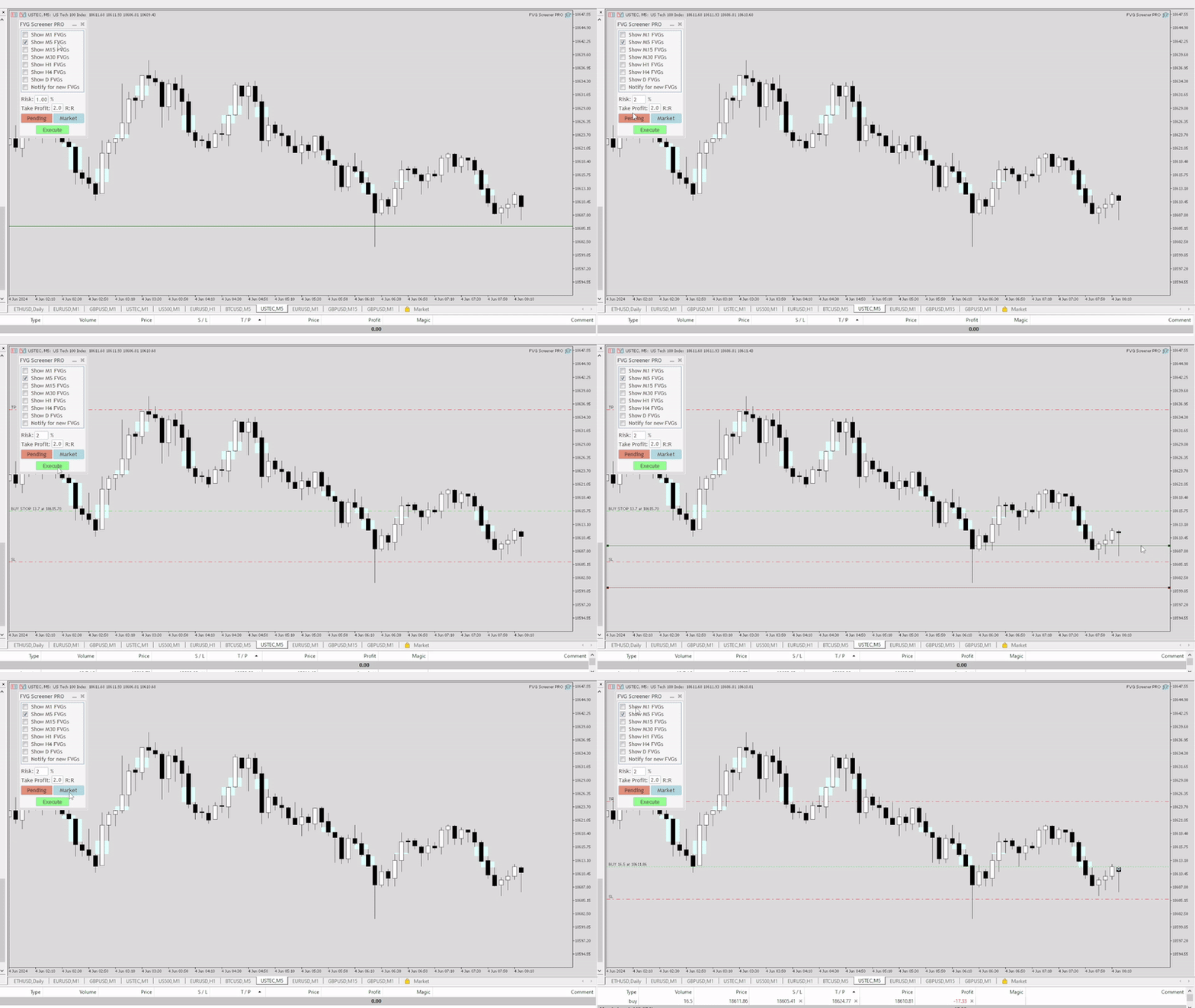
Most importantly, the user can click the button "Pending" where the following will happen:

1) Two horizontal lines will appear on the chart. One Green and one Red (by default colors, but are customizable). The Green line represents the entry level, and the Red one the stop loss level.
If you place the Green line above the current price, with the red line below the green line, then the EA recognizes the pending order as a buy stop order, and once you click "Execute", the EA places the trade with the Risk % and Take Profit RR you set in the panel.
If you place the Green line below the current price , with the red line below the green line, then the EA recognizes the pending order as a buy limit order, and once you click "Execute", the EA places the trade with the Risk % and Take Profit RR you set in the panel.
If you place the Green line above the current price , with the red line above the green line, then the EA recognizes the pending order as a sell stop order, and once you click "Execute", the EA places the trade with the Risk % and Take Profit RR you set in the panel.
If you place the Green line below the current price , with the red line above the green line, then the EA recognizes the pending order as a sell limit order, and once you click "Execute", the EA places the trade with the Risk % and Take Profit RR you set in the panel.

Check my video below where I go through the EA features and functions so that you fully understand the quick way of using it for fast and simplified trade execution without needing to calculate your Lots and TP every time you trade.


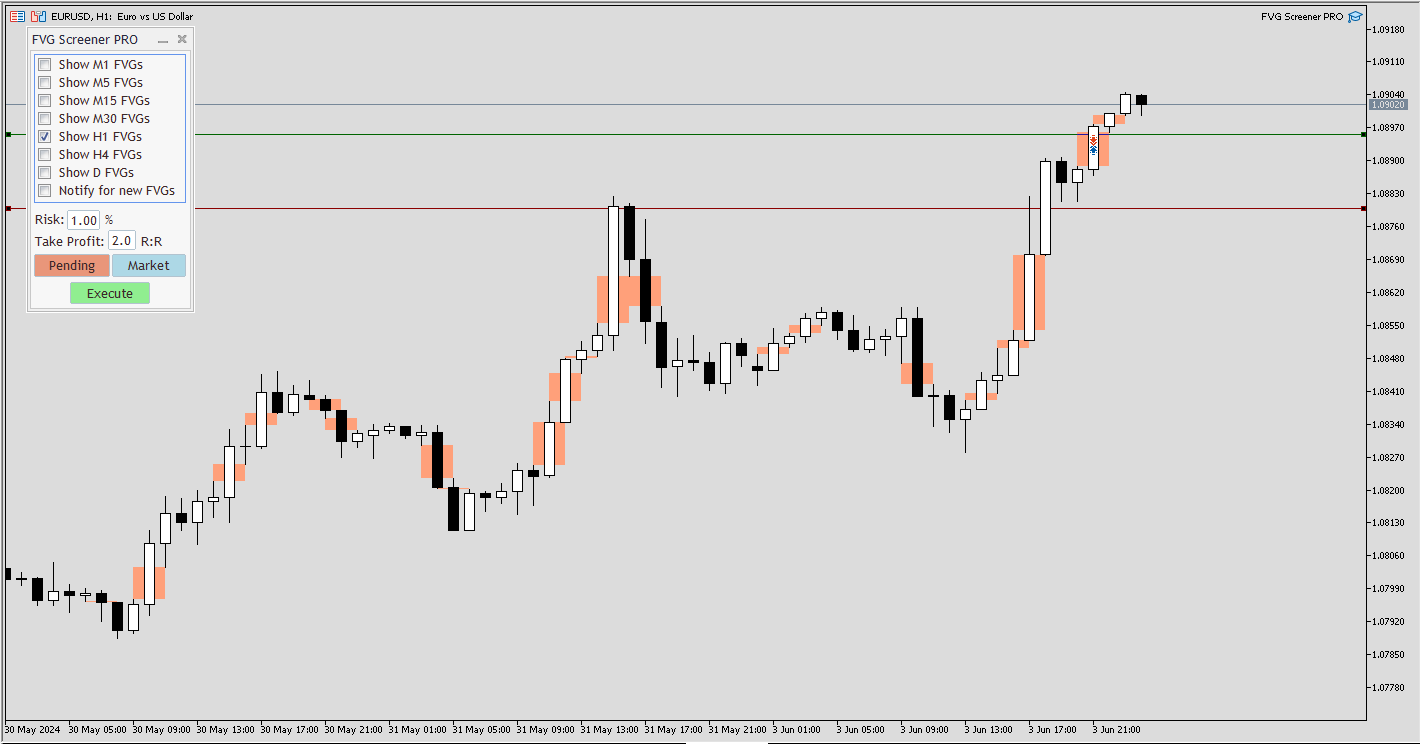
Let's go through the Trade Panel that appears on the top left corner of the chart, once you place the EA on the Symbol you want to use it on:

  • Show M1 FVGs: If clicked, it'll instantly show all past M1 Fair Value Gaps, and will draw any new one as time goes on.
  • Show M5 FVGs:  If clicked, it'll instantly show all past M5 Fair Value Gaps, and will draw any new one as time goes on.
  • Show M15 FVGs:  If clicked, it'll instantly show all past M15 Fair Value Gaps, and will draw any new one as time goes on.
  • Show M30 FVGs:  If clicked, it'll instantly show all past M30 Fair Value Gaps, and will draw any new one as time goes on.
  • Show H1 FVGs:  If clicked, it'll instantly show all past H1 Fair Value Gaps, and will draw any new one as time goes on.
  • Show H4 FVGs:  If clicked, it'll instantly show all past H4 Fair Value Gaps, and will draw any new one as time goes on.
  • Show D FVGs:  If clicked, it'll instantly show all past Daily Fair Value Gaps, and will draw any new one as time goes on.
  • Notify for new FVGs: If clicked, the EA will alert or send notification to the user (based on the input parameters that is explained below) for every new FVG (it clarifies whether it's a bullish or bearish FVG) of the SELECTED timeframes only!
    In example, if you've only clicked to show M1 and M5 FVGs, the notifications for new FVGs will only apply to new M1 and M5 Fair Value Gaps
  • Risk: % : Here you type the Risk percentage you want the trades to have (1%, 0.5% etc.) - You MUST have a value here otherwise it won't open trades
  • Take Profit: R:R : Here you type the Risk-to-Reward ratio of the trade you want to open. In example, if set at "3" and you place a trade with a SL of -10 pips, the TP will be at +30 pips.


Input Parameters:

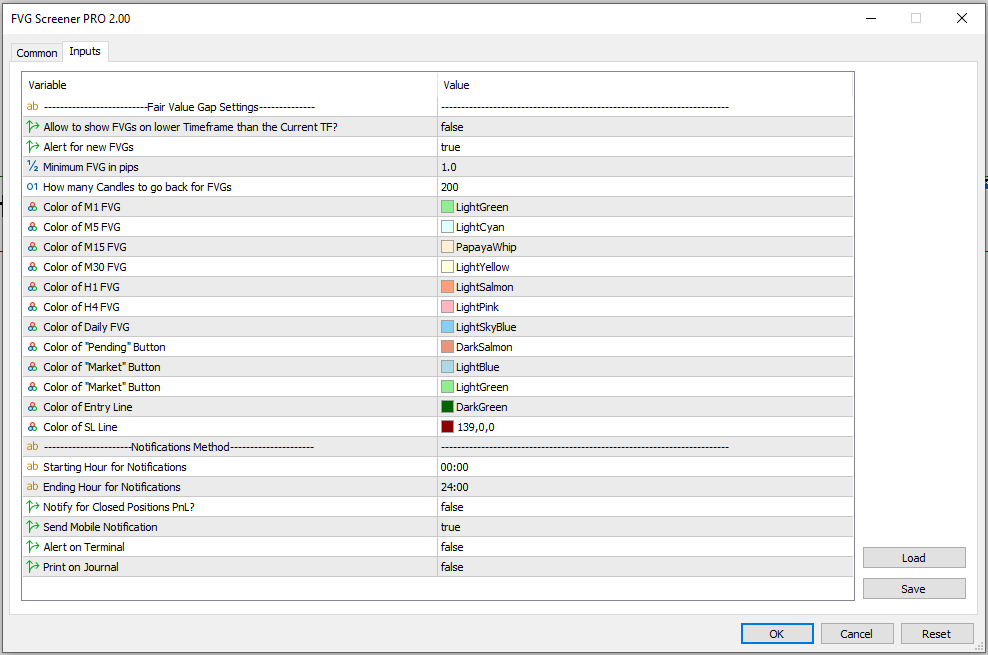
--------------------------Fair Value Gap Settings---------------------------

  • Allow to show FVGs on lower Timeframe than the Current TF?: True/False (double click to change its value). If "true", the EA will not show FVGs that are in a LOWER timeframe then the current chart's timeframe. In example, if your chart is on M15 timeframe, even if you have clicked to show M1 FVGs, it won't show them while this input parameter is set to "true". 
  • Alert for new FVGs: True/False. If true, it'll notify the user based on his preferences of notification method (explained below)
  • Minimum FVG in pips: Here, you type a number to filter out tiny FVGs that are not important to you.
  • How many Candles to go back for FVGs: Type the number of how many candles it'll go back to draw past FVGs. It's at 200 by default.

  • Color of M1 FVG: Color of the M1 FVG. Double click on the color to change it. Select any desired color from the palette.
  • Color of M5 FVG: Same as above
  • Color of M15 FVG: Same as above
  • Color of M30 FVG: Same as above
  • Color of H1 FVG: Same as above
  • Color of H4 FVG: Same as above
  • Color of Daily FVG: Same as above
  • Color of "Pending" Button: Color of the "Pending" Button that is at the bottom of the EA's trade panel.
  • Color of "Market" Button: Same as above
  • Color of "Execute" Button:  Same as above
  • Color of Entry Line: Color of the "Entry" line which is used for the Pending orders. It's Green by default, but if you have a dark chart background, it's better to be changed to a bright color.
  • Color of SL Line:  Color of the "Entry" line which is used for the Pending orders. It's Red by default, but if you have a dark chart background, it's better to be changed to a bright color.
----------------------Notifications Method----------------------
  • Starting Hour for Notifications: In case you want the notifications to only be sent in a desired time window (i.e. in AM Session Silver Bullet which is 17:00 to 18:00), you type the starting hour of that window. (00:00 format)
  • Ending Hour for Notifications: Here, you type the ending hour of that window. (00:00 format)
  • Notify for Closed Positions PnL?: If "true", the EA will notify you on your phone's MT5 app with the trade's result for the current symbol only. More about how it works, here.
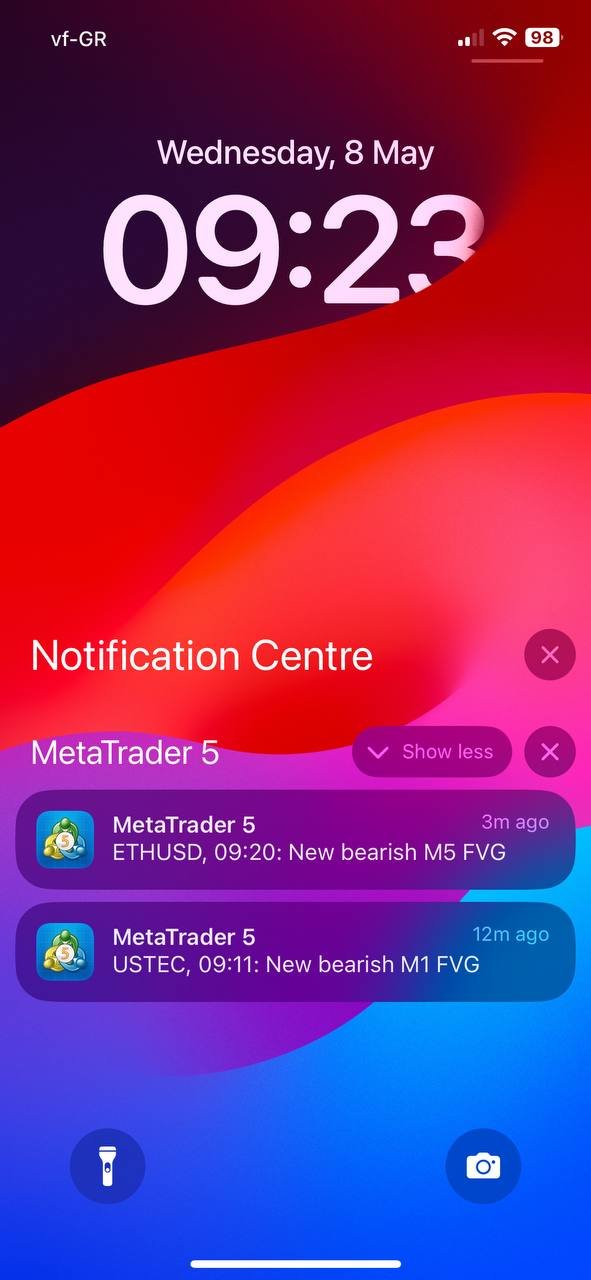
  • Send Mobile Notification: If "true", the EA will notify you through your Mobile MT5 app. Make sure you've connected it with your computer's terminal. (I have attached a screenshot of a test notification, for illustration purposes)
  • Alert on Terminal: If "true", the EA will send alerts in a new window when new patterns form, or when there's an error with a trade order.
  • Print on Journal: If "true", the EA will print in the Journal tab of the terminal. It's the lowest form of communication between the user and the EA.

Important Note: 
-This tool only works on the attached symbol.
-The drawn FVG boxes are not extended to the right, in order to keep the chart clean and easy to read.
-You must have "Algo Trading" enabled in the EA's settings, as well as have the "Algo Trading" button clicked at the top left of your MT5 terminal

Feel free to message me for any special enquiry or question about this tool. I'm always open to help and hear to your suggestions. I'd highly appreciate a review on the product's page if you're satisfied!

You can check my Website for the full list of Metatrader tools I provide.


리뷰 1
Levent Safak
1303
Levent Safak 2025.04.21 14:56 
 

Easy to use on 1 chart. Nearly everything there. If it had the option deleting filled FVG's and Order Block show option before FVG's would have been excellent but surely not at this price. Bargain as is.

추천 제품
Sonic R Pro Enhanced EA - 버전 2025 249달러 - 첫 5명만! 실시간 신호 Sonic R Pro Enhanced의 실시간 성과 확인하기: 거래 전략 Sonic R Pro Enhanced는 Dragon Band (EMA 34 및 EMA 89)를 기반으로 한 전통적인 Sonic R 전략의 업그레이드 버전으로, 자동화된 거래 시스템입니다. 타임프레임: M15, M30 지원 통화쌍: XAUUSD, BTCUSD, AUDJPY, USDJPY 거래 스타일: 스윙 트레이딩 - 풀백 및 반대 트렌드 최소 자본: 500 USD 레버리지: 1:200 이상 사용자 가이드 Sonic R Pro Enhanced는 단순함을 위해 최적화되었습니다. 사용자는 RiskAmount 하나의 파라미터만 설정하면 됩니다. RiskAmount < 0일 경우: 계좌 잔액의 백분율로 위험을 계산 RiskAmount > 0일 경우: 거래당 고정 USD 금액으로 위험을 설정 예제:
| Fully-automated Smart Money Concept (ICT) inspired trading solution with multi-strategy capabilities | Built by a grid trader >> for grid traders.  This is MT5 version, click  here  for  Blue CARA MT4  (settings and logics are same in both versions)     Real monitoring signal  -->  Cara Gold Intro Blue CARA EA   ('CARA') - short for  C omprehensive  A lgorithmic   R esponsive   A dvisor is a next-gen  multi-currency    multi-timeframe  EA base on the widely known (and perhaps the most popul
Magic EA MT5
Kyra Nickaline Watson-gordon
Magic EA is an Expert Advisor based on Scalping, Elliot Waves and with filters such as RSI, Stochastic and 3 other strategies managed and decided with the robot smartly. Large number of inputs and settings are tested and optimized and embedded in the program thus inputs are limited and very simple. Using EA doesn't need any professional information or Forex Trading Knowledge. EA can trade on all symbols and all time frames, using special and unique strategies developed by the author. The EA w
The Bitcoin Reaper
Profalgo Limited
3.71 (34)
출시 프로모션: 현재 가격으로는 매우 제한된 수의 사본만 구매 가능합니다! 최종 가격: 999달러 신규(349달러부터) --> 1개 무료 증정(거래 계좌 번호 2개에 한함). 최고의 콤보 상품     ->     여기를 클릭하세요 공개 그룹에 가입하세요:   여기를 클릭하세요   LIVE SIGNAL LIVE SIGNAL V2.0 UPDATE 2.0 INFO 비트코인 리퍼에 오신 것을 환영합니다!   골드리퍼의 엄청난 성공 이후, 저는 동일한 성공 원칙을 비트코인 ​​시장에도 적용할 때가 되었다고 생각했고, 와, 정말 유망해 보이네요!   저는 20년 넘게 거래 시스템을 개발해 왔으며, "단연" 제 전문 분야는 브레이크아웃 전략입니다. 이 간단하지만 효과적인 전략은 역대 최고의 트레이딩 전략 중 하나로 자리매김하며, 사실상 모든 시장에 적용할 수 있습니다.       특히 비트코인처럼 변동성이 큰 시장에서는 더욱 빛을 발합니다!   그렇다면 이 전략은 어떻게 작동할까요? 브레이크
Exclusive EA for FOREX HEDGE account The EA (FuzzyLogicTrendEA) is based on fuzzy logic strategies based on the analysis of a set of 5 indicators and filters. Each indicator and filter has a weight in the calculation and, when the fuzzy logic result reaches the value defined in the EA parameter, a negotiation is opened seeking a pre-defined gain. As additional functions it is possible to define maximum spread, stop loss and so on . Recommended Symbol: EURUSD, AUDUSD, GBPUSD, NZDUSD, USDCAD, AUD
SolarTrade Suite Financial Robot: LaunchPad Market Expert - 거래를 시작하도록 설계되었습니다! 이 거래 로봇은 특별하고 혁신적이며 고급 알고리즘을 사용하여 가치를 계산합니다. 금융 시장의 세계에서 여러분의 조수입니다. SolarTrade Suite 시리즈의 지표 세트를 사용하여 이 로봇을 시작할 순간을 더 잘 선택하세요. 설명 하단에서 SolarTrade Suite 시리즈의 다른 제품을 확인하세요. 투자와 금융 시장의 세계를 자신 있게 탐색하고 싶으신가요? SolarTrade Suite Financial Robot: LaunchPad Market Expert는 정보에 입각한 투자 결정을 내리고 수익을 늘리는 데 도움이 되도록 만들어진 혁신적인 소프트웨어입니다. SolarTrade Suite Financial Robot: LaunchPad Market Expert의 장점: - 정확한 계산: 로봇은 고급 알고리즘과 분석 방법을 사
RSI Grid MT5
Joseph Anthony Aya-ay Yutig
다른 EA를 무료로 받으세요!!! 다른 EA를 무료로 받으세요!!! 다른 EA를 무료로 받으세요!!! 다른 EA를 무료로 받으세요!!! 다른 EA를 무료로 받으세요!!! RSI Grid는 RSI 과매수 및 과매도 조건을 기반으로 하며 거래가 시장에서 손해를 보는 쪽에 있을 때 그리드를 엽니다. RSI는 기술 거래자들에게 강세 및 약세 가격 모멘텀에 대한 신호를 제공하며 종종 자산 가격 그래프 아래에 표시됩니다. 자산은 일반적으로 RSI가 70% 이상일 때 과매수 상태로 간주되고 30% 미만일 때 과매도 상태로 간주됩니다. 매개변수: 시간 필터 월요일 화요일 수요일 목요일 금요일 토요일 일요일 시작 시간 종료 시간 RSI 설정 RSI 기간 과매수 과매도 타임프레임 자산 관리 오토로트 최대 부지 이익을 취하다 그리드 크기 승수 후행 옵션 후행 정지 후행 단계 트레일 오프셋 파일 설정 v1.8 GBPUSD 세트 1 https:
US500 Scalper
Sergey Batudayev
S&P 500 스캘퍼 어드바이저(S&P 500 Scalper Advisor)는 S&P 500 지수를 성공적으로 거래하고자 하는 트레이더를 위해 설계된 혁신적인 도구입니다. S&P 500 지수는 미국 주식 시장에서 가장 널리 사용되고 권위 있는 지표 중 하나로, 미국 500대 기업으로 구성되어 있습니다. 특징: 자동화된 거래 솔루션:       이 자문가는 고급 알고리즘과 기술적 분석을 기반으로 시장 상황의 변화에 맞춰 전략을 자동으로 조정합니다. 다양한 접근 방식:       자문가는 지수 추세 이해, 가격 변동 분석, 수익 극대화와 위험 최소화를 위한 알고리즘 등 여러 가지 전략을 결합합니다. 유연성 및 사용자 정의 가능성:       트레이더는 자신의 트레이딩 목표, 위험 수준, 트레이딩 전략 선호도에 맞춰 EA 설정을 사용자 지정할 수 있습니다. 위험 관리:       자문가는 시장을 지속적으로 모니터링하고 위험을 관리하기 위한 조치를 취합니다. 특정 손실 수준에 도달하면 거래
Magic Grid MT5
Aliaksandr Charkes
4.14 (7)
Magic Grid MT5 is a non-indicator Expert Advisor using a grid strategy (on a hedging account). The strategy is based on automatic reopening of grid pending orders, after closing their market positions (by Take-Profit, Stop-Loss or manually). Pending orders are placed with a specified step from the initial prices, which can be entered manually or generated automatically (once at the beginning of the trade).   The robot can trade on any timeframe, on any currency pair, on several currency pairs,
Gold Smc Apex Scalping h1
Chaibadee Dechtanankul
Here is a breakdown of how the GOLD SMC APEX SCALPER (H1 BUY EDITION) operates specifically on the H1 (1-Hour) timeframe. This Expert Advisor (EA) uses a hybrid approach , combining Smart Money Concepts (SMC) for entry zones with a Grid & Martingale system for trade execution and recovery. 1. Execution on the H1 Timeframe (The "New Bar" Rule) Strict H1 Lock: The EA checks its environment during initialization ( OnInit ). If you attach it to any timeframe other than H1, it will trigger an alert a
YenSync
Michael Prescott Burney
1 (1)
원형 동기화       YenSync는 Fujinami Systems의 검증된 핵심 로직을 기반으로 개발된 USD/JPY 1시간 차트용 고급 거래 시스템입니다. USD/JPY 통화쌍의 독특한 가격 변동에 맞춰 특별히 개발되었으며, 다양한 변동성 조건 하에서 정확한 시장 진입, 추세 동기화 및 위험 관리에 중점을 둡니다. 이 시스템은 내부 모멘텀 추적 및 방향성 정렬 필터를 활용하여 명확하고 일관된 시장 추세를 파악하고 단기 변동의 영향을 최소화합니다. 거래 시점, 최대 스프레드, 자본 감소 필터는 물론, 거래량, 최대 포지션 규모, 거래 빈도를 정밀하게 제어할 수 있어 사용자가 원하는 대로 위험 관리 및 거래 전략을 조정할 수 있습니다. YenSync는 효율성과 적응성을 염두에 두고 개발되었으므로 USD/JPY 쌍의 높은 변동성에 대처하기 위한 안정적이고 체계적인 접근 방식을 찾는 트레이더에게 이상적인 선택입니다.
Cyclone Intraday
Mikhail Mitin
5 (1)
How the EA works (simple explanation) Trades on M5 timeframe Uses H1 timeframe to analyze global market context Analyzes 2 or 3 timeframes simultaneously On each timeframe: Checks price position relative to one or two Moving Averages Evaluates MA angle and distance between price and MA Entry logic is based on trend + volatility conditions , not on random signals The full algorithm is illustrated in the screenshots. Recommended usage Symbol: EURUSD Timeframe: M5 Trading style: Intraday
Manus Pro
Itumeleng Mohlouwa Kgotso Tladi
MANUS PRO EA The Trading Revolution You've Been Waiting For Are you TIRED of watching other traders make consistent profits while your account bleeds red?   The financial markets don't wait for anyone – and neither should you. MANUS PRO isn't just another Expert Advisor... it's your   TICKET TO FINANCIAL FREEDOM . Why MANUS PRO is Different (And Why Everyone's Talking About It) FOR BEGINNERS: Your Trading Mentor That Never Sleeps Zero Learning Curve   – Install, activate, and watch it wo
Gold EA: Proven Power for 1-Minute Gold Trading Transform your trading with our Gold EA, meticulously crafted for 1-minute charts and delivering over 2000% growth in 5 years from just $100-$1000 . No Martingale, No AI Gimmicks : Pure, time-tested strategies with robust money management, stop loss, and take profit for reliable performance across multiple charts. Flexible Trading Modes : Choose Fixed Balance for safe profits, Mark IV for bold growth, or %Balance for high rewards—combine Mark IV an
SkyScraperMT5
Teressa Herlene Thomson
Overview SkyScraper is a sophisticated automated trading system built exclusively for MetaTrader 5. This versatile EA adapts to your trading style on any timeframe (optimized for 3-5 minute charts) and works seamlessly across forex pairs, cryptocurrencies, and metals including gold. Why SkyScraper? Smart Automation That Protects Your Capital Intelligent trade execution with multi-layer risk controls Dynamic position sizing that automatically adjusts to your broker's requirements Adaptive stop l
Srfire Hedge Position
Javier Antonio Gomez Miranda
SRFire Hedge Position - Automated Trading Strategy SRFire Hedge Position is an Expert Advisor (EA) designed to ensure trades always close in profit using a hedging and scaling technique. Here’s how it works: How It Works: Trade Initiation: The EA opens a Buy position within a predefined channel. Simultaneously, it places a Sell Stop order below the channel with double the lot size of the Buy position. If the Buy position hits the Take Profit (TP), the Sell Stop order is canceled, and the proces
Hamster Scalping mt5
Ramil Minniakhmetov
4.71 (239)
Hamster Scalping은 마틴게일을 사용하지 않는 완전 자동화된 거래 고문입니다. 야간 스캘핑 전략. RSI 표시기와 ATR 필터는 입력으로 사용됩니다. 고문은 헤징 계정 유형이 필요합니다. 실제 작업 및 기타 개발 모니터링은 여기에서 찾을 수 있습니다. https://www.mql5.com/en/users/mechanic/seller 일반 권장 사항 최소 예치금 $100, 최소 스프레드의 ECN 계정 사용, 기본 설정은 eurusd M5 gmt + 3입니다. 입력 매개변수 EA는 4자리 및 5자리 따옴표 모두에서 작동합니다. 입력 매개변수에서 5자에 대해 포인트로 값을 표시하면 자동으로 모든 것을 4자로 다시 계산합니다. NewCycle - 모드가 켜져 있으면 고문이 멈추지 않고 작동하고, 모드가 꺼져 있으면 일련의 거래가 완료된 후 고문이 새 주문을 열지 않습니다. 기간 표시기1 - 첫 번째 표시기의 기간. 상위 레벨 - 고문이 판매를 시작하는 첫 번째 지표의
The Gold Buyer
Moses Aboliwen Aduboa
Ride the Gold Trend with a Simple Buy-Only EA The  EA is a fully automated Buy-Only Expert Advisor for MetaTrader 5. It is designed to capture upward market opportunities with safe risk management and seamless execution. Why Traders Choose It: Best performance on Gold (XAUUSD) – highly liquid and trending. Buy-Only EA – focuses purely on long positions. Plug & Play setup – attach and let it trade automatically. Built-in Stop Loss & Take Profit protection. Smart one-position contro
Pro Experience Only 4 copies available for $99.00. Next price 199 USD ECN Pro Experience is a scalping strategy based on breaking through strong price levels. One of the oldest and most reliable strategies with the author's modernization for the current market. The strategy does not require any optimizations. We installed it on the chart according to the recommendation and enjoy trading!!! Advantages of ECN Pro Experience: - optimal SL/TP ratio - low SL, which makes the system as safe as possi
EMLU Precision AI
Ali Shimaz
1 (1)
EMLU Precision AI — Free Demonstration Version for MT5 Type: Expert Advisor (MT5) ️ Important Notice (Read Before Downloading) This Free version of EMLU Precision AI is designed strictly for demonstration, research, structural inspection, and interface familiarisation . It does not represent the behaviour, logic depth, live signals, or performance results of the full paid version. Performance, trade frequency, and result quality are intentionally reduced to prevent misuse of the free edition as
FREE
Stormer RSI 2
Ricardo Rodrigues Lucca
This strategy was learned from Stormer to be used on B3. Basically, 15 minutes before closing the market, it will check RSI and decided if it will open an position. This strategy do not define a stop loss. If the take profit reach the entry price it will close at market the position. The same happens if the maximal number of days is reached. It is created to brazilian people, so all configuration are in portuguese. Sorry Activations allowed have been set to 50.
EA16 Taka Grid
Nhat Tien Duong
TAKA Grid EA (EA16): The Sideway King & Prop Firm Shield Are you tired of EAs that get destroyed by choppy, ranging markets? Meet TAKA Grid EA , the ultimate mean-reversion system designed specifically for the AUDNZD cross pair on the M15 timeframe. It doesn't rely on explosive breakouts; it dominates the sideways chop with mathematical precision.   ENTER YOUR KEY HERE:   [  EA16_99999D_TANINCODER_595559587987 ] -- MANDATORY: ALLOW WEBREQUEST TO ACTIVATE THE BOT To verify your License
FREE
Classic Market Surfer EA - A Timeless, Proven Strategy for Gold Trading For years, this powerful trading strategy has been hidden from the public-reserved for a select few. Now, for the first time, the Classic Market Surfer EA is available to traders like you.   Built on pure, time-tested trading principles, this EA doesn't rely on trendy gimmicks like AI or machine learning. Instead, it harnesses a classic, robust strategy that has consistently delivered results over the years. This is not a "g
Golden Mind EA
Leszek Aleksander Mroczek
FREE FOR LIMITED TIME Golden Mind EA – Adaptive Grid Trading for GOLD Description Golden Mind EA is a fully automated Expert Advisor for MetaTrader 5 that utilizes a dynamic BUY-only grid strategy, designed exclusively for GOLD (XAU/USD) trading. What sets this EA apart from traditional grid trading systems is its intelligent pair-based position closure logic. Instead of relying on fixed take-profit levels, Golden Mind EA calculates the profit difference between pairs of trades and closes them
FREE
Universal Trend
Maryna Shulzhenko
The Universal Trend indicator was created to detect trends in price movement and allows you to quickly determine not only the direction of the trend, but also understand the levels of interaction between buyers and sellers. The indicator works on all timeframes and currency pairs. The indicator gives fairly accurate signals and it is customary to use it both in trending and flat markets. It is advisable to use the indicator in combination with other tools for more reliable signals and making a
The Inside Bar e one is a reversal/continuation candle formation, and is one of the most traded candle patterns. Robot F1 allows you to configure different trading strategies, Day Trade or swing trade, based on the Inside Bar as a starting point.  This pattern only requires two candles to perform. Robot F1 uses this extremely efficient pattern to identify trading opportunities. To make operations more effective, it has indicators that can be configured according to your strategy. Among the o
Scalping bot for the gold/dollar pair (XAU/USD) — a powerful and versatile solution for traders, designed to deliver maximum efficiency in a dynamic market. This bot is specifically engineered for scalping: it analyzes price changes and places trades even before significant market movements begin. This allows it to secure advantageous positions early and capitalize on even the smallest market fluctuations. Key Features: Flexibility: Adapts to any market conditions and suits your trading strategy
Gyroscopes mt5
Nadiya Mirosh
5 (2)
Gyroscope        professional forex expert   (for EURUSD, GBPUSD, USDJPY, AUDUSD, USDCHF, EURGBP, EURJPY, NZDUSD, USDCAD, EURCHF, AUDJPY, CADJPY pairs)   alyzing the market using the Elliot Wave Index. Elliott wave theory is the interpretation of processes in financial markets through a system of visual models (waves) on price charts. The author of the theory, Ralph Elliott, identified eight variants of alternating waves (of which five are in the trend and three are against the trend). The mov
ID Trade_Bot BS - an effective tool for automated trading using RSI Trade_Bot BS is an efficient solution for automated trading based on RSI, allowing flexible parameter customization and risk management. Thanks to the ability to choose a trading mode, dynamic Stop-Loss and Take-Profit levels, and trading mode adjustment (buying, selling, or both), it is suitable for various trading strategies. Key Features: Uses the RSI indicator to determine market conditions. Automatically opens an
Bober Real MT5
Arnold Bobrinskii
4.76 (17)
Bober Real MT5 is a fully automatic Forex trading Expert Advisor. This robot was made in 2014 year and did a lot of profitbale trades during this period. So far over 7000% growth on my personal account. There was many updates but 2019 update is the best one. The robot can run on any instrument, but the results are better with EURGBP, GBPUSD, on the M5 timeframe. Robot doesn't show good results in tester or live account if you run incorrect sets. Set files for Live accounts availible only for cu
이 제품의 구매자들이 또한 구매함
Trade Assistant MT5
Evgeniy Kravchenko
4.42 (208)
거래당 위험 계산, 라인을 사용한 손쉬운 신규 주문, 부분 청산 기능을 통한 주문 관리, 7가지 유형의 트레일링 스탑 및 기타 유용한 기능을 제공합니다. 추가 자료 및 지침 설치 지침   -   애플리케이션 지침   -   데모 계정용 애플리케이션 평가판 라인 기능       - 차트에 개시선, 손절매, 차익실현을 표시합니다. 이 기능을 사용하면 새로운 주문을 쉽게 하고 개봉 전에 추가 특성을 볼 수 있습니다. 위기 관리       -       위험 계산 기능은 설정된 위험과 손절매 주문의 크기를 고려하여 새 주문의 볼륨을 계산합니다. 이를 통해 손절매 크기를 설정하고 동시에 설정된 위험을 존중할 수 있습니다. 로트 계산 버튼 - 위험 계산을 활성화/비활성화합니다. 필요한 위험 값은 위험 필드에 0에서 100 사이의 백분율 또는 예금 통화로 설정됩니다. 설정 탭에서 위험 계산 옵션을 선택합니다. $ 통화, % 잔액, % 지분, % 자유 마진, % 사용자 정의, % AB 이전
Trade Manager EA에 오신 것을 환영합니다. 이 도구는 거래를 보다 직관적이고 정확하며 효율적으로 만들기 위해 설계된 궁극적인 리스크 관리 도구 입니다. 단순한 주문 실행 도구가 아닌, 원활한 거래 계획, 포지션 관리 및 리스크 제어를 위한 종합 솔루션입니다. 초보자부터 고급 트레이더, 빠른 실행이 필요한 스캘퍼에 이르기까지 Trade Manager EA는 외환, 지수, 상품, 암호화폐 등 다양한 시장에서 유연성을 제공합니다. Trade Manager EA를 사용하면 복잡한 계산은 이제 과거의 일이 됩니다. 시장을 분석하고 진입, 손절 및 익절 수준을 차트의 수평선으로 표시한 후 리스크를 설정하면, Trade Manager가 이상적인 포지션 크기를 즉시 계산하고 SL 및 TP 값을 실시간으로 표시합니다. 모든 거래가 간편하게 관리됩니다. 주요 기능: 포지션 크기 계산기 : 정의된 리스크에 따라 거래 크기를 즉시 결정합니다. 간단한 거래 계획 : 진입, 손절, 익절을 위한
Local Trade Copier EA MT5
Juvenille Emperor Limited
4.96 (131)
Local Trade Copier EA MT5 를 사용하여 매우 빠른 거래 복사 경험을 해보세요. 1분 안에 간편하게 설정할 수 있으며, 이 거래 복사기를 사용하면 Windows 컴퓨터 또는 Windows VPS에서 여러 개의 MetaTrader 터미널 간에 거래를 0.5초 미만의 초고속 복사 속도로 복사할 수 있습니다. 초보자든 전문가든   Local Trade Copier EA MT5 는 다양한 옵션을 제공하여 사용자의 특정 요구에 맞게 맞춤 설정할 수 있습니다. 이는 수익 잠재력을 높이려는 모든 사람을 위한 최고의 솔루션입니다. 지금 사용해보시고 이것이 왜 시장에서 가장 빠르고 쉬운 무역용 복사기인지 알아보세요! 팁: 여기 에서 데모 계정에서 Local Trade Copier EA MT5 데모 버전을 다운로드하여 사용해 볼 수 있습니다. 다운로드한 무료 데모 파일을 MT5 >> File >> Open Data Folder >> MQL5 >> Experts 폴더에 붙여넣고 터
TradePanel MT5
Alfiya Fazylova
4.87 (149)
Trade Panel은 다기능 거래 도우미입니다. 이 애플리케이션에는 50개 이상의 수동 거래 기능이 포함되어 있으며 대부분의 거래 작업을 자동화할 수 있습니다. 구매하기 전에 데모 계정에서 데모 버전을 테스트할 수 있습니다. 데모 계정용 애플리케이션 체험판 다운로드: https://www.mql5.com/en/blogs/post/750865 . 전체 지침 여기 . 거래. 한 번의 클릭으로 거래를 수행할 수 있습니다: 리스크 자동 계산과 함께 예약 주문 및 포지션 열기. 한 번의 클릭으로 여러 주문 및 포지션 열기. 주문 그리드 열기. 예약 주문 및 포지션을 그룹별로 닫기. 포지션 방향 전환 (Buy 닫기 > Sell 열기, Sell 닫기 > Buy 열기). 포지션 잠금 (부족한 포지션을 열어 Buy와 Sell 포지션의 수량을 동일하게 만들기). 모든 포지션 한 번의 클릭으로 부분적으로 닫기. 모든 포지션의 테이크 프로핏과 스톱로스를 같은 가격 수준에 설정. 모든 포지션의 스톱로스를
베타 출시 Telegram to MT5 Signal Trader 는 곧 공식 알파 버전을 출시할 예정입니다. 일부 기능은 아직 개발 중이며, 작은 버그가 발생할 수 있습니다. 문제가 있으면 꼭 보고해 주세요. 여러분의 피드백은 소프트웨어 개선에 도움이 됩니다. Telegram to MT5 Signal Trader 는 Telegram 채널 또는 그룹의 거래 신호를 자동으로 MetaTrader 5 계정으로 복사하는 강력한 도구입니다. 공개 및 비공개 채널을 모두 지원하며, 여러 신호 제공자를 여러 MT5 계정에 연결할 수 있습니다. 소프트웨어는 빠르고 안정적으로 동작하며, 복사된 거래를 완벽히 제어할 수 있습니다. 인터페이스는 깔끔하며 대시보드와 차트가 시각적으로 구성되어 있고, 직관적인 네비게이션이 가능합니다. 여러 Signal Account를 관리하고, 공급자별 설정을 세밀하게 조정하며, 모든 동작을 실시간으로 모니터링할 수 있습니다. 필수 조건 MQL의 제한으로 인해 EA는 Te
VERIFIED TRADING RESULTS - Farmed Hedge Yield Axi Copy:  https://www.mql5.com/en/signals/2356376 - Farmed Hedge Yield Exn Copy:   https://www.mql5.com/en/signals/2356404 - Farmed Hedge Yield V Copy:  https://www.mql5.com/en/signals/2357156 Contact me via private message to receive the User Manual and Setup. * Thai Lauguage Support Available Farmed Hedge Yield Farming - Professional Pair Trading Dashboard (Manual - Hybrid - Semi/Automated EA) VERSION 3 - WILD HARVEST UPDATE Trading Approac
Trade Dashboard MT5
Fatemeh Ameri
4.94 (119)
Tired of complex order placement and manual calculations? Trade Dashboard is your solution. With its user-friendly interface, placing orders becomes effortless, by a single click, you can open trades, set stop loss and take profit levels, manage trade lot size, and calculate risk to reward ratios, allowing you to only focus on your strategy. Say goodbye to manual calculations and streamline your trading experience with Trade Dashboard. Download  Demo Version  right now. You can find  Details of
Copy Cat More Trade Copier MT5 (복사 고양이 MT5) 는 오늘날의 거래 과제를 위해 설계된 로컬 거래 복사기이자 완전한 위험 관리 및 실행 프레임워크입니다. 프롭펌 챌린지부터 개인 포트폴리오 관리까지, 견고한 실행, 자본 보호, 유연한 구성 및 고급 거래 처리의 조합으로 모든 상황에 적응합니다. 복사기는 마스터(송신자)와 슬레이브(수신자) 모드 모두에서 작동하며, 시장 주문과 예약 주문, 거래 수정, 부분 청산 및 헷지 청산 작업의 실시간 동기화를 제공합니다. 데모 및 실계좌, 거래 또는 투자자 로그인과 호환되며, EA, 터미널 또는 VPS가 재시작되어도 지속적인 거래 메모리 시스템을 통해 복구를 보장합니다. 고유 ID로 여러 마스터와 슬레이브를 동시에 관리할 수 있으며, 브로커 간 차이는 접두사/접미사 조정 또는 사용자 정의 심볼 매핑을 통해 자동으로 처리됩니다. 매뉴얼/설정  | Copy Cat More MT4 | 채널  특별 기능: 설정이 간편함 —
Trade copier MT5
Alfiya Fazylova
4.56 (39)
Trade Copier는 거래 계정 간의 거래를 복사하고 동기화하도록 설계된 전문 유틸리티입니다. 복사는 공급자의 계정/단말기에서 동일한 컴퓨터 또는 vps에 설치된 수신자의 계정/단말기로 발생합니다. 구매하기 전에 데모 계정에서 데모 버전을 테스트할 수 있습니다. 데모 버전 여기 . 전체 지침 여기 . 주요 기능 및 이점: 복사기는 "МТ5> МТ5", "МТ4> МТ5", "МТ5> МТ4" 복사를 지원합니다. 복사기는 데모 계정 > 실 계정, 실 계정 > 데모 계정, 데모 계정 > 데모 계정 및 실제 계정 > 실 계정 복사를 지원합니다. 복사기는 읽기 전용 암호가 적용된 투자자 계정에서 복사를 지원합니다. 하나의 공급자 터미널은 여러 수신 터미널로 트랜잭션을 보낼 수 있고 하나의 수신 터미널은 여러 공급자 터미널에서 트랜잭션을 수신할 수 있습니다. 복사기는 귀하 또는 귀하의 고문이 거래하는 동일한 터미널에서 작동할 수 있습니다. 높은 복사 속도(0.5초 미만). 복사기에는 간편
Smart Stop Manager – 전문 트레이더 수준의 자동 스톱로스 실행 개요 Smart Stop Manager는 Smart Stop 라인업의 실행 계층으로, 여러 개의 오픈 포지션을 보유한 트레이더를 위해 설계된 구조적이고 신뢰할 수 있으며 완전 자동화된 스톱로스 관리 시스템입니다. 모든 활성 거래를 지속적으로 모니터링하고, Smart Stop 시장 구조 로직을 사용해 최적의 스톱레벨을 계산하며, 명확하고 투명한 규칙에 따라 스톱을 자동으로 업데이트합니다. 단일 자산부터 전체 멀티심볼 포트폴리오까지, Smart Stop Manager는 모든 거래에 규율, 일관성, 그리고 완전한 리스크 가시성을 제공합니다. 감정적 판단을 제거하고, 수동 작업을 줄이며, 모든 스톱이 항상 시장 구조 기반의 논리적 진행을 따르도록 보장합니다. 하이라이트 시장 구조 기반 자동 스톱 배치 • 모든 오픈 포지션을 평가하여 Smart Stop 로직에 기반한 최적의 스톱로스를 자동 적용합니다. 포트폴
Timeless Charts
Samuel Manoel De Souza
5 (3)
Timeless Charts is an advanced charting solution designed for professional traders seeking for custom charts / custom timeframes , including seconds charts / seconds timeframe, renko charts / renko bars, cluster charts / footprint charts and advanced tools present in most of the popular platforms. Unlike traditional offline charts or simplistic custom indicators, this solution constructs fully custom bars with true timestamp accuracy , down to miliseconds, allowing for a powerful and precise tr
The News Filter MT5
Leolouiski Gan
4.74 (19)
이 제품은 뉴스 시간 동안 모든 전문가 어드바이저 및 수동 차트를 필터링하여 수동 거래 설정이나 다른 전문가 어드바이저가 입력한 거래가 파괴될 수 있는 급격한 가격 상승으로부터 걱정하지 않아도 됩니다. 이 제품은 또한 뉴스 발표 전에 열린 포지션과 대기 주문을 처리할 수 있는 완전한 주문 관리 시스템이 함께 제공됩니다.   The News Filter  를 구매하면 더 이상 내장 뉴스 필터에 의존할 필요가 없으며 이제부터 모든 전문가 어드바이저를 여기서 필터링할 수 있습니다. 뉴스 선택 뉴스 소스는 Forex Factory의 경제 캘린더에서 얻어집니다. USD, EUR, GBP, JPY, AUD, CAD, CHF, NZD 및 CNY와 같은 어떤 통화 기준으로 선택할 수 있습니다. Non-Farm (NFP), FOMC, CPI 등과 같은 키워드 식별을 기준으로 선택할 수도 있습니다. 저, 중, 고 영향을 가지는 뉴스를 필터링할 수 있도록 선택할 수 있습니다. 차트와 관련된 뉴스만 선
Ultimate Extractor
Clifton Creath
5 (9)
Ultimate Extractor - Professional Trading Analytics for MT5 *****this is the local HTML version of Ultimate Extractor. For the online version please reach out to me directly****** Ultimate Extractor transforms your MetaTrader 5 trading history into actionable insights with comprehensive analytics, interactive charts, and real-time performance tracking. What It Does Automatically analyzes your MT5 trading history across all Expert Advisors and generates detailed HTML reports with interactive vi
Telegram To MT5 Receiver
Levi Dane Benjamin
4.53 (15)
가입한 모든 채널에서 (개인 및 제한된 채널 포함) 시그널을 바로 MT5로 복사합니다.   이 도구는 사용자를 고려하여 설계되었으며 거래를 관리하고 모니터하는 데 필요한 많은 기능을 제공합니다. 이 제품은 사용하기 쉽고 시각적으로 매력적인 그래픽 인터페이스로 제공됩니다. 설정을 사용자 정의하고 제품을 몇 분 안에 사용할 수 있습니다! 사용자 가이드 + 데모  | MT4 버전 | 디스코드 버전 데모를 시도하려면 사용자 가이드로 이동하십시오. Telegram To MT5 수신기는 전략 테스터에서 작동하지 않습니다! Telegram To MT5 특징 여러 채널에서 동시에 신호를 복사합니다. 개인 및 제한된 채널에서 신호를 복사합니다. Bot 토큰이나 채팅 ID가 필요하지 않습니다.   (원하는 경우에는 사용할 수 있습니다) 위험 % 또는 고정된 로트로 거래합니다. 특정 심볼을 제외합니다. 모든 신호를 복사할지 또는 복사할 신호를 사용자 정의할지 선택할 수 있습니다. 모든 신호를 인
Smart Stop Scanner – 실제 시장 구조 기반의 멀티자산 스톱로스 분석 시스템 개요 Smart Stop Scanner는 여러 시장에서 스톱로스 구조를 전문적으로 모니터링하기 위해 설계된 강력한 도구입니다. 실제 시장 구조, 핵심 브레이크아웃, 가격 행동 로직을 기반으로 가장 의미 있는 스톱 영역을 자동으로 감지하며, 고해상도(DPI 지원)의 깔끔하고 일관된 패널에 모든 정보를 표시합니다. 포렉스(FOREX), 금, 지수, 금속, 암호화폐 등 다양한 자산군을 지원합니다. 스톱 레벨 계산 방식 이 시스템은 기존의 인디케이터 공식을 사용하지 않습니다. 대신 브레이크아웃, 더 높은 고점, 더 낮은 저점 과 같은 실제 시장 구조 이벤트를 분석합니다. 스톱 레벨은 이러한 구조적 지점에서 직접 생성되므로 시장의 실제 움직임과 자연스럽게 일치하며, 더 신뢰도 높은 스톱 시스템을 제공합니다. 주요 기능 • 고정밀 멀티자산 호환성 포렉스, 금속, 금, 지수, 암호화폐 등 다양한
HINN MagicEntry Extra
ALGOFLOW OÜ
4.71 (14)
HINN MAGIC ENTRY – the ultimate tool for entry and position management! Place orders by selecting a level directly on the chart! full description   ::  demo-version  :: 60-sec-video-description Key features: - Market, limit, and pending orders - Automatic lot size calculation - Automatic spread and commission accounting - Unlimited partitial take-profits  - Breakeven and trailing stop-loss and take-profit  functions - Invalidation leves - Intuitive, adaptive, and customizable interface - Works
Exp COPYLOT CLIENT for MT5
Vladislav Andruschenko
3.82 (34)
MT5용 트레이드 복사기는 metaТrader 5 플랫폼용 트레이드 복사기입니다   . 그것은 사이의   외환 거래를 복사합니다       모든 계정   COPYLOT MT5 버전의 경우   MT5   -   MT5, MT4   -   MT5 (또는 COPYLOT MT4 버전의 경우   MT4 -   MT4 MT5   -  MT4) 믿을 수 있는 복사기! MT4 버전 전체 설명   +DEMO +PDF 구입 방법 설치하는 방법     로그 파일을 얻는 방법     테스트 및 최적화 방법     Expforex의 모든 제품 МТ4 터미널에서 거래를 복사할 수도 있습니다(   МТ4   -   МТ4, МТ5   -   МТ4   ):   COPYLOT CLIENT for MT4 이 버전은 МТ5   -   МТ5, МТ4   -   МТ5   터미널 간을 포함합니다. 거래 복사기는 2/3/10 터미널 사이의 거래/포지션을 복사하기 위해 만들어졌습니다. 데모 계정 및 투자 계정에서
Trade Manager DashPlus
Henry Lyubomir Wallace
5 (13)
DashPlus 는 MetaTrader 5 플랫폼에서 거래 효율성과 효과를 향상시키기 위해 설계된 고급 거래 관리 도구입니다. 리스크 계산, 주문 관리, 고급 그리드 시스템, 차트 기반 도구 및 성과 분석 등 포괄적인 기능을 제공합니다. 주요 기능 1. 리커버리 그리드 불리한 시장 상황에서 거래를 관리하기 위한 평균화 및 유연한 그리드 시스템을 구현합니다. 거래 회복을 최적화할 수 있도록 전략적인 진입 및 종료 포인트를 제공합니다. 2. 스택 그리드 강한 시장 움직임 동안 포지션을 추가하여 유리한 거래에서 잠재적 수익을 극대화하도록 설계되었습니다. 유리한 시장 트렌드에서 승률을 높이며 거래를 확장할 수 있도록 합니다. 3. 손익(P&L) 라인 차트에서 잠재적인 수익 및 손실 시나리오를 시각적으로 표현합니다. 설정을 조정하고 P&L 라인을 드래그하여 실행 전에 다양한 거래 결과를 평가할 수 있습니다. 4. 바스켓 모드 동일한 심볼에 여러 포지션을 단일 집계 포지션으로 결합하여 관리합니
MT5 to Telegram Signal Provider 는 사용하기 쉽고 완전히 커스터마이즈 가능한 유틸리티로, 특정 신호를 Telegram의 채팅, 채널 또는 그룹으로 전송하고, 귀하의 계정을 신호 제공자 로 만듭니다. 경쟁 제품과 달리 DLL 임포트를 사용하지 않습니다. [ 데모 ] [ 매뉴얼 ] [ MT4 버전 ] [ 디스코드 버전 ] [ 텔레그램 채널 ]  New: [ Telegram To MT5 ] 설정 단계별 사용자 가이드 가 제공됩니다. 텔레그램 API에 대한 지식은 필요하지 않습니다; 개발자가 제공하는 모든 것이 필요합니다. 주요 특징 구독자에게 보낸 주문 상세 정보를 커스터마이즈할 수 있습니다. 예를 들어, 브론즈, 실버, 골드와 같은 계층 구독 모델을 만들 수 있습니다. 골드 구독에서는 모든 신호를 받습니다. id, 심볼, 또는 코멘트로 주문을 필터링할 수 있습니다. 주문이 실행된 차트의 스크린샷이 포함됩니다 보낸 스크린샷에 닫힌 주문을 그려 추가 검증을 합니다
Seconds Chart MT5
Boris Sedov
4.59 (17)
Seconds Chart - MetaTrader 5에서 초 단위 차트를 생성하는 독특한 도구입니다. Seconds Chart 를 사용하면 초 단위로 설정된 타임프레임으로 차트를 작성할 수 있어, 표준 분 또는 시간 단위 차트에서는 불가능한 유연성과 정밀한 분석이 가능합니다. 예를 들어, S15 타임프레임은 15초 동안의 캔들로 구성된 차트를 의미합니다. 사용자 정의 심볼을 지원하는 모든 인디케이터와 전문가 어드바이저를 사용할 수 있습니다. 이를 사용하는 것은 표준 차트에서 거래하는 것만큼 편리합니다. 표준 도구와 달리, Seconds Chart 는 초고속 타임프레임에서도 높은 정확도와 지연 없이 작업할 수 있도록 지원합니다. Seconds Chart의 장점 1초부터 900초까지 의 타임프레임 지원. 내장 틱 데이터베이스 덕분에 역사 데이터 즉시 로딩 . 실시간 데이터 업데이트로 지연이나 차이 없음 . 여러 초 단위 차트를 동시에 생성 가능. Seconds Chart가 이상적인 경우
Risk Manager for MT5
Sergey Batudayev
4.35 (17)
MT5의 Expert Advisor Risk Manager는 매우 중요하며 제 생각에는 모든 거래자에게 필요한 프로그램입니다. 이 Expert Advisor를 사용하면 거래 계정의 위험을 제어할 수 있습니다. 위험 및 이익 통제는 금전적 측면과 백분율 측면에서 모두 수행될 수 있습니다. Expert Advisor가 작동하려면 통화 쌍 차트에 첨부하고 예금 통화 또는 현재 잔액의 %로 허용되는 위험 값을 설정하기만 하면 됩니다. [Instruction for Risk Manager parameters] 어드바이저 기능 이 위험 관리자는 위험을 제어하는 ​​데 도움이 됩니다. - 거래를 위해 - 하루 - 일주일 동안 - 한 달 동안 당신은 또한 제어할 수 있습니다 1) 거래 시 최대 허용 랏 2) 1일 최대 주문 수 3) 하루 최대 수익 4) 지분 인수 이익 설정 그게 다가 아닙니다. 설정에서 자동 설정을 지정하면 고문이 기본 SL 및 TP를 설정할 수도 있습니다. 상
Grid Manual MT5
Alfiya Fazylova
4.9 (21)
"Grid Manual"은 주문 그리드 작업을 위한 거래 패널입니다. 이 유틸리티는 보편적이며 유연한 설정과 직관적인 인터페이스를 제공합니다. 그것은 손실을 평균화하는 방향뿐만 아니라 이익을 증가시키는 방향으로 주문 그리드와 함께 작동합니다. 거래자는 주문 그리드를 만들고 유지할 필요가 없으며 유틸리티에서 수행합니다. 거래자가 주문을 시작하는 것으로 충분하며 "Grid Manual"는 자동으로 그를 위한 주문 그리드를 생성하고 거래가 마감될 때까지 그와 동행할 것입니다. 전체 설명 및 데모 버전 여기 . 유틸리티의 주요 기능: 모바일 터미널을 포함하여 어떤 방식으로든 열린 주문과 함께 작동합니다. "제한" 및 "중지"의 두 가지 유형의 그리드와 함께 작동합니다. 고정 및 동적(ATR 표시기 기반)의 두 가지 유형의 그리드 간격 계산과 함께 작동합니다. 오픈 오더 그리드의 설정을 변경할 수 있습니다. 차트에서 각 주문 그리드의 손익분기점 수준을 표시합니다. 각 주문 그리드에 대한 이익
Pulsar Terminal 은 Astralys LLC 의 상표인 Pulsar Technologies 의 제품입니다. Pulsar Terminal은 MetaTrader 5용 유틸리티 애드온입니다. Expert Advisor 를 통해 MetaTrader 5 계정에 연결되는 동반 애플리케이션 내에서 실행 도구와 결합된 비주얼 인터페이스 입니다. 표준 MT5 패널보다 더 고급 비주얼 인터페이스와 워크플로우를 제공하기 위해 동반 애플리케이션을 사용하여 도구의 기능을 극대화합니다. Pulsar Terminal은 독립형 애플리케이션이 아니며 작동하려면 MetaTrader 5가 필요합니다. EA는 Pulsar Terminal 동반 애플리케이션과 localhost를 통해서만 통신합니다. 동반 애플리케이션 설치 프로그램은 설치 가이드(MQL5 블로그 게시물)를 통해 구매자에게 제공됩니다. 인터페이스를 통해 주문 실행, 리스크 관리, 거래 통계 확인, 그리고 MetaTrader 5에 연결된 동반
YuClusters
Yury Kulikov
4.93 (43)
Attention: You can view the program operation in the free version  YuClusters DEMO .  YuClusters is a professional market analysis system. The trader has unique opportunities to analyze the flow of orders, trade volumes, price movements using various charts, profiles, indicators, and graphical objects. YuClusters operates on data based on Time&Sales or ticks information, depending on what is available in the quotes of a financial instrument. YuClusters allows you to build graphs by combining da
The product will copy all telegram signal to MT5 ( which you are member) , also it can work as remote copier.  Easy to set up, copy order instant, can work with almost signal formats, image signal,  s upport to translate other language to English Work with all type of channel or group, even channel have "Restrict Saving Content", work with  multi channel, multi MT5 Work as remote copier: with signal have ticket number, it will copy exactly via ticket number. Support to backtest signal. How to s
Take a Break MT5
Eric Emmrich
4.75 (24)
News filter, equity guard & session control for all your EAs — one tool, full protection Take a Break has evolved from a basic news filter into a comprehensive account protection solution . It pauses your other Expert Advisors during news events or based on custom filters. When trading resumes, it automatically restores your entire chart setup , including all EA settings. Why traders choose Take a Break One news filter for all your EAs — no more relying on individual built-in filters that may o
DrawDown Limiter
Haidar Lionel Haj Ali
5 (20)
Drawdown Limiter EA You are in the right place if you were searching for Drawdown control, Drawdown limiter, Balance protection, Equity Protection or Daily Drawdown Limit related to Prop Firm, FTMO, or Funded account trading, or if you want to protect your trading account. Have you suffered from controlling your drawdown when trading funded accounts? This EA is meant for you. Prop firms usually set a rule called “Trader Daily Drawdown”, and if it is not respected, you are disqualified.  I am an
Entry In The Zone with SMC Multi Timeframe is a real-time market analysis tool developed based on Smart Money Concepts (SMC). It is designed to analyze market structure, price direction, reversal points, and key zones across multiple timeframes in a systematic way. The system displays Points of Interest (POI) and real-time No Repaint signals, with instant alerts when price reaches key zones or when signals occur within those zones. It functions as both an Indicator and a Signal System (2-in-1),
Telegram to MT5 Coppy
Sergey Batudayev
5 (8)
Telegram에서 MT5로:   최고의 신호 복사 솔루션 DLL 없이도 Telegram 채널과 채팅에서 MetaTrader 5 플랫폼으로 거래 신호를 직접 복사하는 최신 도구인 Telegram to MT5를 사용하여 거래를 간소화하세요. 이 강력한 솔루션은 정밀한 신호 실행, 광범위한 사용자 정의 옵션을 제공하고 시간을 절약하며 효율성을 높여줍니다. [ Instructions and DEMO ] 주요 특징 직접 Telegram API 통합 전화번호와 보안 코드를 통해 인증하세요. 사용자 친화적인 EXE 브리지를 통해 채팅 ID를 쉽게 관리하세요. 여러 채널/채팅을 추가, 삭제, 새로 고침하여 동시에 신호를 복사합니다. 고급 필터를 사용한 신호 파싱 예외 단어(예: "보고서", "결과")가 포함된 원치 않는 신호를 건너뜁니다. 유연한 SL 및 TP 형식을 지원합니다: 가격, 핍 또는 포인트. 가격 대신 포인트를 지정하는 신호에 대한 진입 포인트를 자동으로 계산합니다. 주문 맞춤화 및
Trade Manager DaneTrades
Levi Dane Benjamin
4.36 (28)
거래 관리자는 위험을 자동으로 계산하는 동시에 거래를 빠르게 시작하고 종료하는 데 도움을 줍니다. 과잉 거래, 복수 거래 및 감정 거래를 방지하는 데 도움이 되는 기능이 포함되어 있습니다. 거래를 자동으로 관리할 수 있으며 계정 성과 지표를 그래프로 시각화할 수 있습니다. 이러한 기능은 이 패널을 모든 수동 거래자에게 이상적으로 만들고 MetaTrader 5 플랫폼을 향상시키는 데 도움이 됩니다. 다중 언어 지원. MT4 버전  |  사용자 가이드 + 데모 트레이드 매니저는 전략 테스터에서 작동하지 않습니다. 데모를 보려면 사용자 가이드로 이동하세요. 위기 관리 % 또는 $를 기준으로 위험 자동 조정 고정 로트 크기 또는 거래량과 핍을 기반으로 한 자동 로트 크기 계산을 사용하는 옵션 RR, Pips 또는 Price를 사용한 손익분기점 손실 설정 추적 중지 손실 설정 목표 달성 시 모든 거래를 자동으로 마감하는 최대 일일 손실률(%)입니다. 과도한 손실로부터 계정을 보호하고 과도한
제작자의 제품 더 보기
News Filter Protector
Konstantinos Kalaitzidis
5 (1)
뉴스 필터 보호기는 뉴스 공지에 대한 공개 포지션/주문을 방지하도록 설계되었습니다. 뉴스가 예측할 수 없는 변동성과 확장된 손실을 초래할 수 있는 오늘날의 세계에서 이러한 도구는 달력을 다시 확인할 필요가 없기 때문에 마음의 평화에 매우 도움이 됩니다! 각 매개변수의 작동 방식을 이해하기 위해 EA의   입력을   살펴보겠습니다 . --------------------------------뉴스 설정---------------- ---------------- 필터링할 뉴스의 통화를 쉼표로 구분(예: USD, EUR, GBP):   필터링하려는 모든 통화(MT5 달력 창에 표시됨)를 쉼표로 구분하여 입력합니다(아래에서 더 많은 특정 뉴스를 필터링할 수 있습니다. 하지만 먼저 이 뉴스와 관련된 모든 통화를 입력해야 합니다.) 키워드 #1(필터링할 특정 뉴스용 - 예: "급여"): 각 키워드에 MT5 캘린더에 있는 설명과 정확히 동일하게   (예: Forex Factory에 있는 것과는
FVG Screener
Konstantinos Kalaitzidis
4.67 (3)
"FVG Screener"는 ICT로 대중화된 개념인 "공정 가치 격차"(FVG)를 식별하고 경고하도록 설계된 무료 유틸리티 도구입니다. 이 EA는 거래에서 공정 가치 격차를 이용하는 거래자가 사용하도록 고안되었습니다.    패널은 원하는 기간을 선택할 수 있는 간단하고 직관적인 인터페이스를 제공하므로 거래자는 차트가 있는 기간에 관계없이 특정 기간에 집중할 수 있습니다. EA는 시장에서 통화 쌍의 현재 시장 가격과 계산된 공정 가치 간의 본질적인 불일치인 불균형 또는 FVG를 검색합니다. FVG가 감지되면 EA는 시각화 목적으로 차트에 레벨을 그립니다. 클릭 한 번으로 사용자는 특정 기간의 FVG를 표시하거나 숨길 수 있으므로 차트의 효율성을 확인하는 트레이더에게 귀중한 도구가 됩니다.   사용하려는 기호에 EA를 배치한 후 차트 왼쪽 상단에 나타나는   거래 패널을   살펴보겠습니다 .   M1 FVG 표시:   클릭하면 과거의 모든 M1 공정 가치 격차가 즉시 표시되고 시
FREE
Revenge Trading Protector MT 5
Konstantinos Kalaitzidis
5 (3)
복수 거래 수호자(Revenge Trading Protector)는 복수 거래의 피해자가 될 수 있는 거래자를 위한 간단하지만 효과적인 도구입니다. 나 자신도 데이 트레이더이기 때문에 복수 트레이딩의 심리적 측면과 손실을 보상하려는 욕구를 이해합니다. 그래서 나는 손실 후에도 인내심을 갖고 비합리적인 거래 결정을 내리지 않을 수 있다는 것을 100% 확신하기 위해 (나 자신도 사용하는) 이 도구를 개발했습니다. 손실을 입으면 Revenge Trading Protector EA는   원하는 시간이 경과할 때까지  다른 주문     (지정 주문, 중지 주문 또는 시장 실행 주문) 을 열지 못하게 합니다.   예를 들어 오전 10시 45분에 손실을 보고 30분의 휴식 시간을 설정한 경우 오전 11시 15분 이전에 설정한 모든 주문은 EA에 의해 즉시 취소됩니다. 다시 허용되면 경고 알림을 받게 됩니다.   30분이 경과하기 전에 거래를 시도하면 각각 알림을 받게 됩니다.   추
Trade Notifications
Konstantinos Kalaitzidis
5 (4)
"거래 알림"은 개설 또는 마감된 모든 거래에 대한 모바일 알림이나 단말기 알림   은 물론 각 거래의 $ 이익/손실 결과를   알려주는 것을 목표로 하는 유틸리티 도구입니다 .   제가 오랫동안 사용해오던 도구인데, 무료로 공유하게 되었습니다! 입력 매개변수: (모든 입력은    참/거짓   유형입니다.     값을 변경하려면 두 번 클릭하세요.) 마감된 포지션 손익에 대한 알림   : true인 경우 마감된 거래의 $ 결과를 알려줍니다. 이렇게 하면 거래가 종료되는 시기와 그 결과에 대한 정보를 얻을 수 있습니다. 이는 차트에 얽매이지 않고 거래의 PnL이 오르락내리락하는 것을 지켜보는 데 유용한 기능입니다. 이는 스트레스를 덜 받는 거래로 이어집니다. 새로 개설된 거래에 대해 알림   : true인 경우 새 거래가 개설될 때 알려줍니다.   지정가 주문을 설정하고 언제 진입 레벨이 시작되는지 알고 싶을 때 매우 중요한 매개변수입니다. 귀하가 알고 트레이더이고 시장에 진입
FREE
Lot Size Limiter
Konstantinos Kalaitzidis
This Expert Advisor helps enforce disciplined risk management by preventing new trades from being opened once a specified cumulative lot size across all open positions is reached. Designed for MT5, the EA continuously monitors the account’s active trades and calculates the total lot size. If the total exceeds the predefined limit, the EA temporarily blocks the execution of new market or pending orders. This is particularly useful for traders who want to control exposure/emotions during high-vola
Revenge Trading Protector
Konstantinos Kalaitzidis
5 (1)
복수 거래 수호자(Revenge Trading Protector)는 복수 거래의 피해자가 될 수 있는 거래자를 위한 간단하지만 효과적인 도구입니다. 나 자신도 데이 트레이더이기 때문에 복수 트레이딩의 심리적 측면과 손실을 보상하려는 욕구를 이해합니다. 그래서 나는 손실 후에도 인내심을 갖고 비합리적인 거래 결정을 내리지 않을 수 있다는 것을 100% 확신하기 위해 (나 자신도 사용하는) 이 도구를 개발했습니다. 손실을 입으면 Revenge Trading Protector EA는   원하는 시간이 경과할 때까지  다른 주문   (지정 주문, 중지 주문 또는 시장 실행 주문) 을 열지 못하게 합니다.   예를 들어 오전 10시 45분에 손실을 보고 30분의 휴식 시간을 설정한 경우 오전 11시 15분 이전에 설정한 모든 주문은 EA에 의해 즉시 취소됩니다. 다시 허용되면 경고 알림을 받게 됩니다.   30분이 경과하기 전에 거래를 시도하면 각각 알림을 받게 됩니다. 추가 기능
Drawdown Protector MT4
Konstantinos Kalaitzidis
5 (2)
하락 보호 장치는 원하는 최대 일일 하락폭을 관리하는 데 사용됩니다. 이는 거래자, 특히 소품 회사 거래자에게 매우 귀중한 도구이므로 하락 한도에 주의해야 합니다.    이는 자산 손실 관리 목적으로 사용하기 쉬운 효과적인 EA입니다. 이는 새로운 거래를 차단하고 기존 거래를 종료하는 방식으로 작동하며, 유동 자산(잔액 아님)이 귀하가 설정한 일일 손실 한도를 초과하는 경우. 또한 단일 거래에 대해 최대 손실 한도를 설정할 수 있습니다. 이 한도를 초과하면 다음 날까지 거래가 차단됩니다. 사용자는 3개의 매개변수 값을 삽입합니다. $ 단위의 일일 손실 한도:   명목 통화 단위의 최대 손실률(예제 목적으로 "$"를 사용함)   계정 잔액   에 대해 명목 가치로 허용되는 최대 감소액입니다   . 초과하는 경우 EA는 다음 날까지 거래를 차단합니다. $로 표시된 거래당 손실 한도:    명목 통화로 표시된 최대 손실(단지 예시 목적으로 "$"를 사용했습니다). 이는   단일 거래
Drawdown Protector
Konstantinos Kalaitzidis
5 (1)
Drawdown Protector는 원하는 최대 일일 하락폭을 관리하는 데 사용되는 유틸리티 도구입니다. 프롭 회사와 도전의 시대에는   일일 감소 한도를 인식하는 것이   매우 중요합니다   . 자본 손실 관리 및 보복 거래 방지에 사용하기 쉬운 효과적인 EA입니다.  입력 매개변수: 거래를 차단하는 데 몇 시간이 걸립니까? - 여기에서는   일일 % 하락폭을 위반한 후   EA가 새로운 거래를 차단할 시간을 설정합니다 .   값은 0보다 커야 합니다. 다음 날까지 거래를 차단하시겠습니까? -   예/아니요(변경하려면 두 번 클릭). 여기에서는   위의 입력(거래를 차단하는 시간)에 관계없이 새 거래를 차단하려면 새 달력 날짜   (서버 시간대의 자정)   까지 적용할지 여부를 설정합니다 . 이 입력이 "예"로 설정되고 위의 입력으로 "거래 차단 시간"도 설정한 경우   두 매개변수 중   가장 빠른 시간에 거래가 다시 허용됩니다. 일일 % 하락률   - 여기에서 한도로 원
Scalping Scale in
Konstantinos Kalaitzidis
"스캘핑 스케일 인(Scalping Scale in)"은 스캘핑 시 매 순간이 중요하기 때문에 S/L 및 T/P 배치에 대해 걱정하지 않고 고정된 거리에서 초기 위치로 스케일링을 원하는 스캘퍼를 위해 설계된 유틸리티 도구입니다. 작동 방식: EA의 입력 탭에서 원하는 값을 설정하고, 보다 구체적으로 T/P에 배치할 위험 대 보상, S/L(핍 단위)의 폭을 설정합니다. 또한 다음 정지 명령까지의 거리입니다(위치 조정). MT5에서 매수/매도를 수동으로 클릭하면 EA가 자동으로 SL과 TP를 설정하는 동시에 SL과 동일한 거리(핍 단위)에서 동일한 방향으로 새로운 중지 주문을 설정합니다(즉, 매수하는 경우 S/L이 5핍인 경우). , 다음 구매 중지 주문은 초기 진입 가격보다 5핍 위에 배치됩니다. 보류 중인 중지 주문이 채워지면 이전 포지션은 손익분기점까지 추적되고 S/L은 이전 거래의 진입 수준에 있는 새로운 중지 주문이 배치됩니다.  기본적으로 이 도구는 공격적인 움직임을 포
"캔들스틱 패턴 거래 패널"은 캔들스틱 패턴으로 거래하고 패턴을 식별하고 거래를 실행하는 프로세스를   빠르고 쉽게   원하는 트레이더를 위한 최고의 도구입니다 . 다양하지만 핵심적인 입력 옵션을 갖춘 이 도구는 캔들스틱 패턴 수동 거래를 자동화하거나 이전보다 더 빠르게 수동으로 거래하도록 지원하거나 보고 싶은 패턴을 간단히 알려주려는 사람들에게 적합합니다. 사용하려는 기호에서 EA를 활성화하면 차트 왼쪽 상단에 나타나는   거래 패널을   살펴보겠습니다 .   실시간 거래에서는 시간이 돈이기 때문에 패널은 단순하고 거래자에게 필요할 수 있는 주요 기능만 사용하도록 세심하게 설계되었습니다. 거래 불가   : 안전상의 이유로 사전 확인됩니다. 이는 본질적으로 촛대 패턴이 나타날 때만 EA가 화살표 개체를 표시하고 그 이상은 표시하지 않기를 원한다는 것을 나타냅니다. 거래하려면 화살표를 클릭하세요 . 클릭하면   화살표 개체를 간단히 클릭하여   패턴이 나타날 때마다 반 수동으로 거
안티 그리드 포지션 프로텍터(Anti Grid Position Protector)   는 하락세 회복을 희망하면서 손실 포지션에 추가하려는 유혹이나 의도하지 않은 헤징을 시도하는 유혹으로부터 사용자를 보호하기 위해 설계된 유틸리티 도구입니다. ------------------------입력------------ ---- 손실 포지션에 대한 헤징을 허용하시겠습니까? -   기존   손실   포지션(동일 기호) 에서   반대 방향   으로 거래 개시(보류 주문 또는 시장 실행)를 허용/불허하는 참/거짓 입력   (값을 전환하려면 두 번 클릭)   입니다. "손실" 포지션을 식별하는 방법   - 두 가지 옵션(   손절매   및   손익   ). "StopLoss"를 선택하면 실행 중인 포지션에 손실 영역에 손절매가 있는 경우 손절매가 손익 분기점 수준을 초과하지 않는 한 도구에서 새 거래를 허용하지 않습니다. 마찬가지로, "PnL"을 선택하면 부동 포지션이 이익(>$0)이 아닌 이상
Symbol Drawdown Manager
Konstantinos Kalaitzidis
Symbol Drawdown Protector is a utility tool used to manage your desired Max Daily Drawdown only on a  specific trading symbol. It's like a %-based stop loss, but it's functioning as a revenge protector tool too. In the era of prop firms and challenges, it's   highly important   to be aware of daily drawdown limits. It's an effective EA that is simple to use for Equity Drawdown Management and prevention of revenge trading.  Input parameters:  Daily % Drawdown  - Here you set the Maximum Daily Dra
필터:
Levent Safak
1303
Levent Safak 2025.04.21 14:56 
 

Easy to use on 1 chart. Nearly everything there. If it had the option deleting filled FVG's and Order Block show option before FVG's would have been excellent but surely not at this price. Bargain as is.

Konstantinos Kalaitzidis
6891
개발자의 답변 Konstantinos Kalaitzidis 2025.04.21 15:01
Thank you very much for the feedback Levent! I'm glad you like it, and will definitely consider adding the options you mentioned :)
리뷰 답변