
Telegram Trader MT5 Pro

Setting Up a Telegram Bot for MetaTrader 5 (MT5)

MetaTrader 5 (MT5) is a powerful platform for trading, and integrating it with Telegram can help you receive trading updates and alerts efficiently. Follow these steps to set up a Telegram bot for MT5:

  1. Launch Telegram: Begin by opening the Telegram app on your device.

  2. Search for "BotFather": In the Telegram search bar, type "BotFather" and select it from the search results.

  3. Create a New Bot:

    • Send /start to BotFather.
    • Next, send /newbot to initiate the bot creation process.
  4. Bot Nickname and Username:

    • Give your bot a friendly nickname (e.g., "Bestnavisignal").
    • Choose a username for your bot that ends with 'bot' (e.g., "Bestnavisignalbot").
  5. Congratulations!: You've successfully created your Telegram bot.

  6. API Token: Upon creating the bot, you will receive a unique API token (e.g., 787517015:AAFnbcZYxx_iXAdRGrZD1W8bsSF5Xr_FmQ0 ). Remember to save this token; you'll need it later.

  7. Create a Channel or Group: If you haven't already, establish a Telegram channel or group where you'd like to receive trading updates.

  8. Add Bot as Administrator:

    • Open the channel/group Info.
    • Navigate to "Manage," then "Add Administrators."
    • Enter the bot's username (e.g., "Bestnavisignalbot") and click "Save."
  9. Send a Test Message: To ensure proper setup, send a test message to the channel/group, such as "hello world."

  10. Retrieve Channel/Group ID:

    • Open a web browser and visit the URL: https://api.telegram.org/bot&lt;token>/getUpdates (Replace <token> with your bot's API token).
    • Look for the string "chat":{"id": to find a large negative number. This number represents your group or channel ID. Copy this ID.
  11. MetaTrader 5 Configuration:

    • In MetaTrader 5, navigate to "Tools" > "Options" > "Expert Advisors."
    • Enable the option for 'Allowed WebRequest for specified URL' and add 'https://api.telegram.org' to the list.
  12. Attach the Utility:

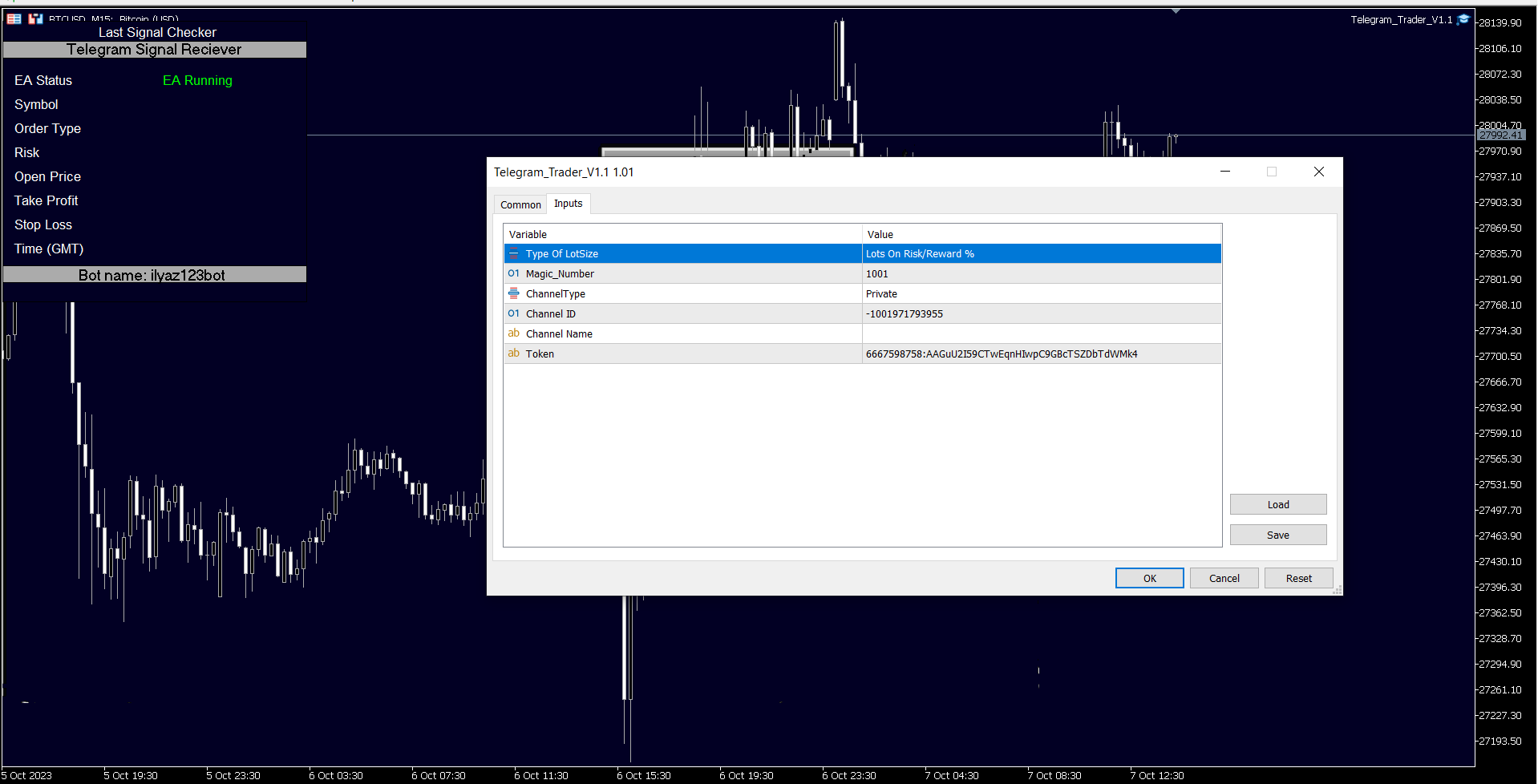
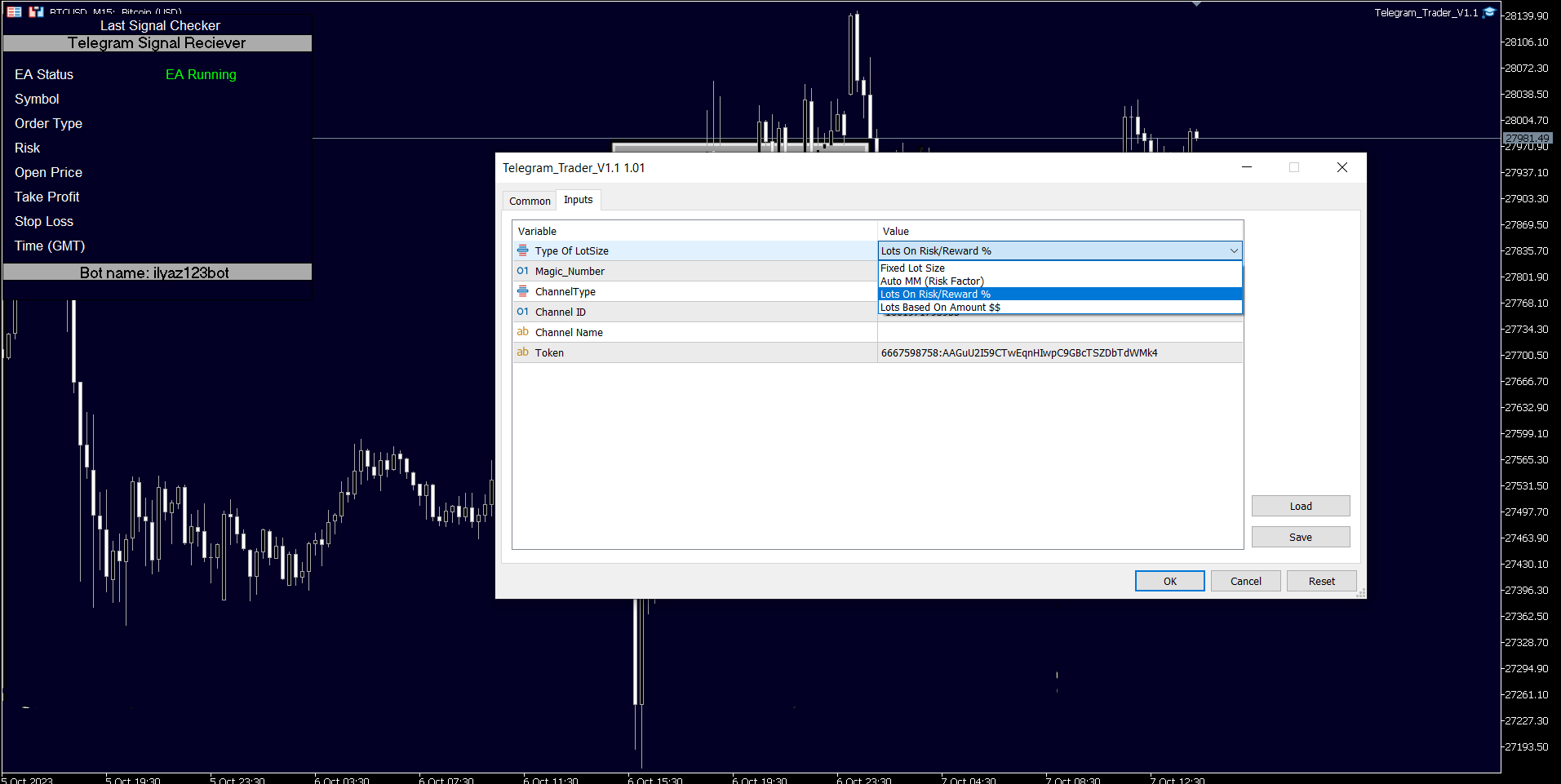
    • In MetaTrader 5, attach the utility to your trading chart.
    • Fill in the Token (from step 6) and Chat ID (from step 10).
    • Additionally, enter the magic number separated by commas (",") in the utility chart window to specify which trades should be sent to Telegram.
  13. Ready to Receive Updates: Your utility is now configured and ready to work seamlessly with MetaTrader 5. It will send trading updates and alerts to your Telegram channel/group according to your settings.

By following these steps, you can effortlessly integrate your MetaTrader 5 trading activities with Telegram, ensuring you receive real-time updates and alerts on your chosen channel or group.
추천 제품
Orders Executor
Claudio Aguiar De Aragao
Introducing Orders Executor , your powerful and efficient trading companion designed to seamlessly execute orders directly from a user-specified text file . This innovative trading tool streamlines your trading process, providing a convenient and automated solution for executing trades with precision and speed. Key Features : **Text File Integration:**     Orders Executor is designed to effortlessly read and interpret orders from a plain text file, eliminating the need for manual input. Simpl
This tool will perform Trailing stop loss and Break even management for orders. Helps you limit or reduce the time spend watching orders on the screen, especially when you need to go to sleep. Just add this EA to 1 chart, you can manage all pairs. You can filter orders by comment, magic number, symbol and order ticket number. When Breakeven it can add shift/offset pips (to cover the commission...). You can try in strategy tester before purchase. The EA will add Buy and Sell alternately, so you
With the 2UP Risk & Trade Management EA you will be able to enjoy seeing your positions being fulfilled all you gotta do is take the position and have the right lot size and the 2UP EA will do the rest - You can set your risk per position so your account never losses more than what is supposed to, it will close automatically once you reach a certain % of DrawDown. - You can set your reward as well based on %, how much do you wanna grow your account in % per trade ?,  it will close automatically
This Expert Advisor monitors all open positions across all symbols in MetaTrader 5. Whenever a Stop Loss (SL) or Take Profit (TP) is manually set or adjusted on any position, the EA automatically applies that value to all other open positions , regardless of symbol or order type (Buy/Sell). This ensures consistent and synchronized SL and TP levels across your account. Perfect for mobile trading via tablet or smartphone!
Trade Control Panel
Jerry Jilun Anak Liban
Trade Control Panel Function Normal One Click Function Close All Close All Profit Close All Loss Close All Pending Order Close All Sell Close All Buy Advance One Click Function 1.  Close Partial Lot Sell by Percent It will help you partial close for all open position by desire percent you wanted. No longer partial close one by one for every open position Manual input for desire percent 2. Close Partial Lot Buy by Percent It will help you partial close for all open position by desire percent
TradeBlitz
Feng Jiang Peng
TradeBlitz: The Intelligent Forex Trading Assistant TradeBlitz is a highly efficient trading assistant tool specifically designed for forex traders. It helps traders make quick decisions and precisely manage risks in the complex and volatile forex market, thereby enhancing trading efficiency and returns. Core Features One-Click Trading: Supports instant one-click opening and closing of positions, allowing traders to swiftly seize market opportunities and capture every crucial moment. Intelligen
Scalping Scale in
Konstantinos Kalaitzidis
"스캘핑 스케일 인(Scalping Scale in)"은 스캘핑 시 매 순간이 중요하기 때문에 S/L 및 T/P 배치에 대해 걱정하지 않고 고정된 거리에서 초기 위치로 스케일링을 원하는 스캘퍼를 위해 설계된 유틸리티 도구입니다. 작동 방식: EA의 입력 탭에서 원하는 값을 설정하고, 보다 구체적으로 T/P에 배치할 위험 대 보상, S/L(핍 단위)의 폭을 설정합니다. 또한 다음 정지 명령까지의 거리입니다(위치 조정). MT5에서 매수/매도를 수동으로 클릭하면 EA가 자동으로 SL과 TP를 설정하는 동시에 SL과 동일한 거리(핍 단위)에서 동일한 방향으로 새로운 중지 주문을 설정합니다(즉, 매수하는 경우 S/L이 5핍인 경우). , 다음 구매 중지 주문은 초기 진입 가격보다 5핍 위에 배치됩니다. 보류 중인 중지 주문이 채워지면 이전 포지션은 손익분기점까지 추적되고 S/L은 이전 거래의 진입 수준에 있는 새로운 중지 주문이 배치됩니다.  기본적으로 이 도구는 공격적인 움직임을 포
Manually enter the price for Buy position or Sell position. This EA will automatically open 3 orders and also 3 Pending (In deposited position) = Total 6 orders per one click Please see Screenshot or Videos for more explanation. - Easy to manage your different order. - Fast in modification for SL and TP. - Can modified the SL and TP depends on individual techniques.
JohnApollo
Jonathan Mboya Kinaro
JOHN EA - MANUAL TRADING ASSISTANT Professional Order Management and Risk Control Tool PRODUCT OVERVIEW JOHN EA is a manual trading assistant designed to help you efficiently manage multiple pending orders in MetaTrader 5. This is NOT an automated trading robot - you maintain complete control over all trading decisions while the EA provides advanced order management tools, risk management features, and monitoring capabilities. LICENSING & ACTIVATION Activation Policy: Your purchase includes
FREE
Telegram2MT5 Signal Copier — Telegram 신호를 MetaTrader 5에서 자동으로 복사하세요 Telegram2MT5 Signal Copier를 사용하면, Telegram에서 받는 모든 신호가 여러분의 MetaTrader 5 계좌에서 즉시 자동으로 실행됩니다. 빠르고, 신뢰할 수 있으며, 완전히 사용자 지정 가능합니다. Windows Bridge APP 파일 및 튜토리얼 을 받아보세요 Bridge 파일은 로컬 웹 패널을 MT5 EA와 연결하는 데 필요합니다.  Windows 10 & Windows 11 — 64비트 — 그리고 2016년 이후 버전의 Windows Server와 호환됩니다 Main Features 완전 호환: 공개/비공개 채널 모두에서 완벽하게 작동하며, 어떠한 제한도 없습니다. 즉시 실행: ENTRY, STOP LOSS 및 최대 5개의 TAKE PROFIT 레벨을 밀리초 단위로 감지하고 주문을 실행합니다. (현재는 대기 주문 사용 권장)
Telegram Trade Notifier EA Enhanced Utility Expert Advisor Real-time Telegram notifications for new positions AND TP/SL closures on its chart symbol Core Functionality Monitors all new positions (manual/EA/script) on its attached chart Alerts when positions close via Take Profit or Stop Loss Sends Telegram alerts within 0.5-2 seconds Works concurrently with other EAs New Position Alerts Include : • Symbol • Direction (Buy/Sell) • Entry Price • Take Profit Level • Stop Loss Level • Position Tick
King ElChart Manual Trade Panel
Mohammed Maher Al-sayed Mohammed Ahmed Saleh
King Chart – Manual Trading Panel for MetaTrader 5 Overview King Chart is a simple yet powerful manual trading panel built for traders who want speed, precision, and clarity. It enables quick order execution, clear lot control, and real-time account monitoring — all directly on your MT5 chart. Main Features Multi-Lot Trade Execution 3 Buy and 3 Sell buttons for instant execution Each button is tied to a custom lot size field Designed for flexible scaling in or out of trades Position Management
Spread Costs refers to the amount of the loss caused by the spread, and Swap Benefits refers to the amount of the income gained by overnight positions. Spread Costs is an important indicator for short-term traders, especially for scalping traders, and Swap Benefits is an important indicator for long-term traders. Since the spreads and swaps on the MetaTrader 5 platform are all expressed in points, we need to convert it into the amount expressed in the account currency. This tool can display the
Trade Manager DaneTrades
Levi Dane Benjamin
4.33 (27)
거래 관리자는 위험을 자동으로 계산하는 동시에 거래를 빠르게 시작하고 종료하는 데 도움을 줍니다. 과잉 거래, 복수 거래 및 감정 거래를 방지하는 데 도움이 되는 기능이 포함되어 있습니다. 거래를 자동으로 관리할 수 있으며 계정 성과 지표를 그래프로 시각화할 수 있습니다. 이러한 기능은 이 패널을 모든 수동 거래자에게 이상적으로 만들고 MetaTrader 5 플랫폼을 향상시키는 데 도움이 됩니다. 다중 언어 지원. MT4 버전  |  사용자 가이드 + 데모 트레이드 매니저는 전략 테스터에서 작동하지 않습니다. 데모를 보려면 사용자 가이드로 이동하세요. 위기 관리 % 또는 $를 기준으로 위험 자동 조정 고정 로트 크기 또는 거래량과 핍을 기반으로 한 자동 로트 크기 계산을 사용하는 옵션 RR, Pips 또는 Price를 사용한 손익분기점 손실 설정 추적 중지 손실 설정 목표 달성 시 모든 거래를 자동으로 마감하는 최대 일일 손실률(%)입니다. 과도한 손실로부터 계정을 보호하고 과도한
Bulk Order
Arva Sesha Sandeep
Bulk Order Bulk Order is a manual trading panel for MetaTrader 5. It allows placing multiple market and pending orders, adjusting TP/SL levels, and managing open positions from a compact on-chart interface. The EA does not perform automated trading and acts only when the user presses a button. Functions :  The panel supports simultaneous placement of up to fifty market orders. Users can set lot size, Take Profit and Stop Loss values, and send Buy or Sell orders with one action. Pending orders
통화의 힘은 통화의 강도를 분석합니다. 이것은 당신이 추세의 시작 부분에 시장에 진입 할 수 있습니다. 이 제품은 거래 시스템을 보완하고 구매 또는 판매 결정을 내릴 때 필터 역할을합니다. 분석기 패널은 단순히 누르고 당기면 쉽게 이동할 수 있습니다. 입력 매개 변수에 대한 설명: 정렬 유형-정렬 순서. 글꼴 이름-글꼴의 이름입니다. 글꼴 크기-글꼴 크기. 글꼴 간격-줄 간격. 진행률 표시줄 너비-진행률 표시줄의 너비입니다. 텍스트 색상-텍스트의 색상입니다. 다시 색상-배경 색상. 배경 투명도-투명도. 책임의 부인: 또한 돈 관리 및 정지 손실에 대해 잊지 말아야합니다. 레버리지로 외환 및 기타 금융 상품을 거래하는 것은 매우 위험하며 상당한 손실을 초래할 수 있습니다. 시장에서 거래 작업을 수행하는 것은 모든 사람에게 적합하지 않을 수 있습니다. 당신은 모든 위험을 인식하고 질문이나 의심이있는 경우 독립적 인 재정 고문의 도움을 요청해야합니다. 이 유틸리티를 거래 시스템의 보조 요
The Stop Loss Manger - SL Mange With the Stop Loss Manager you can finally sleep peacefully while it effectively manages your risk in stock market trading. Simply set your individual stop loss limits and let the manager trade for you. Never worry about losses again - the Stop Loss Manager takes care of it for you! Get the ultimate support for your trading now and maximize your profits with ease. Join the community of successful traders who swear by Stop Loss Manager today. Function overview: 1.
Expert TP SL v04 - Professional Trading Assistant with AI Motivation System Advanced manual trading tool with automatic risk management, overtrading protection, and intelligent psychological support for disciplined trading. PRODUCT OVERVIEW Expert TP SL v04 is a comprehensive trading assistant designed for manual traders who want to maintain emotional discipline while automating risk calculations. This isn't just another order placement tool - it's a complete trading psychology system that pr
This script use DIDI+BB indicators and display alerts, send mail, send notifications, and play sounds. Scanner can monitor market watch using  ***MARKET***  as symbol name, with  all timeframes Inputs: media_lenta=3 media_base=8 media_longa=20 bb_periodo=20 bb_shift=0 bb_deviation=1.96 symbols - Symbol list, separated by ;   when using ***MARKET*** symbols from marketwatch will be included wait_interval_between_signals - Seconds between signals, default =60, but high frequency signals should red
Elevate Your Trading Signals with Our Advanced Telegram Bridge EA It’s time to captivate your audience with real-time trading updates that are both professional and visually appealing. Contact me to see the demo and get a trial version We have significantly invested in user friendly features that create a unique experience for customers and providers. Not sure? Check our brochure  here SIGNAL BRIDGE is able to deliver 100% COPIER FRIENDLY SIGNALS for all business cases, even bypassing Metatrade
BTC Trading Assistant EA Manual Trading Tool with Automated Risk Management This Expert Advisor assists manual cryptocurrency traders by automating risk management, position sizing, and profit protection while providing visual trade management through an intuitive interface. Brief Description BTC Trading Assistant EA is a utility tool designed for manual cryptocurrency traders. The EA calculates position sizes based on account risk, automatically sets stop loss and take profit levels, manages br
Use for risk management and opening positions as per the user settings. The user is allowed to set the stop loss and take profits in pips. The user can also choose the risk percentage per trade that he/she wants to use while opening the trade. The volume of the trade that the user wants to sent shall be calculator according to the stoploss and the risk percentage that the user has selected.
Help Panel
Bogdan Kupinsky
Данная панель предназначена для удобного совершения сделок в платформе Metatrader. Она позволяет с легкостью открывать позиции, устанавливать стоп лосс и тэйк профит, использовать трейлинг стоп и тд.. Входные параметры : Magic - уникальный номер эксперта Lot step - шаг изменения лота Custom - произвольная сумма для высчитывания риска Risk Value  - тип поиска значения риска (в %) Функции панели : Открытие sell и buy позиций Возможность установки profit / loss для позиции, в том числе и графичес
Prop Firm Simulator
Abdeljalil El Kedmiri
실제 자금을 위험하기 전에 Prop Firm 도전을 숙달하세요!   당사의 고급 시뮬레이터는 진정한 Prop Firm 거래 환경을 재현하여 자신 있게 연습, 전략 수립 및 도전 통과를 돕습니다. 당사 시뮬레이터를 사용하면 데모 또는 실계좌를 사용하여 모든 Prop Firm 도전을 시뮬레이션하고, 수동 거래 전략과 EA를 통한 자동화 거래를 모두 지원하며, 맞춤형 기간에 대한 개인화된 도전을 생성하고 일관된 수익성에 필요한 훈율을 개발하기 위해 자신에게 도전할 수 있습니다. FTMO 10k 및 100K 도전 세트파일:   모든 주요 Prop Firm에 대한 세트파일 및 전용 지원 이용 가능 - 문의만 하세요! 선착순 10명 구매자에게 30% 할인. 주요 기능 실시간 도전 모니터링 실시간 통계 대시보드 - 잔고, 자본, P&L, 드로다운 실시간 추적 전문 지표 - 종결 P&L 대 미결 P&L, 승률, 거래 분석 수동/자동거래 지원: 수동 거래 전략 및 Expert Advisors를
Core function Intelligent transaction management one-click opening and closing operation, which supports user-defined lots to set multiple closing modes: all closing, closing by direction and closing by profit and loss status. Professional risk control, real-time risk monitoring and spread control to avoid high-cost trading environment. Visual control panel has an intuitive graphical interface, and all functions can be operated with one button to display position information, profit and loss sta
FREE
XP Trade Manager 1. Overview XP Trade Manager is a professional visual trading panel designed for manual traders on MetaTrader 5. It simplifies execution and provides advanced risk management tools like bulk closures, hedging, and position reversal directly from the chart. 2. Interface & Controls A. Trade Entry Section LOT: Trade volume input. Use the arrows to adjust by the Lot Box Step . TP / SL: Take Profit and Stop Loss inputs (in Points). SELL / BUY: Instant execution buttons. COMMENT: Cu
Introducing the Revolutionary   Trade Closing Assistant ! Are you tired of manually closing hundreds trades? Are you a   scalper ,   day trader ,   swing trader   and  you want to maximize your profits and minimize your losses by closing multiple positions at thesame time under different conditions? Are you a   Prop Firm Trader  who wishes to avoid hitting maximum daily drawdown? Search no further. This kit is the ultimate solution for all you. GUIDE TO USE THE KIT 1. Shows the total profit/los
Manus Pro
Itumeleng Mohlouwa Kgotso Tladi
MANUS PRO EA The Trading Revolution You've Been Waiting For Are you TIRED of watching other traders make consistent profits while your account bleeds red?   The financial markets don't wait for anyone – and neither should you. MANUS PRO isn't just another Expert Advisor... it's your   TICKET TO FINANCIAL FREEDOM . Why MANUS PRO is Different (And Why Everyone's Talking About It) FOR BEGINNERS: Your Trading Mentor That Never Sleeps Zero Learning Curve   – Install, activate, and watch it wo
SmartRAL
Jemy Yeferson Dimu Ludji
SmartRAL (Smart Risk Auto-Lot EA) SmartRAL: The Ultimate Risk & Lot Management Expert Advisor (EA) SmartRAL is an essential tool for traders who demand precise risk management and automated position sizing in MetaTrader 5. Stop guessing your lot size and let the algorithm handle the calculations. This EA allows you to trade with confidence by guaranteeing your risk exposure on every single trade, while offering absolute flexibility in setting your Stop Loss (SL). Key Features & Benefits Guarante
Quick Close Panel
Boaz Nyagaka Moses
5 (1)
'Quick Close Panel' is an easy to use interface for managing orders. It has a button for closing all winning trades on the current chart, a button for closing all losing trades and another button for closing   all running trades (Losing and Winning)   on the current chart. It is very responsive and quick to execute operations due to the effective time complexity of the algorithm used in the  program.  Vist this link to download demo:  https://www.mql5.com/en/market/product/62901?source=Site+Mark
이 제품의 구매자들이 또한 구매함
Ultimate Extractor
Clifton Creath
5 (7)
Ultimate Extractor - Professional Trading Analytics for MT5 Ultimate Extractor transforms your MetaTrader 5 trading history into actionable insights with comprehensive analytics, interactive charts, and real-time performance tracking. What It Does  Phase 1: Automatically analyzes your MT5 trading history across all Expert Advisors and generates detailed HTML reports with interactive visualizations. Tracks live performance metrics including open positions, floating P/L, and drawdown in real-time.
YuClusters
Yury Kulikov
4.93 (42)
Attention: You can view the program operation in the free version  YuClusters DEMO .  YuClusters is a professional market analysis system. The trader has unique opportunities to analyze the flow of orders, trade volumes, price movements using various charts, profiles, indicators, and graphical objects. YuClusters operates on data based on Time&Sales or ticks information, depending on what is available in the quotes of a financial instrument. YuClusters allows you to build graphs by combining da
Crypto Charting
Rajesh Kumar Nait
5 (5)
Crypto Charting for MT5 – MetaTrader 5용 암호화폐 차트 통합 도구 개요 Crypto Charting for MT5는 WebSocket을 통해 실시간 OHLC 차트 데이터를 제공합니다. 여러 거래소를 지원하며 MT5에서 자동으로 데이터가 동기화됩니다. 기능 WebSocket을 통한 실시간 차트 자동 역사 데이터 업데이트 네트워크 중단 시 예약된 동기화 모든 MT5 타임프레임 지원 OHLCV 데이터 지원 전략 테스터 지원 자동 재연결 기능 지원 거래소 Binance, Bybit, OKX, KuCoin, MEXC, Gate.io, Bitget, XT.com 추가 정보 Crypto Ticks 라는 별도 제품에서 틱 데이터와 오더북 정보를 제공합니다. 참고 사항 DLL 미사용, VPS 환경에 적합합니다. Strategy Tester에서는 WebRequest 기능이 작동하지 않습니다. 데모가 필요하신 경우 MQL5의 개인 메시지를 통해 문의하십시오. Full
EasyInsight AIO MT5
Alain Verleyen
4.91 (11)
EASY Insight AIO – 스마트하고 손쉬운 트레이딩을 위한 올인원 솔루션 개요 외환, 금, 암호화폐, 지수, 심지어 주식까지 — 전 시장을 몇 초 만에, 수동 차트 확인이나 복잡한 설치, 인디케이터 설정 없이 스캔할 수 있다고 상상해 보세요. EASY Insight AIO 는 AI 기반 트레이딩을 위한 궁극의 플러그 앤 플레이(Plug & Play) 데이터 내보내기 도구입니다. 단 하나의 깔끔한 CSV 파일로 전체 시장 스냅샷을 제공하며, ChatGPT, Claude, Gemini, Perplexity 등 다양한 AI 플랫폼에서 즉시 분석할 수 있습니다. 창 전환, 복잡함, 차트 오버레이는 더 이상 필요 없습니다. 자동으로 내보내지는 순수하고 구조화된 데이터 인사이트만으로, 반복적인 차트 감시 대신 데이터 기반의 스마트한 의사결정에 집중할 수 있습니다. 왜 EASY Insight AIO인가요? 진정한 올인원 • 별도의 설정, 인디케이터 설치, 차트 오버레이가 필요 없습
The product will copy all telegram signal to MT5 ( which you are member) , also it can work as remote copier.  Easy to set up, copy order instant, can work with almost signal formats, image signal,  s upport to translate other language to English Work with all type of channel or group, even channel have "Restrict Saving Content", work with  multi channel, multi MT5 Work as remote copier: with signal have ticket number, it will copy exactly via ticket number. Support to backtest signal. How to s
Crypto Ticks and Depth
Rajesh Kumar Nait
5 (1)
MetaTrader 5용 Crypto Ticks – 실시간 암호화폐 틱 데이터 및 오더북 통합 개요 Crypto Ticks는 주요 암호화폐 거래소의 실시간 틱 데이터와 오더북 깊이를 MetaTrader 5에 직접 스트리밍합니다. 스캘핑, 알고리즘 트레이딩, 전략 테스트를 위한 정밀 데이터를 원하는 트레이더를 위해 설계되었습니다. 지원 거래소 Binance: 스팟 (차트창에 오더북 표시) 및 선물 (다중 종목 오더북 지원) KuCoin: 스팟 및 선물 (차트 오더북 지원) Bybit: 선물 및 역방향 선물 XT.com: 스팟 및 선물 주요 기능 WebSocket을 통한 실시간 틱 스트리밍 Binance 스트림 지원: @trade, @ticker, @bookTicker, @aggTrade API를 통한 완전한 OHLCV 히스토리 업데이트 오더북 시각화 (최고 매수/매도 + 레벨) 자동 재연결로 안정성 유지 정확한 캔들 차트를 위한 예약 데이터 교체 MT5 재시작 시 자동 히스토리 업데
Strategy Builder offers an incredible amount of functionality. It combines a trade panel with configurable automation (covert indicators into an EA), real-time statistics (profit & draw down) plus automatic optimization of SL, TP/exit, trading hours, indicator inputs. Multiple indicators can be combined into an single alert/trade signal and can include custom indicators, even if just have ex4 file or purchased from Market. The system is easily configured via a CONFIG button and associated pop-u
HINN Lazy Trader
ALGOFLOW OÜ
5 (2)
Lazy Trader is your personal risk management assistant that independently finds the best market entries, manages positions, and helps you extract maximum profit from every trading idea! It monitors charts from M1 to W1 , finds optimal entry points based on your parameters, and manages trades without your involvement: - Got an idea on the daily chart? No need to wait for lower timeframes to form a signal — Lazy Trader will check everything and open all necessary positions while you live your lif
Remote Trade Copier is an advanced tool designed for efficiently copying trades between accounts in both local and remote modes. It allows for lightning-fast order replication from a master account to a slave account. In local mode, trades are copied instantly, while in remote mode, the copying process takes less than 1 second. MT4 Version (Only Local) MT5 Version (Only Local) MT4 Full Version (Local & Remote) Local mode refers to both MetaTrader platforms being installed on the same system,
Bots Builder Pro MT5
Andrey Barinov
4.17 (6)
This is exactly what the name says. Visual strategy builder . One of a kind. Turn your trading strategies and ideas into Expert Advisors without writing single line of code. Generate mql source code files with a few clicks and get your fully functional Expert Advisors, which are ready for live execution, strategy tester and cloud optimization. There are very few options for those who have no programming skills and can not create their trading solutions in the MQL language. Now, with Bots Builde
Custom Alerts AIO: 다중 시장을 동시에 모니터링 – 설정 없이 즉시 사용 가능 개요 Custom Alerts AIO 는 복잡한 설정 없이 즉시 사용할 수 있는 통합 시장 모니터링 도구입니다. FX Power, FX Volume, FX Dynamic, FX Levels, IX Power 등 필요한 모든 지표가 내장되어 있어 별도의 설치나 구성 없이 알림 기능을 바로 사용할 수 있습니다. 차트 그래픽 없이 작동하며, Forex, 금속, 지수, 암호화폐 등 주요 자산군을 모두 지원합니다. 주식(Symbols)은 별도로 입력하여 추가할 수 있으나, MetaTrader에서는 일반적으로 제한적으로만 사용됩니다. 1. 왜 Custom Alerts AIO를 선택해야 하나요? 추가 라이선스가 필요 없습니다 • 모든 Stein Investments 지표가 내장되어 있어 별도 구매가 필요 없습니다. • 즉시 알림 기능을 시작할 수 있어 빠르고 간편합니다. 모든 시장을 하나의 도구로
Mentfx Mmanage mt5
Anton Jere Calmes
4.25 (8)
The added video will showcase all functionality, effectiveness, and uses of the trade manager. Drag and Drop Trade Manager. Draw your entry and have the tool calculate the rest. Advanced targeting and close portions of a trade directly available in tool (manage trades while you sleep). Market order or limit order on either side with factored spread. Just draw the entry, the tool does the rest. Hotkey setup to make it simple. Draw where you want to enter, and the stop loss, the tool calculates al
Timeless Charts
Samuel Manoel De Souza
Timeless Charts is an advanced charting solution designed for professional traders seeking for custom charts / custom timeframes , including seconds charts / seconds timeframe, renko charts / renko bars, cluster charts / footprint charts and advanced tools present in most of the popular platforms. Unlike traditional offline charts or simplistic custom indicators, this solution constructs fully custom bars with true timestamp accuracy , down to miliseconds, allowing for a powerful and precise tr
HYT utility
Sergey Batudayev
HYT(Help Your Trading)   는 두 가지 주요 기술을 사용하여 손실 포지션의   평균을 낮추는 데   도움이 되도록 설계된 도구입니다. 표준 평균화. 추세 방향으로 포지션을 개시하여 헤지하는 방식입니다. 이 도구를 사용하면 매수와 매도 모두에서 여러 방향으로 개설된 여러 포지션을 관리할 수 있습니다. HYT는 다음 포지션의 크기, 주문 가격, 평균화 방향, 지정된 이익 실현 수준으로 포지션을 마감하는 것을 자동으로 계산합니다. 또한 매수 및 매도 버튼을 사용하여 포지션을 개설하고, 원하는 이익 실현 수준과 초기 로트를 지정하는 옵션도 제공합니다. 사용을 시작   하려면 도구를 차트로 끌어다 놓고, 이익 실현 수준을 설정한 후 "평균화 시작" 버튼을 클릭하면 됩니다. 초기 포지션이 너무 크지 않도록   주의하고, 평균화할 때 도구가 포지션 크기를 늘리므로 추가 비용이 발생할 수 있음을 대비하세요. HYT는   자동 거래   도 가능합니다. 자동 거래가 활성화되면, 도구
Telegram To MT5 Receiver
Levi Dane Benjamin
4.53 (15)
가입한 모든 채널에서 (개인 및 제한된 채널 포함) 시그널을 바로 MT5로 복사합니다.   이 도구는 사용자를 고려하여 설계되었으며 거래를 관리하고 모니터하는 데 필요한 많은 기능을 제공합니다. 이 제품은 사용하기 쉽고 시각적으로 매력적인 그래픽 인터페이스로 제공됩니다. 설정을 사용자 정의하고 제품을 몇 분 안에 사용할 수 있습니다! 사용자 가이드 + 데모  | MT4 버전 | 디스코드 버전 데모를 시도하려면 사용자 가이드로 이동하십시오. Telegram To MT5 수신기는 전략 테스터에서 작동하지 않습니다! Telegram To MT5 특징 여러 채널에서 동시에 신호를 복사합니다. 개인 및 제한된 채널에서 신호를 복사합니다. Bot 토큰이나 채팅 ID가 필요하지 않습니다.   (원하는 경우에는 사용할 수 있습니다) 위험 % 또는 고정된 로트로 거래합니다. 특정 심볼을 제외합니다. 모든 신호를 복사할지 또는 복사할 신호를 사용자 정의할지 선택할 수 있습니다. 모든 신호를 인
Mt5 To InterativeBrokers Copier allows you to copy deals from MT5 account to Interactive Brokers. With this, you can run your EA strategy on a MT5 Demo/Real Account, then copy all the deals to Interactive Brokers account real time. Features: 1. Copy or Invert-Copy deals Realtime from MT5 to IB Account. 2. Synchronizing positions of both accounts periodicaly, in case any missing copying. 3. You can choose only Buy position or Sell position. Symbols Setup: General Format:  {MT Symbol} -> {IB S
Live Forex Signals 사이트 신호에 거래를 위해 설계   https://live-forex-signals.com/en 그리고  https://foresignal.com/en . Live Forex Signal for MetaTrader 4   https://www.mql5.com/en/market/product/81445 매개 변수 사용자 이름 및 암호는 사이트에 가입 한 경우 live-forex-signals.com/foresignal.com 구독이 없으면 필드를 비워 둡니다; 댓글 개설 된 거래에 대한 댓글 위험 위험 거래에 대한 예금의 백분율로,위험=0 인 경우,다음 값 많이 사용됩니다 거래에 대한 많은 고정 볼륨 사이트에서 이익을 가져 가라 웹 사이트에서 정지 손실을 사용 빈도신호업데이트고문의 사이트 방문 빈도 분 최대 스프레드무역에 허용되는 최대 스프레드를 거래합니다.스프레드가 더 높으면 보류 중인 주문 세트가 취소됩니다 사용트레일링 사용 후행 정지 트레일링
I present to your attention a powerful utility for predicting the future movement of an asset based on W.D. Ganna’s law of vibration. This utility analyzes the selected market model and provides codes for future possible market movement patterns. If you enter the selected code into the appropriate box, you will receive a forecast of the potential market movement. The utility has the ability to display several potential forecast models. The forecast is not yet tied to time and price and gives th
ManHedger MT5
Peter Mueller
4.8 (5)
THIS EA IS A SEMI-AUTO EA, IT NEEDS USER INPUT. Manual & Test Version Please DON'T BUY this product before TESTING  and watching my video about it. The price of the ManHedger will increase to 250$ after 20 copies sold. Contact me for user support or bug reports or if you want the MT4 version! MT4 Version  I do not guarantee any profits or financial success using this EA. With this Expert Advisor, you can: Implement your own Zone Recovery strategy to capitalize on trending markets. Create Grid
DoIt Trade Coach AI (MT5/MT4) — AI Trade Validator for Manual Traders You are the trader. The AI is your second opinion. Intro price valid until 26.12.2025. After that, price updates to 197 USD. DoIt Trade Coach AI is a MetaTrader utility that helps you validate your trade ideas before you enter: you propose direction + Entry/SL/TP, the AI analyzes the setup, explains what’s strong/weak, suggests improvements, and lets you execute directly from the panel. This is NOT an automated trading EA.
The  Easy Strategy Builder (ESB)  is a " Do It Yourself " solution that allows you to create a wide range of the automated trading strategies without any line of codes. This is the world’s easiest method to automate your strategies that can be used in STP, ECN and FIFO brokers. No drag and drop is needed. Just by set conditions of your trading strategy and change settings on desired values and let it work in your account. ESB has hundreds of modules to define unlimited possibilities of strategi
The product will copy all  Discord  signal   to MT5   ( which you are member  ) , also it can work as remote copier.  Easy to set up. Work with almost signal formats, support to translate other language to English Work with multi channel, multi MT5. Work with Image signal. Copy order instant, auto detect symbol. Work as remote copier: with signal have ticket number, it will copy exactly via ticket number. How to setup and guide: Let read all details about setup and download Discord To MetaTrader
MT5 To Tradovate
Laurent Xavier Richer
MT5 → Tradovate Bridge (Prop-Firm Ready) Mirror your MT5 trades into Tradovate in real time—perfect for running your favorite Expert Advisor (EA) on MT5 while executing on prop-firm compliant futures accounts (e.g., Apex, Topstep) that clear via Tradovate. Click here to read the Full Manual & Setup Guide Key Features Live Mirroring: Replicates MT5 market executions (open/close) to Tradovate as market orders in milliseconds. Smart Symbol Routing: Automatically maps your chart (e.g., US100, UST
MT5용 바이낸스 거래 도구 1. 이 제품은 웹소켓 실시간 차트, 과거 차트, 그리고 MT5 터미널 재시작 시 자동 업데이트 기능을 제공하여 수동 개입 없이 원활하게 작동하여 바이낸스 거래를 원활하게 진행할 수 있도록 지원합니다. 현물 및 선물 거래, 실시간 차트 및 과거 데이터 제공 차트 기능: 1. 웹소켓(WSS)을 통한 실시간 OHLC 차트 2. API를 통한 과거 데이터 업데이트 3. MT5를 열 때마다 차트에 과거 데이터 자동 업데이트 4. M1부터 MN1까지 모든 시간대 지원 5. 사용 가능한 데이터: 시가 고점, 저점, 종가, 실제 거래량 및 틱 거래량 6. 전략 테스터를 사용하여 암호화폐 데이터를 기반으로 모든 전략을 EA(Expert Advisor)로 백테스트할 수 있습니다. 차트 및 과거 데이터 지침: 1. MT5 옵션에 URL을 추가합니다. 2. 모든 차트에 유틸리티를 로드하고 모드를 라이브로 선택한 후, 거래소(예: 바이낸스 현물)를 선택하고, 최초
Trade Copier Pro MT5
Vu Trung Kien
3.67 (3)
Trade Copier Pro MT5 is a tool to copy trade remotely to multiple MT4, MT5 and cTradfer accounts at different computers/locations over internet. This is an ideal solution for you if you are a signal provider and want to copy your trades to other receivers globally on your own rules. One provider can copy trades to multiple receivers and one receiver can get trade from multiple providers as well. The provider can even set the subscription expiry for each receiver, so that receiver will not be abl
What Exactly Is A Smart Trading Tool? Smart Trading Tool   was developed for fast and comfortable trading of the financial markets especially for   ORDER BLOCKS TRADERS .   It provides traders functionalities, such as: A Drawing Tool One-Click Trading Panel Automated Lot Sizes Calculation   based on your risk appetite & Money Management ( Watch this video , how this tool can help manage your risk per trade better!) Built in PRICE LEVELS (Fibonacci, Round Numbers, Daily hi-low, etc) Shows Trading
GRat Crypto
Ivan Titov
4.5 (2)
Trade on crypto exchanges in MT5! GRat_Crypto is a tool for manual and automated trading , including ANY available EA, ANY  cryptocurrency  on most popular crypto exchanges in the familiar MT5 environment 24/7. Features 1. ALL instruments of the 9 most popular crypto exchanges are available: Binance, BingX, Bybit, Coinbase, CoinEx, Kraken,   KuCoin, MEXC and OKX . 2. The ability to place ANY type of order available in MT5, both market and pending, to modify orders and positions, to delete order
Renko Builder GLX1
Eranga Thilina Dhanushka Gallage
GLX1 Renko Builder   Expert Advisor (EA) can create the Renko bar charts on any symbol. The Renko charts are generated as real-time custom symbol charts which can be further used for technical analysis with any MT5 compatible indicator.  Find the free   GLX1 Renko Euro   Expert Advisor from here.  https://www.mql5.com/en/market/product/115074 Included Features: Truly responsive Renko Charting on a custom symbol chart Accurate automatic live chart update Ability to attach any MT5 indicator Abi
FTMO Protector 8
Vyacheslav Izvarin
PROTECT YOUR FTMO Account in a simplest way Must-Have Account Protector for any Prop-trading Account and Challenge MT4 / MT5 Expert Advisor that protects your Forex Prop Trading account from an unexpected drawdown! FTMO Protector  is a Tool that lets you manage trades and control your profit and loss across multiple Robots and currency pairs using a simple parameters and settings. Use as many EAs and Instruments you need, the Protector will: 1.   Calculate your midnight (01:00 System time) Balan
제작자의 제품 더 보기
Rambo Breakout
Mahammadjamil Kazi
Follow a step-by-step system that detects the most powerful breakouts! Discover market patterns that generate massive rewards based on a proven and tested strategy. Benefits You Get On Indicator: Unique price action based algorithm. Powerful combination to any trading strategy. Auto-detects entry, exit, stop loss & take profit levels. Auto-calculates statistics of signals. Never repaints, never backpaints, never recalculates. Signals strictly on the "Close of the bar". Works in all symbols a
Here's a step-by-step guide on how to create and set up a Telegram bot for MetaTrader 4, enabling you to receive trading updates and alerts on your Telegram channel or group. Open Telegram : Launch your Telegram app on your device. Search for "BotFather" : In the Telegram search bar, type "BotFather" and select it from the search results. Create a New Bot : Type /start and send it to BotFather. Then, type /newbot to initiate the bot creation process. Bot Nickname and Username : Give your bot a n
필터:
리뷰 없음
리뷰 답변