 MetaTrader 5
 Experts
 지표
지표
 라이브러리
라이브러리
 유틸리티
유틸리티
 위젯
위젯
 규칙
규칙
MetaTrader 5용 트레이딩 유틸리티 - 31
 다음은 MetaTrader 5의 거래를 단순화하는 거래 프로그램입니다. 유틸리티의 설명과 목적을 읽으려면 유틸리티 위에 마우스를 놓으십시오.
Bundle Risk Manager Pro EA
"Risk Manager Pro EA is an all-in-one trading utility that combines advanced risk management tools, ensuring full control over your trading account while protecting your capital and complying with trading regulations. By bundling Limit Positions , Concurrent Risk Capital , and the newly added Limit Profit , this EA is the ultimate solution for disciplined trading and achieving evaluation goals. Key Features: 1. Limit Positions : Enforces a maximum number of open posi
FREE

This is a simple indicator type thing to track potential total risk if all the stop losses to be hit. It gives the sum of the total stop losses for a certain currency in positions and orders. These are the functions. (I will add more functions later, eg - total profits per symbol etc.) ( Add a comment if you need any feature. I will add it ) Total risk exposure - This is the total risk that can happen if all the stop losses in positions and open orders were to hit. Total positions risk - This is
FREE

Trade Assistant – Position & History Overview Streamline your trading workflow with a powerful all-in-one panel for MetaTrader 5. Trade Assistant is a professional EA panel that gives you full control over your trades — from order execution to real-time position monitoring — all within a clean, intuitive on-chart interface. Key Features One-Click Order Execution Instant Market Orders (Buy / Sell) with configurable Lot, SL and TP Full Pending Order support: Buy/Sell Limit & Buy/Se
FREE

CHART REVOLUTION EA - 반자동 매매의 혁명! 다루기 힘든 MT5 기본 인터페이스에 지치셨나요? 계속해서 창을 바꾸고 복잡한 계산을 하는 것은 이제 그만! Chart Revolution EA 는 여러분의 차트를 완전한 트레이더의 지휘 본부로 바꿔줄 차세대 전문가용 트레이딩 패널입니다! 왜 CHART REVOLUTION을 선택해야 할까요? 모든 것을 한 화면에서 - 더 이상 추가 창은 필요 없습니다
즉시 실행 - 원클릭으로 거래 시작
스마트한 리스크 계산 - 예치금의 %에 따른 자동 랏 크기 계산
시각적 제어 - 모든 포지션 레벨을 차트 위에 바로 표시
4가지 스타일리시한 테마 - 사이버펑크부터 매트릭스까지 핵심 기능 트레이딩 패널: 원클릭으로 BUY/SELL 포지션 오픈 랏, SL, TP의 빠른 설정 빠른 선택 버튼 (0.01 - 1.00 랏) 사전 설정된 SL/TP 레벨 (25, 50, 100, 200 포인트) 모든 포지션 청산
FREE

This is the demo version of AK Strategy Creator ( STC ) which enables traders to create, edit and save their own strategies using MT5 standard and custom indicators. Attach your strategy's indicators with your preferred settings, then attach STC EA, which will read the attached indicators so that you can use them in defining Buy and Sell Entry and Exit conditions.
Two default indicators are always included in the indicator list to allow access to Candle (Bar) prices and indicator values:
FREE

Stop Guessing Your Lot Size. Trade With Defined Risk. Order Management Script is a FREE risk-management utility that automatically calculates your lot size, Entry, Stop Loss, and Take Profit based on your predefined trading rules. No manual position-size calculations.
No repeated SL/TP calculations.
Just define your risk and trading setup. KEY FEATURES Automatic Lot Size Calculation
Calculate the correct position size using: • Fixed monetary risk
• Percentage of account equity Multip
FREE

Management
The complete trade execution and position management toolkit for MetaTrader 5.
TEAM EA replaces your entire manual trading workflow with a single floating panel — from precision entry timing to live position management, all from one unified interface directly on your chart.
---
Overview
TEAM EA is a professional-grade Expert Advisor built for active traders who need speed, precision, and control. It provides four distinct execution modes, a live positions dashboard with automated mana
FREE

MetaTrader 5 차트에서 직접 깔끔하고 빠른 실시간 프로핏 팩터(Profit Factor) 추적을 경험하세요. 복잡한 화면과 무겁고 끊기는 대시보드와는 이제 작별입니다. InnovaDash의 Simple Profit Factor Tracker는 필요한 데이터를 필요한 곳에 정확하게 제공하는 초경량 위젯입니다. 프로핏 팩터를 추적해야 하는 이유 프로핏 팩터(총 이익 ÷ 총 손실)는 거래 우위를 보여주는 궁극적인 척도입니다. 1.0 이상이면 전략이 돈을 벌어들이고 있음을 의미하며, 1.0 미만이면 자금을 잃고 있음을 의미합니다. 이 위젯은 시스템의 진정한 수익성에 대한 즉각적인 현실 점검을 제공합니다. InnovaDash 에코시스템 이 위젯은 InnovaDash 분석 엔진의 무료 샘플입니다. MT5 차트를 어지럽히지 않고 모든 지표를 한 번에 보고 싶으신가요? innovadash.com을 방문하여 계정을 연결하고 전체 대시보드를 잠금 해제하세요. 50개 이상의 고급 지표를
FREE

Precision Risk Manager and Multi-Order Controller for MT5 — Version 2 This utility provides risk-based lot size calculation, one-click order execution, and batch trade modification from a single collapsible panel. It is designed for manual traders who manage multiple entries on the same symbol. Features Lot Size Calculator: Enter a risk percentage and stop-loss price, then click Calculate Lot Size to receive the exact lot size for that risk amount. Order Execution: Click Buy or Sell to execute
FREE

BangkacangFX Gold Trading Panel PRO Professional Manual Trading Panel for MT5 BangkacangFX Gold Trading Panel PRO adalah Expert Advisor (EA) khusus MetaTrader 5 yang dirancang untuk trader manual XAUUSD, Forex, dan Indices yang membutuhkan eksekusi cepat, manajemen posisi lengkap, serta kontrol risiko langsung dari chart. Panel ini menggabungkan fungsi entry, pending order, break-even, trailing stop, partial close, dan monitoring akun dalam satu tampilan yang ringkas dan mudah digunakan. Main Fe
FREE

Smart Trade Manager EA – Simple, Visual, and Risk-Based Trading Take control of your trades with ease!
This free Expert Advisor is designed for traders who want a fast, intuitive, and risk-based way to manage entries directly from the chart. Risk-Based Position Sizing – Just set your preferred % risk in the EA settings, and lot size is calculated automatically.
One-Click Trading – Place trades instantly with two simple buttons: BUY or SELL .
Interactive SL & TP Lines – Drag and drop stop-
FREE

Account Guard – Trading Account Protection for MT5 Account Guard is a safety layer for prop firm and funded accounts.
It automatically closes positions at day end and enforces daily loss limits to prevent rule violations and account breaches. Account Guard is designed to protect traders from costly operational mistakes such as forgetting to close positions before the trading day ends or exceeding daily drawdown limits. It does not open trades and does not interfere with your strategy logic — it
FREE

Golden Sizer By SKPAD – Calculateur et Gestionnaire de Position Intelligent Golden Sizer est bien plus qu'un simple outil de trading : c'est un assistant stratégique complet pour la gestion des risques et des positions. Conçu pour s'adapter à tous les styles de trading – du débutant au professionnel, du swing trader au scalpeur – il transforme votre approche des marchés grâce à une interface intuitive, une précision de calcul optimale et une exécution rapide. Compatible avec tous les marchés (F
FREE
This utility will help you avoid losing money on your trades when your terminal loses connection to the broker or your VPS / computer goes into an update and doesn't open your MetaTrader client automatically after the update. How is this product different from the other disconnect alerts? This one will email you and/or an SMS even when your MetaTrader client gets disconnected from the Internet or doesn't respond! Your client is monitored externally and doesn't rely on its own Internet con
FREE
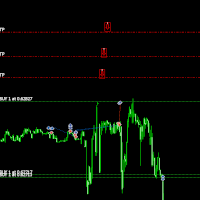
Move TakeProfit - 사용 방법 사용 방법 드래그 앤 드롭 스크립트를 클릭한 후 차트로 드래그하여 새로운 TakeProfit 레벨을 설정합니다. 원하는 가격 수준에서 스크립트를 놓습니다. 확인 팝업 스크립트를 놓으면 확인 창이 나타납니다. 변경되는 포지션 수와 정확한 TakeProfit 가격이 표시됩니다. "예"를 클릭하면 진행되고, "아니요"를 클릭하면 취소됩니다. 자동 TakeProfit 업데이트 확인하면, 현재 차트의 모든 열린 포지션에 대해 TakeProfit이 업데이트됩니다. TakeProfit이 없는 포지션에는 선택한 레벨에서 자동으로 추가됩니다. 배치 검증 매수(BUY) 거래의 TakeProfit은 진입 가격보다 높아야 합니다. 매도(SELL) 거래의 TakeProfit은 진입 가격보다 낮아야 합니다. TakeProfit이 잘못 설정된 경우, 오류 메시지가 표시되며 작업이 취소됩니다. 브로커 제한 처리 일부 브로커는 TakeProfi
FREE

Balance History Indicator The Balance History indicator visually tracks the entire trading history of your account for the selected timeframe. It plots three key performance metrics: Profit – Displayed in Green Loss – Displayed in Red Zero Profit/Break-even – Displayed in Gray Balance Curve – Displayed as a SkyBlue line This indicator helps you instantly see the distribution of profitable and losing periods over time, along with your running account balance. It's ideal for evaluating historic
FREE

a script created with ChatGPT. It changes the symbol in every other chart window to the symbol of the window where you run the script. The story behind it. I use MT5 across 2 monitors. Same price/symbol, different candles. because changing the symbol in every window was tedious. So I had ChatGPT write this script. Important: this script only changes the symbol, everything else like indicators or objects is not transferred to other chart windows
FREE

The TradeHistoryParsing is a utility for working with the trade history obtained from the MetaTrader 5 terminal. The product is based on the " RegularExpressions in MQL5 " library. It allows to quickly get the required data on your trading history. The filtering results are displayed as a table, a summary of mathematical statistics is provided below the table.
Working with the tool Export the trade report as an html file and place it into the "sandbox". After that, when launching the EA, specif
FREE

"Are you tired of losing money on unsuccessful trades? Look no further than EA Trailing Stop! Our program is designed to help you prevent losses and control your trades efficiently. With features such as adjustable stop loss and more, you can rest assured that your trades are in good hands. Don't wait any longer to start making successful trades. Try EA Trailing Stop today!"
You can use this as a starting point and tailor it to your audience and the platform you're using. This EA Trailing Stop
FREE

Indicador que calcula e exibe dois níveis de preço: o preço médio das posições atualmente abertas e o preço de cobertura, definido como o preço necessário para zerar ou manter o lucro acumulado em determinado período. O cálculo do preço médio considera o volume e o preço de entrada das operações abertas, enquanto o preço de cobertura é ajustado dinamicamente conforme o lucro ou prejuízo realizado e não realizado no período analisado.
Versão MT4: https://www.mql5.com/pt/market/product/139409
FREE

An Essential Tool for Traders regardless of experience
Problem : You want to place trades for a few trading pairs, you now have to scroll through individual charts to place your trades. Your playing it wisely and would like to secure small gains for trades that go in your favour and here you are again checking your trades back and forth and closing some off manually Solution : Use the panel. Drag and Drop the panel into any single chart and type in the pairs you need in the inputs. Save time an
FREE

Protect your funded accounts and personal capital with military-grade precision. This utility continuously monitors your floating equity against your daily starting balance. The moment your custom drawdown threshold is breached, it instantly liquidates all open positions, deletes pending orders, and completely unloads from the chart. Stop revenge trading and never fail a prop firm evaluation due to a margin breach again.
FREE

Less is more. Find the strongest trends! This expert scans ALL currency pairs for a strong trend combined with a breakout.
Requirements for a trend report: 1. Up-trend or down-trend must be found in all of the following timeframes (D, H4, H1, M30) 2. Breakout in the daily timeframe (the upper or lower band of the Bollinger band must be broken)
The correctness of the trend is confirmed to 90%
FREE
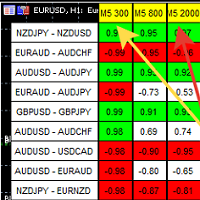
A script showing the correlation for three selected zones at once (TF-bar) In the parameters, select 3 options The data is displayed sorted by the first zone The script also creates a file in which it writes all the data without sorting. In this way, you can expand the number of zones to any number and perform the analysis in exsel
Parameters:
TF_Trade1 =PERIOD_M5; BarsCor1 = 300; TF_Trade2 =PERIOD_M5; BarsCor2 = 800; TF_Trade3 =PERIOD_M5; BarsCor3 = 2000; K = 0.8; WindSize
FREE
多数の通貨を取引している場合、画面をカチャカチャ切り替えの際にどの通貨を見ているか 迷ったことはありませんか。 表示している通貨が大きく表示されるMT4用のインジケーターは あるのですがMT5用がなかったので作成しました。
機能: どの通貨でも表示可能になります。 表示位置 (左上 、 右上 、 左下 、 右下) の 指定 が可能 になります。 表示位置(X軸、Y軸)が変更可能 になります。 フォントの色を 変更可能 になります。 使用するフォント を指定することが可能になります。 フォントサイズ の 変更が可能 になります。 インストール方法: ファイル->データフォルダーを開く->MQL5フォルダー->Indicatorsフォルダー 配下にex5ファイルを置いてMT5を再起動してください。
FREE

Save time placing orders This is a tool for manual trading. It has an intuitive, and straightforward interface without any useless extras. Allows you to automatically calculate the order volume size, open both market and pending order. Works on any symbol/instrument, account type or broker. Input fields: Order Size - as percentage of account free margin Take Profit - as percentage of account balance Stop Loss - as percentage of account balance Symbol Contract Size - needs to be manually entered
FREE

This is a utility for storing the data on open interest (OI), ratio of buyer/seller orders' number and the ratio of buyer/seller orders' volumes on the Russian FORTS futures market. This is the first product of the series. Now, you can trace history of the specified data in real time in МТ5 terminal. This allows you to develop brand new trading strategies or considerably improve the existing ones. The data received from FORTS market is stored as a database (text CSV or binary one at user's discr
FREE
This indicator allows to hide CCI oscillator (on all MT5 timeframes) from a date define by the user, with a vertical line (Alone) or a panel (with "Hidden Candles"). Indicator Inputs: Period Apply To Information on "Commodity Channel Index" indicator is available here: https://www.metatrader4.com/en/trading-platform/help/analytics/tech_indicators/commodity_channel_index ************************************************************* Hey traders!! Give me your feeds! We are a community here and
FREE

Welcome to my product page, glad you stopped by and I hope you find interest in this product which is completely free to use. There are certainly many other similar products but this is my version of one. AS Check MT5 - Account and symbol informer utility compatible with Meta Trader 5 With this software you quickly and easily extract information about your account and symbol. As this is a script and not an indicator or expert, the program runs once and detach itself from the chart and the i
FREE
개요
Performance Indicator 는 구성 가능한 시간 간격에 대한 여러 심볼의 백분율 수익률을 히트맵 으로 보여줍니다. 상대적인 강도 와 약점 을 시각적으로 비교하는 데 사용되며, 결과에 대한 보장을 제공하지 않습니다. 설정
SymbolsList: 쉼표로 구분된 심볼들; 터미널에 있는 이름과 정확히 일치해야 합니다.
BaseTF: 계산을 위한 기준 타임프레임.
UpdateSeconds: 자동 갱신 간격(초).
CapPercent: 색상 강도를 정규화하는 값.
PeriodsList: 기간을 정의하는 문자열(예: D1, W1, M1, M3, M6, Y1, YTD); 1M , 2W , YTD 같은 형식도 허용됩니다. 수익률 계산
Standard periods: 현재 종가와 N 기간 전 종가를 비교합니다.
YTD: 일관된 비교를 위해 현재 연도 초에 가장 가까운 종가를 사용합니다. 시각적 인코딩
배경: 음수가 아닌 수익률은 녹색, 음수는 빨간색; 강도는 CapPerce
FREE

CxPV Analyst is a high-performance trading utility and Expert Advisor designed for traders who demand data-driven precision over simple indicator crossovers. By combining four distinct quantitative engines into a single "Cert Score" (Certainty Score), this tool identifies high-conviction market phases while filtering out low-probability "noise." Whether you are a manual analyst looking for a powerful dashboard or an algorithmic trader seeking automated execution, CxPV Analyst provides the instit
FREE
Copier MS MT5 Netting Copyist MS is a fast and easy-to-use copier of trade orders; it works as an advisor in the form of a single file with switching between the Master and Slave operating modes. The current version of the adviser works only on netting accounts. Settings Type of work - selection of the operating mode: Master or Slave; Master account number - number of the trading account of the master terminal; Selective copying currency pairs - individual selection of currency pairs for copyin
FREE

Discover our all-in-one monitoring and notifications EA for MetaTrader. Designed to ensure traders’ security and peace of mind, this unique EA offers a full range of advanced features that will allow you to stay informed and control your account activity, anytime and anywhere. Key Features : Continuous server monitoring: real-time notification on server availability and performance (Cpu, Ram, disk), connectivity, latency and more Advanced account management: live tracking of margin calls, dro
FREE

** LIMITED version** This EA utility helps Price Action traders calculate the risk as Big Money profesional traders do: in points or percentages. Allows to also set a desired Profit:Risk ratio and optionally enter a second and third orders simultaneously with different ratios and risk percentages. Great for BTMM, ICT, and other methodologies.
Very simple to use, just "point and shoot"!!!
Full version available here .
FREE

NHS Prop Firm Guardian NHS Prop Firm Guardian is a dedicated, single-panel risk monitor and drawdown protection overlay for MetaTrader 5, built around one core idea: watch the account relentlessly, and enforce the limit the moment it's crossed — even if the trader isn't looking . It is a pure risk-monitor companion tool, not an order-entry or trade-management system: it does not place trades, manage stops, or run automation strategies. Its job is tracking Daily drawdown on the current chart symb
FREE
I find the lot calculation tedious so I just use this script and tell it the dollar amount to use. It then does the rest. This works for any currency.
How-To: Open a buy position using the desired dollar amount instead of lots. To use, just drop it onto a chart and set inputs as needed. The script will then do the necessary lot calculation and open the trade.
Inputs: FIXED_DEAL_AMOUNT: Fixed amount to use per trade e.g 100 to open a R100 deal USE_SL_ON_BUY: If true then a suitable stoploss wil
FREE

FWS Tide Clock — Session Clock & Activity Monitor Know when to trade — at a glance. FWS Tide Clock is a real-time session clock that shows you exactly what's happening across global forex markets. See which sessions are active, when they overlap, and whether conditions favour trading — all from a compact on-chart panel with a stunning browser-based web dashboard. Part of the Forex Weather Station suite. This free module gives you instant market timing awareness — right where you need it. W
FREE

The utility draws reversal levels using the formulas for each of the selected number of candles:
Pivot = (high + close + low) / 3 R1 = ( 2 * Pivot) - low S1 = ( 2 * Pivot) - high R2 = Pivot + (R1 -S1) R3 = high + ( 2 * (Pivot - low)) S2 = Pivot - (R1 - S1) S3 = low - ( 2 * (high - Pivot)) H = high L = low U = if the candle is bullish, then close. Otherwise - open D = if the candle is bullish, then open. Otherwise - close
On any timeframe.
After a new candle closes on the calculated timeframe
FREE
This indicator is to be used in bot connectors for automation of Pct Multi indicator entries.
How to use: Configure the bot connector with the following information: Indicator name: pctmultibot Call buffer: 0 Put buffer: 1
Do not add this indicator to the chart, just configure it in the bot connector!
Pct Multi indicator:
https://www.mql5.com/en/market/product/111091
FREE

NS Financas Clear All Objects Automatically Script for quick removal of all objects from your chart (lines, shapes, symbols, etc ...) Don't waste any more time trying to find all the objects on your screen for removal. Use this script and in one click all objects will be removed from the chart automatically. Also, it is possible to configure hotkeys to make the script even faster in its use. NS Financas Clear All Objects Automatically does not remove indicators. Take the opportunity to visit our
FREE

This utility is a graphical shell for other Expert Advisors that do not have their own graphical shell or whose graphical shell you do not like. Just run the utility on a free chart of any currency pair, specify in the input parameters the "Magic Number" of the advisor to which you want to connect the utility, and a graphical shell will appear on the graph, containing information about the traded currency pairs, current positions and trading results of your advisor. If you like this utility, tak
FREE

If you use several charts open at the same time, you know how boring it is to apply formats to each chart individually. This script can change all open charts using a single command. Parameters: 1 - Choose symbol to put on charts: apply the selected symbol to all charts. If "current", it does not change the symbol; 2 - Choose timeframe or leave empty: apply the selected timeframe to all charts. If "CURRENT", it does not change the timeframe; 3 - Apply template to the charts: If true, apply the t
FREE

RTrade panel is easy trading panel use both (Stop Loss & Take Profit) based on pips with easy interface can be use by anyone
Panel Feature: -Open position based on (Lot) size
-Auto detect entry price -Use Stop Loss based on (pips) -Use Take Profit based on ( pips ) -Close all position in one button click
i will add more function in future update if you like it write your review
FREE

Обычная трейдец-сетка, но не имеет явного диапазона. Вместо диапазона, в настройках устанавливаются стоп-лоссы. Закрытие происходит по тейк-профиту, так же устанавливаются в настройках. Робот может торговать в любом направлении, как вверх или вниз, так и в обоих направлениях. Робот не проверяет баланс счета, а потому имеет очень высокий риск. По умолчанию стоят настройки для EURUSD пары (не самые лучшие). Рекомендуемый минимальный депозит $200. Имеется вторая версия в которой добавлены дополните
FREE

This is an indicator to control the Parameters of Range Volume Hybrid Generator expert advisor -It does not work as stand alone, it works as a remote control of Range Volume Hybrid Generator and must be applied on the custom chart generated by the EA. To get Range Volume Hybrid Generator expert advisor: https://www.mql5.com/en/market/product/165557
Parameters that can be adjusted: Trading Style as well as manual setting of Range, Volume and start Date of data collection. What's the video for
FREE

"Twits Price speedometer" is an indicator designed to measure current "speed" and directional efficiency of price movement in real time. It has been developed as an Expert Advisor (EA) because it reacts to every incoming tick, making it independent from traditional chart time frames and capable of analyzing markets with extremely high precision, even at the level of individual ticks or milliseconds. The operating principle is simple yet highly effective. Within a user-defined analysis window (fo
FREE

A FOMO blocker to click before opening an emotional trade.
Once activated, the blocker remains in effect—even if you change settings or restart MT5—until the timer runs out, preventing you from opening new trades.
Set the duration you need for your mindset to return to normal.
Use it without restraint.
If you open a trade during this period, it will be closed immediately.
---- NEW VERSION FULL https://www.mql5.com/en/market/product/192677
Check out my alert for stepping away from your PC
FREE
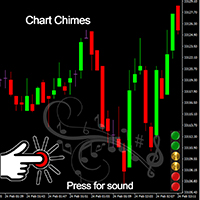
Wir stellen den Chart Chimes vor - den MT4/MT5-Indikator, der den Handel zu einer Klangsymphonie macht! Sind Sie es leid, den ganzen Tag auf Charts zu starren? Brauchen Sie einen kleinen Muntermacher, um Ihre Stimmung beim Handeln hochzuhalten? Nun, Chart Chimes hat Sie abgedeckt!
Mit Chart Chimes hören Sie jedes Mal, wenn Sie diese Taste drücken, einen lustigen Ton, der ein Lächeln auf Ihr Gesicht zaubert und Ihren Schritt zum Hüpfen bringt. Stellen Sie sich vor, Sie handeln mit dem Klang ein
FREE

Change lot size, set TP / SL points and with one click place an order. Track current order count and total running profit. Instant Close all Buy trades, Close all Sell trades or Close All open trades buttons. Trailing SL feature Support for Manual orders. Utility types Risk management, Graphical objects, Panels. Main features
Take Profit and Stop Loss in points (10pip = 100 points) After the price reaches the Take Profit threshold, orders will be closed in profit After the price reaches the St
FREE

Very often there are situations when you need to quickly close all open positions or close only under a certain condition...
The Positions Close script closes open positions according to the selected settings.
You can choose to close All positions , only Buy, only Sell
You can also choose by which symbols to close positions: by all symbols or only by the current one, on the chart of which the script was thrown
There is a filter for closing profitable or unprofitable positions, as well as bo
FREE

This Utility tells you the volatility of any symbol for any of the major time frames. As trades occur, the volume increases for each period. When each period ends, the bucket is reset to 0. Volumes are sorted from largest to smallest within each shown period. Click any symbol to highlight that symbol in all period columns. Volume information is specific to transactions placed at your broker. To test in the Tester, set the following:
EURUSD,M1,1 minute OHLC 2018.01.01 to 2018.01.02 (a day’s worth
FREE

Introducing our cutting-edge Trade Copier Expert Advisor for MetaTrader 5 (MT5) – the ultimate solution for seamless trade replication across multiple accounts on the same server or computer. Elevate your trading experience and take control of your investment strategy like never before with our professional-grade Trade Copier. Key Features: Effortless Trade Replication: Our Trade Copier effortlessly duplicates trades from a master account to multiple slave accounts, ensuring that you never miss
FREE
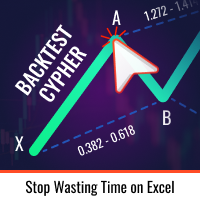
시장에서 거래 아이디어를 테스트하고 그 효과를 확인하는 것이 이제까지 이렇게 쉬웠던 적이 없습니다. 차트에서 4번의 클릭으로 과거의 모든 사이퍼 패턴 중 원하는 것을 선택하고 백테스팅 리스트에 추가하기만 하면 완료됩니다. 그러면 각 심볼과 시간프레임에 대한 완전한 데이터 분석을 얻게 됩니다.
사이퍼 전략 튜토리얼
로봇이 전략 테스터에서 작동하지 않음에 유의하십시오 4번 클릭으로 사이퍼 선택 자동으로 SL 및 TP 레벨 조정 여러 금융 관리 전략: 거래 당 위험 비율, 고정 금액 거래, 고정 로트 수 거래 유효하지 않은 패턴을 피하기 위한 사이퍼 전략의 유효성 검사 과거의 사이퍼를 선택하고 각 심볼과 시간프레임에 대한 데이터 분석 생성으로 쉽게 백테스팅 분석에는 거래 횟수, 승률, 이익, 목표 달성률, 평균 보상 대 위험 비율 등이 포함됩니다 느린 컴퓨터 또는 VPS용 특별 모드 전략 최적화, 최대 손실 감소 및 추가 분석 옵션 등의 업데이트가 예정되어 있습니다
FREE

A ticker that shows the average bitcoin price of the selected currency and keeps updating it at regular intervals. PRO version updates more often and displays details about the price change! Make sure you have added the API address http://metakod.com/mk/api in the list of allowed URLs on tab Tools → Options → Expert Advisors. All of the supported currencies and the API address are listed in the screenshots below.
Inputs Logging level - Controls the amount of details written to the log (default:
FREE

이 응용 프로그램은 당신이 당신의 개인 정보를 보호 할 수 있습니다. 이는 다른 서버에서 거래 전략의 결과를 확인하는 데 유용 할 수 있습니다.
예를 들어,계정 내역 내보내기를 사용하여 계정의 거래 내역을 원하는 형식의 파일로 내보내거나,전문가 내역 내보내기의 프로그램 코드를 전문가에게 연결하여 내역을 내보낼 수 있습니다.
파일의 시작 부분에 이러한 라인이 있어야합니다:
날짜,티켓,유형,기호,볼륨,항목,가격,정지 손실,수익,이익,수수료,수수료,스왑,매직
이 파일의 처음부터 위치하지 않을 수 있습니다,즉,다른 정보는 그 앞에 갈 수 있습니다.
그 후 파일의 끝에 하나의 트랜잭션에 대해 쉼표로 구분 된 필드 값이있는 줄이 있습니다. 행의 필드 값:
DATE - date in the format YYYY.MM .DD HH:MM:SS TICKET - transaction ticket (integer) TYPE - transaction type from ENUM_DEAL_TY
FREE

Take control of your trading performance with the Pro Dashboard Screener Designed for serious traders, this utility provides a clean, professional, and real-time overview of your account's health directly on your chart. Stop switching between tabs to check your stats. With the Quant Pro Dashboard, your key metrics are always front and center, allowing you to focus on what matters most: your analysis. Key Features: Account Intelligence: Automatically detects your Account Number and Broker detail
FREE

Positions Risk Analyzer Utility
The Trade Analyzer is a powerful tool designed for real-time monitoring of your trading performance directly on the chart. It provides insights into: Total Open Positions : Number of active trades. Potential Profit (TP) : Estimated profit if all Take Profits are hit. Potential Loss (SL) : Maximum potential loss if all Stop Losses are triggered. Floating Profit/Loss : Real-time net profit or loss of all open trades. This utility dynamically updates its calculation
FREE

SymbolScope MT5는 거래 상품 사양에 대한 개인 비서입니다. 터미널에서 계약 사양을 찾아보거나 인터넷에서 데이터를 검색할 필요가 없습니다. 필요한 모든 정보는 차트의 우아하고 미니멀한 패널에서 항상 확인할 수 있습니다. 이것은 무엇을 위한 것인가?
트레이더에게 거래를 시작하기 전에 상품의 정확한 매개변수(포인트 가치, 계약 크기, 최소 로트, 스왑)를 아는 것은 매우 중요합니다. SymbolScope MT5는 현재 심볼에 대한 이 데이터를 즉시 제공하고 다른 상품으로 빠르게 전환하여 그 사양을 연구할 수 있도록 합니다. 주요 기능: 원클릭 전체 사양: INFO 버튼을 누르면 패널이 확장되어 선택된 심볼의 포괄적인 매개변수 목록을 보여줍니다. 모든 중요 매개변수를 한눈에: 현재 ASK 및 BID 가격. 포인트 값 (최소 가격 변동폭). 틱 값 및 틱 크기. 계약 크기. 최소 로트, 최대 로트 및 로트 변경 단위. 매수 포지션 및 매도 포지션에 대한 스왑 값. 빠른 심볼 전
FREE

The utility opens copies of open trades. It is very convenient if you use the Signals service and want to increase the volume of transactions.
Settings: Symbols: all symbols only current symbol Orders: Buy Sell Magic Any Magic Input Magic Lot size Original - lot size from original order; Fix Lot - fix lot size (input); Lot X Mult - lot size X koef; Stop Loss From sender - Stop Loss from original; Without - without Stop Loss; Plus Fix - Stop Loss from original order + fix points; Fix Point -
FREE
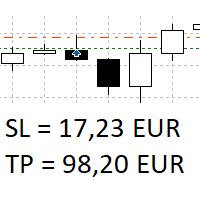
The panel shows all positions and all orders in a small movable window in the chart. Stop loss and take profit are converted into account currency. With the tool you can immediately see the maximum loss in the case of stop loss and the profit in the case of take profit. If there are several positions, a sum is formed. The panel shows either all positions/orders of the current symbol or all existing ones. The data is recalculated for each tick, and moving Stop Loss or Take Profit is immediately v
FREE

한 거래 계정(Master)에서 다른 계정(Slave)으로 BUY/SELL 거래의 개설을 자동으로 복사하며 동일한 방향에 대해 공유 Take Profit을 자동으로 동기화합니다. 그리드, 평균화 및 마틴게일 전략을 위해 설계되었습니다. Slave 계정은 Master 계정의 거래 동작을 그대로 반복하며 독립적인 거래 결정을 내리지 않습니다. 터미널은 동일한 장치에 설치될 필요가 없습니다. 작동 방식: Master 계정이 EURUSD에서 BUY 포지션 그리드를 열고 공통 Take Profit을 설정합니다. 몇 초 후 Slave 계정이 동일한 BUY 포지션 그리드를 자동으로 열고 TP를 복사합니다. 로트 크기는 Slave 계정의 잔액에 비례하여 계산되거나 1:1 비율로 설정될 수 있으며 이 параметр는 입력 설정에서 구성됩니다. Master가 열린 포지션의 TP를 변경하면 Slave도 동일하게 변경합니다. 필요 시 설정에서 Take Profit 동기화를 비활성화할 수 있습니다. 설정
FREE

Trading Companion is an EA bridge to the Telegram chat. It does not place trades, it provides to your Telegram's terminal information about your accounts - it can be used with any other EA, indicator or trading solution. It notifies you about the server lag (ping between your terminal and your broker) and includes a feature to withdraw wisely from your account.
Settings Ping limit: default 300ms - will warn you if ping is superior Basis Fund: 0, deactivated - each time you will withdraw, it is
FREE

VTB High Watermark Drawdown INFO Indicator for MT5 Advanced Account Monitoring & Drawdown Information Dashboard VTB High Watermark Drawdown INFO is a professional account monitoring indicator designed to display drawdown statistics, account performance, and risk management information directly on the chart. Unlike Expert Advisors, this indicator does not interfere with trading activity. It does not open or close positions, modify orders, or block trading. Its sole purpose is to provide a clear a
FREE

Prop Firm Daily Loss Guardian Prop Firm Daily Loss Guardian is a lightweight risk-management utility for MetaTrader 5. It displays a clear on-chart “traffic light” status panel for your daily loss usage and can optionally enforce a hard stop by closing newly opened positions once a critical drawdown level is reached. The tool is designed for traders who want an immediate, visual understanding of when to reduce risk and when to stop trading for the day. Key Features On-chart status panel with tra
FREE

Project Overview Totz Visual Risk Calculator EA is an interactive, on-chart Risk Management panel for MetaTrader 5 (MT5). It replaces manual position size calculations by automatically computing appropriate lot sizes based on visual, draggable Entry, Stop Loss (SL), and Take Profit (TP) lines. Key Features Automated Risk Calculation: Lot sizing automatically adjusts to target a specific percentage of account balance or equity. Interactive Visual Lines: Drag-and-drop horizontal lines directly
FREE

Advanced harmonic filter is a reliable and smart utility that uses an author's algorithm to process continuous data and present them in the form of harmonic oscillations. The utility can identify regularities and patterns in the input data, which are then used to generate output data that is most similar to the input data. This makes it a powerful tool to use with other indicators to predict future trends and identify Elliott waves on selected intervals. The utility is most effective when us
FREE

TradePulseMonitor for MetaTrader 4 & 5 Overview: TradePulseMonitor is a comprehensive, real-time dashboard indicator designed for MetaTrader 4 and MetaTrader 5. It provides traders with an at-a-glance overview of their account's financial health, risk exposure, position metrics, and historical performance. By consolidating critical data into a single, customizable on-chart dashboard, it eliminates the need to constantly check the Terminal window, allowing for faster and more informed trading de
FREE

Margin Tick Ratio — margin efficiency analysis for all broker's instruments
Margin Tick Ratio is a script for MetaTrader 5 that runs through your broker's tools in one run and answers a practical question: how much "tick" profit do you get for each unit of collateral, and how expensive is the entry spread.
The script does not trade. It collects data, ranks tools by efficiency, and generates a user-friendly report in a terminal, CSV, and interactive HTML file.
Who is this product for
• T
FREE

Coyote by Stellarex Horizons — visual trade setup, sized to your risk, every time. Coyote turns trade planning into three lines on a chart. Drag your Entry, Stop Loss, and Take Profit into position, and Coyote handles the rest — calculating the correct position size for your account risk, working out your reward-to-risk ratio, and automatically choosing the right order type. No manual lot-size math, no guessing whether you need a limit or a stop order. Why traders use Coyote Most traders either
FREE

Características Principales El bot actúa como una herramienta de supervisión y control automatizado de posiciones abiertas, enfocándose en la gestión dinámica basada en la detección de velas de expansión rápida ( Spikes ). 1. Detección Inteligente de Spikes Identificación Automática: Analiza si el símbolo activo corresponde a un índice Boom o Crash . Filtro de Cuerpo de Vela: Compara el tamaño de las velas recientes con un promedio dinámico (calculado sobre un periodo de referencia) para iden
FREE
트레이딩 전략과 기술 지표를 판매하기에 가장 좋은 장소가 왜 MetaTrader 마켓인지 알고 계십니까? 광고나 소프트웨어 보호가 필요 없고, 지불 문제도 없습니다. 모든 것이 MetaTrader 마켓에서 제공됩니다.
