 MetaTrader 5
 Experts
 지표
지표
 라이브러리
라이브러리
 유틸리티
유틸리티
 위젯
위젯
 규칙
규칙
MetaTrader 5용 새 트레이딩 유틸리티 - 65
 다음은 MetaTrader 5의 거래를 단순화하는 거래 프로그램입니다. 유틸리티의 설명과 목적을 읽으려면 유틸리티 위에 마우스를 놓으십시오.
Baby Shark Pro EA works using a series of indicators, mainly the RSI. This is an EA that uses martingale, so use with caution. But Baby Shark Pro EA gives you the ability to change the multiplier parameter, which allows it to decrease the martingale level. Thus, you determine the risk level you want. Unlike most of the other martingale, EA’s This doesn’t place random entries, rather it is riding on market movement RSI > 50. If the market moved the opposite direction after the first entry, th

This is a utility panel to assist closing of open Deals. The panel has input filters to assist one select the right trades. The tool displays the number of trades to be closed as well as profits to be realized. One click close, Filter trades to be closed by: symbol, (Filter by a particular symbol in the trade terminal). magic number (If your orders are from particular EA with unique magic numbers). whether in profit, loss or All. (P/L=all trades, profiting = trades in profit, loosing = trades
FREE

Crypto Charting for MT5 – MetaTrader 5용 암호화폐 차트 통합 도구 개요
Crypto Charting for MT5는 WebSocket을 통해 실시간 OHLC 차트 데이터를 제공합니다. 여러 거래소를 지원하며 MT5에서 자동으로 데이터가 동기화됩니다. 기능 WebSocket을 통한 실시간 차트 자동 역사 데이터 업데이트 네트워크 중단 시 예약된 동기화 모든 MT5 타임프레임 지원 OHLCV 데이터 지원 전략 테스터 지원 자동 재연결 기능 지원 거래소
Binance, Bybit, OKX, KuCoin, MEXC, Bitget, XT.com, Delta Exchnage 추가 정보
Crypto Ticks 라는 별도 제품에서 틱 데이터와 오더북 정보를 제공합니다. 참고 사항 DLL 미사용, VPS 환경에 적합합니다. Strategy Tester에서는 WebRequest 기능이 작동하지 않습니다. 데모가 필요하신 경우 MQL5의 개인 메시지를 통해 문의하십

이 작은 도구는 차트에서 간단한 선을 드래그하여 위험 관리를 정의하는 데 도움이 됩니다. 계정 % 또는 라인에서 직접 고정 금액으로 계산된 실제 로트 크기를 보여줍니다.
당신이 해야 할 일은 키보드의 "t" 키를 눌러 라인을 활성화하고 라인을 손실 정지 지점으로 드래그하는 것입니다. 그게 다야.
설정에서 선과 텍스트의 색상과 너비, 선과 오른쪽 사이의 텍스트 공간을 정의할 수 있으며 계정 비율 또는 고정 금액 크기로 위험을 설정할 수 있습니다.
질문이나 희망사항이 있으시면 언제든지 문의해 주세요.
이 작은 도구는 차트에서 간단한 선을 드래그하여 위험 관리를 정의하는 데 도움이 됩니다. 계정 % 또는 라인에서 직접 고정 금액으로 계산된 실제 로트 크기를 보여줍니다.
당신이 해야 할 일은 키보드의 "t" 키를 눌러 라인을 활성화하고 라인을 손실 정지 지점으로 드래그하는 것입니다. 그게 다야.
설정에서 선과 텍스트의 색상과 너비, 선과 오른쪽 사이의 텍스트 공간을 정의할 수
FREE

Achieve peace of mind with our EA companion! Simply set it and let it roll. Safeguard your trades on sluggish market days and holidays. Get updates on your balance and EA status every Friday evening, for example. Stay in the loop even if your terminal or VPS decides to take a break. Trading made easy – enjoy the tranquility! This EA has several functionalities
Closing of pending or open positions during pre-configured holidays. Automatic closing and reopening of pending positions during the nig

Simply deletes all objects from a chart, at once.
Q: Shouldn't I remove the indicator(s) from the chart instead, if I want to get rid of those objects? A: Absolutely. There are rare cases though, when you might end up with residual objects that don't programatically get removed from your chart, due to bugs or some other reason.
Q: Why use this script, when I can press Ctrl+B, list all objects, then manually select and delete each one? A: To save time, really. Maybe you have too many unwanted o
FREE
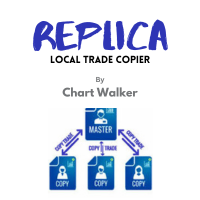
White label available. contact us for more info. dushshantharajkumar@gmail.com Replica Local Trade copier by Chart Walker
Replica, a MetaTrader 5 (MT5) local trade copier, is a powerful tool designed to streamline and automate trading processes for users within the MT5 platform. This innovative software allows traders to replicate trades from one account (master) to another (slave) in real-time, enabling efficient and synchronized trading across multiple accounts. With its user-friendly inte
FREE
Multi Take Profit Manager Automatically close portions of your open trades at up to three profit targets. This utility is designed for manual traders who frequently open multiple positions and want to scale out of trades automatically as profit targets are reached. Instead of manually closing positions one by one, the utility can partially close your total open position at predefined Take Profit levels, helping you lock in profits while allowing the remaining positions to continue running. Key F
Expert for setting stop loss and take profit simultaneously for all orders or positions of a currency pair Once attached to the graph, the expert panel will appear on which there are buttons for setting and a green horizontal line, if you click on the line you can move it on the graph and choose the stop loss or take profit threshold with it, move the cursor over the panel and the value will be set where you have positioned the horizontal green line, press the button for the setting you want t

Cheers, traders! In today's video, dive into the world of advanced trading with our exclusive Trade Panel. This Cyber Monday, we're offering a special deal – get access for only $27 instead of the usual $60!
In this tutorial, we explore a semi-automated trading system that empowers manual traders to seize opportunities effectively. Watch as we demonstrate using real market scenarios, showing you how to set up trades, manage risk, and maximize profits.
Key Features of the Trade Pan

"캔들스틱 패턴 거래 패널"은 캔들스틱 패턴으로 거래하고 패턴을 식별하고 거래를 실행하는 프로세스를 빠르고 쉽게 원하는 트레이더를 위한 최고의 도구입니다 . 다양하지만 핵심적인 입력 옵션을 갖춘 이 도구는 캔들스틱 패턴 수동 거래를 자동화하거나 이전보다 더 빠르게 수동으로 거래하도록 지원하거나 보고 싶은 패턴을 간단히 알려주려는 사람들에게 적합합니다.
사용하려는 기호에서 EA를 활성화하면 차트 왼쪽 상단에 나타나는 거래 패널을 살펴보겠습니다 . 실시간 거래에서는 시간이 돈이기 때문에 패널은 단순하고 거래자에게 필요할 수 있는 주요 기능만 사용하도록 세심하게 설계되었습니다. 거래 불가 : 안전상의 이유로 사전 확인됩니다. 이는 본질적으로 촛대 패턴이 나타날 때만 EA가 화살표 개체를 표시하고 그 이상은 표시하지 않기를 원한다는 것을 나타냅니다. 거래하려면 화살표를 클릭하세요 . 클릭하면 화살표 개체를 간단히 클릭하여 패턴이 나타날 때마다 반 수동으로 거

안녕하세요 친구
사람들의 눈에는 투자가 어렵고 위험한 사업으로 여겨집니다. 그러나 지식과 기술을 습득하여 투자한다면 시장은 결코 당신에게 해를 끼치지 않을 것입니다. 자본 시장에서 필터 라이팅은 전문가들이 생산성을 높이고 시간을 절약하기 위해 이 분야에서 취하는 조치 중 하나입니다. 많은 수의 기호 활동으로 인해 저장된 정보 및 데이터의 양이 매우 높습니다. 이 시장에서 활동하는 사람들은 때때로 일련의 정보가 필요하며 문제의 민감성으로 인해 가능한 한 빨리 정보를 얻어야 합니다. 이 정보는 일반적으로 시장의 미래를 예측하는 데 도움이 되며 매우 중요합니다.
Fitler가 우리의 명령으로 작성하면 요청한 조건에 맞는 공유를 찾아줄 것입니다! 선택한 기능을 필터링하면 거래 가능한 모든 주식을 검색하고 적합한 주식을 표시합니다. 자본시장의 각 개인은 거래에 대한 구체적인 전략을 가지고 있으며 필터링을 통해 전략에 따라 진행하기 쉽습니다. 그 후, 그는 다양한 시간대에 걸쳐 자신의 전

가장 가까운 가격으로 자석 스냅을 사용하여 TradingView 드로잉 경험을 에뮬레이트합니다.
거래를 위한 편리한 정밀 그리기 도구:
ICT SMC (Smart Money Concept) Demand & Supply FVG (Fair Value Gap) Breakout Trend Following Reversal MTF (Multiple Timeframe) Price Action Support & Resistance Elliott Wave
지원되는 그리기 도구: 수직선 수평선 추세선 수평 광선(각도 추세선) 피보나치 되돌림 직사각형
입력:
Threshold (px) : 십자선을 가장 가까운 가격에 맞추는 픽셀 단위의 거리입니다.
자유롭게 리뷰를 작성하고, 더 많은 기능을 요청하고, 버그를 신고해 주세요.
FREE
Description: - BidAskLine Indicator is very simple and easy, but each utility can be important in the probability that we will win in our trade. This utility Indicator shows lines and prices of the Bid, Ask and Spread. Input Parameters: - Visual Aspect Options : Select between 2 options with Box or Simple Style. - Parameters Bid Price : Select between show or hide line or box objects, change color, style or width line. - Parameters Ask Price : Select between show
FREE
Introducing the BlackWing Signal Provider—an advanced EA designed to enhance your trading experience by facilitating seamless communication between your MetaTrader 5 platform and Telegram channels, groups, or individual users.
Key Features:
1. Real-Time Event Notifications: Receive instant alerts on new trades, modified orders, closed positions, and deleted orders. Stay informed and make well-timed decisions.
2. Interactive Chart Snapshots: Share chart snapshots along with new trades and ord
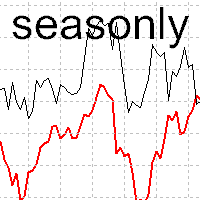
The tool for exploring seasonal patterns. It compares the chart with charts of other years and compares with the average for other years. Allows you to shift charts if necessary. Explore any year by specifying the zero point. Up to 10 charts in one tool. Works only on the daily chart ! The best for you! Enjoy your work! (It's not indicator - do not download demo it not work) for mt4 Seasonly MT4

A very usefull EA helps you control Trailing Stop and Break even point for single order
it works seperately for Buy side and Sell side
the EA displays some information useful when you load to your chart
all you need to do is to change the name of the pair you want to control TP and BEP
it works with all pairs and all types of accounts
if you have any questions you can always write to us at info@auranos.me

EquitySafe V1.0 is a powerful risk management tool designed for MetaTrader 5 . It enables traders to effectively manage their risk by setting maximum loss limits based on custom time frames. With this tool, you have the flexibility to define your own time intervals and allocate specific risk thresholds accordingly. This helps you maintain control over your trading account and minimize potential losses. By utilizing EquitySafe, you can ensure that your trading strategy aligns with your risk tole

News Filter EA: Advanced Algo Trading Assistant News Filter EA is an advanced algo trading assistant designed to enhance your trading experience. By using the News Filter EA , you can integrate a Forex economic news filter into your existing expert advisor, even if you do not have access to its source code. In addition to the news filter, you can also specify trading days and hours for your expert. The News Filter EA also includes risk management and equity protection features. MT4 Version
Ma

One button. One trade. MT5 Trading Deck is a hotkey trading panel for MetaTrader 5 that turns the platform into a keyboard-driven execution cockpit. Stop loss, take profit and lot size are pre-calculated for every key; the moment you press, a market order is live on the broker. A complete technical user manual is attached in the product Comments section. It documents every input parameter, the full hotkey map, the recommended Stream Deck XL layout, and the advanced workflows for Pre-Limit orders

The Trade Manager Interface is a free utility designed to simplify manual trading in MetaTrader. MT4 Version Available Manual +Free Strategy Gold Breakout Engine Please leave a review, if you like the trade manager.
It allows traders to visualize trades directly on the chart, calculate position size automatically, and manage orders with advanced features such as partial take profits, automatic breakeven, and trailing stops. For more advanced features check out: ManHedger This
FREE

Ultimate Trade Panel MT5은 MetaTrader 5를 위해 독점적으로 설계된 강력한 유틸리티로, 초보자와 경험이 풍부한 트레이더 모두의 거래 경험을 향상시키는 것을 목표로 합니다. 직관적인 인터페이스와 강력한 기능을 제공하여 사용자가 거래를 보다 효율적이고 정확하게 관리할 수 있도록 돕습니다. 이 유틸리티는 거래 작업을 간소화하여 사용자가 수동 프로세스가 아닌 전략에 집중할 수 있게 합니다. 원클릭 거래 및 사용자 정의 알림과 같은 기능을 통해 트레이더는 시장 기회에 신속하게 대응할 수 있어 중요한 거래 설정을 놓치지 않도록 합니다. MQL 제품 설치 가이드 | MT4/MT5에서 구매한 MQL 제품 업데이트 | 일반 문제 해결 가이드 | 지표 설정 / 가이드 주요 기능 팝업 알림: 신호 이벤트에서 MetaTrader 알림 팝업을 발생시켜 거래 설정을 놓치지 않도록 합니다. 푸시 알림: 이동 중 모니터링을 위해 MetaTrader 모바일 앱으로 실시간 푸시 알림을 보

소개합니다 Ea CloseManager MT5, MetaTrader 5을 위해 맞춤 설계된 전문 Expert Advisor (EA)로, 거래 종료 프로세스를 간소화하고 자동화합니다. 이 강력한 도구는 수동 및 자동 거래 전략 모두에 이점을 제공하며, 종료 기준에 대한 정밀한 제어를 통해 다양한 수준의 전문성을 가진 트레이더에게 이상적입니다. Ea CloseManager MT5을 사용하면 사용자는 거래 관리에서 상당한 시간 절약과 개선된 위험 관리를 경험합니다. 이 EA을 활용하는 트레이더는 빠르게 변화하는 시장 상황에 적응하는 규율 있는 종료 전략을 통해 수익성이 향상되었다고 보고하고 있습니다. 특히 forex, 지수 및 암호화폐에서 그렇습니다. MQL 제품 설치 가이드 | 구매한 MQL 제품 업데이트 MT4/MT5 | 일반 문제 해결 가이드 | 일반 설정 / 입력 가이드 | 백테스트 및 설정 파일 주요 기능 자동 거래 종료: 사용자 정의 가능한 기준에 따라 거래를 원활하게 종료하여
FREE

안녕하세요 친구
사람들의 눈에는 투자가 어렵고 위험한 사업으로 여겨집니다. 그러나 지식과 기술을 습득하여 투자한다면 시장은 결코 당신에게 해를 끼치지 않을 것입니다. 자본 시장에서 필터 라이팅은 전문가들이 생산성을 높이고 시간을 절약하기 위해 이 분야에서 취하는 조치 중 하나입니다. 많은 수의 기호 활동으로 인해 저장된 정보 및 데이터의 양이 매우 높습니다. 이 시장에서 활동하는 사람들은 때때로 일련의 정보가 필요하며 문제의 민감성으로 인해 가능한 한 빨리 정보를 얻어야 합니다. 이 정보는 일반적으로 시장의 미래를 예측하는 데 도움이 되며 매우 중요합니다.
Fitler가 우리의 명령으로 작성하면 요청한 조건에 맞는 공유를 찾아줄 것입니다! 선택한 기능을 필터링하면 거래 가능한 모든 주식을 검색하고 적합한 주식을 표시합니다. 자본시장의 각 개인은 거래에 대한 구체적인 전략을 가지고 있으며 필터링을 통해 전략에 따라 진행하기 쉽습니다. 그 후, 그는 다양한 시간대에 걸쳐 자신의 전
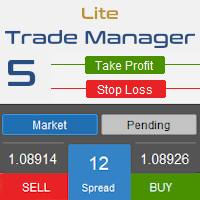
Trade Manager 5 Lite is trading panel developed with a goal to make manual trading in some (routine) task easier.
Version for Meta Trader 4 is here: Trade Manager 4 Lite . (MT4 version also works in Strategy Tester)
Main features of Trade Manager 5 Lite Trading for Forex and CFDs Support for 4 and 5 digit brokers 65 combinations to set order Set Take Profit, Stop Loss and entry level for Pending Order with lines positioned on the chart Break Even Trailing Stop Loss Multiple Orders at one c

Script to configure "TweetHelper for MT5" environment settings for "Twitter API v2 OAuth 2.0 with PKCE".
Client ID : ${CLIENT_ID} Auth Basic base64 : β string(Base64) Response Code : auth_code to be obtained in step 2 of "Connection Procedure Using OAuth2.0" Callback URI : the value set in User authentication settings "Callback URI / Redirect URL"
TweetHelper trial for MT5 https://www.mql5.com/ja/market/product/54832
TweetHelper for MT5
https://www.mql5.com/ja/market/produ
FREE

Hey Trader!
Boring with the Meta chart? Do you want to move it as you do in Profit?
Your problems are over! Now available Chart Panoramic or ChartPan for closer friends, a utility that allows you to move the chart to better visualize the most relevant points for your trade.
Recommend you to add a keyboard shortcut for quick access (Ctrl + Q - for example), because you will need to run ChartPan after symbol changing to "release" the chart again.
To add a hotkey: after downloading
FREE

Position Closer is advisor used to close all orders when the profit will cross specified value either above or below. You can close all orders with one button click.
On panel on chart you have options: Deactivate after close - If Deactivate after close is checked the advisor will disable Close above profit and Close below profit options after orders are closed either on crossing the profit or on hitting the CLOSE ALL button. Close above profit - If Close above profit is checked, the advisor wil
FREE

这款专为MetaTrader 5设计的EA(Expert Advisor),能够在加载后自动关闭所有图表,并立即从当前图表中自行移除。它适合那些希望快速清理所有图表,并避免手动关闭每个图表的用户。 功能特点: 一次性清理: 加载后立即关闭所有打开的图表。 自动移除: 执行完毕后,EA自动从当前图表中移除,无需手动操作。 快速高效: 适用于快速清理交易环境,特别适合在需要快速重置或结束交易日的情境。 使用说明: 只需将此EA添加到任何一个图表上,它将自动执行关闭所有图表的操作并自行移除。使用前,请确保已保存所有重要的图表数据和设置。 风险提示: 请谨慎使用此EA,以防不小心关闭重要图表。 适用于MetaTrader 5平台。 技术支持: 如有任何技术问题或需求,请联系我以获得帮助。
FREE

Introducing BoTutor - Simplify Candlestick Data Collection and Export! Are you tired of the hassle of manually collecting and exporting candlestick data from your charts? Look no further, because BoTutor is here to revolutionize your data mining experience . BoTutor offers a user-friendly graphical interface that is intuitive, clean, and easy to navigate. Say goodbye to complex data extraction procedures, and effortlessly gather candlestick data with just a few clicks. BoTutor lets you expo
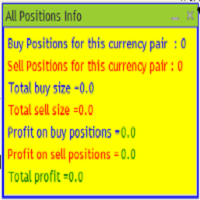
The provided MQL5 expert creates a custom information panel in the MetaTrader 5 (MT5) trading platform This panel displays information about the trading positions for the current symbol (currency pair) on the chart. It shows the number of buy and sell positions, their sizes, and profits. Provide traders with a quick overview of their trading positions for the current symbol It is very useful when you open several positions of several sizes and you want to know the exact situation of the number
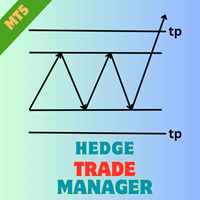
EA HedgeTradeManager MT5을 소개합니다. 이는 강력한 Expert Advisor로, 헤징 전략을 자동화하여 트레이더에게 불리한 가격 변동을 관리할 수 있는 신뢰할 수 있는 도구를 제공합니다. 이 EA은 헤징 기법을 탐색하는 초보 트레이더와 거래 설정을 향상시키고자 하는 경험이 풍부한 전문가 모두에게 적합합니다. 정교한 위험 관리 기능을 갖춘 EA HedgeTradeManager MT5은 잠재적인 손실을 크게 줄이고 유연한 lot 크기를 허용하여 두드러집니다. 트레이더는 동적 lot 진행 및 자본 기반 종료 전략을 활용하여 forex, 지수 또는 암호화폐와 같은 변동성이 큰 시장을 효율적으로 탐색할 수 있습니다. MQL 제품 설치 가이드 | 구매한 MQL 제품 MT4/MT5 업데이트 | 일반 문제 해결 가이드 | 일반 설정 / 입력 가이드 | 백테스트 및 설정 파일 주요 기능 헤지 활성화: 정의된 손실 거리에서 반대 거래를 트리거하여 트레이더가 갑작스러운 시장 변화에
FREE
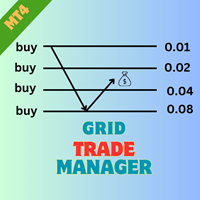
EA GridTradeManager MT4을 소개합니다. 이는 MetaTrader 4 플랫폼에서 그리드 거래 전략을 최적화하도록 설계된 강력한 거래 전문가 조언자입니다. 이 도구는 그리드 주문의 배치 및 관리를 자동화하여 시장 변동을 효과적으로 활용하려는 초보자와 경험이 풍부한 거래자 모두에게 적합합니다. MQL 제품 설치 가이드 | MT4/MT5에서 구매한 MQL 제품 업데이트 | 일반 문제 해결 가이드 | 일반 설정 / 입력 가이드 | 백테스트 및 설정 파일 고급 기능을 갖춘 EA GridTradeManager MT4은 동적 그리드 조정을 가능하게 하여 거래 효율성을 높이고, 손실을 크게 줄이며 수익 잠재력을 극대화합니다. forex 쌍 및 암호화폐와 같은 변동성이 큰 자산 거래에 이상적이며, 사용자는 강력한 리스크 관리 통제를 유지하면서 손쉬운 자동 거래 경험을 누릴 수 있습니다. MQL 제품 설치 가이드 | MT4/MT5에서 구매한 MQL 제품 업데이트 | 일반 문제 해결 가
FREE
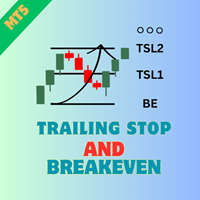
Ea TrailingStop BreakEven MT5을 소개합니다. 이는 귀하의 손절매 수준 관리를 자동화하여 거래 효율성을 높이기 위해 설계된 강력한 Expert Advisor입니다. 초보자와 경험이 풍부한 거래자 모두에게 완벽한 이 EA은 손익을 극대화하면서 손익 분기점 및 트레일링 스톱 설정을 동적으로 조정하여 위험을 최소화합니다. Ea TrailingStop BreakEven MT5을 사용하면 거래자들은 최적화된 거래 관리의 상당한 이점을 누릴 수 있어 유리한 시장 움직임 동안 더 나은 이익 유지를 할 수 있습니다. 사용자들은 EA이 프로세스를 간소화하고 수동 거래 감독에 소요되는 시간을 줄여 거래 성과에서 상당한 이익을 보고했습니다. MQL 제품 설치 가이드 | 구매한 MQL 제품 업데이트 MT4/MT5 | 일반 문제 해결 가이드 | 일반 설정 / 입력 가이드 | 백테스트 및 설정 파일 주요 특징 자동화된 손절매 관리: 기존 거래의 손절매 수준을 손쉽게 조정하여 이익을 확보
FREE
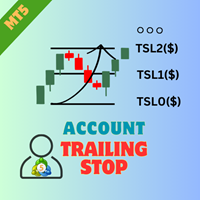
EA AccountTrailingStop MT5을 소개합니다. 이는 Expert Advisor로, MetaTrader 5에서 자동으로 수익을 관리하고 보호하여 거래 전략을 향상시키도록 설계되었습니다. 이 도구는 초보자와 전문 트레이더 모두에게 적합하며, 다양한 거래 환경에서 동적인 수익 잠금을 위한 강력한 솔루션을 제공합니다. EA AccountTrailingStop MT5을 사용하면 사용자들은 유리한 시장 조건에서 수익 유지가 개선되고 수동 모니터링 시간이 줄어드는 등의 상당한 이점을 경험합니다. forex, 지수 및 암호화폐에서 거래하는 트레이더들은 전반적인 수익성이 눈에 띄게 증가했다고 언급하며, 이 EA은 거래 성과를 최적화하려는 모든 사람에게 필수 자산입니다. MQL 제품 설치 가이드 | 구매한 MQL 제품 업데이트 MT4/MT5 | 일반 문제 해결 가이드 | 일반 설정 / 입력 가이드 | 백테스트 및 설정 파일 주요 기능 동적 수익 추적: 총 계좌 수익을 자동으로 추적하고
FREE

"스캘핑 스케일 인(Scalping Scale in)"은 스캘핑 시 매 순간이 중요하기 때문에 S/L 및 T/P 배치에 대해 걱정하지 않고 고정된 거리에서 초기 위치로 스케일링을 원하는 스캘퍼를 위해 설계된 유틸리티 도구입니다.
작동 방식:
EA의 입력 탭에서 원하는 값을 설정하고, 보다 구체적으로 T/P에 배치할 위험 대 보상, S/L(핍 단위)의 폭을 설정합니다. 또한 다음 정지 명령까지의 거리입니다(위치 조정). MT5에서 매수/매도를 수동으로 클릭하면 EA가 자동으로 SL과 TP를 설정하는 동시에 SL과 동일한 거리(핍 단위)에서 동일한 방향으로 새로운 중지 주문을 설정합니다(즉, 매수하는 경우 S/L이 5핍인 경우). , 다음 구매 중지 주문은 초기 진입 가격보다 5핍 위에 배치됩니다. 보류 중인 중지 주문이 채워지면 이전 포지션은 손익분기점까지 추적되고 S/L은 이전 거래의 진입 수준에 있는 새로운 중지 주문이 배치됩니다. 기본적으로 이 도구는 공격적인 움직임을 포

The spread in trading is the difference between the purchase price and the sale price of a financial instrument on the market. The spread is a commission fee that traders pay brokers for the opportunity to trade.
It's no secret that each broker offers its own terms for trading. The size of the spread is important. There are a lot of advisors (especially scalpers) who show different results at different brokers. We have repeatedly encountered this. Therefore, using this utility, find out what s
FREE

This EA help trader to manage his pending orders, when you place many Pending Orders this utility monitor them and when of them get filed (executed) the EA cancel and delete all rest of pending orders, to avoid opening of all of pending orders at the same time , and lose your risk management. this utility is very useful for trader when he /she is not available on the desk.

The "InfoBox" utility is designed to display the presence of open orders, the number of lots, current profit and much more in one window. The version for the MT4 platform is here . You've probably encountered a situation where you have an advisor that works on a currency pair, but information about its operation: - orders and their number, the size of the spread for the instrument, the volume of lots on the market, drawdown and much more - are scattered in different places of the terminal an
FREE

Having a chart window that has multiple pairs (symbols), timeframes, and indicators displayed simultaneously can be quite advantageous. This indicator will allow traders to place multiple chart objects in a sub window of the main chart window. The indicator is capable of adding all available MT5 indicators and custom indicators to the existing chart. The list and parameters of the indicators are for reference at: https://www.mql5.com/en/docs/indicators
Input parameters Name
Example
Indicator
FREE

In this article, we would like to introduce the trade panel product with the Martingale panel.
This panel is made in such a way that it can meet the needs of traders to a great extent.
This trade panel actually consists of two trade panels at the same time, with the first one you can take positions with certain profit and loss limits, and with the second one, you can have positions with profit limits but without loss limits.
When positions lose, a new position will be added based on the settings
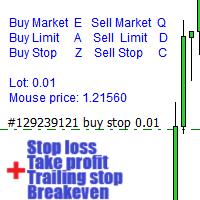
경고: 이 EA는 테스터에서 작동하지 않습니다. 데모 또는 실제 계좌에서만 작동합니다. 데모를 시도하려면 저에게 연락하십시오. https://www.mql5.com/en/users/abudabi MT4 version
키보드와 마우스로 MetaTrader 5에서 빠른 주문 보내기(배치하기): 원하는 가격 위로 커서를 이동하고 키를 누릅니다: 마켓에서 매수: E 리미트 매수: A 스탑 매수: Z 마켓에서 매도: Q 리미트 매도: D 스탑 매도: C (키 사용자 정의 가능) 주문이 보내졌을 때 Fast Keyboard Orders MT5는 주문 관리를 할 수 있습니다: 손절 주문 이익 주문 트레일링 스탑 손절 주문 손익분기점 주문 기능 또는 버그 수정을 제안하거나 질문이 있으면, 언제든지 https://www.mql5.com/ru/users/abudabi/에서 DM을 보내 주십시오. "Fast Keyboard Orders MT5"을 업데이트하겠습니다. 전체 매개변수: bool

TimeBar TimeBar는 바가 닫힐 때까지 남은 시간과 바가 열린 후 경과된 시간, 현재 시간을 표시하는 간단한 정보 표시기입니다. 이해하기 쉽도록 두 가지 유형의 표시 모드가 추가되었습니다. 즉, 그래프 왼쪽 상단에 설명 형식으로 표시되거나 그래픽 개체 형식으로 표시됩니다.
장점 글꼴 선택 글꼴 크기. 아무거나 설정할 수 있습니다. 댓글보니 너무 작아서 개체를 이동할 수 있습니다. 언제든지 마우스를 두 번 클릭하여 선택하고 차트의 어느 위치로든 이동할 수 있으며 평소와 같이 계속 업데이트됩니다 시각적 경고. 현재 막대가 닫힐 때까지 지정된 시간(초)을 설정할 수 있으며, 해당 시간에 도달하면 설정에 지정된 경고 색상으로 변합니다 설정 표시할 시간을 선택합니다 각 시간의 색상(그래픽 개체의 경우) 바가 곧 닫힐 것임을 알려주는 알림입니다 귀하의 거래 시스템에 추가로 TimeBar 표시기를 사용하십시오.
시장에 있는 다른 제품도 사용해 보세요 https://www.mql5
FREE

Rosy Trade Assistant A very easy to use EA, simple and friendly. Many features available to manage your trade. Compact panel with 4 sizes that can be selected according to your convenience. And trading in your local time has never been easier, using local timescale and clock. User Guide and Demo version Pages Trading Panel - Page to place an order and manage it's SL/TP Tools - Page to manage order: trailing, close on target, close all by categories Settings - Page to use custom time scale with s

Magic News Trade Assistant는 뉴스가 나올 때 거래하기 위한 도구입니다. 이 도구는 자신만의 Stop Loss 및 Take Profit을 명확하게 설정할 수 있기 때문에 수익 창출에 매우 유용합니다. 이 도구는 XAUUSD 거래에 적합합니다. JOLTS, NFP 등 거래에 활용할 수 있는 뉴스는 매우 수익성이 높습니다. 당신은 침착하게 주문이 수익을 낼 때까지 기다릴 것입니다. 모든 것은 생성된 뉴스에 달려 있습니다. 추천 : • 통화쌍: XAUUSD • 로트 및 지분 비율: 1:1000($1000가 있으면 1랏을 사용할 수 있습니다) • 최고의 브로커: Orbitrade(슬리피지가 매우 낮기 때문에 Orbitrade 계정을 생성하려는 경우 관리자에게 문의할 수 있습니다) 사양 : • 로트 크기: 로트 수를 결정합니다. • 범위 크기: 계산 거리 범위는 가격이 2-3 스프레드이며 원하는 대로 설정할 수 있으며 자동으로 채워집니다. • Stop Loss: 일반적인

가입한 모든 채널에서 (개인 및 제한된 채널 포함) 시그널을 바로 MT5로 복사합니다. 이 도구는 사용자를 고려하여 설계되었으며 거래를 관리하고 모니터하는 데 필요한 많은 기능을 제공합니다. 이 제품은 사용하기 쉽고 시각적으로 매력적인 그래픽 인터페이스로 제공됩니다. 설정을 사용자 정의하고 제품을 몇 분 안에 사용할 수 있습니다!
사용자 가이드 + 데모 | MT4 버전 | 디스코드 버전 데모를 시도하려면 사용자 가이드로 이동하십시오. Telegram To MT5 수신기는 전략 테스터에서 작동하지 않습니다!
Telegram To MT5 특징 여러 채널에서 동시에 신호를 복사합니다. 개인 및 제한된 채널에서 신호를 복사합니다. Bot 토큰이나 채팅 ID가 필요하지 않습니다. (원하는 경우에는 사용할 수 있습니다) 위험 % 또는 고정된 로트로 거래합니다. 특정 심볼을 제외합니다. 모든 신호를 복사할지 또는 복사할 신호를 사용자 정의할지 선택할 수 있습니다. 모든 신호를 인

이 어드바이저는 다음과 같은 기능을 제공합니다. 포지션 오픈: 가격이 추세선을 넘을 때 롱 또는 숏 주문을 오픈합니다. 청산: 가격이 추세선을 교차할 때 롱 또는 숏 포지션을 청산합니다. 추적 정지 손실 – EA는 추세선을 따라 장기 주문에 대한 정지 손실을 계속 늘리거나 단기 주문에 대한 정지 손실을 줄입니다. 선은 추세선일 수도 있고 수평선일 수도 있습니다. 추세선은 반경 또는 세그먼트일 수 있습니다. 라인은 해당 라인이 존재하는 기간에만 거래된다는 특징이 있습니다. 포지션을 개설하고 청산할 수 있는 이 라인에는 특정 이름이 있습니다. EA는 수동으로 선을 그리는 대신 선 그리기 패널을 제공합니다. 모든 오픈 및 청산 포지션의 스크린샷은 MQL5/Files/Cross Trend Line to Trade 폴더에 저장됩니다. EA는 헤징 계정에서만 작동합니다.
버전 MT4: https://www.mql5.com/ko/market/product/4439
선 그리기

MT5에서 Telegram으로 완전히 사용자 정의 가능한 신호를 보내고 신호 제공자가 되세요! 이 제품은 사용하기 쉽고 시각적으로 매력적인 그래픽 사용자 인터페이스로 제공됩니다. 설정을 사용자 정의하고 제품을 몇 분 안에 사용할 수 있습니다!
사용자 가이드 + 데모 | MT4 버전 | Discord 버전 데모를 시도하려면 사용자 가이드를 참조하십시오. MT5에서 Telegram으로 보내는 기능은 전략 테스터에서 작동하지 않습니다.
MT5에서 Telegram으로의 기능 다양한 옵션으로 신호를 완전히 사용자 정의합니다 신호 앞이나 뒤에 자체 사용자 지정 메시지를 추가합니다. 태그, 링크, 채널 또는 기타 모든 것이 될 수 있습니다 신호에 이모티콘을 추가, 제거 또는 사용자 정의합니다. 또는 모두 제거할 수도 있습니다. 심볼 또는 매직 번호로 보낼 거래를 필터링합니다 특정 심볼의 전송 제외 특정 매직 번호의 전송 제외 신호와 함께 전송할 거래 세부 정보를 사용자 정의합니다 신호와

MT5에서 Discord로 완전히 사용자 정의 가능한 신호를 보내고 Signal Provider가 되세요! 이 제품은 사용자 친화적이고 시각적으로 매력적인 그래픽 인터페이스로 제공됩니다. 설정을 사용자 정의하고 제품을 몇 분 안에 사용하기 시작하세요!
사용자 가이드 + 데모 | MT4 버전 | Telegram 버전 데모를 시도하려면 사용자 가이드로 이동하십시오. MT5에서 Discord로 보내기는 전략 테스터에서 작동하지 않습니다.
MT5에서 Discord로 기능 다양한 옵션으로 신호를 사용자 정의하세요 신호 앞이나 뒤에 사용자 정의된 메시지를 추가하세요. 태그, 링크, 채널 또는 기타 내용이 될 수 있습니다 신호에 이모티콘을 추가, 제거 또는 사용자 정의하세요. 모두 제거할 수도 있습니다. 심볼 또는 매직 번호에 따라 전송할 거래를 필터링하세요 특정 심볼의 전송 제외 특정 매직 번호의 전송 제외 신호와 함께 전송할 거래 세부 정보를 사용자 정의하세요 신호와 함께 스크린샷을

Rhino Backtest Manager - 실거래와 전략 테스터를 위한 거래 관리 패널 Rhino Backtest Manager는 실거래와 MetaTrader 5 전략 테스터에서 모두 작동하는 거래 관리 패널입니다. 실계좌에서 쓰는 것과 같은 인터페이스로 테스터 안에서 직접 주문을 내고 관리할 수 있으므로, 과거 데이터로 전략을 확인한 뒤 도구를 바꾸지 않고 그대로 거래할 수 있습니다. 패널은 설정한 리스크 조건으로 주문 수량을 계산하고, 주문을 보내기 전에 각 손절과 익절의 금액을 표시하며, 일간·주간·월간 및 계좌 전체 기간의 결과를 기록합니다. 사용 설명서: 제품 사용 방법 무료 데모 버전: 데모 내려받기 MetaTrader 4 버전: Rhino Backtest Manager MT4 버전 처음 실행하기 전에 설명서 페이지에서 제공하는 폰트를 설치해야 합니다. 폰트가 없으면 패널이 정상적으로 표시되지 않습니다. 기능 두 가지 모드. 같은 패널이 실거래와 전략 테스터 모드에서

이 도구를 사용하면 한 번의 클릭으로 열려 있는 모든 주문을 닫을 수 있습니다. "모두 닫기"를 클릭하기만 하면 됩니다. 수익성 있는 주문만 청산하려면 "수익성 있는 청산" 버튼을 클릭하세요. 클릭한 후 모든 변동 주문이 청산됩니다. 변동 손실이 있는 주문만 종료하려면 "손실 가능 청산" 버튼을 클릭하세요. 클릭한 후 변동 손실이 있는 모든 주문이 종료됩니다. 이 도구는 1년 동안 테스트를 거쳤으며 원클릭 포지션 청산 기능이 매우 완벽합니다. 포지션 청산은 적시에 이루어지며 지연 범위는 작습니다. 물론 지연은 귀하가 속한 지역 및 네트워크 환경과도 관련이 있습니다. 이에 주의하시기 바랍니다. 과거 데이터의 백테스트 과정에서 도구는 더욱 완벽하게 작동했으며 100개의 주문을 모두 마감하는 데 최대 0.495초밖에 걸리지 않았습니다. 실제 거래 과정에서 나의 최대 포지션 주문 수는 26개에 불과했고, 모든 포지션이 청산되는 데 걸리는 시간은 1.28초였습니다.

Unlock the Power of Automated Trading with Cutting-Edge Moving Average Signals!
Are you looking for a reliable and efficient way to trade the markets?
Our automated trading system leverages the power of moving average signals to identify high-probability trading opportunities with precision and speed. Why Choose Our Trading Bot? Advanced Moving Average Strategies – Our algorithm dynamically adapts to market conditions using short-term and long-term moving averages to detect optimal entry and
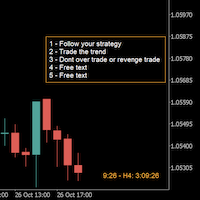
A good trader is a trader that respect his plan and keep the head cool. This indicator allow to display up to 5 lines of text for the things you always to see.
Congifuration 5 lines of text Text font, color, size Frame on/off, color, style, size Position of the text anchored Corners or anywhere on the screen Any questions or comments, send me a direct message here https://www.mql5.com/en/users/mvonline
FREE

Hello everyone, this is another utility that I wrote specifically for users using my profile with a large number of experts and sets ( https://www.mql5.com/en/blogs/post/750723 ) . This utility is useful for working with a profile using grid strategies (averaging and martingale). As we know, such strategies periodically fall into a large drawdown and you need to be careful when opening averaging positions (do not open too many). In my profile, I use a limit of 3 positions for each EA, if this w
FREE

The Maximun Minimun Strata (100 bars and any period) is used to identify key levels on a price chart, which can be useful in technical analysis and decision making in trading:
Identify Key Levels: They help identify support and resistance levels on a price chart. The support level represents a minimum floor at which the price tends to bounce upwards, while the resistance level represents a maximum ceiling at which the price tends to bounce downwards.
Decision Making: Traders use these key lev
FREE

The Linear Surfer (Works on 50 bars and any interval) is a valuable tool in technical analysis and trading, as it offers a series of qualities and advantages:
Trend Identification: The main quality of a trend line is its ability to identify and visualize trends on a graph. You can clearly see if the market is in an uptrend, downtrend or sideways trend.
Easy to use.
Predicting Supports and Resistances: Trend lines can also be used to identify support levels (in uptrends) and resistance (in do
FREE

Dieser Expert Advisor unterstützt Sie bei Ihrem Handel. Er setzt für Sie automatisch, nach denen von Ihnen vordefinierten Parametern den Stopp Loss, den Take Profit. des Weiteren hat dieser Expert Advisor eine Break Even Funktion, der Ihre Positionen glattstellt, so dass Sie bei einem Rücksetzer des Kursen noch mit ein wenig Plus schliessen. Auch besitzt er eine Trailling Funktion, welche des SL für Sie automatisch nachzieht.

A Trade Manager with automatic volume calculation
Automatic Volume Calculation can be done either by percentage (from the lowest between Equity and Balance) or by value (Money amount) Market Order with drag-and-drop feature for Stop Loss and Take Profit Limit and Stop Orders drag-and-drop feature for Entry , Stop Loss and Take Profit Review Order Details before placing orders ( Entry Price , SL , TP , and Volume ) Open Positions Management with Automatic Break-Even when profit reaches predefin
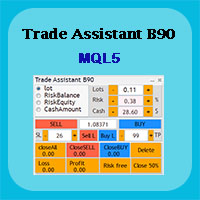
Trade Assistant B90 is designed for manual trading so that it helps us to manage capital and position well.
This expert has the ability to change the default inputs of the expert as desired before use.
You can see the expert entries in the photo below, each of which we explain below.
1. Background Color : With this entry, you can change the assistant's background
Color
2. Font size: You can change the size of the fonts used in the assistant.
3. Button color: Change the color of assis
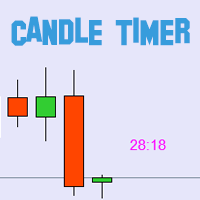
BLZ 캔들 타이머: 트레이딩의 미래를 열다
현재 막대가 끝나고 새 막대가 나타나기까지 남은 시간을 알려주는 고급 막대 타이머 카운트 다운 인 BLZ 캔들 타이머로 최첨단 거래의 세계로 들어서십시오.
이 지표는 차트에서 마지막 막대의 남은 시간을 표시하여 시장 리듬보다 앞서 나갈 수 있도록 정밀도의 힘을 경험하십시오. 새 막대가 도착하면 적시에 알림을 보내 트레이딩 전략에 동적 우위를 더합니다.
다재다능함이 핵심입니다: - 빠른 속도의 *M1 차트주기*부터 넓은 시야의 *MN 차트주기*까지 모든 차트주기에서 원활하게 작동합니다. - 사용자 지정 가능한 매개 변수로 거래 경험을 맞춤화하여 선호도에 따라 *색상*, *텍스트 크기* 및 *가시성*을 가지고 놀 수 있습니다.
*단순한 도구가 아니라 모든 트레이딩 스타일*에 맞는 다용도 동반자로 스캘퍼와 장중 트레이더의 요구를 충족합니다. 번개처럼 빠른 계산을 통해 *BLZ 캔들 타이머 *는 시장의 심장 박동과 동기화되어 한 비트도
FREE
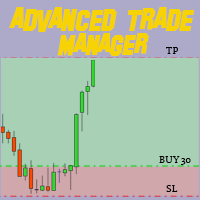
MT4 및 MT5 고급 거래 관리자로 거래를 혁신하십시오 Mt4 Version : https://www.mql5.com/en/market/product/107249
정밀하고 통제된 거래를 위해 궁극적인 도구인 우리의 MT4 및 MT5 고급 거래 관리자로 거래 전략을 강화하세요. 일반적인 거래 관리자와 달리, 우리의 거래 관리자는 시장 상황에 따라 동적으로 조정되며, 거래를 시작하자마자 자동으로 손절매와 목표 이익 수준을 설정합니다. 주요 기능: 자동 진입 전략: 거래 관리자의 자동 진입 전략으로 기회를 즉시 포착하세요. 거래를 시작할 때 시스템이 미리 정의된 손절매와 목표 이익을 전략적으로 설정하여 시작부터 규율있는 리스크 관리를 보장합니다. 동적 손절매 관리: 실시간으로 시장 변동에 반응하세요. 거래가 +0.50% 수익을 기록하면 시스템이 자동으로 손절매를 절반으로 줄여 이익을 보호하면서도 위험을 억제합니다. 손익분기점 보호: +1% 수익을 달성하면 안심하고 수익을 누리세요.
FREE

한 번에 여러 포지션/거래를 열어야 합니까? 우리는 귀하의 쉬운 솔루션을 만들었습니다. 이제 한 번에 여러 직위를 입력할 수 있습니다. 로트 크기, 포지션 수, 이익 실현 및 손실 중지를 설정할 수 있습니다. 예: 특정 로트 규모로 3, 5, 10 또는 원하는 수의 포지션을 구매하려고 합니다. 이제 "구매" 버튼을 탭하기만 하면 됩니다. 또는 예: 특정 로트 규모로 3, 5, 10 또는 원하는 수의 포지션을 판매하려고 합니다. 간단히 "판매" 버튼을 클릭하시면 됩니다. han beon-e yeoleo pojisyeon/geolaeleul yeol-eoya habnikka? ulineun gwihaui swiun sollusyeon-eul mandeul-eossseubnida. ije han beon-e yeoleo jig-wileul iblyeoghal su issseubnida. loteu keugi, pojisyeon su, iig silhyeon mich sonsil jung

TP SL Bot is a utility that automatically sets Stop Loss and Take Profit for newly opened orders in several ways. There is also a function for calculating the volume that you need to open the trade to get the desired amount with the specified Stop Loss / Take Profit size. There are several options for calculating the size and setting parameters: 1. Setting based on the amount specified by the user as a percentage of the current deposit balance. 2. Setting as the amount entered by the user. 3. Se

Easy and Smart Trade Manager. Take your trading to the next level with it. This assistant has everything you need to do that. MT4 version
Basic features: Works with any FX, Crypto, Indices, Futures etc Several volume calculations methods, included risk calculation based on StopLoss level Several BreakEven modes Time close, timeout close and orders expiration Cancel pending orders level (OCO) Real and virtual StopLoss and TakeProfit One Click open and close trades Screenshots of your trades Cust
FREE

FISHERMAN'S ASSISTANT The Fisherman's Assistant is a powerful tool to assist in general operations. INTELLIGENT STOP LOSS With it, we can program the stop loss, take profit, break even, and trailing stop so that, in our manual operations, they are placed automatically. OPENING AND MANAGING POSITIONS We can use the Fisherman's Assistant to open positions within the programmed parameters, make re-entries, close positions by time, and much more. With it, we can manage all open positions of all lis

The "Simple Trading Controller" for MetaTrader 5 sets a new standard for speed and efficiency in opening and closing market positions. Crafted with a clean and intuitive design, this tool is a response to the specific needs of traders, ensuring a seamless and rapid trading experience. All it provides is: Quick BUY and SELL Buttons Open multiple operations at the same time Set Trade Size Set Stop Loss Take Profit Points Close All Positions Let's go and see the advantages of using "Simple Trading
FREE

FISHERMAN'S ASSISTANT The Fisherman's Assistant is a powerful tool to assist in general operations. INTELLIGENT STOP LOSS With it, we can program the stop loss, take profit, break even, and trailing stop so that, in our manual operations, they are placed automatically. OPENING AND MANAGING POSITIONS We can use the Fisherman's Assistant to open positions within the programmed parameters, make re-entries, close positions by time, and much more. With it, we can manage all open positions of all lis
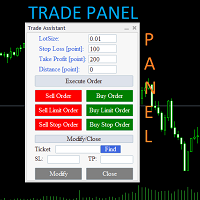
Trade Assistant Panel: Your Optimal Trading Ally "The Trade Assistant Panel" is a graphical tool for traders aiming to simplify and enhance their trading experience. It streamlines order execution and management, allowing you to focus on market analysis and decision-making. With just a few clicks, you can initiate various order types, ensuring that you always have full control over your trading strategy: Buy Orders Sell Orders Buy Stop Orders Buy Limit Orders Sell Stop Orders Sell Limit Orders Y
FREE

The timeline will be displayed according to the set time difference. (Time differences in 30-minute increments are not supported.) Additionally, price lines are displayed at round numbers such as 100.000, 100.010, and 100.020. The standard gridlines are displayed with the time and price by MT4, but they are very confusing as they become the broker's time and are displayed at the halfway point along with the price. It hides them and displays gridlines at user-defined time differences and prices i
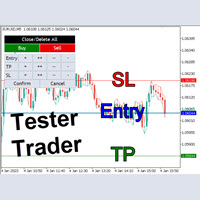
The Tester Trader EA is designed to simulate your manual trading strategy in the strategy tester. By default this is not possible and manual trading is completely disabled in the MT5 strategy tester. This tool helps you to open, manage and close orders and positions easily using action buttons in the chart. Forward testing your manual trading strategy can be a real pain. Time moves slow and it can take days or months to fully test a manual trading strategy. With this tool you can simulate forwar
MetaTrader 마켓은 개발자들이 거래 애플리케이션을 판매할 수 있는 간단하고 편리한 사이트이다.
제품을 게시하고 마켓용 제품 설명을 어떻게 준비하는가를 설명하는 데 도움이 됩니다. 마켓의 모든 애플리케이션은 암호화로 보호되며 구매자의 컴퓨터에서만 실행할 수 있습니다. 불법 복제는 불가능합니다.
