 MetaTrader 5
 Experts
 지표
지표
 라이브러리
라이브러리
 유틸리티
유틸리티
 위젯
위젯
 규칙
규칙
MetaTrader 5용 새 트레이딩 유틸리티 - 70
 다음은 MetaTrader 5의 거래를 단순화하는 거래 프로그램입니다. 유틸리티의 설명과 목적을 읽으려면 유틸리티 위에 마우스를 놓으십시오.
Multi Chart Sync MT5 is a tool that synchronizes the chart symbol it is placed on to other charts, it can also be customized to exclude/skip some pairs from being synchronized to other charts, It also supports prefixes and suffixes that can be set from the input parameters for brokers with none-standard symbol formats, Synchronisation can be done once or continuously where if a synchronized chart symbol changes it will be reverted to the original/master symbol. This tool comes in handy for mult

基于Goodtrade/GoodX 券商推出的黄金双仓对冲套利的交易模型/策略/系统,在日常的操作遇到的问题: 1、B账户跟随A账户即刻下单。 2:A账户 下单后 B账户 自动抄写止损止盈。 3:A账户平仓B账户同时平仓。 4:B账户平仓A账户也平仓。 5:不利点差下拒绝下单。 6:增加有利点值因子。 通过解决以上问题,改变了熬夜、手工出错、长期盯盘、紧张、恐慌、担心、睡眠不足、饮食不规律、精力不足等问题 目前解决这些问题后,有效提升了工作效率和盈利比例,由原来月10%盈利率提升到月45%的最佳盈利率。 原来的一名交易员只能管理操作两组账户,通过此EA提高到操作管理高达16组交易账户,或许你可以超越我们的记录,期待你的经验交流。 此EA分为: GoodtradeGoodX Tradercropy A GoodtradeGoodX Tradercropy B 是一个组合EA,假设您购买的额 GoodtradeGoodX Tradercropy A 必须同时购买 GoodtradeGoodX Tradercropy B 两个组合使用会到最佳效果。
Close it All is the EA that most of traders want because it help them did not miss their profit or protect them from the loss. Why you need the Close It All ? the EA work to close all open positions and the pending orders in the account when its reached to specified profit or loss. Input Parameters : ProfitInMoney : the number of profit in USD. LossInMoney : the number of loss in USD.
the upcoming versions including more helpful tools.
블라인드 브로커 시스템 의 유일한 목적은 거래 계획을 숨기고 브로커에게 보이지 않게 만드는 것입니다. 당신이 정말로 그를 "맹인"으로 만들고 그가 당신의 손절매 수준, 거래량, 사전 이익 수준에 대해 아무것도 모르고 있는지 확인하고 싶다면 이 거래 로봇을 사용하십시오.
Blind Broker System 은 주문을 관리하는 대체 시스템입니다. 어떤 의미에서는 Meta Trader Terminal 내부의 시스템과 동일합니다.
차이점은 Blind Broker System 을 통해 제출된 모든 주문은 브로커의 서버에 기록되지 않고 프로그램의 메모리에 기록된다는 것입니다.
브로커는 시장 주문이 발생하는 순간에만 요청을 받습니다. 그 이상은 없습니다.
메모! 올바른 작동을 위해서는 무정전 전원 공급이 필요하며 VPS(Virtual Private Server)를 권장합니다.
이 시스템은 화면 앞에 앉아 거래하는 자신의 복제품이라고 생각할 수 있습니다. 그러면 아무도 당신의 마음을 읽을
FREE

Copy Trade EA (Expert Advisor) is an automatic trading software that can help investors automatically replicate the trading strategies and operations of other traders, thus obtaining trading results similar to those of other traders. The software is based on the MetaTrader platform and has the characteristics of easy-to-use, efficient, flexible, and adaptive, providing investors with a one-stop solution for automated trading. The software supports multiple trading varieties, including Forex, com
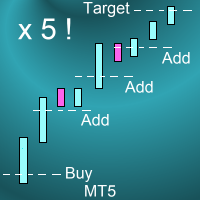
Introduction This powerful MT4 trade mangement EA offers a way potentially to aggressively multiply trade profits in a riskfree manner. Once a trade has been entered with a defined stoploss and take profit target then the EA will add three pyramid add-on trades in order to increase the overall level of profit. The user sets the total combined profit target to be gained if everything works out. This can be specified either as a multiple of the original trade profit or as a total dollar amount. Fo
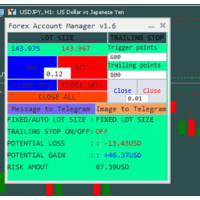
The "Lot Size" button toggles between fixed and auto lot size modes. Fixed mode uses a predetermined lot size, while auto mode calculates lot size based on a customizable percentage of the account balance, displayed at the bottom. The "Trailing Stop" button enables the activation or deactivation of the trailing stop feature. Initially set to "No Trailing," clicking the button changes it to "Trailing ON" when the trailing stop is active, and "Trailing OFF" when it is inactive. Below the button,
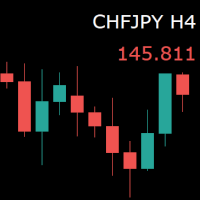
For those who monitor charts from afar, this utility is essential. It displays the chart symbol, time frame, and bid price as text. Users can adjust the text position, color, and font size. It’s also a useful tool for forex video publishers. There will be no more complaints about which symbol and time frame are displayed on the screen, even if the content is viewed on a phone. Symbol prefixes such as “_ecn” or “_stp” can be removed from the displayed symbol.
FREE
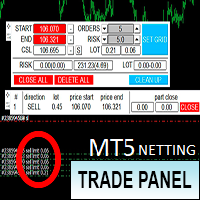
Торговая панель предназначена для установки сетки ордеров с различными параметрами. Предназначена для торговли акциями, где в одном лоте будет одна акция, на неттинговых видах счетов. Панель не дает дает открывать сетки на продажу, если уже стоят ордера на покупку и наоборот, есть возможность только управления текущей сеткой. Имеет несколько основных функций по установке ордеров в заданном диапазоне и с заданным риском, закрытию части ордеров из сетки, переносом в безубыток, закрытие части по п

이 EA를 사용하면 거래량을 다시 계산할 필요가 없습니다. 그리고 이것은 또한 당신이 할 수 있다는 것을 의미합니다 분석에 더 집중하세요 트레이딩 사고방식에 더 집중하세요 더 나은 결정을 내리다 더욱 안정적이고 지속적인 수익을 얻으세요 또한 사용자가 각 거래를 보다 쉽고 규칙적으로 실행할 수 있도록 자동 이익 가격 계산 및 일일 손실 관리 시스템이라는 두 가지 기능도 추가했습니다. 사용 가능한 통화: 통화쌍 암호화폐 금속 색인 재고 사용하는 방법: MT5를 열고 "알고리즘 트레이딩"을 클릭하세요. 차트를 열고 EA를 차트로 드래그하세요.
창 분야 소개: 선택_보호_유형: 두 가지 옵션이 제공됩니다: DailyBalanceAndEquity 초기화BalanceAndEquity 여기서는 두 가지 보호 방법에 대해 자세히 소개하지 않습니다. 더 자세히 알고 싶다면 FTMO 및 TFT의 일일 손실액 규칙을 확인하세요. InitBalanceAndEquity는 FTMO용이고 DailyBala

Connector Solutions Binance — Binance 가상화폐 거래소에서 거래를 복사하기 위한 전문적인 프로그램. MetaTrader 5를 이용하지만 귀하의 거래를 가상화폐 거래소에서도, 예컨대, Binance에 있는 것을 원하시는 분들에게 추천드립니다. Connector Solutions Binance - MetaTrader 5를 통해서 데모 계정을 복사합니다. (데모 계정에 사용하고 싶은 가상화폐가 있어야 합니다) 해당 버전은 Connector Solutions Binance 무료인데 기능성을 테스트를 하기 위한 만들어낸 프로그램입니다. 그리고 AAVEUSDT 가상화폐만 사용 가능합니다. 풀 버전의 링크는 다음과 같습니다. https://connector.solutions 시작 케이스: 시작하기 전에 Binance에서 먼저 API 키를 받아야 합니다. https://www.mql5.com/ru/blogs/post/752065 또한 웹사이트에서 쿠코인
FREE

This tool is designed to quickly calculate the lot depending on the Stop Loss.
The control is done by hot keys
By default:
1 - Limit order price level
2 - Stop Loss Level
3 - Take Profit Level
Space Bar - Open an order
Escape - Cancel All 9 - Open 2 orders
Market Order
To open a Market order, click (2) and set up Stop Loss with the mouse If you want to put Take Profit - click (3) and set up Take Profit with the mouse
FREE
M ulti Cross Alert! on your smartphone. Use multiple indicators to get a crossover signal on chart as well as on MetaTrader app. You can use all crossovers at the same time but it is not recommended cause your chart will look messy. Instead use combination of two indicators which will be better. IMP NOTE:- More indicators will be added in future updates. Any suggestions regarding indicators are welcome! Indicators List: 1. MA (Cross) 2. RSI (OB/OS) 3. MACD Lines (Main Line & Signal Line Cross)
FREE
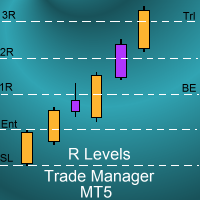
Introduction
The SDS_TradeManager EA is a powerful EA designed to manage your positions once you have been filled. It basically works a break-even stop and also a trailing stop where the trigger levels and trail levels are all specified in "R's", that is to say multiples of the initial trade risk. Many successful professional traders think about all their trades and profit taking in terms of multiples of the initial risk R. So for example, if your initial risk on your trade is 50 pips and you wa

Hello Partial N Trail Ea exists to make your trader life easier. How? Well.. With this ea you can be sure that your positions are safe when you´re away or doing something else! Features: 1) -Activate/Deactivate Partial Close -Partial Close at X Pips -% to be closed 2) - Activate/Deactivate SL to Break even -Break even start -Break even Profit 3) -Activate/Deactivate Trailing Stop -Trailing Start -Trailing Distance 4) Auto place TP at x pips Auto place SL at x pips above/below last closed c

A professional tool for real-time monitoring of the account status and the work of Expert Advisors. Information about the account status can be sent to Telegram chats automatically at a specified interval or upon request.
From the screenshots of the open charts of the terminal, you receive upon request from your Telegram bot. Account information includes: 13:02 Trade monitoring by Telegram v.1.0 (headline) Account : 6802ххх RoboForex-Pro (account information)
Profit start: 2661 USD (profit earne

This bot is designed to compliment your existing trading strategy. The Advanced Entry Bot is NOT FULLY AUTOMATED. Once the user finds an area of interest, he or she can set the bot to BUY or SELL and input their area of interest into the settings. In essence, this bot enables traders to do their analysis of the market; then utilize the Advanced Entry Bot to benefit from a mechanical and automated system that takes entries once price reaches their area of interest. I created this bot as a way to

With the 2UP Risk & Trade Management EA you will be able to enjoy seeing your positions being fulfilled all you gotta do is take the position and have the right lot size and the 2UP EA will do the rest
- You can set your risk per position so your account never losses more than what is supposed to, it will close automatically once you reach a certain % of DrawDown. - You can set your reward as well based on %, how much do you wanna grow your account in % per trade ?, it will close automatically

TTraderAssistant was developed to help ordinary traders in there journey to becoming successful and profitable traders. TTraderAssistant will/does not open trades on it's own, it's sole purpose is to work along the trader. TTraderAssistant will help you manage your trading risk with a variety of lot-sizing profiles available to open trades by your command and risk appetite. Various Trailing-Stop Features were built in such as Trailing-Start and Trailing-Step to help judge your exiting strateg
FREE

Meditation Seed:
Meditation is a practice in which an individual uses a technique – such as mindfulness, or focusing the mind on a particular object, thought, or activity – to train attention and awareness, and achieve a mentally clear and emotionally calm and stable state.[1][2][3][4][web 1][web 2] Meditation is practiced in numerous religious traditions. The earliest records of meditation (dhyana) are found in the Upanishads, and meditation plays a salient role in the contemplative repertoire
FREE

OrderHelper script is super easy and trader friendly to use. It would boost your trading experience. Because it is designed to open one to multiple orders quickly with just one click. Besides using the OrderHelper script, traders can define various parameters for open orders such as the symbol, order type, lot size, stoploss, takeprofit and more. Basically, with this script traders can manage their open orders more efficiently and save their trading time. OrderHelper manages:
Open the number of

Auto Take Profit MT5 is designed to take profits in automatic way.
As a trader (manual or auto), you define your own expected profits schema. When you open one or several orders, the AutoTP program calculates profits then update into SL or TP automatically. It also re-calculates and updates accordingly for remaining open positions when a new order opened or an existing position closed. ---------------------------------- (Watch live in this DEMO ONLY signal https://www.mql5.com/en/signals

Pips Pop Up를 사용하면 수익과 손실을 핍과 포인트로 쉽게 알 수 있습니다!
이 EA가 활성화되면 포지션이 청산되는 순간 이 EA가 연결된 차트에 심볼 이름, 결과 pips, 통화로 표시된 손익 등 청산된 포지션의 기본 정보가 팝업됩니다*.
또한 글꼴 스타일, 크기, 색상, 결과 표시 위치, 스크롤 속도, 표시 기간 등을 변경할 수 있는 옵션 매개 변수를 제공합니다. 원하는 대로 변경하고 사용자 지정할 수 있습니다.
또한 Pips Pop Up는 청산된 포지션의 pips와 수익/손실을 합산하여 차트에 결과를 표시합니다. 이 EA가 추가된 차트가 활성화되어 있을 때 Esc 키(기본값)를 누르면 언제든지 도구 상자의 전문가 탭에 총 pips 및 수익이 인쇄됩니다.
*시장 상황, 인터넷 연결, 동시에 처리되는 많은 주문 등으로 인해이 EA가 결과를 표시하는 시간이 지연 될 수 있습니다 (이러한 경우 일반적으로 몇 초 이하로 표시됨). 이러한 경우 재로드 키(기본값은 F5이며,
MAMMA 표시기는 STOP, 볼륨 또는 위험 수준을 계산하는 고급 트레이더뿐만 아니라 초보자에게도 이상적입니다. 매개 변수를 제어하고 도구를 거래에 적용할 수 있는 조종석이 있습니다. 이 조종석은 필요할 때 이동하거나 간단히 축소하여 확대할 수 있습니다. 3가지 계산 방법이 있습니다. 로트 크기 및 중지 크기로 수행할 계획에 따라 자동으로 위험을 계산할 수 있습니다. 예상 위험 및 스탑 크기를 기반으로 로트 크기를 설정할 수 있습니다. 예상되는 위험과 로트 크기에 따라 이상적인 스탑 크기를 설정할 수 있습니다. 각 계산을 통해 정확한 위험량을 알 수 있으며 계획된 정류장의 위치를 차트에서 직접 볼 수도 있습니다. 계획을 놓치지 않으려면 그날의 목표와 최대 손실을 설정할 수 있습니다. 마지막으로 현재 시장 또는 단순히 현재 요일, 주 및 월에 대한 진행 상황을 종합적으로 볼 수 있습니다. 보너스로 제안된 이상적인 스탑과 함께 각각의 새로운 오픈 포지션에 대한 알림을 받게 됩니다.

이것은 시장 주문별로 판매, 구매 또는 교차 주문이 가능한 주문 유틸리티 서비스로, STOP-Loss(SL)와 Take-Profit(TP)를 동시에 설정할 수 있습니다. SL과 TP를 설정하는 데는 포인트별 또는 가격별 두 가지 옵션이 있습니다.
또한 버튼을 클릭하기만 하면 이 EA(Expert Advisor)가 부착된 차트에 표시된 기호의 모든 위치를 변경하거나 닫을 수 있습니다. 위에서 언급한 수정/닫기 버튼을 사용할 때 판매 또는 구매 포지션을 제외하는 기능도 제공합니다.
** 주의 **
1. 중개인이 교차 주문을 지원하지 않는 경우, CROSS-ORDER 버튼을 사용하지 마십시오.
2. 본 EA의 SEL, BUY, CROSS-ORDER 버튼을 사용하여 신규 포지션을 획득할 때 자신의 포지션에 설정된 SL, TP 포인트가 다소 미끄러질 수 있습니다. SL과 TP 값은 주문이 처리되는 시점이 아니라 클릭하는 순간의 가격을 기준으로 계산되기 때문입니다. 특히 주요 경제 지표

T his is an ON CHART trade management panel. In other words, ON CHART Lot Size, Buy, Sell, Stop Loss, Take Profit, Close Buy, Close Sell and Close All buttons! *IMPORTANT NOTE: Input settings are NOT usable. You can change or insert Stop Loss and Take Profit values only on the chart panel. (See the below video!) This one is MT5 version!
BUTTONS List: 1. Lot Size - (0.01) is default click on it and insert the lot size with which you want to open a trade. 2. Stop Loss - (0.0) is default click on
FREE

PROTECT YOUR FTMO Account in a simplest way Must-Have Account Protector for any Prop-trading Account and Challenge MT4 / MT5 Expert Advisor that protects your Forex Prop Trading account from an unexpected drawdown! FTMO Protector is a Tool that lets you manage trades and control your profit and loss across multiple Robots and currency pairs using a simple parameters and settings. Use as many EAs and Instruments you need, the Protector will: 1. Calculate your midnight (01:00 System time) Balan

Line function : Displays the opening line, Stop Loss, Take Profit( 3:1 RR ) on the chart. Risk management : The risk calculation function calculates the volume of a new order taking into account the established risk and the size you want to risk. It allows you to set any Stop Loss size between 3 and 10 pips. Breakeven Button : Brings all open orders to Breakeven. Clear button : Clears the graph and the selected parameters. Trade Button : Execute the idea. Partials Button : Taking partials of al

Have you ever wanted to back-test a strategy but never wanted to risk real money? And the thought of using a demo account is exhausting as real time markets develop your skills slowly. This utility will help you develop your strategy faster and will help determine if the strategy works long-term by simulating real trading through back-tests. This will save you time as you can back-test strategies from previous price data. With the new update you can now change your lot-size add take-profit and
FREE

A depth of market product is a powerful trading tool that provides a comprehensive view of the supply and demand levels for a particular financial instrument. It provides traders with a real-time display of all the buy and sell orders that are currently available in the market, allowing them to make more informed trading decisions based on the most up-to-date information available. With Valle Depth Of Market , traders can see not only the best bid and ask prices, but also the volume of orders at
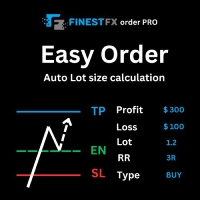
FinestFx order PRO is easy order execution and auto risk management tool developed by FinestFx official Programmer : Mohammed Rafi Just move SL,TP , Entry lines or Type SL,TP on entry columns . Lot are calculated automatically by fill out the loss cut amount. Work with all base currencies Fixed loss amount can be selected. Calculate risk rewards. Market order, limit order, and stop order are selected using buttons Supports FX, CFD, and crypto currency on MT5 Visit the owner website to see it

Trade on Binance in MT5! GRat_Crypto is a tool for manual and automated trading , including ANY available EA, ANY cryptocurrency on most popular crypto exchange Binance in the familiar MT5 environment 24/7. Features 1. ALL instruments of the most popular crypto exchange Binance . 2. The ability to place ANY type of order available in MT5, both market and pending, to modify orders and positions, to delete orders and close positions (even partially), to set trailing stop and trailing profit. 3
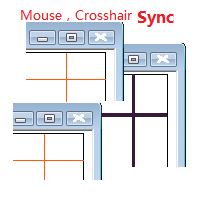
Objective: Mouse Crosshair Synchronization In multiple-charts. Syncronization crosshair for other timeframes. Syncronization mouse for other timeframes. Use: 1. Download the program and put it in the dir (MQL 5 / Indicators or MQL 4 / Indicators). 2. Load this indicator to the charts that need to be synchronized. It just work. 3. Support the left and right keys of the keyboard. When the left and right keys move crosshair on a chart, the same symbol charts will a

Automatic Trade Calculation Panel One-Klick-Trading Automatic calculation of Lot sice Atuomatic calulation of Stop-Loss and TakeProfit Up to 3 partial closings Trailingstop (Stop-Loss moves automatically) The lot size is calculated by the previously determined risk (e.g. 1.0% of the account size) and the distance of the Stop Loss from the entry point. The distance from the Stop Loss to the entry point results from the ATR indicator multiplied by a freely selectable factor. The Stop Loss and
You can use this tool to create as many pending orders (limit order) as you want in one button press. All inputs must be in points. You can use this useful tool when such as FED speech times. User Inputs:
MagicNumber = Magic number DeviationPoint = Deviation point number for limit orders Level = You can choise how many level do you want to create pending orders. BuyOrder = true/false SellOrder = true/false StartDistance = Distance between each level. StepDistance = Distance to be added increment
FREE
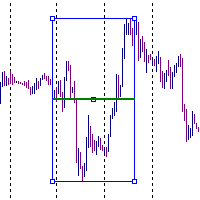
It is just an alternative fibo lines. mt4 have is a very strange drawing of fibo lines, this utilites was written for mt4, but for mt5 it may not be particularly useful. A simple Box (Rectangle) graphic element with adjustable levels binding: it is possible to specify up to 17 custom levels, all rectangles on the chart with the given prefix in their name are processed. Levels are specified in % of the height of the rectangle. A convenient graphical element for analyzing charts by growth-correct
FREE

You can send MetaTrader screenshot easily to your identified telegram channel via press the send button that on the chart. TelegramBotToken: Telegram API credentials. You can create API credentials on my.telegram.org web page ChatId: Your telegram chatId. Secreenshots will be sending this channel - Please do not press the button repeatedly. This may cause your bot or ip address to be blocked. - You have to add telegram api address ( https://api.telegram.org ) in Option > Expert Advisors > Allow
FREE

거래 포지션 및 백테스팅 도구:
"거래 포지션 및 백테스팅 도구"는 "리스크 리워드 비율 도구"로도 알려진 포괄적이고 혁신적인 지표로, 기술적 분석과 거래 전략을 향상시키기 위해 설계되었습니다. 리스크 도구는 외환 거래에서 효과적인 리스크 관리를 위한 포괄적이고 사용하기 쉬운 솔루션입니다. 입찰 가격, 손실 중지 (SL) 및 이익 중지 (TP)를 포함한 거래 포지션을 미리 볼 수 있어 다가올 거래에 대한 투명한 개요를 제공합니다. 사용자 친화적인 패널은 자동 잔액 및 사용자 정의 잔액 옵션과 함께 자동 로트 및 리스크 계산을 제공합니다. 시장 매수 및 매도, 바이 스톱 및 세일 스톱 주문을 포함한 다양한 거래 미리보기를 지원합니다. 이 도구는 구매 및 판매 설정과 함께 차트 어디서나 매우 사용자 정의 가능한 움직임을 제공하는 고급 리스크 리워드 비율 기능을 포함하고 있습니다. 거래 정보의 스마트한 표시는 개방용 로트 크기, 스톱 로스, TP 및 주문 유형과 같은 중요한 세부 정보
FREE
The strategy tester of the MT5 terminal does not allow robots (advisers) to read the events of the economic calendar. Therefore, news robots cannot be tested and optimized in the strategy tester. The solution to this problem is the reading of events by the robot from a previously prepared external database, in which the events of the economic calendar are recorded.
With the help of this utility, a Database File is generated from the economic calendar of the MT5 terminal. The File is created in
FREE

Introducing the Revolutionary Trade Closing Assistant ! Are you tired of manually closing hundreds trades? Are you a scalper , day trader , swing trader and you want to maximize your profits and minimize your losses by closing multiple positions at thesame time under different conditions? Are you a Prop Firm Trader who wishes to avoid hitting maximum daily drawdown? Search no further. This kit is the ultimate solution for all you.
GUIDE TO USE THE KIT 1. Shows the total profit/los

AC Trade Assistant – Simplify Your Trading Experience The AC Trade Assistant is a compact and efficient tool designed to help traders execute orders quickly and manage trades with ease. Whether you’re a beginner or an experienced trader, this assistant streamlines your workflow and enhances your trading performance. Key Features : § Compact Design : A non-intrusive dialog box that keeps your chart clean and organized. § Fast Order Execution : Place market orders, pending orders, and manag

UTM Manager는 빠르고 효율적인 거래 실행을 제공하는 직관적이고 사용하기 쉬운 도구입니다. 눈에 띄는 기능 중 하나는 스프레드를 완전히 무시하고 양초 가격으로 거래할 수 있는 "스프레드 무시" 모드입니다(예: LTF에서 더 높은 스프레드 쌍을 거래할 수 있고 스프레드로 인해 거래에서 제외되는 것을 방지할 수 있음). UTM Manager의 또 다른 주요 측면은 고유한 로컬 거래 복사기로 각 브로커에서 다양한 거래 전략 및 설정(예: 다양한 TP, BE 및 위험 규칙)을 실행할 수 있는 유연성을 허용합니다.
거래 실행: 빠르고 효율적인 거래 실행: 차트에서 진입 및 손절매 가격을 클릭하여 쉽게 거래를 입력하거나 원클릭 고정 손절매 크기 기능을 사용하십시오. 자동 로트 크기 계산: 로트는 미리 정의된 위험 설정을 기반으로 계산되며 위치가 드래그하여 수정될 때 다시 계산됩니다. 하나 또는 여러 위치를 동시에 처리하는 기능. 이익 실현 및 손익분기점: 유연한 이익 실현 설정: 특정

차트에 표시 할 수 있는 최대 7개의 시장 세션 및 3개의 주간 범위, 완전히 사용자 정의 가능 각 세션 및 범위는 트레이더의 필요에 따라 특별한 인트라데이 또는 인트라위크 기간에 맞게 표시 또는 숨길 수 있으며 조정할 수 있습니다. 다음 중 하나를 사용하여 세션 시작/종료 시간 정의: GMT/UTC 시간 (모든 시간대에 대해 조정 가능) 서버/브로커 시간 (차트 시간) 로컬 시간 (컴퓨터 시간)
PRO 버전 특징
이름 : 각 세션 및 주간 범위에 특정 이름 부여 시작 및 종료 시간 (분 단위) : 시간:분 (HH:mm) 또는 시간 (HH) 형식으로 설정할 수 있음 주간 범위를 위한 시작 및 종료 일자: 주간 범위를 위해 주 중 어떤 날에도 기간 설정 (일요일부터 월요일까지) GMT 시간을 위한 조정 가능한 시간대 오프셋 : 기본 GMT 시간에 대한 시간대 오프셋 설정으로 위치에 따라 어떤 시장 기준 시간을 쉽게 사용 가능. 예를 들어 뉴욕 시간: GMT -5 Meta
Clean all symbols from a chart to get a better view. We all love to draw a chart, but it's hard to get the unwanted objects away that we don't need anymore. With this script, you simply remove ONLY SYMBOLS. All others will stay on the chart. In my eyes, a must-have tool in case you need to clean quick up to continue observations or strategy finding. Just pull it onto the chart.
KEEP IT GROWING! Happy Trading
FREE

This EA will provide you with the amount of points once you open a position, being a sell or a buy. I use it instead of the profit, as this plays some tricks in my mind. You can also set up a Take Profit and/or a Stop Loss in the settings of the EA.
The point calculation will only work with manual trade. Magic number is 0.
You also have the possibility to create labels for + Haut, - Haut, - Bas, + Bas and some trendlines at a 45 or - 45 degree angle.
Here are the settings :
Settings
Choices

Trace une ligne fléchée à la hauteur de votre choix, de la couleur de votre choix, sur la date d'aujourd'hui de 00h00 à 23h59 le même jour.
Choisissez à quelle hauteur (en points) vous souhaitez la tracer, la grosseur de la ligne ainsi que la couleur et voila, traçage automatique.
Paramètres
Choix Points
Mettre le chiffre en point de votre ligne
Couleur
Choisissez la couleur de la ligne
Style
Plusieurs styles disponibles, défaut est Solide
Grosseur Ligne
Grosseur de Très fine a Très large, d

오픈 포지션 및 보류 중인 주문을 관리하기 위한 유틸리티. 내장형 트레일링 스톱에는 5가지 모드와 7가지 도구가 있습니다. 차트에서 자유롭게 이동할 수 있는 가상 손절매와 가상 이익실현이 있습니다. 내장된 거래 시뮬레이터의 도움으로 전략 테스터에서 EA가 어떻게 작동하는지 확인할 수 있습니다. 에 대한 자세한 가이드 유트랄비르투알트 5 에서 찾을 수 있습니다 코멘트 섹션. MT5 테스터에서 차트에 따른 가상 SL 및 TP 라인의 수동 이동이 작동하지 않습니다! 장점: 5가지 후행 정지 모드: 가상, 일반, 전체, 비율 및 모바일 손절매; 7가지 옵션: 점별, 극단 막대별, 프랙탈별, 체적별, MA별, Parabolic SAR 및 ATR별; 가상 TP 및 SL - 그래프에 따라 수동으로 자유롭게 이동합니다. 손절매 추가 및 모든 오픈 포지션에 이익실현; 손절매 설정: 포인트, 프랙탈, ATR 표시기, 일일 고가/저가; 차트에서 열린 모든 주문에 대한 후행 정지; 후행 정지를 시작하는

다윈은 도구 EA를보고합니다
뛰어난 발사 가격! 35 USD
설명 :
다윈 보고서 도구 EA는 다윈 범위의 새로운 제품입니다.
다윈 제품은 자질과 성능을 위해 MQL5로 인정 받고 유명합니다.
이번에는 제가 제공하는 고문 전문가가 아니지만 유틸리티에는 자동 지점이 있습니다.
본질적으로 성능을보고하십시오
설명 :
실제로이 유틸리티 덕분에 계정, 전략 또는 몇 가지 선택 가능한 EAS의 성능 보고서를 보낼 수 있습니다.
휴대 전화의 푸시 메시지로 이메일, 네트워크 및 Telegram과 같은 메시징으로 보고서를 보낼 가능성이 있습니다.
이익 :
성능을 공부하기 위해 매일, 주 또는 월 각 EAS의 보고서를 별도로 받으십시오.
거래 계좌에 대한 구체적인 통계를 만드십시오 .....
-이메일로 보내십시오
- 전보 채널에서 보내십시오
- MT4/5 플랫폼을 통해 푸시 알림으로 보내기
- 일일 이익 ( "X"시간에 보낸)
- 주간 이익 (X 일, X 시간으로 발송)
- 월별

SIMPLE AND QUICK CHART CLEANUP SCRIPT - FREE FOR ALL - EASY TO DRAG AND DROP ONTO THE CHART - A MUST HAVE IN MY EYES
Everybody loves to draw on a chart! But cleaning is nobodies favor. Most of the time it will be faster to dump all and redraw the important part. Repetition makes you good! ALWAYS think about that! KEEP IT GROWING, ;-) I wish you a good day, Traders!
If you need something, send me a message. Best wishes to you from Vienna!
FREE

Broker Desynchronization script MT5 is a script in the form of an EA. It will check the desynchronization of a BROKER's server compared to your time at your PC.
Usually BROKER sets time forward to have some space to execute trades.
If you wish to check how big the difference is, please load the EA to any chart.
After loading, it will wait for the first tick to check the desynchronization.
Information will be available for 10 seconds.
NOTE!
If market is closed, you get information to try again la
FREE
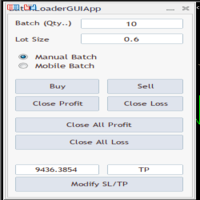
BatchLoaderGUIApp is a Utility tool that allows TRADERS to efficiently manage their trade with "ONE CLICK" such as "Closing All Positions In Profit or Loss", "Closing A Single or Batch Position In Loss or Profit" and "Modifying Positions". A Mobile Batch option enables a trader Batch Load a single Mobile Execution.. "Experience the ultimate trading efficiency with BatchLoaderGUIApp for MetaTrader - one-click management for opening, closing, and modifying positions, plus mobile batch execution fo
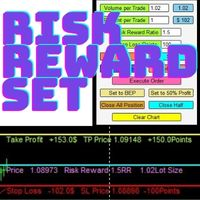
Risk Reward Manager is Utilities to help you calculate exact profit and loss or Risk Reward Ratio based on your preference Risks. There is panel you can change at anytime. The panel shows : Volume per Trade (Editable). You can change the volume you desire. Percent per Trade (Editable). You can change the Percentage of your desire Risks. You can change to 1% Risk per Trade for Conventional Trading Strategy. Risk Reward Ratio (Editable). You can change any Risk Reward Ratio you want. 1:1,5 || 1:2
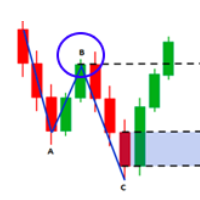
Fibo Musang FMBCR CB1 Breakout-Scanner MT5
Fibo Musang CB1 oder Candle Break 1 ist eine Strategie, die sehr gut mit Gold XAUUSD und anderen Forex-Symbolen funktioniert. Dieser Scanner hilft Ihnen dabei, Währungen mit mehreren Symbolen sehr schnell zu scannen und Benachrichtigungen über den Ausbruch von FMCBR CB1 zu erhalten
Bitte sehen Sie sich das Video für weitere Details an, da es vollständig nach den Vorlieben des Händlers anpassbar ist:
1. Sie können den Zeitrahmen und den Balkenverlauf

This Expert Advisor waits a position to be opened, no matter if you open manually or with the EA buttons or eventually via mobile: it creates a Grid in Anti Martingale with pending stop orders in the same direction of the first position. You can specify the number of orders, the size and the distance between the orders. You can also adjust the Monetary Target of the Grid, the monetary Stop Loss, the Intermediate Target (when reached the EA insert an order with opposite direction of the total pos

A utility for managing open positions using virtual (invisible to the broker) stops. Virtual stop loss and virtual take profit can be freely moved around the chart. If the price touches the virtual stop line (TP, SL, TS), the EA will close all orders of the same direction on the current chart. Closing orders by virtual take profit is possible only if there is a profit.
With the help of the built-in trading simulator, you can, in the strategy tester, see how the adviser works. Parameters Block

Not just a copy trader. A signal factory! Imagine trading without surrendering your day to charts. While you’re out living, an engine that never gets tired is busy reading markets, scanning news, spotting high-quality entries, and dropping Telegram alerts with full explanations and screenshots.
And when a setup hits? One tap. Lot sizing, entries, SL/TP, risk control, breakevens, news tracking — all done automatically.
You keep your freedom; your side hustle keeps running. EazyTrader — the essen
FREE
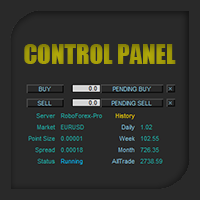
Control Panel mette a disposizione una semplificata ed avanzata gestione dedicata per ogni singolo mercato Forex, CFD, Materie Prime, Indici Azionari, Metalli Preziosi, Prodotti Energetici, Azioni & Crypto Valute, dal trade pad si posso aprire posizioni e ordini pendenti, visualizzare tutti i dati relativi alla quantità delle posizioni Buy, Sell e di tutti i trade oltre alla quantità espressa in lotti anche per i posizionamenti hedge indicando il valore espresso in lotti relativo all’esposizion
The purpose of this service is to warn you when the percentage of the margin level exceeds either a threshold up or down. Notification is done by email and/or message on mobile in the metatrader app. The frequency of notifications is either at regular time intervals or by step of variation of the margin. The parameters are: - Smartphone (true or false): if true, enables mobile notifications. The default value is false. The terminal options must be configured accordingly. - email (true or false)
Clean up Market Watch from unused symbols.
If you use multiple advisors and terminals on the same account your Market Watch windows may get filled with unused symbols from orders and positions opened on other terminals. Every symbol in the Market Watch consumes cpu power and bandwidth to get constantly updated and if you are on a vps you want to minimize resources consumption. Market Watch Cleaner helps you with that by periodically cleaning your Market Watch window from unused symbols.
Param
FREE

Events Timer EA allows you to place a trade at a specific time and close it at a specific. The stop loss is trailed automatically. The EA performs one trade at time until the time elapses. Since it has a Trailing Stop, it will open another trader when it gets stopped out. It is ideal for trading news events using a very short trading time. Inpits: -Trade Time -Stop Trade Time -Trade Type(buy/sell) -lot -stoploss points
The utility for managing open positions can work with stops (take profit and stop loss) in money, percentages or points. The built-in trailing stop starts working from profit, the size of which can be set in currency or as a percentage. With the help of the built-in trading simulator, you can check how the utility works in the strategy tester. Benefits setting stop loss and take profit in the deposit currency, as a percentage of the account balance or by points; adding stop loss and take profit
The utility for managing open positions can work with stops (take profit and stop loss) in money, percentages or points. The built-in trailing stop starts working from profit, the size of which can be set in currency or as a percentage. Trailing stop can work in three modes and for five instruments. With the help of the built-in trading simulator, you can check how the utility works in the strategy tester. Benefits setting stop loss and take profit in the deposit currency, as a percentage of the

I’m sharing this EA here for free to support the trading community. I hope it’s helpful, and don’t hesitate to reach out if you have any questions or feedback!
Closes all Trades with click on a button. This button will appear on the right bottom side of the chart. When you remove the utility, the button will also dissappear. It closes all trades, no matter if Sell, Buy, the Symbol, if in profit or loss. One Click - and you solve it all. Especially made for demo and testing purposes. Use it wi
FREE

Panel for send/modify orders/positions by handle moved levels for take profit, stop loss, open price and expire at with lot calculations in several modes. Settings: Risk management Lot calculation mode: default: Free margin, Modes: Fixed, Free margin, Equity, Balance Minimal lot size - default: 0.01 Maximal lot size - default: 0.1 Fixed lot - default: 0.01 Percents - default: 5 Trade when have free margin (0 - disabled) - default: 30 Levels Style - default: Dash Width - default: 1 Panel Positio

You may have found after a carefully planned trade something happened. An unexpected event... You forgot to look the web calender or use any kind of program. This fills this gap in its own way. Features: - show all events as vertical lines - low, medium or high events... with different colors. -name of the events and numbers associated with the event are also shown such actual value, forecast value and previous value.
The calendar information is obtained from your broker. It is a built-in serv
FREE

DrawDown Limiter v5.0 — 고급 계좌 보호 컨트롤러 DrawDown Limiter v5.0은 거래 계좌를 모니터링하고 설정된 리스크, 수익, 뉴스, 일정, 롤오버 또는 포지션 수 제한에 도달했을 때 자동으로 대응하도록 설계된 클라이언트 측 계좌 보호 컨트롤러입니다. 하나의 전용 차트에서 수동 거래, 자동화 전략, 여러 Expert Advisor, 대기 주문 및 오픈 포지션 을 모니터링할 수 있습니다. 전체 계좌를 보호하거나 Magic Number를 사용하여 특정 EA 또는 여러 EA 그룹만 모니터링하도록 설정할 수도 있습니다. DrawDown Limiter의 목적은 단순히 드로다운을 표시하는 것이 아닙니다. 설정한 거래 규칙을 적극적으로 적용 하고 보호 조건이 활성화되어 있는 동안 해당 규칙을 계속 시행하는 것이 목적입니다. DrawDown Limiter v5.0은 단순히 얼마나 손실이 발생하고 있는지만 모니터링하는 것이 아니라, 전략이 언제 계속 거래할 수 있는지,

Send your trades on the Metatrader 5 platform to your Telegram Group!
Simple to use, just follow the steps below:
Create a group in Telegram and enter the name in the robot parameters; Create a Bot in Telegram with the user BotFather: Send the following message-> /newbot; BotFather will ask for a name for your Bot; Send a message with the desired name; BotFather will ask for a username for your Bot; Send a message with the desired username; BotFather will send the Token; Insert the Token

Binary Trade Panel은 MT4/MT5 플랫폼에서 바이너리 옵션을 거래하는 데 매우 유용한 도구입니다. 더 이상 MT4/MT5 외부에서 플러그인을 설정할 필요가 없습니다. MT4/MT5 차트에 바로 표시되는 간단하고 편리한 패널입니다. Binary Trade Panel은 MT4/MT5 플랫폼을 사용하여 바이너리 옵션을 거래하는 거래자에게 유용한 도구입니다. 트레이더가 외부 플러그인을 설정하거나 여러 화면과 메뉴를 탐색할 필요 없이 MT4/MT5 차트에서 직접 바이너리 옵션 거래를 배치할 수 있는 간단하고 편리한 패널입니다. Binary Trade Panel은 MT4/MT5 거래 플랫폼을 제공하는 바이너리 옵션 브로커와 특별히 작동하도록 설계되었습니다. 즉, 바이너리 옵션 거래가 작동하는 방식을 선호하고 일반 중개인과 해당 스타일로 계속 거래하고 싶다면 Binary Trade Panel은 거래자에게 바이너리 옵션 거래와 유사한 경험을 제공하도록 설계되었습니다. 바이너리 옵
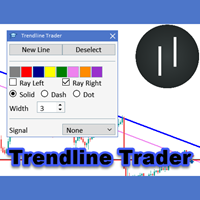
The Trendline Trader EA helps you to analyze and trade the markets with trendlines. You can place and modify lines easily with only few clicks. When you found a strong trend you can also activate the lines to open trades (or place orders) when reached by the price. The tool helps you to analyze multiple markets and still be able to trade trends without sitting in front of the charts all the time. You can change the appearance of the lines. It might be a good idea to choose different colors or si

THIS RISK MANAGER WILL HELP YOU IN YOUR DAILLY TRADING, BY CALCULATING THE RISK AND THE LOTS, AND SET STOPLOSS, AND TAKE PROFIT, AND CAN CLOSE TRADES FOR YOU. RISK PERCENTAGE CASHRISK LOTS STOPLOSS TAKE PROFIT SELL AND BUY BUTTONS LOSE IN PROFIT BUTTON WICH WILL CLOSE ALL TRADES IN PROFIT SET BY THE USER CLOSE ON PROFIT BUTTON WICH WILL CLOSE ALL TRADES WHEN THE EQUALITY IS IN PROFIT SET BY THE USER AS WELL CLOSE TRADES BUTTON
MetaTrader 플랫폼 어플리케이션 스토어에서 MetaTrader 마켓에서 트레이딩 로봇을 구매하는 방법에 대해 알아 보십시오.
MQL5.community 결제 시스템은 페이팔, 은행 카드 및 인기 결제 시스템을 통한 거래를 지원합니다. 더 나은 고객 경험을 위해 구입하시기 전에 거래 로봇을 테스트하시는 것을 권장합니다.
