Prop coach

How To Use Prop Guardian:

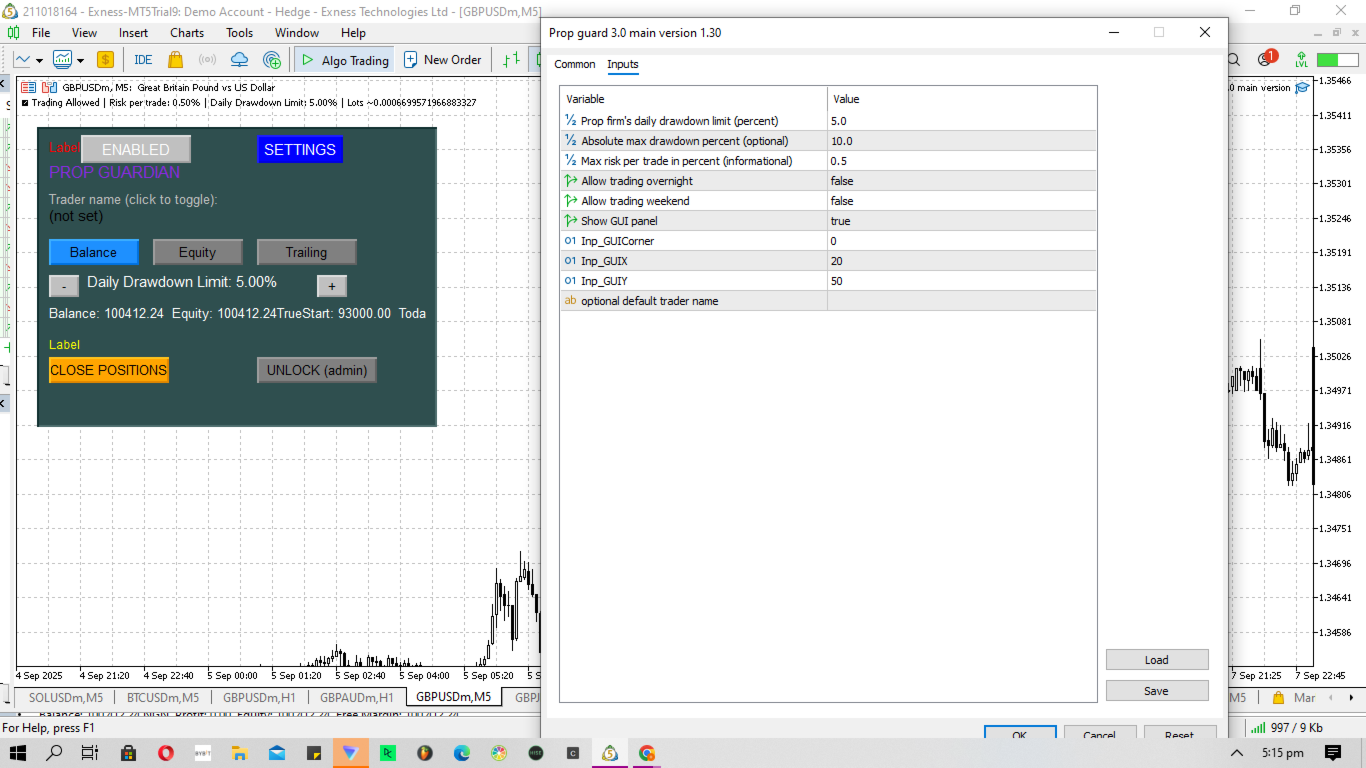
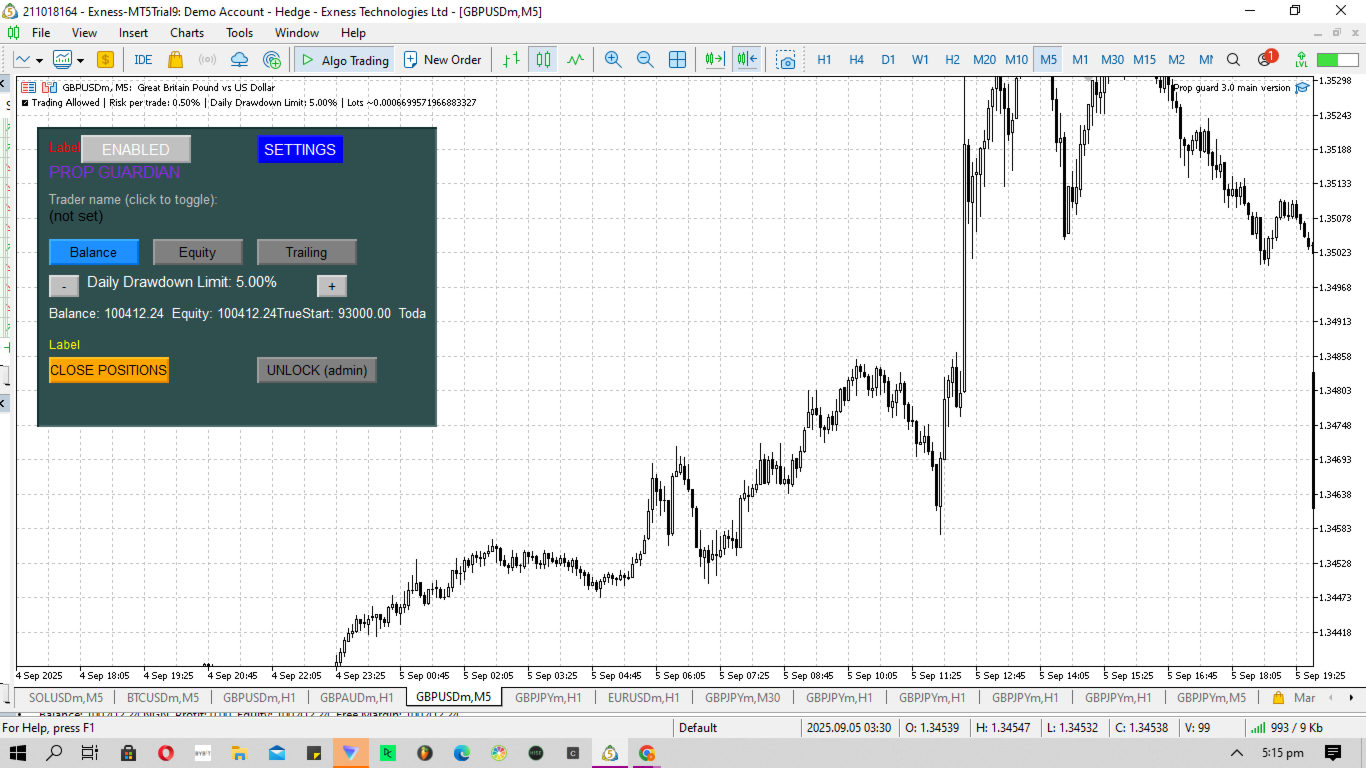
1. The enabled/ disabled button is used to turn Prop Guardian On/Off.

2. You can add your name by double clicking the expert advisor icon at the top right corner of the chart, then add your name where it says 'optional default trader name'. Once you add your name Prop guardian will address you by your name anytime it needs to send you a message.

3. You can choose your Prop firm's drawdown type by choosing between the 'Balance', 'Equity' and 'trailing' button .NOTE; this is important as different Prop firms have different drawdown types. The right choice will help Prop Guardian calculate and control risk in a more optimized manner, and protect user from breaching prop firm rules.

4. To adjust the daily drawdown limit to suit the Prop firm's rules, Click the '+' button to increase the Daily drawdown limit if the prop firm's daily drawdown limit is higher than the default 5%, or Click the '-' button to reduce the Daily drawdown limit if the prop firm's daily drawdown limit is lower than the default 5%.NOTE: A TIGHT DAILY DRAWDOWN LIMIT WILL CAUSE PROP GUARDIAN TO BE MORE STRICTS AND DISABLE TRADES MORE FREQUENTLY TO REDUCE ACCOUNT BREACH.

5. 'Balance' shows the user the current account balance, 'Equity' shows the user the current account equity, 'True start' shows the user the starting balance after purchasing/resetting the prop firm account, and 'Today's limit' shows the trader the amount allowed for trading before Prop guardian will disable trading to control risk and prevent Prop firm account breach.

6. To close all positions, click the 'Close positions' button.

7. Click the 'unlock (admin)' to regain full control while controlling your risk.

Prop Guardian – Your Trading Discipline Partner

Prop Guardian is a powerful MetaTrader 5 utility designed to help traders stay disciplined, consistent, and fully compliant with prop firm rules. This tool acts as your personal trading guardian, monitoring key risk parameters such as daily drawdown limits, absolute maximum drawdown, and per-trade risk. With a clean, interactive on-chart interface, you can set limits, toggle features, and control your trading environment in real-time. Simply load it onto your chart, adjust your preferences (daily drawdown %, max risk per trade, weekend/overnight allowances), and let Prop Guardian handle the rest. The panel also gives you quick-action buttons like Close All Positions and an Admin Unlock, ensuring that you retain full control when necessary while protecting yourself from impulsive decisions.

Why Prop Firm Traders Need This

If you’ve ever traded a prop account, you know how strict the rules can be. One wrong trade, a sudden news spike, or even a single lapse in emotional control can cost you your hard-earned funded account. Prop firms design rules that test discipline, not just profitability. Many traders can generate profits, but few can stick to consistent systems under pressure. That’s where Prop Guardian steps in — it doesn’t just protect your account from breaking rules, it protects you from yourself. By enforcing daily risk caps, automated shutdowns when limits are reached, and equity protection, it ensures you remain within the firm’s boundaries, avoiding unnecessary breaches.

Systems Over Goals

A common pitfall for traders is focusing only on profit goals — “I want to make $500 today” — instead of building systems that survive the long run. Prop Guardian reinforces system-based trading by limiting what you can lose per day, per trade, or per week. This prevents over-leveraging, revenge trading, and impulsive lot-size adjustments. Remember: A trader without a system eventually breaks. With Prop Guardian, your risk management is the system. You’ll stop trading when you’re supposed to stop, even when emotions scream otherwise.

Trading is Lonely – Prop Guardian as a Mentor

Trading is often described as one of the loneliest careers. No boss to supervise you, no coworkers to check your mistakes, no one to stop you when greed or fear takes over. A mentor helps, but not every trader can afford one. Prop Guardian serves as a 24/7 risk management mentor, sitting silently on your charts, enforcing discipline when you can’t. It will disable trading when you break the rules, and remind you through clear on-chart warnings when your behavior becomes risky. Think of it as having a coach who never sleeps, never judges, and only cares about your long-term survival.

Emotional Regulation & Consistency

Many prop firm accounts are lost not because of lack of skill, but because of emotions. Traders cut winners too early, let losers run, double up on losses, or ignore rules after a bad day. Prop Guardian eliminates this destructive cycle by locking your account once your defined limits are reached. No more revenge trading, no more “just one more trade.” This is how consistency is built — day after day, risk is controlled, rules are respected, and emotions are neutralized.

Transparency & Disclaimer

  • Prop Guardian does not guarantee profits. It is a risk management and discipline tool, not a magic system.

  • It will not predict the market or place trades for you. Its purpose is to keep you aligned with your prop firm’s rules and your own discipline framework.

  • Results still depend on your strategy, psychology, and execution.

  • Prop Guardian is a safeguard, not a shortcut — but for traders who struggle with consistency, it may be the difference between failing challenges repeatedly and finally getting funded.

Why You’ll Love It

  • ✅ Enforces daily & absolute drawdown rules automatically.

  • ✅ Protects you from over-risking and emotional trading.

  • ✅ Interactive, simple on-chart GUI with instant control.

  • ✅ Gives you peace of mind, knowing your account is safe.

  • ✅ Functions as a mentor, risk officer, and accountability partner.

Prop Guardian is not just another utility. It’s your trading discipline partner, your risk management coach, and your last line of defense against emotional sabotage.

If you’re serious about passing and keeping your prop firm accounts, Prop Guardian is the tool you’ve been missing
추천 제품
EA Portfolio Analytics Dashboard Pro - Advanced Multi-EA Performance Monitor EA Portfolio Analytics Dashboard Pro is a professional MetaTrader 5 tool designed for advanced portfolio management and real-time performance analytics. Monitor all your Expert Advisors simultaneously with institutional-grade metrics. Key Benefits: Multi-EA Performance Matrix:   Track unlimited EAs and their statistics in a single view. Real-Time Risk Analytics:   Monitor key metrics like Sharpe Ratio, Value at Risk (V
EA 작동 방식: https://youtu.be/EV3Rilud3BQ MQL5 블로그: https://www.mql5.com/en/blogs/post/768117 MT4 버전: https://www.mql5.com/en/market/product/167977 MT5 버전: https://www.mql5.com/en/market/product/167978 커맨드 센터 [tambangEA] 전문 멀티 페어 트레이딩 터미널 대시보드 문제점 대부분의 트레이더는 워크플로가 파편화되어 속도와 명확성을 잃습니다. 신호를 찾기 위해 하나의 차트를 살펴봅니다. 확인을 위해 다른 차트를 엽니다. 웹사이트에서 뉴스를 확인합니다. 다른 곳에서 노출을 모니터링합니다. 포지션 관리를 위해 패널을 전환합니다. 이러한 활동은 지연을 초래합니다. 지연은 망설임을 유발합니다. 망설임은 실수를 초래합니다. 효율적인 트레이딩 워크플로에는 무엇보다 중요한 한 가지가 있습니다. 바로 통제력입니다. 시장을 파악하고
MetaTrade Hub   is an easy-to-use and customizable tool. This product is presented in an attractive   graphical interface  that allows you to send adjustable signals in two ways ( Manual or Automatic ) from   Metatrader5   to the   Telegram channel or Discord channel.   In this case, your account becomes a   Signal Provider.  You can also share N ews reports with others. All   message formats   -   language   -   emojis   can be adjusted and personalized. You can   Enable   or   Disable   certai
Manual Trade Step Manager for MT5   is a trade management utility designed for traders who open positions manually and want the platform to handle the position afterward according to fixed rules. This utility does not open trades automatically. It is built to manage manual positions already opened by the trader and apply a structured sequence of protection and profit management. The main idea is simple: you open the trade manually the utility monitors the position when profit reaches your chosen
XXXX ATR (Average True Range) Position Manager: ATR StopLoss, ATR Target, ATR Breakeven, ATR Trailing StopLoss, with Risk % Calculation / Position. More about ATR: www.atr-trading.com Key takeaways   One click does it all: SELL and BUY button automatically places ATR stoploss, ATR target, ATR breakeven, ATR trailing stop and Risk % calculation of equity Entire position is calculated based on ATR No more manual position calculations = No more wasted time =  No more late entries Position sizes c
Sessions Killzone
Wafa Mohammed Omar Abou Alwafa
Session Killzone Indicator Indicator that helps you to identify the killzone times of both London and NewYork sessions which usually is the most times for high volatility and taking liquidity from the market. Killzone times are configurable through indicator parameters. The indicator adjusts the range of the killzones based on the daily trading range.
FREE
BTC Miner Pro MT5
Rahman Pavaleh
5 (4)
BTC Miner Pro   EA works on Time and Price theory. As the price patterns change, there will be no difference in performance of the EA, which is why this system has long-term stability and performance. The EA finds important and valuable price and executes trades based on them. This system works 100% automatically. Suitable for BITCOIN or BTCUSD . MT4 :  https://www.mql5.com/en/market/product/149981 Blog :  https://www.mql5.com/en/blogs/post/775423 Public channel :  https://www.mql5.com/en/ch
Close by percentage MT5
Konstantin Kulikov
5 (1)
Hello friends. I wrote this utility specifically for use in my profile with a large number of Expert Advisors and sets ("Joint_profiles_from_grid_sets"   https://www.mql5.com/en/blogs/post/747929 ). Now, in order to limit losses on the account, there is no need to change the "Close_positions_at_percentage_of_loss" parameter on each chart. Just open   one   additional chart, attach this utility and set the desired percentage for closing all trades on the account. The utility has the following fu
MetaTrader 5용 RiskFrame Trade Manager 차트에서 전체 거래 계획을 만들고, 주문이 브로커에 도달하기 전에 검증하며, 같은 패널에서 포지션을 관리하세요. RiskFrame은 MetaTrader 5용 수동 거래 계획, 실행 및 포지션 관리 도구입니다. 자체 시장 아이디어를 가진 재량 트레이더가 이를 더 명확하게 주문으로 전환하도록 설계되었습니다. Entry, Stop Loss, Take Profit 및 선택적 TP2를 차트에 직접 배치합니다. RiskFrame은 선택한 위험으로 거래량을 계산하고, 계획된 위험과 예상 결과를 표시하며, 전송 전에 거래를 검증하고 같은 인터페이스에서 포지션을 관리합니다. RiskFrame은 신호를 생성하거나 독립적으로 거래하지 않습니다. 결정은 트레이더가 내리며, RiskFrame은 준비, 검증, 실행 및 관리를 지원합니다. 매뉴얼: 전체 RiskFrame 사용자 매뉴얼 열기 실행 전 전체 계획 확인 Visual Trade P
Account Protector Metatrader 5
Emmanuel Lovski Ijeawele Maduagwuna
Account Protector Meta Trader 5 This utility prevents risk of ruin per trading cycle. Retail forex trading accounts are designed with stop-out levels that make it nearly impossible to restore lost capital after a trader — human or algorithmic — blows an account . This is especially frustrating for traders who have grown their account to multiples of its starting value, only to suffer irreparable losses from a series of bad trade entries. The Account Protector solves this by enforcing a specified
Trade Copilot - 금(XAUUSD) 및 모든 상품을 위한 반자동 리스크 관리 패널 Trade Copilot는 자신의 진입 결정권을 유지하면서도 EA와 같은 규율을 원하는 재량 트레이더를 위해 설계된 반자동 트레이딩 패널입니다. 방향과 가격대는 사용자가 결정하고, 리스크 사이징, 손절 설정, 익절 관리, 포지션 보호는 패널이 자동으로 처리합니다. 주요 기능 - 리스크 기반 로트 계산 - Risk %, Risk $, 고정 로트 중 선택 가능; 손절 거리에 따라 패널이 포지션 크기를 자동 계산 - 3가지 손절 모드 - ATR 배수, 고정 포인트, 고정 $ 거리 - 원클릭 시장가/예약 주문(Buy/Sell Now, Pending Buy/Sell), 드래그 가능한 진입가/SL/TP 라인 - 그리드 트레이딩 - 가격 범위에 걸쳐 벨커브 로트 분배로 다수의 예약 주문 배치(마틴게일이 아님 - 로트 크기는 중심으로부터의 거리로 고정되며 손실 시 절대 두 배로 늘어나지 않음) -
Trade Performance Journal — Your Visual Trading Summary Tool Trade smarter by understanding your performance. This Expert Advisor (EA) provides an instant visual summary of your trading results directly on the chart. Whether you’re a scalper, swing trader, or long-term investor, this tool helps you stay on top of your performance metrics with ease. Key Features Flexible Time Analysis View your performance by Quarter, Month, or Half-Year. Easily switch between display modes to analyze your res
FREE
SAB Advance Assistant는 MetaTrader 5용 수동 트레이드 관리 패널입니다. 모든 거래를 차트에서 시각적으로 구성하고, 리스크를 정확히 통제하며, 내장 엔진이 부분 익절, 본전(브레이크이븐), 트레일링을 처리하도록 맡기세요. 모두 깔끔하고 크기 조절이 가능한 하나의 패널에서. 스프레드시트 없이 정밀함을 원하는 재량 트레이더와 ICT/SMC 트레이더를 위해 설계되었습니다. 주요 기능 - 드래그 가능한 Entry, Stop Loss, TP1-TP5, Final TP 라인과 실시간 라벨 (핍, 금액, R:R, %, 가격) - 잔고의 리스크 % 또는 고정 금액에서 랏 자동 계산 - 최대 5개의 부분 익절 (TP별 % 또는 정확한 랏 배분)과 나머지를 청산하는 Final TP - 이동 가능한 본전 라인 (TP1 또는 SL 기준 트리거), 마우스로 조정 - % 또는 핍 단위의 트레일링 스톱, TP1 이후 작동 - Link 모드: 전체 설정을 준비하고 R:R을 유지한
Telegram EA Manager
Ebunoluwa Abimb Owodunni
All in one Multipurpose Telegram Trade Management , Manage and Copy Trades on the go From Telegram Pro Version MT5:  www.mql5.com/en/market/product/95742 Pro Version MT4:  www.mql5.com/en/market/product/85691 Execute Trades on mobile with fast execution When away from desktop MT5, or scalping the market with mobile device, or needed to copy trades from telegram groups while away, or doing some other activities, Telegram EA Manager is an effective tool to perform any trade operation with swift
FREE
MT5 to MT5 Trade Copier
Freedom Uzochukwu Nnadi
MT5 to MT5 Trade Copier: Unified Master-Slave Trade Replication for MetaTrader 5 Unlock seamless trade replication with the MT5 to MT5 Trade Copier, a powerful and versatile Expert Advisor (EA) for MetaTrader 5, now reengineered into a single, efficient solution. This updated version combines Master and Slave functionalities into one EA, allowing you to effortlessly switch between modes with a single parameter. Whether you are mirroring trades across accounts, managing client portfolios, or sca
Protect your funded accounts and personal capital with military-grade precision. This utility continuously monitors your floating equity against your daily starting balance. The moment your custom drawdown threshold is breached, it instantly liquidates all open positions, deletes pending orders, and completely unloads from the chart. Stop revenge trading and never fail a prop firm evaluation due to a margin breach again.
FREE
Edgezone Strategy Monitor The Edgezone Strategy Monitor is a professional portfolio, strategy, and performance analysis solution for MetaTrader 5. The tool was specifically developed for traders who manage multiple Expert Advisors, manual trading approaches, or complete strategy portfolios and want to monitor their performance objectively. Unlike standard MetaTrader statistics, the Strategy Monitor allows precise assignment of trades to individual strategies and portfolios via Magic Numbers. Thi
FREE
SL Based TP Multiplier
Muhammad Hassan Muhammad Ahmad Atiyah
Smart TP by Risk Ratio MT5 Script – Take Profit Calculation Based on Stop Loss Overview Smart TP by Risk Ratio is a script for MetaTrader 5 that calculates Take Profit levels using the distance between the Open Price and Stop Loss, multiplied by a user-defined ratio (R-Multiple). The script can be applied once per execution to the current chart symbol or to all open positions. It does not open trades and requires a Stop Loss to be set for the calculation. Functionality TP Calculation: Take Prof
What this dashboard does The panel displays: Current Ichimoku signal per symbol Current Ichimoku signal per timeframe Key Ichimoku line values Signal direction summary Instead of switching charts manually, you can analyze the market structure in seconds. Available Ichimoku values Each cell may display: Tenkan-Sen Kijun-Sen Senkou Span A Senkou Span B Chikou Span Span A – Span B difference This allows detailed analysis or quick signal filtering. Signal types The dashboard can detect:
WHAT IT DOES This tool watches every open position on your account, no matter which EA opened it. It adds up your real exposure per currency (for example, how much EUR or USD you are net long or short) and shows it in a clear on-chart panel with a simple status badge (Safe / Watch / Breach). If one currency goes above a limit you set, the tool can automatically reduce the position that caused it - this feature is OFF by default and must be turned on by you. WHO IT'S FOR Traders who run more th
MT5インジケータ TC-Alerts 開発経緯: 実はFXで簡単に勝てる手法があるんです。 それは。。。 主要な(4時間足以上、4時間足、日足、週足)のレジスタンスとサポートラインの反発を狙う FXは一方向には進まず90%以上で 必ず、必ずと言っていいほど、 どこかで反発します 。そこは大抵主要なレジスタンスとサポートラインまたは主要なフィボナッチラインなのです。 なのでそこに水平線を引いて ただ待つ のです。そこに到達したら、1分足や5分足に落として 長いヒゲ、ダブルボトム、ダブルヘッド、トリプルボトム、トリプルヘッド、三尊、逆三尊などの反転の形成を確認してエントリーする。 または、こちらを使用して https://www.mql5.com/ja/market/product/53987 強弱が弱くなってきたのを確認してエントリーすればいいのです。 これだけです。シンプルです!! うまく行くと、長期足レベルでレジスタンスとサポートライン間、つまり頭から尻尾まで取れる可能性もありますし、リスクリワードが異常にいいです。 そのためには、チャートに主要なレジスタンスとサポートラインに
Telegram to mt5 signal copier
Chukwuemeka Kingsley Anyanwu
5 (2)
Here is the translation into **Korean**: --- **모든 텔레그램 채널에서 신호를 복사하여 관리자 권한 없이 MT5에서 즉시 거래를 실행하세요!** 텔레그램에서 트레이딩 신호를 수신하고 이를 메타트레이더 5에서 즉시 실행되길 원하시나요? **Telegram to MT5 Signal Copier**는 텔레그램 신호 채널과 메타트레이더 5 사이의 강력한 브리지입니다. 특정 텔레그램 채널의 메시지를 모니터링하고 트레이딩 신호(심볼, 매수/매도 방향, 진입가, 손절가, 익절가 포함)를 자동으로 추출하여 즉시 실행합니다. 프리미엄 신호 제공자를 팔로우하든 자체 텔레그램 알림을 자동화하든, 이 도구는 트레이딩 워크플로우를 간소화하고 수동 작업을 줄이며 기회를 놓치는 것을 방지하는 데 도움을 드립니다. ️ **주요 기능:** 텔레그램 채널에 직접 연결 주요 거래 지시사항(매수/매도 또는 예약주문, 심볼, 진입가, SL, TP) 파싱 MQL
Overview : The Advanced News Trading Panel is a versatile tool designed for traders who rely on news-based trading strategies. This Expert Advisor (EA) provides an intuitive graphical interface that allows users to quickly set up pending orders and manage risk with ease. With the ability to automatically place Buy/Sell Stop orders based on your pre-set stop order distance from the bid/ask price, stop-loss and take-profit levels, the EA allows for precision trading during high-volatility news eve
AILibrary
Marius Ovidiu Sunzuiana
AI Utility Library for MQL5 The AI Utility Library for MQL5 is a next‑generation development framework that brings artificial intelligence, adaptive logic, and intelligent data processing directly into the MetaTrader ecosystem. Designed for traders, quants, and algorithm developers who demand more than traditional indicator logic, this library transforms MQL5 into a smarter, more predictive, and more efficient environment for building advanced trading systems. Built with a modular architectur

Why execution quality matters more than you think You can have the best trading strategy, perfect entry points, and proper risk management. But if your broker consistently executes orders at worse prices, you lose money before the market even moves. A slippage of 0.01% seems insignificant. But over 100 trades per month, it becomes a noticeable amount. Over 1000 trades, it becomes a serious problem. Scalpers and algorithmic traders understand this well: execution quality directly affects your bot
Introducing the  Precision Data Extractor: SMMA , an MQL5 utility crafted for traders, analysts and quants who need accurate historical data to build robust datasets. This tool lets you selectively pull historical price and indicator data—  Smoothed Moving Average  ( SMMA )—from  multiple applied prices, timeframes, and  periods , then stores it in a  CSV  format, making it easy to feed into  machine learning models, trading algorithms , or  in-depth market analyses . Compatible with  Forex ,  S
I started of as a complete novice in trading not understanding what a pip was, not understanding leverage or how to factor in risk to manage my trades. Its been almost 3 years. I am more knowledgeable in trading. My trading continues to improve as I work on my strategy, technical analysis, trading psychology and risk management. One thing I am not worried about though is getting the right volume to match the risk for each trade. Not too long after I began trading, I learned how to code to make m
ProTradeLib - Professional MQL5 Trading Library Complete Developer Toolkit for MetaTrader 5 ProTradeLib is a production-ready, single-file MQL5 include library designed for professional developers building Expert Advisors and trading systems. With seven integrated modules, it provides all the essential building blocks needed to create robust, feature-rich trading applications. Key Features 1. Risk Manager Calculate lot sizes based on account balance percentage, fixed USD risk, or fixed lots Enfo
AccountVista — profit and deposit information panel for MetaTrader 5 Version 1.6 INDICATOR DESCRIPTION ===================== The AccountVista indicator displays a compact information panel on the chart with the key statistics of your trading account: current floating profit, results for today, for each of the four previous trading days, for the current week, month, quarter and year, as well as the volumes of closed deals, deposits and withdrawals. The panel uses no indicator buffers and does
Gold Trader Pro is an advanced analytical tool specifically engineered for professional trading on XAUUSD (Gold). It provides an immediate comprehensive overview of market structure across 7 different timeframes, allowing traders to identify flow direction and signal strength through a modern, draggable, and interactive interface. Key Features Multi-Timeframe Analysis: Real-time monitoring of M1, M5, M15, M30, H1, H4, and D1. Two Operational Modes: MODE_SCALPING: Optimized for fast-paced analys
FREE
이 제품의 구매자들이 또한 구매함
Farmed Hedge Yield Farming | All Markets (Manual - Hybrid - Semi/Automated EA) VERIFIED TRADING RESULTS - Farmed Hedge Yield Axi Copy:  https://www.mql5.com/en/signals/2356376 - Farmed Hedge Yield Exn Copy:   https://www.mql5.com/en/signals/2356404 - Farmed Hedge Yield V Copy:  https://www.mql5.com/en/signals/2357156 IMPORTANT NOTICE: FarmedHedge is a MANUAL-FOCUSED TRADING UTILITY ,not a fully automated EA. Results shown on this Signal include manual trades and overall strategic management.
EA Overfitter
Stephen J Martret
5 (1)
That backtest looks great. But will it still be making money tomorrow, next week, next month? EA Overfitter re-runs your EA on 100 price histories it has never seen. One score tells you if the edge is real. A backtest tells you what an EA did on one price history — the one that happened to occur. What you cannot tell from it is how much of that result was the strategy and how much was the particular path. EA Overfitter answers that. It builds up to 100 synthetic price histories your EA has n
Footprint Chart Pro — Professional OrderFlow EA for MetaTrader 5 Version 6.34 | Professional tool for real traders | Institutional-Grade Visualization DEMO USERS - PLEASE SELECT EVERY TICK / REAL TICK WHEN TESTING AND YOU HAVE DOWNLOADED HISTORICAL DATA. IF YOU SEE A WAITING SCREEN AND IT IS NOT DOWNLOADING, IT MEANS YOU HAVE LOW HISTORICAL DATA. TRY 1 MIN AND 5 MIN FIRST ON 1 DAY DATA. ONE DAY DATA SHOULD BE THE NEWEST AND MOST CURRENT DATE. PLEASE WAIT UNTIL THE MARKET HAS ROLLED OVER PERIOD.
Prop Firm Os
Gayathiri Gopalakrishnan
5 (1)
PROP FIRM OS Structured Trading Assistant for MetaTrader 5 PROP FIRM OS is a structured trading assistant designed for MetaTrader 5 users who prefer rule-based market analysis and organized trading workflows. The Expert Advisor combines market analysis tools, scanner functions, dashboard monitoring, alerts, risk-control settings, and trade management features inside one system. PROP FIRM OS is designed to help traders follow selected rules, filters, and monitoring conditions during trading activ
The product will copy all telegram signal to MT5 ( which you are member) , also it can work as remote copier.  Easy to set up, copy order instant, can work with almost signal formats, image signal,  s upport to translate other language to English Work with all type of channel or group, even channel have "Restrict Saving Content", work with  multi channel, multi MT5 Work as remote copier: with signal have ticket number, it will copy exactly via ticket number. Support to backtest signal. How to s
AI Agent Supervisor is NOT an Expert Advisor. AI Agent Supervisor   is a   multi-agent AI risk & portfolio supervisor   that watches every EA on your account and intervenes in real time.  WANT AN AI PORTFOLIO MANAGER WATCHING YOUR FLEET 24/7?   Run your fleet on the same brokers I do:   IC MARKETS , IC TRADING   .  Unlike the centralized stock market, Forex has no single, unified price feed.  Every broker sources liquidity from different providers, creating unique data streams. The Supervisor r
YuClusters
Yury Kulikov
4.93 (43)
Attention: You can view the program operation in the free version  YuClusters DEMO .  YuClusters is a professional market analysis system. The trader has unique opportunities to analyze the flow of orders, trade volumes, price movements using various charts, profiles, indicators, and graphical objects. YuClusters operates on data based on Time&Sales or ticks information, depending on what is available in the quotes of a financial instrument. YuClusters allows you to build graphs by combining da

Copy your MT5 trades to Interactive Brokers You keep using MT5. Every order you open or close is sent to your IB account. In real time. No coding. No changes to your strategy or EA. Try it first Rent 1 month: $30. Test on a live or paper account. What it does Real-time copying: same direction, reverse, or one side only. Map any MT5 symbol to any IB symbol. Set a lot ratio for each. Forex, Futures, Stocks, CFDs, Metals and Crypto. Position sync: both accounts checked, any difference fixed. Optio
FUTURES ORDERFLOW FOOTPRINT CHART Professional OrderFlow EA for MetaTrader 5 Version 1.01| Professional tool for real traders | Institutional-Grade Visualization STRATEGY TESTER USERS - PLEASE SELECT EVERY REAL TICK WHEN TESTING AND YOU HAVE DOWNLOADED HISTORICAL DATA. IF YOU SEE A WAITING SCREEN AND IT IS NOT DOWNLOADING, IT MEANS YOU HAVE LOW HISTORICAL DATA. TRY 1 MIN AND 5 MIN FIRST ON 1 DAY DATA. ONE DAY DATA SHOULD BE THE NEWEST AND MOST CURRENT DATE. PLEASE WAIT UNTIL THE MARKET HAS ROL
Quant AI Agents
Ho Tuan Thang
5 (1)
Quant AI Agents are independent trading Expert Advisors. Instead of trading using a fixed strategy like other conventional EAs, Quant AI Agents   is a   multi-agent AI trading framework   that turns natural-language strategy prompts into live.  WANT THE SAME RESULTS AS MY LIVE SIGNAL?   Use the exact same brokers I do:   IC MARKETS , IC TRADING   .  Unlike the centralized stock market, Forex has no single, unified price feed.  Every broker sources liquidity from different providers, creating un
Custom Alerts AIO: 다중 시장을 동시에 모니터링 – 설정 없이 즉시 사용 가능 개요 Custom Alerts AIO 는 복잡한 설정 없이 즉시 사용할 수 있는 통합 시장 모니터링 도구입니다. FX Power, FX Volume, FX Dynamic, FX Levels, IX Power 등 필요한 모든 지표가 내장되어 있어 별도의 설치나 구성 없이 알림 기능을 바로 사용할 수 있습니다. 차트 그래픽 없이 작동하며, Forex, 금속, 지수, 암호화폐 등 주요 자산군을 모두 지원합니다. 주식(Symbols)은 별도로 입력하여 추가할 수 있으나, MetaTrader에서는 일반적으로 제한적으로만 사용됩니다. 1. 왜 Custom Alerts AIO를 선택해야 하나요? 추가 라이선스가 필요 없습니다 • 모든 Stein Investments 지표가 내장되어 있어 별도 구매가 필요 없습니다. • 즉시 알림 기능을 시작할 수 있어 빠르고 간편합니다. 모든 시장을 하나의 도구로
Global Investing FX Terminal
Santiago Nicolas Pla Casuriaga
5 (1)
Global Investing FX Terminal 은 MetaTrader 5용 올인원 FX 대시보드입니다 — 중앙은행 정책금리, CFTC COT 포지션, 캐리 순위, 경제 서프라이즈, 옵션 스큐, 소매 심리, 상관관계까지 총 열세 개의 분석 패널을 깜빡임 없는 단일 캔버스에 렌더링하며, 단일 EA에서 10초마다 갱신됩니다. 외부 소프트웨어가 필요 없습니다. 전문적인 FX 분석은 일반적으로 별도의 플랫폼에 분산된 데이터에 동시에 접근해야 합니다: 금리 파생상품, 정부 데이터 포털, 브로커 스왑 명세, 옵션 데스크. 이 EA는 이 모든 것을 거래 결정이 실행되는 거래 터미널 내 단일 화면에 통합합니다. 대시보드에서 보이는 것 시장 개요 FX 페어 테이블 — 28개 G10 통화쌍 전체에, 브로커의 Market Watch에 NOK/SEK 크로스가 있을 경우 이를 더한 최대 36개 통화쌍의 실시간 매수/매도 가격. 각 행은 스프레드, 일간·주간 변화, 핍 단위의 절대 범위, ADR% — 1
Trading Chaos Expert
Gennadiy Stanilevych
5 (11)
This software has no equals in the world and represents a universal trade "console" covering trading signals, automated market entry, setting of Stop Loss and Take Profit, as well as Trailing Profit for multiple trades at the same time in a single open window. Intuitive control of the Expert Advisor in "three clicks" ensures a comprehensive use of all its functions on different computers, including tablets PCs. Interacting with additional signal indicators that mark the chart to give a real mark
EasyInsight AIO MT5
Alain Verleyen
4.92 (12)
EASY Insight AIO – 스마트하고 손쉬운 트레이딩을 위한 올인원 솔루션 개요 외환, 금, 암호화폐, 지수, 심지어 주식까지 — 전 시장을 몇 초 만에, 수동 차트 확인이나 복잡한 설치, 인디케이터 설정 없이 스캔할 수 있다고 상상해 보세요. EASY Insight AIO 는 AI 기반 트레이딩을 위한 궁극의 플러그 앤 플레이(Plug & Play) 데이터 내보내기 도구입니다. 단 하나의 깔끔한 CSV 파일로 전체 시장 스냅샷을 제공하며, ChatGPT, Claude, Gemini, Perplexity 등 다양한 AI 플랫폼에서 즉시 분석할 수 있습니다. 창 전환, 복잡함, 차트 오버레이는 더 이상 필요 없습니다. 자동으로 내보내지는 순수하고 구조화된 데이터 인사이트만으로, 반복적인 차트 감시 대신 데이터 기반의 스마트한 의사결정에 집중할 수 있습니다. 왜 EASY Insight AIO인가요? 진정한 올인원 • 별도의 설정, 인디케이터 설치, 차트 오버레이가 필요 없습
TradePad
Ruslan Khasanov
5 (1)
TradePad는 수동 및 알고리즘 트레이딩을 위한 도구입니다. 여러 거래 상품에 대한 빠른 거래 작업과 포지션 제어를 위한 간단한 솔루션을 제공합니다. 주의, 이 애플리케이션은 전략 테스터에서 작동하지 않습니다! 데모 계정을 위한 애플리케이션의 평가판과 모든 도구에 대한 설명 애플리케이션 인터페이스는 고해상도 모니터에 맞게 조정되었으며 간단하고 직관적입니다. 편안한 작업을 위해 트레이더에게 다음과 같은 도구 세트가 제공됩니다. 거래 작업 관리, 메인 차트 기간 간 전환, TradePad 상품 간 전환을 위한 핫키 관리자; 포지션을 개설하거나 보류 주문을 설정할 때 하락 위험을 평가하고 잠재적 이익을 계산하기 위한 거래 수준 표시 도구; 여러 거래 심볼을 시각적으로 모니터링하고 알고리즘 트레이딩을 위한 거래 신호를 수신하기 위한 MultiCharts 도구. 편의를 위해 거래 쌍 세트를 구성하여 여러 시간대의 가격을 모니터링하고 다중 통화 거래를 수행할 수 있습니다. 확장된 HTML
Bots Builder Pro MT5
Andrey Barinov
4.17 (6)
This is exactly what the name says. Visual strategy builder . One of a kind. Turn your trading strategies and ideas into Expert Advisors without writing single line of code. Generate mql source code files with a few clicks and get your fully functional Expert Advisors, which are ready for live execution, strategy tester and cloud optimization. There are very few options for those who have no programming skills and can not create their trading solutions in the MQL language. Now, with Bots Builde
The real‑time view of what is happening inside the market. Footprint Secrets brings detailed analysis directly into MetaTrader 5. It shows where volume is trading, how buyers and sellers are interacting, and how liquidity shifts as the market evolves. Designed for traders who want a precise, real‑time understanding of market behavior. Check out the free preview version here:  https://www.mql5.com/en/market/product/172398 Benefits for the Trader See the real activity behind price . Footprint ch
HINN Lazy Trader
ALGOFLOW OÜ
5 (1)
The core idea: using the user interface, you configure the parameters the chart must meet before entering a position (or positions), choose which entry models to use, and set the rules for when trading and planning should end. Lazy Trader  handles the rest: it  takes over all the routine chart watching and execution! full description  :: 3 key videos [1] ->  [2]   ->  [3] What can it do? - Understands Larry Williams market structure - Understands swing market structure by Michael Huddleston
Check EA performance  https://www.mql5.com/en/signals/2376164?source=Site +Profile+Seller Spot vs Future Arbitrage EA for MT5 Spot vs Future Arbitrage EA is an automated Expert Advisor designed for MetaTrader 5 that operates using price differences between Gold spot and Gold futures instruments. The strategy opens positions on both instruments simultaneously to take advantage of temporary differences between spot and futures prices. Requirements The trading account must provide both Gold spot
The product will copy all  Discord  signal   to MT5   ( which you are member  ) , also it can work as remote copier.  Easy to set up. Work with almost signal formats, support to translate other language to English Work with multi channel, multi MT5. Work with Image signal. Copy order instant, auto detect symbol. Work as remote copier: with signal have ticket number, it will copy exactly via ticket number. How to setup and guide: Let read all details about setup and download Discord To MetaTrader
Trade Copier Pro MT5
Vu Trung Kien
3.67 (3)
Trade Copier Pro MT5 is a tool to copy trade remotely to multiple MT4, MT5 and cTradfer accounts at different computers/locations over internet. This is an ideal solution for you if you are a signal provider and want to copy your trades to other receivers globally on your own rules. One provider can copy trades to multiple receivers and one receiver can get trade from multiple providers as well. The provider can even set the subscription expiry for each receiver, so that receiver will not be abl
Telegram to mt5 pro
Janet Abu Khalil
4 (4)
Telegram to MT5 Pro — Advanced Telegram Signal Copier with Auto-Fix, Multi-TP, Risk Control and Full Trade Management Telegram to MT5 Pro — 전문 텔레그램 신호 복사기 Telegram to MT5 Pro는 텔레그램 신호를 MetaTrader 5 계정으로 자동으로 직접 실행하는 고성능 트레이드 복사기로, 리스크, 실행, 트레이드 관리에 대한 완전한 제어를 제공합니다. 이 시스템은 두 가지 구성 요소로 이루어져 있습니다: • MetaTrader 5 내부에서 실행되는 Expert Advisor (EA) • 텔레그램에 연결되어 신호를 로컬로 EA에 전송하는 데스크톱 브리지 애플리케이션 두 구성 요소는 동일한 컴퓨터에서 실행되어야 합니다. MQL5 플랫폼 제한으로 인해 EA는 텔레그램에 직접 연결할 수 없습니다. 브리지는 텔레그램을 처리하고 EA는 거래를 실행합니다. 지원 및 설치
ManHedger MT5
Peter Mueller
4.83 (6)
THIS EA IS A SEMI-AUTO EA, IT NEEDS USER INPUT. Manual & Test Version Please TEST this product before BUYING  and watch my video about it. The price of the ManHedger will increase to 250$ after 20 copies sold. Contact me for user support or bug reports or if you want the MT4 version! MT4 Version  I do not guarantee any profits or financial success using this EA. With this Expert Advisor, you can: Implement your own Zone Recovery strategy to capitalize on trending markets. Create Grid trading s
Unlimited Trade Copier Pro MT5 is a tool to copy trade remotely to multiple MT4, MT5 and cTrader accounts at different computers/locations over internet. This is an ideal solution for you if you are a signal provider and want to copy your trades to other receivers globally on your own rules. One provider can copy trades to multiple receivers and one receiver can get trade from multiple providers as well. The provider can even set the subscription expiry for each receiver, so that receiver will n
# If you have any other requirements or are interested in collaboration, please contact  dev.quantech.london@gmail.com . Flash Trade (FT) Most friendly manual trading tool. Easy operation to secure your funds. Features of FT Click the chart to trade fast FT supports market orders and pending orders Click twice to complete the order and set SL and TP Click trice to complete the pending order and set SL and TP Automatically set the stop-loss amount of each order to a fixed percentage of the bala
RiskGuard Management
MONTORIO MICHELE
5 (22)
ATTENTION For a free trial version, visit my website. Manual QUANTUM RiskGuard Management — Your ultimate ally for uncompromising trading. Lot Calculator — Automatic lot size calculation. Quantum — Automatic risk to maximize profits and reduce drawdowns. Automatic Journal — Included and freely downloadable from my website. Automatic Screenshot — Two screenshots: one at entry and one at exit. Partial Profit — Smartly managed partial exits. Smartphone Trading — Place orders from your mobile, mana
Adam FTMO MT5
Vyacheslav Izvarin
5 (2)
ADAM EA Special Version for FTMO Please use ShowInfo= false for backtesting ! Our 1st EA created using ChatGPT technology Trade only GOOD and checked PROP FIRMS  Default parameters for Challenge $100,000 Tested on EURUSD and GBPUSD only  Use 15MIN Time Frame Close all deals and Auto-trading  before Weekend at 12:00 GMT+3  Friday For Prop Firms MUST use special Protector  https://www.mql5.com/en/market/product/94362 --------------------------------------------------------------------------------
Crystal Trade Manager – Advanced MT5 Risk and Trade Control Utility Overview Crystal Trade Manager (CTM) is a professional MetaTrader 5 utility designed for risk management, trade automation, and instant execution control. It provides traders with an integrated system for protecting equity, managing daily drawdowns, controlling lot sizes, and applying automation features such as automatic SL/TP, break-even, and trailing stop. The tool is suitable for manual traders, prop-firm challenge particip
Royal Copier
Janet Abu Khalil
5 (1)
Royal Copier — 전문 MT5 트레이드 복사기 Royal Copier는 MetaTrader 5용 전문 로컬 실시간 트레이드 복사기입니다. 이제 두 기능이 하나의 MT5 Expert Advisor 안에 통합되었습니다. 입력값에서 EA를 Master 모드 로 실행할지 Client 모드 로 실행할지 선택하면 됩니다. 즉, 동일한 EA를 원본 계정과 수신 계정 모두에서 사용할 수 있으며, 기존 복사기의 동작 방식은 그대로 유지됩니다. Royal Copier는 다음과 같은 일반적인 계정 간 복사를 지원합니다. MT5에서 MT5 MT5에서 MT4 MT4에서 MT4 MT4에서 MT5 MT4와 복사하려면 MT4_Copier 를 사용하십시오. 작동 방식 Royal Copier는 동일한 Windows PC의 공유 파일을 통해 작동하는 로컬 복사기입니다. EA가 Master 모드 로 설정되면 원본 계정을 모니터링하고 모든 거래 활동을 공유 파일에 기록합니다. EA가 Client 모드 로 설정되
Features   With MT5 to Interactive Brokers(IB) Trader, you can: 1. Load chart data from IB to MT5, and Analyze with all standard or customer Indicators. 2. Place Orders to IB Account Directly in MT5. 3. Make your Own EAs upon IB Securities by only making minus changes of the trading function. Usage 1) Installation Copy the "Mt5ToIBTraderEn.ex4" and sample files to [MT5 Data Folder]->MQL5->Experts.  2)  MT5 Settings Add the IP Address to the MT5 Allowed URLs in 'Tools->Options->Expert Adviso
필터:
리뷰 없음
리뷰 답변