Portfolio Backtest Combiner
- 유틸리티
-
Mohamed-amine Baddir
 MetaTrader 5용 Expert Advisor(EA)를 개발하고, 실제 거래에 사용하기 전에 충분히 테스트합니다.
제가 제공하는 작업:
고객의 전략, TradingView 스크립트 또는 문서화된 규칙을 깔끔한 MT5 Expert Advisor로 구현
기존 EA 수정 및 문제 해결: % 기준 리스크 포지션 사이징, 트레일링 스톱, 세션 및 시간 필터, 스프레드 필터, 멀티 심볼 포트폴리오, 드로다운 보호 기능 - 버전: 1.0
- 활성화: 5
The Strategy Tester runs one Expert Advisor at a time. If you run several EAs on one account, their separate reports do not tell you the combined drawdown, the margin they need together, or whether the account can carry them at all. Portfolio Backtest Combiner answers that from the reports you already have.
How It Works
- Backtest each Expert Advisor as usual and save the report as HTML (Strategy Tester > Backtest tab > right click > Report > save as HTML) into the MQL5\Files folder of the terminal.
- Attach Portfolio Backtest Combiner to any chart and list the report files in the inputs.
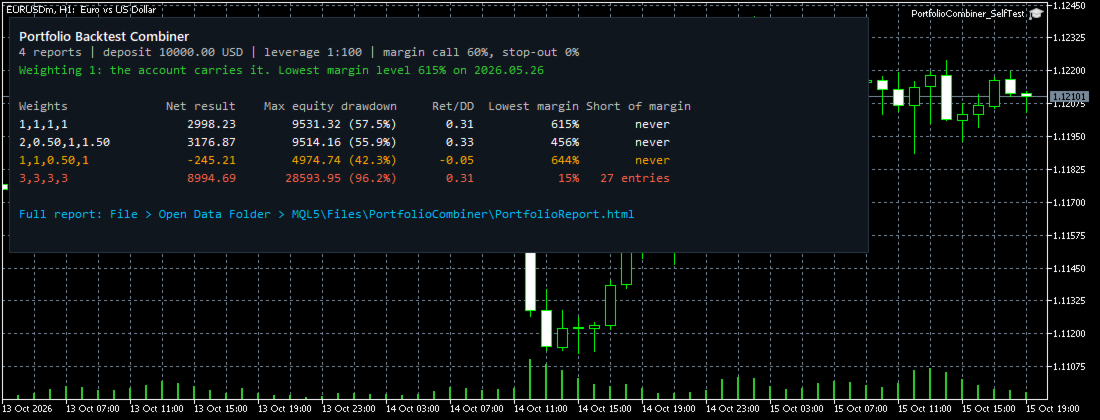
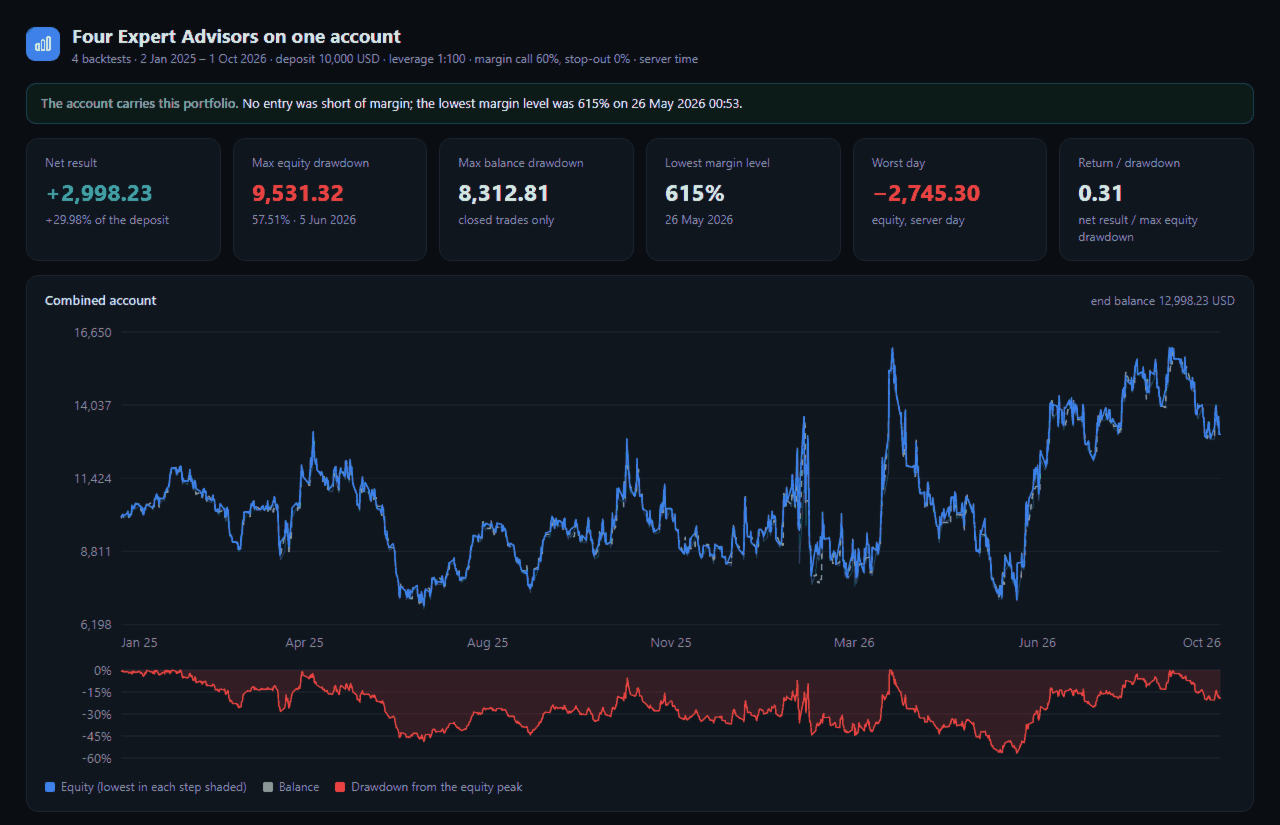
- In a few seconds the chart shows the verdict and the key figures of every weighting, and a full HTML report is written to MQL5\Files\PortfolioCombiner.
No source code of your Expert Advisors is needed: compiled EAs from the Market work.
What Is Calculated
- The account rebuilt minute by minute from the M1 history of your terminal: balance, floating profit converted at historical prices, equity, swap charged night by night (triple swap day included).
- Margin of every open position by the calculation mode of the symbol, including hedged positions, margin level, margin call and stop-out.
- Every entry the combined account could not have paid the margin for, with the first date: the moment the account stops following the separate backtests.
- Risk weights: multiply the lots of each EA (rounded to the volume step) and compare several weightings in one run.
- Report: verdict, net result, maximum equity and balance drawdown, lowest margin level, worst day, return/drawdown, the result and own drawdown of each EA, the correlation of their daily results, the margin level over time, and a table of all weightings.
Accuracy
The method was checked against a real multi-symbol backtest of four strategies running together (EURUSD, USDJPY, XAUUSD, hedging account, 21 months):
- net result and balance drawdown identical to the cent
- lowest margin level identical (minute records)
- equity within 3.61 USD in 99% of 651,169 minutes
- on a small account, the first order the account could not pay for was predicted to the second
The margin of a position is held at its open price and swap is charged at every rollover, as in the Strategy Tester.
Demo
The free demo runs in the Strategy Tester: copy your saved reports into the common Files folder (File > Open Common Data Folder > Files), run the demo with the model "1 minute OHLC" or "Every tick" over the same period as the reports. The results are printed in the journal at the end of the test and the report is written to the common folder.
Inputs
- Saved tester reports: file names in MQL5\Files, separated by ;
- Weightings: one lot multiplier per report, sets separated by ; (example 1,1,1;1,0.5,2)
- Deposit: 0 = the deposit of the first report
- Symbol names: when the reports come from another broker, map them (example XAUUSD=GOLD;US30=DJ30)
- Margin rule: fixed at the open price (as in the Strategy Tester), recalculated every minute, or recalculated on every trade
- Margin call and stop-out levels: 0 = those of the current account
- Report title
Good To Know
- Test all EAs with the same deposit, leverage and period, on data of the same broker.
- Set Tools > Options > Charts > Max bars in chart to Unlimited, and open each symbol once so its M1 history is downloaded.
- The report has no position IDs; exits are matched with the oldest open entry of the same symbol and direction. This is exact for EAs that hold one position per symbol and direction, and close to exact for grid and averaging EAs.
- EAs that size their lots from the balance trade differently together than alone; the tool shows the combination of the trades they made alone.
- Equity is evaluated once a minute; spikes inside a minute are not seen.
- The tool reads reports and writes files. It does not trade.