 MetaTrader 5
 Experts
 지표
지표
 스크립트
스크립트
 라이브러리
라이브러리
 보관함
보관함
당사 팬 페이지에 가입하십시오

Completed Bar Trend Regime Dashboard MT5 - MetaTrader 5용 지표

I develop MQL4/MQL5 indicators, Expert Advisors and utilities, with a focus on chart analysis, configurable trading logic and practical dashboards.
Choosing a product
- 조회수:
- 883
- 평가:
- 게시됨:
- 업데이트됨:
-
 이 코드를 기반으로 한 로봇이나 지표가 필요하신가요? 프리랜스로 주문하세요
프리랜스로 이동
이 코드를 기반으로 한 로봇이나 지표가 필요하신가요? 프리랜스로 주문하세요
프리랜스로 이동


Completed Bar Trend Regime Dashboard is a lightweight MetaTrader 5 indicator that summarizes market structure from completed candles. It combines EMA structure and slope, ADX/DI strength, higher-timeframe confirmation, ATR volatility, breakout position and spread context in one panel.
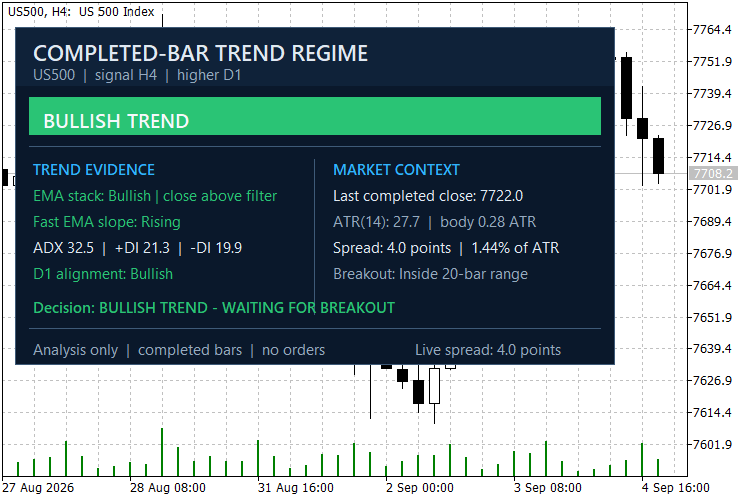
The indicator is designed as a decision-support tool. A bullish or bearish regime requires agreement between the signal timeframe and the higher timeframe. If the conditions are not aligned, the panel reports a range or transition instead of forcing a directional label.
How to read the panel
- EMA stack shows the fast/slow relationship and the completed close relative to the filter EMA.
- Fast EMA slope shows whether the short-term average is rising, falling or flat.
- ADX and DI show trend strength and directional pressure.
- Higher-timeframe alignment confirms or rejects the signal-timeframe direction.
- ATR and body/ATR put the completed candle in current volatility context.
- Breakout shows whether the completed close is outside or inside the recent range.
- Spread/ATR compares current spread with recent volatility.
Suggested US500 setup
Start with a US500 H4 chart, H4 signal timeframe and D1 higher-timeframe confirmation. Read the dashboard after the H4 candle closes. The defaults are only a starting point; all timeframes, EMA periods, ADX threshold, ATR period and breakout lookback are adjustable.
Inputs
- Signal timeframe / Higher timeframe control the two analysis periods.
- Fast, slow and filter EMA periods define trend structure.
- ADX period / Minimum ADX define the trend-strength requirement.
- ATR period / Minimum body in ATR define volatility and candle-body context.
- Breakout lookback defines the recent completed-bar range.
- Dashboard corner, offsets and font size control panel placement.
All regime decisions use shift 1, so the current forming candle is excluded. The indicator does not open or manage trades, use DLLs, send network requests or collect account data. It is an analysis tool, not a guarantee of future results.
Gold Session Boxes: Sydney, Tokyo, London, New York and the overlap
Draws Sydney, Tokyo, London and New York as high/low boxes with the London-New York overlap outlined and the rollover hour shaded. Session times in GMT, broker offset detected automatically, average range of the last N sessions on every label, optional alert at session open.
MT5 Memory Meter Panel
A lightweight memory meter dashboard that reveals current MT5 memory usage and key resource statistics directly on the chart.
Pending Order Inspector MT5
Read-only panel that checks a BUY STOP or SELL STOP against the symbol contract before you send it: price tick grid, volume minimum/step/maximum, stop distances and order permissions. It never sends, changes or suggests anything.
SuperTrend TV
A SuperTrend that returns the same values as TradingView's ta.supertrend, shipped with the tool that proves it bar for bar against the Pine reference