 MetaTrader 5
 Experts
 지표
지표
 스크립트
스크립트
 라이브러리
라이브러리
 보관함
보관함
당사 팬 페이지에 가입하십시오

- 조회수:
- 858
- 평가:
- 게시됨:
- 업데이트됨:
-
 이 코드를 기반으로 한 로봇이나 지표가 필요하신가요? 프리랜스로 주문하세요
프리랜스로 이동
이 코드를 기반으로 한 로봇이나 지표가 필요하신가요? 프리랜스로 주문하세요
프리랜스로 이동


Pending Order Inspector MT5 is a read-only indicator. It checks a proposed BUY_STOP or SELL_STOP on the current chart symbol and shows, rule by rule, how your intended order compares with the broker contract. It turns the checks that normally fail only after you press Send into a report you can read before you send.
It does not trade. There is no OrderSend, no OrderCheck, no CTrade, no price suggestion, no automatic normalization and no account-risk calculation in version 1.00.
What it reads
Point, tick size, volume minimum / maximum / step, stops level, freeze level, bid, ask, spread, trade mode and the symbol order permissions. Point measures broker distance; tick size is the allowed price increment. The two are shown separately, because a price can be a valid number of digits and still be off the tick grid.
What it checks
- Entry direction: BUY_STOP must be above Ask, SELL_STOP must be below Bid.
- Price tick grid for entry, Stop Loss and Take Profit.
- Volume minimum, maximum and step.
- Stops-level distance for entry, Stop Loss and Take Profit.
- Whether the symbol permits stop orders, Stop Loss and Take Profit.
- Quote age. A stale or missing quote can never produce a pass.
For an off-grid price or volume it also shows the adjacent grid values and the grid quantum. For volume, only neighbours inside the reported volume limits are shown. These are neutral grid facts: the indicator never changes your input, never fills a field for you and never presents a value as a recommended order size.
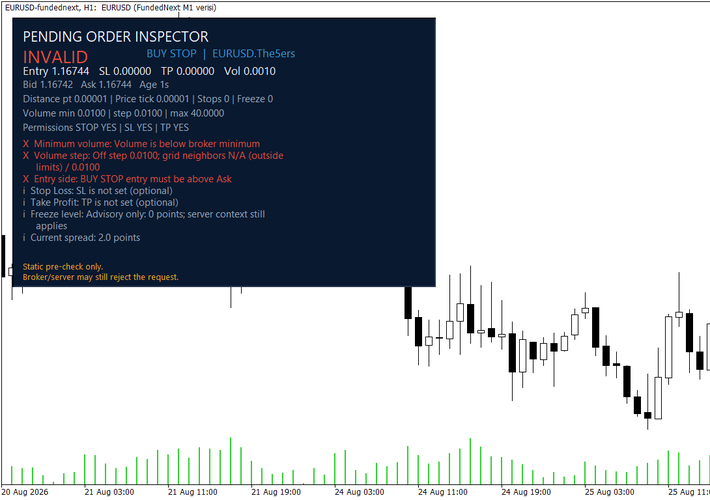
A failing input set: the volume is below the symbol minimum and off the step grid, and the entry sits on the wrong side of Ask. Each row names the rule and the value.
Result states
- CHECKS PASS - the completed static checks found no failed rule. This is not a server acceptance guarantee.
- INVALID - at least one rule failed. The row names the rule, the entered value and the required distance or grid.
- CHECK - an input or a contract value needed for a complete check was unavailable.
- UNKNOWN - a single rule could not be completed. The indicator does not invent a replacement value.
- INFO - context that is not a failure, for example an optional Stop Loss that was not set.
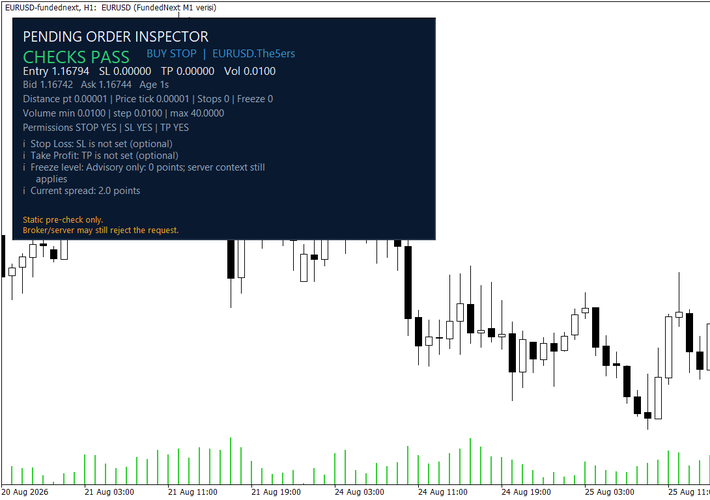
The same symbol with a valid volume and an entry above Ask on the tick grid. The footer still states that this is a static pre-check.
Install and first run
- Download PendingOrderInspector.mq5. This CodeBase release is a single standalone source file, so no include files have to be placed anywhere.
- Compile it in MetaEditor and attach the indicator to the symbol you want to inspect.
- In Inputs choose BUY_STOP or SELL_STOP, then enter your intended entry price and volume. Add Stop Loss and Take Profit if your plan uses them.
- Read the overall state and every non-pass row before you place the order manually.
An entry price of 0.0 is deliberately not replaced with a market price; the panel reports CHECK: Set an entry price in Inputs instead.
Inputs
- InpOrderType - BUY_STOP or SELL_STOP.
- InpEntryPrice, InpStopLoss, InpTakeProfit, InpVolume - the values you intend to send. They are inspected, never adjusted.
- InpRequireStopLoss, InpRequireTakeProfit - treat an unset optional level as a required field.
- InpMaxQuoteAgeSeconds - maximum quote age for a complete check, default 60.
- InpPanelX = 16, InpPanelY = 24 - panel offsets from the fixed upper-left corner.
- InpShowLines - show non-draggable reference lines for entry, SL and TP.
Scope of version 1.00
One chart symbol and the two pending stop types. Limit orders, stop-limit orders, draggable inputs, multi-symbol monitoring, alerts, CSV export, position management and risk sizing are outside this version.
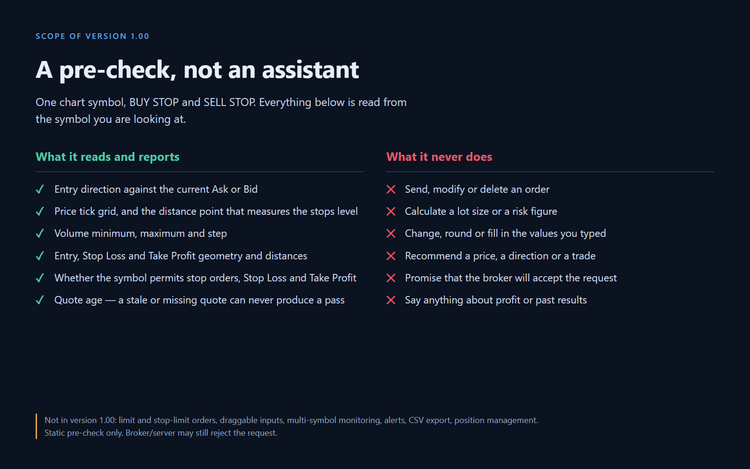
Use it on a demo account first. This is a static pre-check: quotes and server conditions can change after the panel refreshes, and the broker or server may still reject a request the panel found clean.
 Completed Bar Trend Regime Dashboard MT5
An MT5 dashboard that classifies completed-bar trend regimes using EMA structure, ADX/DI, higher-timeframe confirmation, ATR, breakout position and spread context.
Gold Session Boxes: Sydney, Tokyo, London, New York and the overlap
Draws Sydney, Tokyo, London and New York as high/low boxes with the London-New York overlap outlined and the rollover hour shaded. Session times in GMT, broker offset detected automatically, average range of the last N sessions on every label, optional alert at session open.
SuperTrend TV
A SuperTrend that returns the same values as TradingView's ta.supertrend, shipped with the tool that proves it bar for bar against the Pine reference
Any Indicator Alert - alerts, push notifications and multi-timeframe for any custom indicator, no source code needed
Attach it to a chart, type the name of any custom indicator, and it alerts you on that indicator's own buffers - popup, sound, push notification to your phone, or email. It reads the indicator through iCustom, so no source is needed: a compiled .ex5 you downloaded is enough. It can also read that indicator from a higher timeframe, and it re-checks closed bars to tell you whether the indicator repaints or merely lags. It opens in EXPLORE mode, which lists every buffer the indicator has and what is in each one, because "which buffer holds the signal" is the question that stops most people using iCustom at all.