Partial Close EA

3.25

The most simple and easy to use Partial Close EA (by Rimantas Petrauskas)

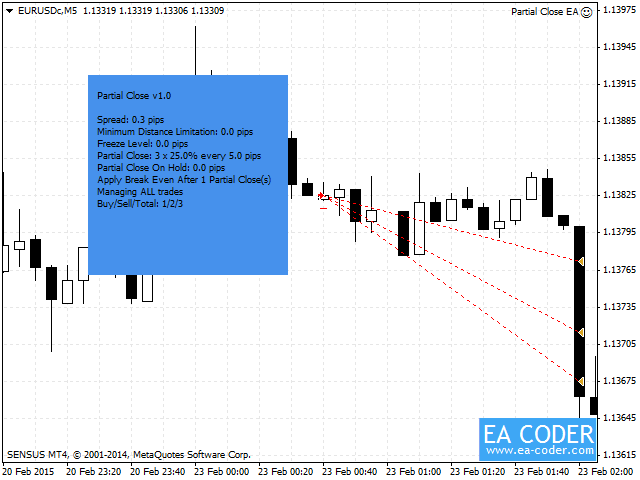
The main idea of this EA is to apply partial close to your positions. EA will automatically find your open market positions and apply partial close according to your settings.

For those who do not know what Partial Close is: it is simply an action to close only a part of your position. For example, if your trade lot size is 1.2 and you close 25% of it (which is 0.3) you will still have 0.9 lot size trade running and existing bank profits from that 0.3 lot size that was just closed. This action obviously can be performed manually, but if you want to program your MT4 to do this for you then you need "Partial Close EA".


How to use Partial Close EA?

The EA should be attached to a separate chart on your MT4 and it will apply partial close to all trades selected by magic number or trade number. The EA will see the trades of that currency pair (instrument) that it is attached to. By default the EA will apply partial close to any market order on the currency pair (instrument) it is attached to. The EA can also be applied to non-Forex pairs/instruments like Indices, Commodities, etc. For this you might need to use CustomPipSizes option (read explanation below).


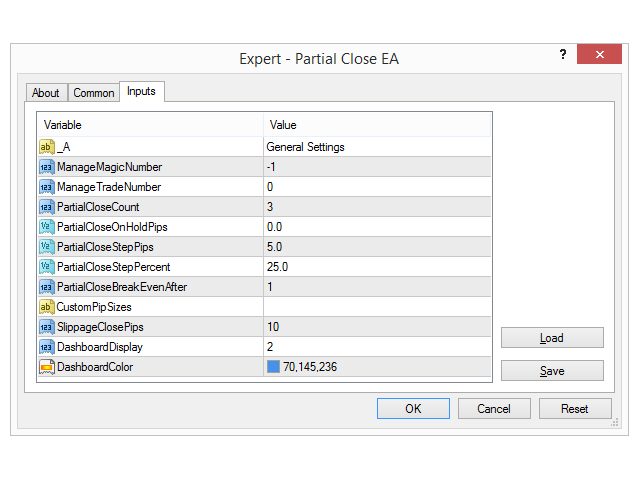
Partial Close EA Inputs

  • ManageMagicNumber — This tells the EA to apply partial close to trades only with certain magic number you choose. If this value is set to zero, the EA will manage only manually opened trades. If you set this to -1 (negative one), the EA will manage all of the trades running on the account (default value).
  • ManageTradeNumber — This tells the EA to apply partial close only to the trade number specified. This will also make the EA ignore the ManageMagicNumber option.
  • ManageTradeWithComment - This tells the EA to apply partial close only to those trades that have a specified text in "trade comment". If you set this parameter to "777", it will manage trades that have "trade comment" like "1777" or "777" or "777565, but not "7737" or trades with no "trade comment" at all.
  • PartialCloseCount — This tells the EA to apply partial close X times. Set this to zero to disabled Partial Close option.
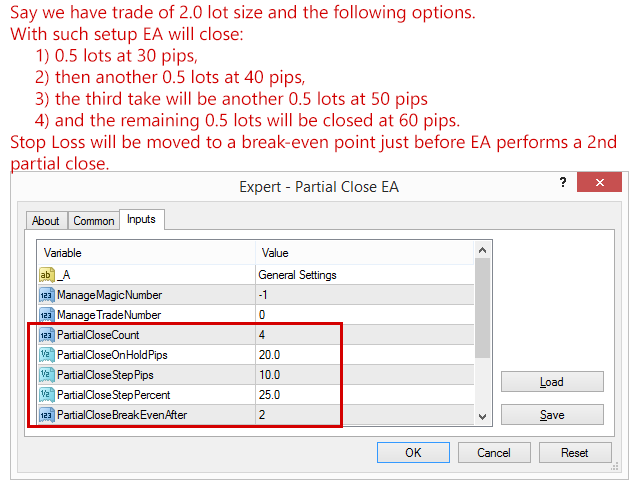
  • PartialCloseOnHoldPips — This tells the EA to start partial close when trade reaches X pips in profit. Zero means EA will start applying partial close at the first target (PartialCloseStepPips). If this option is set to 50 pips and PartialCloseStepPips=20 pips, then EA would wait for the trade to reach profit of 50 + 20 = 70 pips to close the first part of the trade.
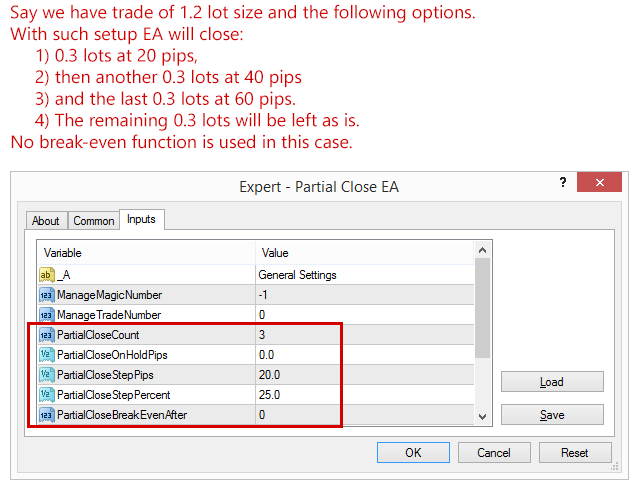
  • PartialCloseStepPips — This tells the EA to apply partial close each X pips in profit. If this option is set to 20 pips and PartialCloseCount=3, then EA will apply partial close 3 times every 20 pips. This means TP1 = 20 pips, TP2 = 40 pips and TP3 = 60 pips.
  • PartialCloseStepPercent — This tells EA to close X% of the trade. Percentage of the lot size is counted from the initial lot size.
  • PartialCloseBreakEvenAfter — This indicates after how many partial closes EA should move stop loss to a break-even point (open price + few pips to cover commission expenses). Zero value means no break-even will be applied.
  • CustomPipSizes — I have added this option because there are no standard pip sizes for indices and other non-Forex pairs between brokers. This option allows you to override the pip size that the EA will detect automatically. In 99% cases EA will work fine on all Forex pairs, but for non-Forex pairs you might notice that pip size is different between brokers. For example NAS100 with one broker might be quoted with 1 decimal and another broker might quote it to 2 decimals. Here is an example how to enter in a comma separated list of custom pip sizes: XAUUSD=0.1,XAGUSD=0.01,WTI=0.1
  • For those who are using EA on a non-Forex pairs please set the CustomPipSizes option correctly according to your broker settings. Sorry, I am unable to help you setting this option, because each broker might need different value.
  • SlippageClosePips — This is the slippage setting EA will use to exit the market (close the trade). Note that not all brokers use this and this will be ignored by your broker on ECN accounts. If you do not know what that is, simply leave it as is.


Author

Rimantas Petrauskas, programmer, software engineer, algorithmic Forex trader.
レビュー 21
darktideac2
246
darktideac2 2016.04.06 19:26 
 

Great program! Other scale out EA's I have tried worked only on attached chart and you had to set timeframe manually and cost 10x as much as this one.

Georgios Baizanis
2258
Georgios Baizanis 2025.04.23 08:15 
 

The EA works well. It performs as expected. Tested in multiple Mt4 accounts. Was also easy to use and set up. I recommend that

おすすめのプロダクト
Risk Control Utility MT4   designed for manual trading. It helps to calculate and control your risks, transfer transactions to breakeven and accompany positions with trailing stop. Easy to set up and use. It can be used for calculating a trading lot, calculating stop loss and take profit levels. Works with currency pairs, CFDs, stocks, indices, futures, cryptocurrencies Displays   volume,   potential loss and profit before   placing an order Ability to set the expiration time of a pending order
For MT5: TP SL Calculator This tool helps you to automatically calculate profit at Take - Profit price and loss at Stop - Loss price. Feature: - Calculate profit at TP price. Apply to all operators (BUY / BUY LIMIT / BUY STOP / SELL / SELL LIMIT / SELL STOP), with TP price is greater than 0. Profit is expressed in money and points. - Calculate loss at SL price. Apply to all operators (BUY / BUY LIMIT / BUY STOP / SELL / SELL LIMIT / SELL STOP), with SL price is greater than 0. Loss is express
ScoutFX Panel
Kalinka Capital OU
5 (1)
ScoutFX Panel is created to make manual trading and decision making process easier for the traders who prefer manual trading. This trading panel will help you to make a market entry decision by displaying the majority of trades statistics. Using this data, trader can easily determine the market entry direction or to make corrections for used trading strategy based on statistics. ScoutFX Panel notifies   the trader about reached percent of sell or buy overtake for each instrument, via voice noti
FREE
MTSBSPanel is a multifunctional trading panel with an integrated risk manager. Main features of the trading panel Placement of pending orders directly from the chart with the ability to divide a position into multiple orders Opening by market in one click with the ability to divide a position into multiple orders Risk management: risk per trade and per day Dynamically calculated lot depending on the specified risk per trade Brief information on the account, result of trades for the day, week, m
Trade Assistant Expert TF MT4 The Trade Management Assistant is a specialized Expert Advisor (EA) designed to streamline capital allocation and strengthen risk control within the MetaTrader 4 (MT4) platform. This EA offers an intuitive on-screen control panel that enables smooth trade execution, enhanced risk management, and efficient capital distribution. It also includes essential automated functions such as breakeven adjustment and a Trailing Stop mechanism to improve trade protection.   Key
Waddah Attar Easy Positions Risk Management This EA gives you a full ability to close one position or close all positions . Close buy or sell trades in any position . Close profit or loss position . by clicking on a command button on the chart with confirmation message . Show you  a full information about your positions like : count - lots - average price - points - profit -  profit % - used margin for this position and the risk percent . and also the scrolled table of trades that position has
Itrade Manager MT4
Nestor Smill Soler Olivero
Itrade manager expert advisor (EA) is a type of software that can be programmed to perform a variety of tasks related to managing trades in the financial markets. Some of the ways in which the Itrade manager EA can help you trade better include: Itrade manager EA can automatically modify, and close trades based on predefined rules and conditions, freeing you up to focus on other aspects of your trading strategy. Managing risk: Itrade manager EA can help you manage risk by placing stop-loss and
Naughty Trader – The Risk Discipline Enforcer for Smart Traders Tired of letting emotions sabotage your trades? Naughty Trader is here to discipline your risk — even when you can't. Naughty Trader is a lightweight, real-time risk control Expert Advisor designed to protect your capital by forcefully closing all trades when your account drawdown hits a defined threshold . Whether you're a manual trader or running another EA, Naughty Trader stands guard like a strict risk manager on duty — no merc
Position Calculator calculates how many lots to trade based on: Entry and stop-loss levels Risk tolerance Account size (balance, equity, or even your savings account) Account currency Currency exchange rates - The main tab of the panel provides the primary control over the EA's functions and serves to output the most important calculation results: the position size, risk, reward, and risk-to-reward ratio. - The risk tab can help you assess current and potential risk and reward profile. Using a s
FREE
The utility is designed to save funds on your trading account. There is support for three levels of minimum equity and free margin. For each level, you can set partial (by a certain percentage) or complete closing of all market orders. The partial close percentage is applied for each order separately based on its current size (i.e. the size at the time the equity or free margin reaches the appropriate level). Upon reaching the last third level, the utility can close all charts, which will make i
Do you over trade???  Do you lose your account by adjusting the stop loss or not putting stop loss?? Do you cross your daily loss limit and closed your account??? Do you breach your funded account??? Do you fail frequently because of emotion??   So you have to control your emotion in trading. And this EA will do the job for you. You can not repeat those mistake even if you try hard. Just set the EA and relax. This will do major role in funded account. This EA will not open orders/positions. It j
MyBreakeven Expert Advisor automatically moves a position to breakeven. The EA works both with all open positions and with a certain order. The robot allows moving a position to breakeven in several modes: Points - move a position to breakeven when reaching a certain profit in points. To work in this mode, fill in the SizePoints field in the inputs; Summ - move a position to breakeven when reaching a certain profit in deposit currency. To work in this mode, fill in the SizeSumm field in the inpu
The ScriptForOrders utility is intended for placing orders with the required Magicnumber parameter manually! Manually opened orders have Magicnumber = 0. Expert Advisors often open orders with a Magicnumber parameter other than zero. This is done so that the EA can distinguish its own orders from those of others, or apply different control algorithms to different orders. Sooner or later, a trader has a situation when he needs to intervene in the work of the adviser and place an order manually
Coral Rescue will help save an account with trades in drawdown.  Do you have losing trades that are just too large to deal with?  They reduce your available margin and can be accumulating swap costs, but the loss would be too great to just accept closing the trades.  Just hoping that price will eventually come back is not an effective strategy, you need a disciplined, consistent and preferably automatic way to dig yourself out of the hole. Coral Rescue is not an EA that places trades on its own.
A script for closing all open positions in one click. It has no settings, you only need to save it to folder ...\mql4\scripts folder and restart the terminal. A click on the script will close all open positions with the best possible time. Works on all types of accounts with all currency pairs and any broker. The number of open positions is not limited. The script will be useful for trading strategies, in which you need to manage a large number of orders.

ティックスキャルパー「Tick Scalper」 純粋な価格行動、インジケーターなし。常に損切り/利確を設定し、トレーリングストップで追跡。   主要パラメータ パラメータ デフォルト値 説明 TakeProfit — 固定利確(ピップ単位)。 StopLoss — 固定損切り(ピップ単位)。 TrailingStop — ポジション修正のためのトレーリングストップ距離(ピップ単位)。 cSeconds — シグナルチェック間隔(秒単位)。 MinPriceShot — シグナルをアクティブにする最小価格変動(ピップ単位)。 MaxOrdersCount — 同時に開ける最大注文数(定数)。 RiskPercent — 残高に対するリスク%(自動ロット計算用)。 FixedLotSize — 固定ロットサイズ(UseAutoLot = falseの場合)。 UseAutoLot — 残高とリスクに基づく自動ロット計算。 MagicNumber — EA注文の一意識別子。 MaxSpread — 取引開始可能な最大スプレッド(ピップ単位)。   通貨ペアのプリセットと
A simple script that closes all current orders. Terminate once close all positions, so please don't worry about constantly closing your order. How to use : Drag the script from the navigator to the chart to activate it. Do remember to enable algo trading to use this script. There are different versions of the script that can choose whether to close all buy/sell posiitons, if you need this, do contact me in MQL5.

Entry TP and SL Time Trader Manager Expert for MetaTrader 4 The Entry TP and SL Time Trader Manager is a powerful semi-automated trading tool for MetaTrader 4, designed to simplify trade setup, manage exits, and execute orders with precise timing. This expert advisor enables traders to optimize their trading strategy by defining key parameters such as entry levels, trade volume, and scheduled execution times for maximum efficiency.   Specification Table – Entry TP and SL Time Trader Manager for
StopLoss and TakeProfit Utility MT4 for automatic setting of stop loss and take profit levels. Created by a professional trader for traders.   The utility   works with any market orders opened by a trader manually or using advisors. Can filter trades by magic number. The utility can work with any number of orders simultaneously. WHAT THE UTILITY CAN DO: Set virtual stop loss and take profit from 1 pip Real   stop loss and take profit W ork with each order separately (   stop loss and take prof
Modify SELL orders v1.0    Managing Orders   During trading, you may need to modify   orders, i.e.   to change stop levels or  take profit. This can be done with one click with  the script Modify SELL orders v1.0 The script modifies all orders (market )  with specified Take Profit and Stop Loss.(pip or price) If the take profit or(and) stop loss is incorrect, then the value is not changed. Parameters script : Take Profit (PIP) Stop Loss (PIP) Take Profit (price) Stop Loss (price)
BreakEven Grid Utility for MT4 BreakEven Grid is a powerful utility for manual trade management on the MetaTrader 4 platform. It provides a convenient on-screen panel with buttons to help you manage your open positions with a single click.  Features: Set BE+Profit: Automatically sets Take Profit to breakeven + desired profit in pips or money. Close BUY/SELL: Instantly close all Buy or Sell orders for the current symbol. Close +$/-$/Old/New: Close only profitable, losing, oldest or newest tra
Parameters Lots = 0.01 Stop loss= 50 Take Profit=50 Delay= 2 Buy = true Sell=true LotMultiplier=2 PointMultiplier=1.5 Magic=111 MaxSlippage=30 Start Time=00:00 Stop Time=23:00 GMT Offset=0 that is a utility for trade, you can aitomaticly trading whit vps. And your invest can growing up to 100% or 1000%. you can back test before you buy this for analisis how this utility traing for you.
This utility provides the ability to use hot keys in manual trading instantly responding to the current market situation. You can assign hot keys to open/close positions by their type, close all positions on the current chart and remove all orders on the current chart. You can also assign hot keys for five predefined trade volumes and switch between them if necessary with no need to change the volume manually from time to time. It is also possible to set the auto calculation of a trade volume in
This is an analogue of the Virtual   Stop Loss / Take Profit Features: automatic closing of trades by profit/loss points/money the number of deals and the total profit for the Symbol Auto close deals by profit / loss (analogue of virtual StopLoss / TakeProfit): mode: Off; by profit / loss in points by profit / loss in the deposit currency Types of deals: Buy and sell only Buy only Sell set conditions for closing by profit per trade set conditions for closing at a loss per trade Attention: thi
This utility sends notification to trader’s MT4 (for MT5 version, checkout this link ) mobile app, to remind traders about their open positions. Super useful for part time traders to keep track and not forget any positions. To turn on notification, please visit this link (https://www.metatrader4.com/en/trading-platform/help/setup/settings_notifications) Features Keep track on open orders (pending orders, running orders) Customize time to send notification Customize notification interval (send ev
EA Setting, Common Common 1)Long & Short -allow EA open short and long position Live Trading  1)Tick -Allow live trading Safety Tick All 1)Allow DLL import 2)Allow import of external experts 3)Allow modification Signal settings Inputs Variable Value Remarks  Open new series true  Make it default                                                           Trade BUY true Make it default Trade SELL true Make it default Support manual order true Make it default Max sell order 10 You may control EA m
A Utility used for accounts with multiple open positions with Magic numbers added via Expert Advisors or manually. The Utility closes specific Magic number open positions when a certain profit in currency $ has been reached. The Utility also closes specific Magic numbers open positions with a break-even feature when the Expert Advisors or manually a certain amount of open positions has been placed. The Utility also closes all buy stops and sell stops when the "Take profit sum $" has been reache
The Expert Advisor notifies that a price has crossed a line on the chart. It handles two types of lines - horizontal line and a trendline. The number of lines is unlimited. Parameters: prefix of signal line - prefix of object (line) names processed by the indicator. If the parameter is empty, it handles all object types: horizontal lines and trendlines. price Mode - price type (bid or ask). timeout - crossing alert timeout. number of repeats - the limit of crossing alert repeats. number of comme
このパネルはエキスパートアドバイザーであり、6 つのグループの取引パネルを提供します。 MT5 バージョン:   クイックパネルカバレッジ 特徴 ほとんどの取引操作は、これらのパネルのボタンをクリックすることで迅速に実行できます。 パネルの変更は緑色のボタンをクリックするだけで簡単に行えます。 EA はストラテジー テスターの視覚的なチャート上で実行でき、履歴データに基づいて取引を練習する簡単な方法を提供します。 マウスをクリックしてストップロスとテイクプロフィットを素早く変更します(バックテストには使用できません) 背景が黄色のパネルに平均価格を表示し、平均価格の線を描きます。       ここをクリック パネル ダッシュボードには 2 つの列が含まれています。左の列は売りに関するもので、右の列は買いに関するものです。 売る:     売り注文をオープンします。 初め:     最初の売り注文をクローズします。 1 つ目はオープンタイムを指します。 最後:     最後の売り注文をクローズします。最後のはオープンタイムを指します。 すべて+:     売り注文を利益を上げてクロー
アクティブ注文と保留中の注文の管理:自動ブレイクイーブン、TP/SL変更、部分/完全決済、チャート上のレベルの視覚的表示 私の #1  Utility :66以上の機能、PROトレード管理を含む   |    ご質問はこちら  まで 1) メインウィンドウ:注文を管理するには、特定のシンボル [Symbol] を設定するか、すべてのシンボル [ALL] を選択できます すべてのアクティブポジションを閉じる [ALL] すべての利益のあるトレードを閉じる [profits] すべての損失のあるトレードを閉じる [losses] すべての買いトレードを閉じる [longs] すべての売りトレードを閉じる [shorts] すべての指値注文を削除 [Delete limit orders] すべての逆指値注文を削除 [Delete stop order] 右側には、各注文カテゴリの現在のフローティング損益(口座通貨および現在の残高のパーセンテージ)が表示され、各カテゴリの注文数が計算されます。 2) 手動でトレードをブレイクイーブンに変更 [- Move SL to BE now -]:SL
このプロダクトを購入した人は以下も購入しています
Local Trade Copier EA MT4
Juvenille Emperor Limited
4.96 (104)
Local Trade Copier EA MT4 による、驚くほど高速な取引コピーを体験してください。1分で簡単にセットアップできるこの取引コピー機は、同じWindowsコンピュータまたはWindows VPS上の複数のMetaTrader端末間で取引をコピーすることができ、0.5秒未満の高速コピースピードを実現します。 初心者であろうとプロのトレーダーであろうと、 Local Trade Copier EA MT4 には、あなたの特定のニーズに合わせてカスタマイズするための幅広いオプションが用意されています。これは、利益の可能性を高めたい人にとって究極のソリューションです。 今すぐ試してみて、これが市場で最も速くて簡単なトレードコピー機である理由を理解してください。 ヒント: デモアカウントで Local Trade Copier EA MT4 デモバージョンをダウンロードして試すことができます: ここ ダウンロードした無料のデモ ファイルを MT4 >> ファイル >> データ フォルダを開く >> MQL4 >> Experts フォルダに貼り付けて、ターミナルを再起動しま
Trade Assistant MT4
Evgeniy Kravchenko
4.42 (192)
取引 ごとのリスクの 計算、新規注文 の 簡単 な 設置、部分的 な 決済機能 を 持 つ 注文管理、 7 種類 のトレーリングストップなど 、便利 な 機能 を 備 えています 。 追加の資料と説明書 インストール手順 - アプリケーションの手順 - デモアカウント用アプリケーションの試用版 ライン機能 チャート上にオープニングライン、ストップロス、テイクプロフィットを表示します。この機能により、新規注文を簡単に設定することができ、注文を出す前にその特徴を確認することができます。   リスク計算 リスク計算機能は、設定されたリスクとストップロス注文のサイズを考慮して、新規注文のボリュームを計算します。ストップロスの大きさを自由に設定できると同時に、設定したリスクを守ることができます。 Lot calc ボタン - リスク 計算 を 有効 / 無効 にします 。 Risk フィールドでは 、必要 なリスクの 値 を 0 から 100 までのパーセンテージまたは 預金通貨 で 設定 します 。 設定」 タブで 、 リスク 計算 の 種類 を 選択 します :「 $ 通貨」、「 % 残
Trade Manager EAへようこそ。これは、取引をより直感的、正確、そして効率的にするために設計された究極の リスク管理ツール です。これは単なるオーダー実行ツールではなく、包括的な取引計画、ポジション管理、リスク管理のためのソリューションです。初心者から上級者、迅速な実行を必要とするスキャルパーまで、Trade Manager EAはあらゆるニーズに対応し、為替、指数、商品、暗号通貨などさまざまな市場で柔軟に対応します。 Trade Manager EAを使用すると、複雑な計算が過去のものになります。市場を分析し、エントリーポイント、ストップロス、テイクプロフィットのレベルをチャート上のラインでマークし、リスクを設定するだけで、Trade Managerが最適なポジションサイズを即座に計算し、SLとTPをピップ、ポイント、口座通貨でリアルタイムに表示します。すべての取引が簡単かつ効果的に管理されます。 主な機能: ポジションサイズ計算機 :定義されたリスクに基づいて取引サイズを瞬時に決定します。 簡単な取引計画 :エントリー、ストップロス、テイクプロフィットを設定するためのド
The product will copy all telegram signal to MT4   ( which you are member  ) , also it can work as remote copier.  Easy to set up, copy order instant, can work with almost signal formats, image signal, s upport to translate other language to English Work with all type of channel or group, even channel have "Restrict Saving Content", work with  multi channel, multi MT5 Work as remote copier: with signal have ticket number, it will copy exactly via ticket number. Support to backtest signal. How to
Ultimate Extractor - Professional Trading Analytics for MT4 Ultimate Extractor transforms your MetaTrader 4 trading history into actionable insights with comprehensive analytics, interactive charts, and real-time performance tracking. Ability to combine multiple accounts and MT4 and MT5 into a single dashboard. What It Does Automatically analyzes your MT4 trading history across all Expert Advisors and generates detailed HTML reports with interactive visualizations. Tracks live performance metric
TradePanel MT4
Alfiya Fazylova
4.84 (89)
Trade Panel は、多機能の取引アシスタントです。このアプリケーションには手動取引用の 50 を超える取引機能が含まれており、ほとんどの取引操作を自動化できます。 注意、アプリケーションはストラテジー テスターでは動作しません。購入する前に、デモアカウントでデモ版をテストできます。デモ版 ここ 。 完全な手順 こちら 。 取引。 ワンクリックで取引操作を実行できます: 自動リスク計算を使用して未決の注文とポジションをオープンします。 ワンクリックで複数の注文とポジションをオープンします。 注文グリッドを開きます。 未決の注文とポジションをグループごとにクローズします。 ポジション反転 (買いを閉じて売りを開く、または売りを閉じて買いを開く)。 ポジションをロックします(買いポジションと売りポジションの量を均等にする追加のポジションをオープンします)。 ワンクリックですべてのポジションを部分的にクローズします。 すべてのポジションのテイクプロフィットとストップロスを同じ価格レベルに設定します。 すべてのポジションのストップロスをポジションの損益分岐点レベルに設定します。 注文とポ
コピー機->便利で高速なインターフェースインタラクション、ユーザーはすぐに使用できます     ->>>> WindowsコンピュータまたはVPS Windowsでの使用を推奨 特徴: 多様でパーソナライズされたコピー取引設定:1. 異なるシグナルソースに異なるロットモードを設定できます。2. フォワードコピー取引とリバースコピー取引に異なるシグナルソースを設定できます。3. シグナルはコメントで設定できます。4. 契約ロットに応じてロットを調整するかどうか 多様でパーソナライズされたコピー注文設定2:1.品種ごとに異なるロットモードを設定できます2.順方向コピー注文と逆方向コピー注文に異なる品種を設定できます3.コメントでシグナルを設定できます4.契約ロットに応じてロットを調整するかどうか コメントフィルタリング、MAGICフィルタリング、シグナルロットフィルタリング、ローカル製品フィルタリング 勤務時間設定 逆同期SLAVE終了 注文バインド機能: 任意の注文を設定されたシグナルソース注文にバインドできます (テーブルをダブルクリックして編集します) アカウントリスク管理 基本
MT4 to Telegram Signal Provider は使いやすく、完全にカスタマイズ可能なツールで、Telegramに信号を送信し、あなたのアカウントを信号提供者に変えることができます。 メッセージのフォーマットは 完全にカスタマイズ可能です! しかし、簡単な使用のために、あらかじめ定義されたテンプレートを選択し、メッセージの特定の部分を有効または無効にすることもできます。 [ デモ ]   [ マニュアル ] [ MT5バージョン ] [ Discordバージョン ] [ Telegramチャンネル ]  New: [ Telegram To MT5 ] セットアップ ステップバイステップの ユーザーガイド が利用可能です。 Telegram APIの知識は必要ありません。開発者が必要なものをすべて提供します。 主要機能 購読者に送信される注文の詳細をカスタマイズする機能 例えばブロンズ、シルバー、ゴールドなど、階層型のサブスクリプションモデルを作成できます。ゴールドサブスクリプションでは、すべての信号が得られますなど。 ID、シンボル、またはコメントによる注文のフ
Custom Alerts AIO:マルチマーケット監視を一括で実現 — 設定不要ですぐに使えるインテリジェントツール 概要 Custom Alerts AIO は、追加のインジケーター設定が不要で、インストール後すぐに利用できる高機能マーケットスキャナーです。FX Power、FX Volume、FX Dynamic、FX Levels、IX Power を内部にすべて統合し、主要なすべての資産クラス(為替、金属、指数、暗号資産)を一括監視できます。MetaTrader の仕様により、株式は個別のシンボルとして追加可能ですが、一般的には利用頻度は低めです。 1. なぜ Custom Alerts AIO を選ぶべきか 追加ライセンス不要 • 必要なすべての Stein Investments インジケーターが内蔵されており、すぐに使用可能です。 • チャートに表示されるグラフィックは省略されており、アラート生成に特化した構成です。 市場を広範囲にカバー • 為替、金属、暗号資産、株価指数に対応(株式は手動追加可能)。 • シンボル名を入力する必要はなく、プロパティで資産クラス
Exp COPYLOT CLIENT for MT4
Vladislav Andruschenko
4.69 (65)
MetaTrader4のコピー機を取引します。     それは任意の口座からの外国為替取引、ポジション、注文をコピーします。 それは最高の貿易コピー機の1つです     MT4 - MT4、MT5 - MT4     のために     COPYLOT MT4     バージョン(または     MT4 - MT5  MT5 - MT5     のために     COPYLOT MT5     バージョン)。 MT5のバージョン 完全な説明   +DEMO +PDF 購入する方法 インストールする方法     ログファイルの取得方法     テストと最適化の方法     Expforex のすべての製品 のコピー機 バージョン       MetaTrader 5 ターミナル(   МТ5 - МТ5、МТ4 - МТ5   )-   コピーロットクライアントMT5 独自のコピーアルゴリズムにより、すべての取引がマスターアカウントからクライアントアカウントに正確にコピーされます。 また、動作速度が速いことでも知られています。タフなエラー処理。 強力な機能セット。 プログラムは、複数
Copy Cat More Trade Copier MT4 (コピー猫MT4) は単なるローカル取引コピーツールではなく、現代の取引課題に対応するために設計された完全なリスク管理と実行フレームワークです。Propファームのチャレンジから個人の資産管理まで、強力な実行力、資金保護、柔軟な設定、高度な取引処理を組み合わせ、あらゆる状況に適応します。 このコピーツールは Master(送信側) と Slave(受信側) の両モードで動作し、成行注文や指値注文のリアルタイム同期、取引修正、部分決済、Close By 操作をサポートします。デモ口座・リアル口座の両方に対応し、取引用パスワードまたは投資家パスワードでも利用可能です。Persistent Trade Memory 技術により、EA・ターミナル・VPS が再起動しても復元可能です。複数の Master と Slave を同時に管理でき、ブローカー間の違いはプレフィックス/サフィックスの自動調整やシンボルマッピングで処理されます。 マニュアル/設定: Copy Cat Trading Copier マニュアル Copy Cat Mo
Risk/Reward Toolは、MetaTrader 4でのトレード計画、可視化、執行の方法を革新するために設計されたプロフェッショナルグレードのエキスパートアドバイザーです。精密なリスク管理を重視する裁量トレーダーでも、トレード設定を視覚的にテストする必要のある戦略開発者でも、このツールはエレガントで直感的なインターフェースで必要なすべてを提供します。 基本的なポジション計算機とは異なり、Risk/Reward Toolは視覚的なトレード計画を即時執行機能、リアルタイムの損益モニタリング、包括的なトレード管理機能と組み合わせています。このツールはMT4ストラテジーテスターと完全に互換性があり、実際の資金をリスクにさらすことなくトレード戦略を練習し、アプローチを改善することができます。 ツールの完全なマニュアルはこちら: https://www.mql5.com/en/blogs/post/766244 MT5 version:  https://www.mql5.com/en/market/product/158601 主な機能 視覚的なトレード計画 ドラッグ&ドロップ操作可能
News Filter EA: Advanced Algo Trading Assistant News Filter EA is an advanced algo trading assistant designed to enhance your trading experience. By using the   News Filter EA , you can integrate a Forex economic news filter into your existing expert advisor, even if you do not have access to its source code. In addition to the news filter, you can also specify   trading days   and   hours   for your expert. The News Filter EA also includes   risk management   and   equity protection   features
Trading History - A program for trading and money management on the history of quotes in stratagy tester. It can work with pending and immediate orders, and is equipped with trailing stop, breakeven and take profit functions. Very good for training and testing different strategies. Manual (Be sure to read before purchasing) Advantages 1. Allows you to test any trading strategy in the shortest possible time 2. An excellent simulator for trading training. You can gain months of trading experience
Draw Agent は、すべてのチャート分析、落書き、メモなどを作成および管理するための美しく革新的な方法として設計されています。 このツールは、チャート スペースを黒板として扱い、手で描くためのフリーハンド描画方法を提供します。 このフリーハンド描画ツールを使用すると、MT4/MT5 チャートに描画して、チャート上のイベントをマークまたは強調表示できます。 エリオット波動を手で下書きしたり、チャートに線を引いたり、チャートにアイデアを示したりしたい場合に 役立つツールです。クライアント向けのライブウェビナーを実行している場合、またはスクリーンショットやチャートファイルを人々に配布している場合に特に役立ちます同じように。 Draw Agent のインストールと入力ガイド EA追加URL(   http://autofxhub.com   )MT4/MT5端末(スクリーンショット参照) に関する通知を受け取りたい場合 。 MT4 バージョン https://www.mql5.com/en/market/product/14929 MT5 バージョン https://www.mql5.
Tired of complex order placement and manual calculations? Trade Dashboard is your solution. With its user-friendly interface, placing orders becomes effortless, by a single click, you can open trades, set stop loss and take profit levels, manage trade lot size, and calculate risk to reward ratios, allowing you to only focus on your strategy. Say goodbye to manual calculations and streamline your trading experience with Trade Dashboard. Download  Demo Version  right now. You can find  Details of
This trading panel has been developed for fast and comfortable operation of the financial markets. It is equipped with the necessary functions for manual and semi-automated trading. Due to the presence of the order trailing feature, trailing stop and automatic closure by equity, profit, time. You can use it to automate your trading system. All you have to do is open a position and set the parameters for maintenance, everything else will be handled by the EA. If you want to limit your losses, set
DFGX Dashboard
Tsvetan Tsvetanov
5 (2)
Take your trading to the next level with DFGX - our second generation Dynamic Fibonacci Grid. This new, powerful and easy to use application is specially designed and optimized for contrarian intraday trading, scalping and news trading on the Forex market. This system is the ideal solution for active professional traders and scalpers who are looking for innovative ways to optimize their strategy. The system also provides excellent opportunity for new traders who want to learn to trade in a syste
The most advanced news filter on MQL market - free demo available Take a Break has transformed from a basic news filter into a comprehensive account protection solution. It seamlessly pauses any other Expert Advisors during news events or based on your custom filters, all while safeguarding your EA settings - restoring them automatically when trading resumes for complete peace of mind. Typical use cases: A single news filter for all your EAs. Stop trading during news/high volatility (+ close all
This dashboard displaying current news from ForexFactory.com (calendar FFC) and from the Investing.com website . You can sort news by impact and by country, and display them on the chart with one click. By holding down the 'Ctrl' key, you can select several different 'currencies' or 'impacts' to sort. Also, this utility shows not only the forecast, but also the actual values ​​after they appear on the site. You can set a separate notification for each news. You can read the news using your EA
平均化ヘルパー - この種の取引ヘルパー ツールは、次の 2 つのテクニックを使用して、以前は利益がなかったポジションを平均化するのに役立ちます。 標準平均 トレンドに応じてポジションを開くヘッジ このユーティリティは、買いと売りの両方の異なる方向の複数のオープンポジションを一度に整理する機能を備えています 。例えば、売りポジションを1つ、買いポジションを1つオープンしたが、どちらも利益が出ていない場合、あるいは1つは利益が出ているものの利益が十分でない場合、この2つのポジションを平均化してプラスで取引を終了したい場合などです。これは、私の平均化支援ユーティリティが役立ちます。 平均化ヘルパー ユーティリティ - 次のポジションのサイズ、注文価格、ポジションを平均化する方向、指定した利益確定サイズでプラスでポジションをクローズする方向を自動的に計算できます。 このユーティリティでは、「買い」と「売り」ボタンを使ってポジションを開くこともできます。希望する利益確定額と開始ロットを指定するだけです。ユーティリティ自体は、最初に指定した利益確定額でポジションをクローズするか、ポジションを平均
With this Expert Advisor, you can seamlessly integrate various channel, arrow, and reversal indicators. It offers the flexibility to use all popular channel trading strategies, while also providing powerful tools to customize your trading conditions and risk management system.   The Expert Advisor opens orders when the price crosses the channel boundaries. Multiple crossing conditions are available for customization: Price touches boundary on re-entry into the channel Price touches boundary on
Basket EA MT4
Juvenille Emperor Limited
5 (5)
Basket EA MT4 は、強力な利益収穫ツールであり、包括的な口座保護システムがシンプルで使いやすい形で統合されたソリューションです。その主な目的は、すべてのポジションを個別管理ではなく“バスケットレベル”で一括管理することで、口座全体の損益を完全にコントロールすることにあります。EAは、テイクプロフィット、ストップロス、ブレイクイーブン、トレーリングストップといったバスケットレベルの機能を備えており、これらを口座残高の%/口座通貨の固定額/管理対象取引の平均ポイントといった形で設定できます。この柔軟性により、トレーダーは個々のリスクと利益戦略を自分に合わせてカスタマイズできます。さらに、 Basket EA MT4 は、Magic Number、通貨ペア、コメントなどに基づいて特定の取引を管理対象から除外または含めるフィルタリング機能を提供し、望む取引だけを管理できるようにします。 追加の保護機能として、高度な口座セーフガード機能を搭載しています。指定したエクイティのテイクプロフィット・ストップロス水準、または最高残高からの最大ドローダウンに達した場合、EAはすべてのオープン
VirtualTradePad mt4 Extra
Vladislav Andruschenko
4.86 (58)
ワンクリックで取引できるトレーディングパネル。ポジションと注文の操作!チャートまたはキーボードから取引。 手動取引用の取引パネル。チャート(チャートウィンドウ)またはキーボードから取引できます。開閉、リバース、ロックポジションと注文を処理する МetaТrader4のメインオーダーのトレーディングコントロールパネル:売買、売却、売却、売却、売却、閉じる、削除、修正、トレーリングストップ、ストップロス、takeproft MT5のバージョン 完全な説明   +DEMO +PDF 購入する方法 インストールする方法     ログファイルの取得方法     テストと最適化の方法     Expforex のすべての製品 シンボルウィンドウからの取引とキーボードからの取引! あなたはMetaTrader 4ターミナル - バーチャルコントロールパネルVirtualTradePadのためのユニークなプラグインを持っています。 Description on English 注意!  ストラテジーテスターの 取引方法を学びたい場合は、無料の TesterPad ユーティリティをチェックしてくだ
DESCRIPTION: The EA is a trade manager for managing manual or other trades by EA. It can place Stoploss, Takeprofit, Trailing, and Martingale/Average all open positions. Make sure to just place 1 type of open orders for each symbols   (Examples: 1 Buy or 1 Sell). The EA will not open the initial trades, but can be backtested to see how it works. FEATURES: Multicurrency or Single Pair Mode. Placing Stoploss / Takeprofit. Auto Martingale / Average Positions. Trailing for All Open Positions (Singl
日ごとおよび週ごとのクローズ取引履歴、現在のオープン取引、および外国為替エクスポージャーを 1 つのチャートで即座に確認できます。ヒートマップを使用して、収益性の高い取引と、取引ポートフォリオ内の現在のドローダウンの位置を特定します。 クイック クローズ ボタン クイック クローズ ボタンを使用すると、1 つのシンボルのすべての取引をクローズしたり、個々の取引を完全にクローズしたり、ボタンをクリックするだけで部分的な利益または損失を取得したりできます。リストで取引を探したり、取引の一部をクローズする方法を考えたりする必要はもうありません。ダッシュボードには、外国為替ペアの取引中に各通貨シンボルの現在のエクスポージャーも表示されるため、主要なニュース イベントの前にエクスポージャーが過剰になっている可能性のある領域を特定するのに役立ちます。ボタンを使用して、ニュースの前にエクスポージャーを即座にすばやく減らすことができます。または、ニュースがすでに発生して利益が出ている場合は、1 回のクリックでその利益をすばやく銀行に預けることができます。 オープン取引ヒートマップ 取引ヒートマッ
取引したい主要エリアを特定したら、サポートとレジスタンス、または供給と需要のゾーンを自動的に取引します。この EA を使用すると、1 回のクリックで買いゾーンと売りゾーンを描画し、価格が反転すると予想される場所に正確に配置できます。EA はそれらのゾーンを監視し、ゾーンに指定した価格アクションに基づいて自動的に取引を行います。最初の取引が行われると、EA は、ターゲット エリアとなる、配置した反対のゾーンで利益を出して終了します。その後、2 つの選択肢があります。取引を終了して新しいゾーンを描画してエントリーするか、利益を出して終了し、すぐに反対方向に取引を反転して、「常に市場に参加する」スタイルの戦略を作成します。 入力と戦略を含む完全なマニュアルはこちら: https://www.mql5.com/en/blogs/post/760256 この EA は、市場で固定またはハード ストップ ロスを使用しないポジション トレーダーまたはドル コスト平均法の取引戦略向けに設計されています。代わりに、次の利用可能なサポートまたはレジスタンス ゾーンで同じ方向に新しい取引を行うことで、
Trade Manager は、リスクを自動的に計算しながら、取引を迅速に開始および終了するのに役立ちます。 過剰取引、復讐取引、感情的な取引を防止する機能が含まれています。 取引は自動的に管理され、アカウントのパフォーマンス指標はグラフで視覚化できます。 これらの機能により、このパネルはすべてのマニュアル トレーダーにとって理想的なものとなり、MetaTrader 4 プラットフォームの強化に役立ちます。多言語サポート。 MT5バージョン  |  ユーザーガイド + デモ Trade Manager はストラテジー テスターでは機能しません。 デモについてはユーザーガイドをご覧ください。 危機管理 % または $ に基づくリスクの自動調整 固定ロットサイズを使用するか、ボリュームとピップに基づいた自動ロットサイズ計算を使用するオプション RR、Pips、または価格を使用した損益分岐点ストップロス設定 トレーリングストップロス設定 目標に達したときにすべての取引を自動的に終了するための 1 日あたりの最大損失 (%)。 過度のドローダウンからアカウントを保護し、オーバートレードを防ぎま
革新的な X2 Copy MT4 で瞬時のトレードコピーを発見しましょう。わずか10秒のセットアップで、単一のWindowsコンピューターまたはVPS上のMetaTrader端末間でのトレード同期を、前例のない速度(0.1秒未満)で行う強力なツールを手に入れられます。 複数の口座を管理していても、シグナルをフォローしていても、戦略を拡大していても、X2 Copy MT4 は比類のない精度とコントロールであなたのワークフローに適応します。待つのはやめてください — 市場をリードする速度と信頼性でコピーを開始しましょう。今すぐ トライアル版 をダウンロードしてください。 *重要:MT5端末での作業には、別途 X2 Copy MT5 バージョンが必要です X2 Copy MT4/5 の設定と機能の説明 | X2 Copy トライアル版のインストール方法 特徴 高速コピー — 0.1秒未満でのトレード転送 すべてのコピータイプのユニバーサルサポート:MT4>MT4, MT4>MT5, MT5>MT4, MT5>MT5 直感的なインターフェースで10秒で即時セットアップ 24時間年中無休の安定動
Remote Trade Copier   is an advanced tool designed for efficiently copying trades between accounts in both   local   and   remote   modes. It allows for lightning-fast order replication from a master account to a slave account. In local mode, trades are copied instantly, while in remote mode, the copying process takes a second.  In new version, in remote mode , the copy operation can be performed with a delay of milliseconds or zero . After purchase, ask how to activate it MT4 Version (Only Loc
作者のその他のプロダクト
Timed Exit EA
Rimantas Petrauskas
5 (2)
The most simple and easy to use Timed Exit EA to close all trades automatically at specific time each day (hours:minutes:seconds) (by Rimantas Petrauskas) The main idea of this EA is to automatically close trades daily at your specified time. For example if you set EA to close all trades at 15:29:30, EA will do this each day when markets are open. This way you can set the EA to close all trades before the news. EA should be attached to a separate chart of any time frame on your MT4 and it will s
フィルタ:
Georgios Baizanis
2258
Georgios Baizanis 2025.04.23 08:15 
 

The EA works well. It performs as expected. Tested in multiple Mt4 accounts. Was also easy to use and set up. I recommend that

bikletona
44
bikletona 2020.03.02 12:44 
 

NO FUNCIONA YA

Cameron DAndrea
244
Cameron DAndrea 2018.01.26 15:34 
 

Once u get it figured out it work great

14048788
154
14048788 2018.01.14 01:22 
 

I bought it But it's not working.

Victor Angel Revilla Marquez
2563
Victor Angel Revilla Marquez 2017.10.23 05:30 
 

dosent work, what disgusting thing

Lee Bryant
2675
Lee Bryant 2016.09.20 16:51 
 

ユーザーは評価に対して何もコメントを残しませんでした

bkarri
87
bkarri 2016.08.10 05:55 
 

Break even functionality is not working in this EA.

Example:: If break even is expected to happen on a trade after x number of partial closes, EA is modifying trade to break even right at first partial close. EA is not considering value specified. NO RESPONSE FROM AUTHOR YET. Waiting to hear back from Rimantas/ seller /author. Will update this review after response from them.

darktideac2
246
darktideac2 2016.04.06 19:26 
 

Great program! Other scale out EA's I have tried worked only on attached chart and you had to set timeframe manually and cost 10x as much as this one.

junghunna7
14
junghunna7 2015.04.23 11:45 
 

ユーザーは評価に対して何もコメントを残しませんでした

mikal
15
mikal 2015.04.02 15:50 
 

ユーザーは評価に対して何もコメントを残しませんでした

mrsparky
48
mrsparky 2015.03.31 14:13 
 

ユーザーは評価に対して何もコメントを残しませんでした

tradderx
332
tradderx 2015.03.31 08:23 
 

ユーザーは評価に対して何もコメントを残しませんでした

agustrader01
14
agustrader01 2015.03.27 03:55 
 

ユーザーは評価に対して何もコメントを残しませんでした

chadhansen1
14
chadhansen1 2015.03.23 07:06 
 

ユーザーは評価に対して何もコメントを残しませんでした

Rabbitpips
299
Rabbitpips 2015.03.19 02:03 
 

ユーザーは評価に対して何もコメントを残しませんでした

Artep05
1884
Artep05 2015.03.17 21:38 
 

ユーザーは評価に対して何もコメントを残しませんでした

ptrader
18
ptrader 2015.03.16 13:07 
 

ユーザーは評価に対して何もコメントを残しませんでした

stevenvasen
17
stevenvasen 2015.03.16 09:51 
 

ユーザーは評価に対して何もコメントを残しませんでした

Cesta
24
Cesta 2015.03.10 22:23 
 

ユーザーは評価に対して何もコメントを残しませんでした

Povilas Zukauskas
18
Povilas Zukauskas 2015.03.04 09:04 
 

ユーザーは評価に対して何もコメントを残しませんでした

12
レビューに返信