ChartOrder Desk

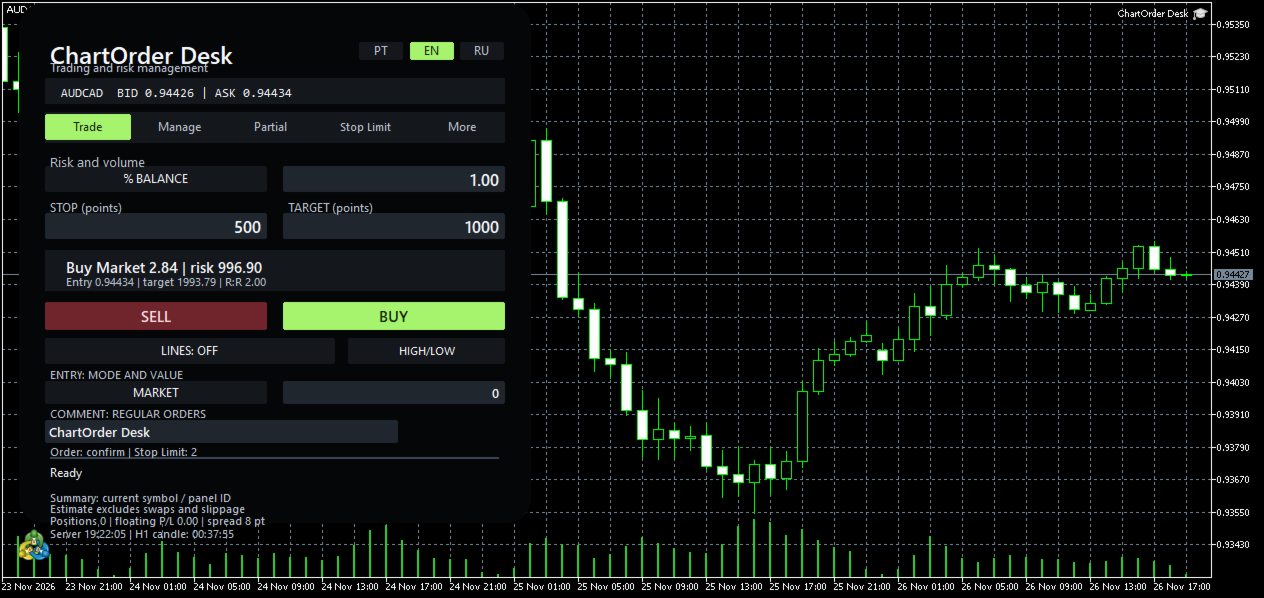
チャート上で手動注文を行い、リスクに応じたロット計算とポジション管理を行うパネルです。売買判断と注文条件はトレーダーが設定します。利益を保証するものではなく、自動売買システムではありません。

主な機能

  • 固定ロット、またはストップまでの距離と残高、資産額(equity)、余剰証拠金の割合や金額からロットを計算できます。送信前にエントリー価格、SL、TP、ロット、推定リスクを確認でき、手数料の推定にも対応します。エントリー分割とリスクリワード比の制限も設定できます。
  • 成行注文と Buy/Sell Limit、Stop、Stop Limit の予約注文に対応します。価格はパネルまたはチャート上の Entry、SL、TP ラインで指定できます。送信確認、プリセット、注文コメント、任意のショートカットキー、価格アラートを備えています。
  • 手動または自動の建値移動、部分決済、条件で絞った決済、予約注文の取消、ラインによる SL/TP 調整が可能です。ポジションのトレーリングはポイント、MA、Parabolic SAR、ATR、部分決済レベル、バーの高値/安値から選べます。Fractal トレーリングはコード上で実験的とされています。予約注文向けトレーリングも別途設定できます。
  • OCO は指定した2つの注文チケットを関連付け、一方が約定した際に他方の取消を試みます。状態とエラーを確認してください。サーバー時間と曜日を指定して買い、売り、または決済を予約できます。選択したポジションの合計損益による決済しきい値も設定できます。
  • そのほか、過去バーの高値/安値ライン、現在レート付近への価格スナップ、注文種別を選べる一括取消ライン、設定保存、状態表示を利用できます。

使用手順

  1. MetaTrader 5 で対象銘柄のチャートを開き、ChartOrder Desk を追加します。取引許可、レート、銘柄仕様、口座設定を確認してください。まずデモ口座で使用します。
  2. パネルでリスク方式と計算基準を選び、割合/金額または固定ロットを入力します。ストップと目標の距離を設定するか、ライン機能を有効にして Entry、Stop Loss、Take Profit をドラッグします。表示されたロット、リスク、価格を確認します。
  3. 売買方向と注文種別を選びます。Market は利用可能な価格で約定し、Limit は現在価格より有利な価格を指定します。Stop は指定水準への到達で有効になり、Stop Limit はトリガー後に指定価格の指値注文を出します。条件と距離は銘柄およびブローカーのルールに従います。
  4. 注文内容を確認して送信を確定します。初期設定では追加確認が必要です。送信後はパネルと MetaTrader の画面で結果を確認してください。ブローカーによる拒否、価格変動、部分約定が起こる場合があります。
  5. ポジション管理では対象ポジション/数量を選び、建値、部分決済、トレーリングを設定してパネルで有効化し、SL/TP と状態を確認します。OCO やスケジュールを使う場合は、曜日、サーバー時刻、チケット、注文状態を確認してください。

EA 入力パラメータ

識別と保護:InpMagic — パネル注文の識別番号;InpPanelX、InpPanelY — パネルの初期位置;InpDeviationPoints — 許容偏差(ポイント);InpMaxSpreadPoints — 最大スプレッド、0 で制限なし;InpMaxVolumeLots — 最大ロット、0 で制限なし;InpDailyLossLimit — 日次損失上限、0 で無効、既存の予約注文は残ります;InpRiskCustomBase — カスタム割合リスクの口座通貨ベース、0 でこの方式を無効化。

確認と注文:InpConfirm — 管理操作の確認;InpOneClickOrders — 通常の新規注文を二度目の確認なしで送信、Stop Limit は常に確認が必要;InpEnableHotkeys — パネルのショートカットキーを有効化;InpOrderComment — 初期注文コメント;InpRestoreOrderComment — 起動時に保存コメントを復元;InpCommissionPerLot — 1ロット往復分の手数料推定(口座通貨);InpEntryParts — エントリー分割数;InpRRLock、InpRRReward、InpRRRisk — リスクリワード制限の有効化と目標リワード/リスク値。

管理対象:InpManageManual — 手動で開いたポジションの管理を許可;InpManageNetting — netting のネットポジション全体の管理を許可;InpPartialPercent — 部分決済割合;InpNettingPartialExperimental — 実験的な netting 部分決済を許可(別途検証が必要)。netting ではパネルからポジションを反転できません。対象範囲を慎重に設定してください。

建値移動:InpBEOffsetPoints — 手動建値移動のオフセット;InpAutoBEEnabled — 自動建値移動の初期有効化;InpAutoBETriggerPoints — ポイント方式のトリガー;InpAutoBEOffsetPoints — ポイント方式のオフセット;InpAutoBETriggerMode、InpAutoBETriggerValue — トリガーの単位と値(ポイント、R:R、価格比率、TP 比率);InpAutoBEOffsetMode、InpAutoBEOffsetValue — オフセットの単位と値;InpAutoBEIncludeCosts — 推定コストを含めるかどうか。

ポジションのトレーリング:InpTrailMode — 方式(ポイント、MA、SAR、ATR、部分決済レベル、バー高安、実験的フラクタル);InpTrailTimeframe — 指標の時間足;InpTrailMAPeriod、InpTrailMAMethod、InpTrailMAPrice — MA の期間、方式、適用価格;InpTrailIndicatorOffsetPoints — 指標からのオフセット;InpTrailSARStep、InpTrailSARMaximum — SAR の設定値;InpTrailATRPeriod、InpTrailATRMultiplier、InpTrailATRUseHighLow — ATR 期間、倍率、高安値を使う計算の指定;InpTrailBarShift、InpTrailBarOffsetPoints — バーのシフトと高安値からの距離;InpFractalTimeframe、InpFractalStartPoints、InpFractalOffsetPoints、InpFractalStepPoints、InpFractalShiftLimit — 実験的フラクタル方式の時間足、開始距離、オフセット、ステップ、走査上限;InpTrailStartPoints、InpTrailDistancePoints、InpTrailStepPoints — ポイント方式の開始距離、追従距離、ステップ。

予約注文のトレーリング:InpPendingTrailEnabled — 初期有効化;InpPendingTrailLimitDistancePoints、InpPendingTrailStopDistancePoints、InpPendingTrailStepPoints — Limit/Stop 注文の距離とステップ;InpPendingTrailIncludeManual — パネル外で作成した予約注文を含めるかどうか。

OCO とプリセット:InpOCOEnabled — OCO の初期有効化;InpOCOFirstTicket、InpOCOSecondTicket — 2つの注文チケット;InpOCOIncludeManual — 手動注文を対象に含める許可;InpPresetName — 初期プリセット名。市場制約や接続障害により、他方の注文が直ちに取り消される保証はありません。

チャートと通知:InpBarLevelsBars、InpBarLevelsOffsetPoints、InpBarLevelsIncludeCurrent — 高安値参照に使うバー数、オフセット、現在バーを含めるかどうか;InpAlertPrice — アラート価格、0 でドラッグ可能なラインを作成;InpCancelLineFamily、InpCancelLinePrice — 一括取消する予約注文の種類とライン価格;InpMagnetDistancePoints — 現在レートに吸着する範囲。

スケジュールとしきい値:InpAggregateGain、InpAggregateLoss — 口座通貨での合計損益しきい値、0 で該当しきい値を無効化;InpScheduleEnabled — スケジュールの初期有効化;InpScheduleMode — 買い、売り、決済;InpScheduleId — スケジュール識別名;InpScheduleHour、InpScheduleMinute — サーバー時刻;InpScheduleSunday、InpScheduleMonday、InpScheduleTuesday、InpScheduleWednesday、InpScheduleThursday、InpScheduleFriday、InpScheduleSaturday — 実行する曜日。

言語:InpLanguage — パネルの初期表示言語(英語、ポルトガル語、ロシア語)。言語はパネル内でも切り替えられます。パネル設定は EA 入力値とは別に保存される場合があります。

制限事項とリスク

ポジション管理は初期状態でパネルの識別範囲に限られ、手動ポジションには InpManageManual の有効化が必要です。netting 口座では同一銘柄の取引が一つのネットポジションに集約され、管理を許可すると全体が対象になります。netting 部分決済は実験的機能です。Stop Limit と仮想予約注文の利用可否はブローカーおよび執行方式によります。netting 口座の仮想 Stop Limit は確認待ちとして保留され、不確実性が解消するまで実行されない場合があります。仮想機能はパネルで明示的に有効化する追加モードです。ターミナル/EA の停止、通信断、ティックがない状況では発動を保証できません。自動管理を無監視で利用せず、対象銘柄と口座のデモ環境で事前検証してください。
おすすめのプロダクト
TradePanel Pro - Manual Trading Panel with Grid, Trailing, and Targets  "Complete manual trading panel for MT5: grid, trailing stop, smart breakeven, daily targets and risk management in one click." TradePanel Pro is a professional manual trading panel for MetaTrader 5, built for traders who want speed, organization and automatic position protection — without juggling multiple tools or complex setups. Everything you need lives in a single panel: one-click buy/sell, point-based stops and targe
Stop and Take EA
Luis Enrique Ricales
3.67 (3)
The Expert Advisor is only designed for manual trading. The EA sets stop loss and take profit for positions and pending orders on the current symbol. It also has trailing stop and breakeven functions. Input Parameters Stop loss   - stop loss value; Take profit   - take profit value; Close all if profit reached the x percent of balance or   - close all positions once the total profit reaches x percent of balance; close all if profit reached the x profit amount in currency   - close all positions
FREE
Babel Assistant
Iurii Bazhanov
4.33 (9)
Babel assistant 1 MT5ネッティングロボット「Babel_assistant_1」は、ZigZagインジケーターを使用してM1、M5、M15、H1、H4、D1、W1の時間足全体でフィボナッチレベルを生成し、買いトレンドと売りトレンドの強さを計算します。指定されたトレンドレベル4.925を超えると、「Lot for open a position」の設定を使用してポジションをオープンします。その後、Babelは特定のフィボナッチレベルに指値注文(または逆指値注文)を配置し、指定されたストップロス(Stop Loss)およびテイクプロフィット(Take Profit)のラインを設定します。画面には、ポジション、トレード、トレンドの現在の結果が表示されます。 0.02ロット以上の手動でのポジション追加は、ロボットによって独自の保留注文のトリガーとして認識されます。0.01ロットの保留注文または成行注文は、執行時に単にポジション量を変更します。 免責事項: 以下の資料は、情報提供および教育目的のみを目的としています。外国為替市場向けの自動取引プログラムである本製品「Babel
FREE
Ichimoku Kinko Hyo is a purpose-built trend trading charting system that has been successfully used in nearly every tradable market. It is unique in many ways, but its primary strength is its use of multiple data points to give the trader a deeper, more comprehensive view into price action. This deeper view, and the fact that Ichimoku is a very visual system, enables the trader to quickly discern and filter "at a glance" the low-probability trading setups from those of higher probability. This i
BTC Scalper - Automated RSI Breakout Strategy for BTCUSD Unlock the power of automated trading with BTC Scalper! This expert advisor is a fully autonomous trading strategy, designed to capitalize on fast-moving BTCUSD markets. It leverages a potent combination of RSI Breakouts and two Exponential Moving Averages (EMA) to find high-probability trade entries, ensuring optimal confluence for success. Key Features: Fully Automated Trading : Set it, forget it, and let BTC Scalper handle your trades 2
FREE
One Click Trading – Auto TP SL Developer TraderLinkz Version 1.00 Category Utility What it does Adds missing TP and SL to your manual trades and pending orders Sets them once per ticket Lets you move TP and SL afterward Works on hedging and netting accounts Scans on every tick and reacts on trade events Why you want it You place faster entries You get consistent risk and exit targets You reduce fat finger errors You keep full manual control Quick start Attach the EA to any chart Keep TP and SL e
FREE
MTF Ichimoku is a MetaTrader 5 indicator based on well known Ichimoku. In MetaTrader 5 we have Ichimoku already included as a standard technical indicator. However it can be used only for the current timeframe. When we are looking for a trend, it is very desirable to have Ichimokuis showing higher timeframes. MTF Ichimoku presented here has additional parameter - TimeFrame. You can use it to set up higher timeframe from which Ichimokuis will calculate its values. Other basic parameters are not c
AI Auto BreakEven Partial Close Manager is a universal trade-management utility that automatically protects and scales out of profitable positions - on any symbol, opened by any Expert Advisor or manually by you. Attach it once and it silently manages every open position on the account (or just the current symbol, your choice) according to rules you define, freeing you from having to babysit trades. KEY FEATURES - Automatic break-even: once a position reaches your trigger profit (in points), its
FREE
T Trade Panel Pro 2 - 究極のリスク管理&高速注文ツール LT Trade Panel Pro   は、MetaTrader 5 において精度、スピード、そして完璧なリスク管理を求めるトレーダーのための究極のツールです。 スキャルピング   や   デイトレーダー   向けに設計されており、複雑な注文実行をワンクリックで直感的に行えるようにします。 最新の   バージョン 2   では、システムを全面的に刷新し、遅延を最小限に抑え、独自の資金保護機能を追加して最高のパフォーマンスを実現しました。 なぜ LT Trade Panel Pro を選ぶのか? 多くのトレーダーが失敗する原因は、リスク管理の規律不足にあります。 LT Trade Panel Pro   は、最も重要なプロセスである「リスクを一定に保ち、適切なタイミングでポジションを保護する」ことを自動化します。 プロップファーム (Prop Firms)   やプロフェッショナルな口座で取引する方にとって、欠かせないツールです。 主な機能: 自動ロット計算:   手動でロットを計算する必要
Lot Size Calculation MT5 x   Calculation of Lot Size x Position Size Calculation Lot Size Calculator MT5 は、 口座残高またはEquity、リスク率、エントリー価格、Stop Loss、Take Profit に基づいて適切なロットサイズを計算するための、実用的なリスク管理ツールです。 MT5チャート上に表示されるインタラクティブなパネルから取引条件を調整でき、計算されたロットサイズ、pips距離、金額、Risk/Rewardをすぐに確認できます。 主な機能 ロットサイズ計算 以下の情報を基に許容ロットサイズを計算します。 エントリー価格 Stop Loss リスク率 BalanceまたはEquity エントリー価格 価格を手動入力するか、 Current Price ボタンで現在のBid価格を設定できます。 Take Profit / Stop Loss Take ProfitとStop Lossを自由に設定できます。 対応する水平線はチャート上でマウス操作により移動でき、価格も自
AntaresX Volume Profile — Indicator for MetaTrader 5 AntaresX Volume Profile is an indicator that displays the price levels where the highest trading activity was concentrated during a selected period, and calculates the historical probability of the price reacting when it reaches each of those levels. What the indicator draws The indicator identifies three levels on the chart: POC (Point of Control): the price where the highest trading activity was recorded during the selected period. Displaye
FREE
CCI FIXED DUALとは何か CCI FIXED DUALは、プロフェッショナル向けのTrend Direction Filterであり、次の要素を正確に識別するために設計されています。 市場の支配的な方向 値動きの構造的な質 メイントレンドと加速局面との一貫性 これは直接的なエントリー指標ではありません。 これはクラシックなオシレーターではありません。 これはコンテキストツールであり、トレーダーがいつ取引すべきか、そしていつ取引すべきでないかを判断するのを助け、市場のノイズと解釈ミスを大幅に減らすために設計されています。 CCI FIXED DUALの基本哲学 CCI FIXED DUALが基づいている原則はシンプルですが非常に強力です。 シグナルは、市場構造と一貫している場合にのみ価値を持ちます。 この理由から、このインジケーターは 単一の値を使用しません 価格に衝動的に反応しません 無理に反転ポイントを探しません その代わりに、次の要素に基づいて階層的なトレンドの読みを構築します。 Typical Price上のCCI 異なる速度のLWMA移動平均 短期 中期 長期の動的
概要 Candle Timer Countdown Pro は、現在のローソク足が終了するまでの残り時間を、滑らかで正確なカウントダウンとして表示します。さらに、円形のプログレスアーク(進行表示)を組み合わせることで、残り時間を瞬時に視覚的に把握できます。 ティック間で停止したり、時間がずれてしまう他のタイマーとは異なり、本インジケーターはサーバー時間の補間(Server Time Interpolation)を使用し、M1 から MN まであらゆる時間足で途切れのないスムーズなカウントダウンを実現します。 1分足でのスキャルピングでも、H4でのスイングトレードでも、現在のローソク足が正確にいつ確定するのかを把握することで、エントリータイミングの最適化、ローソク足パターンの確認、そして早すぎる判断の回避に役立ちます。 このタイマーが他と違う理由 多くの MT5 用キャンドルタイマーは TimeCurrent() のみに依存しており、新しいティックが到着したときにしか更新されません。低ボラティリティ時や上位時間足では、ティックの間隔が数秒空くことがあり、その間タイマーが停止し、その後突
Risk Sized Trade Panel — Professional Manual Trading & Risk Management for MT5 Trade manually. Size precisely. Manage risk consistently. Risk Sized Trade Panel is a professional manual trading and risk management utility for MetaTrader 5, designed to simplify order execution, automate position management, and help traders maintain consistent risk controls. You decide when to enter the market. The panel handles position sizing, stop-loss and take-profit placement, trade management, and predefined
FREE
「Simple Trading Lot Panel」の商品ページをご覧いただきありがとうございます。 このツールは、裁量トレーダーの取引補助を目的として設計されています。 面倒なリスク計算の工程を省き、素早い注文をサポートすることを目的としています。 【主な機能】 ︎ロット計算 3つのロット計算モードを選択できます。各モードは、パネル内の「Lot Sizing Value」を基準として取引ロットを決定します(以下、この値をValueとします)。 計算モードはパネル内のボタン操作で切り替えることができます。 ①Calc by Risk(リスクから計算) 指定したストップロス到達時の損失を、「Value」で設定した割合以内に制御します。 ②Calc by Equity(証拠金から計算) 証拠金を「Value」で割った値に対し、0.01Lot単位でロットを算出します。 (Lot = 証拠金 / Value × 0.01) ③Fixed Lot(固定ロット) 「Value」をそのままロット数として使用します。 ︎テイクプロフィット、ストップロス、リスクリワード比をリアルタイム
TANIN ICHIMOKU CLOUD (EA20): The Ultimate Trend Rider & Prop Firm Shield Trading the Ichimoku Kinko Hyo system manually can be complex and emotionally draining. Are you tired of getting shaken out of massive trends by market noise? Meet EA20 Tanin Ichimoku Cloud , a fully automated trend-following system. It takes the guesswork out of Ichimoku by executing sniper entries and riding the mega trends with zero emotions. AUTO-LICENSE SYSTEM (NO KEY REQUIRED) This EA is 100% FREE. We have upgrad
FREE
GOM Trade Manager helps you execute trades the way you want it. Works on all instruments Forex, Commodities, & Crypto. It helps you with lot calculations, spread addition and balance calculations so you can just focus on actual trading. For full automatic planned management, stackable triggers and spread widening protection >> check out GOM Trade Manager Pro . ------------------------------------------NOTABLE FEATURES------------------------------------------ You set everything based on bid
FREE
AP VWAP Bands Pro (MT5) Volume-weighted average price with ±σ bands for clear intraday bias, mean-reversion zones, and dynamic support/resistance. Works on crypto (incl. BTC) , FX , indices , and metals . Uses tick-volume when real volume isn’t available. What it shows VWAP line (volume-weighted mean price). Two envelopes around VWAP (default ±1σ and ±2σ) to highlight balance vs. extension. Reset modes : Day , Week , or Anchor Time (HH:MM) to start VWAP where you need it (e.g., exchange open).
FREE
QuickTrade Panel – Fast Order Execution & Risk Management The QuickTrade Panel is a powerful MetaTrader 5 trading tool that helps traders place orders faster, manage risk automatically, and control trades directly from the chart. It reduces manual work, improves trading accuracy, and makes trade management simple and efficient. Key Features On-Chart Trading: Change Lot Size, Risk %, Stop Loss (SL), Take Profit (TP), and Pending Distance without opening EA settings. Smart Position Sizing: Choose
Key Features: 200+ Fully Implemented Patterns   across all categories Advanced Market Structure Analysis Smart Money Integration   (Wyckoff, Order Blocks, Liquidity) Professional Risk Management Multi-Timeframe Analysis AI-Powered Confidence Scoring Advanced Visualization Real-time Alerts Pattern Categories: Single Candle Patterns (Hammer, Doji, Marubozu, etc.) Multi-Candle Patterns (Engulfing, Stars, Harami, etc.) Chart Patterns (Head & Shoulders, Cup & Handle, Triangles, etc.) Harmonic Pattern
FREE
194+ downloads and counting - thanks to everyone who's already running it. Risk Calculator is a free MetaTrader 5 tool that removes the manual math from position sizing. Drag the Stop Loss line to where your setup actually invalidates, and the dashboard instantly tells you the correct lot size for your risk — no calculator, no spreadsheet, no guesswork. What it does: - Draggable SL line — drop it exactly where your stop belongs; the tool reads the distance in real time. - Draggable TP line —
FREE
G2X Order Panel MT5
Geanderson Cardoso Da Rocha
G2X Trading Panel and Risk Manager Professional MT5 Trading Panel | Order Management | Risk Management | Smart Break-Even G2X Order Panel MT5 is a professional manual trading panel and risk management utility developed for MetaTrader 5. It combines chart trading, order execution, position management, position sizing, Stop Loss management, and trading risk controls in one compact interface. Designed for traders who value disciplined execution, structured decision-making, and efficient trade mana
¿Necesitas data de alta calidad para tus backtests algorítmicos pero te enfrentas a límites de descarga masiva? Este script está diseñado específicamente para extraer datos de ticks históricos reales directamente desde tu broker en MetaTrader 5, exportándolos en un archivo CSV con el formato exacto y limpio que requiere StrategyQuant X (SQX) . La principal ventaja de esta herramienta es su sistema de descarga por bloques de tiempo (chunks) . En lugar de pedir millones de ticks en una sola solici
FREE
MT5用「ダブル・シューティングスター・パターン」インジケーター(リペイントなし・遅延なし) - 「ダブル・シューティングスター・パターン」は、プライスアクション・トレードにおいて非常に強力なインジケーターであり、特に下降トレンドの相場に適しています。 - チャート上で、稀ではあるものの有効性の高いパターンである「弱気(ベアリッシュ)ダブル・シューティングスター」を検知します。 - 弱気ダブル・シューティングスター・パターン:チャート上に赤い矢印のシグナルが表示されます(画像をご参照ください)。 - PCおよびモバイルへの通知機能を搭載しています。 - 「ダブル・シューティングスター・パターン」は、サポートラインやレジスタンスラインと組み合わせて使用​​するのに最適です。 - シグナル矢印には4種類のスタイルが用意されています。 Click here to see high quality Trading Robots and Indicators! 本製品は、このMQL5ウェブサイトでのみ提供されているオリジナル商品です。
SwiftEdge Scalper 完全な手動制御を備えたプロフェッショナルティックスキャルピングEA スキャルピングには瞬時の判断、正確なリスク管理、シームレスな注文執行が求められます。価格動向を見ながらブレイクイーブン計算、トレーリングストップ、複数ポジションを管理することは、適切なツールなしでは圧倒されます。 SwiftEdge Scalperは、アクティブなスキャルパーとデイトレーダー向けに設計されたプロフェッショナルなトレーディングアシスタントです。ワンクリックまたはキーボードショートカットで取引を実行し、EAが自動的にブレイクイーブン、トレーリングストップ、ポジション管理を処理します。これは自動売買ロボットではありません — あなたが決定した時のみ取引します。 詳細はこちら: 完全な設定ガイドとドキュメント (English) 期間限定オファー: 最初の50ダウンロードは無料!その後、この製品は有料になります。今すぐダウンロードして無料コピーを確保してください。 主な機能 ワンクリック取引: パネルボタンまたはカスタマイズ可能なキーボードショートカット(B/S/A/C/E/
PRODUCT TITLE: Mindgame  SHORT DESCRIPTION (Max 150 chars): All-in-One professional indicator: 5 SMAs, Non-Repainting MACD Crossover Arrows, NY Session Shading, and Live HUD Dashboard for MT5. CATEGORY: Market > MetaTrader 5 > Indicators > Trend / Oscillators PRICE RECOMMENDATION: $39 - $59 (or Free with premium upgrade / rental options) ================================================================================ FULL PRODUCT DESCRIPTION (Copy-paste directly into MQL5 Market description
FREE
GDS RiskLab TradeDesk Free Manual Trading Desk and Risk-Control Utility for MetaTrader 5 GDS RiskLab TradeDesk is a free chart-based utility for traders who want a cleaner manual trading workspace in MetaTrader 5. It is designed as a simple execution-support and risk-control panel. The goal is to keep the trading process more organized: review the chart, plan the trade, keep risk visible and execute manually with more structure. This tool does not generate buy or sell signals. It does not predic
FREE
EasyTrade Pro - MT5 手動トレーディングパネル EasyTrade Proで、より速く、よりシンプルに、より効率的なトレードを実現しましょう。 EasyTrade Proは、素早い注文操作と重要な市場情報をチャート上で一目で確認したいトレーダーのために開発された、軽量で使いやすい手動トレーディングパネルです。 複雑な設定は不要。 不要なインジケーターも不要。 毎日のトレードに本当に必要な機能だけを搭載しています。 主な機能 ワンクリックでBUY / SELL注文 すべてのポジションを一括決済 Stop Loss(損切り)と Take Profit(利確)の設定 ブレークイーブン(Break Even)機能 トレーリングストップ(Trailing Stop)機能 ロットサイズのクイックプリセット リアルタイムの含み損益(Open P/L)表示 日次利益の追跡 勝率(Win Rate)統計 プロフィットファクター(Profit Factor)統計 リアルタイムスプレッド監視 市場セッション表示 ローソク足カウントダウン
FREE
Liquidity Zones is a free MetaTrader 5 indicator by MarketStructureLab. It automatically highlights support and resistance zones, counts separate price returns and marks broken zones. The indicator helps you keep important price areas in view and assess how the market reacts to them. Colored zones, compact labels and historical levels make it useful for both beginners and experienced traders with their own analysis methods. Main features Zones based on confirmed price swings. Support zones come
FREE
The jcoworld OTE EA is an automated trading bot for MetaTrader 5 built on Smart Money Concepts (SMC) . It accurately identifies market impulse moves and automatically enters trades within the Optimal Trade Entry (OTE) zone (61.8% – 79.0% Fibonacci) as soon as a confirmation candle closes. Optimized for: XAUEUR, XAUUSD, and Major Forex Pairs Features: Automatic risk management, dynamic lot sizing & automated Stop Loss/Take Profit. Try for free: This demo version is 100% free! Pricing Plans for Fu
FREE
このプロダクトを購入した人は以下も購入しています
Trade Assistant MT5
Evgeniy Kravchenko
4.43 (216)
取引 ごとのリスクの 計算、新規注文 の 簡単 な 設置、部分的 な 決済機能 を 持 つ 注文管理、 7 種類 のトレーリングストップなど 、便利 な 機能 を 備 えています 。 追加の資料と説明書 インストール手順   -   アプリケーションの手順   ライン機能 チャート上にオープニングライン、ストップロス、テイクプロフィットを表示します。この機能により、新規注文を簡単に設定することができ、注文を出す前にその特徴を確認することができます。   リスク計算 リスク計算機能は、設定されたリスクとストップロス注文のサイズを考慮して、新規注文のボリュームを計算します。ストップロスの大きさを自由に設定できると同時に、設定したリスクを守ることができます。 Lot calc ボタン - リスク 計算 を 有効 / 無効 にします 。 Risk フィールドでは 、必要 なリスクの 値 を 0 から 100 までのパーセンテージまたは 預金通貨 で 設定 します 。 設定」 タブで 、 リスク 計算 の 種類 を 選択 します :「 $ 通貨」、「 % 残高」、「 % エクイティ 」、「
Trade Manager EAへようこそ。これは、取引をより直感的、正確、そして効率的にするために設計された究極の リスク管理ツール です。これは単なるオーダー実行ツールではなく、包括的な取引計画、ポジション管理、リスク管理のためのソリューションです。初心者から上級者、迅速な実行を必要とするスキャルパーまで、Trade Manager EAはあらゆるニーズに対応し、為替、指数、商品、暗号通貨などさまざまな市場で柔軟に対応します。 Trade Manager EAを使用すると、複雑な計算が過去のものになります。市場を分析し、エントリーポイント、ストップロス、テイクプロフィットのレベルをチャート上のラインでマークし、リスクを設定するだけで、Trade Managerが最適なポジションサイズを即座に計算し、SLとTPをピップ、ポイント、口座通貨でリアルタイムに表示します。すべての取引が簡単かつ効果的に管理されます。 主な機能: ポジションサイズ計算機 :定義されたリスクに基づいて取引サイズを瞬時に決定します。 簡単な取引計画 :エントリー、ストップロス、テイクプロフィットを設定するためのド
Black Week: 購入価格 69.99 USD。このオファーは 11 月 27 日(金)に終了します。 Telegram to MT5 Multi-Channel Copier   は、 Telegram と Discord チャンネルのトレードシグナルを MetaTrader 5 へ自動コピーします。ボット不要、ブラウザ拡張不要、手動コピー不要。Telegram や Discord にシグナルが届くと、EA が数秒であなたのターミナルに注文を出します。 さらに、チャンネルをコピーする前に、内蔵バックテスターでそのチャンネルがあなたの口座でどう動いたかを確認できます。 製品は 2 つのコンポーネントで構成されます:Telegram チャンネルを監視する Windows アプリと、MT5 ターミナルでシグナルを執行する本 EA です。MT4 版もあります   こちら . 購入前にお試しください:   アプリは無料でダウンロードできます。ご自身のチャンネルを接続し、各シグナルがどのように読み取られるかをご確認ください。Backtest タブと実際の取引には、購入またはレンタルした E
Local Trade Copier EA MT5
Juvenille Emperor Limited
4.94 (150)
Local Trade Copier EA MT5 は、同一の Windows PC または Windows VPS 上で稼働する複数の MetaTrader 5 口座間で、取引をコピーおよび管理するための高速で柔軟なトレードコピーツールです。 ローカルでの取引同期に加え、Receiver 側でロットサイズ、リスク管理、取引フィルター、シンボルマッピング、取引管理、口座保護を個別に設定できます。 Transmitter と Receiver のターミナルは約 1分 で設定でき、同一ブローカーまたは異なるブローカーの口座間で、手動取引や EA による取引をコピーできます。適切な条件下では、ローカルの MetaTrader ターミナル間で取引情報を 0.5秒未満 で同期できます。実際の約定速度は、ブローカーのレイテンシー、ネットワーク状況、PC/VPS の性能、ターミナルの負荷によって異なります。 ご購入前に無料デモをお試しください Local Trade Copier EA MT5 の完全機能版無料デモ を、MT5 デモ口座で 1回につき4時間 テストできます。 Local Trad
Farmed Hedge Yield Farming | All Markets (Manual - Hybrid - Semi/Automated EA) VERIFIED TRADING RESULTS - Farmed Hedge Yield Axi Copy:  https://www.mql5.com/en/signals/2356376 - Farmed Hedge Yield Exn Copy:   https://www.mql5.com/en/signals/2356404 - Farmed Hedge Yield V Copy:  https://www.mql5.com/en/signals/2357156 IMPORTANT NOTICE: FarmedHedge is a MANUAL-FOCUSED TRADING UTILITY ,not a fully automated EA. Results shown on this Signal include manual trades and overall strategic management.
EA Overfitter
Stephen J Martret
5 (5)
That backtest looks great. But will it still be making money tomorrow, next week, next month? EA Overfitter re-runs your EA on 100 price histories it has never seen. One score tells you if the edge is real. A backtest tells you what an EA did on one price history — the one that happened to occur. What you cannot tell from it is how much of that result was the strategy and how much was the particular path. EA Overfitter answers that. It builds up to 100 synthetic price histories your EA has n
TradePanel MT5
Alfiya Fazylova
4.89 (176)
Trade Panelは多機能なトレーディングアシスタントです。アプリには手動取引用の50以上のトレーディング機能が搭載されており、ほとんどの取引作業を自動化することができます。 アプリの説明書: https://www.mql5.com/en/blogs/post/756482 デモ口座用アプリの試用版: https://www.mql5.com/en/blogs/post/750865 アプリのインストール方法: https://www.mql5.com/en/blogs/post/756239 アプリをビジュアルモードでテストする方法: https://www.mql5.com/en/blogs/post/770277 VPSのMetaTraderにアプリをインストールする方法: https://www.mql5.com/en/blogs/post/770190 取引。 ワンクリックで取引操作を行うことができます: リスクを自動計算して指値注文やポジションを開く。 複数の注文やポジションをワンクリックで開く。 注文のグリッドを開く。 保留中の注文やポジションをグループごとに閉じる
Strategy Ledger Pro
Abdullah Uygar Tuna
5 (17)
日本語に対応しました。 Strategy Ledger Pro は、MetaTrader 5 用の読み取り専用の口座分析パネルです。口座の成績をエキスパートアドバイザー(EA)、戦略、銘柄、マジックナンバーごとに分け、それぞれが実際にどれだけ貢献しているかを明らかにします。 パネルは 11 言語に対応しています:English、Français、Deutsch、Español、Italiano、Português、Русский、Türkçe、中文、日本語、한국어。 デモをお試しください。 ストラテジーテスターのビジュアルモードで実行すると、パネルは組み込みのサンプル口座で開き、すべてのページを対話形式で案内します。表示されるのはサンプルデータであり、何も保存されません。ご自身の口座では、パネルは実際の履歴を読み取ります。 デモの実行手順は、こちらの ブログ記事 をご覧ください。 この説明内の動画では、実口座でのパネルの動作をご覧いただけます。 すべての機能を解説した詳しい マニュアル (英語)と、情報交換やお知らせのための AureusAI Trading Suite グループを

自分の取引ルールで Telegram のシグナルをコピー Telegram to MT5 Signal Trader は、Telegram の公開・非公開チャンネルやグループから、テキスト形式の取引シグナルを MetaTrader 5 へ自動でコピーします。1つのデスクトップアプリで複数の配信者と MT5 口座を管理し、 配信者ごとにリスクと取引設定を個別に指定 できます。 シグナルのコピーに Telegram ボットや API 設定は必要ありません。 電話番号または QR コードでご自身の Telegram アカウントにログインし、すでに参加しているチャンネルやグループを選ぶだけです。ボットの作成や、Telegram API トークン、API ID、API hash の入力は不要です。 ポジションサイズを選び、複数の利確水準に分けて決済し、建値へのストップ移動やトレーリングストップを自動化できます。配信者のシグナルを受け取りながら、実際の取引方法は自分で管理できます。 本製品は、この MT5 エキスパートアドバイザ(EA)と、必須の Windows 連携アプリで構成されます。 インス
Exp COPYLOT CLIENT for MT5
Vladislav Andruschenko
3.97 (35)
MetaTrader 5 用のプロフェッショナル取引コピー機 MetaTrader 向けの高速・高性能・信頼性の高い 取引コピー機 です。 COPYLOT は、MT4 と MT5 のターミナル間で Forex 取引をコピーでき、 Hedge 口座と Netting 口座の両方に対応しています。 COPYLOT MT5 版の対応構成: - MT5 Hedge → MT5 Hedge - MT5 Hedge → MT5 Netting - MT5 Netting → MT5 Hedge - MT5 Netting → MT5 Netting - MT4 → MT5 Hedge - MT4 → MT5 Netting MT4 版 完全な説明 + DEMO + PDF 購入方法 インストール方法 ログファイルの取得方法 テストと最適化の方法 Expforex のすべての製品 MT4 ターミナルへのコピーも可能です(MT4 → MT4、MT5 → MT4): COPYLOT CLIENT for MT4 COPYLOT は、2台、3台、さらには10台のターミナル間で同時に動作できる、プロフェッ
AI Agent Supervisor is NOT an Expert Advisor. AI Agent Supervisor   is a   multi-agent AI risk & portfolio supervisor   that watches every EA on your account and intervenes in real time.  WANT AN AI PORTFOLIO MANAGER WATCHING YOUR FLEET 24/7?   Run your fleet on the same brokers I do:   IC MARKETS , IC TRADING   .  Unlike the centralized stock market, Forex has no single, unified price feed.  Every broker sources liquidity from different providers, creating unique data streams. The Supervisor r
================================================================================ POC BREAKOUT - V20.72. Full Professional Grade Toolkit ================================================================================ POC Breakout is a full MetaTrader 5 trading dashboard for discretionary traders who want breakout signals, Point of Control (POC) context, volume profiles, order flow, market structure, news, alerts, and advanced trade planning in one professional workspace. Attached directly to you
HINN MAGIC ENTRY 4 – click the chart, the trade is done! SIMPLE. FAST. PRECISE. Stop, entry and take right on the chart – the lot is sized to your risk automatically. full description   ::  install & FAQ   ::  support chat What's inside: - LIMIT in 3 clicks, MARKET in 2 – risk in %, $, lots or classic Fixed Lots - DEFAULTS: your TP, partials and BE scheme pre-loaded into every new trade – MARKET in 1 click - Unlimited partial take-profits with a % volume splitter - Breakeven with any trigger an
Unlimited Trade Copier Pro MT5 is a tool to copy trade remotely to multiple MT4, MT5 and cTrader accounts at different computers/locations over internet. This is an ideal solution for you if you are a signal provider and want to copy your trades to other receivers globally on your own rules. One provider can copy trades to multiple receivers and one receiver can get trade from multiple providers as well. The provider can even set the subscription expiry for each receiver, so that receiver will n
News Trade EA MT5
Konstantin Kulikov
4.55 (11)
僕自身が数年間使っている便利なロボットをご紹介します。半自動モードでも完全自動モードでもお使いいただけます。 >>> Chat <<< 当プログラムは経済指標カレンダーで発表されるニュースをもとにした取引の柔軟な設定が可能です。戦略テスターでは確認不可です。実際の取引のみです。 最新の設定アーカイブをダウンロードしてください: https://www.mql5.com/en/blogs/post/747929 シグナルモニタリング: https://www.mql5.com/en/signals/author/test-standart 当該エキスパート・アドバイザーのためのカスタマイズ設定セットを作る場合は、ブログの全パラメータの説明を参照してください :   https://www.mql5.com/en/blogs/post/748545 。 基本的なデフォルト設定について 一つのチャートからGBPとの通貨ペア(GBPUSD、EURGBP、GBPJPY、GBPCAD、GBPAUD、GBPCHF)で取引をします。GBPは最もボラティリティの高い通貨のため、取引が成功するチ
The product will copy all telegram signal to MT5 ( which you are member) , also it can work as remote copier.  Easy to set up, copy order instant, can work with almost signal formats, image signal,  s upport to translate other language to English Work with all type of channel or group, even channel have "Restrict Saving Content", work with  multi channel, multi MT5 Work as remote copier: with signal have ticket number, it will copy exactly via ticket number. Support to backtest signal. How to s
EA Auditor
Stephen J Martret
5 (7)
EA Auditor is an independent analysis tool for traders evaluating Expert Advisors and trading signals on MetaTrader 5. It audits backtest reports, reviews posted developer signals, and cross-verifies the two against each other to help traders assess strategies before committing capital. The MQL5 market offers a wide range of Expert Advisors from many developers, with varying approaches, quality, and transparency. EA Auditor provides a consistent, data-driven framework for reviewing them, answer
Equity Protect Pro: 安心取引のための総合的な口座保護エキスパート 口座保護、資産保護、ポートフォリオ保護、マルチ戦略保護、利益保護、利益確定、取引セキュリティ、リスク管理プログラム、自動リスク管理、自動決済、条件付き決済、スケジュール決済、動的決済、トレーリングストップロス、ワンクリッククローズ、ワンクリック決済、ワンクリック復元などの機能をお探しなら、Equity Protect Pro が最適なプログラムです。 設定は簡単で、事前設定された条件に達すると、すべてのチャートを閉じることができ、シグナルサブスクリプションのキャンセルもサポートします(これは、すべての取引プログラムも停止することを意味します)。この時点で、新しい注文は生成されなくなり、最終的にすべての注文が閉じられ、予期せぬ損失を効果的に防止し、安心して取引できるようになります。 Equity Protect Pro (Technical Manual) Equity Protect Pro Demo Version for yo u to test   Equity Protect Pro MT4
Trade copier MT5
Alfiya Fazylova
4.62 (58)
Trade Copierは、取引口座間の取引をコピーして同期するように設計された専門的なユーティリティです。 コピーは、同じコンピューターまたはvps にインストールされている、サプライヤーのアカウント/端末から受信者のアカウント/端末に行われます。 購入する前に、デモ アカウントでデモ バージョンをテストできます。 デモ版 こちら 。 詳細な説明は こちら 。 主な機能と利点: MT5ネッティングアカウントを含む、MT5> MT5、MT4> MT5、MT5> MT4のコピーをサポートします。 高いコピー速度(0.5秒未満)。 ベンダーモードと受信者モードは同じ製品内に実装されています。 チャートから直接リアルタイムでコピーを制御できる、簡単で直感的なインターフェイス。 接続が切断されたり、端末が再起動されたりしても、設定と位置が失われることはありません。 コピーするシンボルを選択できます。また、受信者のシンボルを置き換えることもできます(例:EURUSD> USDJPY)。 各シンボルごとにコピーの個別設定を行うことができます。 バックコピーをサポートします。 特定の注文のみのコピー
25% discount on the release of the tool: only for the next 3 buyers Send a message to receive a demo version. AstroTrade Trading Assistant AstroTrade is a comprehensive multi-functional trading utility developed for the MetaTrader 5 platform. It integrates essential tools for trade execution, risk management, and technical monitoring into a single unified interface. The application is designed to assist traders in managing their daily operations through a visual and structured environment. Vi
Timeless Charts
Samuel Manoel De Souza
5 (9)
Timeless Charts is an all-in-one trading utility for professional traders. It combines custom chart types such as Seconds Charts and Renko with advanced order flow analysis using Footprints , Clusters , Volume Profiles , VWAP studies, and anchored analysis tools for deeper market insight. Trading and position management are handled directly from the chart through an integrated trade management panel , while Market Replay and Virtual Accounts provide environments for practicing trading skills and
Power Candles Strategy Scanner:自己最適化するマルチシンボル・セットアップファインダー わずかな動きのたびに鳴るスキャナーは、やがて無視されるようになります。慌ただしいローソク足の確定ひとつでアラートが次々と届き、本当にトレードしたい唯一のセットアップがノイズに埋もれてしまう。 Power Candles Strategy Scanner は、自己最適化する Power Candles エンジンを Market Watch のすべてのシンボルで動かし、あなた自身のフィルターを通過したものだけを知らせます。基準は、直近の確定足の強さ、セットアップのリスクリワード、リアルタイムのスプレッド、そしてあなたがトレードする資産クラスです。シンボルがリストに入った瞬間、スキャナーがあなたを呼びます。フィルターで外したものはすべて静かなまま。同じローソク足の確定で出たヒットは、すべて1通のメッセージにまとめて届きます。 購入前にパネルとすべてのフィルターをご覧ください。 スクリーンショット、全機能のツアー、Power Candles との連携ワークフロー: stein.
Trade Manager DashPlus
Henry Lyubomir Wallace
4.85 (13)
DashPlus は、MetaTrader 5プラットフォーム上での取引効率と効果を向上させるために設計された高度なトレード管理ツールです。リスク計算、注文管理、高度なグリッドシステム、チャートベースのツール、パフォーマンス分析など、包括的な機能を提供します。 主な機能 1. リカバリーグリッド 逆境の市場環境下で取引を管理するための平均化および柔軟なグリッドシステムを実装します。 取引回復のための戦略的なエントリーおよびエグジットポイントを可能にします。 2. スタックグリッド 強い市場の動きの中でポジションを追加することで、有利な取引での潜在的なリターンを最大化するように設計されています。 トレンド市場で利益を得られるよう、勝ち取引を拡大します。 3. 損益(P&L)ライン チャート上に直接、潜在的な利益と損失のシナリオを視覚的に表示します。 設定を調整し、P&Lラインをドラッグして、実行前にさまざまな取引結果を評価します。 4. バスケットモード 同じシンボルでの複数ポジションの管理を簡素化し、それらを単一の集約ポジションにまとめます。 平均価格に基づいて、ストップロスやテイクプ
Zentral Trading Manager
Ray Zeanrik Parreno Fredeluces
5 (4)
Zentral Manager Your Command Center for Precision Trading — Now Stronger than Ever Take control of your trades like never before. Zentral Trading Manager is your all-in-one manual trading panel for MetaTrader 5 — built for scalpers, day traders, and serious strategy execution. Fully compatible with both Mac and Windows laptops. High-DPI safe. No more layout issues. Key Features (Latest 2025 Update): • One-Click Close – Instantly close Buy/Sell, winning/losing trades, or even half positions with
KT Equity Protector MT5
KEENBASE SOFTWARE SOLUTIONS
3.6 (5)
An equity protection EA for MetaTrader that enforces your loss limits and profit target for you: when your account reaches a rule you set, it closes your trades on every symbol, before one bad day turns into a lost account. It suits prop firm challenges and personal accounts alike. Attach it to one chart, answer a few questions in the on-chart setup wizard, and it watches your whole account in the background while you trade by hand or with other EAs. What it protects Daily loss limit: a percenta
Custom Alerts:複数市場を監視し、重要なチャンスを見逃さない 概要 Custom Alerts は、複数の銘柄にまたがるトレードチャンスを一元的に監視したいトレーダーのためのダイナミックなソリューションです。FX Power、FX Volume、FX Dynamic、FX Levels、IX Power などの主要ツールと連携し、複数のチャートを切り替える手間なく、重要な市場変動を自動で通知します。ブローカーが提供するすべての資産クラスに対応しており、シンボルを入力する必要はありません。設定で資産クラスを選択するだけで、すぐにアラートを構成できます。 1. Custom Alerts がトレーダーにとって非常に有益な理由 オールインワンの市場監視 • Custom Alerts は、為替、金属、暗号資産、指数、株式(ブローカーが対応している場合)からのシグナルを収集・統合します。 • 複数のチャートを切り替える必要がなくなり、明確で一元化された通知が得られます。 戦略に合わせたアラート構成 • ボリューム急増、通貨強弱の閾値、極端な価格変動など、目的に応じたアラート
A clearer plan before your next trade You have a trading idea. Can you explain the risk, the evidence that supports it and the reasons to wait? APEX AI Advisor puts a structured second opinion beside your chart, without taking the decision away from you. Prepare with an AI market brief, check the trade you actually want to take, and review your exposure through your own trading rules. This is an AI-assisted trading workspace, not an autonomous signal robot or a promise of better returns. Every n
チャート型トレードアシスタント&リスク管理パネル マルチモードSL&TP(ATR、リスクリワード比R:R、ポイント、口座通貨)、リアルタイム分析、経済指標カレンダーを搭載した多機能チャート上ツール Ergotick Trade Manager は、裁量トレーダー、プロップファーム挑戦中のトレーダー、およびスキャルパー向けに設計された、オールインワンのプロフェッショナルなトレード用パネルです。ロット数の自動・瞬時計算、マルチモードでのストップロス(SL)やテイクプロフィット(TP)の設定、高度な一括決済(Basket)管理、口座のリアルタイム統計、そしてチャート上に経済指標を表示するニュースカレンダー機能を、MetaTrader 5の洗練された1つのユーザーインターフェースに統合しました。 ポジションサイズの計算に手動で時間を取られるのはもう終わりにしましょう。ミリ秒単位でロットサイズを自動計算し、適切にリスク管理された注文を瞬時に執行するとともに、内蔵された「日次損失制限保護」機能で大切な資金を保護します。 主な特徴 1. インタラクティブなビジュアルツール&自動ロット数計算機能 チャ
Seconds Chart - MetaTrader 5で秒足チャートを作成するユニークなツールです。 Seconds Chart を使用すると、秒単位のタイムフレームでチャートを構築でき、標準的な分足や時間足チャートでは得られない柔軟性と分析精度を実現します。例えば、 S15 は15秒足を表します。カスタムシンボルをサポートしているインジケーターやEAをすべて使用できます。標準的なチャートと同様に便利に操作できます。 標準的なツールとは異なり、 Seconds Chart は超短期のタイムフレームでも高い精度と遅延なく作業できるように設計されています。 Free Demo: Seconds Chart v2.29 Demo.ex5 無料デモをダウンロードしてご自身でお確かめください: 完全機能版 - すべての機能が利用可能 24時間テスト - 精度と利便性を評価するのに十分な時間 デモ口座のみ - ほとんどのブローカーで簡単に開設可能 GBPCADチャートのみ - ほとんどの端末で利用可能 これらの制限はデモ版のみに適用されます。製品版は、あらゆる口座タイプ(リアル、デモ、コンテス
クリックする前にリスクを把握し、その後はトレードを管理しましょう。 ラインをドラッグして BUY または SELL をクリックするだけで、ロットサイズは自動で計算されます。その後は、建値ストップ、部分決済、複数ターゲットなどでトレードを管理できます。 Mercurial Position Sizing PRO は、裁量トレーダー向けの MT5 ツールです。口座残高、リスク率、ストップロスまでの距離から適切なロットサイズを計算し、SL と TP を設定済みの状態で注文を出します。無料版のすべての機能に加えて、より多くのコントロールを求めるトレーダー向けの追加ツールが含まれています。 トレーダーに好まれるポイント チャート上には2本のラインだけ。ワンクリックで取引。複雑なパネルも、pip 価値の手計算も不要です。 使い方 1. EA をチャートに追加し、Algo Trading が有効になっていることを確認します。 2. リスク率を設定します(例:1%)。 3. New Position をクリックして EA を起動します。必要ないときは待機状態のままです。 4. Pending Or
作者のその他のプロダクト
FXBlueでTitanのリアル口座の運用状況を確認 FXBlueでリアル口座を見る Titanの詳細情報 My AI Golden H1 Titan My AI Golden H1 TitanはMetaTrader 5向けの3つの自動売買戦略を組み合わせ、それぞれに有効化、ロット計算、ポジション管理の設定を備えています。基準設定は金のH1です。ブローカーの金の銘柄名を、必要な接尾辞も含めて選択してください。パネルは各戦略と合計の結果を表示します。以下の入力項目で各モジュールを個別に設定できます。 グローバルコントロール ShowStatusPanel - チャート上に統合されたステータスパネルを表示または非表示にします。これは取引の有効化または無効化ではありません。 Strategy01Enabled - 戦略01のマスタースイッチです。falseの場合、このモジュールは新規取引を開かず、自身のポジションも管理しません。 Strategy02Enabled - 戦略02のマスタースイッチです。falseの場合、戦略02 Aと戦略02 Bの両方が無効になります。 Strategy03
Advanced Breakout Gold Grid is an Expert Advisor for XAUUSD that uses an internal M30 breakout structure. It places pending orders around calculated price levels and manages open positions with configurable stop loss, break-even and progressive trailing controls. MAIN FEATURES - Internal M30 signal calculation, independent of the chart timeframe. - Pending Buy Stop and Sell Stop entry maps. - Automatic or fixed lot sizing. - Configurable risk per trade. - Spread and trading-session filters base
FREE
AI Titanium バージョン1.120は、ストラテジー01と02に任意のATRエントリーフィルターを追加します。ストラテジー03は、H1のEMAトレンドと確定足プルバックによるシステムに置き換えられ、ATRベースのストップとトレーリングを使用します。新しいマジックナンバーを使用し、以前のストラテジー03のポジションは管理しません。このバージョンのローカルバックテストは実施されていません。 AI TitaniumはMetaTrader 5向けの3つの自動売買戦略を組み合わせ、それぞれに有効化、ロット計算、ポジション管理の設定を備えています。基準設定は金のH1です。ブローカーの金の銘柄名を、必要な接尾辞も含めて選択してください。パネルは各戦略と合計の結果を表示します。以下の入力項目で各モジュールを個別に設定できます。 グローバルコントロール ShowStatusPanel - チャート上に統合されたステータスパネルを表示または非表示にします。これは取引の有効化または無効化ではありません。 Strategy01Enabled - 戦略01のマスタースイッチです。falseの場合、このモ
フィルタ:
レビューなし
レビューに返信