Midnight Gold
- インディケータ
- バージョン: 1.0
- アクティベーション: 20

Midnight Gold Dashboard
Midnight Gold Dashboard is a chart indicator that gathers the main information a gold (XAUUSD) trader checks during the day into one dark, compact panel. Trend, momentum, trend strength, multi-timeframe agreement, trade levels, position size, daily ranges and news sentiment are shown together, so you do not need to switch between charts and windows.
The indicator does not open, modify or close trades. It is an analysis and planning tool. All final trading decisions remain with the user.
-------------------------------------------------
NEWS SETUP
-------------------------------------------------
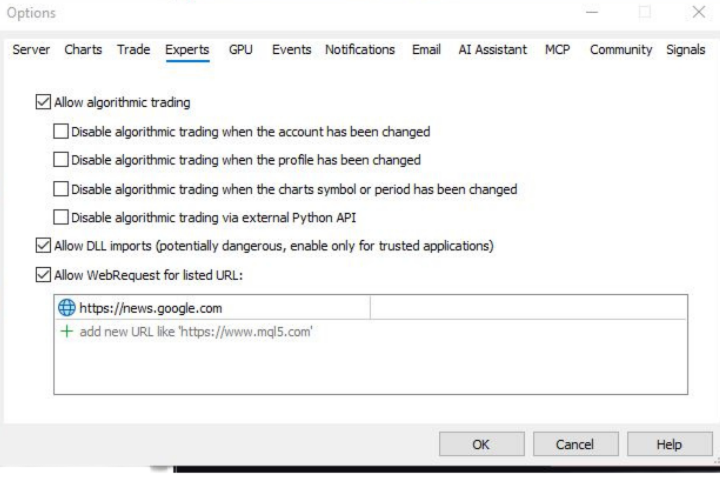
In Mt5 Desktop App: Tools > option > Experts
Add the below link in web requested URL list (see the attached image)
-------------------------------------------------
MAIN PANEL
-------------------------------------------------
Header
- Symbol, live Bid price and change since the previous daily close
- ATR value of the selected timeframe
- Today's range and the percentage of the Average Daily Range already used (colour changes at 70% and 100%)
- Active trading sessions (Asia, London, New York)
Toolbar
- One-click switches for the News, MTF, Trade Plan, Alerts and Day Levels sections
- Collapse button that shrinks the whole panel to a small bar showing symbol, price and current signal
- Last event line showing the most recent alert
Market Signal
- Weighted consensus of six timeframes (M5, M15, M30, H1, H4, D1) shown as BUY, SELL or NEUTRAL with a 0-100% score
- Higher timeframes have more weight (D1 = 3x, H4 = 2.5x, H1 = 2x, M30 = 1.5x, M15 and M5 = 1x)
Momentum (Stochastic)
- Full Bull, Full Bear or Partial status based on %K/%D position and crossover
- %K and %D values with level bars
Trend Strength (ADX)
- Weak, Moderate or Strong classification
- ADX value, +DI and -DI
-------------------------------------------------
MULTI-TIMEFRAME GRID
-------------------------------------------------
For each timeframe from M5 to D1:
- EMA stack (9 / 21 / 50 / 200 alignment)
- RSI 14 value with level bar
- MACD direction (main line vs signal line)
- Price position relative to EMA 200
- Strength score from 0 to 100%
- Individual BUY / SELL / NEUTRAL signal
A summary bar shows how many timeframes agree and the weighted overall score.
-------------------------------------------------
TRADE PLAN AND RISK
-------------------------------------------------
When the weighted score crosses the BUY or SELL level, the indicator builds a trade plan:
- Entry price
- Stop Loss = ATR x multiplier (default 1.5)
- Take Profit 1, 2 and 3 at adjustable risk:reward ratios (default 1:1.5, 1:3, 1:4)
- Price distance and points for every level
- Lot size calculated from account balance, risk percentage and stop distance, using the symbol's tick value, volume step and limits
- Today's high and low, previous day high and low
Two plan modes:
- CANDLE: levels are anchored at the signal candle. SL and TP hits are tracked and marked as HIT.
- LIVE: levels follow the current price.
On the chart:
- Entry, SL and TP1-TP3 lines with price labels
- Shaded risk and reward zones
- Signal arrows on the candle where a new signal starts
- Each level can be switched on or off separately
-------------------------------------------------
TRENDCANDLE
-------------------------------------------------
- Colours chart candles by trend: green when the fast EMA is above the middle EMA and price is above it, red in the opposite case, grey when mixed
- Trend timeframe can be cycled from the panel (current chart, M1, M5, M15, M30, H1, H4)
-------------------------------------------------
NEWS SENTIMENT (optional)
-------------------------------------------------
- Overall news bias for gold with a centred gauge
- Bullish / bearish counts for XAU and USD headlines (USD-positive news is counted as gold-negative)
- Filter tabs: All, XAU, USD
- Two-line headline cards with direction badge, asset tag and age
- Page navigation and manual refresh
-------------------------------------------------
SESSIONS AND DAY LEVELS
-------------------------------------------------
- Session map highlighting Asia (00-09 GMT), London (08-17 GMT) and New York (13-22 GMT)
- Optional dotted lines for previous day high, previous day low and today's open
-------------------------------------------------
ALERTS
-------------------------------------------------
- New BUY or SELL signal
- Stop Loss hit, TP1 hit, TP2 hit, TP3 hit (Candle mode)
- Popup with sound and/or push notification to the MetaTrader mobile app
- No alert is sent for the signal already present when the indicator loads
-------------------------------------------------
DISPLAY
-------------------------------------------------
- Optional dark chart theme that matches the panel. The original chart colours are restored when the indicator is removed.
- Font size and colours are adjustable
- The news column width is adjustable
- The panel is about 1000 px wide with the news column and 480 px without it. A chart height of about 780 px or more is recommended to show all sections. Sections can be switched off on smaller screens.
-------------------------------------------------
INPUT PARAMETERS
-------------------------------------------------
Stochastic / ADX / ATR: %K, %D, Slowing, ADX period, ATR period, ATR timeframe
Trade Plan: SL ATR multiplier, TP1/TP2/TP3 risk:reward, BUY and SELL score levels, zone length in bars, risk % per trade, ADR days
Alerts: enable alerts, popup, push notification
TrendCandle: trend timeframe, EMA fast / mid / slow / trend periods, number of bars to paint
News: news file name, refresh interval in seconds
Colours: buy, sell, neutral and accent colours
Display: show dashboard, show levels, day levels, chart theme, news column width, font size, refresh interval
-------------------------------------------------
NOTES
-------------------------------------------------
- Designed for XAUUSD. The technical sections also work on other symbols. The news section is specific to gold and the US dollar.
- Works on all chart timeframes
- Signals are based on indicator calculations and do not guarantee future results. Test the settings on a demo account before using them on a live account.
- For questions, please use the product comments or private messages on MQL5.com.