YazanPro Trade Manager

YazanPro Trade Manager は MetaTrader 5 のチャート上の取引パネルです:リスクを設定すると、ロットを計算し、ストップロスとテイクプロフィットをリスク金額と一緒に描き、BUY または SELL を押すと注文を送信し、その後ポジションを管理します。

あらゆる銘柄(FX、貴金属、指数、株式、暗号資産)と M1 から MN1 までのあらゆる時間足で動作します。リアル口座やデモ口座で勝手に取引を開くことはありません。すべての注文は、あなたが押したボタンから発生します。

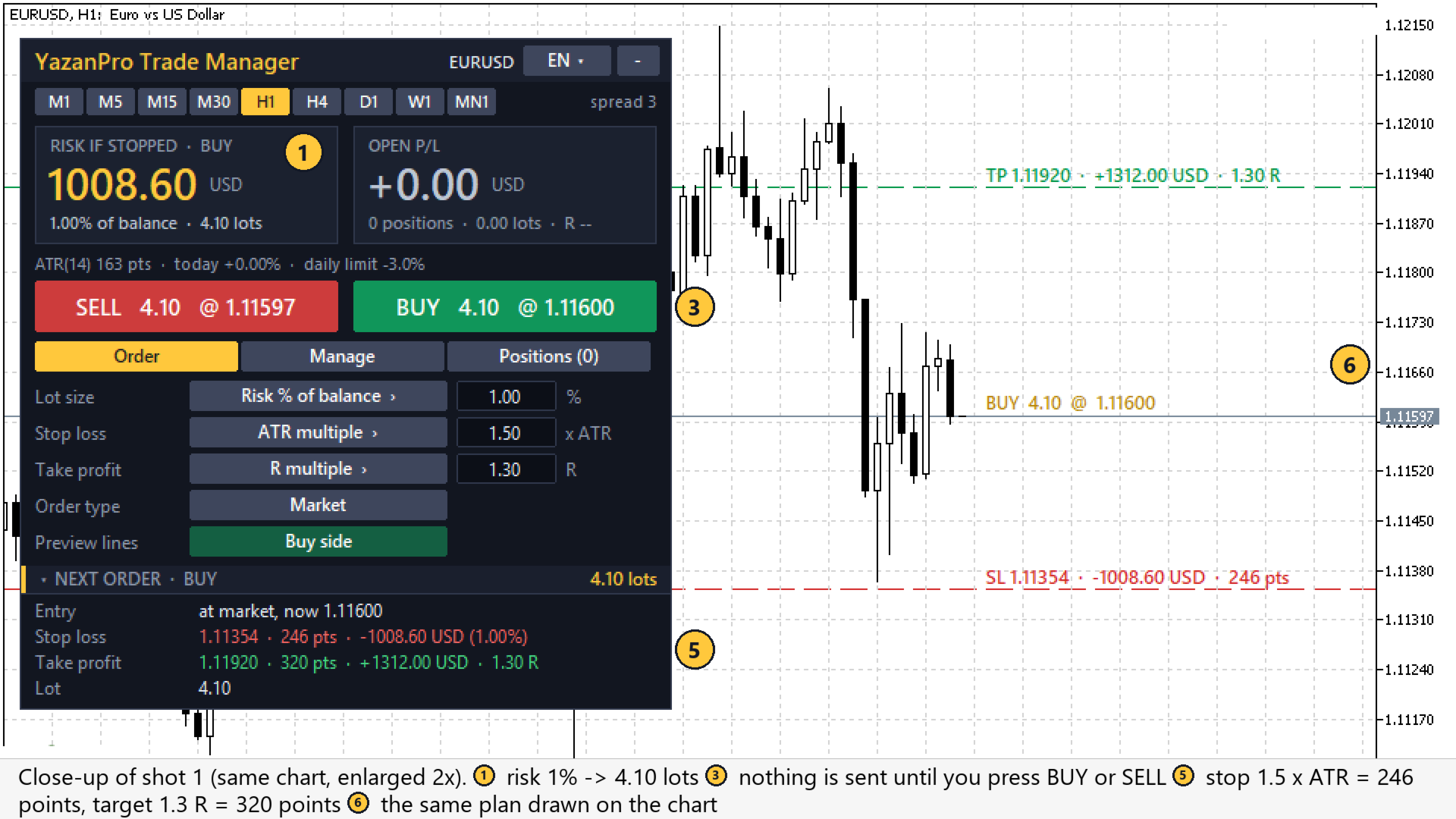
チャートに表示されるもの(番号はスクリーンショットのマークと同じです)

  1. リスクタイル:次の注文のストップロスに達した場合に失う金額、残高に対する %、ロット(最小ロットのリスクが設定を超える場合は琥珀色)。
  2. 含み損益タイル:管理しているポジションの含み損益、件数、ロット、R。
  3. SELL / BUY ボタン:ロットと価格を表示。予約注文モードでは 2 行目にエントリーラインが示す注文(BUY LIMIT または BUY STOP、SELL LIMIT または SELL STOP)が表示されます。
  4. 注文タブの設定:ロット、ストップロス、テイクプロフィットのモード(ボタンを押して切り替え、ボックスに値を入力)、注文タイプ(成行またはラインでの予約注文)、プレビューの方向。
  5. 次の注文:エントリー、ストップロス、テイクプロフィットのポイント・金額・R、ロット、部分決済がオンなら TP1。
  6. チャート上のプレビューライン:エントリー、ストップロス、テイクプロフィット、TP1 を金額と R 付きで表示。
  7. エントリーライン(予約注文モード):指値・逆指値注文の価格までドラッグします。
  8. 管理タブ:ブレークイーブン、トレーリング、部分決済、時間決済のスイッチ。それぞれこのチャートのポイントでルールを表示します。
  9. 決済ボタン:全決済、買いを決済、売りを決済、利益のポジション、損失のポジション、予約注文の削除。
  10. ポジションタブ:保有ポジション(ロット、損益、R)、予約注文、保護の状態(1日の損失上限、最大スプレッド)。
  11. ステータス行:ポイント単位の ATR(14)、本日の有効証拠金の変化、1日の上限、そして新規取引を止めるものがある場合は赤または琥珀色の行(アルゴ取引が許可されていない、市場が閉まっている、銘柄の取引が無効、スプレッドが大きすぎる、1日の上限に達した)。
  12. ヘッダー:言語ボタン(12 言語)、時間足ボタン、スプレッド、折りたたみボタン。

読み方

  1. まずリスクタイルを見ます:ストップロスに達するとこの金額を失います(速い相場や窓開けではそれ以上になることがあります。下記参照)。
  2. チャート上のストップロスとテイクプロフィットのラインを確認します。ストップの位置が合わなければ、ストップのモードか値を変えます:ロットも追従します。
  3. ステータス行を読みます:赤い行は新規取引が送信されないことを意味し、その理由を表示します。
  4. BUY または SELL、あるいは予約注文ボタンを押します。初期設定では確認ボックスが出ます。
  5. その後は管理タブのルールがストップを動かし、ポジションの一部を決済し、または N 本後に決済します。含み損益タイルとポジションタブが結果を金額と R で表示します。

ロットサイズ

  • 残高のリスク% または 有効証拠金のリスク%:ストップロスが口座のこの%分の損失になるようにロットを計算します。送信前にリスク金額を大きな文字で表示します。
  • 固定ロット。
  • ロットは銘柄のボリュームステップに丸められ、最小と最大の範囲内に収められます。余剰証拠金が足りない場合はロットを減らし、パネルがそれを知らせます。最小ロットのリスクが設定を超える場合は、パネルが琥珀色で表示します。

ストップロス

  • ATR の倍数(既定はチャート時間足の ATR 14 の 1.5 倍)。
  • ポイント。
  • 直近スイング:直近の確定したフラクタル安値(買い)または高値(売り)に ATR 単位のバッファを加えた位置。スイングが見つからない場合は ATR ストップを使い、パネルがそれを知らせます。

テイクプロフィット

  • ストップ距離の R 倍(既定 1.3 R)、ポイント、または なし。

注文

  • 成行 BUY / SELL:2 つの大きなボタンにロットと現在価格を表示します。
  • 指値・逆指値注文:注文タイプを「ラインで待機」に切り替え、チャート上の金色のエントリーラインをドラッグします。ラインの位置に応じて、どの注文になるか(BUY LIMIT か BUY STOP、SELL LIMIT か SELL STOP)をボタンに表示します。
  • プレビューライン:エントリー、ストップロス、テイクプロフィット、TP1 をリスク金額、利益、R とともにチャートに描きます。買い側、売り側の表示やオフを選べます。
  • 確認:既定では、すべての注文と決済ボタンは実行前に確認します(入力パラメータ)。

これらの設定はすべてパネル上で変更できます(モードボタンと値の入力欄)。パネルはチャートごとに選択を記憶します。

ポジション管理

このパネルの取引(そのマジックナンバー)、または選択すれば手動や他の EA で開いたものを含むチャート銘柄のすべてのポジションを管理します。

  • ブレークイーブン:利益が 0.25 x ATR に達すると、ストップをエントリー + 0.125 x ATR に移動します。
  • ATR トレーリングストップ:価格の 2.0 x ATR 後ろに、前方向のみ。オフにできます。
  • TP1 で部分決済:利益が設定した R に達すると、数量の一定%を決済します(ポジションごとに 1 回)。
  • 時間決済:チャート時間足で N 本後にポジションを決済します(既定 24、0 = オフ)。
  • 決済ボタン:すべて決済、買いを決済、売りを決済、利益のものを決済、損失のものを決済、待機注文を削除。

保護

  • 日次損失制限:サーバー日の開始から有効証拠金が設定した%下がると、新規取引をブロックします。オプションで、管理中のすべてのポジションも決済します。
  • 最大スプレッド:スプレッドが制限を超えている間は新規取引をしません。

ポジションの概要

「ポジション」タブに保有ポジションをロット、損益、R とともに一覧表示し、上部のタイルに含み損益の合計とその R を表示します。

すべての操作前の安全チェック

注文・変更・決済のたびに、パネルは銘柄の取引モードと取引セッション、許可された注文タイプ、ロットの制限、余剰証拠金、ブローカーのストップレベルとフリーズレベル、ティックサイズ、約定モードを確認します。変わらないストップは再送信せず、価格が利確のすぐ近くにある間はストップを動かしません。

パネル

  • 12 言語:英語、アラビア語、ロシア語、中国語、スペイン語、ポルトガル語、日本語、ドイツ語、韓国語、フランス語、イタリア語、トルコ語。上部のボタンで切り替えます。
  • チャートを切り替える時間足ボタン。
  • 3 つのタブ:注文、管理、ポジション。パネルは折りたためます。

ストラテジーテスター

ストラテジーテスターでは誰もボタンを押せません。そのため、テスターで動作し、入力「Tester only: open a demo trade every N bars」がオン(既定)のとき、EA は N 本ごとに買いと売りを交互に 1 回取引を開き、ストップロス、テイクプロフィット、ブレークイーブン、トレーリング、部分決済、時間決済の動作を確認できます。これらのデモ取引は取引戦略ではなく、その結果はリアル取引にとって何の意味もありません。リアル口座やデモ口座ではこの入力は何もしません。

このツールがしないこと

  • 売買シグナルや予測は出しません。いつ、どちらの方向に取引するかはあなたが決めます。
  • リアル口座やデモ口座で自分から取引を開始することはありません。
  • 損切り価格を保証することはできません。相場が速いときや価格が窓を開けたときは、ブローカーがより不利な価格で決済することがあり、表示されたリスク金額より損失が大きくなる場合があります。
  • DLL、Webリクエスト、外部ファイルは使用しません。

入力パラメータ

Lot size

  • Lot size: Risk % of balance (Risk % of balance / Risk % of equity / Fixed lot)
  • Risk per trade, % (risk modes): 1.0
  • Fixed lot (fixed mode): 0.10

Stop loss

  • Stop loss: ATR multiple (ATR multiple / Points / Last swing (fractal) + buffer)
  • ATR period: 14
  • ATR mode: stop = this x ATR (also the swing fallback): 1.5
  • Points mode: stop distance, points: 300
  • Swing mode: buffer beyond the swing, x ATR: 0.2
  • Swing mode: bars searched for the last fractal: 50

Take profit

  • Take profit: R multiple of the stop distance (R multiple / Points / No take profit)
  • R mode: target = this x the stop distance: 1.3
  • Points mode: target distance, points: 400

Position management

  • Manage: Only trades with this magic number (or: All positions and orders of the chart symbol)
  • Break-even: true
  • Break-even trigger: profit >= this x ATR: 0.25
  • Break-even lock: stop to entry + this x ATR: 0.125
  • ATR trailing stop: true
  • Trailing distance, x ATR: 2.0
  • Partial close at TP1: false
  • TP1 at this x R: 1.0
  • Close this % of the volume at TP1: 50
  • Close a position after N bars (0 = off): 24

Protection

  • Daily loss limit, % of the day's start equity (0 = off): 3.0
  • At the limit also close all managed positions: false
  • Max spread for new trades, points (0 = off): 0

Orders

  • Magic number: 20261101
  • Order comment: YP Trade Manager
  • Max price deviation, points: 10
  • Ask before sending an order or closing positions: true

Panel

  • Tab shown first: Order
  • Order type shown first: pending at the line (true) or market (false): false
  • Panel language: English
  • Panel X / Y, pixels from the top-left corner: 10 / 30
  • Preview lines (entry / SL / TP) on the chart: true

Strategy Tester

  • Tester only: open a demo trade every N bars (alternating): true
  • Tester only: N bars: 12

クイックスタートとよくある質問

クイックスタート

  1. EA をチャートに取り付け、アルゴ取引を許可します(Common タブとターミナルの「アルゴ取引」ボタン)。
  2. 右上のボタンで言語を選びます。
  3. 「注文」タブでロットモード、ストップロス、テイクプロフィットを選びます。大きなタイルのリスクとチャートのラインを確認します。
  4. BUY または SELL を押します。指値・逆指値注文は、注文タイプを「ラインで待機」にし、金色のラインをドラッグして待機注文ボタンを押します。
  5. 「管理」タブでブレークイーブン、トレーリング、部分決済、時間決済のオン/オフを切り替えます。

よくある質問

勝手に取引しますか?

いいえ、リアル口座やデモ口座ではしません。あなたが開いたポジションを管理するだけです。唯一の自動取引はストラテジーテスターのデモ取引です(上記参照)。

手動で開いた取引も管理できますか?

はい。「Manage」を「All positions and orders of the chart symbol」に設定してください。

ロットがリスク%と違うのはなぜですか?

ロットはボリュームステップに切り捨てられます。最小ロットが計算値より大きい場合は最小ロットを使い、パネルが実際のリスクを琥珀色で表示します。余剰証拠金が少なすぎる場合はロットが減らされます。

R とは何ですか?

R は最初のストップロスの距離(または金額)です。1.3 R はストップの 1.3 倍離れた目標を意味します。パネルは各ポジションの最初のストップを記憶するので、ブレークイーブン後も R は正しいままです。

ネッティング口座で動きますか?

両方に対応して書かれています:部分決済と決済ボタンはポジションのチケットに対する取引を送信します。バージョン 1.00 はヘッジ口座でテストしました。まずネッティングのデモ口座で試してください。

リスク警告

取引には高い損失リスクがあります。このパネルはロットを計算しストップを管理しますが、価格を予測せず、いかなる結果も保証しません。まずデモ口座で試してください。

おすすめのプロダクト
Core function Intelligent transaction management one-click opening and closing operation, which supports user-defined lots to set multiple closing modes: all closing, closing by direction and closing by profit and loss status. Professional risk control, real-time risk monitoring and spread control to avoid high-cost trading environment. Visual control panel has an intuitive graphical interface, and all functions can be operated with one button to display position information, profit and loss sta
FREE
One Click Trading – Auto TP SL Developer TraderLinkz Version 1.00 Category Utility What it does Adds missing TP and SL to your manual trades and pending orders Sets them once per ticket Lets you move TP and SL afterward Works on hedging and netting accounts Scans on every tick and reacts on trade events Why you want it You place faster entries You get consistent risk and exit targets You reduce fat finger errors You keep full manual control Quick start Attach the EA to any chart Keep TP and SL e
FREE
Haunted Risk Calculator is a visual risk management panel for MT5 that calculates the correct lot size in real time based on your account balance, risk percentage, and stop-loss distance. HOW IT WORKS Set your risk percentage or dollar amount, drag the SL and TP lines to your desired levels on the chart, and the panel instantly shows the calculated lot size, risk in dollars, reward-to-risk ratio, and expected profit. Execute with one click or a keyboard shortcut. FEATURES Draggable panel — grab
FREE
When executing an order, whether through the Metatrader ticket on a computer or the Metatrader app on a mobile device, either manual or pending, Easy Trade will automatically set the take profit and stop loss levels, as well as a limit order with its respective take profit and stop loss levels. It follows the trading strategy for market open (US30, US100, US500), but it can be applied to any market asset.
FREE
ATC Alert Managerは、チャート上で直接価格アラームを設定し、1つの小さなパネルから管理できるようにします。各アラームはチャート上の線として表示され、新しい価格にドラッグできます。 アラームは、価格があなたのレベルを横切った瞬間に一度だけ発火し、ポップアップアラート、サウンド、そして携帯電話へのオプションのプッシュ通知が伴います。すでにレベルを超えている価格はそれをトリガーしないので、毎ティックで繰り返しアラートを受け取ることはありません。 このツールは、ポジションツール、トレード管理、パフォーマンス分析とともに、 All In One Trade Management Panel MT5 の一部でもあります。 デモ口座向けの無料トライアル版 – ライブチャートで試せます、時間制限なし。 主な機能: ワンクリックでアラームを追加します。価格フィールドは現在の価格から始まり、方向を選択します:AboveまたはBelow。 任意のアラームにメモを追加します。例えば「ロンドン高値」。メモはアラートメッセージに含まれます。 各アラームは、チャートの右側に価格ラベルが付
FREE
Risk Manager Lot Calculator tells you the exact lot size to trade so that a losing trade costs only the amount you decide, no more. You set your risk as a percentage of the account or as a fixed money amount, and you set your stop loss by pips, by price, or by dragging a line on the chart. The panel then shows the correct position size, the money at risk, the pip value and, when you add a take profit, the reward to risk ratio and the potential profit. Position sizing is the part of trading that
FREE
Place trades in one click with the lot size calculated from your risk. How it works Type your risk percent, stop loss in points and take profit as a multiple of the stop. The panel shows the lot size and the money at risk before you click. BUY and SELL open the order with SL and TP already attached. Management buttons move stops to break-even, close half or close all positions on the chart symbol. Key features Risk based lot size from balance, tick value and stop distance SL and TP attached to e
FREE
Overview FiT Panel Pro is a professional-grade trade management panel designed for MetaTrader 5 traders who demand speed, precision, and full control over their trades. Built with a modern dark-theme UI, it combines one-click execution with advanced risk management, visual SL/TP drag lines, automatic Fibonacci-based levels, and comprehensive order management — all in a single, compact panel. Whether you are a scalper, day trader, or swing trader, FiT Panel Pro gives you the edge you need to exec
FREE
Easy and simple tool which close all trades in defined point of time. It can also close all open trades when opened positions reach defined target profit or stop loss. For all pairs, indexes etc. Works with all instruments. All types of orders. All charts. Users inputs: - close time (hour,min,sec) - take profit (in users currency) - stop loss (in users currency) Save & Load settings option. Fast, simple and reliable. Check out other tools provided by our team!
FREE
This tool is designed to visualize the position and trades history and its information, such as the entry and exit points, sizes of the trades, Reward to risk ratio, Risk percent, Profit, Target and stop-loss on the chart. it makes showing trades on the chart more informative and easier to use. it's a strategic tool that enhances your trading experience on MT5 platforms. By providing a clear visual representation of your trades and customizable settings, it empowers traders to make informed deci
FREE
Prop Edge Heartbeat
Nuno Madeira Amaro Pire Costa
EA to prevent inactivity violations on prop firms. This EA will scout for your most recent trade and if it is older than the number of days defined, will enter a micro lot position size 0.01 on the pair defined. It is recommended to use a tight spread pair like EURUSD. This EA will not act as long as you have at least one trade in the last X days (defined on config). This EA will not place other trades or modify existing position.
FREE
Advanced Price Action Suite
Mahoutondji Fredy Venance Assemou
Advanced Price Action Suite Advanced Price Action Suite plots market structure (BOS/CHoCH), support and resistance zones, Fair Value Gaps and the multi-moving-average trend on your chart — with an integrated position calculator that shows the recommended lot, possible loss and risk/reward ratio in real time, before every entry. What Advanced Price Action Suite does Advanced Price Action Suite is an analysis and calculation tool for the price action trader: it shows the market context at a glan
Trade management panel for MetaTrader 5. It lets you place orders and manage open positions from a panel on the chart, without opening separate order windows. It works on any symbol and timeframe, on hedging and netting accounts. Layout and display The panel has two layouts. Single shows all controls in one view. Tabs splits the controls into separate tabs for a smaller footprint. You can hide the panel to see the chart behind it and restore it when needed. The panel scales with the screen res
FREE
ZyloFx Position Size Calculator MT5 is a free risk management utility designed to calculate the appropriate lot size before opening a trade. The tool calculates position size based on your selected risk, account balance or equity, and Stop Loss distance. It also displays useful information directly on the chart. Explore all available ZyloFx Trading Tools: https://www.mql5.com/en/users/rosamartinez2825/seller Main Features Automatic lot size calculation. Percentage or fixed-money risk mode. Balan
FREE
Equitypanel
Timo Mario Hoffmann
5 (1)
Equity Panel for MT5 Equity Panel is a free MT5 indicator that gives you a fast and convenient live overview of your account directly from the chart. Monitor balance, equity, floating P/L, drawdown, daily performance, margin data, and warning levels in one compact dashboard. Built for traders who want better control, faster risk awareness, and clearer account monitoring in live market conditions. Equity Panel is a lightweight and practical account monitoring indicator for MetaTrader 5 that helps
FREE
Position Sizer PROP
Lazaro Farias Do Espirito Santo
Position Sizer PROP Stop putting your challenge at risk because of wrong lot sizing, forgotten limits, or unclear exposure before sending the next order. In PROP Firm challenges, many traders do not fail only because of poor entries. Risk management mistakes also matter: oversized lots, poorly calculated risk, daily drawdown breaches, excessive exposure, or lack of control over account rules. After approval, the challenge continues. Keeping the account active requires discipline, operational co
As traders, we all know that risk management is the most important aspect of profitable trading. So, we need to determine the lot size, every time we need to open a new trade. The FX lot size calculator is a simple tool that will help you to determine your lot size easily without using any third-party service but you will be able to do that by your MetaTrader terminal. LIMITED TIME OFFER: 30$ FOR 10 ACTIVATION. Inputs: Maximum_Risk_Prc: To determine your preferred risk%. For example, if your ris
FREE
Total Closed Trades – MT5 Indicator The Total Closed Trades indicator for MetaTrader 5 provides a quick, visual overview of your trading performance by displaying a simple and intuitive 3-value breakdown : Total Trades – The total number of closed trades. Winning Trades – Number of profitable trades. Losing Trades – Number of losing trades. Instead of digging through reports, traders can instantly monitor their historical performance with a compact and elegant pie chart-style widget. Key
FREE
Equity Target Stop is an automated utility designed to protect your profits and enforce strict capital management. It continuously monitors your account equity in real time and automatically closes all open positions as soon as your predefined profit target is reached. Key Features Automated Profit Securing: Automatically triggers a "Close All" command when equity reaches your specified target. Universal Account Protection: Works seamlessly across multiple open positions, pending orders, and dif
FREE
NINJA MT5 DOCTOR 概要 NINJA MT5 Doctorは、ターミナル、口座、開いているチャート、選択時間足の履歴、Doctorを装着した現在チャートの銘柄を一度に確認する、無料・非売買のMT5環境診断ユーティリティーです。MT5上ではExpert Advisor形式ですが、売買EAではなく、インジケーターでもありません。パネルとInputs名は英語です。 確認内容 ブローカーサーバー接続、ターミナルと口座の取引許可、Doctor自身の許可、Trade modeと公開セッション、tickの新しさ、Spread、選択時間足の同期と本数、Volume規則、Reference marginとFree Marginの比較、ブローカー公開の銘柄仕様を確認します。CHARTSは開いている各チャートと取得できる装着EA名を表示します。他EAの非公開ロジックは確認できません。 ダッシュボードと状態 OVERVIEWは主要確認項目、HISTORYは同期と取得本数、CHARTSは開いているチャート、SPECSは現在チャート銘柄の仕様を表示します。READYは、完成したスナップショットの実装
FREE
GRInvest Breakeven Manager is an MT5 trade-management Expert Advisor designed to manage existing open positions after entry. Its purpose is to automate breakeven protection, staged partial closes, trailing stops and position management while still giving the trader full manual control over individual trades. The EA does not need to open trades itself . It can manage manual trades and trades opened by other Expert Advisors according to the selected symbol, direction and magic-number filters. The
FREE
PropSizer
Timon-pascal Krueger
PropSizer is a free lot calculator on the chart: drag an entry line and a stop line, and one text line shows the broker normalised lot size for your risk, the money on the line and the stop distance. A session candle counter and a news line come with it. Setup takes a minute: attach it to the chart you want to trade, set your risk per trade once, and drag the two lines. It never places an order. Try it first It is free. Attach it to any chart, drag the lines, read the number. In the strategy te
FREE
Breakeven Bot
Gabriel Paul Ange Perrin
Optimize your trading management with Breakeven Bot, the essential tool for active traders managing multiple positions at once. No more wasting time manually adjusting your stops—one click is all it takes to secure your profits! Main Feature: ️ "BREAKEVEN" Button – Instantly set all profitable positions to breakeven and protect your gains quickly. ️ Customization Options: Set breakeven in pips or currency, depending on your preference. Choose whether breakeven should be at the entr
FREE
Lot by Risk MT5
Sergey Vasilev
4.88 (16)
Lot by Risk tradingパネルは、手動取引用に設計されています。 これは、注文を送信するための代替手段です。 パネルの最初の特徴は、管理線を使用した注文の便利な配置です。 第二の特徴は、ストップロスラインの存在下で与えられたリスクのための取引量の計算です。 制御線はホットキーを使用して設定されます: 利益を取る-デフォルトではTキー; 価格-デフォルトではPキー; ストップロス-デフォルトでは、Sキー; 取引パネルの設定で自分でキーを設定できます。 操作のアルゴリズム: 1)-レベルを希望の場所に配置します(すべてのレベルを配置する必要はありません); 2)-リスクを指定します(オプション); 3)-緑の送信注文ボタンをクリックします; 4)-注文が行われるのを待っているか、エラーメッセージ付きのアラートが表示されます; 5)-マジックでExpert Advisorにリンクされている現在のシンボルのすべての注文を閉じる場合は、注文を閉じるボタンをクリックします。 注文を送信ボタンを何度も押すべきではありません。 一度で十分です。 注文後、ボタンは「
FREE
It has never been so easy to manage the risk of your account until now, this tool will allow you to have full control of your capital and manage your entries in the synthetic index derivative markets, in an easy, practical and safe way. The available input and configuration parameters are as follows :  RISK MANAGEMENT 1. Value of your account: Here as its name says you will place the value corresponding to the size of your account, for example if your account is 150 dollars the corresponding val
Trade assistant pro v8
Ahmed Mohammed Bakr Bakr
2 (1)
FREE FREE FREE Trade Assistant MT5 – Professional Trading & Risk Management Panel Trade Assistant MT5 is an advanced trading panel designed to help traders execute orders faster, safer, and more professionally . It simplifies manual trading by combining smart order management , precise risk control , and one-click execution , making it ideal for both beginners and advanced traders. This tool does not trade automatically . Instead, it empowers you with full control while applying professional-gra
FREE
Short description Position sizing and margin calculator for MetaTrader 5 with separate BUY and SELL calculations. Full description QRM Risk Calculator is a position sizing and margin calculation utility for MetaTrader 5. It calculates BUY and SELL volume separately according to the selected percentage risk, stop-loss distance, account data, symbol specifications, and current Bid and Ask prices. The calculator displays the estimated monetary loss at the stop loss, theoretical reward at the take p
FREE
When executing an order, whether through the Metatrader ticket on a computer or the Metatrader app on a mobile device, either manual or pending, Easy Trade will automatically set the take profit and stop loss levels, as well as a limit order with its respective take profit and stop loss levels. It follows the trading strategy for market open (US30, US100, US500), but it can be applied to any market asset.
This utility automates Take Profit (TP) and Stop Loss (SL) levels for your trades, calculated in Pips . It ensures consistent risk management for all your positions. Crucial Note for Manual Traders: If you intend to use this utility on trades opened manually (without an Expert Advisor), you must change the 'Magic Number' setting to 0 (zero) . This allows the utility to correctly identify and manage your manual orders.
FREE
Quick Trade Panel Pro
Nicolas Olivier Menetrey
5 (1)
自動ロット・リスク管理付きワンクリック取引パネル Quick Trade Panel Pro は、リスクを完全にコントロールしながら素早く注文を執行したいトレーダーのために設計された直感的な取引パネルです。 主な機能 利用可能証拠金の割合に基づいてロットサイズを自動計算 ポイント単位で設定可能なストップロス、各取引に自動適用 一連の取引中はロットサイズをロックし、一貫したポジションサイズを確保 スマートヘッジシステム ヘッジモードで既存取引と反対方向のポジションを開くことが可能 独立したヘッジ割合(50%、100%、200%以上) 方向ごとの取引制限で精密なコントロール 自動利益保護 Auto Secure :一定の利益に達するとストップロスを損益分岐点に移動 Trailing Stop :価格を追従して利益を保護しながら、勝ちトレードを伸ばす 両システムを併用して最適な保護が可能 モダンでシンプル、プロフェッショナルなインターフェース リアルタイム表示:最大ロット、最終ロット、ヘッジロット 制限に達するとBUY/SELLボタンが自動的に無効化 シンボルとマジックナンバーごとに
FREE
このプロダクトを購入した人は以下も購入しています
Trade Assistant MT5
Evgeniy Kravchenko
4.43 (216)
取引 ごとのリスクの 計算、新規注文 の 簡単 な 設置、部分的 な 決済機能 を 持 つ 注文管理、 7 種類 のトレーリングストップなど 、便利 な 機能 を 備 えています 。 追加の資料と説明書 インストール手順   -   アプリケーションの手順   ライン機能 チャート上にオープニングライン、ストップロス、テイクプロフィットを表示します。この機能により、新規注文を簡単に設定することができ、注文を出す前にその特徴を確認することができます。   リスク計算 リスク計算機能は、設定されたリスクとストップロス注文のサイズを考慮して、新規注文のボリュームを計算します。ストップロスの大きさを自由に設定できると同時に、設定したリスクを守ることができます。 Lot calc ボタン - リスク 計算 を 有効 / 無効 にします 。 Risk フィールドでは 、必要 なリスクの 値 を 0 から 100 までのパーセンテージまたは 預金通貨 で 設定 します 。 設定」 タブで 、 リスク 計算 の 種類 を 選択 します :「 $ 通貨」、「 % 残高」、「 % エクイティ 」、「
Farmed Hedge Yield Farming | All Markets (Manual - Hybrid - Semi/Automated EA) VERIFIED TRADING RESULTS - Farmed Hedge Yield Axi Copy:  https://www.mql5.com/en/signals/2356376 - Farmed Hedge Yield Exn Copy:   https://www.mql5.com/en/signals/2356404 - Farmed Hedge Yield V Copy:  https://www.mql5.com/en/signals/2357156 IMPORTANT NOTICE: FarmedHedge is a MANUAL-FOCUSED TRADING UTILITY ,not a fully automated EA. Results shown on this Signal include manual trades and overall strategic management.
Telegram to MT5 Multi-Channel Copier   は、 Telegram と Discord チャンネルのトレードシグナルを MetaTrader 5 へ自動コピーします。ボット不要、ブラウザ拡張不要、手動コピー不要。Telegram や Discord にシグナルが届くと、EA が数秒であなたのターミナルに注文を出します。 さらに、チャンネルをコピーする前に、内蔵バックテスターでそのチャンネルがあなたの口座でどう動いたかを確認できます。 製品は 2 つのコンポーネントで構成されます:Telegram チャンネルを監視する Windows アプリと、MT5 ターミナルでシグナルを執行する本 EA です。MT4 版もあります   こちら . セットアップガイドとアプリのダウンロード:   https://www.mql5.com/en/blogs/post/768988 Telegramのシグナルチャンネルをバックテストする方法 をご覧ください。 現在の価格は今後値上げされます。 仕組み アプリはあなた自身の Telegram アカウントで接続するため、フォロ
================================================================================ POC BREAKOUT - V20.72. Full Professional Grade Toolkit ================================================================================ POC Breakout is a full MetaTrader 5 trading dashboard for discretionary traders who want breakout signals, Point of Control (POC) context, volume profiles, order flow, market structure, news, alerts, and advanced trade planning in one professional workspace. Attached directly to you
REVDEN AI Desk:あなた自身の AI との一つの会話で、REVDEN のマーケットコンテキストをもとにトレードを運営する トレードのすべてを一つの会話で運営する姿を想像してみてください。 REVDEN AI Desk はそれを MetaTrader 5 にもたらします。あなた自身の AI に相場をどう読んでいるかを尋ねると、AI はあなたが取引する銘柄について REVDEN の完全なコンテキストをもとに答えます。銘柄の状態、リスク像、今後の指標発表まで含めてです。AI の提案はエントリー、ストップ、ターゲット、リスクとともに届き、合うものをあなたが承認します。ルールの変更も同じ方法です。変えたい点を書けば、AI が新しいルールブックの草案を作り、採用するかどうかはあなたが決めます。会話の周りには、マーケット全体が一つの画面にまとまっています。 デスクとセットアップガイドをご覧ください。 すべての画面、すべての設定、そしてあなた自身の AI との最初のステップ: stein.investments/products/revden-ai-desk AI との一つの会話、マーケッ
News Trade EA MT5
Konstantin Kulikov
4.55 (11)
僕自身が数年間使っている便利なロボットをご紹介します。半自動モードでも完全自動モードでもお使いいただけます。 >>> Chat <<< 当プログラムは経済指標カレンダーで発表されるニュースをもとにした取引の柔軟な設定が可能です。戦略テスターでは確認不可です。実際の取引のみです。 最新の設定アーカイブをダウンロードしてください: https://www.mql5.com/en/blogs/post/747929 シグナルモニタリング: https://www.mql5.com/en/signals/author/test-standart 当該エキスパート・アドバイザーのためのカスタマイズ設定セットを作る場合は、ブログの全パラメータの説明を参照してください :   https://www.mql5.com/en/blogs/post/748545 。 基本的なデフォルト設定について 一つのチャートからGBPとの通貨ペア(GBPUSD、EURGBP、GBPJPY、GBPCAD、GBPAUD、GBPCHF)で取引をします。GBPは最もボラティリティの高い通貨のため、取引が成功するチ
RETAILBERG FOOTPRINT CHART PRO — Order-Flow Workspace for MetaTrader 5 Version 7.00  |  Professional System  |  31 tools  |  One chart A full 150-page illustrated User Manual is included. Please read the full manual to understand this feature packed footprint chart elements and ui. https://www.mql5.com/en/blogs/post/777982 DEMO / STRATEGY TESTER — PLEASE READ FIRST
The Patch It never opens a trade. It walks behind the ones that did. Every open position, every pending order — checked twice a second for the one thing that's easy to forget: a stop, a target. Found bare, it doesn't ask. It writes the missing number in, measured in points from wherever the position began, and moves on to the next. No strategy, no opinion on direction. Just the quiet assumption that nothing should ever sit on the market unprotected — not because someone decided it shouldn't,
次回アップデート — バージョン 2.52 近日公開!【新機能】 市場分析とトレードワークフローを強化する、4つの主要な新機能にご期待ください 皆様のトレードニーズに応える4つの新機能により、市場分析を次のレベルへと引き上げます。新機能をご紹介します: 1. TRADE OVERVIEW DASHBOARD 2. CONFLUENCE AT ZONE 3. STRONG & WEAK HIGH/LOW 4. OTE 1. TRADE OVERVIEW DASHBOARD 市場全体の状況をより簡単に把握できるダッシュボードです。トレード判断をサポートするガイダンスを提供し、市場分析とトレード計画を体系的に行えるよう支援します。すべてを1つの画面で確認できます。 マルチタイムフレーム市場概要(Multi-Timeframe Market Overview) 市場の方向性と価格構造をより明確に把握 市場状況をすばやく確認 体系的な市場分析とエントリー計画のためのガイダンス 2. CONFLUENCE AT ZONE 価格が重要なゾーンに入るとき…いくつのサポート要因が一致しているかを確認で
The product will copy all telegram signal to MT5 ( which you are member) , also it can work as remote copier.  Easy to set up, copy order instant, can work with almost signal formats, image signal,  s upport to translate other language to English Work with all type of channel or group, even channel have "Restrict Saving Content", work with  multi channel, multi MT5 Work as remote copier: with signal have ticket number, it will copy exactly via ticket number. Support to backtest signal. How to s
Floor Watch
Syed Tauqeer Hussain Shah
Floor Watch One number, watched every thirty seconds: how far equity has fallen since the day began — or since its highest point, if it's told to trail the peak instead of the open. Cross the line and it doesn't argue. Every open position closes, every pending order vanishes, and anything that slips through afterward gets shut the moment it appears. Not asked. Removed. The floor holds until the clock turns 5 AM Pakistan time — then, and only then, does the day start over. One rule. No except
Power Candles Strategy Scanner - 自動最適化型マルチシンボル設定ファインダー パワーキャンドル・ストラテジー・スキャナーは 、パワーキャンドル・インジケーターを駆動するのと全く同じ自己最適化エンジンを、マーケットウォッチに登録されているすべての銘柄に対して並行して実行します。1つのパネルで、現在統計的に取引可能な銘柄、各銘柄で勝率の高い戦略、最適なストップロス/テイクプロフィットの組み合わせが表示され、新たなシグナルが発生した瞬間に通知が届きます。 このツールは、Stein Investmentsのエコシステムの一部です。  18種類以上のツールをすべて閲覧し、AIを活用したセットアップの推奨を受け取り、  https://stein.investments でコミュニティに参加しましょう 市場動向を網羅。銘柄ごとに3,000件以上の自動最適化。2種類のアラート。ワンクリックでチャートを切り替えて即座にアクション。 なぜこれが必要なのか 多くのマルチ銘柄スキャナーは、 価格の動き (ボラティリティ、変動率、銘柄ごとのRSI)を表示するだけです。それ
EA Auditor
Stephen J Martret
5 (6)
EA Auditor is an independent analysis tool for traders evaluating Expert Advisors and trading signals on MetaTrader 5. It audits backtest reports, reviews posted developer signals, and cross-verifies the two against each other to help traders assess strategies before committing capital. The MQL5 market offers a wide range of Expert Advisors from many developers, with varying approaches, quality, and transparency. EA Auditor provides a consistent, data-driven framework for reviewing them, answer
YuClusters
Yury Kulikov
4.93 (43)
Attention: You can view the program operation in the free version  YuClusters DEMO .  YuClusters is a professional market analysis system. The trader has unique opportunities to analyze the flow of orders, trade volumes, price movements using various charts, profiles, indicators, and graphical objects. YuClusters operates on data based on Time&Sales or ticks information, depending on what is available in the quotes of a financial instrument. YuClusters allows you to build graphs by combining da
Master Your Trading Discipline   Stop losing your hard-earned gains to overtrading and emotional decisions. The Discipline Tool is your ultimate trading assistant, ensuring strict risk management in real-time. Key Protection Features: Advanced Drawdown Defense : Automatically halts trading if your daily drawdown exceeds a preset threshold (percentage or dollar amount). Real-Time Equity Lock : Safeguard profits by referencing peak equity, ensuring drawdown stays within control. Hard Profit Target
Dealer's Panel No signal decides anything here — a hand does. One click, and the panel calculates what's underneath: lot size from risk, target from a 30-step balance ladder that remembers exactly how far an account has climbed. Toggle between market and pending without touching an input field. Set a stop, and the take-profit can write itself — a fixed share of the balance, translated into price with no arithmetic left for the trader to get wrong. One trade live at a time; it won't let a seco
Trade Indicator Assistant   is a powerful MT5 utility designed to turn indicators into automated trading systems. Its main feature is the ability to automatically detect an indicator’s   BUY and SELL signal buffers , without requiring you to know the buffer numbers, search through indicator settings, or modify the indicator source code. Bonus Indicator:   After purchasing Trade Indicator Assistant, contact me to receive   Trade Signal Pro   completely free as a bonus indicator. [Download Demo V
一度の購入で、現在提供中および今後リリースする私のすべての MT4・MT5 インジケーターと自動売買ロボット(EA)を追加料金なしで受け取れます。 購入後、受け取り方法について私にお問い合わせください。 10 件の購入ごとに 50$ ずつ、最大 999$ まで値上げする予定です。購入手続き時に Market に表示される価格が適用されます。 信頼するインジケーターをそのままに。周辺の取引作業を自動化。 あなたのシグナル。あなたのルール。あなたの取引執行。 信頼する MT5 インジケーターはあるのに、チャートの監視、シグナル待ち、ロット計算、発注、各ポジションの管理を手作業で行っていませんか? Stratiora Signal Engine MT5 は、これらの作業をつなぎます。対応する買い・売りバッファのシグナルを、エントリー、取引量計算、Stop Loss、Take Profit、フィルター、ポジション管理、口座保護までの自動処理に変換できます。 インジケーターや取引アイデアを変えるたびに別の EA を依頼する代わりに、柔軟な一つのエンジンで各シグナルの取引方法を決められます。 あ
Quant AI Agents are independent trading Expert Advisors. Instead of trading using a fixed strategy like other conventional EAs, Quant AI Agents   is a   multi-agent AI trading framework   that turns natural-language strategy prompts into live.  WANT THE SAME RESULTS AS MY LIVE SIGNAL?   Use the exact same brokers I do:   IC MARKETS , IC TRADING   .  Unlike the centralized stock market, Forex has no single, unified price feed.  Every broker sources liquidity from different providers, creating un
EASY Insight AIO – スマートで手間いらずな取引のオールインワンソリューション 概要 数秒で市場全体——FX、ゴールド、暗号資産、指数、さらには株式まで——を、手作業のチャート確認や複雑なセットアップ・インジケーター導入なしにスキャンできたらどうでしょうか? EASY Insight AIO はAIトレードのための究極のプラグ&プレイ型エクスポートツールです。市場全体のスナップショットを、クリーンなCSVファイルで一括出力。ChatGPT、Claude、Gemini、Perplexityなど、さまざまなAIプラットフォームで即座に解析できます。 ウィンドウの切り替えやグラフのごちゃごちゃしたオーバーレイはもう不要。自動エクスポートされる純粋で構造化されたインサイトだけで、無駄なチャート監視に悩まされず、スマートなデータ主導の判断に集中できます。 なぜEASY Insight AIOなのか? 本当のオールインワン • セットアップ不要、インジケーターのインストール不要、チャートへのオーバーレイ不要。インストールして起動し、エクスポートするだけです。 マルチアセット対
Daily Trading Limiter
AL MOOSAWI ABDULLAH JAFFER BAQER
5 (8)
• Please test the product in the Strategy Tester before purchasing to understand how it works. • If you face any issues, contact me via private message—I’m always available to help. • After purchase, send me a screenshot of your order to receive a FREE EA as a gift. Daily Trading Limiter — the rule you cannot break Every trader knows the number. Three trades. Two percent. One bad day and stop. And every trader has watched themselves take the fourth trade anyway. The problem was never knowing th
EA Overfitter
Stephen J Martret
5 (1)
That backtest looks great. But will it still be making money tomorrow, next week, next month? EA Overfitter re-runs your EA on 100 price histories it has never seen. One score tells you if the edge is real. A backtest tells you what an EA did on one price history — the one that happened to occur. What you cannot tell from it is how much of that result was the strategy and how much was the particular path. EA Overfitter answers that. It builds up to 100 synthetic price histories your EA has n
FUTURES ORDERFLOW FOOTPRINT CHART Professional OrderFlow EA for MetaTrader 5 Version 1.01| Professional tool for real traders | Institutional-Grade Visualization STRATEGY TESTER USERS - PLEASE SELECT EVERY REAL TICK WHEN TESTING AND YOU HAVE DOWNLOADED HISTORICAL DATA. IF YOU SEE A WAITING SCREEN AND IT IS NOT DOWNLOADING, IT MEANS YOU HAVE LOW HISTORICAL DATA. TRY 1 MIN AND 5 MIN FIRST ON 1 DAY DATA. ONE DAY DATA SHOULD BE THE NEWEST AND MOST CURRENT DATE. PLEASE WAIT UNTIL THE MARKET HAS ROL
Trading Chaos Expert
Hennadii Stanilevych
5 (11)
This software has no equals in the world and represents a universal trade "console" covering trading signals, automated market entry, setting of Stop Loss and Take Profit, as well as Trailing Profit for multiple trades at the same time in a single open window. Intuitive control of the Expert Advisor in "three clicks" ensures a comprehensive use of all its functions on different computers, including tablets PCs. Interacting with additional signal indicators that mark the chart to give a real mark
Premium Trade Manager - コーチ内蔵型トレードパネル Premium Trade Manager は、AIトレーディングコーチをあなたのチャートの中に置き、その下に完全な執行エンジンを備えたツールです。いつも通りにトレードをセットアップし、あなた専任のAIトレーディングコーチ Max にそのセットアップをそのまま読み取らせて、発注前に率直な見解を伝えてもらいましょう。ストップの幅が規律あるアプローチに合っているか、リスクサイズは適切か、高影響のニュースイベントが数分後に迫っていないか、プロップファームの制限に近づいていないか。その下には、クリックの後をすべて処理するエンジンが備わっています。ワンクリックのリスクサイズ計算による発注、チャート上でドラッグして組み立て、発注後も動かせるプラン、最大4段階の分割利確、7種類のトレール方式、リアルタイムのプロップファームコンプライアンス、ニュースガード、そしてコストを自ら採点するスプレッド機能。判断はあなたが下す。Max がもう一度確認する。後のことはすべてパネルが担う。 購入前に実際に触れて試せます。 ブラウザ上でライブ
Ultimate Extractor - Professional Trading Analytics for MT5 *****this is the local HTML version of Ultimate Extractor. !!!!!it is not compatible with Cloud!!!! For the online version please reach out to me directly****** Ultimate EA manager also now available when you use cloud pro and above for free!! Ultimate Extractor transforms your MetaTrader 5 trading history into actionable insights with comprehensive analytics, interactive charts, and real-time performance tracking. What It Does Automa
Advanced Daily Trading Limiter PRO Professional Risk Management. Uncompromising Trading Discipline. One undisciplined trading session can erase weeks of consistent profits. Whether it's overtrading, revenge trading, or exceeding a prop firm's daily risk limits, emotional decisions often become a trader's biggest obstacle—not the market itself. Advanced Daily Trading Limiter PRO is a comprehensive risk management and discipline enforcement utility for MetaTrader 5, designed to help traders stay
AI Trading Assistant | Discord/Telegram → MetaTrader 5 Automation An advanced automation framework that enables natural language trade instructions sent from Discord or Telegram to be executed automatically on MetaTrader 5 using n8n workflows and a custom Expert Advisor. This solution integrates modern workflow automation with MetaTrader 5, allowing users to send trade instructions such as: “buy EURUSD 1% risk 30 pip SL 3R TP” “sell GBPUSD now 2% 20 SL 60 TP” “buy limit EURUSD at 1.0850 with 1%
AI Arbitron — an MT5 Spot vs Future Gold Arbitrage Bot designed to capture price discrepancies between correlated Spot and Future instruments through hedged, non-directional trading. Platform: MT5 Use Swap Free Accounts, many of the regulated broker gives swap free accounts for 7 days, make use of it by only buying lower price asset and selling higher price asset, hold your position for 2-3 days. Asset: Mainly Gold (XAUUSD) using Spot + Future/CFD price feeds. Core strategy: It monitors the p
Custom Timeframe Manager Pro: MetaTrader 5 で無制限のタイムフレームを ターミナルの標準設定では、価格変動の重要な詳細が隠れてしまうことがよくあります。分析をクラシックな期間のみに制限すると、トレーダーはトレンドの発生の瞬間や真のボラティリティレベルを見逃すリスクがあります。 Custom Timeframe Manager Pro は、MetaTrader 5 の限界を広げるプロフェッショナルなユーティリティです。分数やエキゾチックな期間を含む、あらゆるカスタム期間を作成し、ターミナルのネイティブチャートと同じように操作できます。 利用可能な期間タイプ: 秒足 :任意の数値(例:S1, S5, S15, S30)。 分数足 :分析を微調整するための非標準インターバル(例:M1.5, H1.5, D1.2)。 カスタム :戦略的分析のための多日、多週の拡大期間。 メリット: 本格的なチャート :作成された期間はMT5のネイティブチャートとして機能し、あらゆるインジケーター、オシレーター、テンプレート、EAを適用できます。これは「オーバーレイ」
作者のその他のプロダクト
YazanPro Confluence H1
Yazan Adnan Ramadan Ibrahim
YazanPro Confluence H1 is an Expert Advisor with a chart panel for traders who want to see why a trade is taken. On every closed bar of the analysis timeframe (H1 by default) it scores several groups of indicators, checks the trend on D1, H4 and H1, and looks for a price-action trigger. It enters only when the score, the trend and the trigger agree and every filter passes. It can trade by itself (AUTO), wait for your BUY or SELL click (MANUAL), or only show the analysis (PANEL). Please read this
YazanPro Scalp Panel M5
Yazan Adnan Ramadan Ibrahim
YazanPro Scalp Panel M5 は MetaTrader 5 用のエキスパートアドバイザー(EA)で、M5 時間足で最大 20 銘柄を一つの複数インジケーターのチェックリストで評価し、結果をチャート上の表に表示し、ワンクリックで、または自動で(AUTO モード、初期設定)短期取引を発注します。 最初にお読みください。 初期設定では、これは利益の出るシステムではありません。開発者は現実的な取引コストを含めて同じ取引エンジンをテストし、利益の出る銘柄と時間足を一つも見つけられませんでした。また、下の初期設定のバックテストのうち取引のあった 4 件中 3 件が損失でした(「再現できるテスト設定」を参照)。この EA は分析と発注のツールとして使ってください。まずブローカーのデータとデモ口座でテストし、損失を想定してください。 パネルに表示される内容 下の番号はスクリーンショット内の番号付きマーカーに対応しています。スクリーンショットは PANEL モード(分析のみ)なので、BUY、SELL、CLOSE ボタンはグレー表示です。 1. ヘッダー: モード(AUTO、MANUAL

YazanPro Session Open Scalper is a configurable Expert Advisor for traders who want to test one specific idea: trading the first minutes after a market session opens. At each scheduled open it waits for a tick with a normal spread, takes a small fixed target, and closes after a short time limit if the target is not reached. Please read this first. With the default settings, this idea lost money in every backtest below that placed trades, including a one-year gold test. In a separate research stu
YazanPro Activity Burst Scalper is an experimental Expert Advisor for traders who want to study one idea on their own broker's data: short bursts of market activity. Price does not move at an even pace. Now and then the number of ticks per minute and the size of the 1-minute bars jump well above their usual level for a few minutes. This EA measures those bursts, opens a short trade when one starts, and closes it quickly. Please read this first. With the default settings this EA lost money in eve
YazanPro Pattern Matcher は MetaTrader 5 用のインジケーターです。あらゆるシンボルで、チャートに表示中の時間足(M1からMN1まで)について、次の3つの問いに答えます: 価格が最後にこのような形だったのはいつで、その後どうなったか? ここにチャートパターンはあるか。あるなら、形成、ブレイク、リテスト、確定、失敗のどの段階にあるか? 最も近いサポートとレジスタンスの水準はどこか? 確定した足のみで動作するため、リペイントは一切ありません。注文は一切出しません。 過去の類似局面 確定足ごとに、直近24本の足を、そのチャート自身の過去40,000本の中のすべての区間と比較します。比較の方法は入力項目「Match by」で選びます: Close path(終値の推移) :終値の形。 Candle shapes(ローソク足の形) :各足の実体、上ヒゲ、下ヒゲを1本ずつ比較。 Close path + candles(終値推移 + ローソク足) :両方を併用。 Full situation(相場状況全体) (既定値):推移とローソク足に加え、各区間の終わりの相
YazanPro Supply Demand Flow は MetaTrader 5 用のインジケーターで、サプライ / デマンドゾーン、フェアバリューギャップ(FVG)、VWAP バンド、出来高スパイクの点、セッションボックス、日中レベルをチャートに描画し、最近の出来高をパネルにまとめます。あらゆる銘柄(FX、貴金属、指数、株式、暗号資産)と M1 から MN1 までのあらゆる時間足で動作します。表示専用のツールです。注文は出さず、シグナルも出しません。 チャートに表示されるもの(番号はスクリーンショットの吹き出しと対応します) サプライ / デマンドゾーン。 ゾーンは 1〜3 本の小さなベース足と、その外側で引けたインパルス足で構成されます。赤 = サプライ、緑 = デマンド。色の濃さが状態を表します。濃い = 未テスト (価格がまだ戻っていない)、やや薄い = テスト済み (価格が戻り、ゾーンが持ちこたえた。右端のラベルに回数を表示、例「サプライ · テスト x2」)、薄い = ブレイク済み (足が遠い側の端の外で引けた。ボックスはその足で終わります)。有効なゾーンは右に延長され
YazanPro Auto Levels and Fibonacci は、サポート / レジスタンスゾーン、ブレイクアウト矢印、トレンドライン、ピボット、キリ番、自動フィボナッチをチャートに描画し、価格がそれぞれからどれだけ離れているかをパネルに表示する MetaTrader 5 用インジケーターです。 多くのトレーダーが手で引いている価格水準を描画し、確定した足ごとに更新し、現在の価格がそれらに対してどこにあるかをパネルで示します。あらゆる銘柄(FX、貴金属、指数、株式、暗号資産)と M1 から MN1 までのあらゆる時間足で動作します。注文は一切出しません。 表示される内容(番号はスクリーンショットの番号マークと対応しています。チャートの各レイヤーには入力パラメーターとパネル上のワンクリックボタンがあります) サポート / レジスタンスゾーン。 互いに ATR の半分以内にあるスイング高値・安値(既定で両側 2 本、フラクタルの規則)を 1 つのゾーンにまとめます。ゾーンの強さはタッチ回数、つまりゾーン内のスイングポイントの数です。最も強い 6 ゾーンに加え、価格の上で最も近いゾー
YazanPro Pattern Scanner は MetaTrader 5 用のインジケーターです。選んだ時間足で最大 150 銘柄をチェックして古典的なチャートパターンとローソク足パターンを探し、各チャートパターンが到達した段階(形成中・完成・ブレイク・リテスト・確定・失敗)とともに一つの表に一覧表示します。 確定した足だけを読みます。注文は出さず、売買シグナルも出しません。 チャート上に表示されるもの 段階ごとの件数: 4 つの大きなタイルが、完成・ブレイク済み・リテスト中・確定のパターン数を数え、 強気と 弱気に分けて表示します。タイルをクリックすると、それだけが一覧に残ります。 表: 1 パターンにつき 1 行、新しいものが上です。銘柄、時間足、パターン、段階、方向( )、経過本数、「水準まで」(最後の終値からブレイクラインまでの距離、ATR 単位)、「支 / 抵」(パターン方向で最も近いサポートまたはレジスタンスのゾーン、ATR 単位)、「出来高」(ブレイク時の出来高)。チャート自身の銘柄と時間足の行は金色の枠で囲まれます。1 ページ 18 行(5~30、入力項
YazanPro Pattern Scanner Trader は、チャートパターンの取引を手動で発注するための MetaTrader 5 エキスパートアドバイザー(EA)です。お好みの時間足で最大150銘柄をスキャンし、各パターンを段階とともに一覧にし、ブレイクのある行ごとに Trade ボタンを置きます。ワンクリックで描画されたパターンから注文を準備します:方向、ストップロス、テイクプロフィット、そしてリスクに合ったロット。Confirm を押すまで何も送信されません。 これはスキャナー付きの発注ツールで、戦略ではありません。ライブチャートで自ら取引を開くことはありません。 Trade ボタン 行の Trade、またはチャートに描かれたパターンの横にある Trade ボタンをクリックします。 プレビューに方向、エントリー、SL、TP、ロット、リスク金額(とその基準に対する%)、利益、R:R が表示されます。その銘柄のチャートでは3つの水準が金額付きのラインで描かれます。 Confirm はその SL と TP で成行注文を送信します。Cancel はプレビューを消します。 Conf
The yazan Gold Reaper MT5 は、ゴールド(XAUUSD)用のブレイクアウト型エキスパートアドバイザーです。3つの時間足で3種類の価格レベルを監視し、強いバーがレベルの外側で確定するのを待ち、次のバーでもブレイクが維持されるかを確認してから、ブレイク方向に取引します。すべての取引にストップロスとテイクプロフィットが付きます。 最初にお読みください。 この製品の完成前に、そのルールは事前に書いて固定した計画(2020-2026年、ゴールド、ストラテジーテスター)で検証されました。検証は不合格でした。初期設定はコスト控除後、検証したすべての年で損失を出し(コスト控除前は2022年のみわずかなプラス)、選択に一度も使っていないアウトオブサンプル期間でも損失でした。詳しい表は下の「検証で分かったこと」にあります。取引の約80%は勝ちですが、それは優位性ではありません。勝ちの大半は小さな建値決済で、1回のストップロスがその約6回分を消してしまいます。このEAは、ゴールドのブレイクアウトルールを研究・学習するためのツールとしてお使いください。デモ口座とご自身のストラテジーテス

フィルタ:
レビューなし
レビューに返信