YazanPro Trade Manager

  • Utilità
  • Yazan Adnan Ramadan Ibrahim
    Yazan Adnan Ramadan Ibrahim
    Algorithmic trader and MQL5 developer based in Jordan. I build Expert Advisors for MetaTrader 5 focused on gold (XAUUSD) and major FX pairs: multi-module confluence systems, short-hold scalping tools and manual trade panels. Each product is tested in the Strategy Tester on real ticks with
  • Versione: 1.3
  • Aggiornato: 2 novembre 2026
  • Attivazioni: 10

YazanPro Trade Manager è un pannello di trading sul grafico di MetaTrader 5: imposti il rischio, lui calcola il lotto, disegna stop loss e take profit con il denaro a rischio, invia l'ordine quando premi BUY o SELL e poi gestisce la posizione.

Funziona su qualsiasi simbolo (forex, metalli, indici, azioni, cripto) e su qualsiasi timeframe da M1 a MN1. Non apre operazioni da solo su un conto reale o demo. Ogni ordine arriva da un pulsante che premi tu.

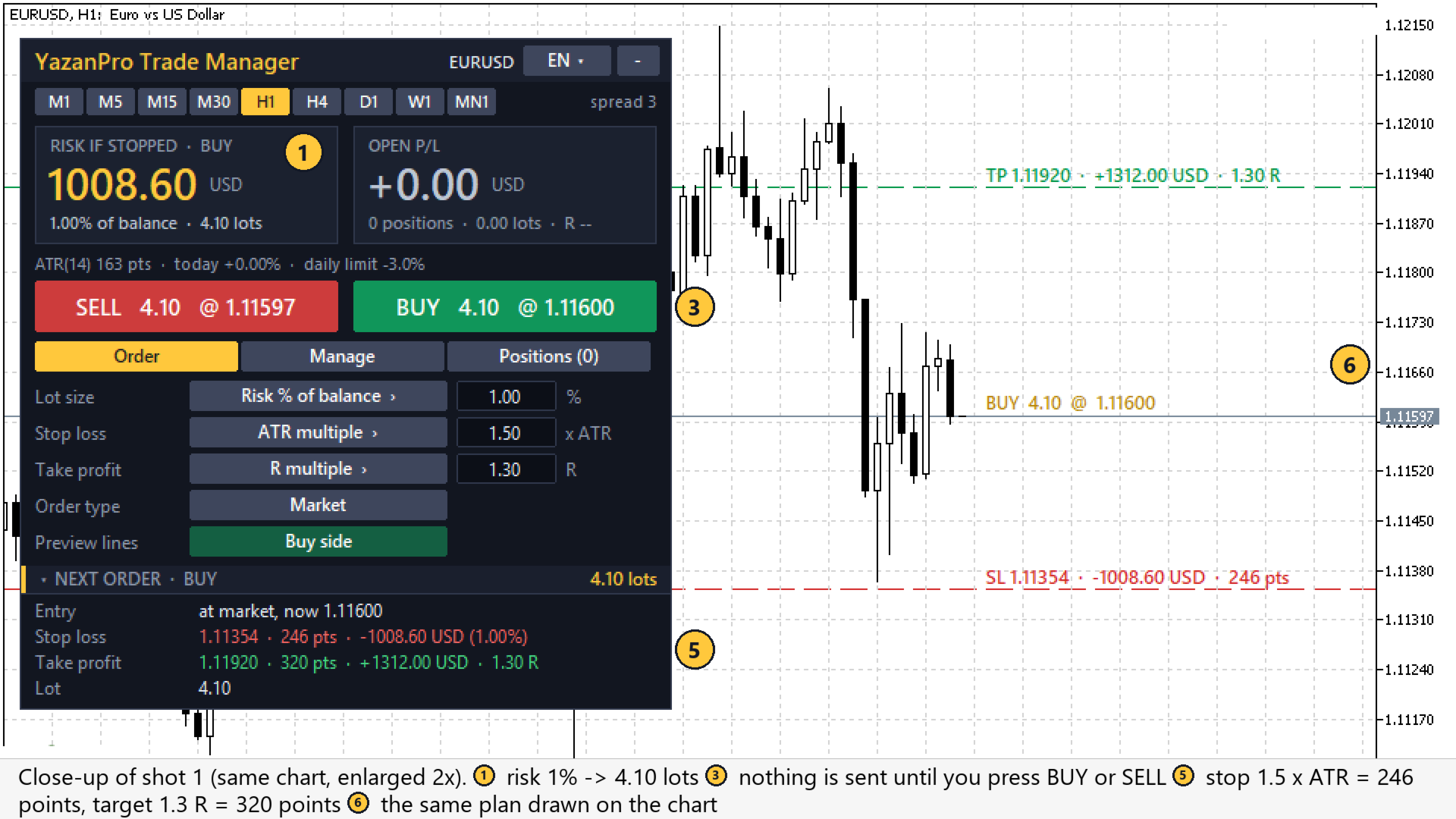
Cosa vedi sul grafico (i numeri corrispondono ai segni sugli screenshot)

  1. Riquadro del rischio: il denaro perso se lo stop loss del prossimo ordine viene toccato, la sua % del saldo e il lotto (in ambra se il lotto minimo rischia più della tua impostazione).
  2. Riquadro P/L aperto: il profitto o la perdita fluttuante delle posizioni gestite, il loro numero, i lotti e l'R.
  3. Pulsanti SELL / BUY con lotto e prezzo. In modalità pendente una seconda riga mostra l'ordine dato dalla linea di ingresso: BUY LIMIT o BUY STOP, SELL LIMIT o SELL STOP.
  4. Impostazioni della scheda ordine: modalità di lotto, stop loss e take profit (clicca il pulsante per cambiarla, scrivi il valore nella casella), tipo di ordine (a mercato o pendente sulla linea) e lato dell'anteprima.
  5. Prossimo ordine: ingresso, stop loss e take profit in punti, denaro e R, il lotto e il TP1 se la chiusura parziale è attiva.
  6. Linee di anteprima sul grafico: ingresso, stop loss, take profit e TP1 con denaro e R.
  7. Linea di ingresso (modalità pendente): trascinala al prezzo del tuo ordine limit o stop.
  8. Scheda gestione: interruttori di break-even, trailing, chiusura parziale e uscita a tempo, ognuno con la sua regola in punti di questo grafico.
  9. Pulsanti di chiusura: chiudi tutto, acquisti, vendite, in profitto, in perdita, cancella pendenti.
  10. Scheda posizioni: le posizioni aperte con lotti, profitto e R, gli ordini pendenti e lo stato della protezione (limite di perdita giornaliera, spread massimo).
  11. Riga di stato: ATR(14) in punti, la variazione dell'equity di oggi, il limite giornaliero e una riga rossa o ambra quando qualcosa blocca nuove operazioni (trading algoritmico non consentito, mercato chiuso, trading disattivato per il simbolo, spread troppo alto, limite giornaliero raggiunto).
  12. Intestazione: pulsante della lingua (12 lingue), pulsanti dei timeframe, spread e pulsante per ridurre il pannello.

Come leggerlo

  1. Guarda prima il riquadro del rischio: questa cifra si perde se lo stop loss viene toccato (può essere di più in un mercato veloce o con un gap, vedi sotto).
  2. Controlla le linee di stop loss e take profit sul grafico. Se lo stop è nel posto sbagliato, cambia la modalità dello stop o il suo valore: il lotto si adegua.
  3. Leggi la riga di stato: una riga rossa significa che non verrà inviata nessuna nuova operazione, e dice perché.
  4. Premi BUY o SELL, oppure il pulsante pendente. Per impostazione predefinita una finestra chiede conferma.
  5. Poi le regole della scheda gestione spostano lo stop, chiudono parte della posizione o la chiudono dopo N barre; il riquadro P/L e la scheda posizioni mostrano il risultato in denaro e R.

Dimensione del lotto

  • Rischio % del saldo o Rischio % dell'equity: il lotto è calcolato in modo che lo stop loss costi quel % del conto. Il pannello mostra il denaro a rischio in grande prima dell'invio.
  • Lotto fisso.
  • Il lotto è arrotondato al passo di volume del simbolo e tenuto tra il suo minimo e massimo. Se il margine libero non basta, il lotto viene ridotto e il pannello lo dice. Se il lotto minimo rischia più della tua impostazione, il pannello lo mostra in ambra.

Stop loss

  • Multiplo di ATR (predefinito 1.5 x ATR 14 del timeframe del grafico).
  • Punti.
  • Ultimo swing: l'ultimo minimo frattale confermato (per un acquisto) o massimo (per una vendita), più un margine in ATR. Se non viene trovato uno swing, si usa lo stop ATR e il pannello te lo dice.

Take profit

  • Multiplo di R della distanza dello stop (predefinito 1.3 R), punti o nessuno.

Ordini

  • BUY / SELL a mercato: due grandi pulsanti mostrano il lotto e il prezzo attuale.
  • Ordini limit e stop: imposta il tipo di ordine su «Pendente sulla linea» e trascina la linea d'ingresso dorata sul grafico. I pulsanti mostrano quale ordine sarà (BUY LIMIT o BUY STOP, SELL LIMIT o SELL STOP) a seconda di dove si trova la linea.
  • Linee di anteprima: ingresso, stop loss, take profit e TP1 sono disegnati sul grafico con il denaro a rischio, il guadagno e l'R. Puoi mostrare il lato acquisto, il lato vendita o disattivarle.
  • Conferma: per impostazione predefinita ogni ordine e ogni pulsante di chiusura chiede prima di agire (parametro di input).

Tutte queste impostazioni si cambiano sul pannello stesso (pulsanti di modalità e campi valore). Il pannello ricorda le tue scelte per il grafico.

Gestione delle posizioni

Gestisce le operazioni di questo pannello (il suo numero magico) oppure, se lo scegli, tutte le posizioni del simbolo del grafico, comprese quelle aperte a mano o da un altro EA.

  • Break-even: quando il profitto raggiunge 0.25 x ATR, lo stop va all'ingresso + 0.125 x ATR.
  • Trailing stop ATR: 2.0 x ATR dietro il prezzo, solo in avanti. Disattivabile.
  • Chiusura parziale al TP1: chiude una % del volume quando il profitto raggiunge un R impostato (una volta per posizione).
  • Uscita a tempo: chiude una posizione dopo N candele del timeframe del grafico (predefinito 24, 0 = spento).
  • Pulsanti di chiusura: chiudi tutto, chiudi acquisti, chiudi vendite, chiudi in profitto, chiudi in perdita, elimina ordini pendenti.

Protezione

  • Limite di perdita giornaliera: quando l'equity scende di un % impostato dall'inizio del giorno del server, le nuove operazioni vengono bloccate. Opzionalmente vengono chiuse anche tutte le posizioni gestite.
  • Spread massimo: nessuna nuova operazione finché lo spread è sopra il tuo limite.

Riepilogo posizioni

La scheda Posizioni elenca le posizioni aperte con lotti, profitto e R, e il riquadro in alto mostra il profitto / perdita fluttuante totale e il suo R.

Controlli di sicurezza prima di ogni azione

Prima di ogni ordine, modifica e chiusura il pannello controlla la modalità di trading e la sessione di trading del simbolo, i tipi di ordine consentiti, i limiti di volume, il margine libero, lo stop level e il freeze level del broker, la dimensione del tick e la modalità di esecuzione. Uno stop che non cambierebbe non viene inviato di nuovo, e lo stop non viene spostato mentre il prezzo è proprio accanto al take profit.

Pannello

  • 12 lingue: inglese, arabo, russo, cinese, spagnolo, portoghese, giapponese, tedesco, coreano, francese, italiano, turco. Cambia con il pulsante in alto.
  • Pulsanti dei timeframe per cambiare il grafico.
  • Tre schede: Ordine, Gestione, Posizioni. Il pannello può essere ripiegato.

Strategy Tester

Nello Strategy Tester nessuno può premere pulsanti. Quindi, quando gira lì e il parametro «Tester only: open a demo trade every N bars» è attivo (predefinito), l'EA apre un'operazione ogni N candele, alternando acquisto e vendita, così puoi vedere stop loss, take profit, break-even, trailing, chiusura parziale e uscita a tempo al lavoro. Queste operazioni demo non sono una strategia di trading e il loro risultato non significa nulla per il trading reale. Su un conto reale o demo questo parametro non fa nulla.

Cosa non fa

  • Non dà segnali di acquisto o vendita e non fa previsioni. Sei tu a decidere quando operare e in quale direzione.
  • Non apre operazioni da solo su un conto reale o demo.
  • Non può garantire il prezzo dello stop loss: in un mercato veloce o con un gap di prezzo il broker può chiudere l'operazione a un prezzo peggiore, quindi la perdita può essere più grande del denaro a rischio mostrato.
  • Non usa DLL, richieste web né file esterni.

Parametri di input

Lot size

  • Lot size: Risk % of balance (Risk % of balance / Risk % of equity / Fixed lot)
  • Risk per trade, % (risk modes): 1.0
  • Fixed lot (fixed mode): 0.10

Stop loss

  • Stop loss: ATR multiple (ATR multiple / Points / Last swing (fractal) + buffer)
  • ATR period: 14
  • ATR mode: stop = this x ATR (also the swing fallback): 1.5
  • Points mode: stop distance, points: 300
  • Swing mode: buffer beyond the swing, x ATR: 0.2
  • Swing mode: bars searched for the last fractal: 50

Take profit

  • Take profit: R multiple of the stop distance (R multiple / Points / No take profit)
  • R mode: target = this x the stop distance: 1.3
  • Points mode: target distance, points: 400

Position management

  • Manage: Only trades with this magic number (or: All positions and orders of the chart symbol)
  • Break-even: true
  • Break-even trigger: profit >= this x ATR: 0.25
  • Break-even lock: stop to entry + this x ATR: 0.125
  • ATR trailing stop: true
  • Trailing distance, x ATR: 2.0
  • Partial close at TP1: false
  • TP1 at this x R: 1.0
  • Close this % of the volume at TP1: 50
  • Close a position after N bars (0 = off): 24

Protection

  • Daily loss limit, % of the day's start equity (0 = off): 3.0
  • At the limit also close all managed positions: false
  • Max spread for new trades, points (0 = off): 0

Orders

  • Magic number: 20261101
  • Order comment: YP Trade Manager
  • Max price deviation, points: 10
  • Ask before sending an order or closing positions: true

Panel

  • Tab shown first: Order
  • Order type shown first: pending at the line (true) or market (false): false
  • Panel language: English
  • Panel X / Y, pixels from the top-left corner: 10 / 30
  • Preview lines (entry / SL / TP) on the chart: true

Strategy Tester

  • Tester only: open a demo trade every N bars (alternating): true
  • Tester only: N bars: 12

Avvio rapido e FAQ

Avvio rapido

  1. Collega l'EA a un grafico e consenti il trading algoritmico (scheda Common e pulsante «Algo Trading» del terminale).
  2. Scegli la lingua con il pulsante in alto a destra.
  3. Nella scheda Ordine scegli la modalità del lotto, lo stop loss e il take profit. Controlla il rischio nel riquadro grande e le linee sul grafico.
  4. Premi BUY o SELL. Per un ordine limit o stop, imposta il tipo di ordine su «Pendente sulla linea», trascina la linea dorata e premi il pulsante dell'ordine pendente.
  5. Nella scheda Gestione attiva o disattiva break-even, trailing, chiusura parziale e uscita a tempo.

FAQ

Fa trading da solo?

No, non su un conto reale o demo. Gestisce solo le posizioni che apri tu. Le uniche operazioni automatiche sono quelle demo nello Strategy Tester (vedi sopra).

Può gestire operazioni che ho aperto a mano?

Sì. Imposta «Manage» su «All positions and orders of the chart symbol».

Perché il lotto è diverso dal mio % di rischio?

Il lotto è arrotondato per difetto al passo di volume. Se il lotto minimo è maggiore di quello calcolato, si usa il minimo e il pannello mostra il rischio reale in ambra. Se il margine libero è troppo piccolo, il lotto viene ridotto.

Che cos'è R?

R è la distanza (o il denaro) del primo stop loss. 1.3 R significa un obiettivo 1.3 volte più lontano dello stop. Il pannello ricorda il primo stop di ogni posizione, quindi l'R resta corretto dopo il break-even.

Funziona su un conto netting?

È scritto per entrambi: la chiusura parziale e i pulsanti di chiusura inviano un'operazione per il ticket della posizione. La versione 1.00 è stata testata su un conto hedging; provalo prima sulla tua demo netting.

Avvertenza sui rischi

Il trading comporta un alto rischio di perdita. Questo pannello calcola lotti e gestisce stop; non prevede i prezzi e non garantisce alcun risultato. Provalo prima su un conto demo.

Prodotti consigliati
Core function Intelligent transaction management one-click opening and closing operation, which supports user-defined lots to set multiple closing modes: all closing, closing by direction and closing by profit and loss status. Professional risk control, real-time risk monitoring and spread control to avoid high-cost trading environment. Visual control panel has an intuitive graphical interface, and all functions can be operated with one button to display position information, profit and loss sta
FREE
Click Trading
Jawad Tauheed
5 (2)
One Click Trading – Auto TP SL Developer TraderLinkz Version 1.00 Category Utility What it does Adds missing TP and SL to your manual trades and pending orders Sets them once per ticket Lets you move TP and SL afterward Works on hedging and netting accounts Scans on every tick and reacts on trade events Why you want it You place faster entries You get consistent risk and exit targets You reduce fat finger errors You keep full manual control Quick start Attach the EA to any chart Keep TP and SL e
FREE
Haunted Risk Calculator is a visual risk management panel for MT5 that calculates the correct lot size in real time based on your account balance, risk percentage, and stop-loss distance. HOW IT WORKS Set your risk percentage or dollar amount, drag the SL and TP lines to your desired levels on the chart, and the panel instantly shows the calculated lot size, risk in dollars, reward-to-risk ratio, and expected profit. Execute with one click or a keyboard shortcut. FEATURES Draggable panel — grab
FREE
Boleta Easy Trade
Silvio Garcia Wohl
When executing an order, whether through the Metatrader ticket on a computer or the Metatrader app on a mobile device, either manual or pending, Easy Trade will automatically set the take profit and stop loss levels, as well as a limit order with its respective take profit and stop loss levels. It follows the trading strategy for market open (US30, US100, US500), but it can be applied to any market asset.
FREE
ATC Alert Manager MT5
Kassim Abdela Banko
ATC Alert Manager ti permette di impostare allarmi di prezzo direttamente sul grafico e gestirli da un piccolo pannello. Ogni allarme è mostrato come una linea sul grafico che puoi trascinare su un nuovo prezzo. Un allarme scatta una volta, nel momento in cui il prezzo attraversa il tuo livello, con un avviso popup, un suono e una notifica push opzionale sul tuo telefono. Un prezzo già oltre il livello non lo attiva, quindi non ricevi mai avvisi ripetuti a ogni tick. Questo strumento fa anche

FREE
Risk Manager Lot Calculator tells you the exact lot size to trade so that a losing trade costs only the amount you decide, no more. You set your risk as a percentage of the account or as a fixed money amount, and you set your stop loss by pips, by price, or by dragging a line on the chart. The panel then shows the correct position size, the money at risk, the pip value and, when you add a take profit, the reward to risk ratio and the potential profit. Position sizing is the part of trading that
FREE
AI One Click Risk Trade Panel
Fadi Hassan Khaled Ghanem
Place trades in one click with the lot size calculated from your risk. How it works Type your risk percent, stop loss in points and take profit as a multiple of the stop. The panel shows the lot size and the money at risk before you click. BUY and SELL open the order with SL and TP already attached. Management buttons move stops to break-even, close half or close all positions on the chart symbol. Key features Risk based lot size from balance, tick value and stop distance SL and TP attached to e
FREE
FiT Panel Pro
Thonglak Janyakorn
Overview FiT Panel Pro is a professional-grade trade management panel designed for MetaTrader 5 traders who demand speed, precision, and full control over their trades. Built with a modern dark-theme UI, it combines one-click execution with advanced risk management, visual SL/TP drag lines, automatic Fibonacci-based levels, and comprehensive order management — all in a single, compact panel. Whether you are a scalper, day trader, or swing trader, FiT Panel Pro gives you the edge you need to exec
FREE
Easy and simple tool which close all trades in defined point of time. It can also close all open trades when opened positions reach defined target profit or stop loss. For all pairs, indexes etc. Works with all instruments. All types of orders. All charts. Users inputs: - close time (hour,min,sec) - take profit (in users currency) - stop loss (in users currency) Save & Load settings option. Fast, simple and reliable. Check out other tools provided by our team!
FREE
TradeViz Tri
Ebdallh Aljlwaxh
This tool is designed to visualize the position and trades history and its information, such as the entry and exit points, sizes of the trades, Reward to risk ratio, Risk percent, Profit, Target and stop-loss on the chart. it makes showing trades on the chart more informative and easier to use. it's a strategic tool that enhances your trading experience on MT5 platforms. By providing a clear visual representation of your trades and customizable settings, it empowers traders to make informed deci
FREE
Prop Edge Heartbeat
Nuno Madeira Amaro Pire Costa
EA to prevent inactivity violations on prop firms. This EA will scout for your most recent trade and if it is older than the number of days defined, will enter a micro lot position size 0.01 on the pair defined. It is recommended to use a tight spread pair like EURUSD. This EA will not act as long as you have at least one trade in the last X days (defined on config). This EA will not place other trades or modify existing position.
FREE
Advanced Price Action Suite
Mahoutondji Fredy Venance Assemou
Advanced Price Action Suite Advanced Price Action Suite plots market structure (BOS/CHoCH), support and resistance zones, Fair Value Gaps and the multi-moving-average trend on your chart — with an integrated position calculator that shows the recommended lot, possible loss and risk/reward ratio in real time, before every entry. What Advanced Price Action Suite does Advanced Price Action Suite is an analysis and calculation tool for the price action trader: it shows the market context at a glan
Trade management panel for MetaTrader 5. It lets you place orders and manage open positions from a panel on the chart, without opening separate order windows. It works on any symbol and timeframe, on hedging and netting accounts. Layout and display The panel has two layouts. Single shows all controls in one view. Tabs splits the controls into separate tabs for a smaller footprint. You can hide the panel to see the chart behind it and restore it when needed. The panel scales with the screen res
FREE
ZyloFx Position Size Calculator MT5 is a free risk management utility designed to calculate the appropriate lot size before opening a trade. The tool calculates position size based on your selected risk, account balance or equity, and Stop Loss distance. It also displays useful information directly on the chart. Explore all available ZyloFx Trading Tools: https://www.mql5.com/en/users/rosamartinez2825/seller Main Features Automatic lot size calculation. Percentage or fixed-money risk mode. Balan
FREE
Equitypanel
Timo Mario Hoffmann
5 (1)
Equity Panel for MT5 Equity Panel is a free MT5 indicator that gives you a fast and convenient live overview of your account directly from the chart. Monitor balance, equity, floating P/L, drawdown, daily performance, margin data, and warning levels in one compact dashboard. Built for traders who want better control, faster risk awareness, and clearer account monitoring in live market conditions. Equity Panel is a lightweight and practical account monitoring indicator for MetaTrader 5 that helps
FREE
Position Sizer PROP
Lazaro Farias Do Espirito Santo
Position Sizer PROP Stop putting your challenge at risk because of wrong lot sizing, forgotten limits, or unclear exposure before sending the next order. In PROP Firm challenges, many traders do not fail only because of poor entries. Risk management mistakes also matter: oversized lots, poorly calculated risk, daily drawdown breaches, excessive exposure, or lack of control over account rules. After approval, the challenge continues. Keeping the account active requires discipline, operational co
As traders, we all know that risk management is the most important aspect of profitable trading. So, we need to determine the lot size, every time we need to open a new trade. The FX lot size calculator is a simple tool that will help you to determine your lot size easily without using any third-party service but you will be able to do that by your MetaTrader terminal. LIMITED TIME OFFER: 30$ FOR 10 ACTIVATION. Inputs: Maximum_Risk_Prc: To determine your preferred risk%. For example, if your ris
FREE
Total Closed Trades – MT5 Indicator The Total Closed Trades indicator for MetaTrader 5 provides a quick, visual overview of your trading performance by displaying a simple and intuitive 3-value breakdown : Total Trades – The total number of closed trades. Winning Trades – Number of profitable trades. Losing Trades – Number of losing trades. Instead of digging through reports, traders can instantly monitor their historical performance with a compact and elegant pie chart-style widget. Key
FREE
Utility Equity Target Stop
Suci Ridha Krismayanti
Equity Target Stop is an automated utility designed to protect your profits and enforce strict capital management. It continuously monitors your account equity in real time and automatically closes all open positions as soon as your predefined profit target is reached. Key Features Automated Profit Securing: Automatically triggers a "Close All" command when equity reaches your specified target. Universal Account Protection: Works seamlessly across multiple open positions, pending orders, and dif
FREE
Ninja MT5 Doctor
Atsushi Katayama
NINJA MT5 DOCTOR PANORAMICA NINJA MT5 Doctor è un'utility MT5 gratuita e di sola lettura che acquisisce un'istantanea diagnostica una tantum del terminale, del conto, dei grafici aperti, dello storico selezionato e del simbolo del grafico host corrente. È un'utility in formato Expert Advisor, non un EA di trading né un indicatore. I nomi del pannello e dei parametri di input sono in inglese. COSA CONTROLLA Verifica la connessione al server del broker, le autorizzazioni al trading del terminale e
FREE
GRInvest Breakeven Manager mt5
Greig Cameron Rennie
4 (1)
GRInvest Breakeven Manager is an MT5 trade-management Expert Advisor designed to manage existing open positions after entry. Its purpose is to automate breakeven protection, staged partial closes, trailing stops and position management while still giving the trader full manual control over individual trades. The EA does not need to open trades itself . It can manage manual trades and trades opened by other Expert Advisors according to the selected symbol, direction and magic-number filters. The
FREE
PropSizer
Timon-pascal Krueger
PropSizer is a free lot calculator on the chart: drag an entry line and a stop line, and one text line shows the broker normalised lot size for your risk, the money on the line and the stop distance. A session candle counter and a news line come with it. Setup takes a minute: attach it to the chart you want to trade, set your risk per trade once, and drag the two lines. It never places an order. Try it first It is free. Attach it to any chart, drag the lines, read the number. In the strategy te
FREE
Breakeven Bot
Gabriel Paul Ange Perrin
Optimize your trading management with Breakeven Bot, the essential tool for active traders managing multiple positions at once. No more wasting time manually adjusting your stops—one click is all it takes to secure your profits! Main Feature: ️ "BREAKEVEN" Button – Instantly set all profitable positions to breakeven and protect your gains quickly. ️ Customization Options: Set breakeven in pips or currency, depending on your preference. Choose whether breakeven should be at the entr
FREE
Lot by Risk MT5
Sergey Vasilev
4.88 (16)
Il pannello di trading Lot by Risk è progettato per il trading manuale. È un mezzo alternativo per inviare ordini. La prima caratteristica del pannello è la comoda emissione di ordini utilizzando linee di controllo. La seconda caratteristica è il calcolo del volume della transazione per un determinato rischio in presenza di una linea stop loss. Le linee di controllo sono impostate utilizzando i tasti di scelta rapida: take profit-tasto T predefinito; price-tasto P predefinito; stop loss-tasto
FREE
It has never been so easy to manage the risk of your account until now, this tool will allow you to have full control of your capital and manage your entries in the synthetic index derivative markets, in an easy, practical and safe way. The available input and configuration parameters are as follows :  RISK MANAGEMENT 1. Value of your account: Here as its name says you will place the value corresponding to the size of your account, for example if your account is 150 dollars the corresponding val
Trade assistant pro v8
Ahmed Mohammed Bakr Bakr
2 (1)
FREE FREE FREE Trade Assistant MT5 – Professional Trading & Risk Management Panel Trade Assistant MT5 is an advanced trading panel designed to help traders execute orders faster, safer, and more professionally . It simplifies manual trading by combining smart order management , precise risk control , and one-click execution , making it ideal for both beginners and advanced traders. This tool does not trade automatically . Instead, it empowers you with full control while applying professional-gra
FREE
Descrizione breve Calcolatore di dimensionamento della posizione e del margine per MetaTrader 5 con calcoli BUY e SELL separati. Descrizione completa QRM Risk Calculator è un’utility per il dimensionamento della posizione e il calcolo del margine su MetaTrader 5. Calcola separatamente il volume BUY e SELL in base alla percentuale di rischio selezionata, alla distanza dello stop loss, ai dati del conto, alle specifiche del simbolo e ai prezzi correnti Bid e Ask. Il calcolatore mostra la perdita m
FREE
When executing an order, whether through the Metatrader ticket on a computer or the Metatrader app on a mobile device, either manual or pending, Easy Trade will automatically set the take profit and stop loss levels, as well as a limit order with its respective take profit and stop loss levels. It follows the trading strategy for market open (US30, US100, US500), but it can be applied to any market asset.
Auto TP SL in Pips
Suci Ridha Krismayanti
This utility automates Take Profit (TP) and Stop Loss (SL) levels for your trades, calculated in Pips . It ensures consistent risk management for all your positions. Crucial Note for Manual Traders: If you intend to use this utility on trades opened manually (without an Expert Advisor), you must change the 'Magic Number' setting to 0 (zero) . This allows the utility to correctly identify and manage your manual orders.
FREE
Quick Trade Panel Pro
Nicolas Olivier Menetrey
5 (1)
Pannello di trading one-click con gestione automatica del lotto e del rischio Quick Trade Panel Pro è un pannello di trading intuitivo progettato per i trader che vogliono eseguire ordini rapidamente mantenendo il pieno controllo sul rischio. Funzionalità principali Calcolo automatico della dimensione del lotto basato su una percentuale del margine disponibile Stop Loss configurabile in punti, applicato automaticamente a ogni trade Dimensione del lotto bloccata durante una serie di trade per ga
FREE
Gli utenti di questo prodotto hanno anche acquistato
Trade Assistant MT5
Evgeniy Kravchenko
4.43 (216)
It helps to calculate the risk per trade, the easy installation of a new order, order management with partial closing functions, trailing stop of 7 types and other useful functions. Additional materials and instructions Installation instructions - Application instructions Line function -   shows on the chart the Opening line, Stop Loss, Take Profit. With this function it is easy to set a new order and see its additional characteristics before opening.   Risk management  - The risk calculation
FarmedHedge Pair Trading Dashboard
Tanapisit Tepawarapruek
5 (7)
Farmed Hedge Yield Farming | All Markets (Manual - Hybrid - Semi/Automated EA) VERIFIED TRADING RESULTS - Farmed Hedge Yield Axi Copy:  https://www.mql5.com/en/signals/2356376 - Farmed Hedge Yield Exn Copy:   https://www.mql5.com/en/signals/2356404 - Farmed Hedge Yield V Copy:  https://www.mql5.com/en/signals/2357156 IMPORTANT NOTICE: FarmedHedge is a MANUAL-FOCUSED TRADING UTILITY ,not a fully automated EA. Results shown on this Signal include manual trades and overall strategic management.
Telegram to MT5 MultiChannel Copier
Sergio Marquez Uroz
4.68 (22)
Telegram to MT5 Multi-Channel Copier   copia automaticamente i segnali di trading dai tuoi canali Telegram e Discord direttamente su MetaTrader 5. Niente bot, niente estensioni del browser, niente copia manuale. Il segnale arriva su Telegram o Discord e l'EA apre l'operazione nel tuo terminale in pochi secondi. E prima di copiare un canale, il backtester integrato ti mostra cosa avrebbe fatto quel canale sul tuo conto. Il prodotto include due componenti: un'applicazione Windows che ascolta i tuo
================================================================================ POC BREAKOUT - V20.72. Full Professional Grade Toolkit ================================================================================ POC Breakout is a full MetaTrader 5 trading dashboard for discretionary traders who want breakout signals, Point of Control (POC) context, volume profiles, order flow, market structure, news, alerts, and advanced trade planning in one professional workspace. Attached directly to you
REVDEN AI Desk: gestisci il tuo trading da un'unica conversazione con la tua IA, sul contesto di mercato di REVDEN Immagina di gestire il tuo trading da un'unica conversazione. REVDEN AI Desk la porta in MetaTrader 5: chiedi alla tua IA come legge il mercato, e lei risponde dal contesto completo di REVDEN sui simboli che operi, con il loro stato, il loro quadro di rischio e le pubblicazioni in arrivo. Le sue proposte arrivano con ingresso, stop, target e rischio, e tu approvi quelle che ti convi
News Trade EA MT5
Konstantin Kulikov
4.55 (11)
Presento un utile robot che io stesso utilizzo da diversi anni. Questo robot può essere utilizzato sia in modalità semiautomatica che completamente automatica. >>> Chat <<< Il programma contiene le impostazioni flessibili per fare trading sulle notizie del calendario economico. Non può essere verificato nel tester delle strategie. Soltanto il vero lavoro. Scarica l'ultimo archivio di impostazioni: https://www.mql5.com/en/blogs/post/747929 Monitoraggio dei segnali: https://www.mql5.com/en/signa
RETAILBERG FOOTPRINT CHART PRO — Order-Flow Workspace for MetaTrader 5 Version 7.00  |  Professional System  |  31 tools  |  One chart A full 150-page illustrated User Manual is included. Please read the full manual to understand this feature packed footprint chart elements and ui. https://www.mql5.com/en/blogs/post/777982 DEMO / STRATEGY TESTER — PLEASE READ FIRST
The Patch
Mian Rameez Ali
The Patch It never opens a trade. It walks behind the ones that did. Every open position, every pending order — checked twice a second for the one thing that's easy to forget: a stop, a target. Found bare, it doesn't ask. It writes the missing number in, measured in points from wherever the position began, and moves on to the next. No strategy, no opinion on direction. Just the quiet assumption that nothing should ever sit on the market unprotected — not because someone decided it shouldn't,
Prossimo aggiornamento — Versione 2.52 in arrivo! [NOVITÀ] Preparati a 4 nuove funzionalità principali progettate per migliorare la tua analisi di mercato e il tuo flusso di lavoro nel trading Portiamo l’analisi di mercato a un livello superiore con 4 nuove funzionalità progettate per soddisfare le tue esigenze di trading. Ecco le novità: 1. TRADE OVERVIEW DASHBOARD 2. CONFLUENCE AT ZONE 3. STRONG & WEAK HIGH/LOW 4. OTE 1. TRADE OVERVIEW DASHBOARD Una dashboard che ti aiuta a comprendere più fa
The product will copy all telegram signal to MT5 ( which you are member) , also it can work as remote copier.  Easy to set up, copy order instant, can work with almost signal formats, image signal,  s upport to translate other language to English Work with all type of channel or group, even channel have "Restrict Saving Content", work with  multi channel, multi MT5 Work as remote copier: with signal have ticket number, it will copy exactly via ticket number. Support to backtest signal. How to s
Floor Watch
Syed Tauqeer Hussain Shah
Floor Watch One number, watched every thirty seconds: how far equity has fallen since the day began — or since its highest point, if it's told to trail the peak instead of the open. Cross the line and it doesn't argue. Every open position closes, every pending order vanishes, and anything that slips through afterward gets shut the moment it appears. Not asked. Removed. The floor holds until the clock turns 5 AM Pakistan time — then, and only then, does the day start over. One rule. No except
Power Candles Strategy Scanner - Strumento di ricerca configurazioni multi-simbolo con ottimizzazione automatica Power Candles Strategy Scanner utilizza lo stesso motore di auto-ottimizzazione che alimenta l'indicatore Power Candles, applicandolo a tutti i simboli presenti nel tuo Market Watch, uno accanto all'altro. Un unico pannello ti indica quali simboli sono statisticamente negoziabili in questo momento, quale strategia è vincente su ciascuno di essi, la coppia ottimale di Stop Loss / Take
EA Auditor
Stephen J Martret
5 (6)
EA Auditor is an independent analysis tool for traders evaluating Expert Advisors and trading signals on MetaTrader 5. It audits backtest reports, reviews posted developer signals, and cross-verifies the two against each other to help traders assess strategies before committing capital. The MQL5 market offers a wide range of Expert Advisors from many developers, with varying approaches, quality, and transparency. EA Auditor provides a consistent, data-driven framework for reviewing them, answer
YuClusters
Yury Kulikov
4.93 (43)
Attention: You can view the program operation in the free version  YuClusters DEMO .  YuClusters is a professional market analysis system. The trader has unique opportunities to analyze the flow of orders, trade volumes, price movements using various charts, profiles, indicators, and graphical objects. YuClusters operates on data based on Time&Sales or ticks information, depending on what is available in the quotes of a financial instrument. YuClusters allows you to build graphs by combining da
Master Your Trading Discipline   Stop losing your hard-earned gains to overtrading and emotional decisions. The Discipline Tool is your ultimate trading assistant, ensuring strict risk management in real-time. Key Protection Features: Advanced Drawdown Defense : Automatically halts trading if your daily drawdown exceeds a preset threshold (percentage or dollar amount). Real-Time Equity Lock : Safeguard profits by referencing peak equity, ensuring drawdown stays within control. Hard Profit Target
Dealer Panel
Mian Rameez Ali
Dealer's Panel No signal decides anything here — a hand does. One click, and the panel calculates what's underneath: lot size from risk, target from a 30-step balance ladder that remembers exactly how far an account has climbed. Toggle between market and pending without touching an input field. Set a stop, and the take-profit can write itself — a fixed share of the balance, translated into price with no arithmetic left for the trader to get wrong. One trade live at a time; it won't let a seco
Trade Indicator Assistant   is a powerful MT5 utility designed to turn indicators into automated trading systems. Its main feature is the ability to automatically detect an indicator’s   BUY and SELL signal buffers , without requiring you to know the buffer numbers, search through indicator settings, or modify the indicator source code. Bonus Indicator:   After purchasing Trade Indicator Assistant, contact me to receive   Trade Signal Pro   completely free as a bonus indicator. [Download Demo V
Un solo acquisto. Tutti i miei indicatori e robot di trading (EA) per MT4 e MT5, disponibili oggi e pubblicati in futuro, senza costi aggiuntivi. Dopo l’acquisto, contattami per sapere come riceverli. È previsto un aumento di 50$ ogni 10 acquisti, fino a 999$. Si applica il prezzo del Market al momento del pagamento. Mantieni l’indicatore di cui ti fidi. Automatizza il lavoro che lo circonda. Il tuo segnale. Le tue regole. La tua esecuzione. Hai già un indicatore MT5 su cui fai affidamento, ma
Quant AI Agents
Ho Tuan Thang
5 (1)
Quant AI Agents are independent trading Expert Advisors. Instead of trading using a fixed strategy like other conventional EAs, Quant AI Agents   is a   multi-agent AI trading framework   that turns natural-language strategy prompts into live.  WANT THE SAME RESULTS AS MY LIVE SIGNAL?   Use the exact same brokers I do:   IC MARKETS , IC TRADING   .  Unlike the centralized stock market, Forex has no single, unified price feed.  Every broker sources liquidity from different providers, creating un
EasyInsight AIO MT5
Alain Verleyen
4.92 (12)
EASY Insight AIO – La soluzione all-in-one per un trading intelligente e senza sforzo Panoramica Immagina di poter analizzare l’intero mercato — Forex, Oro, Cripto, Indici e persino Azioni — in pochi secondi, senza dover controllare manualmente i grafici, installare indicatori o affrontare configurazioni complicate. EASY Insight AIO è il tuo strumento definitivo di esportazione per il trading alimentato dall’IA, pronto all’uso. Offre una panoramica completa del mercato in un unico file CSV pul
Daily Trading Limiter
AL MOOSAWI ABDULLAH JAFFER BAQER
5 (8)
• Please test the product in the Strategy Tester before purchasing to understand how it works. • If you face any issues, contact me via private message—I’m always available to help. • After purchase, send me a screenshot of your order to receive a FREE EA as a gift. Daily Trading Limiter — the rule you cannot break Every trader knows the number. Three trades. Two percent. One bad day and stop. And every trader has watched themselves take the fourth trade anyway. The problem was never knowing th
EA Overfitter
Stephen J Martret
5 (1)
That backtest looks great. But will it still be making money tomorrow, next week, next month? EA Overfitter re-runs your EA on 100 price histories it has never seen. One score tells you if the edge is real. A backtest tells you what an EA did on one price history — the one that happened to occur. What you cannot tell from it is how much of that result was the strategy and how much was the particular path. EA Overfitter answers that. It builds up to 100 synthetic price histories your EA has n
FUTURES ORDERFLOW FOOTPRINT CHART Professional OrderFlow EA for MetaTrader 5 Version 1.01| Professional tool for real traders | Institutional-Grade Visualization STRATEGY TESTER USERS - PLEASE SELECT EVERY REAL TICK WHEN TESTING AND YOU HAVE DOWNLOADED HISTORICAL DATA. IF YOU SEE A WAITING SCREEN AND IT IS NOT DOWNLOADING, IT MEANS YOU HAVE LOW HISTORICAL DATA. TRY 1 MIN AND 5 MIN FIRST ON 1 DAY DATA. ONE DAY DATA SHOULD BE THE NEWEST AND MOST CURRENT DATE. PLEASE WAIT UNTIL THE MARKET HAS ROL
Trading Chaos Expert
Hennadii Stanilevych
5 (11)
This software has no equals in the world and represents a universal trade "console" covering trading signals, automated market entry, setting of Stop Loss and Take Profit, as well as Trailing Profit for multiple trades at the same time in a single open window. Intuitive control of the Expert Advisor in "three clicks" ensures a comprehensive use of all its functions on different computers, including tablets PCs. Interacting with additional signal indicators that mark the chart to give a real mark
Premium Trade Manager - Il pannello di trading con un coach integrato Premium Trade Manager porta un coach di trading direttamente nel tuo grafico, con un motore di esecuzione completo al di sotto. Imposta il trade come fai sempre, poi lascia che Max, il tuo coach di trading IA, legga esattamente quel setup rispetto al tuo conto live e ti dia un verdetto chiaro prima che tu confermi: lo stop rispetta un approccio disciplinato, il rischio è ragionevole, c'è un evento ad alto impatto tra pochi min
Ultimate Extractor
Clifton Creath
5 (7)
Ultimate Extractor - Professional Trading Analytics for MT5 *****this is the local HTML version of Ultimate Extractor. !!!!!it is not compatible with Cloud!!!! For the online version please reach out to me directly****** Ultimate EA manager also now available when you use cloud pro and above for free!! Ultimate Extractor transforms your MetaTrader 5 trading history into actionable insights with comprehensive analytics, interactive charts, and real-time performance tracking. What It Does Automa
Advanced Daily Trading Limiter PRO
AL MOOSAWI ABDULLAH JAFFER BAQER
Advanced Daily Trading Limiter PRO Professional Risk Management. Uncompromising Trading Discipline. One undisciplined trading session can erase weeks of consistent profits. Whether it's overtrading, revenge trading, or exceeding a prop firm's daily risk limits, emotional decisions often become a trader's biggest obstacle—not the market itself. Advanced Daily Trading Limiter PRO is a comprehensive risk management and discipline enforcement utility for MetaTrader 5, designed to help traders stay
AI Trading Assistant | Discord/Telegram → MetaTrader 5 Automation An advanced automation framework that enables natural language trade instructions sent from Discord or Telegram to be executed automatically on MetaTrader 5 using n8n workflows and a custom Expert Advisor. This solution integrates modern workflow automation with MetaTrader 5, allowing users to send trade instructions such as: “buy EURUSD 1% risk 30 pip SL 3R TP” “sell GBPUSD now 2% 20 SL 60 TP” “buy limit EURUSD at 1.0850 with 1%
AI Arbitron — an MT5 Spot vs Future Gold Arbitrage Bot designed to capture price discrepancies between correlated Spot and Future instruments through hedged, non-directional trading. Platform: MT5 Use Swap Free Accounts, many of the regulated broker gives swap free accounts for 7 days, make use of it by only buying lower price asset and selling higher price asset, hold your position for 2-3 days. Asset: Mainly Gold (XAUUSD) using Spot + Future/CFD price feeds. Core strategy: It monitors the p
Custom Timeframe Manager Pro: timeframe illimitati in MetaTrader 5 Le impostazioni standard del terminale spesso nascondono dettagli importanti del movimento dei prezzi. Limitando l'analisi ai soli periodi classici, il trader rischia di perdere i momenti di nascita di un trend e i reali livelli di volatilità. Custom Timeframe Manager Pro è un'utilità professionale che espande i confini di MetaTrader 5. Crea qualsiasi periodo personalizzato, inclusi quelli frazionari ed esotici, e lavora con ess
Altri dall’autore
YazanPro Confluence H1
Yazan Adnan Ramadan Ibrahim
YazanPro Confluence H1 is an Expert Advisor with a chart panel for traders who want to see why a trade is taken. On every closed bar of the analysis timeframe (H1 by default) it scores several groups of indicators, checks the trend on D1, H4 and H1, and looks for a price-action trigger. It enters only when the score, the trend and the trigger agree and every filter passes. It can trade by itself (AUTO), wait for your BUY or SELL click (MANUAL), or only show the analysis (PANEL). Please read this
YazanPro Scalp Panel M5
Yazan Adnan Ramadan Ibrahim
YazanPro Scalp Panel M5 è un Expert Advisor per MetaTrader 5 che valuta fino a 20 simboli con un'unica checklist multi-indicatore sul timeframe M5, mostra il risultato come una tabella sul grafico e apre operazioni brevi con un clic o da solo (modalità AUTO, quella di default). Leggere prima questo. Con le impostazioni di default questo non è un sistema redditizio. Lo sviluppatore ha testato lo stesso motore di trading con un costo di transazione realistico e non ha trovato alcun simbolo né time
YazanPro Session Open Scalper
Yazan Adnan Ramadan Ibrahim
YazanPro Session Open Scalper is a configurable Expert Advisor for traders who want to test one specific idea: trading the first minutes after a market session opens. At each scheduled open it waits for a tick with a normal spread, takes a small fixed target, and closes after a short time limit if the target is not reached. Please read this first. With the default settings, this idea lost money in every backtest below that placed trades, including a one-year gold test. In a separate research stu
YazanPro Activity Burst Scalper
Yazan Adnan Ramadan Ibrahim
YazanPro Activity Burst Scalper is an experimental Expert Advisor for traders who want to study one idea on their own broker's data: short bursts of market activity. Price does not move at an even pace. Now and then the number of ticks per minute and the size of the 1-minute bars jump well above their usual level for a few minutes. This EA measures those bursts, opens a short trade when one starts, and closes it quickly. Please read this first. With the default settings this EA lost money in eve
YazanPro Pattern Matcher
Yazan Adnan Ramadan Ibrahim
YazanPro Pattern Matcher è un indicatore per MetaTrader 5. Risponde a tre domande su qualsiasi simbolo e su qualunque timeframe mostrato dal grafico, da M1 a MN1: Quando il prezzo ha avuto per l'ultima volta questo aspetto, e che cosa è successo dopo? C'è un pattern grafico, e si è formato, ha fatto breakout, retest, è stato confermato o è fallito? Dove si trovano i livelli di supporto e resistenza più vicini? Lavora solo su barre chiuse, quindi non ridisegna nulla (nessun repaint). Non apre ord
YazanPro Trend Dashboard
Yazan Adnan Ramadan Ibrahim
YazanPro Trend Dashboard è un indicatore per MetaTrader 5 che mostra, in un solo pannello sul grafico, in che direzione sta andando il simbolo del grafico su otto timeframe contemporaneamente (M1, M5, M15, M30, H1, H4, D1, W1), quanti indicatori concordano e lo stesso punteggio di trend per un massimo di 30 simboli. Lavora solo sulle barre chiuse: la barra in formazione non viene mai letta. Non piazza ordini e non ha buffer. Cosa vede sul grafico I numeri qui sotto corrispondono ai contrassegni
YazanPro Supply Demand Flow
Yazan Adnan Ramadan Ibrahim
YazanPro Supply Demand Flow è un indicatore per MetaTrader 5 che disegna sul grafico zone di offerta e domanda, fair value gap, bande VWAP, punti dei picchi di volume, box delle sessioni e livelli del giorno, e riassume il volume recente in un pannello. Funziona su qualsiasi simbolo (forex, metalli, indici, azioni, cripto) e su qualsiasi timeframe da M1 a MN1. È uno strumento di visualizzazione: non apre ordini e non dà segnali. Cosa vedete sul grafico (i numeri corrispondono ai richiami negli s
YazanPro Auto Levels and Fibonacci è un indicatore per MetaTrader 5 che disegna sul grafico zone di supporto / resistenza, frecce di rottura, trendline, pivot, numeri tondi e un Fibonacci automatico, e mostra su un pannello quanto dista il prezzo da ciascuno di essi. Disegna i livelli di prezzo che la maggior parte dei trader segna a mano, li tiene aggiornati a ogni candela chiusa e mostra su un pannello dove si trova il prezzo in questo momento rispetto a essi. Funziona su qualsiasi simbolo (fo
YazanPro Pattern Scanner
Yazan Adnan Ramadan Ibrahim
YazanPro Pattern Scanner è un indicatore per MetaTrader 5 che controlla fino a 150 simboli sui timeframe che scegli alla ricerca di pattern grafici classici e pattern di candele, e li elenca in una tabella con la fase raggiunta da ogni pattern grafico: in formazione, completato, rottura, retest, confermato o fallito. Legge solo barre chiuse. Non apre ordini e non dà segnali di acquisto o di vendita. Cosa vedi sul grafico Conteggi per fase: quattro grandi riquadri contano i pattern completati, ro
YazanPro Pattern Scanner Trader
Yazan Adnan Ramadan Ibrahim
YazanPro Pattern Scanner Trader è un Expert Advisor per MetaTrader 5 per aprire a mano operazioni sui pattern grafici. Scansiona fino a 150 simboli sui tuoi timeframe, elenca ogni pattern con la sua fase e mette un pulsante Trade su ogni riga con una rottura. Un clic prepara l'ordine dal pattern disegnato: direzione, stop loss, take profit e il lotto per il tuo rischio. Nulla viene inviato finché non premi Confirm. È uno strumento per ordini con scanner, non una strategia. Su un grafico reale no
The yazan Gold Reaper MT5
Yazan Adnan Ramadan Ibrahim
The yazan Gold Reaper MT5 è un Expert Advisor di breakout per l'oro (XAUUSD). Osserva tre tipi di livelli di prezzo su tre timeframe, attende che una candela forte chiuda oltre un livello, verifica che la rottura regga sulla candela successiva e poi opera nella direzione della rottura con stop loss e take profit su ogni operazione. Leggete prima questo. Prima che il prodotto fosse completato, le sue regole sono state testate con un piano scritto e congelato in anticipo (2020-2026, oro, Tester di
Filtro:
Nessuna recensione
Rispondi alla recensione