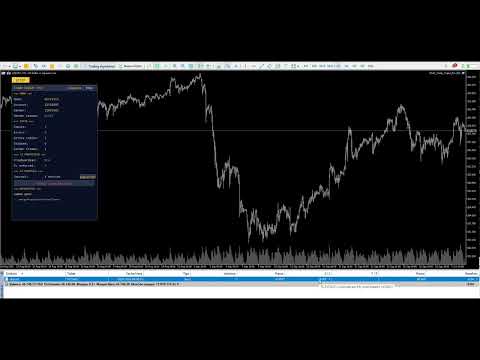
EKAI Trade Copier Pro
- ユーティリティ
- バージョン: 1.0
- アクティベーション: 5

Institutional-grade local trade copier for MetaTrader 5 with News-Aware Guard, Prop Firm Rules Sync, Trade Quality Score, Volatility-Adaptive Lot Sizing, SL Enforcer, and Panic Mode. Zero DLL. Zero network. One EA, two modes.
Overview
EKAI Trade Copier Pro replicates trades in real time from one MetaTrader 5 account (sender) to any number of MetaTrader 5 accounts (receivers) on the same machine, with institutional-grade safety features found nowhere else in the MQL5 Market.
Unlike every other local copier in the Market, EKAI Trade Copier Pro doesn't just mirror trades — it protects your receiver accounts from the kinds of risks that destroy prop firm challenges and funded accounts:
- News-Aware Copy Guard pauses copying automatically around high-impact economic events
- Prop Firm Rules Sync with built-in presets for FTMO, FundedNext, Alpha Capital, The5ers, and FundingPips closes all copies and blocks further trading before you breach a limit
- Trade Quality Score rejects trades that fail a 0-100 scoring on spread, volatility, session, and news proximity
- SL Enforcer attaches an emergency stop-loss to any trade the sender opens without one
- Volatility-Adaptive Lot Sizing automatically reduces position size during ATR spikes
- Prop Guardian Synergy reads severity signals from EKAI Prop Guardian Pro if installed, pausing copies when your account enters a danger zone
- Panic Mode closes all copies across all receivers with a two-click confirmation button
The copier itself is based on file-based inter-terminal communication in the Common\Files directory — the same architecture used by every top-rated local copier in the Market. No DLL, no network calls, no third-party dependencies, no attack surface. Each terminal reads and writes a tiny state file that is shared automatically between all MT5 installations on the same machine.
Auto-discovery means zero manual configuration per terminal. Attach the EA to one chart in each terminal with the default settings, and the EAs figure out automatically which account is the sender (the one you logged into first, or the one you configured as master) and which are receivers. Add a new receiver next week — attach the same EA with the same .set file, done.
What Makes It Different
The MQL5 Market has over 50 trade copiers. Most of them do the same five things: copy market orders, copy pending orders, sync SL/TP, map symbols, scale lot sizes. That is competitive parity, not differentiation.
Here is what EKAI Trade Copier Pro has that nobody else combines in one product:
| Feature | Local Trade Copier EA MT5 | COPYLATOR | Exp COPYLOT CLIENT | EKAI Trade Copier Pro |
|---|---|---|---|---|
| Local file-based copying | ✓ | ✓ | ✓ | ✓ |
| Multi-sender / Multi-receiver | ✓ | ✓ | ✓ | ✓ |
| Symbol mapping (manual + auto) | ✓ | partial | ✓ | ✓ |
| Lot management modes | 3 | 3 | 4 | 4 |
| Reverse copy | ✓ | ✓ | ✓ | ✓ |
| Hedging + Netting support | ✓ | ✓ | ✓ | ✓ |
| Drawdown protection | basic | ✓ | basic | 5-tier severity |
| Auto-discovery (zero config) | ✗ | ✗ | ✗ | ✓ |
| News-Aware Copy Guard | ✗ | ✗ | ✗ | ✓ |
| Trade Quality Score (0-100) | ✗ | ✗ | ✗ | ✓ |
| SL Enforcer with post-opening apply | ✗ | ✗ | ✗ | ✓ |
| Volatility-Adaptive Lot Sizing | ✗ | ✗ | ✗ | ✓ |
| Prop Firm Presets (5 built-in) | ✗ | ✗ | ✗ | ✓ |
| Prop Guardian Synergy | ✗ | ✗ | ✗ | ✓ |
| Multi-Receiver Dashboard | ✗ | ✗ | ✗ | ✓ |
| Copy Journal + CSV export | ✗ | ✗ | ✗ | ✓ |
| Panic Mode (close-all) | partial | ✗ | ✗ | two-click confirm |
| Advanced Session Filter (presets) | ✗ | ✗ | ✗ | ✓ |
| Broker rules validation (STOPS_LEVEL + retry fallback) | ✗ | ✗ | ✗ | ✓ |
The baseline features (rows 1-7) make it a competent copier. The twelve features marked ✓ in the last column make it a category-defining product for prop firm traders, signal copy service operators, and anyone running capital across multiple accounts.
Key Features
Dual-mode SENDER / RECEIVER (single EA, auto-discovery)
One EA file. Three input modes: AUTO, SENDER (forced), RECEIVER (forced).
In AUTO mode (default), the EA scans Common\Files on attach for active sender ping files. If it finds one from another account, this terminal becomes a RECEIVER of that account. If it finds nothing, this terminal becomes a SENDER. If you configure InpMasterAccount = <your master account #> , the EA uses that as the authoritative decider: your master account always acts as SENDER, every other account always acts as RECEIVER.
Result: one .set file works on every terminal. No per-terminal configuration. Add a tenth account next month — same .set , done.
File-based local communication
Each sender writes two files every 500 milliseconds:
- EKAI_TC_<senderAccount>.dat — complete snapshot of currently open positions and pending orders
- EKAI_TC_<senderAccount>_ping.dat — timestamp heartbeat so receivers know the sender is alive
Each receiver polls these files every 250 milliseconds, diffs the current state against the last known state, and detects OPEN / MODIFY / CLOSE events. Latency from sender action to receiver execution: typically 250-750 milliseconds.
Each receiver also writes its own status file so the sender can display a Multi-Receiver Dashboard with real-time counts, balances, and equity across every connected account.
All files live in Common\Files which MT5 shares automatically between every non-portable installation on the same machine. No DLL. No Windows named pipes. No network sockets. Nothing to configure.
Automatic symbol mapping
Different brokers name the same instrument differently: XAUUSD / GOLD , BTCUSD / Bitcoin , EURUSD / EURUSD.m / EURUSDpro . The EA tries five strategies in order:
- Manual mapping from your InpSymbolMappings input ( "XAUUSD:GOLD,BTCUSD:Bitcoin" )
- Exact match on receiver side
- Try common suffix variants ( m , .m , i , .i , pro , .pro , c , .c )
- Try stripping common suffixes from sender symbol
- Auto-add the symbol to Market Watch if the broker has it but it's hidden
If no match found, the trade is skipped with a clear log message naming the symbol so you can add a manual mapping.
Four lot sizing modes
- FIXED: use a fixed lot size regardless of what the sender opens ( InpFixedLotSize )
- MULTIPLIER: multiply the sender's lot by a factor ( InpLotMultiplier , default 1.0)
- BALANCE: scale by receiver-balance / sender-balance ratio (useful when sender and receiver have very different account sizes)
- RISK_PCT: compute lot such that the SL distance equals a fixed % of receiver balance (true risk-based sizing)
All modes respect InpMaxLotSize as a hard cap, so a bug on the sender side can never over-leverage the receiver.
Reverse copy
Set InpCopyReversal = true and every BUY on sender becomes SELL on receiver, every SELL becomes BUY. Pending types flip accordingly (BUY_LIMIT ↔ SELL_LIMIT, BUY_STOP ↔ SELL_STOP). SL and TP are swapped to maintain the correct risk/reward relationship on the reversed side.
Useful for A/B testing opposing strategies, running hedge accounts against a losing EA, or copying a known contrarian signal.
Broker rules validation (unique to EKAI Trade Copier Pro)
Before every OrderSend , the EA validates the sender's SL and TP against the receiver broker's SYMBOL_TRADE_STOPS_LEVEL and SYMBOL_TRADE_FREEZE_LEVEL . These values vary enormously between brokers, especially on crypto and metals:
- Sender broker: Bitcoin allows SL at 100 points
- Receiver broker: Bitcoin requires SL at 500+ points
Without validation, every single Bitcoin trade would fail with retcode=10016 Invalid stops . EKAI Trade Copier Pro:
- Reads STOPS_LEVEL and FREEZE_LEVEL on the receiver
- Adds a 50% safety margin plus 10 points floor
- Pushes SL and TP out to the minimum valid distance for that broker
- Snaps to TRADE_TICK_SIZE (not just digits — crypto often has 0.5 tick size)
If the broker still rejects despite adjustment, a two-step fallback kicks in:
- Retry the order without SL/TP (which the broker will accept)
- After the position opens successfully, call TRADE_ACTION_SLTP (a separate transaction with more permissive rules) to apply an emergency SL — trying 4 progressively more conservative distances until the broker accepts
Result: trades that would fail outright with other copiers get copied successfully and protected with a stop-loss, automatically.
Retry backoff + give-up logic
A trade that fails to copy is tracked in a per-ticket failure list. The EA retries at most 3 times with 10-second backoff, with log output throttled to once per 60 seconds per ticket to avoid Journal flood. After 3 failed attempts, the ticket is marked permanently failed and never retried — a single clear "GIVING UP" log entry, then silence. The Panel shows Skipped: N so you know these trades exist without reading logs.
If the sender closes the trade (removing it from state), the failed-ticket entry is cleaned up with a 30-second grace period that survives file-write race conditions.
Without this logic, a receiver that runs out of margin on Bitcoin would hammer the broker with ~250 identical rejected requests per minute until the sender closed the position. EKAI Trade Copier Pro limits that to 3 requests, then silence. Your broker won't flag your account for abuse, and your Journal stays readable.
Differentiators — Unique Features
News-Aware Copy Guard
Integrates natively with MT5's built-in economic calendar ( CalendarValueHistory and CalendarEventById ). Before every trade copy, the EA:
- Extracts the base and quote currency from the symbol ( EURUSD → EUR, USD)
- Queries the calendar for events in the configurable blackout window (default: 15 minutes before to 15 minutes after)
- If any event affects either currency and matches the importance filter (default: HIGH only, optionally HIGH+MEDIUM), the trade is blocked
A blocked trade is logged as:
[EKAI TC] Trade 14143627 blocked by gate: News blackout: USD HIGH event: Non-Farm Payrolls
The Panel shows a count of news-blocked trades for the day.
Prop firm traders know that trading news often means instant disqualification for breaching daily loss limits. Signal copiers know that spreads widen 5-10x during NFP/FOMC/CPI. This feature alone can save a prop firm challenge from blowing up on a single news event.
Trade Quality Score (0-100)
Four-dimensional scoring runs before every copy:
- Spread score (25 pts): full score if current spread ≤ InpQualityMaxSpread ; linear decay as spread exceeds threshold
- Volatility score (25 pts): full score if current ATR(14) is within 0.5x to 1.5x of 50-bar average ATR; decays outside that range
- Session score (25 pts): full score during configured session, zero outside
- News score (25 pts): full score if no news blackout active, zero if blackout
Total 0-100. If InpEnableQualityScore = true and the score is below InpQualityMinScore (default 50), the trade is rejected with a detailed breakdown:
[EKAI TC] Trade 14143628 blocked by gate: Quality score 35 < 50 (spread=10 vol=15 sess=0 news=10)
Set the threshold to 75+ and you get an institutional-grade pre-trade filter that rejects anything executed during exotic spread widening, dead market zones, or marginal setups.
SL Enforcer (with post-opening fallback)
If a sender opens a trade with SL = 0 (naked position), the receiver applies an emergency stop-loss automatically. Three modes:
- FIXED_PIPS: a fixed pip distance (default 200)
- ATR_MULT: N × current ATR (default 2.0 × ATR(14))
- BALANCE_PCT: SL distance equivalent to a % of receiver balance risk (default 1.0%)
The ATR_MULT mode is universal across instrument classes because it adapts automatically to the volatility of each symbol — Bitcoin gets a wide SL, EURUSD gets a tight one.
The SL is applied in two steps when necessary:
- During OrderSend with the SL included
- If the broker rejects the SL on opening (crypto brokers often do), the position is opened without SL, then TRADE_ACTION_SLTP is called to attach the SL afterward — with 4 progressively more conservative distances (1x, 2x, 3x, 5x) until the broker accepts
The counter in the Panel ( SL enforced: N ) only increments when the SL is actually applied to a real position, not when it was requested. If after 4 attempts no SL could be attached, you get a one-time warning in the log recommending manual intervention.
Volatility-Adaptive Lot Sizing
Compares current ATR(14) to average ATR over last 50 bars. If current ATR > average, the lot is reduced proportionally:
finalLot = baseLot × (avgATR / currentATR)
Clamped to a minimum floor ( InpAdaptiveMinRatio , default 25% of base lot). During flash crashes, volatility spikes, or news-induced chaos, the receiver automatically trades smaller. During calm markets, lot sizes are unchanged.
Combined with ATR_MULT mode for SL Enforcer, this creates a self-balancing risk profile that adapts to market regime without any manual intervention.
Prop Firm Rules Sync — the killer feature
Five built-in presets with the actual rules of each firm:
| Preset | Daily Loss Limit | Max Total Loss |
|---|---|---|
| FTMO | 5% | 10% |
| FundedNext | 5% | 10% |
| Alpha Capital | 4% | 8% |
| The5ers | 4% | 6% |
| FundingPips | 5% | 10% |
| Custom | configurable | configurable |
The EA tracks four states based on worst-case % of either limit used:
- OK (< 50%): everything normal
- WARN (50-80%): panel shows warning color
- DANGER (80-95%): new copies paused automatically until recovery
- CRITICAL (> 95%): all copies closed and copying blocked until manual recovery
Daily loss resets automatically at UTC midnight. Account size is configurable via InpPropAccountSize (default $100,000).
For prop firm traders, this feature is worth the price of the product alone. The number of accounts blown up by one bad hour of overtrading when daily loss limit is close is enormous. EKAI Trade Copier Pro prevents the breach before it happens, not after.
Prop Guardian Synergy
If you also run EKAI Prop Guardian Pro on the same account, the Trade Copier reads the Guardian's severity level via the shared global variable EKAI_PG_Severity_<account> . When Prop Guardian reports DANGER or CRITICAL, the Trade Copier pauses copying automatically. When Prop Guardian recovers, copying resumes.
This lets you keep Prop Guardian as the primary rule-enforcement layer (watching behavioral patterns like revenge trading, overtrading, cooldown violations) and Trade Copier as the execution layer that respects those decisions.
Set InpSyncWithPropGuardian = true and the two products share state transparently. If you don't own Prop Guardian, this input has zero effect.
UX + Advanced
Multi-Receiver Dashboard (sender panel)
When InpShowReceiverGrid = true on the sender, the panel displays a live grid of all connected receivers:
═ RECEIVERS ═ Account Equity Copies Err 24156622 $9850 145 3 22318597 $14200 98 0 50532606 $5400 67 2
Updates every 3 seconds by scanning each receiver's status file. Only counts receivers whose status is < 30 seconds fresh and that point to this sender. Shows up to 6 receivers in the current build (scrollable grid in roadmap).
Copy Journal + CSV Export
Circular buffer of the last 500 copy events (configurable with InpJournalMaxEntries ). Each entry captures:
- Timestamp
- Sender ticket number
- Receiver ticket number
- Symbol
- Action (OPEN / MODIFY / CLOSE / SKIP / PANIC)
- Result (OK / OK+SL / error message)
- Latency in milliseconds
- Lot size
- Order type (0=BUY, 1=SELL, 2=BUY_LIMIT, ... 5=SELL_STOP)
Click "Export CSV" in the panel and the full journal exports to a timestamped CSV file in MQL5\Files\ , ready to open in Excel, Google Sheets, or any analytics tool. Perfect for prop firm audits, trade reconciliation, latency analysis, or post-mortem of a bad trading day.
Emergency Stop-All (Panic Mode)
A single button labeled "PANIC - Close All & Block" in the Panel. Two-click confirmation prevents accidental activation:
- First click → button turns red: "CONFIRM PANIC - CLICK AGAIN"
- Second click (within 10 seconds) → full panic activation
- If not confirmed within 10 seconds → auto-disarmed, back to normal state
On confirmation:
- Sender broadcasts the panic command via EKAI_TC_PANIC_<sender>.dat
- Every receiver detects the file within 1 second
- Every receiver closes all its copied positions immediately and blocks new copies
- Button text changes to " PANIC ACTIVE ** CLICK TO RESUME"**
Click Resume → panic cleared, all copies resume. Panic events are logged in the Copy Journal.
Essential for situations where you discover a bug in your sender strategy at 3am, a signal provider you follow goes rogue, or you simply need to flatten all accounts quickly.
Advanced Session Filter
Six built-in UTC-based session presets:
- ASIA: 00:00-08:00 UTC
- LONDON: 07:00-16:00 UTC
- NEW YORK: 12:00-21:00 UTC
- ASIA-LONDON OVERLAP: 07:00-08:00 UTC
- LONDON-NY OVERLAP: 12:00-16:00 UTC
- CUSTOM: configurable start and end hours
With Monday-Friday filter option. Trades outside the active session are blocked with:
[EKAI TC] Trade blocked: Outside London/NY session (UTC 12:00-16:00, now 03:00)
The Panel shows Session: ACTIVE or Session: CLOSED in real time. Combined with the Trade Quality Score, this gives you precise control over when the receiver trades.
Draggable Panel + Persistence
The entire info panel can be dragged by its title bar to any position on the chart. Position persists across MT5 restarts (per chart). Toggle visibility with the external [x] TCP button in the corner, which stays visible even when the panel is hidden.
Everything in the state file is per-chart: anchor time, panel position, visibility, button toggles. Multiple instances on different charts are fully independent.
Diagnostic button
A Diagnose button in the panel dumps a complete state report to the Journal:
- Account, mode (SENDER/RECEIVER), effective sender
- Common data path (critical for debugging multi-terminal setups)
- Terminal name, data path, company
- List of all EKAI_TC_* files currently in Common\Files
- Last write/read timestamps
- Write test to verify file system access
This is the fastest way to debug any communication issue. One click, full picture.
Use Cases
The Prop Firm Challenge Trader
You're running a $100K FTMO challenge and want to copy your successful live strategy to it. Configure:
InpMode = AUTO InpMasterAccount = <your live account> InpLotMode = BALANCE ; scale with account ratio InpPropFirmPreset = FTMO InpPropAccountSize = 100000 InpEnableNewsGuard = true InpEnableSlEnforcer = true InpSlEnforceMode = ATR_MULT InpSlEnforceAtrMult = 2.0 InpEnableQualityScore = true InpQualityMinScore = 60 InpEnableAdaptiveLot = true
The EA will replicate your live trades scaled to challenge size, pause during news, reject low-quality setups, apply emergency SLs if you forget them, reduce lot size during volatility spikes, and auto-pause copying when you're approaching the 5% daily loss limit. You get the real test of your strategy without the ever-present risk of blowing the challenge on a single mistake.
The Signal Service Operator
You charge subscribers for your signals and want to execute them simultaneously across your own account and theirs. Install EKAI Trade Copier Pro on your signal source as SENDER, send the installer with a one-page config guide to your subscribers who install as RECEIVER. Everyone trades together, nobody can front-run you (file-based copying has guaranteed order), and the Multi-Receiver Dashboard shows you exactly how many subscribers are actively receiving your signals in real time.
The Multi-Account Manager
You manage trades across your own account, your spouse's account, two retirement accounts, and three prop firm challenges. One master account (SENDER), six slave accounts (RECEIVER). Different lot sizing per account via multiple instances with different magic filters, or a single config scaled by balance ratio. Panic Mode gives you a one-click flattening of all seven accounts if you ever need to stop everything.
The Strategy A/B Tester
You want to test the same strategy with and without a specific modification. Run two receiver accounts: one gets straight copies, one gets reversed copies ( InpCopyReversal = true ). After 30 days, compare performance to validate whether the modification helps.
The Latency-Sensitive Scalper
You run a scalping EA on a VPS co-located near your broker, and want to mirror those trades to a slower retail PC without any network copying infrastructure. Install on both machines (which must be the same machine, i.e. the VPS where both terminals run). Enable InpVerboseLog = true and check latencies in the Copy Journal CSV — typically 250-750ms, which is acceptable for any trade with a hold time > 1 minute.
The Risk-Aware Portfolio Manager
You trade several uncorrelated strategies across accounts and want the Trade Copier to be the second line of defense after your human judgment. Set InpSyncWithPropGuardian = true so the copier respects Prop Guardian's severity signals. Set tight Trade Quality Score thresholds and session filters. Enable Volatility-Adaptive Lot. Get a copying infrastructure that fails safe when any one of your layers detects a problem.
Requirements
- MetaTrader 5 build 3550 or newer
- Multiple MT5 installations on the same Windows machine or VPS (same Common\Files directory)
- Terminals must NOT be in portable mode, OR all must be in portable mode pointing at the same shared Common\Files
- AutoTrading enabled in both sender and receiver terminals
- One account per terminal (standard MT5 behavior)
- No specific broker required — works with any MT5 broker
Non-requirements (unlike some competitors):
- No DLL installation
- No Windows firewall exceptions
- No external software
- No internet connection for the copier itself (news guard uses MT5's built-in calendar which syncs automatically)
- No per-terminal configuration — one .set file works everywhere