AlphaDesk 3 EMA Toggle
- インディケータ
- バージョン: 1.0

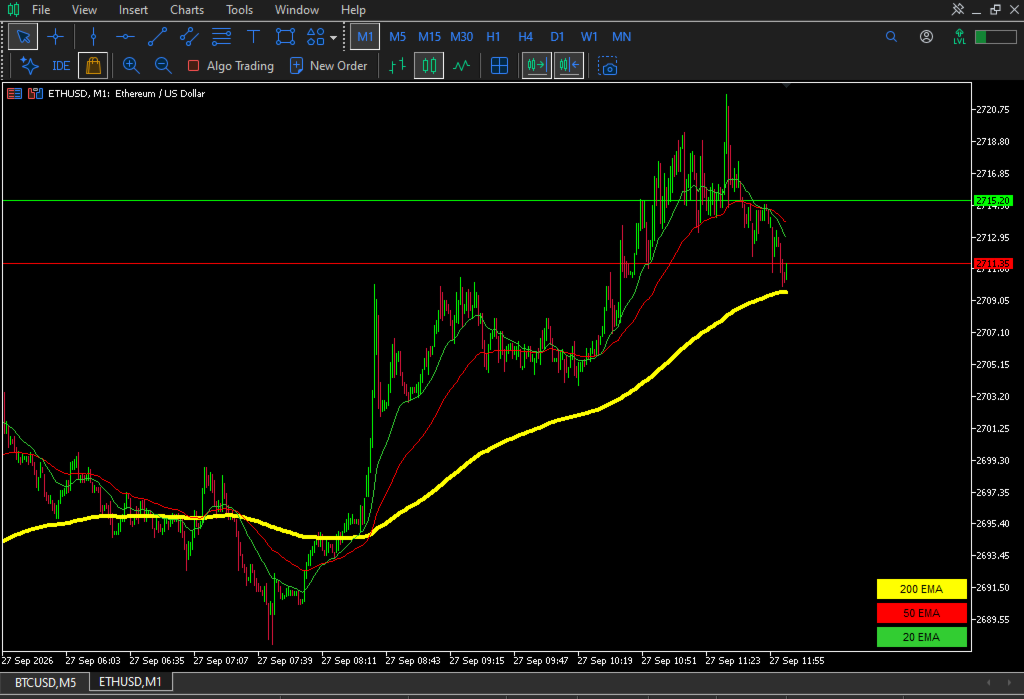
AlphaDesk 3 EMA Toggle draws three exponential moving averages on the chart and puts a separate show/hide button for each of them directly on the chart. It removes the need to open indicator properties and untick plots just to clean up the chart.
The indicator plots the 200, 50 and 20 period EMAs, which are the three periods most traders watch for trend direction and pullback context. Each EMA has its own button in the bottom right corner of the chart.
HOW IT WORKS
The indicator places three buttons on the chart. Clicking a button switches the corresponding EMA between visible and hidden. A visible EMA is drawn in its normal colour and its button is filled with that colour. A hidden EMA is removed from the chart and its button turns grey.
The state of the three buttons is saved, so the chart looks the same way after the timeframe changes, after the indicator is reloaded and after the terminal is restarted. State is stored per account, per symbol and per set of periods, so a hidden 200 EMA on one chart does not affect the same indicator on another symbol.
The state is written to the terminal global variables and mirrored to a small text file as a backup, which keeps the buttons responsive even during a timeframe change before the indicator is calculated again.
INPUTS
EMA Settings
InpEMA200Period - period of the slow EMA, default 200
InpEMA50Period - period of the middle EMA, default 50
InpEMA20Period - period of the fast EMA, default 20
Initial visibility
InpShowEMA200 - starting state of the 200 EMA, used only when no saved state exists
InpShowEMA50 - starting state of the 50 EMA, used only when no saved state exists
InpShowEMA20 - starting state of the 20 EMA, used only when no saved state exists
Button position
InpButtonRightOffset - horizontal distance of the buttons from the right chart edge
InpButtonBottomOffset - vertical distance of the lowest button from the bottom chart edge
FEATURES
Three EMAs in one indicator
A separate on-chart button for each EMA
Button state is remembered per account, symbol and period set
Button colours follow the line colours, so the current state is visible at a glance
Any combination of periods can be used, the defaults are not fixed
Lightweight, it only calls three iMA handles
HOW TO USE
Open the chart and add the indicator from the Navigator. The three buttons appear in the bottom right corner. Click a button to hide or show that EMA. To change the periods, open the indicator properties; the saved visibility state is kept for the new period set.
REQUIREMENTS
MetaTrader 5 build 2360 or later
Works on any symbol and timeframe
NOTES
This indicator displays information only. It does not open trades, does not send signals and does not place orders. It is an analytical chart tool, and no trading outcome is promised or implied. Test any tool on a demo account before using it in live conditions.