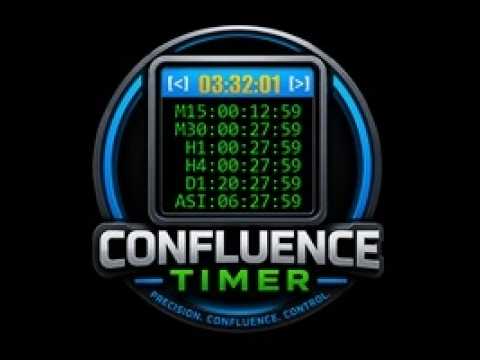
Confluence Timer Mastery Mt4 By Forex Noob Tube

Confluence Timer Mastery (MT4)

Confluence Timer Mastery is an institutional-grade, multi-timeframe countdown and market session dashboard built specifically for professional traders who demand absolute precision. Designed to eliminate guesswork and synchronize trade entries around structural candle closures and major session liquidity blocks, this tool brings elite multi-timeframe analytics directly onto your MetaTrader 4 chart.

Key Features & Capabilities

  • Comprehensive Timeframe & Session Tracking: Seamlessly monitors all 21 standard MT4 timeframes (from M1 up to Monthly) alongside major global session countdowns (Asia, London, New York).

  • Multi-Tier Dashboard Scaling: Fully adaptable interface featuring Shrunk (-20%), Normal (100%), and Enlarged (+20%) scaling modes. Shrunk mode dynamically compacts font metrics and matrix row layouts (MN, ASIA, LOND, NY, ALL) so all characters fit cleanly without clipping.

  • Live Local Clock & Server Sync: Integrated local time display with robust feed-stale guards and advanced clock algorithms that keep countdowns moving accurately even over weekends and holidays when broker tick feeds are frozen.

  • Four Advanced Alert Categories:

    • Category 1 (Independent Candle & Session Close): Fires custom alerts precisely $N$ seconds before closures, intelligently grouping simultaneous timeframe/session closes into a single clean message (e.g., M15, H1, H4 ).

    • Category 2 (Live Confluence): Triggers real-time alerts the moment a unified bullish or bearish bias forms across your selected timeframe basket.

    • Category 3 (Closed Candle Confluence): Evaluates completed historical bars to confirm strict multi-timeframe consensus upon candle closure.

    • Category 4 (Anchor Parent Tracking & Divergence): Links a higher-timeframe parent anchor (e.g., 4H or Daily) against lower-timeframe followers to broadcast instant Sync or Divergence notifications.

  • Dynamic Header & Background Confluence Coloring: Automatically shifts header bar or dashboard background colors based on strict leader timeframes or majority consensus rules.

  • Interactive UI & State Memory: Features intuitive click-to-toggle visibility matrix buttons, cycle display modes ( C key), minimal header-only view ( D key), and persistent window drag coordinates across terminal sessions.

おすすめのプロダクト
EASY Insight – スマートなトレードはここから始まる 概要 もし数秒で市場全体(FX、ゴールド、暗号通貨、指数、株式まで)を、手作業のチャート確認なしでスキャンできたらどうでしょう? EASY Insight は、インジケーターデータを実践的なトレードインテリジェンスに変換する、AI対応のエクスポートツールです。無駄な推測や視覚的な混乱に疲れたトレーダーのために設計されており、市場全体のスナップショットを1つのクリーンなCSVファイルで提供します。 これまでとは全く違う新しいトレード体験です。ウィンドウの切り替えも、グラフのごちゃごちゃしたオーバーレイもありません。FX Power (FXP)、FX Volume (FXV)、FX Dynamic (FXD)、FX Levels (FXL)、そして非FX資産用のIX Power (IXP) ― あなたがすでに知っているツールから得られる、純粋に構造化されたインサイトだけ。 さらに便利さを求めるなら、 EASY Insight AIO を選んでください。すべてが1つのインストールに含まれ、設定不要。チャート上にインジケータ
MQL5ブログ: https://www.mql5.com/en/blogs/post/761446 MT4版: https://www.mql5.com/en/market/product/136790 MT5版: https://www.mql5.com/en/market/product/136791 Time Wizardは、スピード、タイミング、そして執行コントロールを一つの洗練されたダッシュボードで実現したいトレーダーのために開発された、プロフェッショナルなトレーディングアシスタントです。 このエキスパートアドバイザーは、イベントベースのトレーディング、スケジュール執行、そして高速な半自動注文管理のために設計されています。注文を事前に準備し、正確な執行時間を設定し、複数の指値注文を発注し、ストップロスとテイクプロフィットでリスクを管理し、チャート上のコンパクトなインターフェースからすべてを監視できます。 経済イベント、セッション開始、ブレイクアウト、あるいは独自のカスタムスケジュールなど、どのようなタイミングで取引を行う場合でも、Time Wizardは構造と規律に
DOUBLEorNOTHING Daily is the version of the DOUBLEorNOTHING family designed to combine an aggressive Gold / XAUUSD trading strategy with a capital-management model focused on frequently protecting realized profits. The core idea behind the DOUBLEorNOTHING family is simple: recovery strategies may generate strong growth, but they can also experience significant drawdowns. For this reason, every version uses the same main trading concept while handling capital and profits differently. In Daily mod
NewsReady is a semi-automated Expert Advisor that uses a smart straddle methods It needs to be set in charts 2 to 10 minutes before Economic Data release with a red-flag impact on currencies related to the news. Then it run pending orders in specified number of minutes indicated in the time-period parameter. After the specified time, it will stop trading and will remove all pending orders. Important You can not backtest this tool because it is semi-automated and can only be set and run a few min
The Night Scalper EA Lite is a fully automated Expert Advisor that trades at night and relies on price reversion. The EA trades using market orders and has the option to use time averaging to improve performance. This EA works best on EURUSD using the M5 timeframe, but will also work on AUDUSD, GBPUSD, NZDUSD, USDCAD, USDCHF and likely many more. A VPS is advisable when trading this system and a low spread and commission based broker is best. Check the comments for back test results and optimiz
FREE
PrecisionEntry EA is a semi-automatic Expert Advisor for MetaTrader 4 that enables precise order placement at the click of a button — without taking control away from the trader. With a single click on the LONG or SHORT button, the EA automatically places a BuyStop or SellStop order at the high or low of the previous candle. Stop-loss, take-profit, and lot size are calculated fully automatically — based on the configured risk percentage and the desired risk-reward ratio. Features: Interactive on
Description: Please tick "Show object descriptions" in chart properties to enable hrays views That utility converts a trendline into a horizontal ray known as tool for drawing supply and demand zones. Simply create a trendline on a chart and once selected, it will get converted. Ray remains horizontal while dragging.  Quick ray plot: press "R" key to create horizontal ray. It will be snapped to the nearest OHLC value Further versions will be improved. For feature request please post new comm
Program Overview: This program is a trading tool designed to monitor and analyze the 7 major currency pairs. It is a variant of a similar program used for tracking stock indices, but this version focuses on the seven major currency pairs. The program helps in identifying and calculating significant price movements (gaps) between the high and low prices of these currency pairs over a specified time frame. It then provides insights through comments and alerts based on the calculated gaps. Major Cu
Heaven Assistant: Simplify Your MT4 Management Simplify the management of the MetaTrader 4 (MT4) platform with the Heaven Assistant . This Expert Advisor (EA) is a robust tool that allows you to control and customize your trading environment in an efficient and user-friendly manner. Key Features: Multiple Pairs Opening: Quick access to most currency pairs, both major and minor, plus exotic pairs. The ability to open indices, metals, and cryptocurrencies with a single click. Template Change: Easi
Algorithmic FREE
Vladimir Gorbachev
5 (4)
Medium-term trading system that tries to profit during the price rollbacks after significant movements. The system automatically determines the current trading range, the price rollback levels. This is a demonstration version of the Algorithmic EA, which is optimized over the year 2016 for trading the EURUSD currency pair. It is possible to trade in manual mode using a simple on-screen panel or in fully automatic mode. Amount of trades per month is from 5 to 18 in automatic mode. The recommended
FREE
L   H E D G E R   S C A L P E R    A fully automated Expert Advisor that uses counter-trend scalping, managed semi-martingale strategy and lock hedging to execute a complete trading scheme from entry analysis to risk-calculated money management to exit analysis plan execution.         V E R Y  I M P O R T A N T    You can use only ECN type of account. Otherwise, it's a disaster. You can use only the GBPJPY currency pair. Open and attach with 1 chart only. Use a minimum of $5
Simple RSI Forex Trading Strategy
Victor Manuel Valderrama Zamora
2.5 (2)
Diversify the risk in your trading account by combining our Expert Advisors. Build your own custom trading system here:   Simple Forex Trading Strategies The expert advisor opens trades when RSI indicator enter in oversold or overbought areas. The Stop Loss, Take Profit, and Trailing Stop are calculated based on the ATR indicator. The recommended currency pair is EURGBP and the recommended timeframe to operate and to do backtests is H4. This Expert Advisor can be profitable in any TimeFrame an
FREE
️ ORION 2P プロトコル: 必然的利益のアーキテクチャ 市場を追いかけるのはやめなさい。ルールを支配し始めるのです。 従来のトレーディングは、カオス(混沌)との負け戦です。 ORION 2P プロトコル は、単なるインジケーターでも、助言ツールでもありません。それは「価値を体系的に抽出すること」のみを目的として設計された、 バイナリロジック・アルゴリズムプロトコル です。他者が方向を予測しようと躍起になっている間、我々は数学という名の「檻」を構築しました。 完璧の解剖学:ダブルレイヤー(二層構造) システムの鼓動は、誤りを知らない2つの実体の完璧な同期によって刻まれます。 ALPHAモジュール(執行者): 「考える」のではなく、「実行」します。認証されたモメンタムの流れをメスのような精度で遮断し、優位性が圧倒的な瞬間にのみ市場に介入します。 BETAモジュール(アクティブ・シールド): 不確実性に対する我々の保険です。価格が逸脱した場合、BETAモジュールが即座に起動し、リアルタイムでポジションを修正します。リスクを管理するのではなく、リスクを「変質」させ、潜在的なド
Hello friends. I wrote this utility specifically for use in my profile with a large number of Expert Advisors and sets ("Joint_profiles_from_grid_sets" https://www.mql5.com/en/blogs/post/747929 ). Now, in order to limit losses on the account, there is no need to change the "Close_positions_at_percentage_of_loss" parameter on each chart. Just open one additional chart, attach this utility and set the desired percentage for closing all trades on the account. The utility has the following function
MT4用NAS100 Auto SL and TP Makerをご紹介します: MetaTrader4でナスダック100市場をナビゲートするトレーダーにとって不可欠なアシスタントであるNAS100オートSLおよびTPメーカーで、ストップロスおよびテイクプロフィットの設定をもう見逃すことはありません。このツールは、ストップロスとテイクプロフィットのレベル管理を自動化するシームレスなソリューションを求める方々のために設計されています。 主な特徴 簡単な自動化: ストップロスやテイクプロフィットのないナスダック100取引を自動的に監視します。 ユーザーが構成した設定に基づいてレベルを動的に調整します。 注文タイプの多様性: Nasdaq100の成行注文と未決済注文の両方に対応。 MetaTrader 4で利用可能な様々な注文タイプをサポートします。 カスタマイズされた設定: ユーザーフレンドリーなパラメータ設定により、トラッキング設定とストップロス/テイクプロフィットレベルのカスタマイズが可能です。 柔軟な範囲: 実行する特定のNAS100商品、または取引されるすべての商品に対してStop
FREE
TREND PILOT MT4 – SMART MONEY TREND-FOLLOWING SYSTEM Trend Pilot is a fully automated Expert Advisor based on Smart Money Concepts and structural market analysis. The system identifies trend reversals through Break of Structure (BOS) and Change of Character (CHOCH), utilizing precise entry mechanisms for optimal position openings. NEW: Includes a trading
GoldenTrend — a next-generation high-frequency scalping Expert Advisor designed to extract profit from the smallest market movements. Utilizing advanced algorithms for price action and volume analysis, it opens dozens of highly accurate trades daily with minimal risk. Why GoldenTrend? Монитор Ultra-Fast Trades : Captures profit from 5–15 pip movements. Ideal for ECN accounts with low spreads. Adaptive Strategy : Automatically adjusts to current market volatility and dynamically shifts tradi
VTB High Watermark Drawdown Lock EA for MT4 Advanced Equity Protection & Drawdown Management System VTB High Watermark Drawdown Lock is a professional risk management Expert Advisor designed to protect trading accounts, funded accounts, and proprietary trading challenges from excessive drawdown. Unlike traditional drawdown protection systems that calculate risk from the initial account balance, this EA uses a dynamic High Watermark (HWM) model that continuously protects both your original capita
This EA will automatically close all open and pending order when profit or loss is reached according to users setting. Profit or loss can be set by percentage or by amount. When inputting amount for loss make sure to put " - " (minus) sign before the amount. The color of text displayed on the chart can be change in the user input. The text position can also be changed: - left top corner - right top corner - left bottom corner - right bottom corner
EA Master Version any Follow Copy Account  (Acc. Number)  need a open MT Terminal, download multiple times Step1:   Open Master MT5 Terminal    =  install master- Version   (on any Symbol just one Time) Step2:   Open Follower MT5 Terminal = install follower- Version  (on any Symbol just one Time) Step3:   all Trades from any Symbol or any Robot are copy now to follow- Terminal immediately for simple copy set on Chart and   Start   no optimization. This Robot is a Trade Copier for MT5 that automa
FREE
MQL5ブログ: https://www.mql5.com/en/blogs/post/765148 MT4版: https://www.mql5.com/en/market/product/154458 MT5版: https://www.mql5.com/en/market/product/154459 期間限定無料 Telegram注文 [tambangEA] は、より速く、よりクリーンで、よりコントロールされた取引ワークフローを求めるトレーダーのために開発された、プロフェッショナルなセミマニュアル取引アシスタントです。 この製品は、既に独自の市場分析を行っており、取引の実行、管理、監視をより効率的に行う方法を必要としているトレーダー向けに設計されています。硬直的なブラックボックス戦略を押し付けるのではなく、取引判断を効率的な行動へと導く、実用的なチャートダッシュボードを提供します。 プレミアムなビジュアルレイアウト、クイックアクセスボタン、ライントリガー機能、シンボルチェンジャー、リアルタイム取引統計、そしてTelegram連携機能を備えたTelegram Orde
FREE
Introducing   Arrogante EA , an Expert Advisor designed for the MetaTrader 4 (MT4) platform. This EA utilizes a trend-following strategy combined with specific reentry signals derived from a blend of technical indicators. It also features a configurable Martingale system for position management and recovery. Arrogante EA is suitable for traders looking for Forex trading automation and who are comfortable with strategies involving Martingale as a recovery method. Key Features: Entry Strategy: Use
FREE
StatBar 1.6 Indicator showing balance, earnings for today, yesterday and the day before yesterday. The indicator also shows: - Server; - GMT; - Server time; - Shoulder; - Spread. Description of variables: extern int Magic = "-1"; // Magic for statistics -1 = all 0 = manual extern string Symboll = "-1"; // Symbol for statistics -1 = all 0 = current EURUSD = for EURUSD
FREE
Basket Recovery System : is useful for trading multiple pair on a single account, single chart. Functions Of this Ea with a simple click on a button in any Symbol row, this Utilities will, Open new Order, Set Lot, Close Order, Reverse Order, Add new Symbol, Delete Symbol, with a simple click on a Navigation Button, this Utilities will, Select all Symbol Available on Broker, ReSet Symbol Lots, Close all Order, Set Low Risk for all Symbol, Remove all Pair with spread above 2two.
FREE
A free indicator for those who purchase the full version This indicator is created by this Ai, with your desired settings Artificial Intelligence at your service Have a complete artificial intelligence and use it in your codes This artificial intelligence is trained to tell you on each candle whether the market is moving up or down. In general, artificial intelligence can be used in all markets, all timeframes and all symbols However, due to the increasing complexity and decreasing accuracy of
GridProfit
Hafis Mohamed Yacine
Grid Profit  Grid Profit EA Working with all pairs. TimeFrame - 5-15-30-1H Minimum Deposit Recommended : $1000 USD lot 0.01  Grid Profit EA  V 1.00  would probably come about in the event the volatility to your commodity begins to diminish. In the case some sort of examine benefits are generally in the beginning to travel sideways, that ATR profit would probably figure out how to drop off of. This can trigger that trailing terminate to travel in excess since examine benefits began to be way
EA Follower Version any Follow Copy Account  (Acc. Number)  need a open MT Terminal, download multiple times Step1:   Open Master MT5 Terminal    =  install master- Version   (on any Symbol just one Time) Step2:   Open Follower MT5 Terminal = install follower- Version  (on any Symbol just one Time) Step3:   all Trades from any Symbol or any Robot are copy now to follow- Terminal immediately for simple copy set on Chart and   Start   no optimization. This Robot is a Trade Copier for MT5 that auto
FREE
️ Smart Moving Average-Based Expert Advisor – Maximize Your Trading Potential! Experience simplicity and efficiency with this Moving Average-powered EA , built to perform across XAU (Gold), Forex pairs, and even Crypto assets . Key Features: Clean and user-friendly interface – perfect for both beginners and seasoned traders Includes Take Profit to secure your profits automatically No Stop Loss needed – trades are closed based on the opposite price signal Single Shot Mode – only one
これは、ほぼ10年前に初めて公開された私の有名なスキャルパー、ゴールドフィンチEAの最新版です。短期間で起こる急激なボラティリティの拡大で市場をスキャルピングします。突然の価格上昇の後、価格変動の慣性を利用しようとします。この新しいバージョンは、トレーダーがテスターの最適化機能を簡単に使用して最適な取引パラメーターを見つけられるように簡素化されています。 [ インストールガイド | 更新ガイド | トラブルシューティング | よくある質問 | すべての製品 ] 最適化を容易にするシンプルな入力パラメーター カスタマイズ可能な取引管理設定 取引セッションの選択 平日の選択 資金管理 注意してください... 多くの要因が見返りを台無しにする可能性があるため、ダニのダフ屋は危険です。変動スプレッドとスリッページは、取引の数学的期待値を低下させ、ブローカーからの低いティック密度は幻の取引を引き起こす可能性があり、ストップレベルは利益を確保する能力を損ない、ネットワークラグはリクオートを意味します。注意が必要です。 バックテスト Expert Advisorはティックデータのみを使用します
FREE
Custom Alerts:複数市場を監視し、重要なチャンスを見逃さない 概要 Custom Alerts は、複数の銘柄にまたがるトレードチャンスを一元的に監視したいトレーダーのためのダイナミックなソリューションです。FX Power、FX Volume、FX Dynamic、FX Levels、IX Power などの主要ツールと連携し、複数のチャートを切り替える手間なく、重要な市場変動を自動で通知します。ブローカーが提供するすべての資産クラスに対応しており、シンボルを入力する必要はありません。設定で資産クラスを選択するだけで、すぐにアラートを構成できます。 1. Custom Alerts がトレーダーにとって非常に有益な理由 オールインワンの市場監視 • Custom Alerts は、為替、金属、暗号資産、指数、株式(ブローカーが対応している場合)からのシグナルを収集・統合します。 • 複数のチャートを切り替える必要がなくなり、明確で一元化された通知が得られます。 戦略に合わせたアラート構成 • ボリューム急増、通貨強弱の閾値、極端な価格変動など、目的に応じたアラート
このプロダクトを購入した人は以下も購入しています
Trade Manager EAへようこそ。これは、取引をより直感的、正確、そして効率的にするために設計された究極の リスク管理ツール です。これは単なるオーダー実行ツールではなく、包括的な取引計画、ポジション管理、リスク管理のためのソリューションです。初心者から上級者、迅速な実行を必要とするスキャルパーまで、Trade Manager EAはあらゆるニーズに対応し、為替、指数、商品、暗号通貨などさまざまな市場で柔軟に対応します。 Trade Manager EAを使用すると、複雑な計算が過去のものになります。市場を分析し、エントリーポイント、ストップロス、テイクプロフィットのレベルをチャート上のラインでマークし、リスクを設定するだけで、Trade Managerが最適なポジションサイズを即座に計算し、SLとTPをピップ、ポイント、口座通貨でリアルタイムに表示します。すべての取引が簡単かつ効果的に管理されます。 主な機能: ポジションサイズ計算機 :定義されたリスクに基づいて取引サイズを瞬時に決定します。 簡単な取引計画 :エントリー、ストップロス、テイクプロフィットを設定するためのド
Trade Indicator Assistant is a powerful MT4 utility designed to turn indicators into automated trading systems. Its main feature is the ability to automatically detect an indicator’s   BUY and SELL signal buffers , without requiring you to know the buffer numbers, search through indicator settings, or modify the indicator source code. Bonus Indicator: After purchasing Trade Indicator Assistant, contact me to receive Trade Signal Pro completely free as a bonus indicator. [Download Demo Version]
Local Trade Copier EA MT4
Juvenille Emperor Limited
4.96 (112)
Local Trade Copier EA MT4 は、同一の Windows PC または Windows VPS 上で稼働する複数の MetaTrader 4 口座間で、取引をコピーおよび管理するための高速で柔軟なトレードコピーツールです。 ローカルでの取引同期に加え、Receiver 側でロットサイズ、リスク管理、取引フィルター、シンボルマッピング、取引管理、口座保護を個別に設定できます。 Transmitter と Receiver のターミナルは約 1分 で設定でき、同一ブローカーまたは異なるブローカーの口座間で、手動取引や EA による取引をコピーできます。適切な条件下では、ローカルの MetaTrader ターミナル間で取引情報を 0.5秒未満 で同期できます。実際の約定速度は、ブローカーのレイテンシー、ネットワーク状況、PC/VPS の性能、ターミナルの負荷によって異なります。 ご購入前に無料デモをお試しください Local Trade Copier EA MT4 の完全機能版無料デモ を、MT4 デモ口座で 1回につき4時間 テストできます。 Local Trad
Trade Assistant MT4
Evgeniy Kravchenko
4.43 (197)
取引 ごとのリスクの 計算、新規注文 の 簡単 な 設置、部分的 な 決済機能 を 持 つ 注文管理、 7 種類 のトレーリングストップなど 、便利 な 機能 を 備 えています 。 追加の資料と説明書 インストール手順 - アプリケーションの手順 - デモアカウント用アプリケーションの試用版 ライン機能 チャート上にオープニングライン、ストップロス、テイクプロフィットを表示します。この機能により、新規注文を簡単に設定することができ、注文を出す前にその特徴を確認することができます。   リスク計算 リスク計算機能は、設定されたリスクとストップロス注文のサイズを考慮して、新規注文のボリュームを計算します。ストップロスの大きさを自由に設定できると同時に、設定したリスクを守ることができます。 Lot calc ボタン - リスク 計算 を 有効 / 無効 にします 。 Risk フィールドでは 、必要 なリスクの 値 を 0 から 100 までのパーセンテージまたは 預金通貨 で 設定 します 。 設定」 タブで 、 リスク 計算 の 種類 を 選択 します :「 $ 通貨」、「 % 残
Exp COPYLOT CLIENT for MT4
Vladislav Andruschenko
4.69 (65)
MetaTrader 4向け 高機能トレードコピーソフト MetaTrader 4 用の、高速・安定・高機能なトレードコピーソフトです。 COPYLOT は、 MetaTrader 4 と MetaTrader 5 間でFX取引をコピーでき、さまざまな口座タイプや運用スタイルに合わせて柔軟に同期できます。 COPYLOT MT4版の対応コピー方式: MetaTrader 4 → MetaTrader 4 MetaTrader 5 Hedge → MetaTrader 4 MetaTrader 5 Netting → MetaTrader 4   MT5版 詳細説明 + DEMO + PDF 購入方法 インストール方法 ログファイルの取得方法 テストと最適化の方法 Expforexの全製品 MetaTrader 5版 を使えば、 MetaTrader 5 → MetaTrader 5 および MetaTrader 4 → MetaTrader 5 のコピーにも対応します: COPYLOT CLIENT for MT5 COPYLOT は、2台、3台、さらには10台規模のターミナル環境でも
Telegram to MT4 Multi-Channel Copier   は、Telegram チャンネルのトレードシグナルを MetaTrader 4 へ自動コピーします。ボット不要、ブラウザ拡張不要、手動コピー不要。Telegram にシグナルが届くと、EA が数秒であなたのターミナルに注文を出します。 さらに、チャンネルをコピーする前に、内蔵バックテスターでそのチャンネルがあなたの口座でどう動いたかを確認できます。 製品は 2 つのコンポーネントで構成されます:Telegram チャンネルを監視する Windows アプリと、MT4 ターミナルでシグナルを執行する本 EA です。MT5 版もあります   こちら . セットアップガイドとアプリのダウンロード:   https://www.mql5.com/en/blogs/post/768988 Telegramのシグナルチャンネルをバックテストする方法 をご覧ください。 現在の価格は今後値上げされます。 仕組み アプリはあなた自身の Telegram アカウントで接続するため、フォローしているすべてのチャンネル、グループ、ト
Take a Break pauses your Expert Advisors when trading is a bad idea: before news, after a daily loss, outside your trading hours, or when a rule you wrote yourself says so. When the pause is over, your EAs simply continue. Account protection for all your EAs in one tool: news filter, drawdown and equity protection, time filter and custom rules. One EA on one chart protects the whole account, the free indicator gives every chart its own rules on top. Free demo | What is new in 26.09 | Support Ass
Trade Manager は、リスクを自動的に計算しながら、取引を迅速に開始および終了するのに役立ちます。 過剰取引、復讐取引、感情的な取引を防止する機能が含まれています。 取引は自動的に管理され、アカウントのパフォーマンス指標はグラフで視覚化できます。 これらの機能により、このパネルはすべてのマニュアル トレーダーにとって理想的なものとなり、MetaTrader 4 プラットフォームの強化に役立ちます。多言語サポート。 MT5バージョン  |  ユーザーガイド + デモ Trade Manager はストラテジー テスターでは機能しません。 デモについてはユーザーガイドをご覧ください。 危機管理 % または $ に基づくリスクの自動調整 固定ロットサイズを使用するか、ボリュームとピップに基づいた自動ロットサイズ計算を使用するオプション RR、Pips、または価格を使用した損益分岐点ストップロス設定 トレーリングストップロス設定 目標に達したときにすべての取引を自動的に終了するための 1 日あたりの最大損失 (%)。 過度のドローダウンからアカウントを保護し、オーバートレードを防ぎま
VirtualTradePad mt4 Extra
Vladislav Andruschenko
4.85 (61)
ワンクリックで取引できるトレーディングパネル。ポジションと注文の操作!チャートまたはキーボードから取引。 手動取引用の取引パネル。チャート(チャートウィンドウ)またはキーボードから取引できます。開閉、リバース、ロックポジションと注文を処理する МetaТrader4のメインオーダーのトレーディングコントロールパネル:売買、売却、売却、売却、売却、閉じる、削除、修正、トレーリングストップ、ストップロス、takeproft 新しいプレミアム版が利用可能です: VirtualTradePad PRO SE   で取引ワークフローを強化できます。 MetaTrader 5   と   MetaTrader 4   に対応した次世代のプロ向け取引パネルです。 MT5のバージョン 完全な説明 +DEMO +PDF 購入する方法 インストールする方法    ログファイルの取得方法    テストと最適化の方法    Expforex のすべての製品 シンボルウィンドウからの取引とキーボードからの取引! あなたはMetaTrader 4ターミナル - バーチャルコントロールパネルVirtualTr
Smart Copy Local MT4
Kyra Nickaline Watson-gordon
5 (7)
Smart Copy is an Easy-to-Use EA that supports Multi Copying Metatrader4 and Metatrader5 and Local/Remote Copying. (Remote Version is coming soon) Free version is available on Smart Copy Local Free MT4 Specifications :     Real Time, Multi Terminal - Multi Account - MT4/MT5 trade copying     Copy from netting to hedge and hedge to netting is supported.     Fast and instant copy     All settings are input visually.     Easy modifying symbol names, prefix, suffix     Enable/Disable copying s
TelegramからMT4へ: 究極のシグナルコピーソリューション Telegram to MT4 は、DLLを必要とせず、TelegramのチャンネルやチャットからMetaTrader 4プラットフォームに取引シグナルを直接コピーできる最先端のユーティリティです。この堅牢なソリューションは、比類のない精度とカスタマイズオプションにより、シグナルのシームレスな実行を保証し、時間を節約し、効率性を向上させます。 [ Instructions and DEMO ] 主な特徴 直接的なTelegram API統合 電話番号とセキュアコードで認証します。 ユーザーフレンドリーな EXE ブリッジを使用して、チャット ID を簡単に取得および管理します。 複数のチャネル/チャットを追加、削除、更新して、同時に信号をコピーします。 高度なフィルターによる信号解析 カスタム例外語 (例: 「レポート」、「概要」) を含む不要な信号をスキップします。 柔軟な SL および TP 形式 (価格、ピップ、ポイント) をサポートします。 シグナルが価格ではなくポイントを指定する場合、エントリ ポイントを自動
Want automatically to put the pending order, take profit and stop loss? This EA will do it on your behalf! The Fibo Heart EA strategy will place limit order after the ‘check point’ breakout. The position will be triggered when the price make a successful retest. If not, the pending order will automatically deleted after price hit certain level. You also have option to enable market order (instant execution) and custom take profit in the inputs setting. This EA must be attached with Fibo Heart In
MT4 to Telegram Signal Provider は使いやすく、完全にカスタマイズ可能なツールで、Telegramに信号を送信し、あなたのアカウントを信号提供者に変えることができます。 メッセージのフォーマットは 完全にカスタマイズ可能です! しかし、簡単な使用のために、あらかじめ定義されたテンプレートを選択し、メッセージの特定の部分を有効または無効にすることもできます。 [ デモ ]   [ マニュアル ] [ MT5バージョン ] [ Discordバージョン ] [ Telegramチャンネル ]  New: [ Telegram To MT5 ] セットアップ ステップバイステップの ユーザーガイド が利用可能です。 Telegram APIの知識は必要ありません。開発者が必要なものをすべて提供します。 主要機能 購読者に送信される注文の詳細をカスタマイズする機能 例えばブロンズ、シルバー、ゴールドなど、階層型のサブスクリプションモデルを作成できます。ゴールドサブスクリプションでは、すべての信号が得られますなど。 ID、シンボル、またはコメントによる注文のフ
TradePanel MT4
Alfiya Fazylova
4.84 (95)
Trade Panelは多機能なトレーディングアシスタントです。アプリには手動取引用の50以上のトレーディング機能が搭載されており、ほとんどの取引作業を自動化することができます。 アプリの説明書: https://www.mql5.com/en/blogs/post/756482 デモ口座用アプリの試用版: https://www.mql5.com/en/blogs/post/750865 アプリのインストール方法: https://www.mql5.com/en/blogs/post/756239 アプリをビジュアルモードでテストする方法: https://www.mql5.com/en/blogs/post/770277 VPSのMetaTraderにアプリをインストールする方法: https://www.mql5.com/en/blogs/post/770190 取引。 ワンクリックで取引操作を行うことができます: リスクを自動計算して指値注文やポジションを開く。 複数の注文やポジションをワンクリックで開く。 注文のグリッドを開く。 保留中の注文やポジションをグループごとに閉じる
King Trade Copier MT4
Mohammed Maher Al-sayed Mohammed Ahmed Saleh
5 (1)
King Trade Copier は、同じコンピューターまたは VPS 上で動作する MetaTrader ターミナル同士を接続します。ある口座で建てた取引が、ほかの口座にも現れます。このファイルは両方の役割を備えているため、同じダウンロードでも、Mode に設定した値によって送信側にも受信側にもなります。 各チャートでは、パネルがこのターミナルが送信中か受信中かを表示し、相手側の口座名を示し、応答した受信側の数を数え、最後のシグナルからの経過時間を表示します。コピーされなかった注文は、消えてしまうのではなく、その理由がパネルに残ります。 コピーされる内容 成行注文、新規と決済 指値・逆指値注文:発注、変更、削除 Stop Loss と Take Profit、最初の値とその後のすべての変更 部分決済と追加ボリューム 変更は一つずつ個別に追跡されるため、建値に移動してからトレールされるストップも、注文が建っている間は同じように受信側の口座に届きます。 速度と無人運用 送信側では、スケジュールに基づく定期的な確認は行いません。注文が変わった瞬間に更新が書き込まれ、受信側は 1 ミリ秒
MetaTrader 4 用の通貨強弱インジケーター この 通貨強弱インジケーター は最大 28 の主要通貨ペアを読み取り、USD、EUR、GBP、JPY、CHF、CAD、AUD、NZD の 8 通貨それぞれについて 1 つの数値を出します。どの通貨が主導しているかを調べるためにチャートを次々と開く必要はなく、MetaTrader 4 のチャート上の 1 つのパネルを見るだけで、買われている通貨と売られている通貨が分かります。 パネルに表示される内容 8 通貨それぞれの強弱バーとパーセンテージ(強い順) マルチタイムフレーム マトリクス:通貨ごとに 3 つの時間足を横並びで表示し、M15、H1、H4 が一致しているかをエントリー前に確認できます 各行の強弱履歴。20 から 60 まで上げてきた通貨と、90 から 60 まで下げてきた通貨は同じではありません ベストペア :強弱差が最も大きい組み合わせを並べ替えて表示。クリックするとそのペアのチャートが開きます 避けるペア :2 つの通貨が同じ方向に動くと取引の余地がありません。隠さず一覧に出します ワンクリックで開く 28 ペアパネル。
コピー機->便利で高速なインターフェースインタラクション、ユーザーはすぐに使用できます     ->>>> WindowsコンピュータまたはVPS Windowsでの使用を推奨 特徴: 多様でパーソナライズされたコピー取引設定:1. 異なるシグナルソースに異なるロットモードを設定できます。2. フォワードコピー取引とリバースコピー取引に異なるシグナルソースを設定できます。3. シグナルはコメントで設定できます。4. 契約ロットに応じてロットを調整するかどうか 多様でパーソナライズされたコピー注文設定2:1.品種ごとに異なるロットモードを設定できます2.順方向コピー注文と逆方向コピー注文に異なる品種を設定できます3.コメントでシグナルを設定できます4.契約ロットに応じてロットを調整するかどうか コメントフィルタリング、MAGICフィルタリング、シグナルロットフィルタリング、ローカル製品フィルタリング 勤務時間設定 逆同期SLAVE終了 注文バインド機能: 任意の注文を設定されたシグナルソース注文にバインドできます (テーブルをダブルクリックして編集します) アカウントリスク管理 基本
無料トライアル版ダウンロード Copy Cat More (コピーキャット・モア) MT4 トレードコピー (Trade Copier) は単なるローカルのトレードコピーではありません。今日のトレード課題のために設計された 完全なリスク管理・執行フレームワーク (risk management and execution framework) です。プロップファーム (prop firm) のチャレンジから個人のポートフォリオ管理まで、堅牢な執行、資金保護、柔軟な設定、高度なトレード処理の組み合わせによって、あらゆる状況に適応します。 このコピーは   マスター (Master、送信側) と スレーブ (Slave、受信側)   の両モードで動作し、成行注文・指値注文、トレードの変更、部分決済、そして両建て決済 (Close By) 操作をリアルタイムで同期します。デモ口座と実口座、トレード用ログインと投資家ログインの両方に対応し、永続的トレードメモリ (Persistent Trade Memory) システムにより、EA・端末・VPS が再起動しても復旧を保証します。一意の
コピー機->便利で高速なインターフェースインタラクション、ユーザーはすぐに使用できます     ->>>> WindowsコンピュータまたはVPS Windowsでの使用を推奨 基本機能: コピートレードの通常のインタラクション速度は0.5秒未満です。 シグナルソースを自動的に検出し、シグナルソースアカウントのリストを表示します シンボルを自動的に一致させます。異なるプラットフォームでよく使用される取引シンボルの95%(異なるサフィックスなどの特別なケース)が自動的に一致し、基本的に手動設定は必要なく、シンボルマッピングテーブルをダブルクリックして対応するシンボルを変更できます。(マッピングテーブルにはクイック検索シンボル機能があります) 4つのロット計算モード(1. 乗数 2. 固定ロット 3. 適応リスク 4. シグナル 適応リスク ) 特別ロットモード: ストップロス資本リスクに基づいてロットサイズを計算できます (ストップロスが小さすぎる場合や、計算されたロットサイズが大きすぎる場合がありますので、注意して使用してください) 複数のプラットフォーム、複数の信号源(マスター)、複
Risk manager Risk manager - it will simplify the tracking of drawdown and will notify you (alert) when the specified risk is reached, and close/lock orders when the critical DD risk level is reached. If the specified drawdown is exceeded, you can choose two options for actions: All orders will be closed that mean loss will be fixed on depo. The terminal also closes. Instead of fixing the loss on depo, the opposite order will be opened - orders locking will occure. Not a single order will be c
Trade Dashboard simplifies how you open, manage, and control your trades, with built-in lot size calculation. It allows you to execute trades, manage risk, and control positions directly on the chart, with tools such as partial close, breakeven, and trailing stop. Designed to reduce manual work and help you stay focused on your trading decisions. A demo version is available for testing. Detailed explanations of features are provided within the MQL5 platform. Installation instructions are include

The product will copy all telegram signal to MT4   ( which you are member  ) , also it can work as remote copier.  Easy to set up, copy order instant, can work with almost signal formats, image signal, s upport to translate other language to English Work with all type of channel or group, even channel have "Restrict Saving Content", work with  multi channel, multi MT5 Work as remote copier: with signal have ticket number, it will copy exactly via ticket number. Support to backtest signal. How to
News Filter EA: Advanced Algo Trading Assistant News Filter EA is an advanced algo trading assistant designed to enhance your trading experience. By using the   News Filter EA , you can integrate a Forex economic news filter into your existing expert advisor, even if you do not have access to its source code. In addition to the news filter, you can also specify   trading days   and   hours   for your expert. The News Filter EA also includes   risk management   and   equity protection   features
これは視覚的な取引パネルであり、取引を簡単に配置および管理し、人為的エラーを回避し、取引活動を強化するのに役立ちます。使いやすい視覚的なインターフェースと、健全なリスクおよび位置管理アプローチを組み合わせています。 [ インストールガイド | 更新ガイド | トラブルシューティング | よくある質問 | すべての製品 ] 驚くほど使いやすい チャートから簡単に取引 正確なリスク管理との取引、手間のかからない 資本の保存が最優先事項です 気をつけずに利益を上げましょう できるだけ早くリスクのない取引をお楽しみください 開かれているすべての取引の自動トレーリングストップ 最初のストップロスは、取引が行われるとすぐに配置されます EAは、取引を行った後に次のタスクを実行します。 最初のストップロス/テイクプロフィットは自動的に配置されます できるだけ早くフリーライドにロックします(オプション) ストップロスを初めて損益分岐点に移動します(オプション) 停止するまで、希望の方法を使用してストップロスを追跡します その他のクールな機能は次のとおりです。 優れたターミナルアクティビティレポート
Unlimited Trade Copier Pro is a tool to copy trade remotely to multiple MT4, MT5 and cTrader accounts at different computers/locations over internet. This is an ideal solution for you if you are a signal provider and want to copy your trades to other receivers globally on your own rules. One provider can copy trades to multiple receivers and one receiver can get trade from multiple providers as well. The provider can even set the subscription expiry for each receiver, so that receiver will not b
Bar Replay MT4
Hoang The Manh
3.43 (7)
Don't purchase before testing the Demo version first. DEMO version:   https://www.mql5.com/en/market/product/76917 __________________________________________________ This EA  - Tool allow you replay bar in Meta Trader 4 for back test. This Tool can back test in multi timeframe in only one chart. This Tool is very useful for Price action trader. It can work with Indicators, some indicators cannot works. So please download Demo to test before purchase.  Demo Version We do not accept refund in any
This is a program in the form of an EA that attaches to a chart in MetaTrader 4. Then, by using API from Bittrex, Binance websites, it downloads the history of altcoins. By selecting a pair name, the EA automatically downloads all time frames history (Daily,H12,H4,H2,H1,M30,M15,M5,M3,M1) so there is no need to attach multiple EAs to different charts. You can select one pair from Bittrex and 4 pairs from Binance exchange with one running EA and create up to 15 timeframes for 5 different pairs. Th



Strategy Builder offers an incredible amount of functionality. It combines a trade panel with configurable automation (covert indicators into an EA), real-time statistics (profit & draw down) plus automatic optimization of SL, TP/exit, trading hours, indicator inputs. Multiple indicators can be combined into an single alert/trade signal and can include custom indicators, even if just have ex4 file or purchased from Market. The system is easily configured via a CONFIG button and associated pop-up
Grid Manual MT4
Alfiya Fazylova
4.71 (17)
「Grid Manual」は、注文のグリッドを操作するための取引パネルです。 ユーティリティはユニバーサルで、柔軟な設定と直感的なインターフェイスを備えています。 それは、損失を平均化する方向だけでなく、利益を増やす方向でも注文のグリッドで機能します。 トレーダーは注文のグリッドを作成して維持する必要はありません。 すべてが「Grid Manual」によって行われます。 注文を開くだけで十分であり、「Grid Manual」は注文のグリッドを自動的に作成し、非常に閉じるまでそれに付随します。 完全な説明とデモバージョン ここ。 ユーティリティの主な機能と機能 ユーティリティは、モバイル端末から開かれた注文を含め、あらゆる方法で開かれた注文を処理します。 「制限」と「停止」の2種類のグリッドで機能します。 グリッド間隔の計算には、固定と動的(ATRインジケーターに基づく)の2つの方法で機能します。 オープンオーダーグリッドの設定を変更できます。 チャート上の各注文グリッドの損益分岐点を表示します。 各注文グリッドの利益率を表示します。 ワンクリックでグリッドから収益性の高い注文を閉じるこ
取引したい主要エリアを特定したら、サポートとレジスタンス、または供給と需要のゾーンを自動的に取引します。この EA を使用すると、1 回のクリックで買いゾーンと売りゾーンを描画し、価格が反転すると予想される場所に正確に配置できます。EA はそれらのゾーンを監視し、ゾーンに指定した価格アクションに基づいて自動的に取引を行います。最初の取引が行われると、EA は、ターゲット エリアとなる、配置した反対のゾーンで利益を出して終了します。その後、2 つの選択肢があります。取引を終了して新しいゾーンを描画してエントリーするか、利益を出して終了し、すぐに反対方向に取引を反転して、「常に市場に参加する」スタイルの戦略を作成します。 入力と戦略を含む完全なマニュアルはこちら: https://www.mql5.com/en/blogs/post/760256 この EA は、市場で固定またはハード ストップ ロスを使用しないポジション トレーダーまたはドル コスト平均法の取引戦略向けに設計されています。代わりに、次の利用可能なサポートまたはレジスタンス ゾーンで同じ方向に新しい取引を行うことで、
作者のその他のプロダクト
Quick Lines Mastery Lite v1.85 — ユーザーマニュアル 発行元: Forex Noob Tube ウェブサイト: forexnoobtube.com 1. 概要 Quick Lines Mastery Lite は、スピード、精度、クリーンなインターフェースを求める MT5 トレーダー向けに設計された、洗練されたプロフェッショナル向けチャート作成ユーティリティです。ドラッグ可能なフローティングコントロールパネルから、ワンクリックで事前設定された水平線、垂直線、レイ・トレンドライン、ドラッグ&ドロップ・トレンドラインを即座に配置できます。 2. ダッシュボードのインターフェースとコントロール ダッシュボードは、チャートの邪魔にならないようコンパクトで中央揃えのレイアウトを採用しています。 ヒント: ダークグレーのヘッダー ( Quick Lines Mastery Lite ) 部分をクリック&ドラッグして、チャートウィンドウ内の好きな場所にパネルを移動できます。 H-Line 1 & H-Line 2: 事前定義されたカスタムカラー、幅、スタイルを使用して
FREE
ティックレベルの価格追跡とチャートの遅延ゼロを実現した、軽量でリアルタイムなトレーディングセッション・ビジュアライザー。 Session Overlays Mastery Core は、チャートを雑多にすることなく、またターミナルを重くすることなく、アジア、ロンドン、ニューヨークのトレーディングセッションをクリーンかつ機関投資家レベルのビューで表示します。 ローソク足が確定するたびに削除、再描画、チラつきを繰り返す従来のセッションインジケーターとは異なり、Session Overlays Mastery Core は過去のセッションを一度だけ処理し、アクティブなセッションを毎ティックリアルタイムで追跡します。激しい市場のボラティリティやインパクトの大きいニュースによるスパイクが発生した場合でも、価格がアクティブなオーバーレイの境界線を突き破って外に漏れ出すことはありません。 主な機能 リアルタイム・ティックレベルの価格収容機能: アクティブなセッションボックスが、リアルタイムの価格スパイクに合わせて瞬時に動的に伸縮します。ローソク足がオーバーレイの境界外に漏れ出ることはありません。 チ
FREE
軽量2トーンセッションオーバーレイ (MT4版) 標準的なセッションインジケーターは単にチャート上に巨大な中抜きボックスを描画するだけで、視覚的なノイズを生む一方で実用的な分析価値を提供しません。「 Lightweight 2-Toned Session Overlays 」は、セッションの開始価格でボックスを正確に分割することで、セッションボックスの機能を一新します。 「始値から高値」までの範囲を1つの色で、「始値から安値」までの範囲を別の色で塗りつぶすことで、下位の時間足に落とし込むことなく、セッションの方向性、ボラティリティ、主導権を瞬時に把握できます。上のボックスが巨大で下のボックスが極めて小さい場合、買い手が開始直後からセッションを支配していたことが分かります。 Forex Noob Tube より完全無料で提供されます。 主な機能 2トーンの視覚的バイアス: セッションのストーリーを瞬時に読み解く。分割カラーデザインにより、始値に対する価格の推移が正確に示され、流動性狩りやセッション反転の発見が容易になります。 スマートアセット検出: 標準的なFXペアと、ゴールド/インデッ
FREE
Confluence Timer Core は、MetaTrader 5 (MT5) 向けの機関投資家レベルのマルチタイムフレーム・インジケーターです。サブアワー、イントラデイからマクロタイムフレーム(M1から月足MN1まで、上位時間軸「HTF」は厳格にH1以上から開始)にわたり、リアルタイムのカウントダウンタイマーを計算して表示します。高度なアセットモード(標準FX、ゴールド標準、および01:00アンカーと23:59の厳格なセッションカットオフを持つ特殊な「ゴールドシフト」モード)、ローソク足の方向に応じた動的なカラーリング、主要セッション(アジア、ロンドン、ニューヨーク)のスマートな追跡機能、そしてチャート上に残像を残さないクリーンなグラフィック管理を備えています。 German
FREE
Session Overlays Pro by Forex Noob Tube 静的なボックスや乱雑なラインでチャートを散らかすのはやめましょう。 Session Overlays Pro は、セッションのタイミング、日足の始値、そして極端な価格レベルを重視するデイトレーダーのために設計された、完全インタラクティブな機関投資家レベルのマーケットマッピングツールです。 チャート上の洗練されたクリック可能なダッシュボードを中心に構築されたこのインジケーターは、MT4の設定メニューを開くことなく、市場セッションの切り替え、ライブのコンフルエンス(根拠の重なり)の追跡、流動性スイープの測定をシームレスに行うことができます。 コア機能とUIダッシュボード インタラクティブなオンチャートダッシュボード: ワンクリックでアジア、ロンドン、ニューヨーク、またはSyncセッションを切り替えます。パネルをコンパクトなHUDに最小化することで、重要なデータを保持したままチャートをすっきりと保つことができます。 ヒゲ vs 実体での測定: 専用のUIボタンで、セッションの高値/安値(HC/LC)の計算を
Quick Lines Mastery は、MetaTrader 5 専用に構築された機関投資家レベルのチャート描画および注釈ユーティリティです。裁量トレーダー、プライスアクションの愛好家、精度を追求するテクニカルアナリスト向けに設計されており、高パフォーマンスのコントロールパネルをチャート上に直接埋め込むことで、標準の MT5 描画ツールの煩わしさを解消します。 日中(イントラデイ)の水準のマッピング、複雑な幾何学的レイアウトの構築、迅速なテクニカルマークアップの実行など、どのような作業であっても、インスタントテーマ切替、マルチレイヤーコントロール、高度なアラートマトリックスによりワークフローを効率化します。 主な機能 連続線およびレイ(半直線)エンジン: デフォルトのプロパティメニューを操作することなく、無限または制限付きの水平線、垂直線、トレンド線を素早く配置できます。 統合フリードローキャンバス: 最適化されたオンチャート描画レイヤーを使用し、ローソク足の上にフリーハンドのマークアップ、ゾーン、カスタムパターンをシームレスにスケッチできます。 高度なフィボナッチ&幾何学スイート
Confluence Timer Pro — 完全セットアップおよび設定ガイド 1. ダッシュボードのサイズ変更とビジュアルスケーリング アラートエンジンを設定する前に、入力ラベル Dashboard Scale (80%, 100%, 120%) を使用して、ダッシュボードの正確なサイズとレイアウト倍率を制御できます。 Shrunk (-20% / 80%): 縮小されたダッシュボード。コンパクトなマルチチャートグリッドや画面スペースが限られている場合に最適です。 Normal (100%): 標準ダッシュボード。通常のデスクトップモニターレイアウトに最適化されています。 Enlarged (+20% / 120%): 拡大されたダッシュボード。大型画面全体で高い視認性を提供します。 2. 高度な4階層アラートアーキテクチャとカスタムテンプレート Confluence Timerには、カスタムテキストテンプレートと動的スマートタグを活用したマスターアラートエンジンが搭載されています。 {SYMBOL} : 現在のチャートシンボル(例: EURUSD ) {CHART_TF} : 現在
Session Overlays Mastery Pro(Forex Noob Tube 作) チャートの動作を重くしたり、ゴールド(金)チャートで正しく動作しなかったりするインジケーターに悩むのはもう終わりです。 Session Overlays Mastery Pro は、機関投資家レベルのセッションマッピング、動的な高値/安値(High/Low)トラッキング、高度なマルチセッション同期を MetaTrader 5 に直接もたらします。しかも、CPUの処理能力を無駄に消費しません。 選ばれる理由 ゼロ・ラグ・アーキテクチャ: 重い履歴計算は起動時に1度だけ実行されます。軽量なバックグラウンド処理により、ライブセッションは価格とともに呼吸し拡大するため、ターミナルは驚くほどスムーズに動作します。 真の資産シンクロナイゼーション: 標準Forexおよび23時間稼働のゴールド(XAUUSD)市場の両方に対応。ブローカーの不完全なフィードや日曜日のローソク足の不具合を完全に回避し、毎日の始値(Daily Opens)を常に正確に保ちます。 柔軟なビジュアルモード: セッション全体を表示する
フィルタ:
レビューなし
レビューに返信