Kito Candle Range Reversal Scanner
- インディケータ
- バージョン: 1.0
- アクティベーション: 10

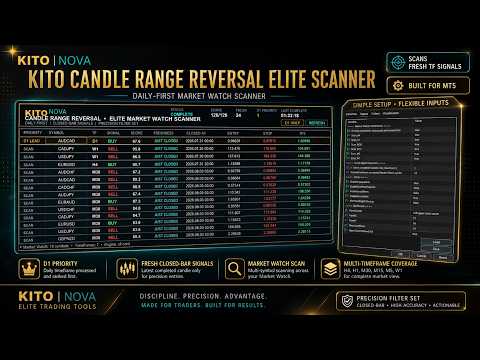
Kito Candle Range Reversal Elite Scanner is a multi-symbol, multi-timeframe MetaTrader 5 scanner designed to detect fresh candle-range reversal signals across the instruments currently visible in Market Watch.
SPECIAL OFFER: Purchase this scanner and send me a private message to claim your FREE bonus indicator(Kito Candle Range reversal).
The scanner places greater emphasis on the Daily timeframe, processes D1 opportunities first and highlights the strongest fresh Daily setup as the current priority signal. It can also scan W1, H4, H1, M30, M15 and M5 for traders who require broader market coverage.
All signals are based on completed candles. The scanner does not rely on the movement of the currently forming candle to produce a confirmed signal.
Main Features
- Scans all symbols currently visible in Market Watch
- Daily-first signal processing and ranking
- Dedicated D1 priority row
- Multi-timeframe scanning
- Fresh closed-candle signal detection
- Bullish and bearish reversal identification
- Signal-strength score
- Signal freshness status
- Signal closing time
- Suggested entry price
- Suggested protective Stop Loss
- Suggested TP2 target
- Popup alerts
- Push notifications
- Email alerts
- Optional sound alerts
- Duplicate-alert protection
- Clickable dashboard rows
- Opens the selected symbol and timeframe directly from the scanner
- Manual Refresh control
- D1-only dashboard view
- No DLL or external service required
Supported Timeframes
The scanner can monitor:
- W1
- D1
- H4
- H1
- M30
- M15
- M5
The Daily timeframe is treated as the primary timeframe and is processed and ranked before the lower timeframes.
Each additional timeframe can be enabled or disabled from the scanner inputs.
MAKE SURE TO TURN TURN THE FILTERS ON IN THE MAIN INDICATOR
How It Works
For every selected Market Watch symbol and enabled timeframe, the scanner:
- Defines a recent candle range using completed price data.
- Detects when price sweeps above or below the range.
- Evaluates rejection and recovery conditions.
- Applies the internal confirmation filters.
- Calculates a signal-strength score.
- Displays the signal only when the setup has completed.
- Ranks fresh Daily signals above signals from other timeframes.
A green BUY result represents a potential bullish reversal after a sweep of the lower side of the range.
A red SELL result represents a potential bearish reversal after a sweep of the upper side of the range.
Dashboard Information
The dashboard displays:
- Priority — D1 Lead or general scan result
- Symbol — detected Market Watch instrument
- TF — signal timeframe
- Signal — BUY or SELL
- Score — calculated setup strength
- Freshness — how recently the signal completed
- Closed At — closing time of the signal candle
- Entry — suggested signal entry reference
- Stop — suggested protective stop level
- TP2 — second target based on the signal risk distance
The dashboard is designed to provide a fast overview without requiring traders to open every chart manually.
Fresh Signal Detection
The freshness setting determines how many completed candles may be checked for a valid signal.
Recommended setting:
1 = latest completed candle only
This keeps the dashboard focused on newly completed setups rather than older historical signals.
The scanner can also search several completed candles when broader signal discovery is required.
Recommended Setup
For Daily-focused scanning:
- Keep the primary D1 timeframe enabled
- Enable H4 for secondary opportunity coverage
- Use a freshness value of 1
- Keep startup alerts disabled
- Enable popup or push notifications according to your preference
For full multi-timeframe scanning, enable the required lower timeframes individually.
Scanning every Market Watch symbol across every timeframe may require more terminal resources. Keep only the symbols you genuinely trade visible in Market Watch.
How to Use
- Add the scanner to one chart.
- Open Market Watch.
- Show the symbols you want the scanner to monitor.
- Select the required timeframes in the scanner inputs.
- Keep D1 enabled for Daily-first ranking.
- Select the required alert methods.
- Wait for the Market Watch scan cycle to complete.
- Review the D1 priority row and other fresh results.
- Click a dashboard row to open the corresponding symbol and timeframe.
- Perform your own chart confirmation before placing a trade.
Only one scanner instance is normally required.
Alerts
The scanner can notify the trader through:
- MetaTrader popup alerts
- Mobile push notifications
- Email notifications
- Sound alerts
Duplicate alerts are controlled so that the same completed signal is not repeatedly announced during every scan cycle.
The option to alert existing signals on startup is disabled by default, preventing a large number of historical notifications when the scanner is first attached.
Important Information
Kito Candle Range Reversal Elite Scanner is an analysis and market-monitoring tool. It does not automatically open, manage or close trades.
A detected signal does not guarantee that price will reverse or that a trade will be profitable. Traders should combine the scanner with their own market-structure analysis, risk management and execution rules.
Suggested entry, Stop Loss and target values are technical reference levels generated from the detected setup. They should be reviewed against current spread, volatility, broker conditions and the trader’s own risk plan before use.
Kito Candle Range Reversal Elite Scanner — Daily-first market scanning, fresh closed-bar signals and multi-timeframe opportunity coverage from one chart.