G2 Trading Assistant MT4

G2 TRADING ASSISTANT – PRODUCT DESCRIPTION

By Ida Bagus Putu Mahardika

G2 Trading Assistant – Smart Trading Solution for Modern Scalpers

G2 Trading Assistant is a professional trading panel designed to maximize your trading performance on the MetaTrader 5 platform. With an intuitive interface and advanced features, this panel gives you full control over order execution and risk management in real time.

🎯 KEY ADVANTAGES OF THE G2 STRATEGY

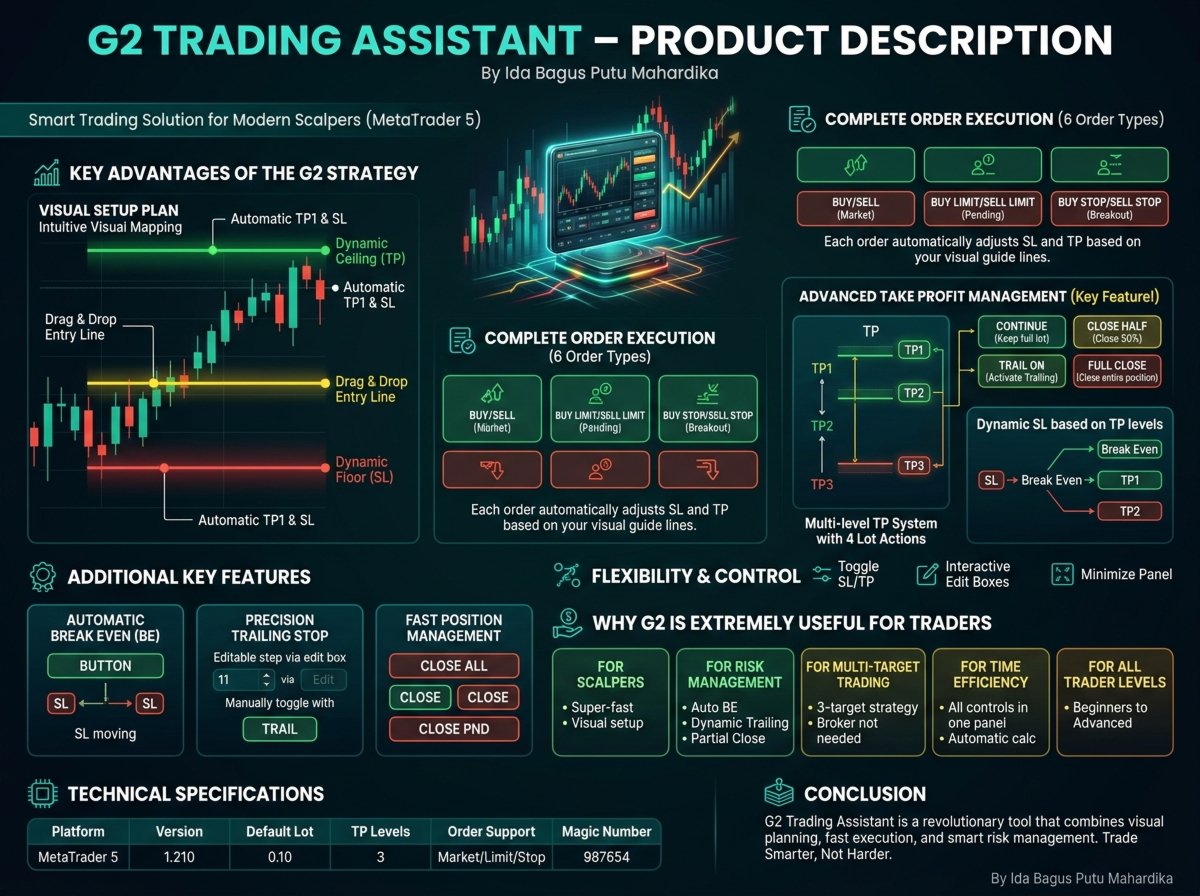
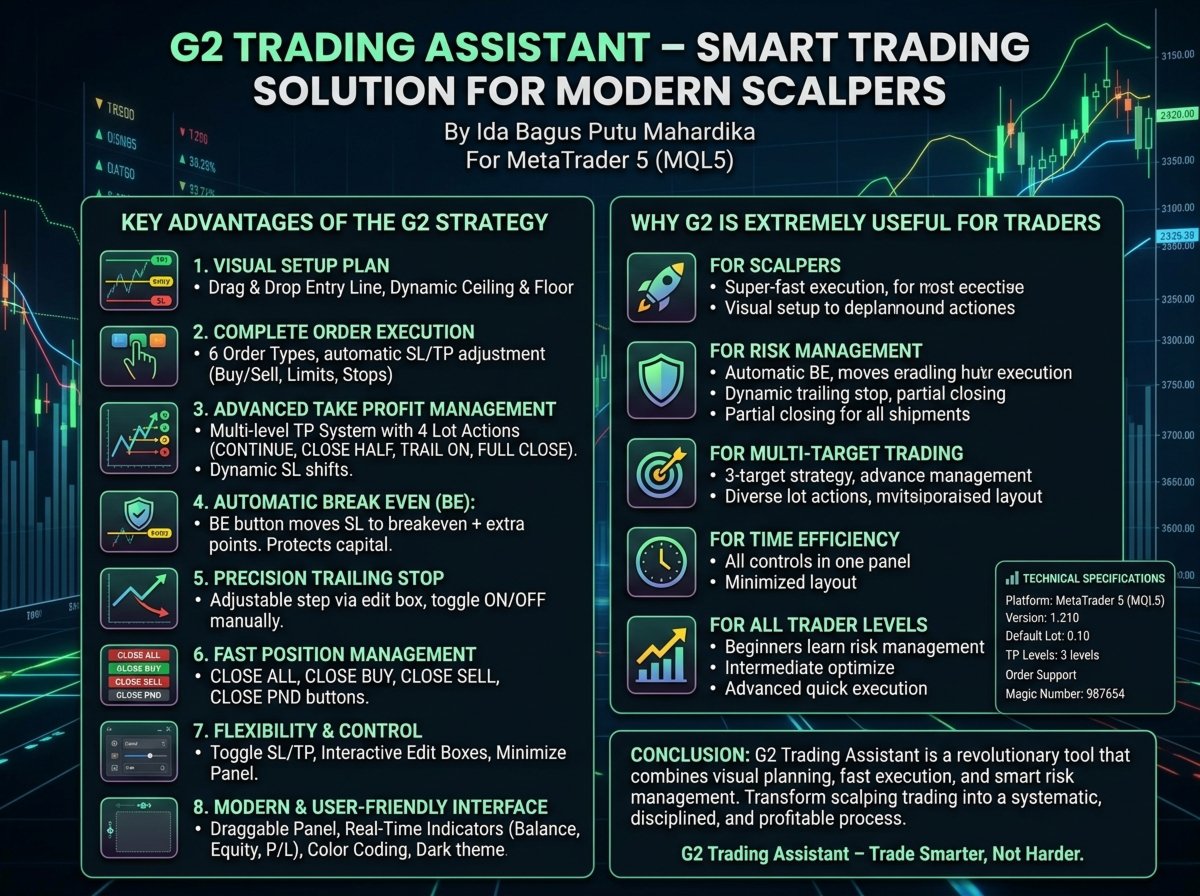
1. VISUAL SETUP PLAN (Entry & Target Levels Visually)

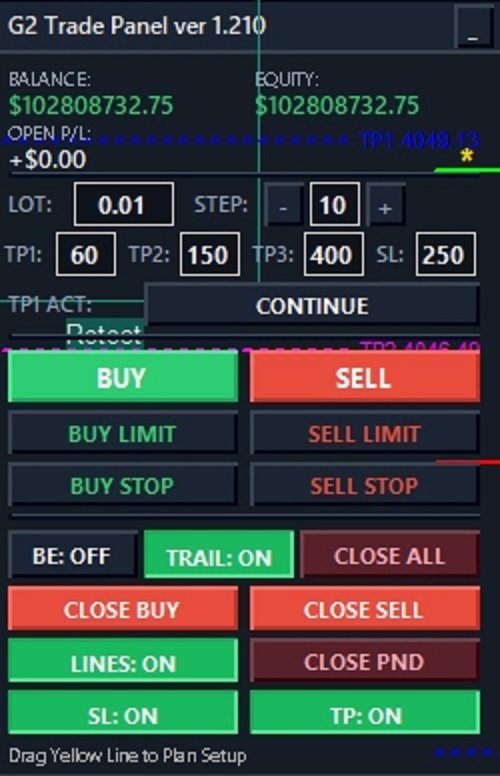
  • Drag & Drop Entry Line: Yellow line you can drag directly on the chart to set your entry level.

  • Dynamic Ceiling & Floor: Green (ceiling) and red (floor) lines automatically follow the entry line, serving as TP1 and SL targets.

  • Intuitive Visual Mapping: Plan your scalping setup with high precision without manual calculations.

2. COMPLETE ORDER EXECUTION (6 Order Types)

Order Function
BUY/SELL Instant market orders
BUY LIMIT/SELL LIMIT Pending orders below/above price
BUY STOP/SELL STOP Breakout pending orders

Each order automatically adjusts SL and TP based on your visual guide lines.

3. ADVANCED TAKE PROFIT MANAGEMENT (Key Feature!)

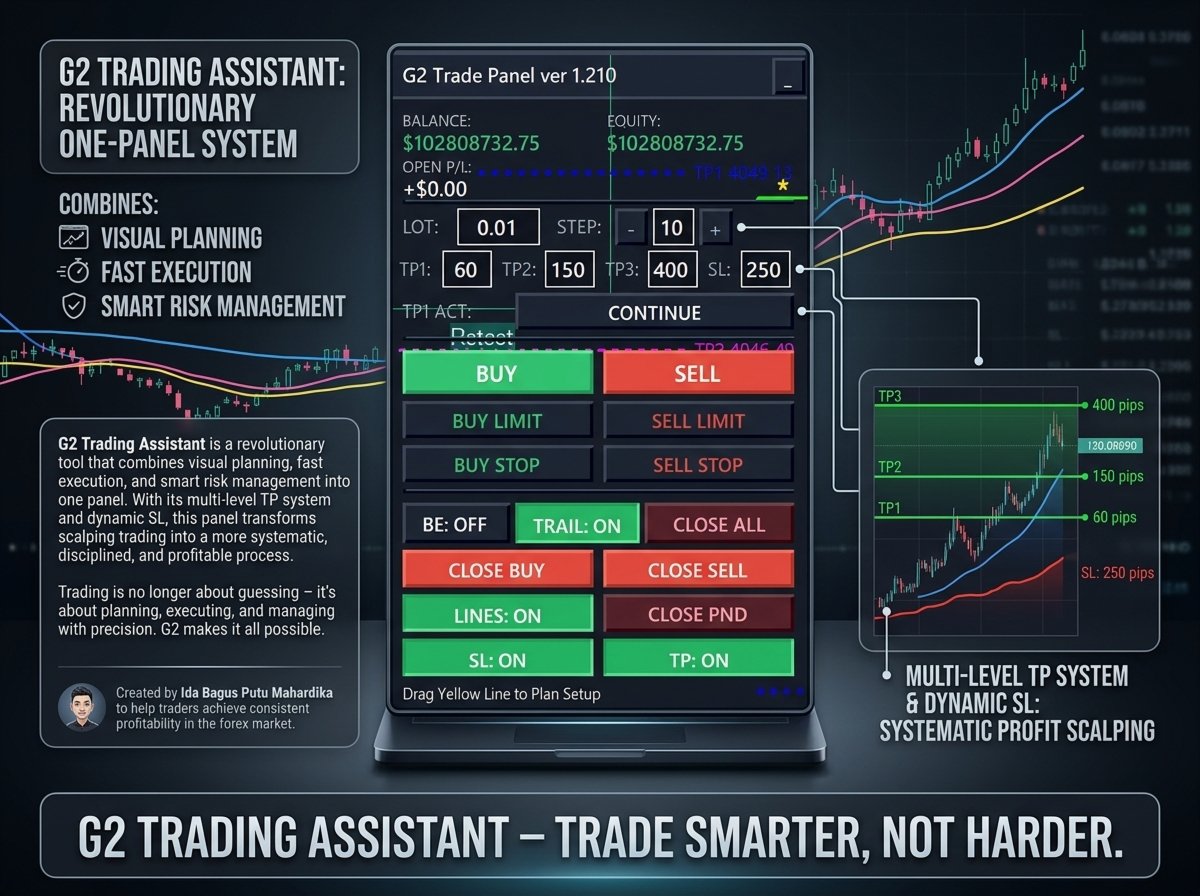
Multi‑level TP System with 4 Lot Actions:

  • CONTINUE : Keep full lot moving to next target

  • CLOSE HALF : Close 50% of position at each TP (lock profit while letting remainder run)

  • TRAIL ON : Activate trailing stop automatically when TP is hit

  • FULL CLOSE : Close entire position at each target

Dynamic SL based on TP levels:

  • TP1 hit → SL moves to Break Even (risk‑free)

  • TP2 hit → SL moves to TP1 level (profit secured)

  • TP3 hit → SL moves to TP2 level (maximise profit)

4. AUTOMATIC BREAK EVEN (BE)

Activate the BE button to move Stop Loss to breakeven + spread + extra points. Protect your capital as soon as the position moves positive.

5. PRECISION TRAILING STOP

  • Fully adjustable step via the edit box on the panel

  • Moves only when price exceeds the set step → avoids overly aggressive trailing

  • Toggle ON/OFF manually with the TRAIL button

6. FAST POSITION MANAGEMENT

Button Function
CLOSE ALL Close all open positions at once
CLOSE BUY Close all BUY positions only
CLOSE SELL Close all SELL positions only
CLOSE PND Delete all pending orders

7. FLEXIBILITY & CONTROL

  • Toggle SL/TP: Enable/disable Stop Loss and Take Profit usage

  • Interactive Edit Boxes: Change Lot, Step, TP1, TP2, TP3, SL values in real time

  • Minimize Panel: Hide the panel to declutter your chart view

8. MODERN & USER‑FRIENDLY INTERFACE

  • Draggable Panel: Move the panel to any comfortable position

  • Real‑Time Indicators: Balance, Equity, and Open P/L always updated

  • Color Coding: Green (Buy), Red (Sell) – intuitive and easy to recognise

  • Professional Look: Dark theme with bright accent colours

💎 WHY G2 IS EXTREMELY USEFUL FOR TRADERS

🔥 FOR SCALPERS

  • Super‑fast order execution with 6 order types in one panel

  • Visual setup allows entry at precise levels

  • SL & TP automatically attached without manual configuration

🔥 FOR RISK MANAGEMENT

  • Automatic BE protects capital once profit starts

  • Dynamic trailing stop locks in profit without disturbing upside potential

  • Partial closing at each TP ensures realised profits

🔥 FOR MULTI‑TARGET TRADING

  • No need to set TP with the broker (EA handles it)

  • Ability to implement a 3‑target strategy

  • Diverse lot actions provide adaptability to changing market conditions

🔥 FOR TIME EFFICIENCY

  • All controls in one panel – no more switching between trading menus

  • Just drag the setup line – all levels are automatically calculated

  • Minimise panel to focus on chart analysis

🔥 FOR ALL TRADER LEVELS

  • Beginners : Learn risk management through clear visual guidance

  • Intermediate : Optimise strategies with multi‑level TP features

  • Advanced : Quick execution and full control over every position

📊 TECHNICAL SPECIFICATIONS

Parameter Details
Platform MetaTrader 5 (MQL5)
Version 1.210
Default Lot 0.10 (adjustable)
TP Levels 3 levels (TP1, TP2, TP3)
Order Support Market, Limit, Stop
Magic Number 987654 (unique)

🚀 CONCLUSION

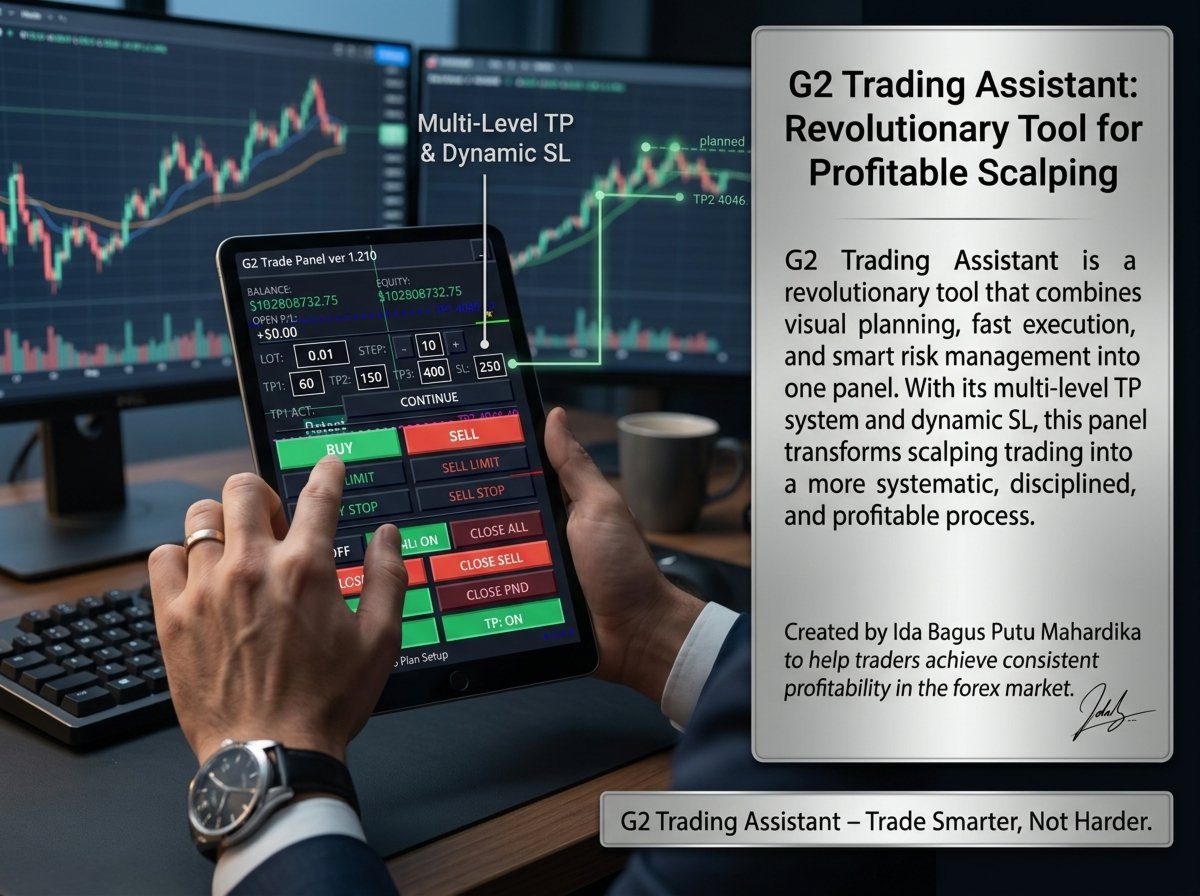
G2 Trading Assistant is a revolutionary tool that combines visual planning, fast execution, and smart risk management into one panel. With its multi‑level TP system and dynamic SL, this panel transforms scalping trading into a more systematic, disciplined, and profitable process.

Trading is no longer about guessing – it's about planning, executing, and managing with precision. G2 makes it all possible.

Created by Ida Bagus Putu Mahardika to help traders achieve consistent profitability in the forex market.

G2 Trading Assistant – Trade Smarter, Not Harder.


おすすめのプロダクト
Virtual Collider Manual   is a trading assistant with a built-in panel for manual trading. It automatically moves a position opened by a trader in profit using innovative adaptive grid algorithm of averaging and adaptive pyramiding Know-how of the grid algorithm of averaging and pyramiding of the   Virtual Collider Manual   trading robot is based on fully automatic adaptation of all characteristics of dynamically build order grid and pyramid with actual price movement with no need for adjusting
Overview Harmonic Patterns MT4 is a technical analysis indicator designed for the MetaTrader 5 platform. It identifies and displays harmonic price patterns, such as Butterfly, Cypher, Crab, Bat, Shark, and Gartley, in both bullish and bearish directions. The indicator calculates key price levels, including entry, stop loss, and three take-profit levels, to assist traders in analyzing market movements. Visual elements and customizable alerts enhance usability on the chart. Features Detects six ha
Margin Call Shield – Defend Your Margin on Your Terms Margin Call Shield   is a tool for MetaTrader 4 traders who want to decide for themselves which open positions are closed during margin call situations before the platform does so automatically based on its internal rules. By default, the broker or platform decides which positions to close, often using undisclosed algorithms. Margin Call Shield lets you set this order according to your own strategy. Why Was Margin Call Shield Created? In a  
TradePilot
Hossein Khalil Alishir
TradePilot Expert Advisor (EA) for MetaTrader 4 TradePilot is a professional and user-friendly Expert Advisor (EA) for MetaTrader 4 (MT4) . It simplifies automated trading , risk management , and trade execution using a smart trading panel . Perfect for beginners and experienced traders looking for a reliable trade manager EA with automated lot size calculation . Key Advantages User-Friendly Trading Panel: Customizable panel with buttons and hotkeys. Smart Risk Management: Supports percen
Product Name: Risk Commander: Trade Assistant & Strategy Simulator Risk Commander is more than just a trade panel—it is a complete Manual Trading Ecosystem . It serves two powerful purposes: Live Assistant: Helps you execute trades with speed, precision, and perfect risk management in real-time markets. Training Simulator: Fully compatible with the Strategy Tester (Visual Mode) , allowing you to practice manual trading on historical data without risking a cent. NEW! Built-in Simulator Mode Stop
導入 仮想 TPSL Close M4 注文管理ユーティリティ ツール (エキスパート アドバイザ) は、使用する別のエキスパート アドバイザによって作成された既存のオープン ポジション、または手動でオープンした注文を管理し、仮想のテイク プロフィットおよびストップロス レベルでそれらをクローズします。 アドバイザは完全な仮想モードで動作します。視覚的なレベルは、監視されているポジションが利益か損失かに関係なくクローズされたときに描画される色付きの矢印オブジェクト以上のものはありません。これは、ユーティリティが接続された状態でオープンして表示されている場合に、チャート上でそのポジションをマークするためのものです。 このユーティリティの使い方は? シンプルです。チャートを開きます。監視は 1 つのチャートのみから制御されるため、どのようなチャートや時間枠でも問題ありません。 このアドバイザをアタッチし、監視したいシンボルとマジックナンバー (手動注文の場合は 0) に加えてポジションタイプ (買い、売り、またはその両方) を指定し、ポジションをクローズしたくない希望の仮想テイクプロ
Expert Advisor for MT4 Useful utility MUST have for all traders.  With 1 click button, you're able to close all your open positions. Its come with a warning pop up notification when you click to close all your trades, to avoid an accident press the button. Just press 'Yes' to confirm or 'No' to cancel it. The expert will close all your open positions no matter what pairs you currently open or directions. Just attach the expert on 1 of your chart, and you're good to go.
Utility, which draws buy or sell trendlines, which can also become support or resistances able to close any position on the screen Algorithm that calculates the gain of the position, at the touch closure of the line.   The benefits you get: Works on forex and CFD, timeframe from M1 to Weekly. Easy to use screen control panel. Audible warning messages at the touch of the line. Easy to use.
Virtual SL TP Trailing Pro for MT4 – Client-Side Stop Loss / Take Profit and Trade Management Looking for MetaTrader 5 version?  I t is available separately in the Market:   Virtual SL TP Trailing Pro MT5 Public channel:   CLICK HERE Virtual SL TP Trailing Pro for MT4 is a trade management utility that keeps Stop Loss (SL) and Take Profit (TP) levels on the client side instead of sending them to the trading server. It is designed to help you manage exits in a structured way using a clear on-cha
FFx Risk Calculator panel will help you to calculate very easily your trades size, SL or the risk directly on the chart. All features are described below: Option to select which parameter to calculate: Risk, Stop Loss or Lot Size The panel will show if the lot size is allowed according to the current account free margin Button to maximize/minimize the panel Drag and Drop the panel anywhere on the chart How to use it? Select the parameter you want to be calculated. It will be based on the 2 other
hello friends bollinger Bands signal traders. I am happy to announce that I have completed the robot that follows the market according to the signal that the closing candle is above the upper Bollinger Bands and the closing candle is below the lower Bollinger Bands, the robot will send the image to Telegram then you will check see if it is a signal that matches your order opening rules. because I find the signal system really useful for traders, so I am trying to complete many products to serve
Panel "panel_kjutaMultiTerminal" for trading. Opens, modifies, closes and deletes trading and pending orders from the chart using virtual lines, buttons and the active information terminal. Automatically opens an order by indicator levels. Hints in Russian, English or disabled. It has a number of functions for trailing virtual Take Profit lines and limit orders. Displays information on the active information terminal.  Hides and includes virtual lines S/L , T / P, buttons "<>","M","X", as well a
Please download Master EA here =   https://www.mql5.com/en/market/product/183103 MT5 Version =  hhttps://www.mql5.com/en/market/product/181686 Free Demo Version =  https://c.mql5.com/6/1019/COPYTRADE_V15DEMO.zip User Manual : download here Professional Copy Trade EA for MT4 , NO HASSLE, PLUG and PLAY, and CROSS PLATFORM MT4 <---> MT5. A powerful and reliable Copy Trade Expert Advisor designed for traders, signal providers, fund managers, and prop firm users. Easily copy trades between multi
Trade Manager 4 Lite is trading panel developed with a goal to make manual trading in some (routine) task easier. Trade Manager 4 Lite also works in Strategy Tester. Version for Meta Trader 5 is here: Trade Manager 5 Lite Main features of Trade Manager 4 Lite Trading for Forex and CFDs Support for 4 and 5 digit brokers 65 combinations to set order Set Take Profit, Stop Loss and entry level for Pending Order with lines positioned on the chart Break Even Trailing Stop Loss Multiple Orders at one
Candlestick Pattern Scanner is a multi-timeframe and multi-symbol dashboard and alert system that checks all timeframes and currency pairs for different candlestick patterns that are formed in them. Scanner is integrated with support and resistance zones so you can check the candlestick patterns in the most important areas of the chart to find breakout and reversal patterns in the price chart. Download demo version   (works on M30,D1,W1 timeframes and 20 symbols of Market Watch window) Read the
Trade with Gann on your side!! MASTER CIRCLE 360 CIRCLE CHART, originally created by Gann admitted that this is “The Mother of all charts”. It is one of the last studies that this great trader left for us. The numeric tab le is apparently quite simple like all the tables and is based on square numbers, the SQUARE OF 12 and is by evolution, one of the most important square numbers. Here we can find CYCLE, PRICE AND TIME thanks to angles and grades, to show past and future support and resistance.
Short Description: FTMO Protector PRO MT4 is an EA designed to protect your funded account by managing risk and ensuring compliance with the Prop Firm's trading rules. This EA automatically monitors equity levels, closes trades when profit targets or drawdown limits are reached, and provides a visual display of key account metrics. EA w orks with all different Prop Firm service providers. Overview: FTMO Protector PRO MT4 is an Drawdown Safeguard Expert Advisor meticulously crafted for traders
This utility is designed to help you with your Manual Trading. It allows different ways of closing trades. It can display total number of BUY and SELL orders individually and also their individual profits. It can enter trades without stopl loss and take profits. However upon selecting UseStopLossTakeProfit from the settings it can use best possible stop loss and take profits based on the market conditions. Upon selecting the CloseOppositeTrades  from the settings it can close opposite trades. Fo
PullbackMatrix provides the key information of the trading transactions when it finds the right market moment based on its built-in logic algorithm. The high accuracy signals including Trading Symbol, Entry Price, Entry Time, TakeProfit, Stoploss, and more. And that's all will be available instantly in your chart panel, drawing the position lines and also sending signal notification to email, mobile phone, and screen popup. More important is that also saves signals into a .csv file which is usef
This EA is designed for automatic placing of pending orders (sell limit, buy limit, sell stop, buy stop) including Stop Loss & Take Profit levels (editable) with only one button click. This EA can make order multi pending level / pending orders grid. So, with this EA placing pending orders will be faster, more accurate and more efficient. Main Purposes Automation Pending orders grid style trading. Automation of the process of placing the Pending Orders: fast accurate efficient Automation of cl
Auto SLTP Maker MT4  is an assistant for all those who forget to set StopLoss and/or TakeProfit in deal parameters, or trade on a very fast market and fail to place them in time. This tool automatically tracks trades without StopLoss and/or TakeProfit and checks what level should be set in accordance with the settings. The tool works both with market and pending orders. The type of orders to work with can be set in the parameters. It can track either trades for the instrument it runs on, or all
Telegram Alert for Universal Indicator serves as an automated trading tool. It takes screenshots of the current chart when buy or sell signals are generated by a custom indicator and sends these screenshots to a designated Telegram channel. This feature allows traders to visually monitor their trading signals, enhancing their decision-making process and overall trading experience. Inputs: Telegram BOT API:   Input your BOT API Telegram Telegram  Chat ID:   Input your CHAT ID (Telegram channel/g
"Impulses and Corrections 4" is created to help traders navigate the market situation. The indicator shows multi-time frame upward and downward "Impulses" of price movements. These impulses are the basis for determining the "Base" , which is composed of zones of corrections of price movements, as well as "Potential" zones for possible scenarios of price movement. Up and down impulses are determined based on a modified formula of Bill Williams' "Fractals" indicator. The last impulse is always "U
このユーティリティは、水平線( Prof1、Prof2、Loss1、Loss2 )で動作します。 これらの線は厳密に固定された名前を持ち、トレーダーが自分の端末の任意のチャートに独立して描画します。 すべての行を一度に作成するか、4 つのいずれかを選択するオプションがあります。 行の名前を見ると、その行の目的が明らかになります。 Prof1 および Prof2 ラインは、取引のテイクプロフィットレベルを示しますが、視覚的な形式で表示されるため、トレーダーが情報を認識しやすくなります。 Loss1 と Loss2 のラインはストップロス レベルを反映し、リスクを明確かつ視覚的に表現します。 したがって、このツールは主要なレベルを明確に視覚化するのに役立ち、トレーダーはより情報に基づいた意思決定を行うことができます。 このユーティリティのユニークな点は、1 つのチャートにインストールするだけで、どのターミナル チャートでもラインを操作できるようになることです。 エキスパート ユーティリティは、ターミナル内のすべての Prof1、Prof2、Loss1、Loss2 ラインを自動的に検出し
NRP Risk Manager Pro Institutional-Grade Trade Management & Prop Firm Protection Get the MetaTrader 4 Version Here: https://www.mql5.com/en/market/product/179888 Get the MetaTrader 5 Version Here: https://www.mql5.com/en/market/product/179885 Trading isn't just about finding the right entry; it is about flawlessly executing your edge while fiercely protecting your capital. NRP Risk Manager Pro is not an automated trading robot—it is a comprehensive, institutional-grade trade terminal d
If you found this EA, it's probably because you want to get a funded account with a prop firm, but you see a rule that most of traders fear :   Maximum Daily Drawdown.  I've been through this problem myself as   I'm a prop firm trader   and I've made a bot to solve this rule, and you can get it to solve this problem too. How does it work ? When you first setup this EA, you need to input the   initial deposit   which corresponds to the size of your funded account. For exemple if you get a 10k$ f
Easy Virtual Trader
Anoop Sivasankaran
4.89 (9)
Easy Virtual Traderのセットアップ>ルールの入力>モバイル、別のEA、またはどこからでも取引する準備ができました。...ロボットが取引を管理できるようにします。     この強力なEAは、事前設定のルールと設定に基づいて、すべてまたは特定の取引を自動的に管理するのに役立ちます     セットアップして実行すると、注文を監視する必要がなくなります。ソフトウェアは定義済みのルールで注文を監視および制御します     デスクトップMT4またはモバイルアプリケーションから取引するか、別のEAの取引を管理できます。     マルチプロテクションとトレーリング戦略をサポートするように設計されています。損益分岐点による保護、パーセンテージによる保護、ピップによる保護、アカウント値による保護、距離によるトレーリング、インジケーターによるトレーリングなど。 Easy Virtual Traderは、自動バージョンの多くのリクエストにより、すでに人気のあるEasy Tradeマネージャーを拡張したものです: https://www.mql5.com/en/market/produ
Trade panel manual is a multifunctional trading assistant. It allows you to open market and pending orders in one click. Value is set via button menu edit or deleted by specific buttons pending orders and the value of take profit and stop loss in one click. Through the edit menu of the button, a value is set that can be easily changed by simply moving level_tp lines for take profit or stop loss levels and for pending orders. It is possible to select orders and determine for them and set the leve
## Smart Reversal Oscillator Pro Smart Reversal Oscillator Pro is an advanced hybrid trading utility designed for MetaTrader 4 that reinvents volatility and momentum analysis. Instead of analyzing raw price action, this indicator applies mathematical Bollinger Bands directly onto the Relative Strength Index (RSI) array data within a separate sub-window. Standard fixed oversold and overbought levels (like 30 and 70) often fail during strong market expansions. This professional oscillator solve
The analyzer panel allows traders to add the pending order grid (Buy Limit, Sell Limit, Buy Stop, Sell Stop) quickly and efficiently.   Parameters stop mode - select stop setting mode every order - stop levels are set for each order separately position as - common stop levels for all orders order type - select pending order type Buy Limit Sell Limit Buy Stop Sell Stop magic - set a magic number for open orders if necessary. If position as mode is enabled, stop levels are corrected for all orders
このプロダクトを購入した人は以下も購入しています
Trade Manager EAへようこそ。これは、取引をより直感的、正確、そして効率的にするために設計された究極の リスク管理ツール です。これは単なるオーダー実行ツールではなく、包括的な取引計画、ポジション管理、リスク管理のためのソリューションです。初心者から上級者、迅速な実行を必要とするスキャルパーまで、Trade Manager EAはあらゆるニーズに対応し、為替、指数、商品、暗号通貨などさまざまな市場で柔軟に対応します。 Trade Manager EAを使用すると、複雑な計算が過去のものになります。市場を分析し、エントリーポイント、ストップロス、テイクプロフィットのレベルをチャート上のラインでマークし、リスクを設定するだけで、Trade Managerが最適なポジションサイズを即座に計算し、SLとTPをピップ、ポイント、口座通貨でリアルタイムに表示します。すべての取引が簡単かつ効果的に管理されます。 主な機能: ポジションサイズ計算機 :定義されたリスクに基づいて取引サイズを瞬時に決定します。 簡単な取引計画 :エントリー、ストップロス、テイクプロフィットを設定するためのド
取引したい主要エリアを特定したら、サポートとレジスタンス、または供給と需要のゾーンを自動的に取引します。この EA を使用すると、1 回のクリックで買いゾーンと売りゾーンを描画し、価格が反転すると予想される場所に正確に配置できます。EA はそれらのゾーンを監視し、ゾーンに指定した価格アクションに基づいて自動的に取引を行います。最初の取引が行われると、EA は、ターゲット エリアとなる、配置した反対のゾーンで利益を出して終了します。その後、2 つの選択肢があります。取引を終了して新しいゾーンを描画してエントリーするか、利益を出して終了し、すぐに反対方向に取引を反転して、「常に市場に参加する」スタイルの戦略を作成します。 入力と戦略を含む完全なマニュアルはこちら: https://www.mql5.com/en/blogs/post/760256 この EA は、市場で固定またはハード ストップ ロスを使用しないポジション トレーダーまたはドル コスト平均法の取引戦略向けに設計されています。代わりに、次の利用可能なサポートまたはレジスタンス ゾーンで同じ方向に新しい取引を行うことで、
DrawDown Limiter MT4
Haidar Lionel Haj Ali
5 (8)
Drawdown Limiter EA You are in the right place if you were searching for Drawdown control, Drawdown limiter, Balance protection, Equity Protection or Daily Drawdown Limit related to Prop Firm, FTMO, or Funded account trading, or if you want to protect your trading account. Have you suffered from controlling your drawdown when trading funded accounts? This EA is meant for you. Prop firms usually set a rule called “Trader Daily Drawdown”, and if it is not respected, you are disqualified.  I am an
Strategy Builder offers an incredible amount of functionality. It combines a trade panel with configurable automation (covert indicators into an EA), real-time statistics (profit & draw down) plus automatic optimization of SL, TP/exit, trading hours, indicator inputs. Multiple indicators can be combined into an single alert/trade signal and can include custom indicators, even if just have ex4 file or purchased from Market. The system is easily configured via a CONFIG button and associated pop-up
これは視覚的な取引パネルであり、取引を簡単に配置および管理し、人為的エラーを回避し、取引活動を強化するのに役立ちます。使いやすい視覚的なインターフェースと、健全なリスクおよび位置管理アプローチを組み合わせています。 [ インストールガイド | 更新ガイド | トラブルシューティング | よくある質問 | すべての製品 ] 驚くほど使いやすい チャートから簡単に取引 正確なリスク管理との取引、手間のかからない 資本の保存が最優先事項です 気をつけずに利益を上げましょう できるだけ早くリスクのない取引をお楽しみください 開かれているすべての取引の自動トレーリングストップ 最初のストップロスは、取引が行われるとすぐに配置されます EAは、取引を行った後に次のタスクを実行します。 最初のストップロス/テイクプロフィットは自動的に配置されます できるだけ早くフリーライドにロックします(オプション) ストップロスを初めて損益分岐点に移動します(オプション) 停止するまで、希望の方法を使用してストップロスを追跡します その他のクールな機能は次のとおりです。 優れたターミナルアクティビティレポート
The product will copy all telegram signal to MT4   ( which you are member  ) , also it can work as remote copier.  Easy to set up, copy order instant, can work with almost signal formats, image signal, s upport to translate other language to English Work with all type of channel or group, even channel have "Restrict Saving Content", work with  multi channel, multi MT5 Work as remote copier: with signal have ticket number, it will copy exactly via ticket number. Support to backtest signal. How to
MT4 to Telegram Signal Provider は使いやすく、完全にカスタマイズ可能なツールで、Telegramに信号を送信し、あなたのアカウントを信号提供者に変えることができます。 メッセージのフォーマットは 完全にカスタマイズ可能です! しかし、簡単な使用のために、あらかじめ定義されたテンプレートを選択し、メッセージの特定の部分を有効または無効にすることもできます。 [ デモ ]   [ マニュアル ] [ MT5バージョン ] [ Discordバージョン ] [ Telegramチャンネル ]  New: [ Telegram To MT5 ] セットアップ ステップバイステップの ユーザーガイド が利用可能です。 Telegram APIの知識は必要ありません。開発者が必要なものをすべて提供します。 主要機能 購読者に送信される注文の詳細をカスタマイズする機能 例えばブロンズ、シルバー、ゴールドなど、階層型のサブスクリプションモデルを作成できます。ゴールドサブスクリプションでは、すべての信号が得られますなど。 ID、シンボル、またはコメントによる注文のフ
手動トレードのための、本格的なトレードパネル。正確なエントリーから口座の保護まで、トレードの全工程をチャート上のひとつのウィンドウで完結させます。設定したリスクに正確に合わせてロット数を計算し、RR Tool でチャートに線を引きながらトレードを組み立て、成行注文・待機注文・Grid・OCO を発注できます。ポジションの管理はパネルが引き受けます。最大5段階の分割決済、6種類のトレーリングストップ、建値、Virtual SL/TP を搭載。日次・週次・月次の上限が資金を守り、上限を超えると自動で作動します。 ガイドと無料の Live デモ 無料の Live デモ版はこちらでご利用いただけます ( Free Live Demo )。 製品の操作ガイドはこちらです ( User Manual )。 NT Trade Manager は、トレーダーの作業の流れ全体を、チャート上のコンパクトなパネルひとつにまとめます。ターミナルのウィンドウを行き来する必要も、エントリーのたびに手計算する必要もありません。自分の意思で手動トレードする人のためのツールです。裁量トレーダーからスキャルパー、スイ
TradePanel MT4
Alfiya Fazylova
4.84 (95)
Trade Panelは多機能なトレーディングアシスタントです。アプリには手動取引用の50以上のトレーディング機能が搭載されており、ほとんどの取引作業を自動化することができます。 購入前に、デモアカウントでアプリのデモ版をテストすることができます。デモアカウント用のアプリの試用版をダウンロードするには、次のリンクをご利用ください: https://www.mql5.com/en/blogs/post/750865 。 完全な手順 こちら 。 取引。 ワンクリックで取引操作を行うことができます: リスクを自動計算して指値注文やポジションを開く。 複数の注文やポジションをワンクリックで開く。 注文のグリッドを開く。 保留中の注文やポジションをグループごとに閉じる。 ポジションの方向を反転(Buyを閉じてSellを開く、またはSellを閉じてBuyを開く)。 ポジションをブロックする(不足している量のポジションを開くことでBuyとSellのポジション量を等しくする)。 すべてのポジションを部分的にワンクリックで閉じる。 すべてのポジションの利食い(Take Profit)および損切り(Sto
Trade Copier Global: The name speaks for itself. This copier allows you to copy orders between MT4 terminals even if they are not installed on the same computer. Features Copying trades between MT4 terminals around the world with a short delay. Automatically recognizes symbol prefixes. Can connect many Slaves to the same Master. Supports pending and market orders. Supports partial order close (with limitations, see below) Can send messages and notifications to the Slaves from the Master Several
コピー機->便利で高速なインターフェースインタラクション、ユーザーはすぐに使用できます     ->>>> WindowsコンピュータまたはVPS Windowsでの使用を推奨 特徴: 多様でパーソナライズされたコピー取引設定:1. 異なるシグナルソースに異なるロットモードを設定できます。2. フォワードコピー取引とリバースコピー取引に異なるシグナルソースを設定できます。3. シグナルはコメントで設定できます。4. 契約ロットに応じてロットを調整するかどうか 多様でパーソナライズされたコピー注文設定2:1.品種ごとに異なるロットモードを設定できます2.順方向コピー注文と逆方向コピー注文に異なる品種を設定できます3.コメントでシグナルを設定できます4.契約ロットに応じてロットを調整するかどうか コメントフィルタリング、MAGICフィルタリング、シグナルロットフィルタリング、ローカル製品フィルタリング 勤務時間設定 逆同期SLAVE終了 注文バインド機能: 任意の注文を設定されたシグナルソース注文にバインドできます (テーブルをダブルクリックして編集します) アカウントリスク管理 基本
Auto Trade Copier is designed to copy trades to multiple MT4, MT5 and cTrader accounts/terminals with 100% accuracy. The provider and receiver accounts must be on the same PC/VPS. With this tool, you can copy trades to receiver accounts on the same PC/VPS. All trading actions will be copied from provider to receiver perfectly. This version can be used on MT4 accounts only. For MT5 accounts, you must use Auto Trade Copier for MT5 . Reference: - For MT4 receiver, please download Trade Receiver Fre
TelegramからMT4へ: 究極のシグナルコピーソリューション Telegram to MT4 は、DLLを必要とせず、TelegramのチャンネルやチャットからMetaTrader 4プラットフォームに取引シグナルを直接コピーできる最先端のユーティリティです。この堅牢なソリューションは、比類のない精度とカスタマイズオプションにより、シグナルのシームレスな実行を保証し、時間を節約し、効率性を向上させます。 [ Instructions and DEMO ] 主な特徴 直接的なTelegram API統合 電話番号とセキュアコードで認証します。 ユーザーフレンドリーな EXE ブリッジを使用して、チャット ID を簡単に取得および管理します。 複数のチャネル/チャットを追加、削除、更新して、同時に信号をコピーします。 高度なフィルターによる信号解析 カスタム例外語 (例: 「レポート」、「概要」) を含む不要な信号をスキップします。 柔軟な SL および TP 形式 (価格、ピップ、ポイント) をサポートします。 シグナルが価格ではなくポイントを指定する場合、エントリ ポイントを自動
Custom Alerts AIO:マルチマーケット監視を一括で実現 — 設定不要ですぐに使えるインテリジェントツール 概要 Custom Alerts AIO は、追加のインジケーター設定が不要で、インストール後すぐに利用できる高機能マーケットスキャナーです。FX Power、FX Volume、FX Dynamic、FX Levels、IX Power を内部にすべて統合し、主要なすべての資産クラス(為替、金属、指数、暗号資産)を一括監視できます。MetaTrader の仕様により、株式は個別のシンボルとして追加可能ですが、一般的には利用頻度は低めです。 1. なぜ Custom Alerts AIO を選ぶべきか 追加ライセンス不要 • 必要なすべての Stein Investments インジケーターが内蔵されており、すぐに使用可能です。 • チャートに表示されるグラフィックは省略されており、アラート生成に特化した構成です。 市場を広範囲にカバー • 為替、金属、暗号資産、株価指数に対応(株式は手動追加可能)。 • シンボル名を入力する必要はなく、プロパティで資産クラス
この製品は、ニュースタイム中にすべてのエキスパートアドバイザーと手動チャートをフィルタリングするため、急激な価格変動によるマニュアルトレードのセットアップの破壊や他のエキスパートアドバイザーによって入力された取引について心配する必要はありません。この製品には、ニュースのリリース前にオープンポジションとペンディングオーダーを処理できる完全な注文管理システムも付属しています。 The News Filter  を購入すると、将来のエキスパートアドバイザーのためにビルトインのニュースフィルターに頼る必要はなく、今後はすべてのエキスパートアドバイザーをここからフィルタリングできます。 ニュース選択 ニュースソースは、Forex Factoryの経済カレンダーから取得されます。 USD、EUR、GBP、JPY、AUD、CAD、CHF、NZD、CNYなど、任意の通貨数に基づいて選択できます。 Non-Farm(NFP)、FOMC、CPIなどのキーワード識別に基づいて選択することもできます。 影響レベルによってフィルタリングするニュースを選択することができ、低、中、高の影響範囲から選択できます。
Unlimited Trade Copier Pro is a tool to copy trade remotely to multiple MT4, MT5 and cTrader accounts at different computers/locations over internet. This is an ideal solution for you if you are a signal provider and want to copy your trades to other receivers globally on your own rules. One provider can copy trades to multiple receivers and one receiver can get trade from multiple providers as well. The provider can even set the subscription expiry for each receiver, so that receiver will not b
Trade Manager は、リスクを自動的に計算しながら、取引を迅速に開始および終了するのに役立ちます。 過剰取引、復讐取引、感情的な取引を防止する機能が含まれています。 取引は自動的に管理され、アカウントのパフォーマンス指標はグラフで視覚化できます。 これらの機能により、このパネルはすべてのマニュアル トレーダーにとって理想的なものとなり、MetaTrader 4 プラットフォームの強化に役立ちます。多言語サポート。 MT5バージョン  |  ユーザーガイド + デモ Trade Manager はストラテジー テスターでは機能しません。 デモについてはユーザーガイドをご覧ください。 危機管理 % または $ に基づくリスクの自動調整 固定ロットサイズを使用するか、ボリュームとピップに基づいた自動ロットサイズ計算を使用するオプション RR、Pips、または価格を使用した損益分岐点ストップロス設定 トレーリングストップロス設定 目標に達したときにすべての取引を自動的に終了するための 1 日あたりの最大損失 (%)。 過度のドローダウンからアカウントを保護し、オーバートレードを防ぎま
VirtualTradePad PRO SE MT4 — MetaTrader 4向け高度な取引パネルとチャートワークスペース VirtualTradePad PRO SE は、 MetaTrader 4 向けのプロフェッショナルな取引パネルであり、トレード管理ワークスペースです。1つのチャートベースのインターフェースから、取引の開始、管理、保護、決済、分析をより速く行えるようにします。 この製品は、単なるボタンセット以上の機能を必要とするアクティブな手動トレーダー向けに作られています。PRO SE は、ワンクリック執行、予約注文、ポジション管理、部分決済、バスケット損益ロジック、平均化レベル、ATMルール、シグナル監視、市場情報、ストラテジーテスターのワークフロー、VPS向け準備を、1つの構造化されたワークスペースに統合します。 MT5版 | 完全な説明とスクリーンショット | 購入方法 | インストール方法 | ログファイルの取得方法 | テストと最適化の方法 | Expforex のすべての製品 通常の手動取引に対する利点 多くのウィンドウではなく1つのワークスペース — 取引執
TradeMirror は、MT4/MT5プラットフォーム向けに開発されたローカル注文同期ツールで、リアルタイム取引をサポートします。 チュートリアル Trademirror チュートリアル のリンクをクリックして、さらにチュートリアルをご覧ください。 製品の特長 金融ソフトウェアにおけるセキュリティ・安定性・プライバシー保護の高基準に準拠し、以下の3つの核心領域を最適化しました: 直感的なグラフィカルインターフェースで操作が容易 金融シナリオにおける機密データ分離のための強化されたプライバシー保護 ミリ秒単位の注文同期で信号遅延ゼロを実現 MT4/MT5完全互換、多様な取引環境にシームレス対応 システム監視機能とメール通知による取引安定性管理 主要機能 本製品には以下のプロフェッショナルコピー機能を搭載: 複数アカウント並列接続 リアルタイムメール通知 ロットサイズカスタマイズ 信号フィルタリング機構 逆方向コピーモード テイクプロフィット/ストップロス再設定 無料デモ手順 購入前に以下の手順で全機能を体験可能: ページ内の「無料デモ」ボタンをクリック 「MetaTrader 4/5
Smart Channel M4
Vahidreza Heidar Gholami
The trend in the market can be predicted using trend lines but the problem is you don’t know where exactly the price is going to touch the trend line where you can put your pending orders on. Smart Channel Expert Advisor makes it possible to put an advanced channel around the price data, which can be configured to handle placing orders, opening and closing positions, managing risk per trade, spread, slippage, and trailing stop-loss and take-profit automatically. Features Money Management (Calcul
Local Trade Copier EA は、MAMまたはPAMMアカウントを必要とせずに、外部ソースからのトレードシグナルを実行する必要がある、または同時に複数のアカウントを管理する必要がある個々のトレーダーまたはアカウントマネージャー向けのソリューションです。最大8つのマスターアカウントから無制限のスレーブアカウントにコピーします [ インストールガイド | アップデートガイド | トラブルシューティング | FAQ | すべての製品 ] 100%セルフホスト インストールと使用が簡単 インストーラー、構成ファイル、サーバー、メモリパイプ、DLLは使用されていません EAを永久に使用するための1000回のアクティベーション ローカル実行、ネットワーク遅延なし それはあなたがこれまでに必要とするすべての機能を実装します: 最大8つのマスターアカウントと無制限のスレーブアカウント すべてのブローカーおよびDD / NDD / ECN / STP実行で動作します 異なる口座通貨の口座で動作します ライブアカウントとデモアカウントの間で区別なく機能します マスターアカウントとスレーブア
MT4 to Discord Signal Provider は、Discord へ直接トレーディングシグナルを送信するために設計された、使いやすく完全にカスタマイズ可能なユーティリティです。このツールは、あなたのトレーディングアカウントを効率的なシグナルプロバイダーに変えます。 スタイルに合わせてメッセージフォーマットをカスタマイズ!利便性を考え、事前にデザインされたテンプレートから選択し、メッセージのどの要素を含めるか除外するかを選択できます。 [ デモ ] [ マニュアル ] [ MT5 バージョン ] [ Telegram バージョン ]  New: [ Telegram To MT5 ] セットアップ 簡単なセットアップのために、私たちの詳細な ユーザーガイド に従ってください。 Discord API の事前知識は必要ありません。必要なツールはすべて提供されます。 主な特徴 購読者の更新のための注文詳細をカスタマイズ。 ブロンズ、シルバー、ゴールドなど、各レベルで異なるシグナルアクセスを提供する階層的サブスクリプションモデルを実装。 注文が実行されたチャートのスクリーン
This EA Utility allows you to manage (with advanced filtering) unlimited open orders (manual or EA) with 16 trailing stop methods: fixed, percent, ATR Exit, Chandelier Exit, Moving Average, Candle High Low Exit, Bollinger Bands, Parabolic, Envelope, Fractal, Ichimoku Kijun-Sen, Alligator, Exit After X Minutes or Bars, RSI and Stochastic. The trailing stop can be either real or virtual, and you can exit fully or with a partial close percent on touch or bar close.  Moreover, you can add (overrid
Riskless Pyramid
Snapdragon Systems Ltd
5 (1)
Introduction This powerful MT4 trade mangement EA offers a way potentially to aggressively multiply trade profits in a riskfree manner. Once a trade has been entered with a defined stoploss and take profit target then the EA will add three pyramid add-on trades in order to increase the overall level of profit. The user sets the total combined profit target to be gained if everything works out. This can be specified either as a multiple of the original trade profit or as a total dollar amount. Fo
News filter, equity guard & session control for all your EAs — one tool, full protection — Free Demo | Latest Updates Take a Break has evolved from a basic news filter into a comprehensive account protection solution . It pauses your other Expert Advisors during news events or based on custom filters. When trading resumes, it automatically restores your entire chart setup , including all EA settings. Why traders choose Take a Break One news filter for all your EAs — no more relying on individua
MultiOrder Assistent V3.0   - Your professional trading assistant for MetaTrader 4 The  MultiOrder Manager  is a powerful trading tool designed to optimize your trading while managing risk efficiently. With intuitive features and a user-friendly interface, this Tool is ideal for traders who want to manage multiple orders simultaneously without losing track.   Symbols: FX pairs, gold and cryptocurrencies Here you get a detailed description of the parameters and functions Manual     Features and
日ごとおよび週ごとのクローズ取引履歴、現在のオープン取引、および外国為替エクスポージャーを 1 つのチャートで即座に確認できます。ヒートマップを使用して、収益性の高い取引と、取引ポートフォリオ内の現在のドローダウンの位置を特定します。 クイック クローズ ボタン クイック クローズ ボタンを使用すると、1 つのシンボルのすべての取引をクローズしたり、個々の取引を完全にクローズしたり、ボタンをクリックするだけで部分的な利益または損失を取得したりできます。リストで取引を探したり、取引の一部をクローズする方法を考えたりする必要はもうありません。ダッシュボードには、外国為替ペアの取引中に各通貨シンボルの現在のエクスポージャーも表示されるため、主要なニュース イベントの前にエクスポージャーが過剰になっている可能性のある領域を特定するのに役立ちます。ボタンを使用して、ニュースの前にエクスポージャーを即座にすばやく減らすことができます。または、ニュースがすでに発生して利益が出ている場合は、1 回のクリックでその利益をすばやく銀行に預けることができます。 オープン取引ヒートマップ 取引ヒートマッ
Простая в управлении Торговая панель обеспечит безопасную торговлю. Вычислит объём сделки от заданного уровня Stop Loss и величины убытка. Поможет рассчитать сейф, и в ноль закрыть неверную сделку. Интуитивно понятный интерфейс делает панель удобной в управлении, освобождая внимание трейдера для принятия решения о входе в сделку. Программа сделает все расчёты за вас. Поэтому работа с помощью панели Снайпер - оптимальное решение для торговли с соблюдением Мани-менеджмента. А это главный ключ к по
THIS EA IS A SEMI-AUTO EA, IT NEEDS USER INPUT. Manual & Test Version Please TEST this product before   BUYING  and watch my video about it. Contact me for user support or bug reports, or if you want the MT5 version! MT5 Version I do not guarantee any profits or financial success using this EA. With this Expert Advisor, you can: Implement your own   Zone Recovery   strategy to capitalize on trending markets. Create   Grid   trading strategies, to profit from ranging markets. Place orders easil
" Trader Evolution " - A utility designed for traders who use wave and technical analysis in their work. One tab of the utility is capable of money management and opening orders, and the other can help in making Elliott wave and technical analysis. Manual (Be sure to read before purchasing) | Version for MT5 Advantages 1. Trading in a few clicks. Immediate and pending orders are available in the panel 2. Money management. The program automatically selects the appropriate lot size 3. Simplifies
作者のその他のプロダクト
G2 SMC System Indicator – Professional Smart Money Concepts Dashboard G2 SMC System Indicator   is a comprehensive Smart Money Concepts (SMC) dashboard that analyzes   H4, H1, M15, M5, and M1   timeframes simultaneously to deliver high-probability entry signals based on   Market Structure, Fair Value Gaps (FVG), and Liquidity Sweeps . Core Logic – SMC + Multi-Timeframe Confluence Component Timeframe Function Trend Filter H4/H1 EMA 20/50 cross – defines macro direction SMC Structure M15 BOS /
FREE
G2 Strategy Signal Pro – Professional SMC Indicator G2 Strategy Signal Pro   is a professional Smart Money Concepts (SMC) indicator that combines   H4/H1 trend analysis ,   M15 SMC structure , and   multiple filters   to deliver high-probability entry signals – all displayed in a fully   draggable, section-collapsible dashboard . Core Logic – 3-Layer Confirmation Layer Timeframe Function Layer 1 H4/H1 EMA trend filter – defines macro direction Layer 2 M15 SMC Structure (BOS/ChoCH), FVG, Liqui
FREE
G2 Signal
Ida Bagus Putu Mahardika
G2 SIGNAL INDICATOR by Ida Bagus Putu Mahardika STRATEGY DESCRIPTION The EA G2 Signal Indicator is an advanced multi-timeframe system that combines 3 layers of analysis to generate high-quality entry signals with exceptional accuracy. Developed with a professional approach, this indicator is designed for traders seeking a competitive edge in the forex market. STRATEGY ADVANTAGES 1. 3-LAYER MULTI-TIMEFRAME SYSTEM Layer 1 (M15):   Market Structure Filtering identifies the primary trend using
FREE
G2 Signal Manual Entry MT4 by Ida Bagus Putu Mahardika Master the Market with Precision Signals and Smart Risk Management G2 Signal Manual Entry   is a cutting-edge trading solution designed to provide a competitive edge for Forex traders. Combining the power of Moving Average crossover signals with extensive automated risk management, this tool acts as a reliable trading assistant that helps you make timely decisions and optimize every profit opportunity. What Makes This Strategy Superior? Accu
FREE
G2 Entry Signal
Ida Bagus Putu Mahardika
G2 ENTRY SIGNAL by Ida Bagus Putu Mahardika STRATEGY DESCRIPTION G2 Entry Signal is a professional multi-strategy entry dashboard that combines top-down analysis with 3 proven trading strategies in one powerful indicator. Designed for traders who demand clarity, accuracy, and actionable signals, this tool filters market noise and delivers high-probability entry opportunities directly on your chart. KEY ADVANTAGES 1. 3 STRATEGIES IN ONE DASHBOARD Strategy 1 – London Session Breakout:   Capt
FREE
G2 SMC SYSTEM INDICATOR by Ida Bagus Putu Mahardika PROFESSIONAL SMART MONEY CONCEPTS (SMC) INDICATOR G2 SMC System Indicator is a comprehensive Smart Money Concepts trading tool that reveals institutional footprints in real-time. Designed for traders who want to think and trade like the professionals, this indicator combines multi-timeframe analysis, SMC principles, and advanced filters to deliver high-probability entry signals directly on your chart. KEY ADVANTAGES 1. INSTITUTIONAL FOOTPR
FREE
G2 SIGNAL INDICATOR by Ida Bagus Putu Mahardika STRATEGY DESCRIPTION The EA G2 Signal Indicator is an advanced multi-timeframe system that combines 3 layers of analysis to generate high-quality entry signals with exceptional accuracy. Developed with a professional approach, this indicator is designed for traders seeking a competitive edge in the forex market. STRATEGY ADVANTAGES 1. 3-LAYER MULTI-TIMEFRAME SYSTEM Layer 1 (M15):   Market Structure Filtering identifies the primary trend using
FREE
G2 STRATEGY SIGNAL PRO by Ida Bagus Putu Mahardika PROFESSIONAL SMC TRADING INDICATOR G2 Strategy Signal Pro is a professional-grade Smart Money Concepts (SMC) indicator designed for serious traders who demand accuracy, clarity, and actionable signals. Built with a draggable, interactive dashboard, this tool provides real-time analysis across multiple timeframes, helping you identify high-probability setups with confidence. WHY YOU NEED THIS INDICATOR 1. TIRED OF GUESSING? Stop second-gues
FREE
G2 ENTRY SIGNAL by Ida Bagus Putu Mahardika STRATEGY DESCRIPTION G2 Entry Signal is a professional multi-strategy entry dashboard that combines top-down analysis with 3 proven trading strategies in one powerful indicator. Designed for traders who demand clarity, accuracy, and actionable signals, this tool filters market noise and delivers high-probability entry opportunities directly on your chart. KEY ADVANTAGES 1. 3 STRATEGIES IN ONE DASHBOARD Strategy 1 – London Session Breakout:   Capt
FREE
G2 Dashboard PRO
Ida Bagus Putu Mahardika
G2 DASHBOARD PRO by Ida Bagus Putu Mahardika PROFESSIONAL TRADE EXECUTION & MANAGEMENT DASHBOARD G2 Dashboard Pro is a comprehensive trading management tool that revolutionizes how you place and manage orders. No more manual calculations or switching between windows – everything you need is in one interactive, draggable dashboard directly on your chart. KEY ADVANTAGES 1. CHART-BASED PENDING ORDER PLACEMENT Click on the chart to set your entry price visually Support for all order types: Bu
FREE
G2 DASHBOARD PRO by Ida Bagus Putu Mahardika PROFESSIONAL TRADE EXECUTION & MANAGEMENT DASHBOARD G2 Dashboard Pro is a comprehensive trading management tool that revolutionizes how you place and manage orders. No more manual calculations or switching between windows – everything you need is in one interactive, draggable dashboard directly on your chart. KEY ADVANTAGES 1. CHART-BASED PENDING ORDER PLACEMENT Click on the chart to set your entry price visually Support for all order types: Buy
FREE
G2 Scalping Detector  by   Ida Bagus Putu Mahardika G2 Scalping Detector – Precision Sniper Pattern Indicator G2 Scalping Detector   automatically identifies the high-probability   Sniper Pattern   – a powerful 3-candle formation where the first and third candles completely engulf the middle candle. When a breakout occurs, the indicator instantly maps out   precise entry levels   with   2 Take-Profit targets , providing a complete scalping roadmap without any repainting. The Sniper Pattern Lo
TRADE DASHBOARD G2 by Ida Bagus Putu Mahardika PROFESSIONAL TRADING COMMAND CENTER Trade Dashboard G2 is a premium, all-in-one trading management system that puts complete control of your trades at your fingertips. Designed with a sleek Slate & Platinum aesthetic, this dashboard combines real-time account monitoring, one-click trading, and an intelligent 5-level take-profit system with automatic trailing stop-loss – all in one draggable, minimizable interface. KEY ADVANTAGES 1. INTELLIGENT
G2 SMC PRo MT4
Ida Bagus Putu Mahardika
G2 SMC PRO – Enhanced Smart Money Concept EA with 8 Filters   12 POWER WORDS Volatility · Precision · Breakout · Safe-Haven · Liquidity · Momentum · Trend-Follow · FVG · VWAP · Institutional Flow · Smart Money · High-Reward   PRODUCT OVERVIEW G2 SMC PRO   is an   Enhanced Smart Money Concept (SMC) Expert Advisor   combining   8 institutional-grade filters   to capture high-probability trades with exceptional accuracy. Built for traders who demand   precision, safety, and consistency   – th
EA G2 Detector Smart Breakout by Ida Bagus Putu Mahardika   Strategy Overview The   EA G2 Detector Smart Breakout   is a high-precision Expert Advisor built on   Pure Price Action   and a proprietary   "Pop Gun" Breakout Pattern . Specifically optimized for   XAUUSD (Gold)   on the   M5 timeframe , this EA identifies unique 3-candle engulfing formations that statistically precede strong directional moves. Unlike traditional indicators that lag, this EA reads raw market structure to enter trad
EA G2 CANDLE – 3 Layer MTF System 12 POWER WORDS FOR XAUUSD Volatility · Liquidity · Safe‑Haven · Breakout · Momentum · Precision · High‑Reward · Trend‑Follow · FVG · Value Area · Institutional Flow · Explosive Growth PRODUCT OVERVIEW EA G2 Candle   is a   multi‑timeframe Expert Advisor   that combines   institutional‑grade Smart Money Concepts (SMC) ,   Volume Profile , and   Fair Value Gaps (FVG) . It hunts for high‑probability entries where banks and institutions place their o
G2 Trend Following By: Ida Bagus Putu Mahardika Welcome to   G2 Trend Following   — a sophisticated indicator that fuses the intelligence of the   Arnaud Legoux Moving Average (ALMA)   with professional   Market Structure   analysis. Designed for traders who demand clarity, integrated risk management, and real-time data visualization, this product is a complete solution for efficient and accurate trend-following strategies.   PRODUCT OVERVIEW G2 Trend Following is far more than a standard ind
EA G2 Trend Following by Ida Bagus Putu Mahardika PRODUCT OVERVIEW EA G2 Trend Following is a fully automated Expert Advisor that intelligently fuses the Arnaud Legoux Moving Average (ALMA) with Market Structure (SMC) logic—identifying Support/Resistance and Break of Structure (BOS) with surgical precision. Integrated with a real-time ForexFactory News Filter, it is engineered to protect capital during high-impact news while maximizing trending opportunities. PROVEN BACKTEST RESULTS (XAUUSD M1
TRADE MANAGER G2 – PRODUCT DESCRIPTION By Ida Bagus Putu Mahardika Trade Manager G2 – All-in-One Trading Panel for Professional Execution & Risk Management Trade Manager G2 is a next-generation trading panel designed to give you full control over order execution, position management, and profit optimization in real time on MetaTrader 5. With a modern card-based user interface and individual TP actions per level, this panel elevates your trading experience to the next level. KEY ADVANTAGES OF
KEY FEATURES 1. Interactive On-Chart Order Planning (Drag & Drop) Select any pending order type and click on the chart to set your entry point. Visual Risk/Reward Zones:   Transparent red (risk) and green (reward) zones instantly display your trade geometry. Real-Time Adjustments:   Drag the Entry, SL, or TP lines directly on your chart. The panel recalculates all values instantly. 2. Pre-Trade Risk & Reward Calculator Know your exact   projected loss in USD   and   expected profit in USD   befo
G2 Scalping Detector – Precision Sniper Pattern Indicator G2 Scalping Detector   automatically identifies the high-probability   Sniper Pattern   – a powerful 3-candle formation where the first and third candles completely engulf the middle candle. When a breakout occurs, the indicator instantly maps out   precise entry levels   with   2 Take-Profit targets , providing a complete scalping roadmap without any repainting. The Sniper Pattern Logic The pattern relies on a specific market compress
EA G2 CANDLE – 3 Layer MTF System 12 POWER WORDS FOR XAUUSD Volatility · Liquidity · Safe‑Haven · Breakout · Momentum · Precision · High‑Reward · Trend‑Follow · FVG · Value Area · Institutional Flow · Explosive Growth PRODUCT OVERVIEW EA G2 Candle   is a   multi‑timeframe Expert Advisor   that combines   institutional‑grade Smart Money Concepts (SMC) ,   Volume Profile , and   Fair Value Gaps (FVG) . It hunts for high‑probability entries where banks and institutions place their order
G2 Candle Pro
Ida Bagus Putu Mahardika
G2 CANDLE PRO - 3-Layer MTF FVG & Volume Profile EA PROVEN RESULTS: $100 $171.25 Experience institutional-grade trading with a system built for consistent, asymmetric growth. Backtested on 100% real tick data, G2 CANDLE PRO delivers exceptional risk-adjusted returns without dangerous gambling strategies. BACKTEST HIGHLIGHTS (XAUUSD M1): Net Profit: +71.25% ($71.25 on $100 deposit) Profit Factor: 2.25 (Highly profitable & stable) Max Drawdown: Only 15.62% (Ultra-safe capital
G2 SMC PRo
Ida Bagus Putu Mahardika
G2 SMC PRO – Enhanced Smart Money Concept EA with 8 Filters   12 POWER WORDS Volatility · Precision · Breakout · Safe-Haven · Liquidity · Momentum · Trend-Follow · FVG · VWAP · Institutional Flow · Smart Money · High-Reward   PRODUCT OVERVIEW G2 SMC PRO   is an   Enhanced Smart Money Concept (SMC) Expert Advisor   combining   8 institutional-grade filters   to capture high-probability trades with exceptional accuracy. Built for traders who demand   precision, safety, and consistency   – th
EA G2 Detector Smart Breakout by Ida Bagus Putu Mahardika   Strategy Overview The   EA G2 Detector Smart Breakout   is a high-precision Expert Advisor built on   Pure Price Action   and a proprietary   "Pop Gun" Breakout Pattern . Specifically optimized for   XAUUSD (Gold)   on the   M5 timeframe , this EA identifies unique 3-candle engulfing formations that statistically precede strong directional moves. Unlike traditional indicators that lag, this EA reads raw market structure to enter tra
G2 Trend Following Signal By: Ida Bagus Putu Mahardika Welcome to   G2 Trend Following   — a sophisticated indicator that fuses the intelligence of the   Arnaud Legoux Moving Average (ALMA)   with professional   Market Structure   analysis. Designed for traders who demand clarity, integrated risk management, and real-time data visualization, this product is a complete solution for efficient and accurate trend-following strategies.   PRODUCT OVERVIEW G2 Trend Following is far more than a stand
G2 TRADING ASSISTANT – PRODUCT DESCRIPTION By Ida Bagus Putu Mahardika G2 Trading Assistant – Smart Trading Solution for Modern Scalpers G2 Trading Assistant is a professional trading panel designed to maximize your trading performance on the MetaTrader 5 platform. With an intuitive interface and advanced features, this panel gives you full control over order execution and risk management in real time. KEY ADVANTAGES OF THE G2 STRATEGY 1. VISUAL SETUP PLAN (Entry & Target Levels Visually) Dra
TRADE MANAGER G2 – PRODUCT DESCRIPTION By Ida Bagus Putu Mahardika Trade Manager G2 – All-in-One Trading Panel for Professional Execution & Risk Management Trade Manager G2 is a next-generation trading panel designed to give you full control over order execution, position management, and profit optimization in real time on MetaTrader 5. With a modern card-based user interface and individual TP actions per level, this panel elevates your trading experience to the next level. KEY ADVANTAGES OF
フィルタ:
レビューなし
レビューに返信