Safe Leverage Platinum

  • ユーティリティ
  • Suwan Chanidnok
    Suwan Chanidnok
    Hello all followers. This is a trading signal that focuses on safety and investment,
    making you feel good and relaxed. Let's have fun with my trades.
    use low - medium risk
    capital 50 usd : profit 1-25 % for 30 days (micro/cent acc)
    capital 5000 usd : profit 1-25 % for 30 days (std acc)
  • バージョン: 1.3
  • アップデート済み: 10 8月 2026
  • アクティベーション: 20

◆ CAPITAL-BASED TRADING APPROACH

When properly configured, my EAs and trading tools are designed to base their capital and position-sizing calculations on actual account funds, without using leverage to increase calculated trading capacity.

This approach is intended to support more conservative capital management and reduce reliance on leveraged exposure, with a focus on long-term trading stability and disciplined risk management.

⚠ Trading always involves risk. No trading system can guarantee safety, stability, or future performance.


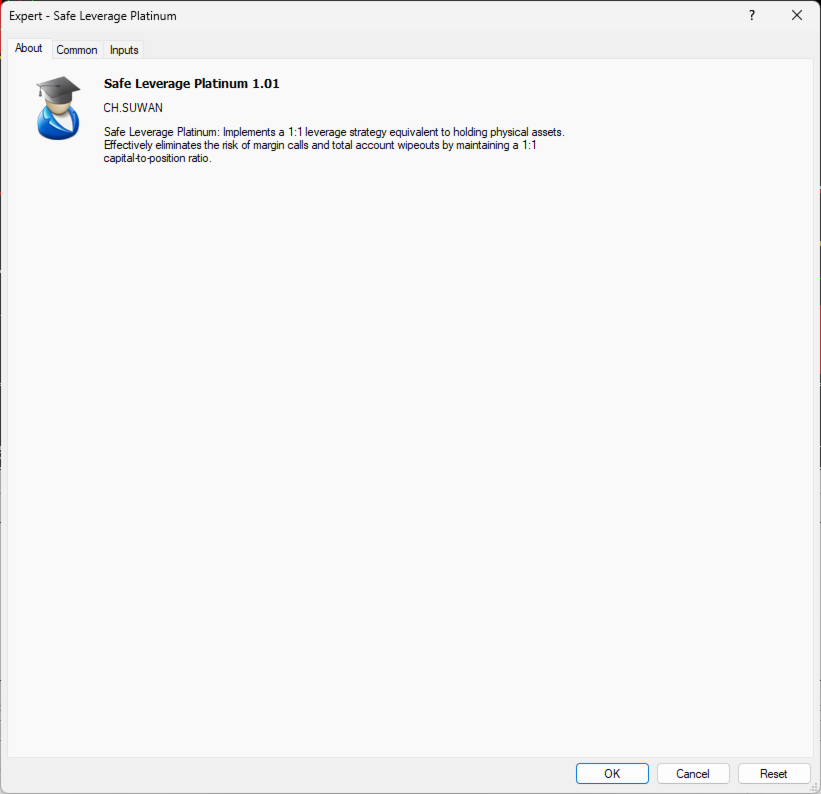
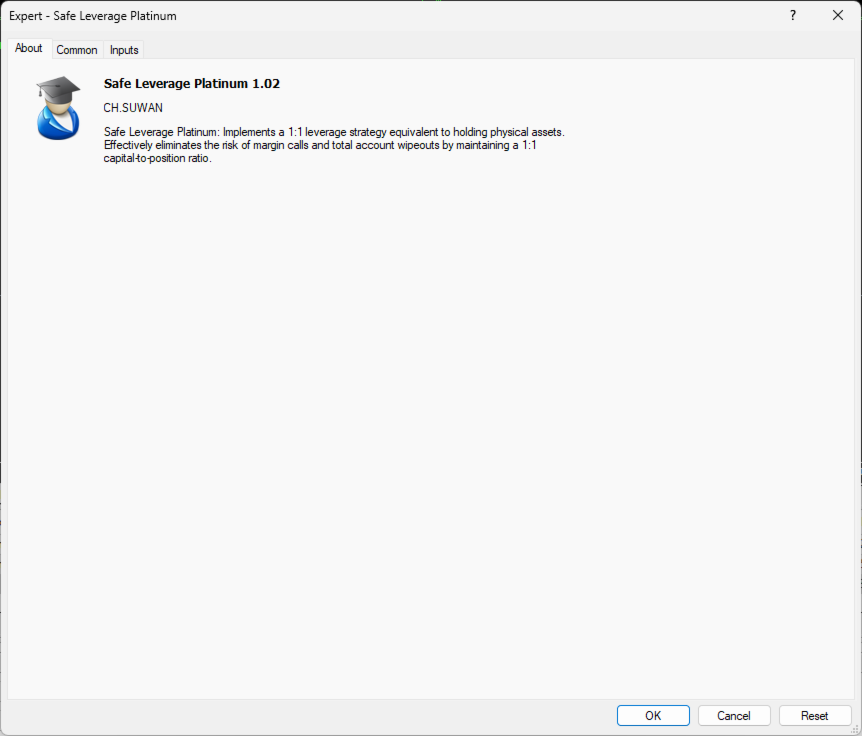
👑 SAFE LEVERAGE PLATINUM

The Flagship Generation of Professional Risk Management

Version 1.2
Updated: June 2026
Activations: 10

💎 The Evolution Beyond Safe Leverage Pro

Safe Leverage Platinum is not a simple software update.

It is the flagship generation of the Safe Leverage family—redesigned from the ground up with a new architecture, smarter risk controls, and professional portfolio management capabilities.

While Safe Leverage Pro focused on reliable 1:1 leverage management, Platinum transforms the entire trading experience into a complete risk management ecosystem for serious traders.

This is not merely a better version.

It is a new class of trading technology.

🚀 Why Upgrade to Platinum?

Safe Leverage Platinum introduces a completely new level of flexibility, automation, and portfolio protection.

Whether you trade manually, operate multiple Expert Advisors, or manage large accounts, Platinum provides tools that were never available in previous editions.

💎 Platinum Exclusive Features

🛡 Independent Buy & Sell Magic Number Architecture

Buy and Sell positions are managed independently using dedicated Magic Numbers.

This architecture allows cleaner portfolio management and safer operation when multiple strategies run simultaneously.

⚙️ Professional Multi-EA Compatibility

Run multiple Expert Advisors inside the same trading account without conflicts.

Each EA can manage only its own positions while remaining fully isolated from others.

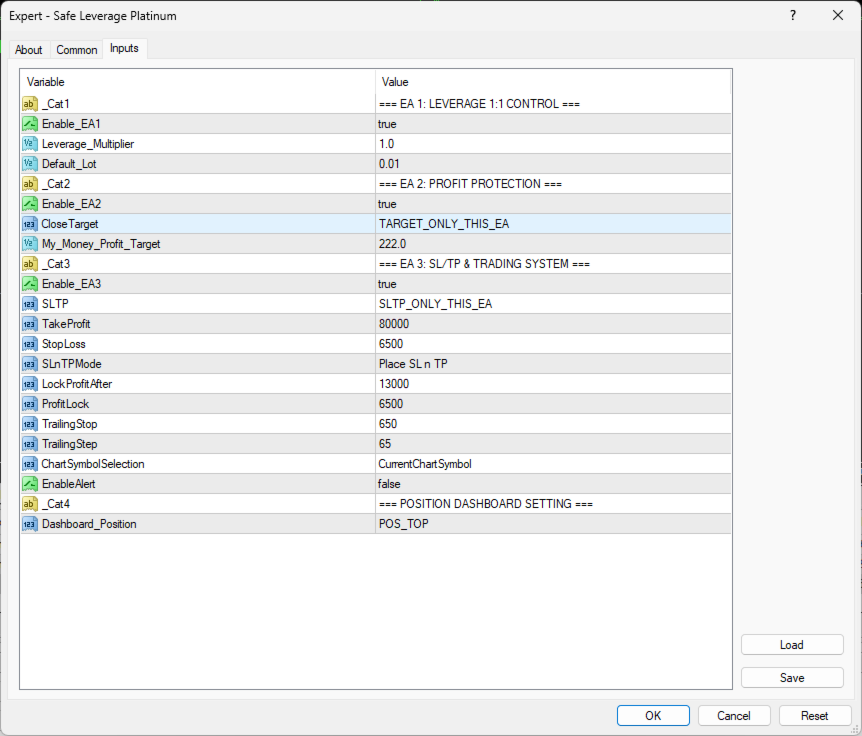
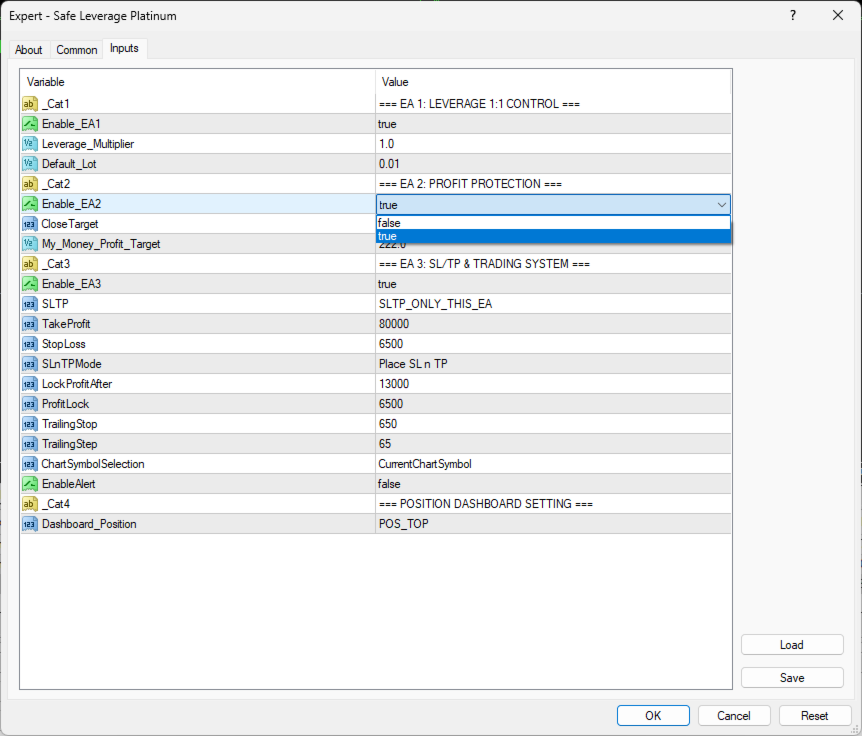
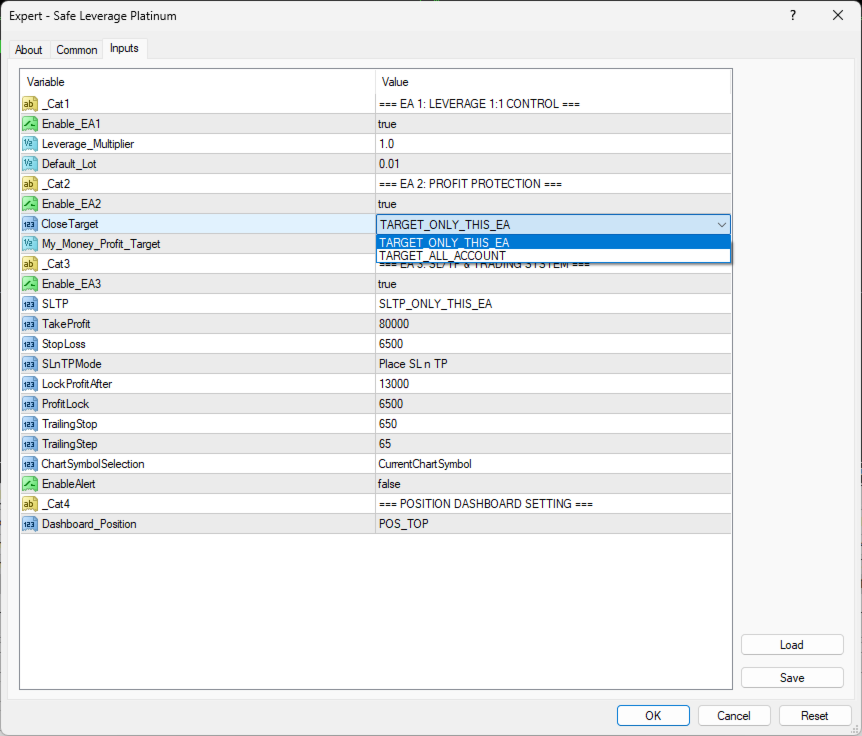
💰 Intelligent Profit Protection

Profit Protection is now fully customizable.

Choose whether to manage:

✔ Only This EA

or

✔ Entire Trading Account

Ideal for traders who combine automated strategies with manual trading.

🎯 Advanced SL / TP Management

Stop Loss

Take Profit

Lock Profit

Trailing Stop

can now operate independently with selectable management modes:

✔ Only This EA

✔ Entire Account

Providing maximum flexibility for every trading style.

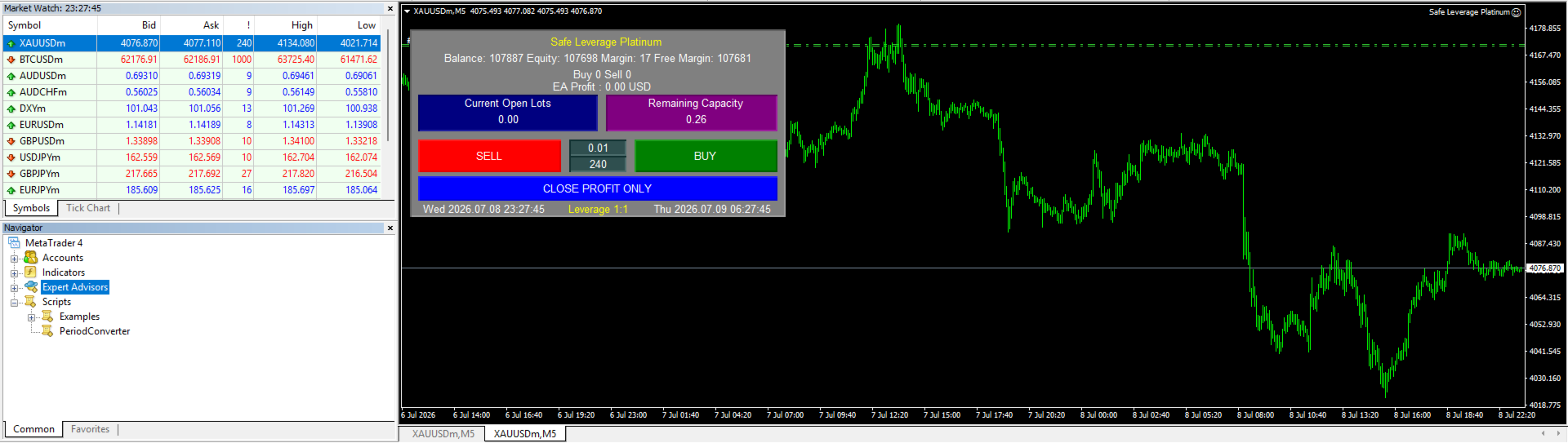
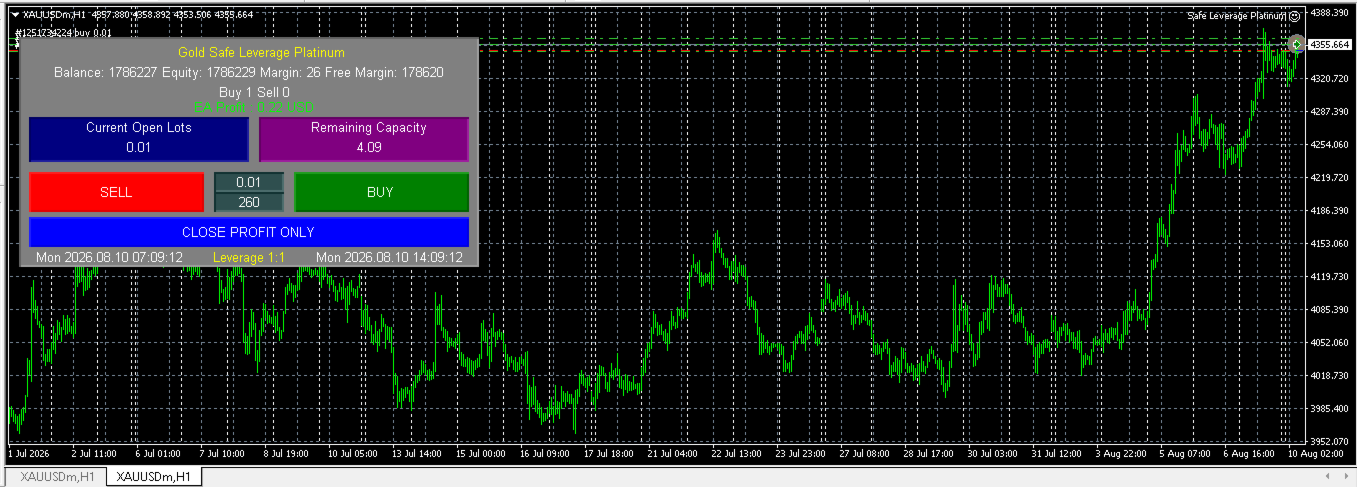
📊 Dedicated EA Performance Dashboard

A completely redesigned monitoring system displaying:

• EA Profit (This EA Only)

• Current Open Lots

• Remaining Capacity

• Buy / Sell Positions

• Leverage Status

• Trading Capacity

All information is presented in real time with a clean professional interface.

⚡ Optimized VPS Performance

Built for continuous 24/7 execution.

Ultra-lightweight architecture minimizes CPU and memory usage while maintaining high execution speed and stability.

🏆 5 Professional Trading Engines

⚖ 1:1 Leverage Control Engine

Maintain healthy leverage ratios and prevent excessive exposure.

💰 Intelligent Profit Protection Engine

Automatically secure profits according to your predefined objectives.

🛡 Advanced SL / TP Engine

Flexible Stop Loss, Take Profit and Hidden Protection modes.

📈 Smart Trailing Stop Engine

Precision trailing algorithm that protects profits while allowing positions to grow.

🖥 Professional Trading Dashboard

Real-time monitoring system designed for fast decision making.

💼 Designed For Professional Traders

Safe Leverage Platinum is designed for traders who demand:

✔ Maximum Capital Protection

✔ Professional Risk Management

✔ Multi-EA Portfolio Trading

✔ VPS Stability

✔ Flexible Money Management

✔ Institutional-Level Trading Workflow

Whether you manage a single strategy or an entire portfolio, Platinum adapts to your trading style.

⭐ Why Choose Platinum Instead of Pro?

Safe Leverage Pro established the foundation.

Safe Leverage Platinum elevates it to a completely different level.

It delivers:

✔ More flexibility

✔ More automation

✔ More control

✔ More compatibility

✔ Better portfolio isolation

✔ Enhanced monitoring

✔ Cleaner user experience

✔ Professional-grade architecture

This is the premium edition built for traders who expect more than ordinary money management.

🔷 Safe Leverage Family

🥈 Safe Leverage Pro

Professional 1:1 Leverage Management

⬇

🥇 Safe Leverage Platinum

Complete Professional Risk Management Platform

⚠ Disclaimer

Safe Leverage Platinum is a professional trading management and risk management platform.

Trading performance depends on market conditions, user settings, and trading decisions.

The software is designed to assist traders in managing risk more efficiently but does not guarantee profits or eliminate trading risk.

Always test new configurations on a Demo account before trading with real funds.


おすすめのプロダクト
This is a semi-automatic Expert Advisor. A user draws a support or a resistance line in the form of a horizontal line or a trendline on a chart. A command in the format of UP|DN_xxxx:yyyy is specified in the line name; the Expert Advisor understands it as a signal to buy or sell setting a stop loss and a take profit. EA settings include a parameter with a lot size and a value for moving stop loss to breakeven. If stop loss = 0, the EA does not use breakeven. If this parameter is greater than zer
TPSpro リスクマネージャー   は、あらゆるトレーニングとあらゆる資本のトレーダーを対象とした、専門的なリスク管理のユニークなシステムです。取引における損失や取引における重大なミスを回避できます。 TPSpro Risk Manager は、主にスキャルパーやデイトレーダーのリスク管理に必要ですが、あらゆる取引スタイルのトレーダーによって問題なく使用されています。 パネルには 3 つの列があり、それぞれに役立つ情報が含まれています。 最初の列には、当月初めの時点でのアカウントに関する情報が表示されます。つまり、全体的な結果がパーセンテージと入金通貨で表示されます。 2 番目の列には、設定で指定されたその日のリスクが表示されます。 3 番目の列には、現在のアカウントの状況が表示されます。 指定されたリスクを 1 日超えた場合、または注文数を超えた場合、アドバイザーはすべての注文を閉じ、新しい注文のオープンを許可しないため、トレーダーを「感情的な取引」から保護します。 「リスクマネージャー」を使用すると、次のパラメータに従って取引を制御できます。 1日あたりの損失限度額 残高損失
MQL5ブログ: https://www.mql5.com/en/blogs/post/761446 MT4版: https://www.mql5.com/en/market/product/136790 MT5版: https://www.mql5.com/en/market/product/136791 Time Wizardは、スピード、タイミング、そして執行コントロールを一つの洗練されたダッシュボードで実現したいトレーダーのために開発された、プロフェッショナルなトレーディングアシスタントです。 このエキスパートアドバイザーは、イベントベースのトレーディング、スケジュール執行、そして高速な半自動注文管理のために設計されています。注文を事前に準備し、正確な執行時間を設定し、複数の指値注文を発注し、ストップロスとテイクプロフィットでリスクを管理し、チャート上のコンパクトなインターフェースからすべてを監視できます。 経済イベント、セッション開始、ブレイクアウト、あるいは独自のカスタムスケジュールなど、どのようなタイミングで取引を行う場合でも、Time Wizardは構造と規律に
Virtual Exchange Reserve Equity Monitor In an environment where exchanges offer increasingly high leverage ratios, it is all the more important for traders to tightly regulate their level of equity .  This software is designed to be run in the background on any virtual private server that can run Meta Trader 4/5.  It implements basic equity control functions ahead of the broker---allowing users to set their own equity trailing stop, an equity limit to lock-in a certain profit margin, and a unive
FREE
「Binary Lab Simulator」は、トレーディング戦略の練習と検証のために設計されたツールです。 このツールは24時間365日動作し、30秒、1分、3分などの様々な有効期間をサポートし、実際の取引に近い環境を提供します。 外部ツールとの互換性があり、エントリー結果を分析できます。 複数のテンプレートを簡単に保存でき、オンライン環境からシミュレータへのシームレスなテストが可能です。 単独でも使用できますが、「SpeedManager」、「Practice Simulator Sync」、「ArwByIdx」と組み合わせることで機能が向上します。 「SpeedManager」は指定されたエントリーで自動停止を行います。 「Practice Simulator Sync」は他の時間枠や通貨ペアとのチャート同期を可能にします。 「ArwByIdx」は外部インジケーターやシグナルツールと連携し、自動でエントリーをリンクします。 シグナルツールと連携すると、指定された取引回数後のエントリー、クローズ、または自動停止をサポートします。 連勝/連敗数を追跡したり、取引結果の画像を保存した
In Forex trading, the 1-day relative performance statistic gives an overview of the movements of various currency pairings in a single day. For traders who want to quickly make trading decisions and comprehend short-term market movements, this statistic is essential. Here's a thorough explanation of the 1-day relative performance, its importance, and a closer look at several particular Finviz cases. Understanding 1-Day Relative Performance The percentage change in a currency pair's value between
Market Monitor
Rodrigo Rethka Goncalves
Market Monitor – Smart Asset Performance Dashboard for MT4 Turn your MetaTrader 4 into a professional trading intelligence center! Market Monitor is a powerful monitoring tool that displays, in real time, the most relevant performance metrics of each symbol being traded — helping you make faster, smarter, and more strategic decisions. What Does This Indicator Do? Market Monitor scans all open and historical orders, consolidates the data by symbol, and displays everything in visual pa

この 2 in 1 トレード マネージャーは、ローソク足のブレイクアウト取引に最適です。プルバック時に追加の指値注文を行うことで、取引のコストを平均化できます。これにより、すべてのポジションで最高の価格が得られ、勝利でより高い RR が得られます。リスクは、最後に閉じたローソク足の高さによって計算されます。取引アシスタント ボタンは、手動で発注されたすべての注文を管理するのに役立ちます。 任意の入力方法で使用します。価格アクションまたはインジケーター、およびあらゆる取引スタイルに対応。スキャルピング、日中取引、またはスイング取引。 特徴: 指値注文を使用してローソク足のブレイクアウトを取引します。 特別なコスト平均機能により、勝ちトレードの RR が増加します。 一度に受け付ける注文数を制限し、過剰取引を減らします。 ローソク足の時間枠ごとにリスクを計算し、ストップロスを設定するユニークな機能です。 テイクプロフィットを設定し、RRで部分利益を確保します。 ワンクリックでストップロスをエントリーに移動します。 ワンクリックで部分的なポジションをクローズします。 毎日の利益または損
Live Forex Signals サイト信号での取引用に設計されています   https://live-forex-signals.com/en   と https://foresignal.com/en . Live Forex Signals for MetaTrader 5  https://www.mql5.com/ru/market/product/81448 パラメータ サイトへのサブスクリプションを持っている場合は、ユーザー名とパスワードlive-forex-signals.com/foresignal.com サブスクリプションがない場合は、フィールドを空のままにします; オープンされているお得な情報へのコメント リスクリスクは、取引のための預金の割合として、リスク=0の場合、値ロットが使用されます 取引のためのロット固定ボリューム UseTakeProfitは、サイトから利益を取る使用します 当サイトからのご利用停止のご案内 F r e c h encysignalupdateinminute顧問のサイトへの訪問頻度を指定します MaximumSpreadFo
RISK CALCULATOR We've all been there where you're not sure what lot size to enter.  This can be a hassle, especially if you're a scalper and you need to move fast.  This is a very simple and quick risk calculator that automatically puts in the the correct lot size for any market (including Gold, US30, etc... it doesn't matter). Simply drag it onto your chart in MT4 and place your trade.  I just remove it once the trade is placed and move onto the next trade. 1. Make sure you save it to Expert A
Hedge Trader is a panel that helps traders who use the hedging strategy in their trading. The panel style in simple and intuitive, and have the necessary shortcuts a fast trader would need for fast order execution. Features: - Auto double the lot after executing an order. The user only specifies the initial order, then the panel will automatically double the lot after an order execution. - Using basket for auto closing all orders on a predefined floating profit (with the possibility to turn it
SESSION PILOT MT4 – MARKET SESSION & NEWS FILTER Session Pilot is an intelligent filtering tool designed to focus trading activity on the most liquid market sessions and avoid trades during high-volatility news events. The system continuously monitors current time and upcoming economic announcements. MAIN FEATURES • Automatic detection of London, New Y
Risepanel
Hossein Ahmadi Beni
1 (1)
Risepanel helps you open positions, close positions and analyze currencies. It works any time frame. For calculations to be correct, your account currency must be USD, EUR or GBP. Features Market information. Orders and Pending Orders (Stop & Limit). 8 kinds of Pending by trend line. Specifications and Margin Calculation Required by Buy or Sell. Calculate and determine Stop Loss by pip, currency pair price, monetary value and percentage of risk. Calculate and determine the take profit by pip, t
TradeGram Pro MT 4 – Trading Monitoring & Telegram Assistant Launch Price: 49 USD (Limited to the first 30 buyers) Regular Price: 149 USD Your 24/7 Trading Control Center TradeGram Pro connects your MetaTrader 4 to Telegram for  real‑time monitoring  and  automatic alerts when the drawdown reaches thresholds you have defined . Ideal for algorithmic trading on a VPS and for manual traders who need instant alerts on mobile. Conceived to  facilitate the monitoring of your challenge‑style accoun
QuickClose: Instant Order Management Made Simple QuickClose   allows you to instantly close all orders with a single click. It operates at high speed, giving you the flexibility to close orders for a specific symbol or all symbols at once. This makes trade management significantly faster and more efficient. This   Expert Advisor can swiftly close all buy and sell orders either for a selected symbol or across all trades. The   SymbolButton is specifically designed for order closure, featuring bo
Time-Based Auto-Close Order Management Tool (MT4) — Technical Description Overview This is an automated order management EA based on time-algorithm logic. Its core function is to automatically execute preset closing operations when user-defined holding periods expire, aiming to help traders enforce predetermined rules mechanically and reduce emotional interference. Core Closing Modes Closing Mode Functional Definition Close All Closes all eligible positions when the set time is reached. Close
CAPITAL-BASED TRADING APPROACH When properly configured, my EAs and trading tools are designed to base their capital and position-sizing calculations on actual account funds, without using leverage to increase calculated trading capacity. This approach is intended to support more conservative capital management and reduce reliance on leveraged exposure, with a focus on long-term trading stability and disciplined risk management. Trading always involves risk. No trading system can guarantee
Trade Closer Set a trade and only have a profit target in mind?  Drag onto the pair of choice, enter your profit target into the box and you're good to go. No need to set a Take profit anymore Your trade will be closed for you once the profit target is hit and will send an alert to your account. Disclaimer: Only works on the windows version of MT4 and only when the computer terminal is active
HFT FAST SCALPING EA the High Frequency Trading which use stop orders to enter the trades when market is trending. best use for 1- Low slippage brokers for us30 and DE40 . 2- LOW OR ZERO COMMISSION BROKERS FOR EUR AND GOLD. 3-Prop firms like ftmo ,tff,.......etc This EA UNLIKE Other HFT EAs , You can see that in the parameters ,, CHOOSE LOT SIZE , MAX LOT , CHOOSE TIME , COMMENT AND OTHERS . IT STOPS 3 MINUTES AUTOMATICALLY EVERY 15 MINUTES TO PROTECT THE EQUITY FROM A BIG UNWANTED SLIPPAGE .
Money Flow Profile MT5 HERE   Here   our more valuable tools SMC Trend Trading   ,  Easy SMC Trading  ,  Institutional SMC Architect Volume Analysis Tools  ,  Volume flow Profile  ,  Market volume profile  , FVG with Volume  , Liquidity Heatmap Profile  ,  Volume Spread Analysis This Master Edition is engineered for clarity and speed, featuring a unique Auto-Theme Sync system that instantly beautifies your chart layout upon loading. Key Features: True Money Flow Calculation: Goes beyond stand
Volume Profile Rectangle 概要 インタラクティブな 出来高プロファイル指標 で、選択したエリア内の各価格レベルにおける取引量の水平方向分布を表示します。自動的に移動可能な長方形を作成し、買い優勢と売り優勢の出来高分布を色付きバーで視覚化します。 機能概要: 水平出来高の表示 :各価格レベルの出来高分布を水平バーとして表示 強気/弱気分析 :強気(買い)優勢を緑、弱気(売り)優勢を赤で表示 インタラクティブな長方形 :選択範囲の長方形を動かすと自動で再計算・更新 自動生成 :起動時にデフォルトの長方形を自動作成し、すぐに使用可能 動作原理: エリア選択 :長方形(自動または手動で作成)で分析範囲(時間+価格)を指定 出来高分布 :価格範囲を複数のレベルに分割(解像度設定可能)し、選択されたローソク足の出来高を分配 スマートカラーリング :各価格レベルで買いと売りのどちらが優勢かを判定 動的表示 :チャートの移動、ズーム、スクロール時にバーが自動的に再描画 オプションフィルター :ローソク足の実体またはヒゲを基準にフィルタリング可能(垂直フィルター) 主な設定: 長
Expert Advisor for MT4 Useful utility MUST have for all traders.  With 1 click button, you're able to close all your open positions. Its come with a warning pop up notification when you click to close all your trades, to avoid an accident press the button. Just press 'Yes' to confirm or 'No' to cancel it. The expert will close all your open positions no matter what pairs you currently open or directions. Just attach the expert on 1 of your chart, and you're good to go.
インディケータは現在のクオートを作成し、これを過去のものと比較して、これに基づいて価格変動予測を行います。インジケータには、目的の日付にすばやく移動するためのテキスト フィールドがあります。 オプション: シンボル - インジケーターが表示するシンボルの選択; SymbolPeriod - 指標がデータを取る期間の選択; IndicatorColor - インジケータの色; HorisontalShift - 指定されたバー数だけインディケータによって描画されたクオートのシフト; Inverse - true は引用符を逆にします。false - 元のビュー。 ChartVerticalShiftStep - チャートを垂直方向にシフトします (キーボードの上下矢印)。 次は日付を入力できるテキストフィールドの設定で、「Enter」を押すとすぐにジャンプできます。
Paid release: Cumulative Delta Flow MT4 is a paid MetaCoderStore indicator. Use the product comments for setup questions, feature requests, and feedback for future updates. Cumulative Delta Flow MT4 is a separate-window tick-volume flow oscillator for MetaTrader 4. It estimates signed buying and selling pressure from candle position, candle direction, and tick volume, then plots a cumulative delta line with a signal line and divergence markers. Use it to spot: Positive and negative tick-volume p
This tool monitors your current Expert Advisors and manages stop losses and take profits. You can customize which EAs and/or which currencies to monitor. It is primarily meant for EAs that you feel manage stop losses and/or take profits poorly. If you want this tool to be able to monitor manual trades, please use '0' (zero) as the magic number. Supports hidden stoploss and take profit Supports ATR-calculated dynamic stoploss Supports Breakeven for individual trades Supports Trailing stop Lower r
The ultimate tool for Prop Firm traders. Automatically closes trades before weekends/swaps and reopens them later. Features spread protection, CSV crash recovery, and multi-schedule support. Swap Shield is a professional utility designed specifically for traders dealing with Proprietary Trading Firms (Prop Firms) rules and those looking to avoid negative Swap fees. Many Prop Firms strictly prohibit holding positions over the weekend. Failing to close trades can lead to the immediate loss of you
自動ブレークイーブンレベル この   ユーティリティを   使用 すると、   取引が所望の利益に達したときに自動的にSLを移動する機能を有効にできます。 特に   短期   トレーダー   にとって重要です。   オフセットオプションも利用可能です:一部の利益を保護できます。 多機能ユーティリティ : 66以上の機能、このツールを含む  |   質問がある場合は連絡してください   |   MT5バージョン 自動ブレークイーブン機能の有効化プロセス: 1.   シンボルまたは取引を選択   Auto BE機能を有効にする対象: 現在の   [Symbol]   / すべての取引   [ALL]   / または特定の取引   [Ticket] . [Symbol]または[ALL]ルールに加えて - 特定の取引に個別のルールを設定できます, チケット番号により: 個別の[Ticket]ルールが優先されます. 2. Auto BEを有効にする   取引タイプ   を選択: [ALL]: すべての有効な取引; [Longs]: 買い取引のみ; [Shorts]: 売り取引のみ; 3.  
FLUXION — Trade Manager Panel for MT4 A fast, native on-chart trading panel. No DLLs, no external files — just attach it to a chart and take full control of your trades. Fluxion turns any MetaTrader 4 chart into a complete trade-management cockpit. Open, average and manage positions with one click, drag your Stop-Loss and Take-Profit directly on the chart, and always see exactly what every level is worth in your account currency. Built for scalpers, day traders and anyone who manages positio
Spread Costs refers to the amount of the loss caused by the spread, and Swap Benefits refers to the amount of the income gained by overnight positions. Spread Costs is an important indicator for short-term traders, especially for scalping traders, and Swap Benefits is an important indicator for long-term traders. Since the spreads and swaps on the MetaTrader 4 platform are all expressed in points, we need to convert it into the amount expressed in the account currency. This tool can display the
このモジュールは、Practice Simulator と同期して、チャートの時間と位置の情報を表示します。同じ通貨ペアだけでなく、さまざまな時間枠や異なる通貨ペアの同期チャートも表示します。 注: このモジュールは単独では機能しません。 「 Practice Simulator 」が必要です。 Practice Simulator https://www.mql5.com/ja/market/product/98348 2 つの同期モードが利用可能です。 簡易同期モード: 同期したいチャートを開いてこのツールを挿入することで、同期されたチャートを簡単に作成できます。 チャートが指定した位置に移動され、部分的に非表示になります。 そのため、チャートがチャート シフトやサブウィンドウなどに表示される場合があります。 アクティブ同期モード: オフライン チャートを使用して、同期用のチャートを作成します。 このプロセスはより複雑ですが、ライブ チャートとほぼ同じように機能します。 詳しい設定情報については、ここをクリックしてください。 https://
FREE
このプロダクトを購入した人は以下も購入しています
The FFx Hidden Manager panel will help you to manage easily your orders directly on the chart. Below all features described: TP, SL and TrailingStop are hidden Each order has its own lines on chart Drag & Drop any line to change the TP/SL as per your need Option to move automatically the SL line at breakeven when TP #1 is reached Option to choose the TP/SL type (by pips or price) Option to choose the TrailingStop type (by pips, MA, Fractals, PSAR or ATR) Define which order(s) you want to manage
FFx Risk Calculator panel will help you to calculate very easily your trades size, SL or the risk directly on the chart. All features are described below: Option to select which parameter to calculate: Risk, Stop Loss or Lot Size The panel will show if the lot size is allowed according to the current account free margin Button to maximize/minimize the panel Drag and Drop the panel anywhere on the chart How to use it? Select the parameter you want to be calculated. It will be based on the 2 other
The FFx Watcher PRO is a dashboard displaying on a single chart the current direction of up to 15 standard indicators and up to 9 timeframes. It has 2 different modes: 1. Watcher mode: Multi Indicators User is able to select up to 15 indicators to be displayed User is able to select up to 9 timeframes to be displayed 2. Watcher mode: Multi Pairs User is able to select any number of pairs/symbols User is able to select up to 9 timeframes to be displayed This mode uses one of the standard indicat
This Stacker EA will: Automatically set Stop loss on a new order Automatically set Take profit on a new order Stack (or open up to 4 additional orders at the same time) when a new order is placed, the SL/TP can be preset individually for each order. Provides a transparent replacement for the standard 1-click trading buttons in MetaTrader 4 (1 click still works and SL/TP will automatically be set as well as Stacking). Automatically calculate lot order size according to preset risk management perc
This program is created by algorithm which economy based logic in the trading market. 1. The program able to work with all of currency and trading items  2. Take profit and loss are basically handled by EA program Recommendation: EUR_USD is the most preferred. Please use this program only for MT4. LOT should be managed depends on own deposit. Otherwise, high risk will be driven(e.g 0.1~0.2 lot is recommended when the deposit is 10,000 dollar)
The EA is used as an assistant for traders in the Trading Masters group.  The EA assists with identifying setups when taking trades using the strategies outline in the Trading Masters Group.  The EA has been developed and is intended for use by community members who understand the concepts and would like assistance navigating trade setups.  It is recommended to first understand the concepts presented in the Trading Masters group before purchasing this EA so the user can understand and benefit fr
HURRICANE EA is a compilation based on the volatility unique to XAUUSD (GOLD), which is a trading tool with simple internal operation logic but not ordinary, which uses martingale + hedging + trending as a set of operating modes. Expert was born by collecting and learning a large amount of historical data, combined with the characteristics of the variety and using it countless times to test the market. Please do not believe that there will be any complex algorithm in the market that can accurate
Note: After installation, please go to Tools>Options>Expert Advisors and add https://porsaj.com to 'Allow WebRequest for listed URL'. Still Problem?! Please check Internet connection! Sentiment is a vital gauge that provides traders and investors with valuable insights into their perceptions of the market and the broader economy. It serves as a reflection of their collective outlook, emotions, and expectations regarding future price movements and economic conditions. Porsaj is a powerful plat
Note: After installation, please go to Tools>Options>Expert Advisors and add https://porsaj.com to 'Allow WebRequest for listed URL'. Still Problem?! Please check Internet connection! An economic calendar in the context of forex refers to a tool or resource that provides information about upcoming economic events, indicators, and data releases that can potentially impact the financial markets, particularly the foreign exchange market. It helps traders stay informed about key economic announce
Dedicated for FTMO and other Prop Firms Challenges 2020-2024 Trade only GOOD and checked PROP FIRMS  Default parameters for Challenge $100,000 Best results on GOLD and US100  Use any Time Frame Close all deals and Auto-trading  before  US HIGH NEWS, reopen 2 minutes after Close all deals and Auto-trading  before Weekend at 12:00 GMT+3  Friday Recommended time to trade 09:00-21:00 GMT+3 For Prop Firms MUST use special Protector  https://www.mql5.com/en/market/product/94887 ---------------------
We offer: - Every day signals on EURUSD, XAUUSD (Gold), XAGUSD, GBPUSD, CADJPY, USDJPY, USDCHF, AUDUSD, AUDNZD, NZDUSD, USDCAD, ... - We offer evaluated signals and you can see the signals with rank of signal providers based on their history Note: After installation, please go to Tools>Options>Expert Advisors and add https://porsaj.com to 'Allow WebRequest for listed URL'. Still Problem?! Please check Internet connection! More explanation: Forex and crypto signals are tools used by traders to
Note: After installation, please go to Tools>Options>Expert Advisors and add   https://porsaj.com   to 'Allow WebRequest for listed URL'. Still Problem?! Please check Internet connection! Unlock the power of cutting-edge technology with Porsaj Artificial Intelligence Bot, your trusted Expert Advisor for MT4. Designed to revolutionize your trading experience, this advanced bot combines sentiment analysis, technical analysis, and harmonic patterns, all driven by the incredible capabilities of art
Note: After installation, please go to Tools>Options>Expert Advisors and add   https://porsaj.com   to 'Allow WebRequest for listed URL'. Still Problem?! Please check Internet connection! Unveiling the Porsaj Scalper: Your Cutting-Edge MetaTrader 4 Utility for Precision Scalping Are you ready to take your forex trading to the next level? Look no further than the revolutionary Porsaj Scalper – a MetaTrader 4 utility designed to empower scalpers with the tools they need to thrive in the fast-pac
ADAM for FTMO 40
Vyacheslav Izvarin
5 (1)
ADAM EA Special Version for FTMO  Our 1st EA created using ChatGPT technology Trade only GOOD and checked PROP FIRMS  Default parameters for Challenge $100,000 Tested on EURUSD and GBPUSD only  Use 15MIN Time Frame Close all deals and Auto-trading  before Weekend at 12:00 GMT+3  Friday For Prop Firms MUST use special Protector  https://www.mql5.com/en/market/product/94887 ----------------------------------------------------------------------------------------------------------------------------
CandleStyx
Guillaume Xavier Andre Turlier
MT4 trading tool. Intuitive Dashboard that allows effortless automated trading, saving 99 Strategies , Advanced Money Management , Automatic group orders :  Global Take Profit / Stop Loss, Smart TP (Multi-Level, Position Recovery) and Smart SL (Breakeven, trailing Stop, Multi-Level), Exit Manager , Signals, Strength Indicator , ATR Graph, Price Alert, News Warning…  # If you have any other requirements or are interested in collaboration, please contact (info@styxia.com)   Get more information
Safe Hedge Robot MT4
Mohammadhossein Yoosefiizad
FULL AUTOMATED ROBOT :  HEDGE ON TWO INDEX OR SHARERS : For get optimize SET file , send massage to me on WhatsApp    FTMO  200K challenge live link. NOW.   FTMO  10K challenge link. PAST.   FTMO   100K challenge link. PAST.   Because this robot performs hedging on TWO INDEX OR SHARERS at the  Same Time , it is not possible to backtest.  A special robot for the forex market whose strategy is to simultaneously open two positions on two indices with a high correlation coeffici
Hello , Most people fail in trading because they use general strategies, trading should follow your own basics Being unique is the best strategy I am MaxlumFX, a trader who uses Microsoft Excel I have been using it for years and the profits are realistic simple Follow the trade with Correlation Trigular for Analyst 1 Pair I share this file as your trading analysis Contact me for Excel file T.me/MaxlumFX
Copiador MT4
Luciana Andrea Maggiori
Copiador – La Mejor Herramienta para Copiar Operaciones en MetaTrader 4 Este no es un simple copiador de operaciones que únicamente permite copiar transacciones de forma local entre diferentes cuentas de MetaTrader 4 en cualquier dirección y cantidad. ¡Por supuesto que lo hace! ¡Pero Copiador hace mucho más! Descubre sus características y beneficios a continuación FUNCIONALIDADES DESTACADAS: Copiado entre brokers diferentes : Puedes copiar operaciones desde una cuenta en un broker
Welcome to Positive Grid — the strategy behind our real-time Telegram signals. This video shows how the cycle works from start to finish, including: • Opening Buy/Sell at the same price • Grid expansion every 20 pips • Mini trades every 10 pips • Pending order logic (“5=5”) • Profit target and cycle restart ⸻ Profit Potential (Per Cycle): Most cycles involve 6 to 30 trades, depending on market movement: • 0.01 lot = $4.00 profit target • 0.10 lot = $40.00 profit target • 1.00 lot = $400.00 pr
Magic Point Calculation System Support, resistance, target position... Use scientific calculations to help your trades Find the corresponding and low points Through our observation of the current chart, find the corresponding high and low points Enter the high and low points and calculate Enter the high and low point at the corresponding positions and click calculate to get the support, resistance, target, etc. Pre-order and wait for the result Pre-order at the price calculatedthe risk of ext
Exp COPYLOT CLIENT for MT4
Vladislav Andruschenko
4.69 (65)
MetaTrader 4向け 高機能トレードコピーソフト MetaTrader 4 用の、高速・安定・高機能なトレードコピーソフトです。 COPYLOT は、 MetaTrader 4 と MetaTrader 5 間でFX取引をコピーでき、さまざまな口座タイプや運用スタイルに合わせて柔軟に同期できます。 COPYLOT MT4版の対応コピー方式: MetaTrader 4 → MetaTrader 4 MetaTrader 5 Hedge → MetaTrader 4 MetaTrader 5 Netting → MetaTrader 4   MT5版 詳細説明 + DEMO + PDF 購入方法 インストール方法 ログファイルの取得方法 テストと最適化の方法 Expforexの全製品 MetaTrader 5版 を使えば、 MetaTrader 5 → MetaTrader 5 および MetaTrader 4 → MetaTrader 5 のコピーにも対応します: COPYLOT CLIENT for MT5 COPYLOT は、2台、3台、さらには10台規模のターミナル環境でも
Trade Assistant MT4
Evgeniy Kravchenko
4.43 (197)
取引 ごとのリスクの 計算、新規注文 の 簡単 な 設置、部分的 な 決済機能 を 持 つ 注文管理、 7 種類 のトレーリングストップなど 、便利 な 機能 を 備 えています 。 追加の資料と説明書 インストール手順 - アプリケーションの手順 - デモアカウント用アプリケーションの試用版 ライン機能 チャート上にオープニングライン、ストップロス、テイクプロフィットを表示します。この機能により、新規注文を簡単に設定することができ、注文を出す前にその特徴を確認することができます。   リスク計算 リスク計算機能は、設定されたリスクとストップロス注文のサイズを考慮して、新規注文のボリュームを計算します。ストップロスの大きさを自由に設定できると同時に、設定したリスクを守ることができます。 Lot calc ボタン - リスク 計算 を 有効 / 無効 にします 。 Risk フィールドでは 、必要 なリスクの 値 を 0 から 100 までのパーセンテージまたは 預金通貨 で 設定 します 。 設定」 タブで 、 リスク 計算 の 種類 を 選択 します :「 $ 通貨」、「 % 残
Local Trade Copier EA MT4
Juvenille Emperor Limited
4.96 (111)
Local Trade Copier EA MT4 は、同一の Windows PC または Windows VPS 上で稼働する複数の MetaTrader 4 口座間で、取引をコピーおよび管理するための高速で柔軟なトレードコピーツールです。 ローカルでの取引同期に加え、Receiver 側でロットサイズ、リスク管理、取引フィルター、シンボルマッピング、取引管理、口座保護を個別に設定できます。 Transmitter と Receiver のターミナルは約 1分 で設定でき、同一ブローカーまたは異なるブローカーの口座間で、手動取引や EA による取引をコピーできます。適切な条件下では、ローカルの MetaTrader ターミナル間で取引情報を 0.5秒未満 で同期できます。実際の約定速度は、ブローカーのレイテンシー、ネットワーク状況、PC/VPS の性能、ターミナルの負荷によって異なります。 ご購入前に無料デモをお試しください Local Trade Copier EA MT4 の完全機能版無料デモ を、MT4 デモ口座で 1回につき4時間 テストできます。 Local Trad
Trade Manager EAへようこそ。これは、取引をより直感的、正確、そして効率的にするために設計された究極の リスク管理ツール です。これは単なるオーダー実行ツールではなく、包括的な取引計画、ポジション管理、リスク管理のためのソリューションです。初心者から上級者、迅速な実行を必要とするスキャルパーまで、Trade Manager EAはあらゆるニーズに対応し、為替、指数、商品、暗号通貨などさまざまな市場で柔軟に対応します。 Trade Manager EAを使用すると、複雑な計算が過去のものになります。市場を分析し、エントリーポイント、ストップロス、テイクプロフィットのレベルをチャート上のラインでマークし、リスクを設定するだけで、Trade Managerが最適なポジションサイズを即座に計算し、SLとTPをピップ、ポイント、口座通貨でリアルタイムに表示します。すべての取引が簡単かつ効果的に管理されます。 主な機能: ポジションサイズ計算機 :定義されたリスクに基づいて取引サイズを瞬時に決定します。 簡単な取引計画 :エントリー、ストップロス、テイクプロフィットを設定するためのド
Telegram to MT4 Multi-Channel Copier   は、 Telegram と Discord チャンネルのトレードシグナルを MetaTrader 4 へ自動コピーします。ボット不要、ブラウザ拡張不要、手動コピー不要。Telegram や Discord にシグナルが届くと、EA が数秒であなたのターミナルに注文を出します。 さらに、チャンネルをコピーする前に、内蔵バックテスターでそのチャンネルがあなたの口座でどう動いたかを確認できます。 製品は 2 つのコンポーネントで構成されます:Telegram チャンネルを監視する Windows アプリと、MT4 ターミナルでシグナルを執行する本 EA です。MT5 版もあります   こちら . セットアップガイドとアプリのダウンロード:   https://www.mql5.com/en/blogs/post/768988 Telegramのシグナルチャンネルをバックテストする方法 をご覧ください。 現在の価格は今後値上げされます。 仕組み アプリはあなた自身の Telegram アカウントで接続するため、フォロ
TelegramからMT4へ: 究極のシグナルコピーソリューション Telegram to MT4 は、DLLを必要とせず、TelegramのチャンネルやチャットからMetaTrader 4プラットフォームに取引シグナルを直接コピーできる最先端のユーティリティです。この堅牢なソリューションは、比類のない精度とカスタマイズオプションにより、シグナルのシームレスな実行を保証し、時間を節約し、効率性を向上させます。 [ Instructions and DEMO ] 主な特徴 直接的なTelegram API統合 電話番号とセキュアコードで認証します。 ユーザーフレンドリーな EXE ブリッジを使用して、チャット ID を簡単に取得および管理します。 複数のチャネル/チャットを追加、削除、更新して、同時に信号をコピーします。 高度なフィルターによる信号解析 カスタム例外語 (例: 「レポート」、「概要」) を含む不要な信号をスキップします。 柔軟な SL および TP 形式 (価格、ピップ、ポイント) をサポートします。 シグナルが価格ではなくポイントを指定する場合、エントリ ポイントを自動
サポートが必要ですか?設定方法は?ご質問は?こちらでお客様の言語でどうぞ、迅速に返信します: https://www.mql5.com/en/market/product/139089/comments 無料トライアル版ダウンロード Copy Cat More (コピーキャット・モア) MT4 トレードコピー (Trade Copier) は単なるローカルのトレードコピーではありません。今日のトレード課題のために設計された 完全なリスク管理・執行フレームワーク (risk management and execution framework) です。プロップファーム (prop firm) のチャレンジから個人のポートフォリオ管理まで、堅牢な執行、資金保護、柔軟な設定、高度なトレード処理の組み合わせによって、あらゆる状況に適応します。 このコピーは   マスター (Master、送信側) と スレーブ (Slave、受信側)   の両モードで動作し、成行注文・指値注文、トレードの変更、部分決済、そして両建て決済 (Close By) 操作をリアルタイムで同期します。デモ口座と実口
Trade Indicator Assistant is a powerful MT4 utility designed to turn indicators into automated trading systems. Its main feature is the ability to automatically detect an indicator’s   BUY and SELL signal buffers , without requiring you to know the buffer numbers, search through indicator settings, or modify the indicator source code. Bonus Indicator: After purchasing Trade Indicator Assistant, contact me to receive Trade Signal Pro completely free as a bonus indicator. [Download Demo Version]
Trade copier MT4
Alfiya Fazylova
4.62 (37)
Trade Copierは、取引口座間の取引をコピーして同期するように設計された専門的なユーティリティです。 コピーは、同じコンピューターまたはvps にインストールされている、サプライヤーのアカウント/端末から受信者のアカウント/端末に行われます。 購入する前に、デモ アカウントでデモ バージョンをテストできます。 デモ版 こちら 。 詳細な説明は こちら 。 主な機能と利点: MT5ネッティングアカウントを含む、MT4> MT4、MT4> MT5、MT5> MT4のコピーをサポートします。 高いコピー速度(0.5秒未満)。 ベンダーモードと受信者モードは同じ製品内に実装されています。 チャートから直接リアルタイムでコピーを制御できる、簡単で直感的なインターフェイス。 接続が切断されたり、端末が再起動されたりしても、設定と位置が失われることはありません。 コピーするシンボルを選択できます。また、受信者のシンボルを置き換えることもできます(例:EURUSD> USDJPY)。 各シンボルごとにコピーの個別設定を行うことができます。 バックコピーをサポートします。 特定の注文のみのコピー
TradePanel MT4
Alfiya Fazylova
4.84 (95)
Trade Panelは多機能なトレーディングアシスタントです。アプリには手動取引用の50以上のトレーディング機能が搭載されており、ほとんどの取引作業を自動化することができます。 アプリの説明書: https://www.mql5.com/en/blogs/post/756482 デモ口座用アプリの試用版: https://www.mql5.com/en/blogs/post/750865 アプリのインストール方法: https://www.mql5.com/en/blogs/post/756239 アプリをビジュアルモードでテストする方法: https://www.mql5.com/en/blogs/post/770277 VPSのMetaTraderにアプリをインストールする方法: https://www.mql5.com/en/blogs/post/770190 取引。 ワンクリックで取引操作を行うことができます: リスクを自動計算して指値注文やポジションを開く。 複数の注文やポジションをワンクリックで開く。 注文のグリッドを開く。 保留中の注文やポジションをグループごとに閉じる
作者のその他のプロダクト
Special Launch Promotion: $30 (Limited Time Only!) To celebrate our new launch on MQL5, we are offering an exclusive introductory price of $39  for a limited time. Please note that this is a special promotion for our early supporters. The price will be adjusted back to its original retail price of $39  effective from July 31, 2026 . Don’t miss this opportunity to get our professional-grade EA at this special price before it reverts to the standard rate! CAPITAL-BASED TRADING APPROACH When pro
Terminator Close All Utility Slogan: "Unmatched Velocity—Clean Your Portfolio in a Flash. " Product Description: A high-performance utility engineered for professional traders who demand absolute speed in trade management. Developed to eliminate the friction of closing orders one-by-one, this tool is your ultimate weapon in volatile markets where every millisecond counts. Key Features: Instant Execution: Operates the very moment it hits the chart—no confirmations, no delays. Mass Liquidation: Ex
Equity Target Manager – Total Profit Control Utility Slogan: "Total Profit Control—Secure Your Gains Instantly." Product Description: Upgrade your trading game with Equity Target Manager , a high-performance utility engineered for precision Trade Management and absolute Total Account Profit control. Designed for serious traders, this Automation Tool instantly executes a Close All Trades command and clears all pending orders the moment your profit target is achieved. Stop staring at your charts!
CAPITAL-BASED TRADING APPROACH When properly configured, my EAs and trading tools are designed to base their capital and position-sizing calculations on actual account funds, without using leverage to increase calculated trading capacity. This approach is intended to support more conservative capital management and reduce reliance on leveraged exposure, with a focus on long-term trading stability and disciplined risk management. Trading always involves risk. No trading system can guarantee
CAPITAL-BASED TRADING APPROACH When properly configured, my EAs and trading tools are designed to base their capital and position-sizing calculations on actual account funds, without using leverage to increase calculated trading capacity. This approach is intended to support more conservative capital management and reduce reliance on leveraged exposure, with a focus on long-term trading stability and disciplined risk management. Trading always involves risk. No trading system can guarantee s
フィルタ:
レビューなし
レビューに返信