AURA Mtf Candle Timer Monitor
- ユーティリティ
- バージョン: 1.1
- アップデート済み: 29 5月 2026

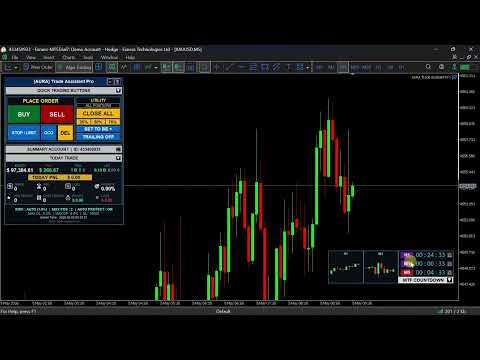
Elevate your trading precision with the ultimate Multi-Timeframe (MTF) Candle Countdown Monitor. Built for professional traders, this indicator is not just a standard timer—it is a powerful, fully interactive dashboard featuring a dynamic mini-chart, custom alerts, and a cutting-edge DPI-Aware Scaling Engine.
Whether you are trading on a compact laptop or a massive 4K multi-monitor setup, this indicator perfectly adapts to your screen, providing a flawless visual experience.
"Simplify your trading, maximize your profits, and eliminate emotional errors by combining this tool with [Aura Trade Assistant Pro]."
Built with advanced Custom CCanvas Rendering, this tool acts as a sleek dashboard that not only counts down the time until the next candle but also visualizes the latest price action through lag-free Mini Charts. It's the perfect companion for scalpers, day traders, and price-action enthusiasts who need to time their entries perfectly.
🔥 KEY FEATURES:
-
High-End DPI-Aware Auto-Scaling: Specially engineered to fully support high-resolution displays (4K/8K) and Windows OS scaling. The UI is exceptionally crisp, and you can freely adjust the panel size using the UI Auto-Scaling input parameter (from 0.5x to 3.0x).
-
Dynamic Mini Chart Integration: Don't just watch the time; watch the trend! Expand the panel to reveal a beautifully rendered, real-time mini candlestick chart displaying price action on your selected timeframes.
-
True Multi-Timeframe Monitoring: Monitor up to 3 different timeframes simultaneously. The first two timeframes are completely adjustable on the fly directly from the panel, while the third automatically synchronizes with your current chart.
-
Interactive UI & Drag-and-Drop: Move the dashboard anywhere on your chart! It also features a Magnetic Boundary Safety system—if you resize your chart, the panel automatically snaps back into view. No more "lost" or hidden panels!
-
Smart Collapse/Expand Mode: Keep your chart clean. Click the collapse button (▲/▼) to minimize the dashboard to a sleek, compact view when you only need the countdown, and expand it when you want to see the mini charts.
-
Audio Alerts on Candle Close: Never miss a critical setup. Enable or disable audio alerts (🔔) independently for each monitored timeframe with a single click.
⚙️ INPUT PARAMETERS:
-
Mini Chart: Number of Candles: Adjust how many candles (3 to 25) to display inside the visual mini chart.
-
User UI Scale Multiplier: Set the overall size of the indicator (e.g., 1.0 for default, 1.5 for 150% size, 0.8 for 80% size).
-
Color Customizations: Fully customize the aesthetics to match your chart template. Change the background, borders, text, active timeframe highlights, and alert button colors effortlessly.
👨💻 HOW TO USE:
-
Attach the indicator to any chart.
-
Click the timeframe text (e.g., "H1") directly on the panel to cycle through and change the monitored timeframe instantly.
-
Click the bell icon (🔔) to toggle alerts for that specific timeframe.
-
Drag the panel by clicking and holding the top header bar.
-
Click the top header or the collapse button to toggle the mini-chart view.
🎁 Complete Your Trading Tools!
Thank you for checking out my product. If you want to take your trading to the next level, don't miss out on our other exclusive tools:
-
Download Our FREE Tools: Looking for more edge without extra cost? Visit my author profile to explore and download our collection of high-quality FREE indicators designed to complement your daily analysis.
-
Meet Your New Trading Assistant: Tired of calculating lots manually or managing open trades? Check out our EA Trading Assistant! It’s a powerful semi-automated tool that handles your risk management, automatic lot sizing, trailing stops, and breakeven functions effortlessly. Let the EA do the hard work while you focus on the strategy.
👉 [https://www.mql5.com/en/users/golbagoltrade/seller]