Pair Drawdown Analyzer
- ユーティリティ
- バージョン: 1.0
- アクティベーション: 20

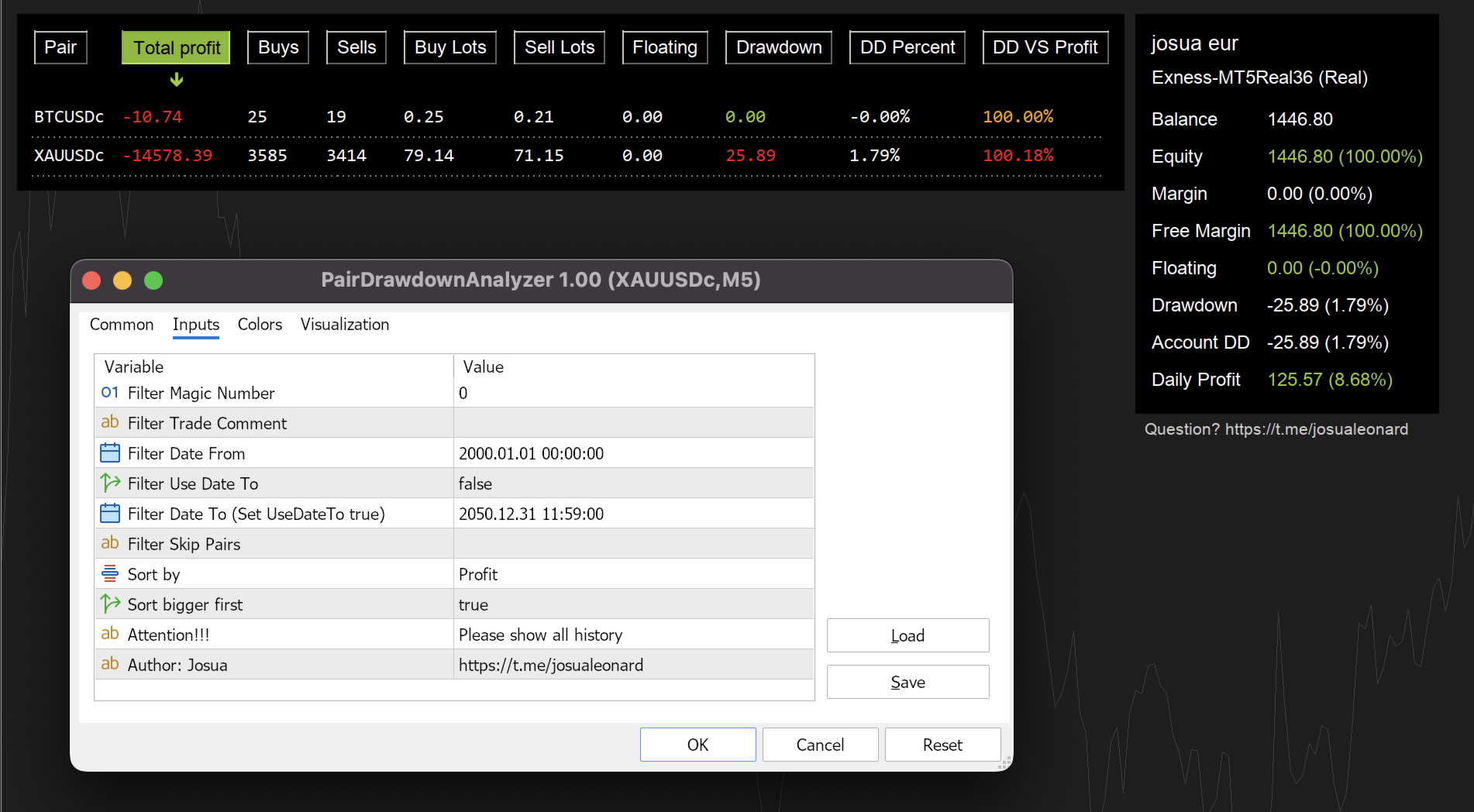
Pair Drawdown Analyzer is a powerful on-chart dashboard that gives you a complete real-time breakdown of every instrument in your account — profit, floating P&L, drawdown, lot exposure, and more — all in one organized, sortable table.
Why you need this indicator: Most traders manage multiple instruments but have no quick way to see which pair is dragging their account down. This indicator answers that question instantly. It tracks the deepest floating drawdown ever recorded per instrument and persists it to file — so even after a restart, your worst-case drawdown history is preserved.
Key Features:
- Real-time instrument table — Displays every traded symbol with columns for total profit, floating P&L, buy/sell count, buy/sell lots, drawdown ($), drawdown (%), and drawdown vs. profit (%).
- Clickable column sorting — Click any column header to sort ascending or descending. Instantly find your biggest winner, biggest loser, or most exposed instrument.
- Persistent drawdown tracking — Records the lowest floating value ever seen per instrument and saves it to a file. Survives terminal restarts.
- Account statistics panel — A side panel showing balance, equity, margin, free margin, daily profit, total floating, and total drawdown at a glance.
- Auto-refresh — Updates every 500ms. Automatically detects when positions are opened or closed and refreshes the table.
- DPI-aware / resolution-independent layout — All column widths, row heights, and padding are calculated dynamically from actual font metrics using TextSetFont/TextGetSize. Looks correct on any screen resolution — from 1080p laptops to 4K monitors.
- Flexible filtering — Filter by Magic Number, trade comment, date range, or skip specific pairs entirely.
- Clean, professional UI — Dark semi-transparent background panels that overlay your chart without obstructing price action.
Input Parameters:
| Parameter | Description |
|---|---|
| Filter Magic Number | Show only trades matching this magic number. Set to 0 to show all trades. |
| Filter Trade Comment | Show only trades whose comment contains this text. Leave empty for all. |
| Filter Date From | Only include trades opened on or after this date. |
| Filter Use Date To | Enable the end-date filter below. |
| Filter Date To | Only include trades opened on or before this date (requires Use Date To = true). |
| Filter Skip Pairs | Comma-separated list of symbols to exclude from the table (e.g. "EURUSD,GBPUSD"). |
| Sort by | Default column to sort by: Symbol, Profit, Buys, Sells, Buy Lots, Sell Lots, Floating, Drawdown, Drawdown %, or DD vs Profit %. |
| Sort bigger first | If true, sorts in descending order. If false, ascending. |
Important: Please make sure "All History" is selected in your terminal's History tab for accurate drawdown and profit calculations.
Compatibility: MetaTrader 5. Works with any broker and any instrument (Forex, Metals, Crypto, Indices, Stocks).