Chart Candle Timer Pro
- インディケータ
- Alireza Gholamreza Mohammadi
- バージョン: 1.0
Copy Trade Ea MT4 https://www.mql5.com/en/market/product/168918
Copy Trade Ea MT5 https://www.mql5.com/en/market/product/168911
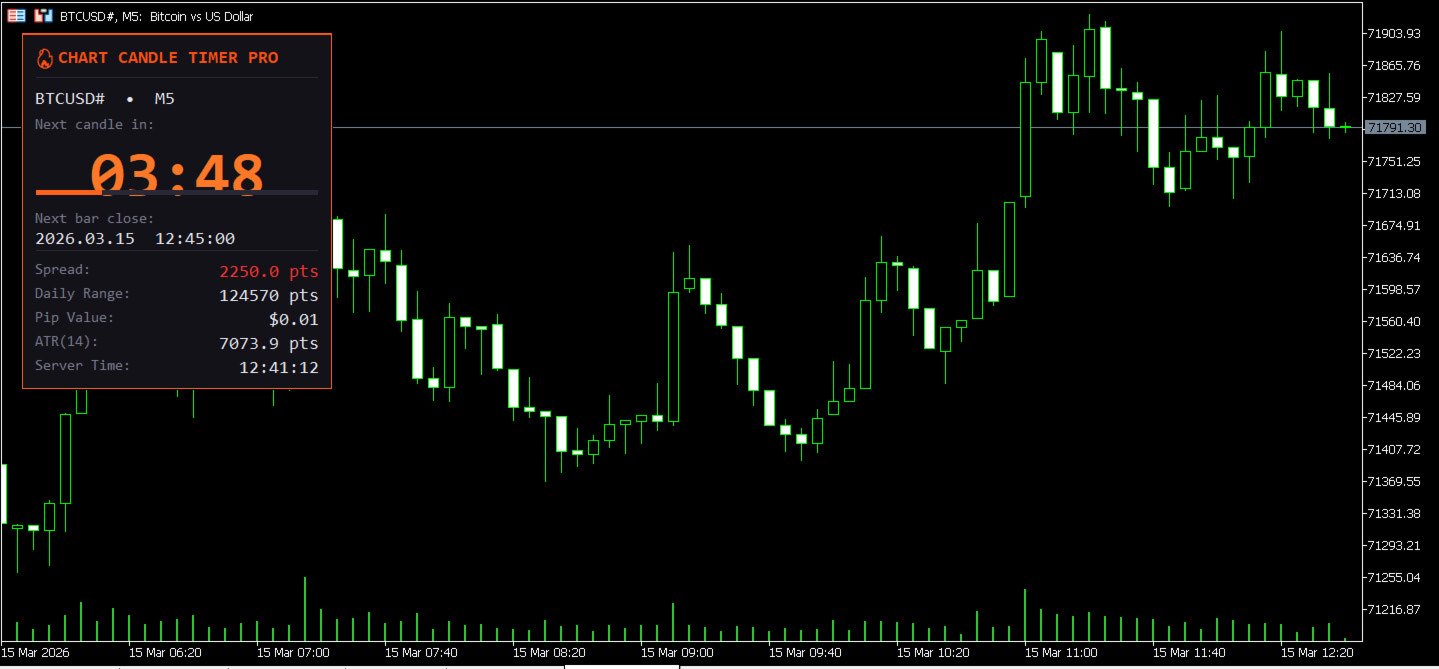
Chart Candle Timer Pro is a professional candle countdown panel for MetaTrader 5. It displays a compact, elegant dashboard on your chart that shows the time remaining until the next candle opens, along with essential market data at a glance.
Copy Trade Ea MT5 https://www.mql5.com/en/market/product/168911
Chart Candle Timer Pro is a professional candle countdown panel for MetaTrader 5. It displays a compact, elegant dashboard on your chart that shows the time remaining until the next candle opens, along with essential market data at a glance.
The panel updates every 200 milliseconds, ensuring a smooth and accurate countdown. It works on all standard timeframes from M1 to MN and adapts its time format automatically, showing HH:MM:SS for higher timeframes and MM:SS for shorter ones.
User Guide PDF file https://www.mql5.com/en/blogs/post/768153
Key Features
- Real-time candle countdown timer with color-coded urgency states
- Visual progress bar showing candle completion percentage
- Live spread display in points with warning colors for widening spreads
- Daily range (High - Low) in points
- Pip value in account currency
- ATR (Average True Range) with adjustable period
- Server time display
- Pop-up alert and sound notification on new candle formation
- Fully adjustable panel position (4 corners + pixel offset)
- 3 panel sizes: Small, Medium, Large
- 6 built-in dark themes + fully customizable color mode
Color-Coded Warnings
The timer and progress bar change color based on urgency. When more than 15 seconds remain, they display in the theme accent color. Between 5 and 15 seconds, they turn yellow as a warning. Below 5 seconds, they turn red to indicate the candle is about to close.
The spread display uses a similar system. Normal spreads appear in white. Spreads above 15 points turn yellow, and above 30 points turn red.
Themes
Choose from six professionally designed dark themes or create your own color scheme.
- Dark Phoenix: Dark background with orange accents
- Neon Cyber: Dark background with cyan accents
- Royal Gold: Dark background with gold accents
- Emerald Night: Dark background with green accents
- Crimson Fire: Dark background with red accents
- Arctic Blue: Dark background with blue accents
- Custom: Set background, border, text, label, and timer colors individually
Input Parameters
Display Settings:
- Panel Position: Top Left, Top Right, Bottom Left, or Bottom Right (default: Top Right)
- X Offset: Horizontal distance from the selected corner in pixels (default: 20)
- Y Offset: Vertical distance from the selected corner in pixels (default: 30)
- Panel Size: Small (200px), Medium (250px), or Large (310px) (default: Medium)
- Color Theme: Select from 7 theme options (default: Dark Phoenix)
Features:
- Show Spread: Toggle spread display on/off (default: On)
- Show Daily Range: Toggle daily High-Low range display (default: On)
- Show Progress Bar: Toggle candle completion bar (default: On)
- Show Server Time: Toggle broker server time display (default: On)
- Show Pip Value: Toggle pip value display (default: On)
- Show ATR: Toggle ATR display (default: On)
- ATR Period: Number of bars for ATR calculation (default: 14)
- Alert on New Candle: Enable pop-up alert on new bar (default: Off)
- Sound on New Candle: Enable sound alert on new bar (default: Off)
Custom Colors (active when Theme is set to Custom):
- Background Color (default: Black)
- Border/Accent Color (default: OrangeRed)
- Main Text Color (default: White)
- Label Text Color (default: DarkGray)
- Timer Text Color (default: OrangeRed)
Supported Timeframes
M1, M2, M3, M4, M5, M6, M10, M12, M15, M20, M30, H1, H2, H3, H4, H6, H8, H12, D1, W1, MN
How to Use
1. Attach the indicator to any chart.
2. Select your preferred theme, size, and corner position.
3. Enable or disable individual data rows as needed.
4. The panel adjusts its height automatically based on active features.
5. Enable new candle alerts if you trade based on specific bar opens.