DC Invest Vip Trading Monitor

DC Invest Vip Trading Monitor Ver 1.09

Busy? No time to monitor orders? Don't let risks swallow your account!

Whether you are a busy office worker or a shipper who is always on the go, constantly monitoring transactions on MetaTrader 5 (MT5) is almost impossible. But don't worry, DC Invest - VIP Trading Monitor will help you control your account and manage risks automatically!

✅ Calculate optimal order volume - No more worrying about placing orders that are too large or too small, the system automatically recommends the appropriate volume to protect your account.

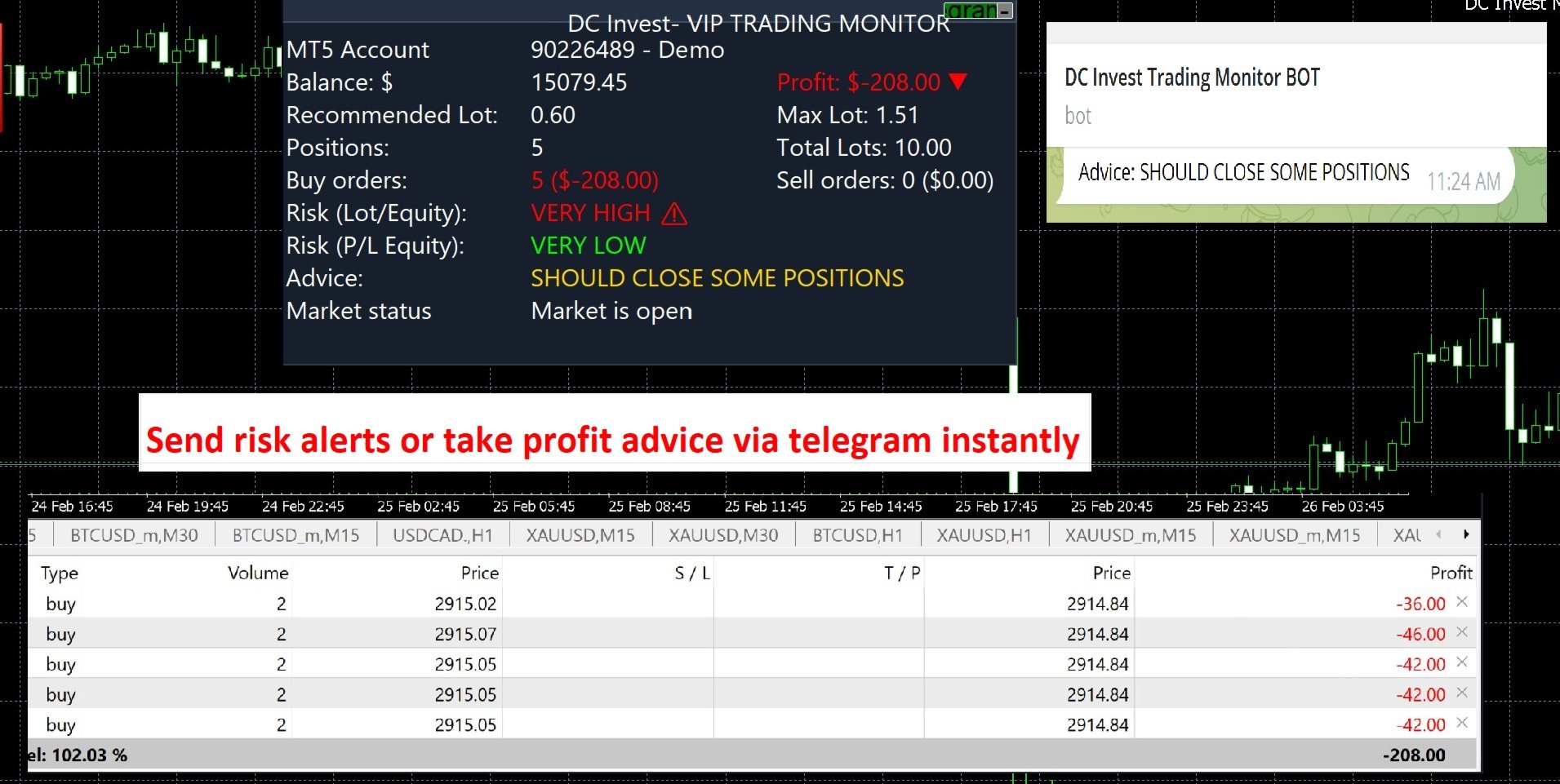
📊 Monitor balance, profit/loss & risk assessment - Display real-time safety level, warn immediately when the account is at risk.

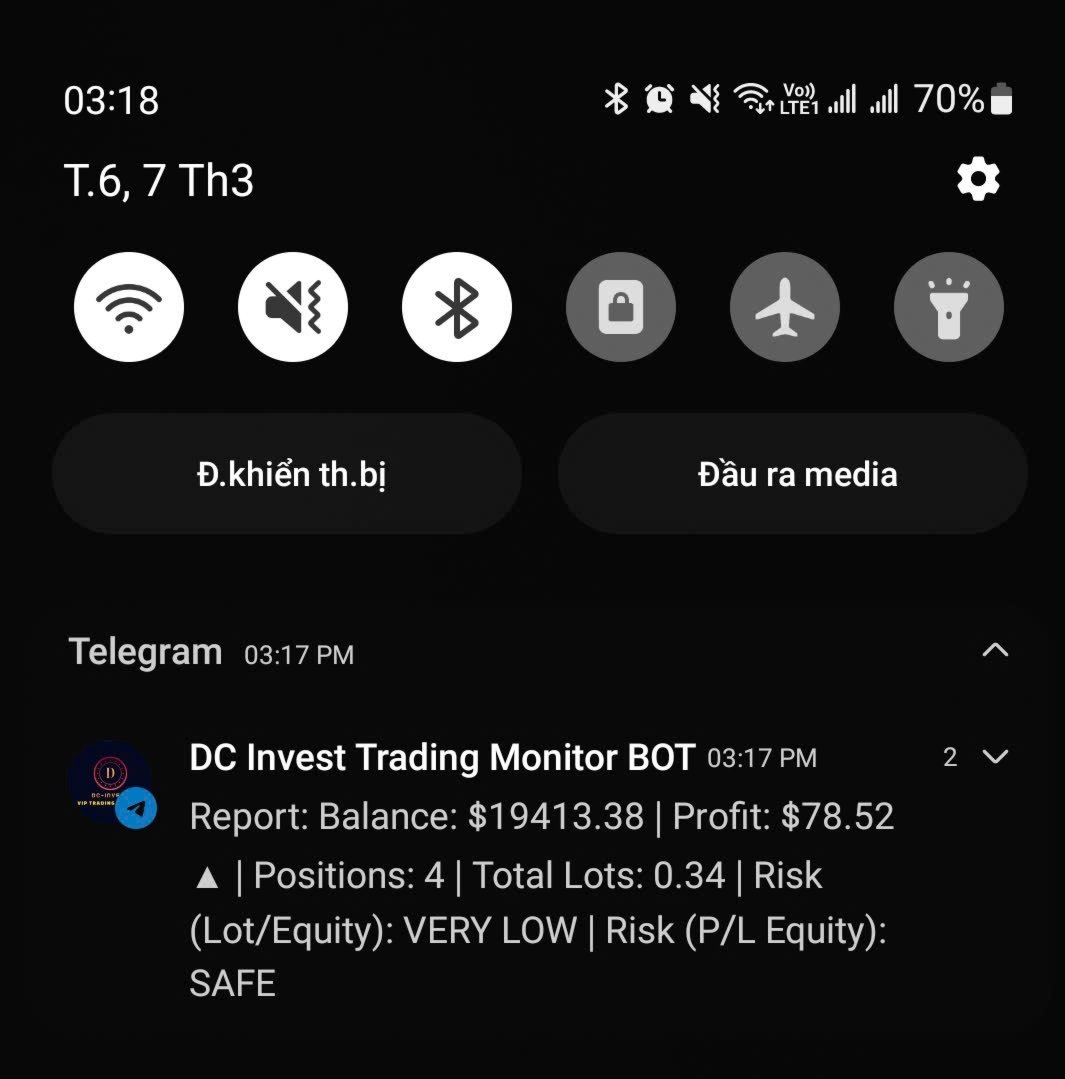
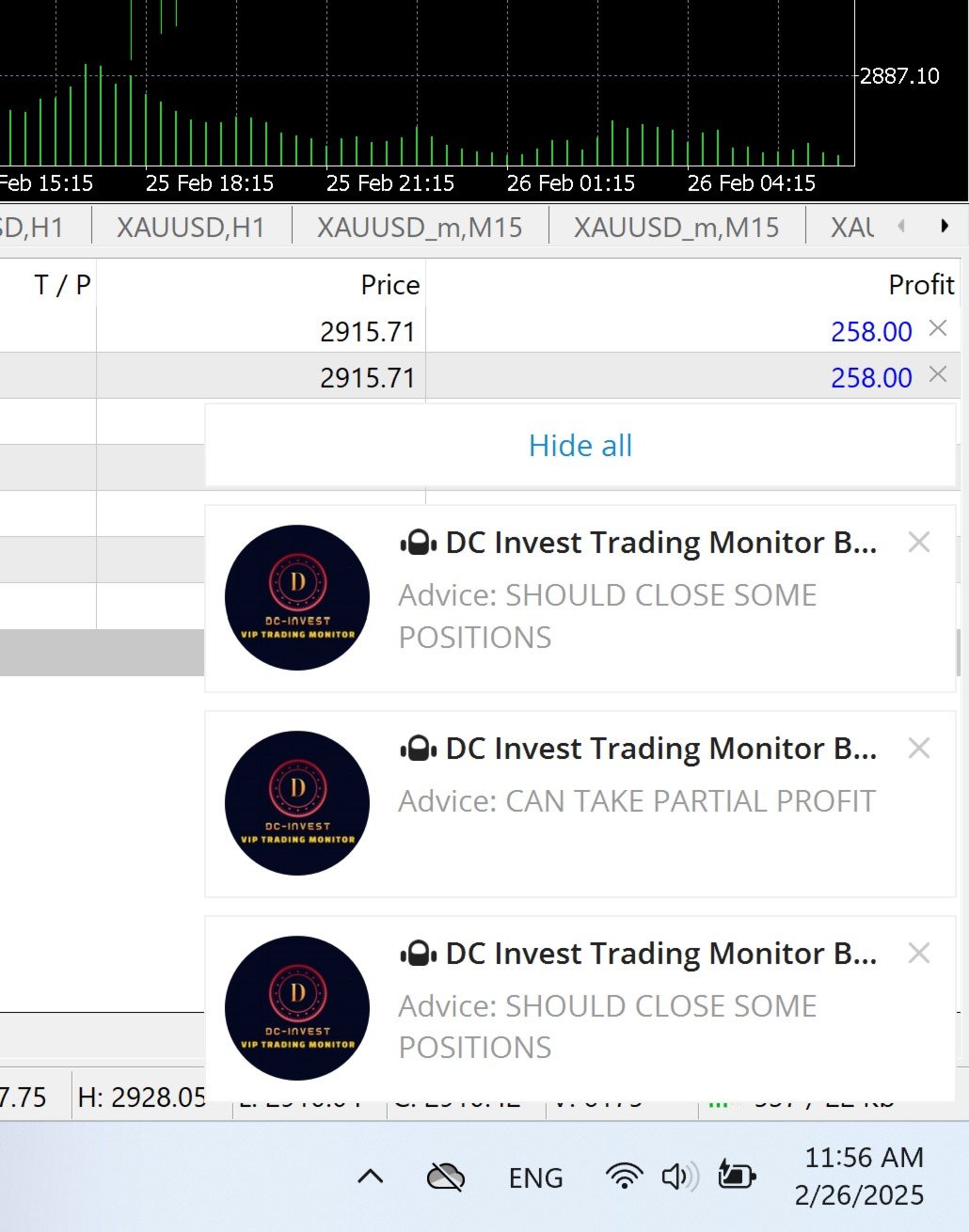
⚠️ Alert immediately when the market fluctuates strongly - No need to keep your eyes on the screen, the system will send notifications to Telegram for you to make timely decisions.

🚀 Smart trading, tight risk management – ​​Let DC Invest - VIP Trading Monitor help you invest with peace of mind!


// Version 1.09 Updates:

// - Display Live/Demo account, server time

// - Added more detailed error checking in the interface functions (CreatePanel, CreateLabels), Telegram (SendTelegramMessage), and closing orders (CloseAllPositions).

// - Complete multilingualization with fully translated strings for English, Vietnamese, Chinese, Spanish, and Arabic.

// - Added flexible customization for SLPips, RiskPercent, and MaxRiskPercent in CalculateRecommendedLot() and CalculateMaxLot() via input parameters.

// - Improved transaction log in SaveToCSV() to save details of each order (ticket, type, symbol, volume, profit).

// - Added sound alert (PlaySound) when advice changes in OnTick().


Features:


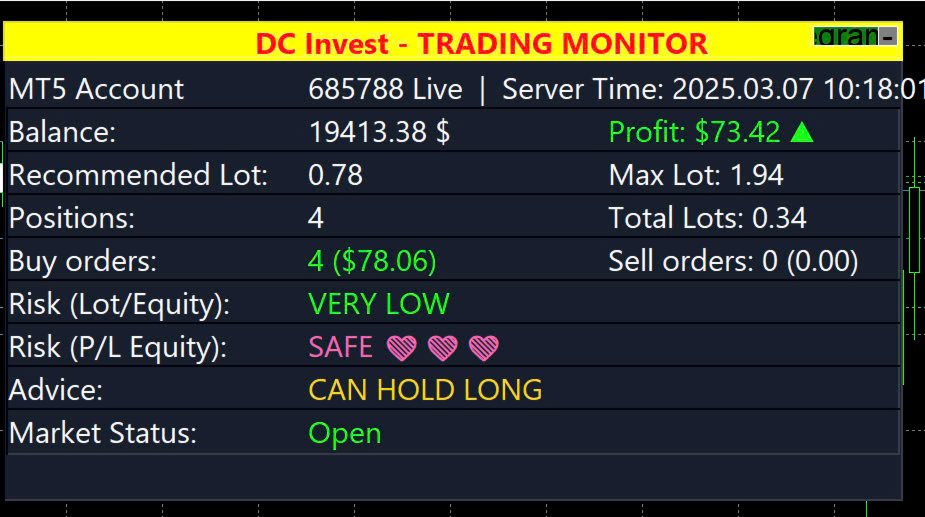
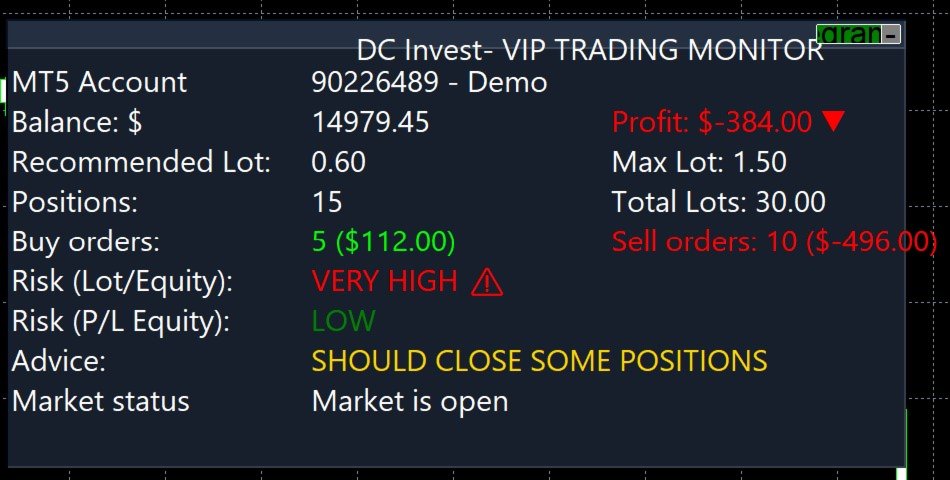
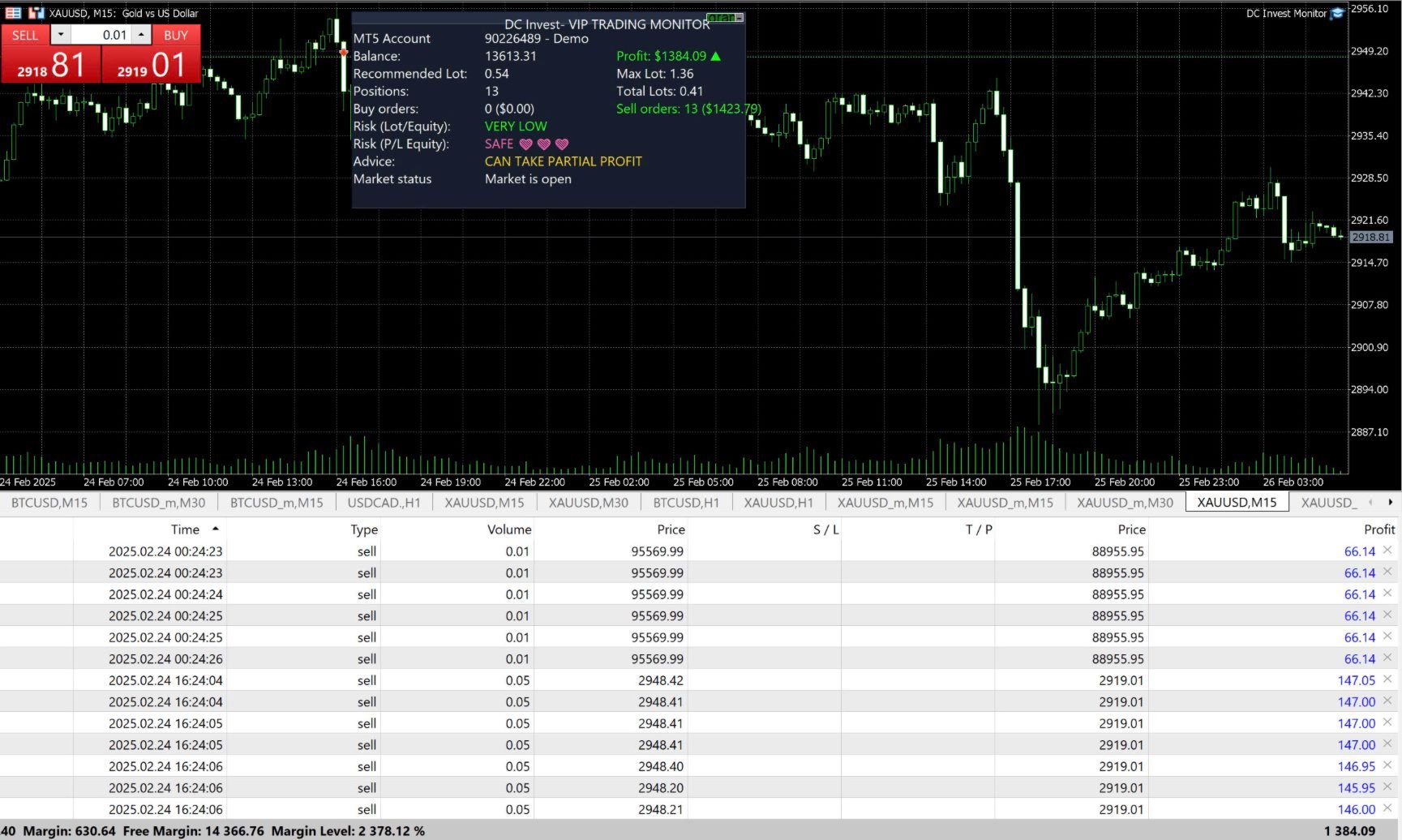
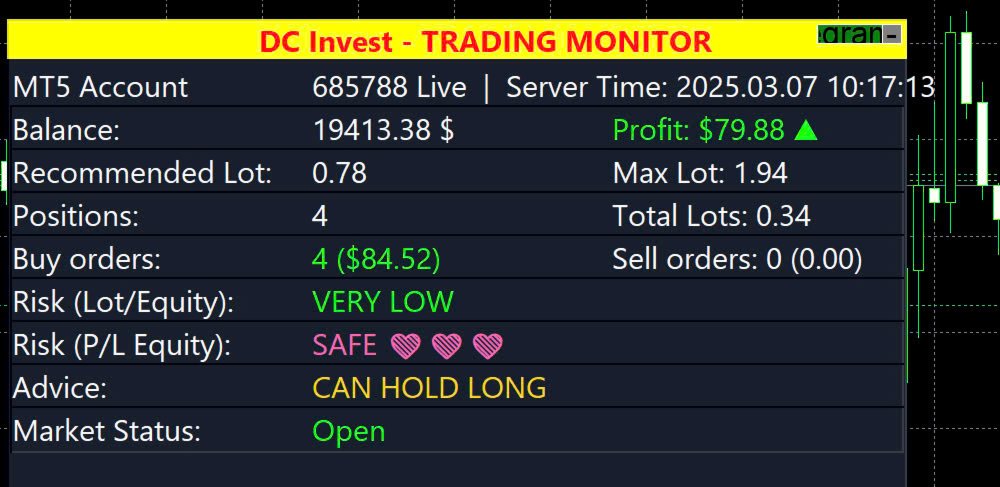
  • Account Monitoring: Displays MT5 account number, balance, equity, profit/loss (P/L), and account type (Live or Demo).

  • Position Tracking: Shows the number of Buy and Sell orders, total lots, and profit/loss for each position type, with visual indicators (green for profit, red for loss, white for no positions).

  • Risk Assessment: Assesses risk based on lot size (Lot/Equity) and profit/loss (P/L Equity), categorized as Very Low, Low, Medium, High, or Very High, with icons and colors.

  • Trading Suggestions: Provides recommendations (e.g., 'Can Hold Long,' 'Should Close Some Positions,' 'Cut Loss Now') based on risk levels and profit/loss.

  • Market Status: Indicates whether the market is open or closed.

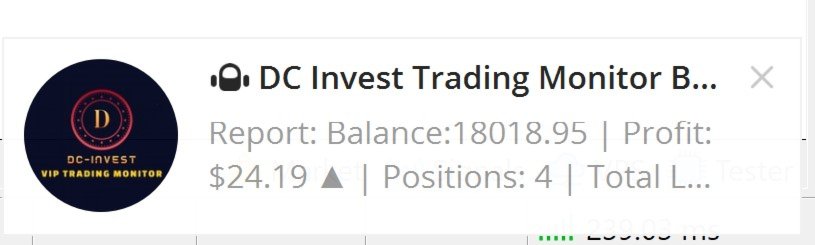
  • Telegram Integration: Sends periodic reports and alerts to a Telegram bot (optional, configurable via inputs, requires internet connection).

  • Manual Position Closing Option: Allows manual closing of all positions if the loss exceeds a specified threshold (optional, configurable).

  • Language Support: Supports 5 languages: English, Vietnamese, Chinese, Spanish, Arabic, for all displayed text.

  • Customizable Appearance: Offers adjustable panel size, position, colors, font size, and update interval.

Why Use DC Invest- VIP Trading Monitor?


  • Suitable for traders needing account monitoring and risk management tools for multiple markets.

  • Supports decision-making with real-time data and monitoring tools, helping manage time effectively.

  • Supported by ongoing updates and multilingual documentation (English, Vietnamese, Chinese, Spanish, Arabic).

Installation:


  • Download the DCInvestVIPTradingMonitor.mq5 file or .ex5 file.

  • Place it in the MQL5/Experts folder of your MetaTrader 5 installation (e.g., C:\Users<YourUser>\AppData\Roaming\MetaQuotes\Terminal<BrokerFolder>\MQL5\Experts).

  • Restart MetaTrader 5 or refresh the Navigator panel.

  • Drag and drop the utility onto any chart from the Navigator > Experts section.

Usage:


  • Adding to Chart: Attach the utility to any MT5 chart to display the monitoring panel.

  • Configuring Settings: Modify the input parameters in the utility settings dialog (as listed below).

  • Interacting with the Panel: Click the 'Telegram ON/OFF' button to toggle Telegram notifications. Click the '-' or '+' button to minimize/maximize the panel.

  • Note: This utility does not perform automated trading; it is for monitoring and risk management only.

Telegram Notification Setup:


  • To enable Telegram notifications for account status reports and alerts, follow these steps:
    • Create a Telegram Bot:
      • Open Telegram and search for '@BotFather'.

      • Send '/start' to @BotFather, then use '/newbot' to create a new bot.

      • Follow instructions to name your bot and get a unique bot token (e.g., '123456789:ABCdefGHIjklMNOpqRSTuvwxYZ'). Save the token.


    • Get Your Chat ID:
      • Add your bot to a Telegram chat or group (or use a private chat).

      • Send a message to the bot (e.g., '/start').

      • Use @userinfobot or @RawDataBot on Telegram to find your chat ID, or check via the bot’s API (e.g., https://api.telegram.org/bot<YourBotToken>
        /getUpdates).

      • Save the chat ID (e.g., '123456789').


    • Configure Utility Settings:
      • In the MT5 utility settings, enter the TelegramToken and TelegramChatID.

      • Set TelegramReportInterval to the desired interval in minutes (e.g., 30, 60, or 0 to disable).

      • Ensure your MT5 terminal has internet access for notifications.


    • Test Notifications: Enable notifications via the panel’s 'Telegram ON/OFF' button and verify reports are sent to your Telegram chat.


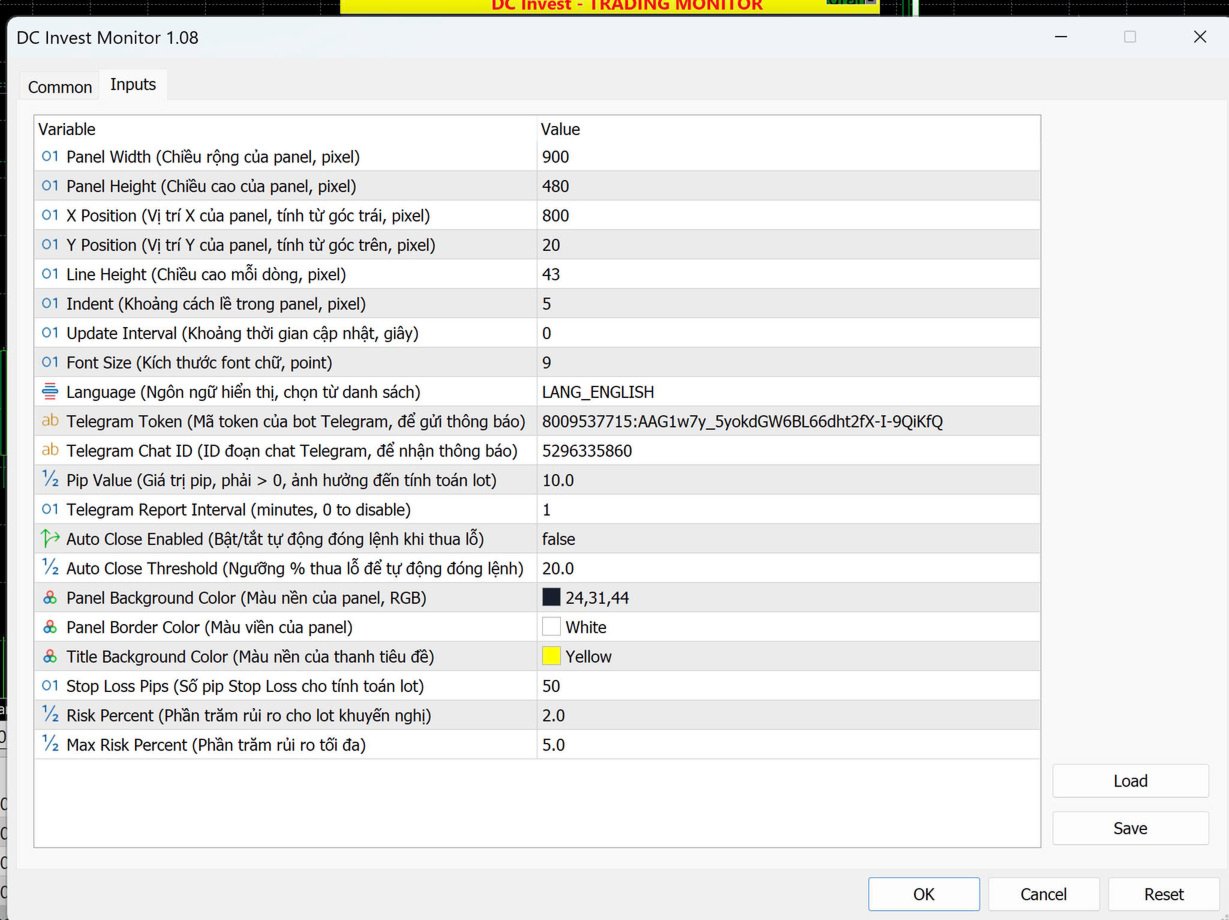
Input Parameters (Adjustable for Your Needs):


  • Parameter | Description | Default Value

  • PanelWidth | Width of the panel (pixels) | 900

  • PanelHeight | Height of the panel (pixels) | 450

  • XPosition | X-position of the panel (from left) | 800

  • YPosition | Y-position of the panel (from top) | 20

  • LineHeight | Height of each line in the panel (pixels) | 40

  • Indent | Indent spacing within the panel (pixels) | 5

  • UpdateInterval | Update frequency (seconds) | 1

  • FontSize | Font size for text | 9

  • Language | Language (English, Vietnamese, Chinese, Spanish, Arabic) | "English"

  • TelegramToken | Telegram bot token (optional, leave blank to disable) | ""

  • TelegramChatID | Telegram chat ID (optional, leave blank to disable) | ""

  • PipValue | Pip value for risk assessment calculations (must be > 0, used for monitoring only) | 10

  • TelegramReportInterval | Periodic report interval (minutes, 0 to disable) | 0

  • AutoCloseEnabled | Enable manual position closing option (false to disable) | false

  • AutoCloseThreshold | Loss threshold (%) for manual position closing | 20.0

  • PanelBgColor | Background color of the panel | C'24,31,44'

  • PanelBorderColor | Border color of the panel | clrWhite

  • TitleBgColor | Background color of the title bar | C'37,47,66'

Display Details:


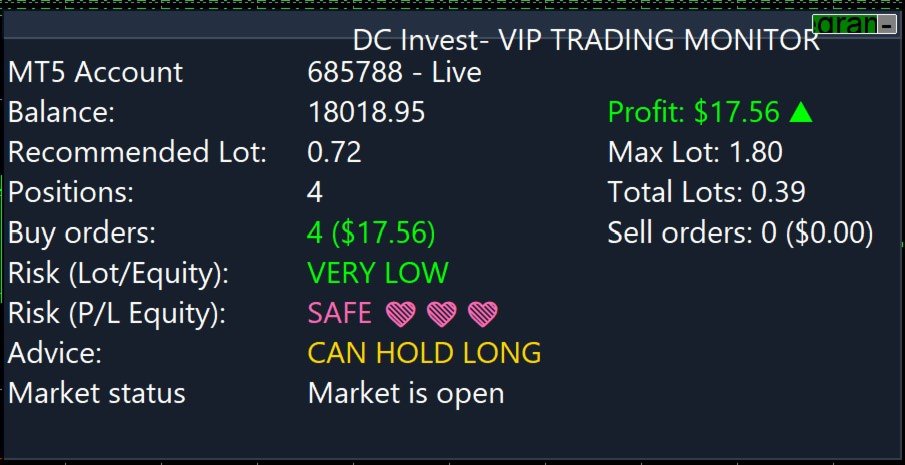
  • MT5 Account: Shows the account number and type (e.g., "685788 - Live" or "685788 - Demo").

  • Balance: Displays the current account balance.

  • Profit: Shows the profit/loss with a green arrow (▲) for profit or red arrow (▼) for loss.

  • Recommended Lot & Max Lot: Suggests lot sizes based on balance and risk settings for monitoring purposes.

  • Positions: Displays total positions, Buy orders, Sell orders, and total lots, with visual indicators for profit/loss.

  • Risk (Lot/Equity & P/L Equity): Assesses risk levels with icons (e.g., ❤️ for safe, ⚠️ for high risk).

  • Advice: Provides recommendations based on risk and P/L.

  • Market Status: Indicates if the market is open or closed.

Notes:


  • Ensure your MT5 account is properly connected to retrieve account information.

  • The Telegram feature requires a valid bot token and chat ID; leave them blank to disable.

  • The PipValue must be greater than 0 for accurate risk assessment calculations, used for monitoring only.

  • The utility requires internet access for Telegram notifications.

  • This utility does not perform automated trading; it is for monitoring and risk management only. Test thoroughly on a demo account before use.

Troubleshooting:


  • If the panel does not display or updates incorrectly, check your MT5 connection and account status.

  • Ensure Unicode and color support are enabled in your MT5 installation.

  • If Telegram notifications fail, verify the token, chat ID, and internet connection.

  • Increase PanelWidth or decrease Indent if text is cut off or overlapping.

  • Ensure the utility is attached as an Expert, not an Indicator.

Contact:


  • For support or feedback, contact Danh Chinh:
    • Phone: +84 888 989 992

    • Telegram: @Danhchinh888

おすすめのプロダクト
Crystal Ball – Trend-Backed Mean Reversion EA for MT5 Crystal Ball is not just another trading robot—it's a precision engine designed to capture the market’s natural rhythm. By combining the pullback-catching power of Mean Reversion with the momentum-following logic of Trend Trading , Crystal Ball enters trades with intention and exits with purpose. It’s built to avoid random noise, capitalize on structure, and adapt as the market moves. How It Works Wait for Deviation: Crystal Ball wat
Inverted_Chart_EA Utility Expert Advisor Inverted_Chart_EA creates and maintains a mirror-inverted chart of any symbol and timeframe. It automatically generates a custom instrument (e.g. US30_INV ) and keeps its price history updated in real time, with bars mirrored around a chosen pivot. This utility gives traders a new way to analyze the market from a different perspective by flipping the chart upside down. Why use an inverted chart? Highlight hidden patterns – price formations that look ordin
Here's a professional product description for your FVG Detector indicator: --- # Fair Value Gap (FVG) Detector with Smart Trend Analysis ## Overview The **Fair Value Gap Detector** is a professional-grade trading tool that automatically identifies, visualizes, and tracks Fair Value Gaps (FVGs) on your charts. FVGs are powerful price imbalances that often act as magnets for future price action, providing high-probability entry and exit zones. This indicator goes beyond simple detection by o
SolarTrade Suite 金融ロボット: LaunchPad Market Expert - 取引を開始するために設計されています! これは、革新的で高度なアルゴリズムを使用して値を計算する取引ロボットであり、金融​​市場の世界でのアシスタントです。 SolarTrade Suite シリーズのインジケーター セットを使用して、このロボットを起動するタイミングをより適切に選択してください。 説明の下部にある SolarTrade Suite シリーズの他の製品をご覧ください。 投資と金融市場の世界を自信を持ってナビゲートしたいですか? SolarTrade Suite 金融ロボット: LaunchPad Market Expert は、情報に基づいた投資決定を行い、利益を増やすのに役立つ革新的なソフトウェアです。 SolarTrade Suite 金融ロボット: LaunchPad Market Expert の利点: - 正確な計算: 当社のロボットは、高度なアルゴリズムと分析方法を使用して、市場の動きを正確に予測します。 資産を売買するのに最適なタイミングを
Classic Market Surfer EA - A Timeless, Proven Strategy for Gold Trading For years, this powerful trading strategy has been hidden from the public-reserved for a select few. Now, for the first time, the Classic Market Surfer EA is available to traders like you.   Built on pure, time-tested trading principles, this EA doesn't rely on trendy gimmicks like AI or machine learning. Instead, it harnesses a classic, robust strategy that has consistently delivered results over the years. This is not a "g
TradePilotmt5
Hossein Khalil Alishir
TradePilot Expert Advisor (EA) for MetaTrader 5 TradePilot is a professional and user-friendly Expert Advisor (EA) for MetaTrader 5 (MT5) . It simplifies automated trading , risk management , and trade execution with a smart trading panel . Perfect for beginners and experienced traders looking for a reliable trade manager EA with automated lot size calculation and smart position management. Key Advantages User-Friendly Trading Panel: Customizable panel with buttons and hotkeys for fast ex
Tiger Lite recreate the history of entry and exit orders. The goal is that you can grasp their strategy how to play. CSV format support for WEB, MT4 and MT5 platforms. The sequence of steps is described in the photo. Note: Please choose the existing date and symbol on the CSV file. For MT4/5, export historical data and copy the records to excel, save it with the extension CSV. For MT4/MT5/WEB, save the name with format mt4.csv/mt5.csv/web.csv If you get the history from another source and your
FREE
Gold EA: Proven Power for 1-Minute Gold Trading Transform your trading with our Gold EA, meticulously crafted for 1-minute charts and delivering over 2000% growth in 5 years from just $100-$1000 . No Martingale, No AI Gimmicks : Pure, time-tested strategies with robust money management, stop loss, and take profit for reliable performance across multiple charts. Flexible Trading Modes : Choose Fixed Balance for safe profits, Mark IV for bold growth, or %Balance for high rewards—combine Mark IV an
Crypto_Forex MT5用インジケーター「 WPR with 2 Moving Averages 」(リペイント機能なし) - WPR自体はスキャルピングに最適なオシレーターの1つです。 - 「WPR and 2 Moving Averages」インジケーターを使用すると、WPRオシレーターの高速移動平均線と低速移動平均線を確認できます。 - このインジケーターを使用すると、価格調整を早期に把握できます。 - このインジケーターはパラメータで簡単に設定でき、どの時間枠でも使用できます。 - 買いと売りのエントリー条件は画像で確認できます。 - WPR MA クロスの PC およびモバイル アラート付き。 買いシグナルの条件例: (1) - 高速MAが低速MAを下向きにクロスし、WPR値が-50を下回っている場合:買いトレードを開きます。 (2) - WPR値が-20を超える買われすぎゾーンに入ったら:買いトレードを終了します。 売りシグナルの条件例: (1) - 高速MAが低速MAを下向きにクロスし、WPR値が-50を超えている場合:売りトレードを開きます。 (2) WP
CosmiCLab SMC FIBO CosmiCLab SMC FIBO is a professional trading indicator designed for traders who use Smart Money Concepts (SMC), market structure analysis and Fibonacci retracement levels. The indicator automatically detects market swings and builds Fibonacci levels based on the latest impulse movement. It also identifies market structure changes such as BOS (Break of Structure) and CHOCH (Change of Character), helping traders understand the current market direction. CosmiCLab SMC FIBO also pr
Overview Mirror Signals Service EA (Text only)   is a powerful monitoring Expert Advisor that automatically sends   real-time Telegram notifications   for all important trade events on your MetaTrader 5 account. It is engineered specifically for   signal providers ,   trade-copier operators ,   auditors ,   educators , and   professional trading services   that require immediate, detailed, and reliable reporting. Everything from   entries, exits, SL/TP changes, comment changes, trailing sto
TradePad
Ruslan Khasanov
5 (1)
TradePad は、手動取引とアルゴリズム取引の両方に使用できるツールです。複数の取引商品での迅速な取引操作とポジション管理のためのシンプルなソリューションを提供します。 注意: アプリケーションは戦略テスターでは動作しません。 デモアカウント用のアプリケーションの試用版とすべてのツールの説明 アプリケーション インターフェイスは高解像度のモニターに適応しており、シンプルで直感的です。快適な作業のために、トレーダーには次のツール セットが提供されます: 取引操作の管理、メイン チャートの期間の切り替え、TradePad 商品の切り替えを行うホット キー マネージャー。 ポジションを開くときや保留中の注文を設定するときに、ドローダウンのリスクを評価し、潜在的な利益を計算するために取引レベルをマークするツール。 複数の取引シンボルを視覚的に監視し、アルゴリズム取引の取引シグナルを受信するための MultiCharts ツール。利便性のために、取引ペアのセットを整理できます。これにより、複数の時間枠で価格を監視し、複数の通貨取引を行うことができます。 履歴の任意の期間の取引統計を表示するた
The Chart Pattern Master EA is a sophisticated expert that allows you to trade all of the common chart patterns. It automatically identifies the chart patterns for you and even displays them on the chart. Use it as an indicator or as an automated trading expert. All pattern breakouts will be traded automatically for you. Recommendations: Trend Timeframe - 1H Breakout Timeframe - Any Symbol - Any TP and SL - false MIn Balance - $250 NOTE: Increase "Pattern Number of Bars" to scan over longer peri
インジケーターについて このインジケーターは、金融商品の終値に対するモンテカルロシミュレーションに基づいています。モンテカルロ法とは、以前の観測結果に基づくランダムな数値を使用して、さまざまな結果の確率をモデル化するための統計的手法です。 どのように機能しますか? このインジケーターは、歴史的データに基づき、時間の経過とともにランダムに価格が変動する複数の価格シナリオを生成します。各シミュレーション試行は、 終値 の変動を考慮するためのランダム変数を使用し、与えられた期間における将来の市場変動を効果的に模倣します。 モンテカルロシミュレーションの利点 - モンテカルロシミュレーションは、複数の将来のシナリオに対して戦略をテストすることで、さまざまなトレード戦略のリスクを分析するのに役立ちます。 - 稀な極端なイベント(テールリスク)を含むさまざまな市場状況で戦略のパフォーマンスを把握することができます。 - 単一の予測に依存するのではなく、モンテカルロ法は関連する確率を伴う潜在的な結果の範囲を提供します。これにより、利益や損失の可能性を理解するのに役立ちます。 モンテカルロ法は、
G8 News Dashboard Pro: The Ultimate Economic Calendar Trading during high-impact news releases without proper monitoring can be devastating to your account. Slippages, spread widening, and extreme volatility can ruin even the best technical analysis. G8 News Dashboard Pro is an advanced, lightweight, and highly customizable on-chart economic calendar designed specifically for professional manual traders and risk managers. It extracts data directly from the native MetaTrader 5 calendar (No DLL
Divergent Stochastic Filter II Catch Reversals Early, Filter Noise, Trade with Confidence The Edge: Why This Stochastic is Different  Every trader knows the Stochastic oscillator. But knowing when to trust its signals, that's the real challenge. The Divergent Stochastic Filter II transforms this classic indicator into a precision reversal detection system by adding critical elements: divergence intelligence, signal filtering and exhaustion detection.  While standard Stochastic oscillators fire s
Price reach indicator. It also serves as the perfect term for supports and resistance. I use it in two experts. The basic tool for professional trading. The indicator analyzes the last 500 bar and uses this to determine the levels ( but it doesn't predict the future ) . Personally, I use it on TF H1.  It is very simple. Four lines on chart and that's all. Only two input parameters.  Thousands of indicators. Why this? Is good ? No! Is very good. Please test the indicator prior to purchasing. You
Advanced History Collector Panel (MT5 履歴統計ツール) Advanced History Collector Panel は、MetaTrader 5 (MT5) 専用に開発された、高度な口座分析および可視化ツールです。膨大な取引履歴を瞬時に解析し、直感的なグラフと詳細なレポートで表示します。 主な機能: 多角的なデータ分析 : 日次・週次ごとの損益、ロング・ショートの比率、ロット数、入出金履歴などを正確に集計。 ダイナミック・チャート : 損益曲線(ラインチャート)、資産推移、注文数分布(ヒストグラム)など、多彩なグラフ表示に対応。 リスク管理の強化 : 最大含み益や最大含み損を自動算出し、トレードの「質」を客観的に評価。 自由度の高いカスタマイズ : フォントサイズ、カラー設定、パネルの大きさなどを自由に調整可能。高解像度モニターにも完全対応。 データの自動保存 : 履歴データをファイルに保存・読み込みが可能で、継続的なパフォーマンス管理を実現。 トレード手法の改善や資金管理の最適化を目指すトレーダーにとって、最も信頼できる分析パートナーとなる
FREE
BTC Terminator
Riaan Adriaan Swanepoel
# Advanced Terminator AI EA MT5 - Neural Network Powered Trading System ## Premium Features Advanced Neural Network Technology - Deep learning algorithms for market pattern recognition - Real-time adaptive strategy optimization - Smart risk management powered by AI - Multi-timeframe analysis system Dual Market Mastery - Specialized for XAUUSD (Gold) trading - Optimized for BTCUSD cryptocurrency pairs - Individual strategy optimization for each market Professional Risk Management
STRICTLY FOR BOOM INDEX ONLY!!!!! Here I bring the Maximum Trend Arrows OT1.0 MT5 indicator. This indicator is made up of a combination of different trend indicators for entries and exits, for entries an orange arrow will paint on the chart below the current market and a red flag for closing of trades and it produces buy arrows only. When the orange arrow appears, it will appear along with it's sound to notify you. The 1H timeframe is recommended, don't use it anywhere else than on the 1H timefr
| Fully-automated Smart Money Concept (ICT) inspired trading solution with multi-strategy capabilities | Built by a grid trader >> for grid traders.  This is MT5 version, click  here  for  Blue CARA MT4  (settings and logics are same in both versions)     Real monitoring signal  -->  Cara Gold Intro Blue CARA EA   ('CARA') - short for  C omprehensive  A lgorithmic   R esponsive   A dvisor is a next-gen  multi-currency    multi-timeframe  EA base on the widely known (and perhaps the most popul
Bober Real MT5
Arnold Bobrinskii
4.76 (17)
Bober Real MT5 is a fully automatic Forex trading Expert Advisor. This robot was made in 2014 year and did a lot of profitbale trades during this period. So far over 7000% growth on my personal account. There was many updates but 2019 update is the best one. The robot can run on any instrument, but the results are better with EURGBP, GBPUSD, on the M5 timeframe. Robot doesn't show good results in tester or live account if you run incorrect sets. Set files for Live accounts availible only for cu
BRIEF INTRODUCTION :   This panel is designed for the XAU/USD  pair, offering a fully automated and manual trading solution with optional money management controls. The application operates seamlessly in all market conditions and includes a built-in indicators attached in the interface for real-time analysis.   KEY FEATURES : - Martingale Strategy & Range Sequence Detection – Enhances trade recovery and identifies key price levels.   - Multiple Indicators – Helps users anticipate future price
AURA SMC QUANTUM V1.01 code in English, structured for a professional presentation or MQL5 Market description: AURA SMC QUANTUM V1.01 | Logic Breakdown The Aura SMC Quantum is an advanced automated trading system (EA) specifically engineered for Gold (XAUUSD) on the H4 timeframe. It combines high-probability Smart Money Concepts (SMC) with a sophisticated Hybrid Grid management system. 1. Market Analysis Strategy (SMC & Trend Filter) The core "intelligence" of the EA relies on a dual-layer confi
Exp TickSniper PRO FULL
Vladislav Andruschenko
3.97 (58)
TickSniper for MetaTrader 5 — 自動パラメータ適応を備えた高速ティックスカルパー 複雑な手動調整なしで、現在の取引銘柄に合わせて自動的にロジックを最適化する完全自動 Expert Advisor です。 TickSniper for MetaTrader 5 は、通貨ペアごとに多数の設定を手動で調整することなく、素早く、賢く、ほぼそのまま運用できるシステムを求めるトレーダーのために設計されています。 この Expert Advisor は、価格配信、ティック到着速度、スプレッドの特性、銘柄仕様を分析し、それに基づいて売買とポジション管理に必要な主要パラメータを自動計算します。これにより、複数の通貨ペアに対して、最小限の手動介入で一つのロジックを運用できます。 TickSniper は単なる一般的なスカルパーではありません。長年にわたる Forex および MetaTrader 向け Expert Advisor 開発経験を基に構築された、成熟した自動売買システムです。 TickSniper for MetaTrader 4 バージョン | 完全説明 + D
Trading Assistent is a multifunctional trading panel that combines all necessary tools for professional trading. The panel provides complete control over positions, in-depth risk analysis, and fast order execution. MAIN FUNCTIONAL BLOCKS Position Management: - Real-time viewing of all open positions - Sorting by symbol, profit, volume, and type - Visual indication of profitable and losing positions - Bulk closing operations - Breakeven function for profit protection Trading Operations: - I
This "MT5 Auto Delete Pending Orders by Timeframe" EA is a high-tech trading efficiency tool designed for modern traders. It does not perform any trading or decision-making. ​ It fundamentally solves the core pain point in traditional trading where forgotten pending orders or sudden market changes lead to tied-up capital and missed new opportunities, by automatically managing order expiration . ️ Core Working Principle: Intelligent Pending Order Management The core of this EA lies in its intell
RBreaker Gold Indicatorsは、金先物の短期日内取引戦略であり、トレンドフォローと日内反転の2つの取引手法を組み合わせたものです。トレンド相場での利益を捉えるだけでなく、相場が反転した際には迅速に利確し、その流れに沿ってポジションを反転させることができます。 この戦略は、アメリカの雑誌『Futures Truth』において、15年連続で最も収益性の高い取引戦略トップ10に選ばれた実績を持ち、非常に長いライフサイクルを誇り、現在も国内外で広く使用・研究されています。 本インディケーターは、2026年の金先物の値動きに対応し、14日間のATR指標に基づいて、ブレイクアウト係数A、観察係数B、リバーサル係数Rをより合理的な値で定義しています。非常に優れたインディケーターであり、安定的な年間収益を実現しています。ぜひおすすめします〜
MSX AI Scalper Pro Smart • Adaptive • Autonomous Trading Engine Overview MSX AI Scalper Pro is an advanced automated trading system built for BTCUSD on M5 timeframe . Unlike many robots that depend on strict time filters, news blocks or manual control, this system is designed to trade continuously 24/7 , adapting to market volatility in real time — without external filters or manual babysitting. Working Principle (Short Theory) The EA combines: Smoothed HMA trend direction – to detect cle
Crash5 EA ,I s a automatic robot that has the level of professional decision when to take a trade without any emotion. The bot will help in your scalping decision making with its own TP (take profit) and SL (stop loss) with the trail stop when in profit. This is a trend based spike catching ,looking on whats happening in real time charts no repainting of any signals. The robot helps in making decisions on the candle stick pattern opened and closed lat price with the help of RSI ,MACD and the EMA
このプロダクトを購入した人は以下も購入しています
Farmed Hedge Yield Farming | All Markets (Manual - Hybrid - Semi/Automated EA) MULTI-ASSET SUPPORT Trade any asset available on your broker - Forex: Major, Minor, Exotic pairs - Crypto: BTC, ETH, XRP, SOL, BNB - Stocks: Apple, Tesla, Amazon, Google, etc. - Commodities: Gold, Silver, Oil, Gas - Indices: US30, NAS100, SPX500, DAX40 - Any CFD your broker offers VERIFIED TRADING RESULTS - Farmed Hedge Yield Axi Copy:  https://www.mql5.com/en/signals/2356376 - Farmed Hedge Yield Exn Copy:   https:/
Limited time offer: 20% off for a few days only!  - Annual subscription $360 instead of $450  - Lifetime plan $550 instead of $690 The core idea: using the user interface, you configure the parameters the chart must meet before entering a position (or positions), choose which entry models to use, and set the rules for when trading and planning should end. Lazy Trader  handles the rest: it  takes over all the routine chart watching and execution! full description  :: 3 key videos [1] ->  [2]   -
Helios Pulse v1.03 — リアルタイム確率ダッシュボード|裁量トレーダー向け Helios Pulseは、マーケットの読み方を根本から変えます。複数のインジケーターウィンドウを切り替えながら矛盾するシグナルを解読する必要はもうありません。ひとつの明確な答え——現在のマーケットの方向性バイアスを示すリアルタイム確率パーセンテージが、ティックごとに連続更新されます。 これは単なるシグナル矢印パネルではありません。Helios Pulseは、複数のテクニカル分析次元の一致度を測定し、本当に信頼できる確信度スコアを算出する確率エンジンです。方向だけでなく、その方向がどれほど確かなのか——そしてそれがリアルタイムで強まっているのか弱まっているのかを見ることができます。 チャート上の表示 コンパクトなダークテーマのパネルがチャート上に配置され、ロングとショートの2つのダイナミック確率カードが表示されます。マーケット状況の変化に応じて、カードの色の強度が淡色から鮮明に変化し、数値を確認する前に瞬時に視覚的な判断が得られます。明確な判定ラベルが現在の状態を表示します:Strong Bu
YuClusters
Yury Kulikov
4.93 (43)
Attention: You can view the program operation in the free version  YuClusters DEMO .  YuClusters is a professional market analysis system. The trader has unique opportunities to analyze the flow of orders, trade volumes, price movements using various charts, profiles, indicators, and graphical objects. YuClusters operates on data based on Time&Sales or ticks information, depending on what is available in the quotes of a financial instrument. YuClusters allows you to build graphs by combining da
Crystal Trade Manager – Advanced MT5 Risk and Trade Control Utility Overview Crystal Trade Manager (CTM) is a professional MetaTrader 5 utility designed for risk management, trade automation, and instant execution control. It provides traders with an integrated system for protecting equity, managing daily drawdowns, controlling lot sizes, and applying automation features such as automatic SL/TP, break-even, and trailing stop. The tool is suitable for manual traders, prop-firm challenge particip
Unlimited Trade Copier Pro MT5 is a tool to copy trade remotely to multiple MT4, MT5 and cTrader accounts at different computers/locations over internet. This is an ideal solution for you if you are a signal provider and want to copy your trades to other receivers globally on your own rules. One provider can copy trades to multiple receivers and one receiver can get trade from multiple providers as well. The provider can even set the subscription expiry for each receiver, so that receiver will n
Introduction Our system is more than just a tool—it’s your personal guide in the dynamic trading landscape. Expertly developed and optimized using advanced strategies, this groundbreaking predictor gives traders a powerful edge. It’s not just about the features; it’s about a trading journey that stands out from the crowd. Get ready for an enhanced trading experience like never before! What It Does Next Candle Prediction: Imagine gaining insights into the market’s next move before it happens. Our
PropFolio Command Manager Pro PropFolio Command Manager Pro is an advanced, multi-symbol execution terminal designed to automate your custom arrow indicators. Simply enter the name of your arrow indicator into the settings, and the Command Manager will monitor up to 30 currency pairs, indices, or metals simultaneously from a single chart. When your indicator generates a signal, the EA verifies the trend using the built-in Higher Timeframe (HTF) algorithm, checks the live spread, and manages the
EA price is reduced to 50% discount for limited time period. Spot vs Future Arbitrage EA for MT5 Spot vs Future Arbitrage EA is an automated Expert Advisor designed for MetaTrader 5 that operates using price differences between Gold spot and Gold futures instruments. The strategy opens positions on both instruments simultaneously to take advantage of temporary differences between spot and futures prices. Requirements The trading account must provide both Gold spot and Gold futures instruments
Mt5 To InterativeBrokers Copier allows you to copy deals from MT5 account to Interactive Brokers. With this, you can run your EA strategy on a MT5 Demo/Real Account, then copy all the deals to Interactive Brokers account real time. Features: 1. Copy or Invert-Copy deals Realtime from MT5 to IB Account. 2. Synchronizing positions of both accounts periodicaly, in case any missing copying. 3. You can choose only Buy position or Sell position. Symbols Setup: General Format:  {MT Symbol} -> {IB S
Reward Multiplier is a semi-automatic trade manager based on pyramid trading that opens additional orders with the running profit of your trades to maximize return exponentially without increasing the risk. Unlike other similar EAs, this tool shows potential profit/loss and reward to risk ratio before even entering the first trade! Download Demo here  (starting lot is fixed at 0.01) Guide + tips here MT4 version   here You only open the first order. When your trade goes into profit RM opens a ne
Mentfx Mmanage mt5
Anton Jere Calmes
4.25 (8)
The added video will showcase all functionality, effectiveness, and uses of the trade manager. Drag and Drop Trade Manager. Draw your entry and have the tool calculate the rest. Advanced targeting and close portions of a trade directly available in tool (manage trades while you sleep). Market order or limit order on either side with factored spread. Just draw the entry, the tool does the rest. Hotkey setup to make it simple. Draw where you want to enter, and the stop loss, the tool calculates al
Trade on crypto exchanges in MT5! GRat_Crypto is a tool for manual and automated trading , including ANY available EA, ANY  cryptocurrency  on most popular crypto exchanges in the familiar MT5 environment 24/7. Features 1. ALL instruments of the 9 most popular crypto exchanges are available: Binance, BingX, Bybit, Coinbase, CoinEx, Kraken,   KuCoin, MEXC and OKX . 2. The ability to place ANY type of order available in MT5, both market and pending, to modify orders and positions, to delete order
MTForge
Hyumilkumar Suryakantbhai Patel
承知いたしました。製品説明の全文を、日本のトレーダーが一般的に使用する専門用語を用いて正確に翻訳しました。 MTForge Chart Trader — チャート上でのプロフェッショナルな注文執行・管理パネル MetaTrader 5専用にネイティブ設計された、最も完成度の高いチャート・オーダー執行システム MT5 Chart Trader は、洗練された完全インタラクティブなチャート上パネルを通じて、機関投資家レベルの注文執行、ブラケット注文(ATM)管理、およびリスクコントロールをMetaTrader 5にもたらします。エントリー、管理、保護、そして決済に必要なすべての機能が、チャートを離れることなく完結します。外部ブリッジ、DLL依存、サードパーティ製プラットフォームは一切不要。MT5端末内で直接動作する純粋なMQL5プログラムです。 1分足でNQ先物をスキャルピングする場合でも、15分足でFXをデイトレードする場合でも、あるいは日足でゴールドをスイングトレードする場合でも、MT5 Chart Traderはプロのトレーダーが求める執行ツールを提供します。クリーンでモダンなイン
Features   With MT5 to Interactive Brokers(IB) Trader, you can: 1. Load chart data from IB to MT5, and Analyze with all standard or customer Indicators. 2. Place Orders to IB Account Directly in MT5. 3. Make your Own EAs upon IB Securities by only making minus changes of the trading function. Usage 1) Installation Copy the "Mt5ToIBTraderEn.ex4" and sample files to [MT5 Data Folder]->MQL5->Experts.  2)  MT5 Settings Add the IP Address to the MT5 Allowed URLs in 'Tools->Options->Expert Adviso
************************************************ *********************************************** GoldMine Train は、ゴールドのトレンド取引戦略 EA です。 オペレーターは主要なトレンドの方向を決定し、トレインに指示を出します。 トレインはその方向で継続的に売買します。ロット数は、アカウント残高と事前設定されたレバレッジ比率によって異なります。 オペレーターがトレンドの方向を変更すると、トレインは停止し、利益を固定します。 ユーザーはチャート上のボタンを使用してトレンドの方向を簡単に選択できます。 ************************************************ ***********************************************
Gold instrument scanner is the chart pattern scanner to detect the triangle pattern, falling wedge pattern, rising wedge pattern, channel pattern and so on. Gold instrument scanner uses highly sophisticated pattern detection algorithm. However, we have designed it in the easy to use and intuitive manner. Advanced Price Pattern Scanner will show all the patterns in your chart in the most efficient format for your trading. You do not have to do tedious manual pattern detection any more. Plus you
FiboPlusWave Series products Ready-made trading system based on Elliott waves and Fibonacci retracement levels . It is simple and affordable. Display of the marking of Elliott waves (main or alternative option) on the chart. Construction of horizontal levels, support and resistance lines, a channel. Superposition of Fibonacci levels on waves 1, 3, 5, A Alert system (on-screen, E-Mail, Push notifications).    Features: without delving into the Elliott wave theory, you can immediately open one of
PineChart
Muhammad Minhas Qamar
Developed by MMQ —  PineChart: Run PineScript Inside MT5 With A Modern Charting Experience An MQL5 Expert Advisor that runs Pine Script indicators and strategies directly inside MetaTrader 5. PineChart includes a full Pine Script interpreter so you can use your existing Pine Script v5/v6 source code without manually rewriting anything in MQL5. Links [  Website  |  Documentation  |  Demo ] NOTE: Downloading demo through MQL5 will give you limited functionality. To experience PineChart fully, dow
Trading Chaos Expert
Gennadiy Stanilevych
5 (11)
This software has no equals in the world and represents a universal trade "console" covering trading signals, automated market entry, setting of Stop Loss and Take Profit, as well as Trailing Profit for multiple trades at the same time in a single open window. Intuitive control of the Expert Advisor in "three clicks" ensures a comprehensive use of all its functions on different computers, including tablets PCs. Interacting with additional signal indicators that mark the chart to give a real mark
如果产品有任何问题或者您需要在此产品上添加功能,请联系我 Contact/message me if you encounter any issue using the product or need extra feature to add on the base version. There is Demo version of this panel Dashboard Babon Scalping System MT5 Demo in my product list, please try it out to get familiar with all functionalities for free. Free version: LINK MT4 version: LINK This system basically utilizes TDI, Heiken Ashi Trend, Price Trend on H1 time-frame and TMA on H1&H4 time-frame to generate the trend (big picture). Then
️ Equity Protector EA – Auto SL & Trailing Stop for MT5 Protect your capital. Automate your risk. Maximize your control. The Equity Protector EA is a powerful risk management tool designed for Meta Trader 5 traders who prioritize capital preservation and smart trade automation. Whether you're a scalper, swing trader, or long-term investor, this EA ensures your account stays protected while optimizing trade exits with precision. Key Benefits Drawdown Shield Automatically monitors your accoun
Professional Order & Risk Management EA for MT5 An advanced order management tool designed to help traders control risk, position size, and trade management with precision. Features include automatic lot size calculation , risk–reward management , manual & automatic partial closes , breakeven automation , market & pending order support , and hotkey execution — built for traders who value systematic and disciplined risk management . EA Features Automatic Lot Size Calculation Automatically c
News Trader Pro is a unique robot that allows you to trade the news by your predefined strategy. It loads every piece of news from several popular Forex websites. You can choose any news and preset the strategy to trade it, and then News Trader Pro will trade that news by selected strategy automatically when the news comes. News release gives opportunity to have pips since the price usually has big move at that time. Now, with this tool, trading news becomes easier, more flexible and more exciti
エリオット波動カウンターは、エリオット波動を迅速かつユーザーフレンドリーに手動でマークアップするためのパネルです。マークの色とレベルを選択できます。最後のマークアップとツールによって作成されたマークアップ全体を削除する機能もあります。マークアップはワンクリックで作成されます。 5 回クリック - 5 つの波があります。エリオット波動カウンターは、エリオット波動の初心者にもプロのアナリストにも最適なツールです。 エリオット波動カウンターのインストールと入力ガイド 取得したい場合     EA 追加 URL (   http://autofxhub.com   ) MT5 端末に関する 通知 (スクリーンショットを参照)。 MT4 バージョン https://www.mql5.com/en/market/product/14016 MT5 バージョン https://www.mql5.com/en/market/product/15081 一般的な入力: 波の種類ボタン: このボタンを使用すると、ユーザーはチャートで強調表示する波のパターンの種類を選択できます。使用可能なオプションには、イ
If you wish to draw Support and Resistance lines, view: daily market opening, classical pivot levels, Fibonacci pivot levels, trend lines, Fibonacci levels, the remaining time to candle closing, and current spread. If you seek to place your orders with the exact lot that meets your desired stop loss risk. If you wish to do all this and more with just one click, then this is the perfect tool to use. This tool will allow you to feel more relaxed when deciding to open orders, as well as predicting
The new version of  MirrorSoftware 2021  has been completely rewriten and optimized.  This version requires to be loaded only on a single chart because  it can detect all actions on every symbol and not only the actions of symbol where it is loaded. Even the  graphics and the configuration mode  have been completely redesigned. The MirrorSoftware is composed of two components (all components are required to work):  MirrorController  (free indicator): This component must be loaded into the MASTER
ClusterSecond
Rafil Nurmukhametov
4.78 (32)
The utility allows you to build different types of graphs: Seconds chart from 1 second to 86400 seconds Tick chart from 1 tick and above The volume chart Delta chart Renko chart Range chart Demo version of the utility https://www.mql5.com/ru/channels/clustersecond Built-in indicators for volumetric analysis: daily market profile and market profile of the selected timeframe, Cluster Search Imbalance VWAP Dynamic POC, VAH, VAL the profile depth of the market vertical volume with various display op
The script displays info about the share's corporate reports and dividends. The data is downloaded from   investing.com : Report date Profit per share (EPS) Revenue Market capitalization Amount of dividends Date of payment of dividends Dividend income The product cannot be tested in the tester (since it is not possible to receive data from the Internet). Before launching:  Add 2   URL   https://ru.investing.com/earnings-calendar/Service/getCalendarFilteredData  and   https://ru.investing.com/di
Telegram Publisher Agent は、 トレーダーが Telegram チャネルおよびグループにリアルタイムでシグナルを送信できるようにするアドオンです。このツールは、カスタマイズ可能なメッセージ、チャートのスクリーンショット、その他の機能を備えており、トレーダーが取引の洞察や戦略をフォロワーと共有するのに役立ちます。このツールは、明暗のテーマ切り替えを備えた美しいデザインも備えており、ユーザーに美的で機能的な取引体験を提供します。 Telegram Publisher Agent は、すべての取引をチャネルおよびグループ内のシグナルとして公開するように設計されています。あなたがしなければならないことは、取引を提供することだけです。その後、ボタンをクリックするだけで、Telegram Publisher Agent が取引シグナルを取引チャネルまたはグループに送信するためのすべての面倒な作業を実行します。 Telegram パブリッシャーエージェント   インストールと入力ガイド EA に関する通知を受け取りたい場合は、URL (   http://autofxhub.
作者のその他のプロダクト
"If I had six hours to chop down a tree, I would spend the first four sharpening the axe." – Abraham Lincoln Entering the financial market means competing against the sharpest minds on the planet. As an amateur trader, what do you have besides your phone and… sheer guts? Do you think you can beat them without a powerful secret weapon? DC-SmartTradeExecutor Pro – The ultimate control center for lightning-fast and seamless trading. News trading is a speed race – You can’t afford to be
MATRIX ONE PRO - Elite Trading Bot by DC Invest Overview Introducing MATRIX ONE PRO , the ultimate Expert Advisor (EA) for MetaTrader 5, crafted by DC Invest to redefine automated trading. Designed for serious traders and investors, this bot delivers unparalleled performance, combining advanced multi-timeframe strategies, intelligent risk management, and cutting-edge features. With a proven track record of 1,326% growth in just 3 months, MATRIX ONE PRO is your key to consistent profits in the f
Here’s an in- depth performance analysis in English for the DC Invest Matrix One Gold Enhanced bot , tested from January 1, 2025 to May 12, 2025 , using: Initial capital : $ 1,000 Fixed lot size : 0.1 lots per trade All trades have SL & TP No martingale or grid strategy used General Performance Metric Value Interpretation Total Net Profit $ 6,841.08 Strong profit, + 684% in ~ 4.5 months. Gross Profit $ 40,409.16 Bot captured large upward moves. Gross Loss -$ 33,568.08 Still high, but control
フィルタ:
レビューなし
レビューに返信