DC Invest Vip Trading Monitor

DC Invest Vip Trading Monitor Ver 1.09

Busy? No time to monitor orders? Don't let risks swallow your account!

Whether you are a busy office worker or a shipper who is always on the go, constantly monitoring transactions on MetaTrader 5 (MT5) is almost impossible. But don't worry, DC Invest - VIP Trading Monitor will help you control your account and manage risks automatically!

✅ Calculate optimal order volume - No more worrying about placing orders that are too large or too small, the system automatically recommends the appropriate volume to protect your account.

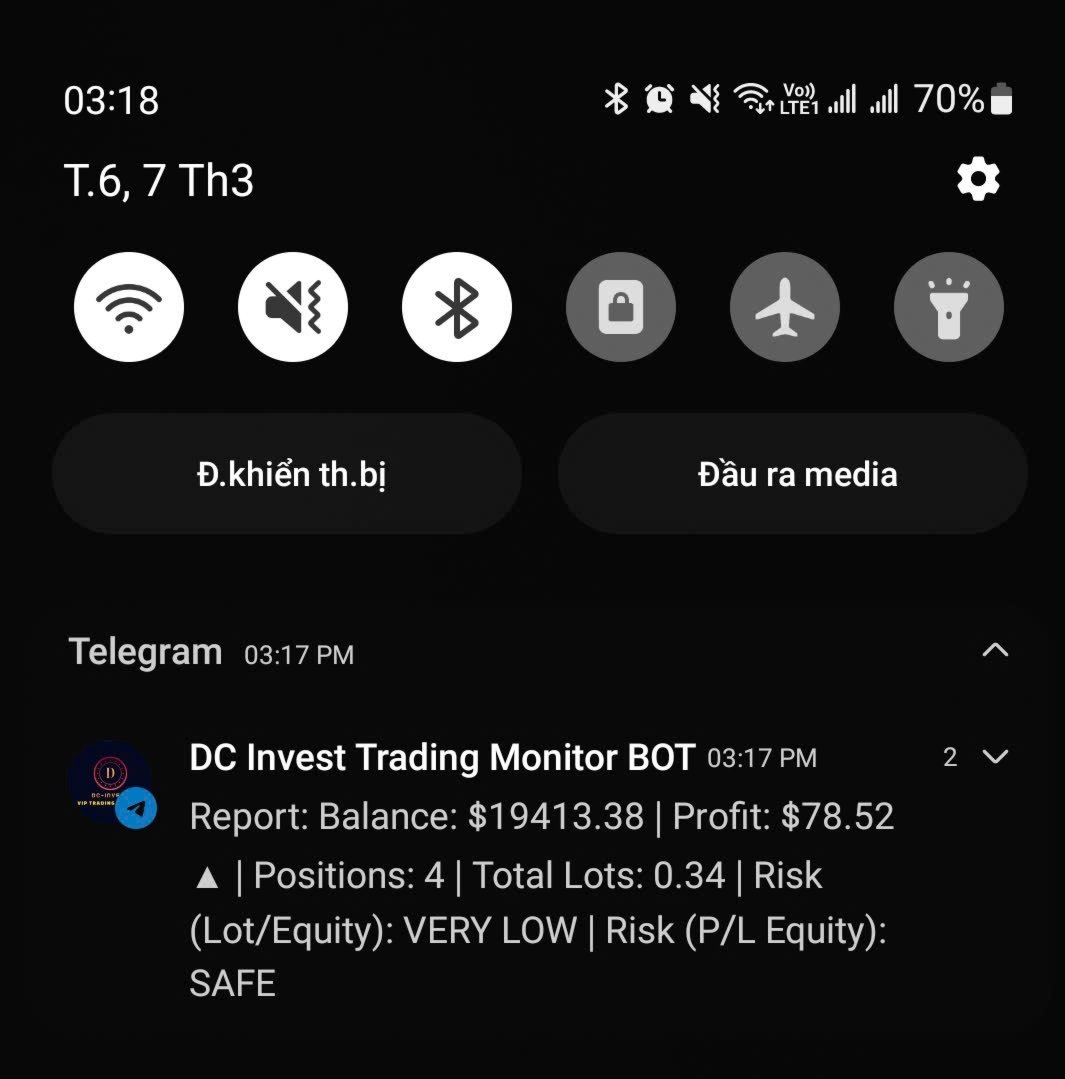
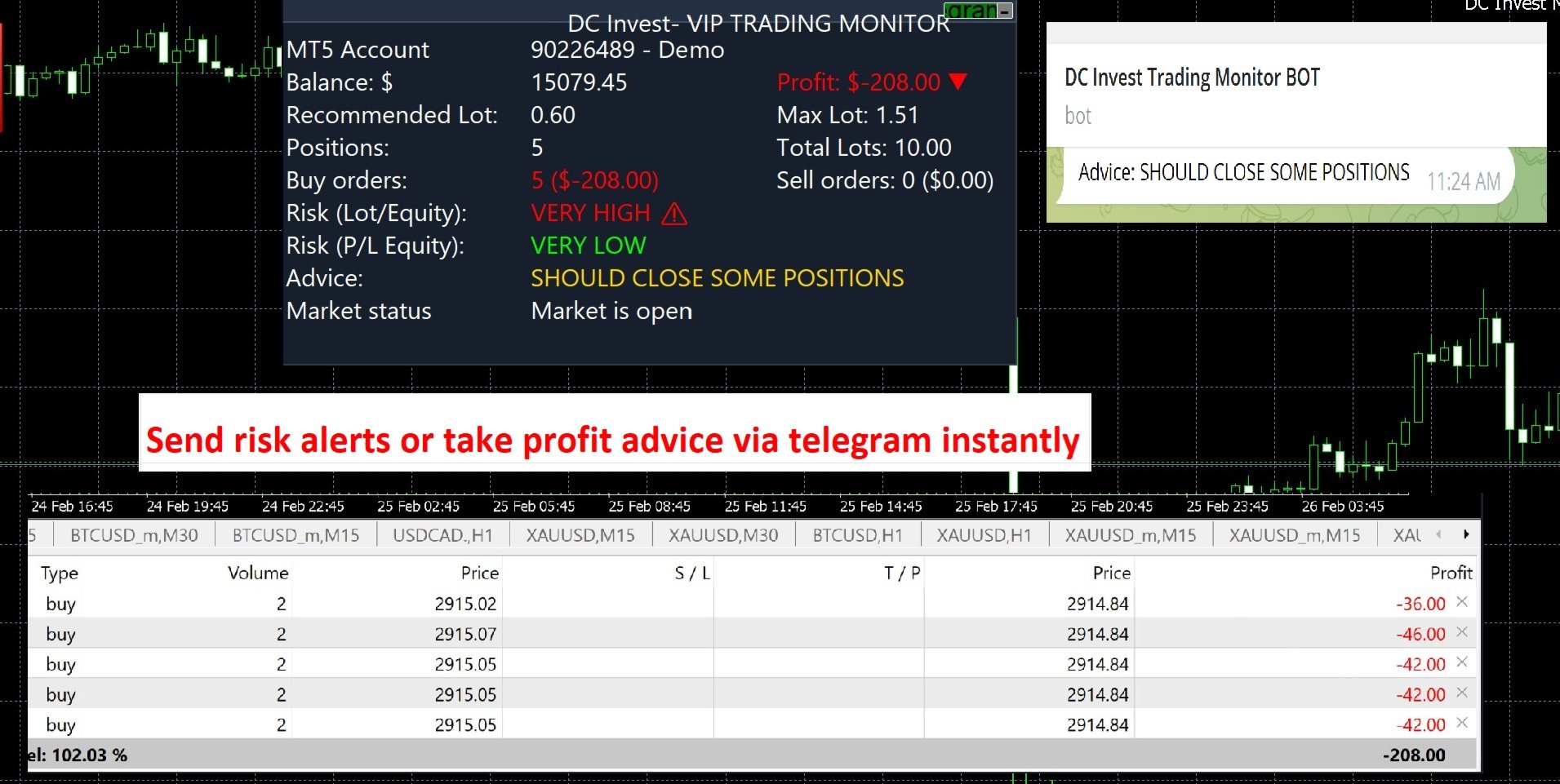
📊 Monitor balance, profit/loss & risk assessment - Display real-time safety level, warn immediately when the account is at risk.

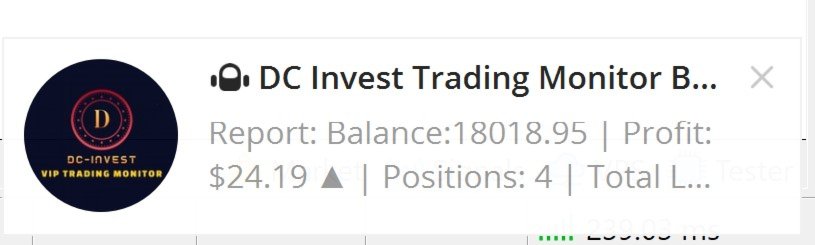
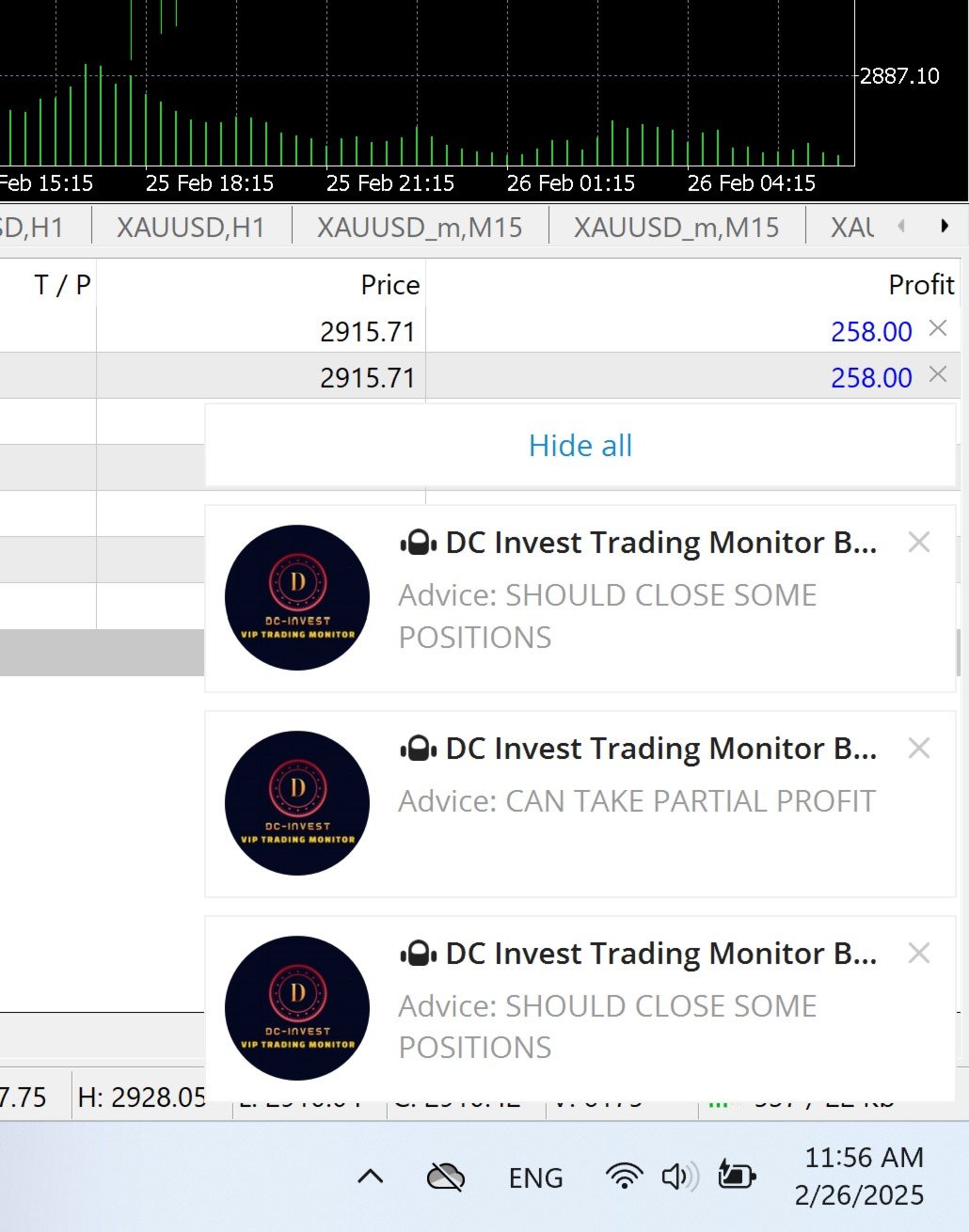
⚠️ Alert immediately when the market fluctuates strongly - No need to keep your eyes on the screen, the system will send notifications to Telegram for you to make timely decisions.

🚀 Smart trading, tight risk management – ​​Let DC Invest - VIP Trading Monitor help you invest with peace of mind!


// Version 1.09 Updates:

// - Display Live/Demo account, server time

// - Added more detailed error checking in the interface functions (CreatePanel, CreateLabels), Telegram (SendTelegramMessage), and closing orders (CloseAllPositions).

// - Complete multilingualization with fully translated strings for English, Vietnamese, Chinese, Spanish, and Arabic.

// - Added flexible customization for SLPips, RiskPercent, and MaxRiskPercent in CalculateRecommendedLot() and CalculateMaxLot() via input parameters.

// - Improved transaction log in SaveToCSV() to save details of each order (ticket, type, symbol, volume, profit).

// - Added sound alert (PlaySound) when advice changes in OnTick().


Features:


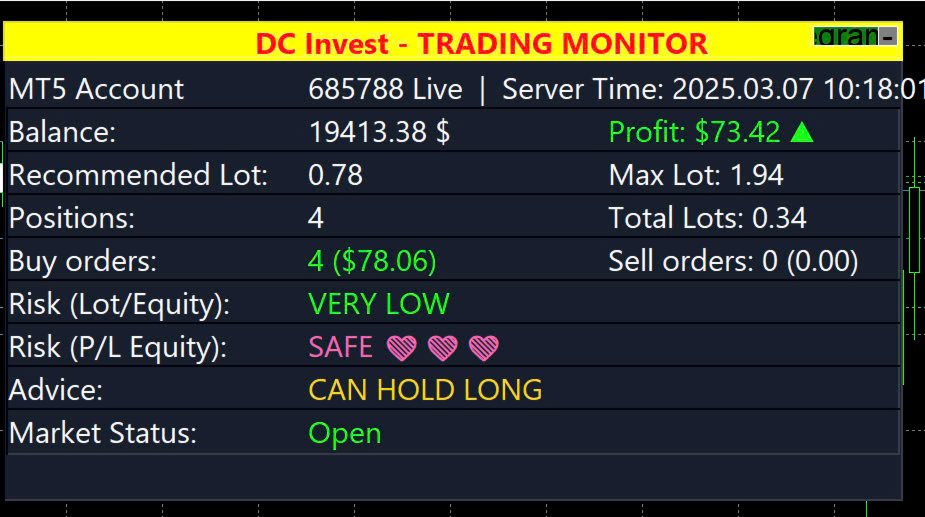
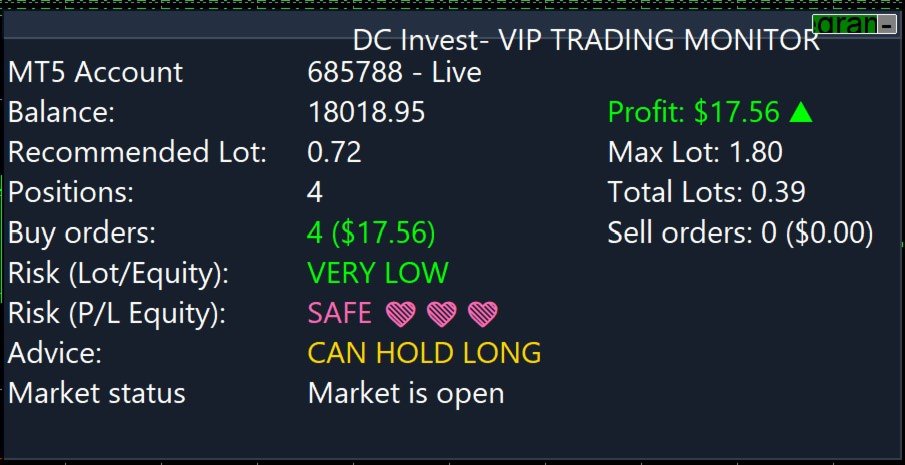
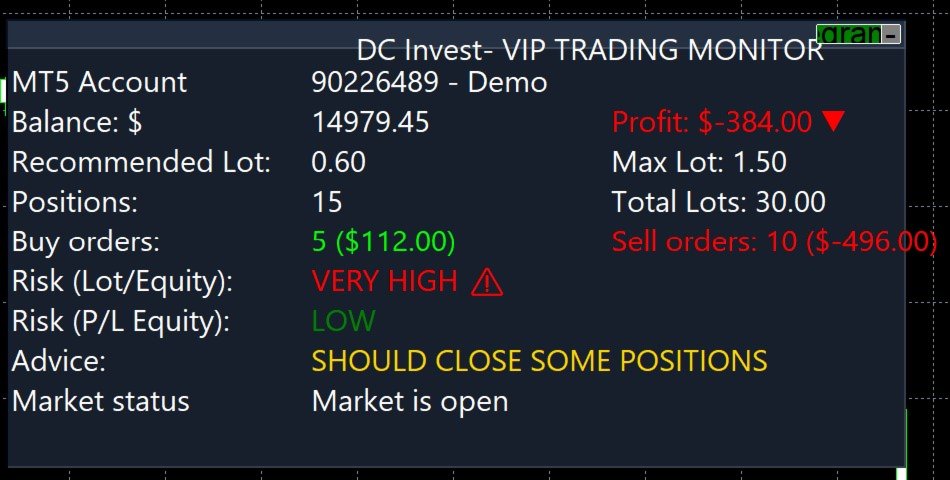
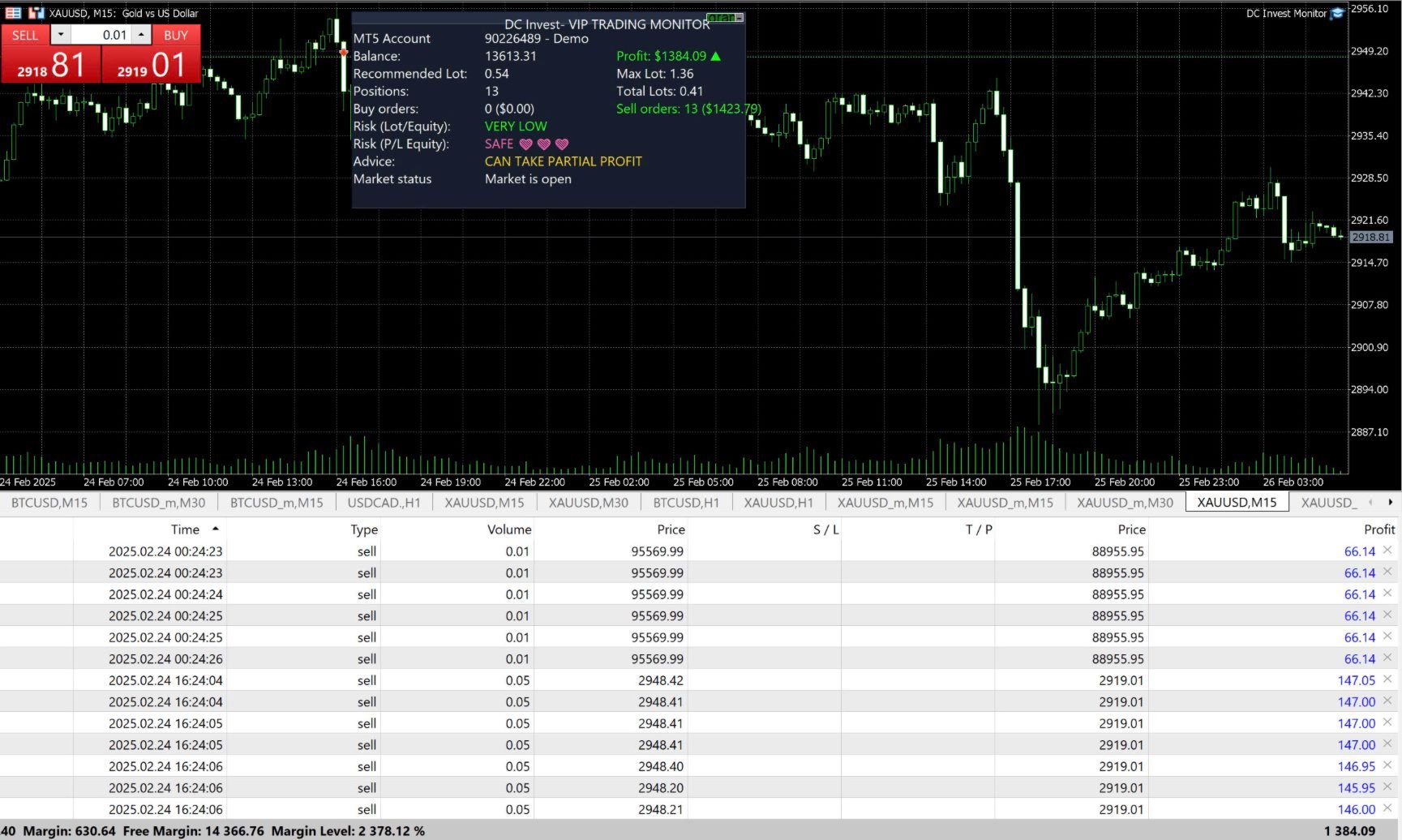
  • Account Monitoring: Displays MT5 account number, balance, equity, profit/loss (P/L), and account type (Live or Demo).

  • Position Tracking: Shows the number of Buy and Sell orders, total lots, and profit/loss for each position type, with visual indicators (green for profit, red for loss, white for no positions).

  • Risk Assessment: Assesses risk based on lot size (Lot/Equity) and profit/loss (P/L Equity), categorized as Very Low, Low, Medium, High, or Very High, with icons and colors.

  • Trading Suggestions: Provides recommendations (e.g., 'Can Hold Long,' 'Should Close Some Positions,' 'Cut Loss Now') based on risk levels and profit/loss.

  • Market Status: Indicates whether the market is open or closed.

  • Telegram Integration: Sends periodic reports and alerts to a Telegram bot (optional, configurable via inputs, requires internet connection).

  • Manual Position Closing Option: Allows manual closing of all positions if the loss exceeds a specified threshold (optional, configurable).

  • Language Support: Supports 5 languages: English, Vietnamese, Chinese, Spanish, Arabic, for all displayed text.

  • Customizable Appearance: Offers adjustable panel size, position, colors, font size, and update interval.

Why Use DC Invest- VIP Trading Monitor?


  • Suitable for traders needing account monitoring and risk management tools for multiple markets.

  • Supports decision-making with real-time data and monitoring tools, helping manage time effectively.

  • Supported by ongoing updates and multilingual documentation (English, Vietnamese, Chinese, Spanish, Arabic).

Installation:


  • Download the DCInvestVIPTradingMonitor.mq5 file or .ex5 file.

  • Place it in the MQL5/Experts folder of your MetaTrader 5 installation (e.g., C:\Users<YourUser>\AppData\Roaming\MetaQuotes\Terminal<BrokerFolder>\MQL5\Experts).

  • Restart MetaTrader 5 or refresh the Navigator panel.

  • Drag and drop the utility onto any chart from the Navigator > Experts section.

Usage:


  • Adding to Chart: Attach the utility to any MT5 chart to display the monitoring panel.

  • Configuring Settings: Modify the input parameters in the utility settings dialog (as listed below).

  • Interacting with the Panel: Click the 'Telegram ON/OFF' button to toggle Telegram notifications. Click the '-' or '+' button to minimize/maximize the panel.

  • Note: This utility does not perform automated trading; it is for monitoring and risk management only.

Telegram Notification Setup:


  • To enable Telegram notifications for account status reports and alerts, follow these steps:
    • Create a Telegram Bot:
      • Open Telegram and search for '@BotFather'.

      • Send '/start' to @BotFather, then use '/newbot' to create a new bot.

      • Follow instructions to name your bot and get a unique bot token (e.g., '123456789:ABCdefGHIjklMNOpqRSTuvwxYZ'). Save the token.


    • Get Your Chat ID:
      • Add your bot to a Telegram chat or group (or use a private chat).

      • Send a message to the bot (e.g., '/start').

      • Use @userinfobot or @RawDataBot on Telegram to find your chat ID, or check via the bot’s API (e.g., https://api.telegram.org/bot<YourBotToken>
        /getUpdates).

      • Save the chat ID (e.g., '123456789').


    • Configure Utility Settings:
      • In the MT5 utility settings, enter the TelegramToken and TelegramChatID.

      • Set TelegramReportInterval to the desired interval in minutes (e.g., 30, 60, or 0 to disable).

      • Ensure your MT5 terminal has internet access for notifications.


    • Test Notifications: Enable notifications via the panel’s 'Telegram ON/OFF' button and verify reports are sent to your Telegram chat.


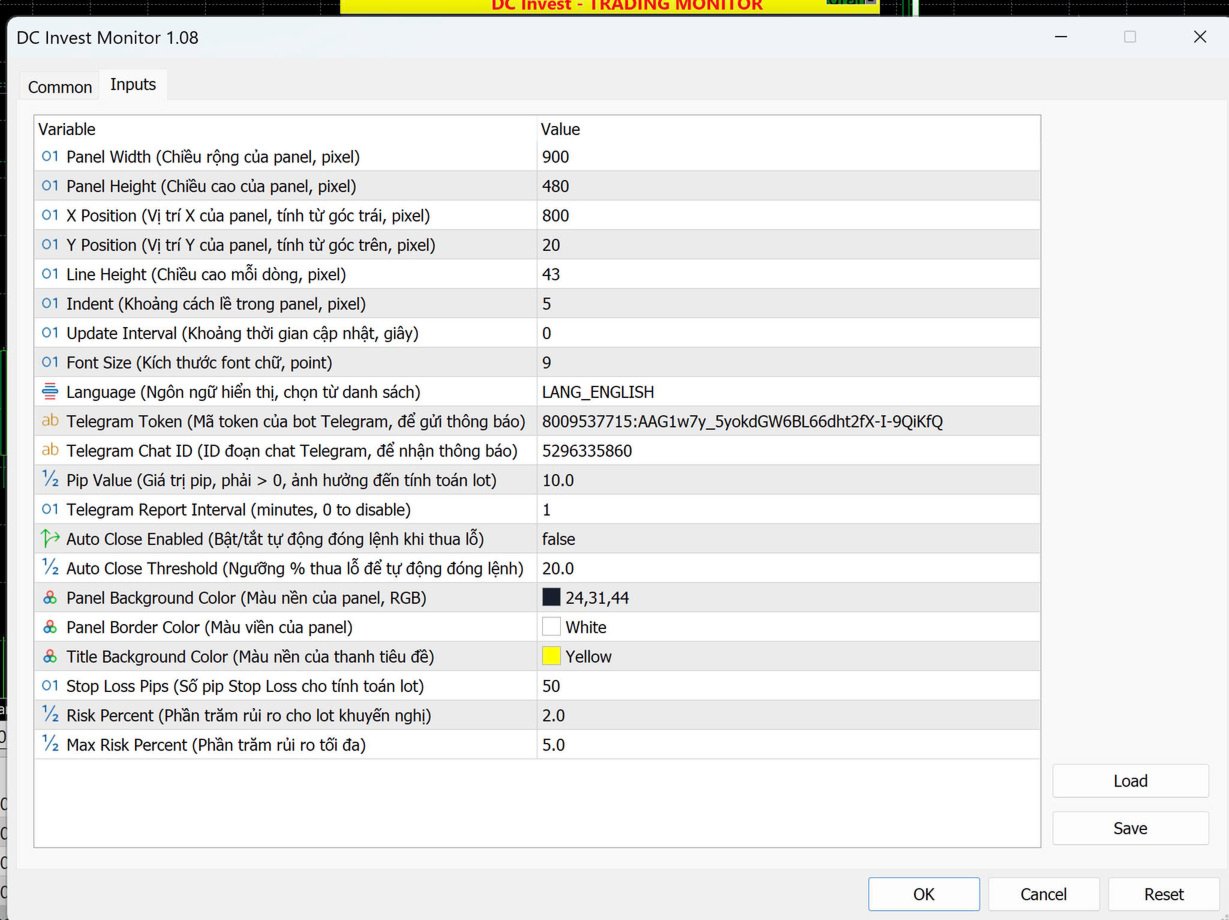
Input Parameters (Adjustable for Your Needs):


  • Parameter | Description | Default Value

  • PanelWidth | Width of the panel (pixels) | 900

  • PanelHeight | Height of the panel (pixels) | 450

  • XPosition | X-position of the panel (from left) | 800

  • YPosition | Y-position of the panel (from top) | 20

  • LineHeight | Height of each line in the panel (pixels) | 40

  • Indent | Indent spacing within the panel (pixels) | 5

  • UpdateInterval | Update frequency (seconds) | 1

  • FontSize | Font size for text | 9

  • Language | Language (English, Vietnamese, Chinese, Spanish, Arabic) | "English"

  • TelegramToken | Telegram bot token (optional, leave blank to disable) | ""

  • TelegramChatID | Telegram chat ID (optional, leave blank to disable) | ""

  • PipValue | Pip value for risk assessment calculations (must be > 0, used for monitoring only) | 10

  • TelegramReportInterval | Periodic report interval (minutes, 0 to disable) | 0

  • AutoCloseEnabled | Enable manual position closing option (false to disable) | false

  • AutoCloseThreshold | Loss threshold (%) for manual position closing | 20.0

  • PanelBgColor | Background color of the panel | C'24,31,44'

  • PanelBorderColor | Border color of the panel | clrWhite

  • TitleBgColor | Background color of the title bar | C'37,47,66'

Display Details:


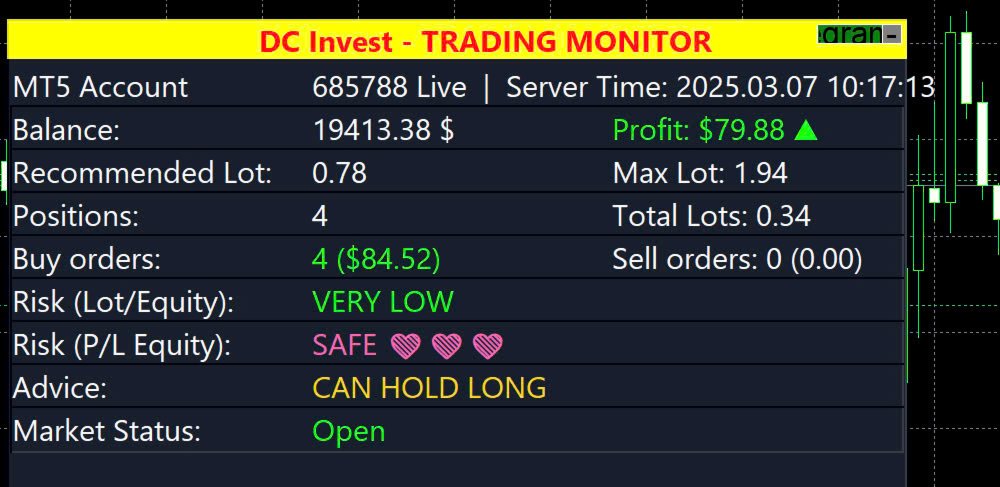
  • MT5 Account: Shows the account number and type (e.g., "685788 - Live" or "685788 - Demo").

  • Balance: Displays the current account balance.

  • Profit: Shows the profit/loss with a green arrow (▲) for profit or red arrow (▼) for loss.

  • Recommended Lot & Max Lot: Suggests lot sizes based on balance and risk settings for monitoring purposes.

  • Positions: Displays total positions, Buy orders, Sell orders, and total lots, with visual indicators for profit/loss.

  • Risk (Lot/Equity & P/L Equity): Assesses risk levels with icons (e.g., ❤️ for safe, ⚠️ for high risk).

  • Advice: Provides recommendations based on risk and P/L.

  • Market Status: Indicates if the market is open or closed.

Notes:


  • Ensure your MT5 account is properly connected to retrieve account information.

  • The Telegram feature requires a valid bot token and chat ID; leave them blank to disable.

  • The PipValue must be greater than 0 for accurate risk assessment calculations, used for monitoring only.

  • The utility requires internet access for Telegram notifications.

  • This utility does not perform automated trading; it is for monitoring and risk management only. Test thoroughly on a demo account before use.

Troubleshooting:


  • If the panel does not display or updates incorrectly, check your MT5 connection and account status.

  • Ensure Unicode and color support are enabled in your MT5 installation.

  • If Telegram notifications fail, verify the token, chat ID, and internet connection.

  • Increase PanelWidth or decrease Indent if text is cut off or overlapping.

  • Ensure the utility is attached as an Expert, not an Indicator.

Contact:


  • For support or feedback, contact Danh Chinh:
    • Phone: +84 888 989 992

    • Telegram: @Danhchinh888

추천 제품
Crystal ball
Nickey Magale
Crystal Ball – Trend-Backed Mean Reversion EA for MT5 Crystal Ball is not just another trading robot—it's a precision engine designed to capture the market’s natural rhythm. By combining the pullback-catching power of Mean Reversion with the momentum-following logic of Trend Trading , Crystal Ball enters trades with intention and exits with purpose. It’s built to avoid random noise, capitalize on structure, and adapt as the market moves. How It Works Wait for Deviation: Crystal Ball wat
Inverted_Chart_EA Utility Expert Advisor Inverted_Chart_EA creates and maintains a mirror-inverted chart of any symbol and timeframe. It automatically generates a custom instrument (e.g. US30_INV ) and keeps its price history updated in real time, with bars mirrored around a chosen pivot. This utility gives traders a new way to analyze the market from a different perspective by flipping the chart upside down. Why use an inverted chart? Highlight hidden patterns – price formations that look ordin
SolarTrade Suite Financial Robot: LaunchPad Market Expert - 거래를 시작하도록 설계되었습니다! 이 거래 로봇은 특별하고 혁신적이며 고급 알고리즘을 사용하여 가치를 계산합니다. 금융 시장의 세계에서 여러분의 조수입니다. SolarTrade Suite 시리즈의 지표 세트를 사용하여 이 로봇을 시작할 순간을 더 잘 선택하세요. 설명 하단에서 SolarTrade Suite 시리즈의 다른 제품을 확인하세요. 투자와 금융 시장의 세계를 자신 있게 탐색하고 싶으신가요? SolarTrade Suite Financial Robot: LaunchPad Market Expert는 정보에 입각한 투자 결정을 내리고 수익을 늘리는 데 도움이 되도록 만들어진 혁신적인 소프트웨어입니다. SolarTrade Suite Financial Robot: LaunchPad Market Expert의 장점: - 정확한 계산: 로봇은 고급 알고리즘과 분석 방법을 사
Classic Market Surfer EA - A Timeless, Proven Strategy for Gold Trading For years, this powerful trading strategy has been hidden from the public-reserved for a select few. Now, for the first time, the Classic Market Surfer EA is available to traders like you.   Built on pure, time-tested trading principles, this EA doesn't rely on trendy gimmicks like AI or machine learning. Instead, it harnesses a classic, robust strategy that has consistently delivered results over the years. This is not a "g
TradePilotmt5
Hossein Khalil Alishir
TradePilot Expert Advisor (EA) for MetaTrader 5 TradePilot is a professional and user-friendly Expert Advisor (EA) for MetaTrader 5 (MT5) . It simplifies automated trading , risk management , and trade execution with a smart trading panel . Perfect for beginners and experienced traders looking for a reliable trade manager EA with automated lot size calculation and smart position management. Key Advantages User-Friendly Trading Panel: Customizable panel with buttons and hotkeys for fast ex
Tiger Lite
Dang Cong Duong
Tiger Lite recreate the history of entry and exit orders. The goal is that you can grasp their strategy how to play. CSV format support for WEB, MT4 and MT5 platforms. The sequence of steps is described in the photo. Note: Please choose the existing date and symbol on the CSV file. For MT4/5, export historical data and copy the records to excel, save it with the extension CSV. For MT4/MT5/WEB, save the name with format mt4.csv/mt5.csv/web.csv If you get the history from another source and your
FREE
Gold EA: Proven Power for 1-Minute Gold Trading Transform your trading with our Gold EA, meticulously crafted for 1-minute charts and delivering over 2000% growth in 5 years from just $100-$1000 . No Martingale, No AI Gimmicks : Pure, time-tested strategies with robust money management, stop loss, and take profit for reliable performance across multiple charts. Flexible Trading Modes : Choose Fixed Balance for safe profits, Mark IV for bold growth, or %Balance for high rewards—combine Mark IV an
MT5용 암호화폐 외환 지표 "WPR with 2 Moving Averages" (리페인트 없음) - WPR 자체는 스캘핑에 가장 적합한 오실레이터 중 하나입니다. - "WPR and 2 Moving Averages" 지표는 WPR 오실레이터의 빠른 이동평균과 느린 이동평균을 함께 보여줍니다. - 이 지표는 가격 조정을 매우 빠르게 감지할 수 있도록 도와줍니다. - 매개변수를 통해 간편하게 설정할 수 있으며, 모든 시간대에 사용 가능합니다. - 매수 및 매도 진입 조건은 그림에서 확인할 수 있습니다. - WPR MA 교차 시 PC 및 모바일 알림 기능 제공. 매수 신호 조건 예시: (1) 빠른 이동평균이 느린 이동평균을 상향 돌파하고 WPR 값이 -50 미만이면 매수 진입. (2) WPR 값이 -20 이상으로 과매수 영역에 진입하면 매수 포지션 청산. 매도 신호 조건 예시: (1) 빠른 이동평균이 느린 이동평균을 하향 돌파하고 WPR 값이 -50 이상이면 매도 진입. (2) -
Overview Mirror Signals Service EA (Text only)   is a powerful monitoring Expert Advisor that automatically sends   real-time Telegram notifications   for all important trade events on your MetaTrader 5 account. It is engineered specifically for   signal providers ,   trade-copier operators ,   auditors ,   educators , and   professional trading services   that require immediate, detailed, and reliable reporting. Everything from   entries, exits, SL/TP changes, comment changes, trailing sto
Chart Pattern Master
Lefika Raphel Sebatane
The Chart Pattern Master EA is a sophisticated expert that allows you to trade all of the common chart patterns. It automatically identifies the chart patterns for you and even displays them on the chart. Use it as an indicator or as an automated trading expert. All pattern breakouts will be traded automatically for you. Recommendations: Trend Timeframe - 1H Breakout Timeframe - Any Symbol - Any TP and SL - false MIn Balance - $250 NOTE: Increase "Pattern Number of Bars" to scan over longer peri
지표에 대하여 이 지표는 금융 상품의 종가에 대한 몬테카를로 시뮬레이션을 기반으로 합니다. 몬테카를로는 통계적 기법으로, 이전에 관찰된 결과에 기반한 랜덤 숫자를 사용하여 다양한 결과가 나올 확률을 모델링하는 데 사용됩니다. 어떻게 작동하나요? 이 지표는 과거 데이터를 바탕으로 시간에 따른 랜덤 가격 변화를 모델링하여 특정 종목에 대한 여러 가격 시나리오를 생성합니다. 각 시뮬레이션은 종가 변동을 반영하기 위해 랜덤 변수를 사용하여, 주어진 기간 동안 미래 시장 움직임을 효과적으로 모방합니다. 몬테카를로 시뮬레이션의 장점 - 몬테카를로 시뮬레이션은 다양한 미래 시나리오에 대한 테스트를 통해 여러 거래 전략의 리스크를 분석하는 데 도움을 줍니다. - 희귀한 극단적 사건(꼬리 위험)을 포함하여 다양한 시장 상황에서 전략의 성과를 확인할 수 있습니다. - 단일 예측에 의존하지 않고, 몬테카를로는 관련 확률과 함께 잠재적 결과의 범위를 제공합니다. 이는 수익 또는 손실 가능성을 이해하는
G8 News Dashboard Pro: The Ultimate Economic Calendar Trading during high-impact news releases without proper monitoring can be devastating to your account. Slippages, spread widening, and extreme volatility can ruin even the best technical analysis. G8 News Dashboard Pro is an advanced, lightweight, and highly customizable on-chart economic calendar designed specifically for professional manual traders and risk managers. It extracts data directly from the native MetaTrader 5 calendar (No DLL
Gold Smc Apex Scalping h1
Chaibadee Dechtanankul
Here is a breakdown of how the GOLD SMC APEX SCALPER (H1 BUY EDITION) operates specifically on the H1 (1-Hour) timeframe. This Expert Advisor (EA) uses a hybrid approach , combining Smart Money Concepts (SMC) for entry zones with a Grid & Martingale system for trade execution and recovery. 1. Execution on the H1 Timeframe (The "New Bar" Rule) Strict H1 Lock: The EA checks its environment during initialization ( OnInit ). If you attach it to any timeframe other than H1, it will trigger an alert a
Golden Surfer EA
Aleksandr Chebotaev
5 (1)
골든 서퍼 — 강력하고 안정적이며 전문적입니다. 특별 출시 가격 한정 혜택 — 다음 5명에게 $355 이후 가격은 $455로 인상됩니다. Golden Surfer는 XAUUSD(금) 자동 거래를 위한 전문가 어드바이저(EA)입니다. 이 EA는 통제된 실행과 사전 정의된 위험 수준을 위해 설계되었습니다. 주요 규칙: EA는 한 번에 하나의 포지션만 유지합니다. 그리드 전략, 마틴게일 전략, 평균화 전략, 복구 시스템은 사용하지 않습니다. 작동 방식 제 이름은   알렉산더   입니다 . 저는 프로그래머이자 알고리즘 트레이더이며, 자동 거래 분야에서 오랫동안 일해 왔습니다.   이 기간 동안 저는 시장에 공격적인 "괴물" EA들이 넘쳐나는 것을 목격했습니다. 화려한 백테스트 결과, 복잡한 로직, 과도한 조작, 그리고 실제 운용 환경에서의 실용성은 거의 찾아볼 수 없는 EA들이죠. 많은 EA들이 겉보기에는 인상적이지만, 실제 거래나 전업 투자 회사에서는 실패하는 경우가 많습니다. 그래
Divergent Stochastic Filter II Catch Reversals Early, Filter Noise, Trade with Confidence The Edge: Why This Stochastic is Different  Every trader knows the Stochastic oscillator. But knowing when to trust its signals, that's the real challenge. The Divergent Stochastic Filter II transforms this classic indicator into a precision reversal detection system by adding critical elements: divergence intelligence, signal filtering and exhaustion detection.  While standard Stochastic oscillators fire s
Mega Indicator MT5
Szymon Palczynski
Price reach indicator. It also serves as the perfect term for supports and resistance. I use it in two experts. The basic tool for professional trading. The indicator analyzes the last 500 bar and uses this to determine the levels ( but it doesn't predict the future ) . Personally, I use it on TF H1.  It is very simple. Four lines on chart and that's all. Only two input parameters.  Thousands of indicators. Why this? Is good ? No! Is very good. Please test the indicator prior to purchasing. You
Advanced History Collector Panel for MT5 The Advanced History Collector Panel is a professional-grade account analysis and visualization indicator for MetaTrader 5 (MT5). It bridges the gap between raw trading logs and actionable insights by transforming execution data into interactive charts and comprehensive tables. Key Features: Comprehensive Data Metrics : Track daily/weekly profit and loss, long/short ratios, total volume, and deposit/withdrawal history. Dynamic Visualizations : Toggle betw
FREE
BTC Terminator
Riaan Adriaan Swanepoel
# Advanced Terminator AI EA MT5 - Neural Network Powered Trading System ## Premium Features Advanced Neural Network Technology - Deep learning algorithms for market pattern recognition - Real-time adaptive strategy optimization - Smart risk management powered by AI - Multi-timeframe analysis system Dual Market Mastery - Specialized for XAUUSD (Gold) trading - Optimized for BTCUSD cryptocurrency pairs - Individual strategy optimization for each market Professional Risk Management
Maximum Trend Arrows OT MT5
Mulweli Valdaz Makulana
STRICTLY FOR BOOM INDEX ONLY!!!!! Here I bring the Maximum Trend Arrows OT1.0 MT5 indicator. This indicator is made up of a combination of different trend indicators for entries and exits, for entries an orange arrow will paint on the chart below the current market and a red flag for closing of trades and it produces buy arrows only. When the orange arrow appears, it will appear along with it's sound to notify you. The 1H timeframe is recommended, don't use it anywhere else than on the 1H timefr
| Fully-automated Smart Money Concept (ICT) inspired trading solution with multi-strategy capabilities | Built by a grid trader >> for grid traders.  This is MT5 version, click  here  for  Blue CARA MT4  (settings and logics are same in both versions)     Real monitoring signal  -->  Cara Gold Intro Blue CARA EA   ('CARA') - short for  C omprehensive  A lgorithmic   R esponsive   A dvisor is a next-gen  multi-currency    multi-timeframe  EA base on the widely known (and perhaps the most popul
Bober Real MT5
Arnold Bobrinskii
4.76 (17)
Bober Real MT5 is a fully automatic Forex trading Expert Advisor. This robot was made in 2014 year and did a lot of profitbale trades during this period. So far over 7000% growth on my personal account. There was many updates but 2019 update is the best one. The robot can run on any instrument, but the results are better with EURGBP, GBPUSD, on the M5 timeframe. Robot doesn't show good results in tester or live account if you run incorrect sets. Set files for Live accounts availible only for cu
Exp TickSniper PRO FULL
Vladislav Andruschenko
3.97 (58)
Exp-TickSniper -   자동으로 각 통화 쌍에 대한 매개변수를 자동으로 선택하는 고속 틱 스캘퍼. 거래 매개 변수를 자동으로 계산하는 고문을 꿈꾸십니까? 자동으로 최적화되고 조정됩니까? MetaTrader 4용 시스템 정식 버전:       MetaTrader 4용   TickSniper   스캘퍼 TickSniper - 전체 설명       + 데모 + PDF EA는 10년 가까운 EA 프로그래밍 경험을 바탕으로 개발되었습니다. EA 전략은 모든 기호와 함께 작동합니다. 기간은 중요하지 않습니다. 로봇은 현재 시세, 틱 도달 속도, 스프레드 크기 및 기타 계약 사양 매개변수를 기반으로 합니다. 시스템은 유리한 정지 손실 및 이익 실현 수준을 자동으로 정의할 뿐만 아니라 평균 위치의 거리, 후행 정지 거리 등을 정의합니다. EA는 추세에 대해 추가 개방 시스템을 적용합니다("평균"). 설정은 실제 계정에서 테스트할 수 있도록 최적화되었습니다. Expert Advisor
Trading Assistent is a multifunctional trading panel that combines all necessary tools for professional trading. The panel provides complete control over positions, in-depth risk analysis, and fast order execution. MAIN FUNCTIONAL BLOCKS Position Management: - Real-time viewing of all open positions - Sorting by symbol, profit, volume, and type - Visual indication of profitable and losing positions - Bulk closing operations - Breakeven function for profit protection Trading Operations: - I
This "MT5 Auto Delete Pending Orders by Timeframe" EA is a high-tech trading efficiency tool designed for modern traders. It does not perform any trading or decision-making. ​ It fundamentally solves the core pain point in traditional trading where forgotten pending orders or sudden market changes lead to tied-up capital and missed new opportunities, by automatically managing order expiration . ️ Core Working Principle: Intelligent Pending Order Management The core of this EA lies in its intell
TradePad
Ruslan Khasanov
5 (1)
TradePad는 수동 및 알고리즘 트레이딩을 위한 도구입니다. 여러 거래 상품에 대한 빠른 거래 작업과 포지션 제어를 위한 간단한 솔루션을 제공합니다. 주의, 이 애플리케이션은 전략 테스터에서 작동하지 않습니다! 데모 계정을 위한 애플리케이션의 평가판과 모든 도구에 대한 설명 애플리케이션 인터페이스는 고해상도 모니터에 맞게 조정되었으며 간단하고 직관적입니다. 편안한 작업을 위해 트레이더에게 다음과 같은 도구 세트가 제공됩니다. 거래 작업 관리, 메인 차트 기간 간 전환, TradePad 상품 간 전환을 위한 핫키 관리자; 포지션을 개설하거나 보류 주문을 설정할 때 하락 위험을 평가하고 잠재적 이익을 계산하기 위한 거래 수준 표시 도구; 여러 거래 심볼을 시각적으로 모니터링하고 알고리즘 트레이딩을 위한 거래 신호를 수신하기 위한 MultiCharts 도구. 편의를 위해 거래 쌍 세트를 구성하여 여러 시간대의 가격을 모니터링하고 다중 통화 거래를 수행할 수 있습니다. 확장된 HTML
RBreaker
Zhong Long Wu
RBreaker Gold Indicators는 금 선물을 위한 단기 데이 트레이딩 전략으로, 추세 추종과 데이 내 반전의 두 가지 거래 방식을 결합합니다. 추세 장에서 수익을 포착할 수 있을 뿐만 아니라, 시장이 반전될 때 적시에 이익을 확정하고 추세에 맞춰 반대 포지션을 잡을 수 있습니다. 이 전략은 미국 잡지 Futures Truth에서 15년 연속으로 가장 수익성 높은 트레이딩 전략 상위 10위 안에 선정되었습니다. 긴 라이프사이클을 자랑하며, 현재까지 국내외에서 널리 사용되고 연구되고 있습니다. 본 지표는 2026년 금 선물의 움직임을 반영하여 14일 ATR 지표를 기반으로 돌파 계수 A, 관찰 계수 B, 반전 계수 R을 보다 합리적인 값으로 정의했습니다. 매우 훌륭한 지표이며, 안정적인 연간 수익성을 달성했습니다. 강력히 추천합니다~ 위 지표는 변동성이 높은 상품에 적합하며, 매개변수는 금 선물, 주가 지수 선물 등에 적합합니다. 다른 상품이 필요한 경우 돌파 계수 A
Msx AI Scalper Pro
Som Prakash Gehlot
MSX AI Scalper Pro Smart • Adaptive • Autonomous Trading Engine Overview MSX AI Scalper Pro is an advanced automated trading system built for BTCUSD on M5 timeframe . Unlike many robots that depend on strict time filters, news blocks or manual control, this system is designed to trade continuously 24/7 , adapting to market volatility in real time — without external filters or manual babysitting. Working Principle (Short Theory) The EA combines: Smoothed HMA trend direction – to detect cle
Crash5 EA ,I s a automatic robot that has the level of professional decision when to take a trade without any emotion. The bot will help in your scalping decision making with its own TP (take profit) and SL (stop loss) with the trail stop when in profit. This is a trend based spike catching ,looking on whats happening in real time charts no repainting of any signals. The robot helps in making decisions on the candle stick pattern opened and closed lat price with the help of RSI ,MACD and the EMA
Trade History By Magic Indicator Unlock Your Trading Insights with Trade History By Magic! Enhance your MetaTrader 5 experience with this powerful indicator designed for traders who demand precision and clarity. Trade History By Magic provides a clear, real-time display of your trading history, organized by magic numbers, directly on your chart. Perfect for both automated and manual traders, this tool helps you track performance effortlessly. Key Features: Organized Trade Tracking : Displays tra
Net Z
Sugianto
5 (1)
NET Z uses a very well-known trend reversal technique to determine position entry with slight modifications by using virtual trade techniques and virtual pending orders so that position entry is not too early or too late. Why NETZ? NET Z does not require complicated settings and is easy to use because user only need to upload a set file that is already available. Currently there are set files for 20 fx pairs. The best GRID EA with the ability to control risks. I will share my personal daily ro
이 제품의 구매자들이 또한 구매함
HINN Lazy Trader
ALGOFLOW OÜ
5 (2)
The core idea: using the user interface, you configure the parameters the chart must meet before entering a position (or positions), choose which entry models to use, and set the rules for when trading and planning should end. Lazy Trader  handles the rest: it  takes over all the routine chart watching and execution! full description  :: 3 key videos [1] ->  [2]   ->  [3] What can it do? - Understands Larry Williams market structure - Understands swing market structure by Michael Huddleston
VERIFIED TRADING RESULTS - Farmed Hedge Yield Axi Copy:  https://www.mql5.com/en/signals/2356376 - Farmed Hedge Yield Exn Copy:   https://www.mql5.com/en/signals/2356404 - Farmed Hedge Yield V Copy:  https://www.mql5.com/en/signals/2357156 Contact me via private message to receive the User Manual and Setup. * Thai Lauguage Support Available Farmed Hedge Yield Farming - Professional Pair Trading Dashboard (Manual - Hybrid - Semi/Automated EA) VERSION 3 - WILD HARVEST UPDATE Trading Approac
YuClusters
Yury Kulikov
4.93 (43)
Attention: You can view the program operation in the free version  YuClusters DEMO .  YuClusters is a professional market analysis system. The trader has unique opportunities to analyze the flow of orders, trade volumes, price movements using various charts, profiles, indicators, and graphical objects. YuClusters operates on data based on Time&Sales or ticks information, depending on what is available in the quotes of a financial instrument. YuClusters allows you to build graphs by combining da
************************************************************************************************************************************** GoldMine Train은 Gold를 위한 트렌드 트레이딩 전략 EA입니다. 운영자는 주요 트렌드 방향을 결정하고 Train에 이동을 지시합니다. Train은 해당 방향으로 지속적으로 매수/매도를 합니다. Lot 볼륨은 계정 잔액과 사전 설정된 레버리지 비율에 따라 달라집니다. 운영자가 트렌드 방향을 변경하면 Train이 멈추고 이익을 잠급니다. 사용자는 차트의 버튼을 사용하여 트렌드 방향을 쉽게 선택할 수 있습니다. ******************************* ***************** ********************** ***************** ********************** *********
Unlimited Trade Copier Pro MT5 is a tool to copy trade remotely to multiple MT4, MT5 and cTrader accounts at different computers/locations over internet. This is an ideal solution for you if you are a signal provider and want to copy your trades to other receivers globally on your own rules. One provider can copy trades to multiple receivers and one receiver can get trade from multiple providers as well. The provider can even set the subscription expiry for each receiver, so that receiver will n
Features   With MT5 to Interactive Brokers(IB) Trader, you can: 1. Load chart data from IB to MT5, and Analyze with all standard or customer Indicators. 2. Place Orders to IB Account Directly in MT5. 3. Make your Own EAs upon IB Securities by only making minus changes of the trading function. Usage 1) Installation Copy the "Mt5ToIBTraderEn.ex4" and sample files to [MT5 Data Folder]->MQL5->Experts.  2)  MT5 Settings Add the IP Address to the MT5 Allowed URLs in 'Tools->Options->Expert Adviso
Mt5 To InterativeBrokers Copier allows you to copy deals from MT5 account to Interactive Brokers. With this, you can run your EA strategy on a MT5 Demo/Real Account, then copy all the deals to Interactive Brokers account real time. Features: 1. Copy or Invert-Copy deals Realtime from MT5 to IB Account. 2. Synchronizing positions of both accounts periodicaly, in case any missing copying. 3. You can choose only Buy position or Sell position. Symbols Setup: General Format:  {MT Symbol} -> {IB S
Mentfx Mmanage mt5
Anton Jere Calmes
4.25 (8)
The added video will showcase all functionality, effectiveness, and uses of the trade manager. Drag and Drop Trade Manager. Draw your entry and have the tool calculate the rest. Advanced targeting and close portions of a trade directly available in tool (manage trades while you sleep). Market order or limit order on either side with factored spread. Just draw the entry, the tool does the rest. Hotkey setup to make it simple. Draw where you want to enter, and the stop loss, the tool calculates al
GRat Crypto
Ivan Titov
4.5 (2)
Trade on crypto exchanges in MT5! GRat_Crypto is a tool for manual and automated trading , including ANY available EA, ANY  cryptocurrency  on most popular crypto exchanges in the familiar MT5 environment 24/7. Features 1. ALL instruments of the 9 most popular crypto exchanges are available: Binance, BingX, Bybit, Coinbase, CoinEx, Kraken,   KuCoin, MEXC and OKX . 2. The ability to place ANY type of order available in MT5, both market and pending, to modify orders and positions, to delete order
PineChart
Muhammad Minhas Qamar
Developed by MMQ —  PineChart: Run PineScript Inside MT5 With A Modern Charting Experience An MQL5 Expert Advisor that runs Pine Script indicators and strategies directly inside MetaTrader 5. PineChart includes a full Pine Script interpreter so you can use your existing Pine Script v5/v6 source code without manually rewriting anything in MQL5. Links [  Website  |  Documentation  |  Demo ] NOTE: Downloading demo through MQL5 will give you limited functionality. To experience PineChart fully, dow
Crystal Trade Manager – Advanced MT5 Risk and Trade Control Utility Overview Crystal Trade Manager (CTM) is a professional MetaTrader 5 utility designed for risk management, trade automation, and instant execution control. It provides traders with an integrated system for protecting equity, managing daily drawdowns, controlling lot sizes, and applying automation features such as automatic SL/TP, break-even, and trailing stop. The tool is suitable for manual traders, prop-firm challenge particip
**MT5 트레이드 카피어 - 주문 복사** **MT5용 트레이드 카피어** *   다중 마스터 및 슬레이브 터미널 지원 *   DLL 사용 없이 로컬에서 운영 *   선택적 저속 모니터링 모드 *   강력하고 신뢰할 수 있는 트레이드 카피어를 필요로 하는 모든 트레이더에게 완벽 **MT5 to MT5 트레이드 카피어** **(메타트레이더 5 to 메타트레이더 5 카피어) | 메타트레이더 5용 초고속 로컬 트레이드 카피어 전문가 어드바이저(EA)** **개요** MT5 to MT5 카피어(메타트레이더 5 to 메타트레이더 5 카피어)는 모든 트레이더, 특히 전문 트레이더(Pro Traders), 계정 관리자(AM), 신호 제공자(Trading Signal Providers), 프로프-펌 사용자(Proprietary Trading Firm Users) 등을 위한 차세대 초고속 로컬 트레이드 카피어(로컬 트레이드 복제기)입니다. 다음과 같은 기능을 제공합니다: *   오프라인
Live Forex Signals 사이트 신호에 거래를 위해 설계   https://live-forex-signals.com/en 그리고  https://foresignal.com/en . Live Forex Signal for MetaTrader 4   https://www.mql5.com/en/market/product/81445 매개 변수 사용자 이름 및 암호는 사이트에 가입 한 경우 live-forex-signals.com/foresignal.com 구독이 없으면 필드를 비워 둡니다; 댓글 개설 된 거래에 대한 댓글 위험 위험 거래에 대한 예금의 백분율로,위험=0 인 경우,다음 값 많이 사용됩니다 거래에 대한 많은 고정 볼륨 사이트에서 이익을 가져 가라 웹 사이트에서 정지 손실을 사용 빈도신호업데이트고문의 사이트 방문 빈도 분 최대 스프레드무역에 허용되는 최대 스프레드를 거래합니다.스프레드가 더 높으면 보류 중인 주문 세트가 취소됩니다 사용트레일링 사용 후행 정지 트레일링
EA price is reduced to 50% discount for limited time period. Spot vs Future Arbitrage EA for MT5 Spot vs Future Arbitrage EA is an automated Expert Advisor designed for MetaTrader 5 that operates using price differences between Gold spot and Gold futures instruments. The strategy opens positions on both instruments simultaneously to take advantage of temporary differences between spot and futures prices. Requirements The trading account must provide both Gold spot and Gold futures instruments
Gold instrument scanner is the chart pattern scanner to detect the triangle pattern, falling wedge pattern, rising wedge pattern, channel pattern and so on. Gold instrument scanner uses highly sophisticated pattern detection algorithm. However, we have designed it in the easy to use and intuitive manner. Advanced Price Pattern Scanner will show all the patterns in your chart in the most efficient format for your trading. You do not have to do tedious manual pattern detection any more. Plus you
FiboPlusWaves MT5
Sergey Malysh
5 (1)
FiboPlusWave Series products Ready-made trading system based on Elliott waves and Fibonacci retracement levels . It is simple and affordable. Display of the marking of Elliott waves (main or alternative option) on the chart. Construction of horizontal levels, support and resistance lines, a channel. Superposition of Fibonacci levels on waves 1, 3, 5, A Alert system (on-screen, E-Mail, Push notifications).    Features: without delving into the Elliott wave theory, you can immediately open one of
Trading Chaos Expert
Gennadiy Stanilevych
5 (11)
This software has no equals in the world and represents a universal trade "console" covering trading signals, automated market entry, setting of Stop Loss and Take Profit, as well as Trailing Profit for multiple trades at the same time in a single open window. Intuitive control of the Expert Advisor in "three clicks" ensures a comprehensive use of all its functions on different computers, including tablets PCs. Interacting with additional signal indicators that mark the chart to give a real mark
如果产品有任何问题或者您需要在此产品上添加功能,请联系我 Contact/message me if you encounter any issue using the product or need extra feature to add on the base version. There is Demo version of this panel Dashboard Babon Scalping System MT5 Demo in my product list, please try it out to get familiar with all functionalities for free. Free version: LINK MT4 version: LINK This system basically utilizes TDI, Heiken Ashi Trend, Price Trend on H1 time-frame and TMA on H1&H4 time-frame to generate the trend (big picture). Then
Equity Gaurd
Eredewei Henry Tiemo
️ Equity Protector EA – Auto SL & Trailing Stop for MT5 Protect your capital. Automate your risk. Maximize your control. The Equity Protector EA is a powerful risk management tool designed for Meta Trader 5 traders who prioritize capital preservation and smart trade automation. Whether you're a scalper, swing trader, or long-term investor, this EA ensures your account stays protected while optimizing trade exits with precision. Key Benefits Drawdown Shield Automatically monitors your accoun
Professional Order & Risk Management EA for MT5 An advanced order management tool designed to help traders control risk, position size, and trade management with precision. Features include automatic lot size calculation , risk–reward management , manual & automatic partial closes , breakeven automation , market & pending order support , and hotkey execution — built for traders who value systematic and disciplined risk management . EA Features Automatic Lot Size Calculation Automatically c
News Trader Pro is a unique robot that allows you to trade the news by your predefined strategy. It loads every piece of news from several popular Forex websites. You can choose any news and preset the strategy to trade it, and then News Trader Pro will trade that news by selected strategy automatically when the news comes. News release gives opportunity to have pips since the price usually has big move at that time. Now, with this tool, trading news becomes easier, more flexible and more exciti
Elliott Wave Counter는 Elliott 파동의 빠르고 사용자 친화적인 수동 마크업을 위한 패널입니다. 색상과 마크 수준을 선택할 수 있습니다. 도구에서 만든 마지막 마크업과 전체 마크업을 제거하는 기능도 있습니다. 한 번의 클릭으로 마크업이 이루어집니다. 5번 클릭 - 5개의 웨이브가 있습니다! Elliott Wave Counter는 Elliott 파동의 초보자와 전문 분석가 모두에게 훌륭한 도구가 될 것입니다. Elliott Wave Counter 설치 및 입력 가이드 당신이 얻고 싶다면       EA 추가 URL(   http://autofxhub.com   ) MT5 터미널에 대한   알림   (스크린샷 참조). MT4 버전   https://www.mql5.com/en/market/product/14016 MT5 버전   https://www.mql5.com/en/market/product/15081 일반 입력: 웨이브 유형 버튼:   이 버튼을 사용하면 차트
If you wish to draw Support and Resistance lines, view: daily market opening, classical pivot levels, Fibonacci pivot levels, trend lines, Fibonacci levels, the remaining time to candle closing, and current spread. If you seek to place your orders with the exact lot that meets your desired stop loss risk. If you wish to do all this and more with just one click, then this is the perfect tool to use. This tool will allow you to feel more relaxed when deciding to open orders, as well as predicting
The new version of  MirrorSoftware 2021  has been completely rewriten and optimized.  This version requires to be loaded only on a single chart because  it can detect all actions on every symbol and not only the actions of symbol where it is loaded. Even the  graphics and the configuration mode  have been completely redesigned. The MirrorSoftware is composed of two components (all components are required to work):  MirrorController  (free indicator): This component must be loaded into the MASTER
ClusterSecond
Rafil Nurmukhametov
4.78 (32)
The utility allows you to build different types of graphs: Seconds chart from 1 second to 86400 seconds Tick chart from 1 tick and above The volume chart Delta chart Renko chart Range chart Demo version of the utility https://www.mql5.com/ru/channels/clustersecond Built-in indicators for volumetric analysis: daily market profile and market profile of the selected timeframe, Cluster Search Imbalance VWAP Dynamic POC, VAH, VAL the profile depth of the market vertical volume with various display op
The script displays info about the share's corporate reports and dividends. The data is downloaded from   investing.com : Report date Profit per share (EPS) Revenue Market capitalization Amount of dividends Date of payment of dividends Dividend income The product cannot be tested in the tester (since it is not possible to receive data from the Internet). Before launching:  Add 2   URL   https://ru.investing.com/earnings-calendar/Service/getCalendarFilteredData  and   https://ru.investing.com/di
Telegram Publisher Agent는   거래자가 Telegram 채널 및 그룹에 실시간으로 신호를 보낼 수 있는 추가 기능입니다. 사용자 정의 가능한 메시지, 차트 스크린샷 및 기타 기능을 통해 이 도구는 트레이더가 트레이딩 통찰력과 전략을 팔로워와 공유할 수 있도록 도와줍니다. 이 도구는 또한 밝고 어두운 테마 스위치가 있는 아름다운 디자인을 특징으로 하여 사용자에게 미적 및 기능적인 거래 경험을 제공합니다. Telegram 게시자 에이전트는 모든 거래를 채널 및 그룹의 신호로 게시하도록 설계되었습니다. 거래를 제공하기만 하면 Telegram 게시자 에이전트가 버튼 클릭 한 번으로 거래 채널이나 그룹에 거래 신호를 보내는 모든 어려운 작업을 수행합니다. 텔레그램 게시자 에이전트       설치 및 입력 가이드 EA 추가 URL(   http://autofxhub.com   ) MT4/MT5 터미널(스크린샷 참조)   에 대한 알림을 받으려면   . MT4 버전   htt
Telegram Notify MT5 Telegram Notify MT5 is an utility tool to bridge your MetaTrader 5 activities to your Telegram chat/channel. It is useful for monitoring your MetaTrader 5 account by sending a notification to your particular Telegram chat/channel when someone/EA is placing trades, modifying order's TP/SL, closing trades and etc. This EA does not place any trade for your account. This EA also could be a convenient tool for monitoring other's EA trading activities or a tool for publishing your
Telegram ChartSnap MT5 is an utility tool to bridge your MetaTrader 5 activities to your Telegram chat/group/channel. It will screen shot your MetaTrader 5 chart and send it to your dedicated Telegram chat/group/channel through a Telegram bot. The whole process will keep repeating based on a time cycle that predetermined by the user. It is a convenient tool for those who like to get access to their favorite system/dashboard that only available at MetaTrader Desktop. Beside that, trader can easi
Virtual Grid MT5
Volodymyr Hrybachov
반자동 거래를 위한 유틸리티. 브로커에게 보이지 않는 스탑 오더, 손절매, 이익 실현 및 트레일링 스탑 설정을 위한 동적 수준을 적용합니다. FIFO 요구 사항이 있는 미국 중개인을 포함하여 모든 중개인과 작업하는 데 적합합니다. 어드바이저 링크의 MT4 버전 버튼이나 라인을 사용하여 거래를 열 수 있습니다. 어드바이저가 선을 따라 포지션을 열려면: 차트에 선을 그리고 이름을 바꿉니다. 가격이 이를 초과하면 EA가 해당 명령을 실행합니다. OPEN_SELL - 판매 주문 열기 CLOSE_SELL - 모든 판매 주문 마감 OPEN_BUY - 구매 주문 열기 CLOSE_BUY - 모든 구매 주문 마감 명령이 실행된 후 "OK"라는 주석이 작성되고 행은 명령을 한 번만 실행합니다. 차트는 수신된 이익, 현재 오픈 포지션(주문 수, 로트 수 및 이익), 오픈 주문 버튼, 실행 속도 및 슬리피지에 대한 정보를 표시합니다. 옵션: MAGIC_NUMBER - 매직 넘버; LOT_
제작자의 제품 더 보기
"If I had six hours to chop down a tree, I would spend the first four sharpening the axe." – Abraham Lincoln Entering the financial market means competing against the sharpest minds on the planet. As an amateur trader, what do you have besides your phone and… sheer guts? Do you think you can beat them without a powerful secret weapon? DC-SmartTradeExecutor Pro – The ultimate control center for lightning-fast and seamless trading. News trading is a speed race – You can’t afford to be
MATRIX ONE PRO - Elite Trading Bot by DC Invest Overview Introducing MATRIX ONE PRO , the ultimate Expert Advisor (EA) for MetaTrader 5, crafted by DC Invest to redefine automated trading. Designed for serious traders and investors, this bot delivers unparalleled performance, combining advanced multi-timeframe strategies, intelligent risk management, and cutting-edge features. With a proven track record of 1,326% growth in just 3 months, MATRIX ONE PRO is your key to consistent profits in the f
Here’s an in- depth performance analysis in English for the DC Invest Matrix One Gold Enhanced bot , tested from January 1, 2025 to May 12, 2025 , using: Initial capital : $ 1,000 Fixed lot size : 0.1 lots per trade All trades have SL & TP No martingale or grid strategy used General Performance Metric Value Interpretation Total Net Profit $ 6,841.08 Strong profit, + 684% in ~ 4.5 months. Gross Profit $ 40,409.16 Bot captured large upward moves. Gross Loss -$ 33,568.08 Still high, but control
필터:
리뷰 없음
리뷰 답변