DC Invest Vip Trading Monitor

DC Invest Vip Trading Monitor Ver 1.09

Busy? No time to monitor orders? Don't let risks swallow your account!

Whether you are a busy office worker or a shipper who is always on the go, constantly monitoring transactions on MetaTrader 5 (MT5) is almost impossible. But don't worry, DC Invest - VIP Trading Monitor will help you control your account and manage risks automatically!

✅ Calculate optimal order volume - No more worrying about placing orders that are too large or too small, the system automatically recommends the appropriate volume to protect your account.

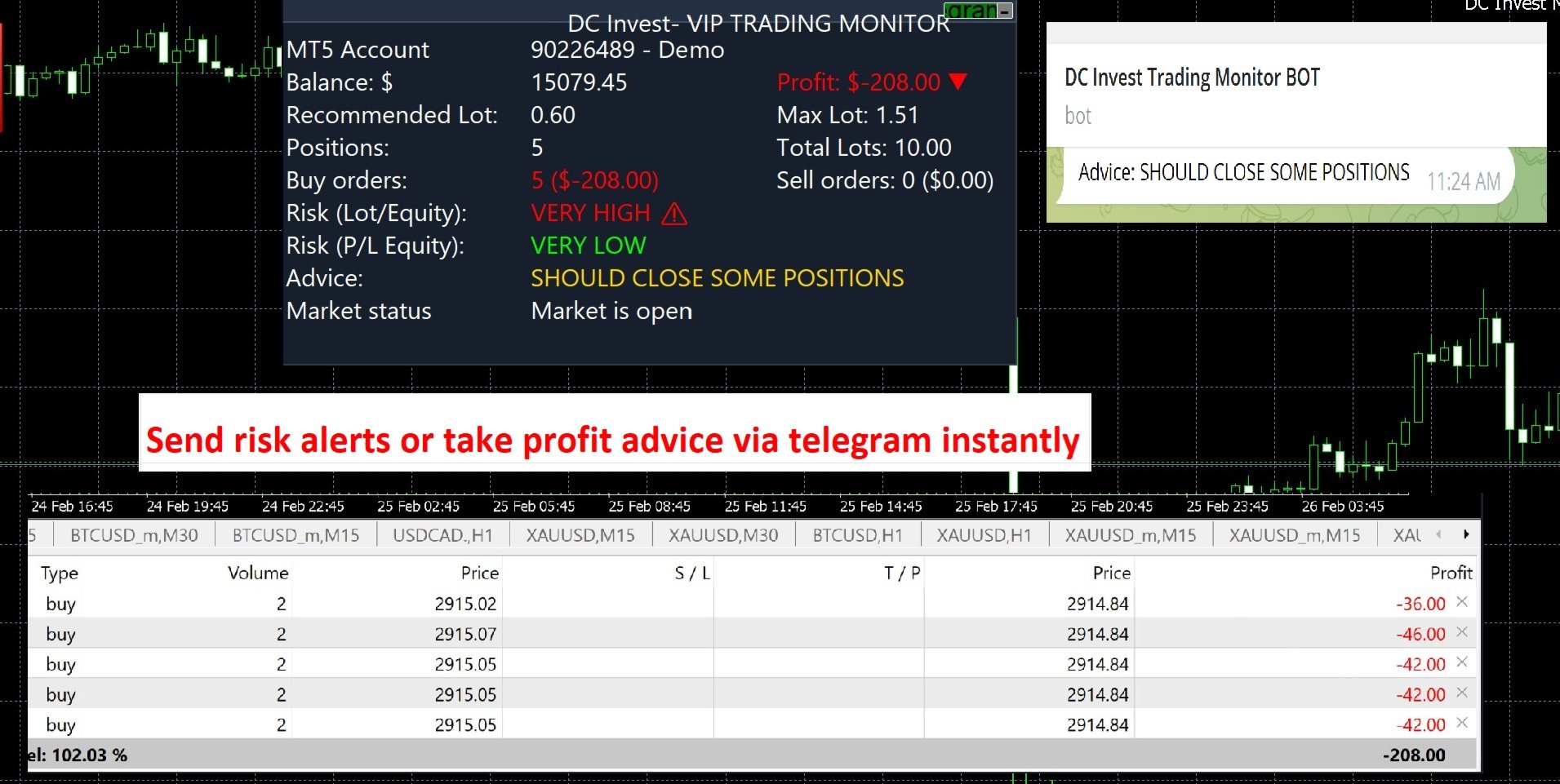
📊 Monitor balance, profit/loss & risk assessment - Display real-time safety level, warn immediately when the account is at risk.

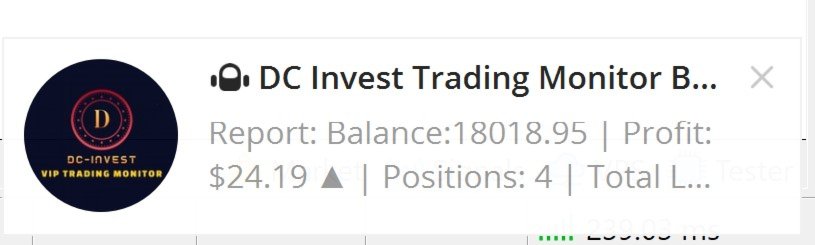
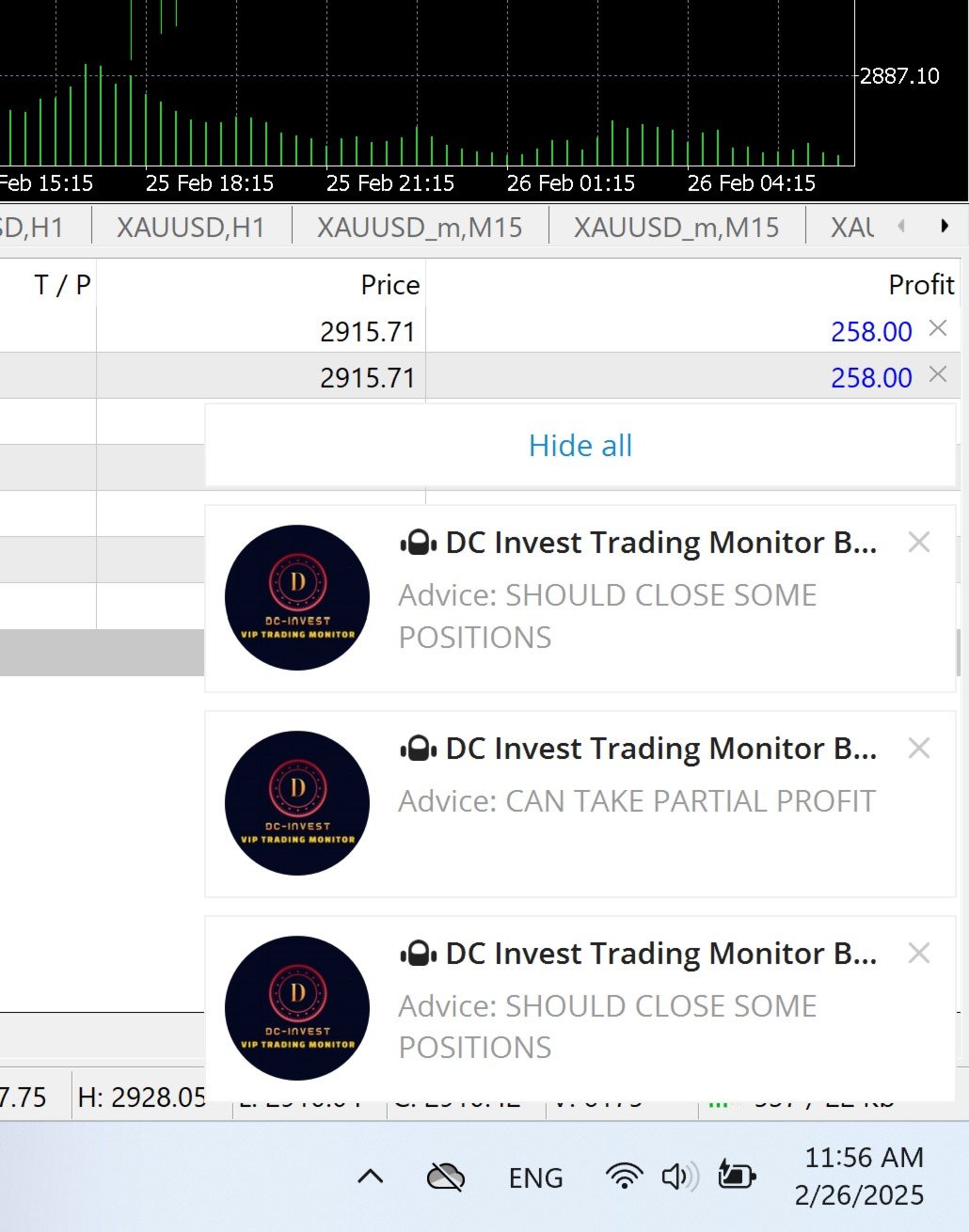
⚠️ Alert immediately when the market fluctuates strongly - No need to keep your eyes on the screen, the system will send notifications to Telegram for you to make timely decisions.

🚀 Smart trading, tight risk management – ​​Let DC Invest - VIP Trading Monitor help you invest with peace of mind!


// Version 1.09 Updates:

// - Display Live/Demo account, server time

// - Added more detailed error checking in the interface functions (CreatePanel, CreateLabels), Telegram (SendTelegramMessage), and closing orders (CloseAllPositions).

// - Complete multilingualization with fully translated strings for English, Vietnamese, Chinese, Spanish, and Arabic.

// - Added flexible customization for SLPips, RiskPercent, and MaxRiskPercent in CalculateRecommendedLot() and CalculateMaxLot() via input parameters.

// - Improved transaction log in SaveToCSV() to save details of each order (ticket, type, symbol, volume, profit).

// - Added sound alert (PlaySound) when advice changes in OnTick().


Features:


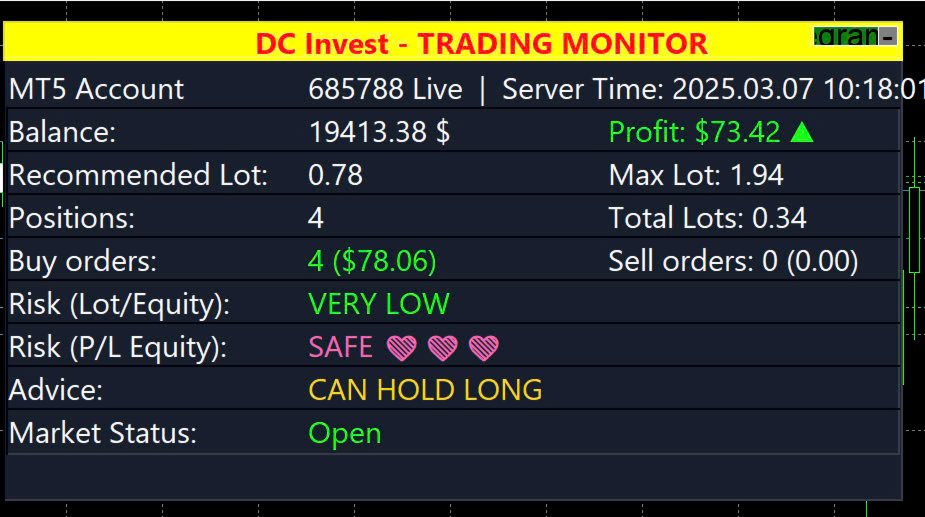
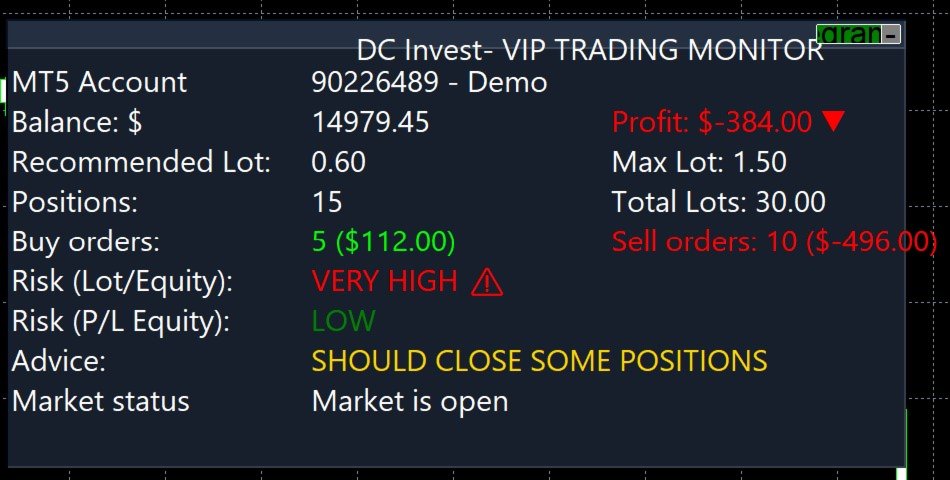
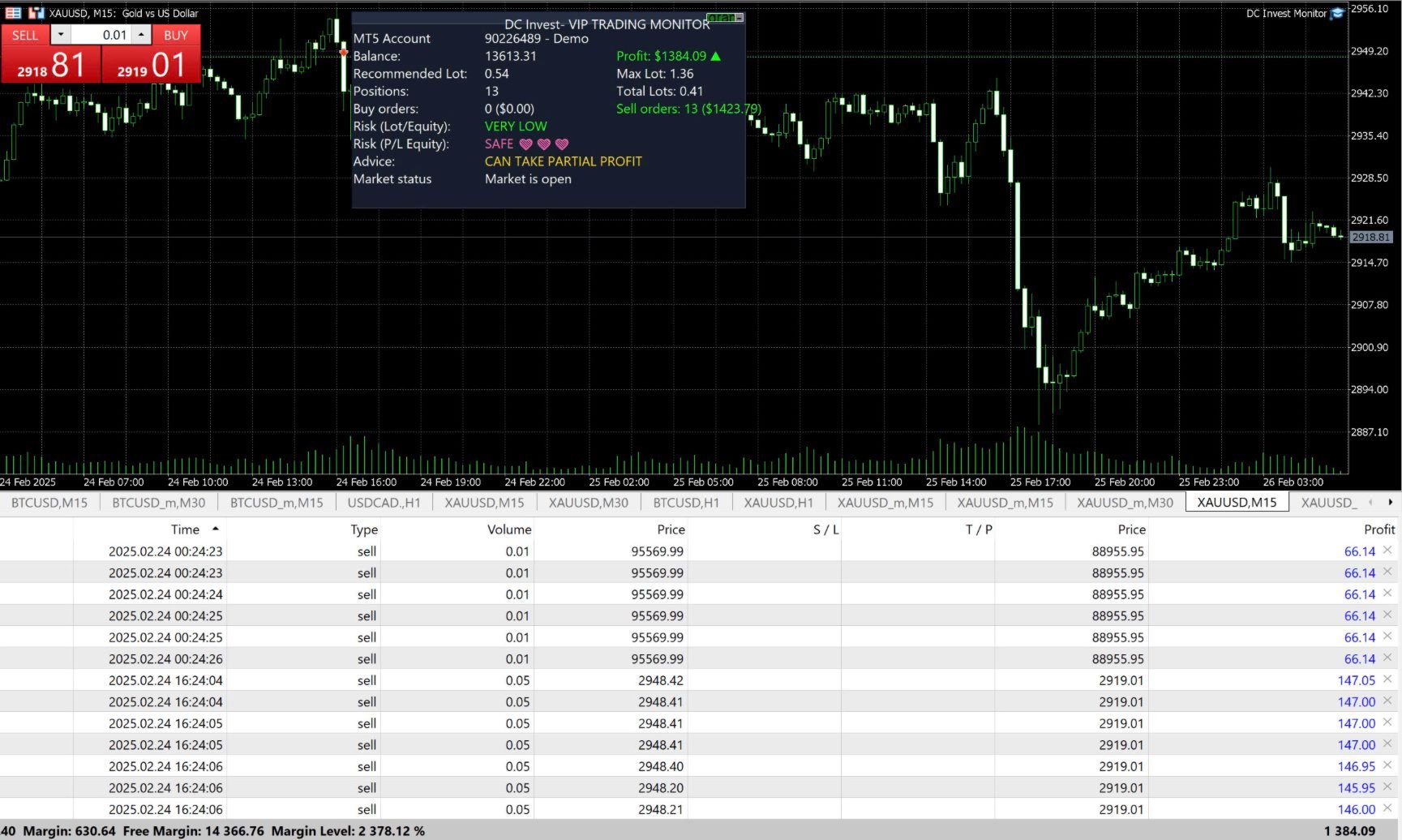
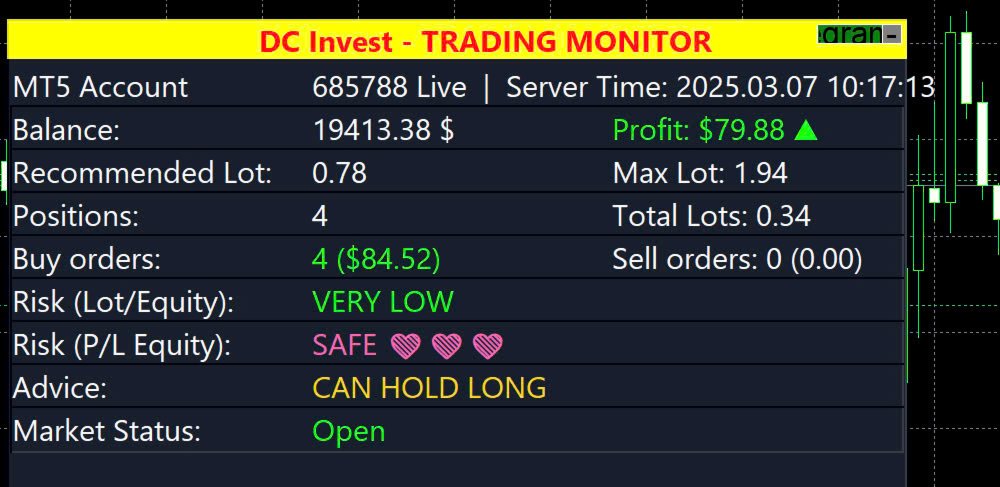
  • Account Monitoring: Displays MT5 account number, balance, equity, profit/loss (P/L), and account type (Live or Demo).

  • Position Tracking: Shows the number of Buy and Sell orders, total lots, and profit/loss for each position type, with visual indicators (green for profit, red for loss, white for no positions).

  • Risk Assessment: Assesses risk based on lot size (Lot/Equity) and profit/loss (P/L Equity), categorized as Very Low, Low, Medium, High, or Very High, with icons and colors.

  • Trading Suggestions: Provides recommendations (e.g., 'Can Hold Long,' 'Should Close Some Positions,' 'Cut Loss Now') based on risk levels and profit/loss.

  • Market Status: Indicates whether the market is open or closed.

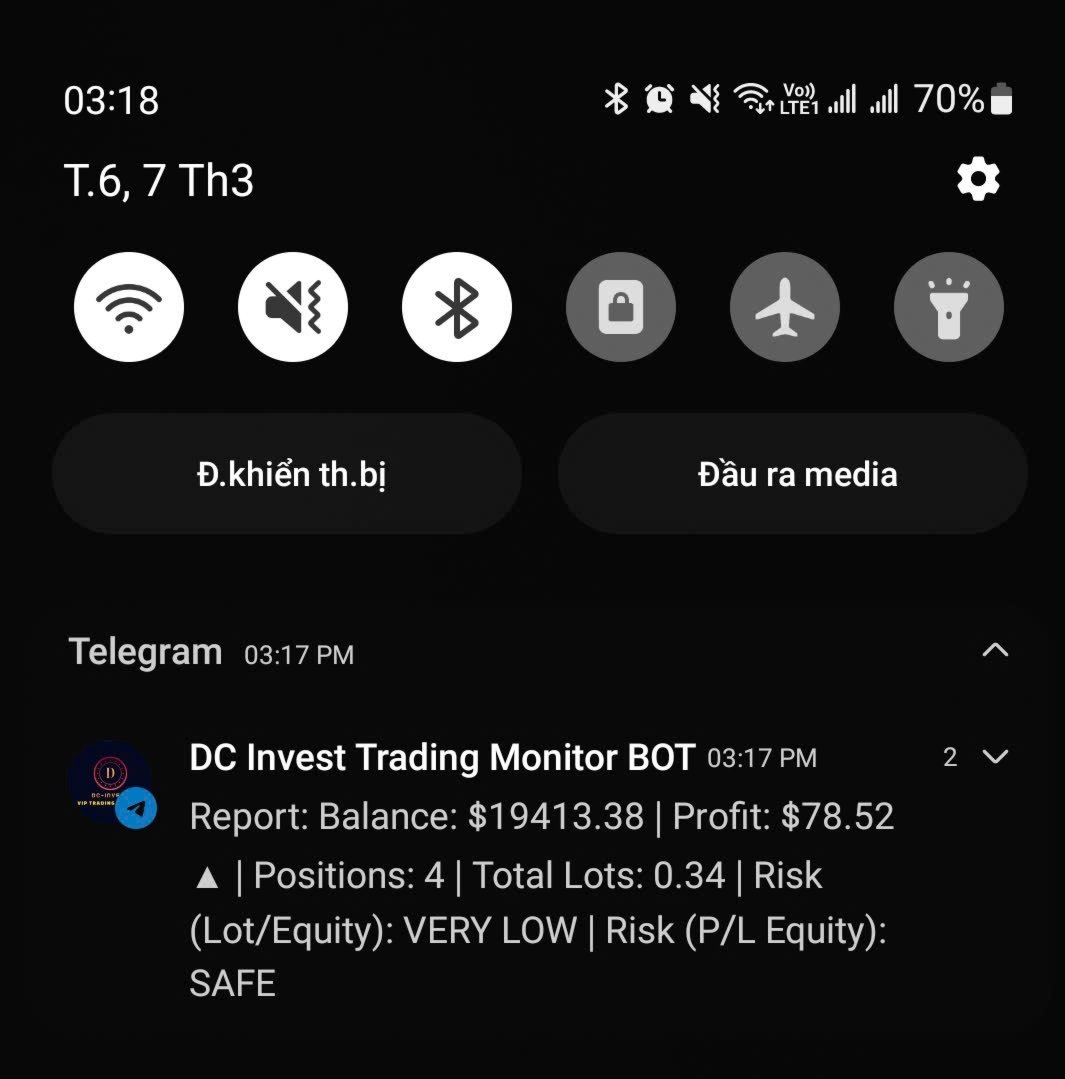
  • Telegram Integration: Sends periodic reports and alerts to a Telegram bot (optional, configurable via inputs, requires internet connection).

  • Manual Position Closing Option: Allows manual closing of all positions if the loss exceeds a specified threshold (optional, configurable).

  • Language Support: Supports 5 languages: English, Vietnamese, Chinese, Spanish, Arabic, for all displayed text.

  • Customizable Appearance: Offers adjustable panel size, position, colors, font size, and update interval.

Why Use DC Invest- VIP Trading Monitor?


  • Suitable for traders needing account monitoring and risk management tools for multiple markets.

  • Supports decision-making with real-time data and monitoring tools, helping manage time effectively.

  • Supported by ongoing updates and multilingual documentation (English, Vietnamese, Chinese, Spanish, Arabic).

Installation:


  • Download the DCInvestVIPTradingMonitor.mq5 file or .ex5 file.

  • Place it in the MQL5/Experts folder of your MetaTrader 5 installation (e.g., C:\Users<YourUser>\AppData\Roaming\MetaQuotes\Terminal<BrokerFolder>\MQL5\Experts).

  • Restart MetaTrader 5 or refresh the Navigator panel.

  • Drag and drop the utility onto any chart from the Navigator > Experts section.

Usage:


  • Adding to Chart: Attach the utility to any MT5 chart to display the monitoring panel.

  • Configuring Settings: Modify the input parameters in the utility settings dialog (as listed below).

  • Interacting with the Panel: Click the 'Telegram ON/OFF' button to toggle Telegram notifications. Click the '-' or '+' button to minimize/maximize the panel.

  • Note: This utility does not perform automated trading; it is for monitoring and risk management only.

Telegram Notification Setup:


  • To enable Telegram notifications for account status reports and alerts, follow these steps:
    • Create a Telegram Bot:
      • Open Telegram and search for '@BotFather'.

      • Send '/start' to @BotFather, then use '/newbot' to create a new bot.

      • Follow instructions to name your bot and get a unique bot token (e.g., '123456789:ABCdefGHIjklMNOpqRSTuvwxYZ'). Save the token.


    • Get Your Chat ID:
      • Add your bot to a Telegram chat or group (or use a private chat).

      • Send a message to the bot (e.g., '/start').

      • Use @userinfobot or @RawDataBot on Telegram to find your chat ID, or check via the bot’s API (e.g., https://api.telegram.org/bot<YourBotToken>
        /getUpdates).

      • Save the chat ID (e.g., '123456789').


    • Configure Utility Settings:
      • In the MT5 utility settings, enter the TelegramToken and TelegramChatID.

      • Set TelegramReportInterval to the desired interval in minutes (e.g., 30, 60, or 0 to disable).

      • Ensure your MT5 terminal has internet access for notifications.


    • Test Notifications: Enable notifications via the panel’s 'Telegram ON/OFF' button and verify reports are sent to your Telegram chat.


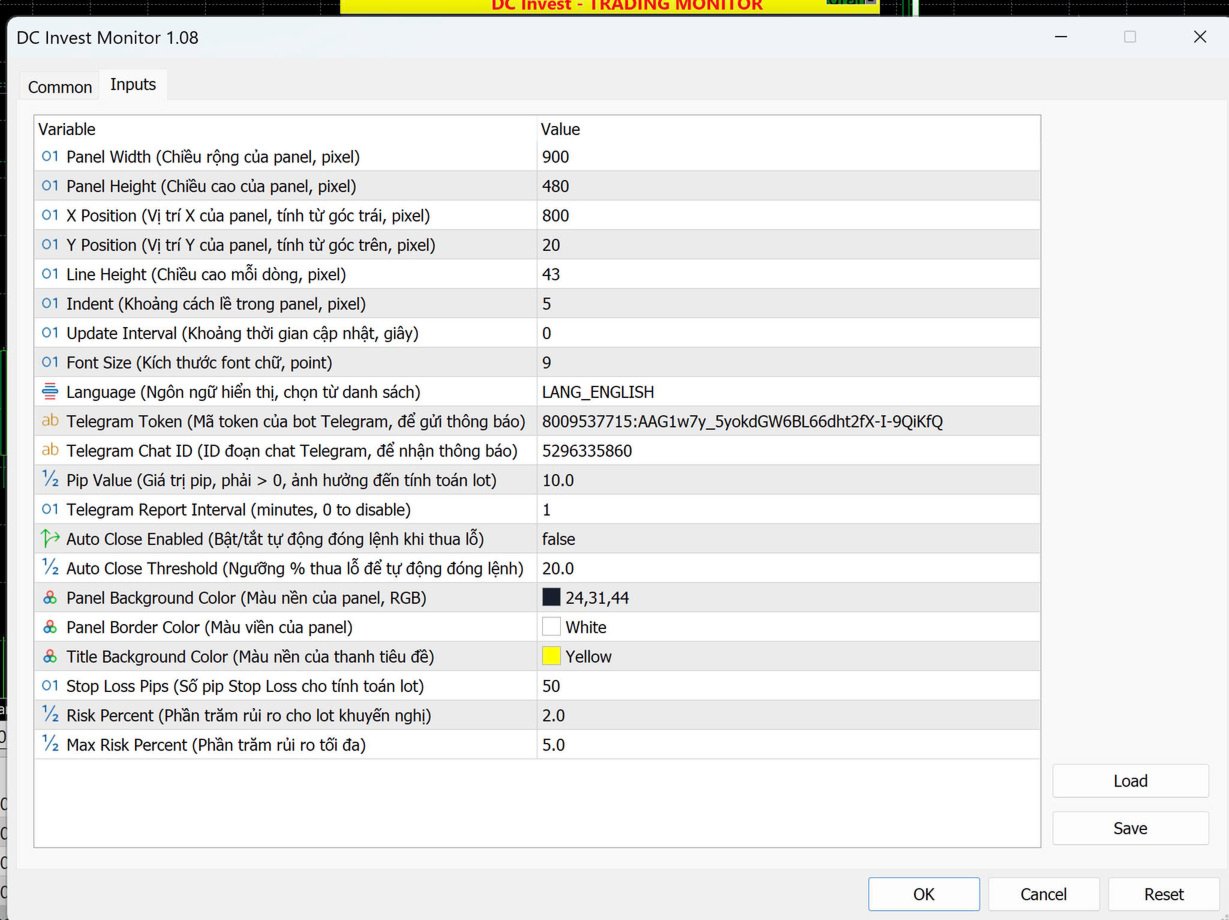
Input Parameters (Adjustable for Your Needs):


  • Parameter | Description | Default Value

  • PanelWidth | Width of the panel (pixels) | 900

  • PanelHeight | Height of the panel (pixels) | 450

  • XPosition | X-position of the panel (from left) | 800

  • YPosition | Y-position of the panel (from top) | 20

  • LineHeight | Height of each line in the panel (pixels) | 40

  • Indent | Indent spacing within the panel (pixels) | 5

  • UpdateInterval | Update frequency (seconds) | 1

  • FontSize | Font size for text | 9

  • Language | Language (English, Vietnamese, Chinese, Spanish, Arabic) | "English"

  • TelegramToken | Telegram bot token (optional, leave blank to disable) | ""

  • TelegramChatID | Telegram chat ID (optional, leave blank to disable) | ""

  • PipValue | Pip value for risk assessment calculations (must be > 0, used for monitoring only) | 10

  • TelegramReportInterval | Periodic report interval (minutes, 0 to disable) | 0

  • AutoCloseEnabled | Enable manual position closing option (false to disable) | false

  • AutoCloseThreshold | Loss threshold (%) for manual position closing | 20.0

  • PanelBgColor | Background color of the panel | C'24,31,44'

  • PanelBorderColor | Border color of the panel | clrWhite

  • TitleBgColor | Background color of the title bar | C'37,47,66'

Display Details:


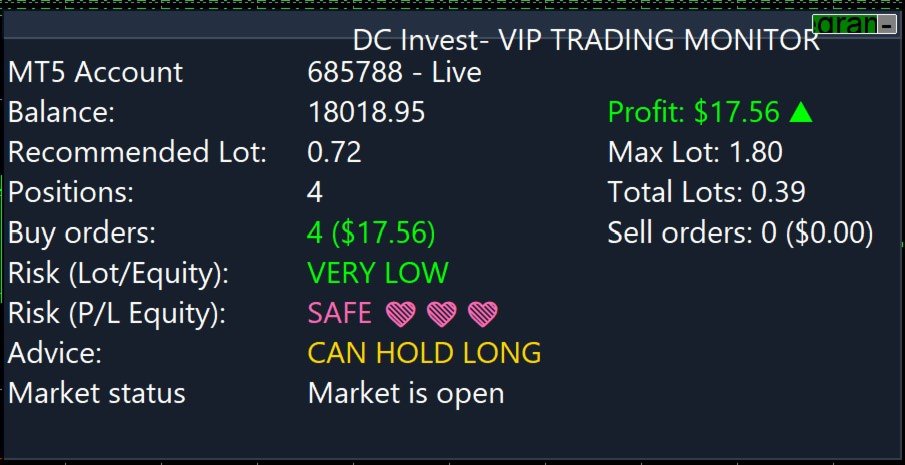
  • MT5 Account: Shows the account number and type (e.g., "685788 - Live" or "685788 - Demo").

  • Balance: Displays the current account balance.

  • Profit: Shows the profit/loss with a green arrow (▲) for profit or red arrow (▼) for loss.

  • Recommended Lot & Max Lot: Suggests lot sizes based on balance and risk settings for monitoring purposes.

  • Positions: Displays total positions, Buy orders, Sell orders, and total lots, with visual indicators for profit/loss.

  • Risk (Lot/Equity & P/L Equity): Assesses risk levels with icons (e.g., ❤️ for safe, ⚠️ for high risk).

  • Advice: Provides recommendations based on risk and P/L.

  • Market Status: Indicates if the market is open or closed.

Notes:


  • Ensure your MT5 account is properly connected to retrieve account information.

  • The Telegram feature requires a valid bot token and chat ID; leave them blank to disable.

  • The PipValue must be greater than 0 for accurate risk assessment calculations, used for monitoring only.

  • The utility requires internet access for Telegram notifications.

  • This utility does not perform automated trading; it is for monitoring and risk management only. Test thoroughly on a demo account before use.

Troubleshooting:


  • If the panel does not display or updates incorrectly, check your MT5 connection and account status.

  • Ensure Unicode and color support are enabled in your MT5 installation.

  • If Telegram notifications fail, verify the token, chat ID, and internet connection.

  • Increase PanelWidth or decrease Indent if text is cut off or overlapping.

  • Ensure the utility is attached as an Expert, not an Indicator.

Contact:


  • For support or feedback, contact Danh Chinh:
    • Phone: +84 888 989 992

    • Telegram: @Danhchinh888

Produits recommandés
Crystal ball
Nickey Magale
Crystal Ball – Trend-Backed Mean Reversion EA for MT5 Crystal Ball is not just another trading robot—it's a precision engine designed to capture the market’s natural rhythm. By combining the pullback-catching power of Mean Reversion with the momentum-following logic of Trend Trading , Crystal Ball enters trades with intention and exits with purpose. It’s built to avoid random noise, capitalize on structure, and adapt as the market moves. How It Works Wait for Deviation: Crystal Ball wat
BeansAssist
Ivanvielle Bonifacio Dupaya
BeansAssist *Major update 3.00 released. Kindly update your copy of BeansAssist Gives you fruitful information of the price of the symbol that you are trading. Improve your trades simply by following the suggestion that it gives you. Tracks deal stats daily so you keep track of your performance. Don't let emotions take control, be a better and profitable trader with BeansAssist to guide you. *Note: This utility is not for free 
Inverted_Chart_EA Utility Expert Advisor Inverted_Chart_EA creates and maintains a mirror-inverted chart of any symbol and timeframe. It automatically generates a custom instrument (e.g. US30_INV ) and keeps its price history updated in real time, with bars mirrored around a chosen pivot. This utility gives traders a new way to analyze the market from a different perspective by flipping the chart upside down. Why use an inverted chart? Highlight hidden patterns – price formations that look ordin
Welcome to ENTRY IN THE ZONE WITH SMC MULTI TIMEFRAME Entry In The Zone with  SMC Multi Timeframe  is a professional trading indicator built on Smart Money Concepts (SMC), combining market structure analysis with a No Repaint BUY / SELL signal system in a single indicator. It helps traders understand market structure more clearly, identify key price zones, and focus on higher-quality trading opportunities. By combining Multi-Timeframe Analysis, Points of Interest (POIs), and real-time signals, t
SolarTrade Suite Financial Robot: LaunchPad Market Expert - conçu pour ouvrir des transactions ! Il s'agit d'un robot de trading qui utilise des algorithmes spéciaux innovants et avancés pour calculer ses valeurs, votre assistant dans le monde des marchés financiers. Utilisez notre ensemble d'indicateurs de la série SolarTrade Suite pour mieux choisir le moment de lancer ce robot. Découvrez nos autres produits de la série SolarTrade Suite en bas de la description. Vous souhaitez naviguer en
Classic Market Surfer EA - A Timeless, Proven Strategy for Gold Trading For years, this powerful trading strategy has been hidden from the public-reserved for a select few. Now, for the first time, the Classic Market Surfer EA is available to traders like you.   Built on pure, time-tested trading principles, this EA doesn't rely on trendy gimmicks like AI or machine learning. Instead, it harnesses a classic, robust strategy that has consistently delivered results over the years. This is not a "g
TradePilotmt5
Hossein Khalil Alishir
TradePilot Expert Advisor (EA) for MetaTrader 5 TradePilot is a professional and user-friendly Expert Advisor (EA) for MetaTrader 5 (MT5) . It simplifies automated trading , risk management , and trade execution with a smart trading panel . Perfect for beginners and experienced traders looking for a reliable trade manager EA with automated lot size calculation and smart position management. Key Advantages User-Friendly Trading Panel: Customizable panel with buttons and hotkeys for fast ex
Tiger Lite
Dang Cong Duong
Tiger Lite recreate the history of entry and exit orders. The goal is that you can grasp their strategy how to play. CSV format support for WEB, MT4 and MT5 platforms. The sequence of steps is described in the photo. Note: Please choose the existing date and symbol on the CSV file. For MT4/5, export historical data and copy the records to excel, save it with the extension CSV. For MT4/MT5/WEB, save the name with format mt4.csv/mt5.csv/web.csv If you get the history from another source and your
FREE
Gold EA: Proven Power for 1-Minute Gold Trading Transform your trading with our Gold EA, meticulously crafted for 1-minute charts and delivering over 2000% growth in 5 years from just $100-$1000 . No Martingale, No AI Gimmicks : Pure, time-tested strategies with robust money management, stop loss, and take profit for reliable performance across multiple charts. Flexible Trading Modes : Choose Fixed Balance for safe profits, Mark IV for bold growth, or %Balance for high rewards—combine Mark IV an
Indicateur Crypto_Forex « WPR avec 2 Moyennes Mobiles » pour MT5, sans repeint. - Le WPR est l'un des meilleurs oscillateurs pour le scalping. - L'indicateur « WPR et 2 Moyennes Mobiles » permet de visualiser les moyennes mobiles rapide et lente de l'oscillateur WPR. - Cet indicateur permet d'anticiper les corrections de prix. - Très facile à configurer via ses paramètres, il est utilisable sur toutes les unités de temps. - Les conditions d'entrée à l'achat et à la vente sont illustrées. - Ave
CosmiCLab SMC FIBO CosmiCLab SMC FIBO is a professional trading indicator designed for traders who use Smart Money Concepts (SMC), market structure analysis and Fibonacci retracement levels. The indicator automatically detects market swings and builds Fibonacci levels based on the latest impulse movement. It also identifies market structure changes such as BOS (Break of Structure) and CHOCH (Change of Character), helping traders understand the current market direction. CosmiCLab SMC FIBO also pr
Overview Mirror Signals Service EA (Text only)   is a powerful monitoring Expert Advisor that automatically sends   real-time Telegram notifications   for all important trade events on your MetaTrader 5 account. It is engineered specifically for   signal providers ,   trade-copier operators ,   auditors ,   educators , and   professional trading services   that require immediate, detailed, and reliable reporting. Everything from   entries, exits, SL/TP changes, comment changes, trailing sto
TradePad
Ruslan Khasanov
5 (1)
TradePad est un outil pour le trading manuel et algorithmique. Nous vous présentons une solution simple pour des opérations de trading rapides et le contrôle des positions sur plusieurs instruments de trading. Attention, l'application ne fonctionne pas dans le testeur de stratégie! Version d'essai de l'application pour un compte démo et une description de tous les outils L'interface de l'application est adaptée aux moniteurs haute résolution, simple et intuitive. Pour un travail confortable, le
Chart Pattern Master
Lefika Raphel Sebatane
The Chart Pattern Master EA is a sophisticated expert that allows you to trade all of the common chart patterns. It automatically identifies the chart patterns for you and even displays them on the chart. Use it as an indicator or as an automated trading expert. All pattern breakouts will be traded automatically for you. Recommendations: Trend Timeframe - 1H Breakout Timeframe - Any Symbol - Any TP and SL - false MIn Balance - $250 NOTE: Increase "Pattern Number of Bars" to scan over longer peri
À propos de l'indicateur Ce indicateur est basé sur des simulations de Monte Carlo des prix de clôture d'un instrument financier. Par définition, Monte Carlo est une technique statistique utilisée pour modéliser la probabilité de différents résultats dans un processus impliquant des nombres aléatoires basés sur des résultats observés précédemment. Comment cela fonctionne-t-il ? Ce indicateur génère plusieurs scénarios de prix pour un actif en modélisant les variations de prix aléatoires au fil
LT Rainbow Trend
Thiago Duarte
5 (1)
== LT RAINBOW TREND - L'INDICATEUR DE TENDANCE AUX 36 MOYENNES MOBILES == APERÇU Le LT Rainbow Trend est un indicateur technique avancé d'analyse de tendance qui utilise 36 Moyennes Mobiles simultanées dotées d'un système de couleurs intelligent (Rainbow). Développé pour les traders souhaitant opérer dans le sens de la tendance principale avec une clarté visuelle maximale, cet indicateur transforme la complexité de l'analyse multi-timeframe en une visualisation simple, colorée et hautement int
G8 News Dashboard Pro: The Ultimate Economic Calendar Trading during high-impact news releases without proper monitoring can be devastating to your account. Slippages, spread widening, and extreme volatility can ruin even the best technical analysis. G8 News Dashboard Pro is an advanced, lightweight, and highly customizable on-chart economic calendar designed specifically for professional manual traders and risk managers. It extracts data directly from the native MetaTrader 5 calendar (No DLL
Divergent Stochastic Filter II Catch Reversals Early, Filter Noise, Trade with Confidence The Edge: Why This Stochastic is Different  Every trader knows the Stochastic oscillator. But knowing when to trust its signals, that's the real challenge. The Divergent Stochastic Filter II transforms this classic indicator into a precision reversal detection system by adding critical elements: divergence intelligence, signal filtering and exhaustion detection.  While standard Stochastic oscillators fire s
Price reach indicator. It also serves as the perfect term for supports and resistance. I use it in two experts. The basic tool for professional trading. The indicator analyzes the last 500 bar and uses this to determine the levels ( but it doesn't predict the future ) . Personally, I use it on TF H1.  It is very simple. Four lines on chart and that's all. Only two input parameters.  Thousands of indicators. Why this? Is good ? No! Is very good. Please test the indicator prior to purchasing. You
QQ Trade Manager
Gumilang Nurhastiko
Tired of watching your winning trades turn into losses because you missed the exit? Quantum Trade Manager is your ultimate automated co-pilot on MetaTrader 5. This premium utility operates strictly as a Trade Manager (No Auto-Trading/No Entry Signals) , which means it will never open unauthorized positions. Instead, it monitors your live manual trades or existing EA orders in millisecond ticks, instantly applying institutional-grade risk management. Key Features: Automatic SL & TP Assignmen
Advanced History Collector Panel for MT5 The Advanced History Collector Panel is a professional-grade account analysis and visualization indicator for MetaTrader 5 (MT5). It bridges the gap between raw trading logs and actionable insights by transforming execution data into interactive charts and comprehensive tables. Key Features: Comprehensive Data Metrics : Track daily/weekly profit and loss, long/short ratios, total volume, and deposit/withdrawal history. Dynamic Visualizations : Toggle betw
FREE
BTC Terminator
Riaan Adriaan Swanepoel
# Advanced Terminator AI EA MT5 - Neural Network Powered Trading System ## Premium Features Advanced Neural Network Technology - Deep learning algorithms for market pattern recognition - Real-time adaptive strategy optimization - Smart risk management powered by AI - Multi-timeframe analysis system Dual Market Mastery - Specialized for XAUUSD (Gold) trading - Optimized for BTCUSD cryptocurrency pairs - Individual strategy optimization for each market Professional Risk Management
STRICTLY FOR BOOM INDEX ONLY!!!!! Here I bring the Maximum Trend Arrows OT1.0 MT5 indicator. This indicator is made up of a combination of different trend indicators for entries and exits, for entries an orange arrow will paint on the chart below the current market and a red flag for closing of trades and it produces buy arrows only. When the orange arrow appears, it will appear along with it's sound to notify you. The 1H timeframe is recommended, don't use it anywhere else than on the 1H timefr
Aurum Intraday EA
Rodrigo Leonardo Favreau Giuliodoro
Aurum Intraday EA – Advanced Gold Trading Algorithm The Aurum Intraday EA is a powerful automated trading system designed specifically for Gold (XAUUSD) traders who want to capture strong intraday movements while maintaining full control over risk and strategy configuration. Built with a robust algorithm and optimized for H1 and H4 timeframes (H4 recommended) , this Expert Advisor is capable of identifying high-probability opportunities in the gold market and executing trades with precision and
| Fully-automated Smart Money Concept (ICT) inspired trading solution with multi-strategy capabilities | Built by a grid trader >> for grid traders.  This is MT5 version, click  here  for  Blue CARA MT4  (settings and logics are same in both versions)     Real monitoring signal  -->  Cara Gold Intro Blue CARA EA   ('CARA') - short for  C omprehensive  A lgorithmic   R esponsive   A dvisor is a next-gen  multi-currency    multi-timeframe  EA base on the widely known (and perhaps the most popul
Bober Real MT5
Arnold Bobrinskii
4.88 (16)
Bober Real MT5 is a fully automatic Forex trading Expert Advisor. This robot was made in 2014 year and did a lot of profitbale trades during this period. So far over 7000% growth on my personal account. There was many updates but 2019 update is the best one. The robot can run on any instrument, but the results are better with EURGBP, GBPUSD, on the M5 timeframe. Robot doesn't show good results in tester or live account if you run incorrect sets. Set files for Live accounts availible only for cu
HMA Scalper Pro EA
Vladimir Shumikhin
5 (2)
HMA Scalper Pro EA — Conseiller Expert Automatique pour MetaTrader 5 basé sur l'indicateur Hull Moving Average (HMA) APERÇU HMA Scalper Pro EA est un robot de trading professionnel (Expert Advisor) pour MetaTrader 5 qui négocie dans la direction du Hull Moving Average (HMA). L'indicateur HMA détermine la direction actuelle de la tendance, et le EA ouvre des transactions dans cette direction, complétées par la gestion du capital Smart Risk, le trading en grid adaptatif, le trailing stop, le bre
Reversal Master for MT5 Reversal Master for MT5 is a non‑repainting reversal indicator for MetaTrader 5. It helps you detect potential market reversal points and shows the maximum favourable price movement after each historical signal, so you can better understand how price behaved after similar situations in the past. The MT5 version keeps the familiar reversal‑signal logic of the original Reversal Master for MT4, but adds improved visualisation, historical statistics and a points summary panel
DDKiller Pro
Njaratahiry Michael Randrianiaina
Arrête de faire sauter ton compte. Une bonne fois pour toutes. DDKiller Pro est le gardien du risque MT5 qui tourne silencieusement sur ton graphique et coupe le trading dès qu'une limite est atteinte — que tu passes un challenge prop firm ou que tu gères ton propre compte CFD. Le problème que tout trader connaît : Tu fixes tes règles. Tu les enfreins quand même. Un trade de vengeance. Une position surleviéragée. Une session qui efface un mois de gains. DDKiller Pro retire cette décision de tes
TradingManagement
Christian Ishmael Calienta Magallon
TradingManager is a comprehensive trading panel designed to streamline your trading workflow in MetaTrader 5. It combines order management, risk controls, and market analysis into one intuitive interface. Key Features 1. Trading Panel Market Order Entry   - One-click BUY/SELL with automatic SL and TP line placement on chart Fib Limit Orders   - Draw Fibonacci-based limit orders with visual SL and TP levels Risk Management   - Choose between Lots, % Risk, or $ Risk modes Take Profit Split   - Dis
Les acheteurs de ce produit ont également acheté
Farmed Hedge Yield Farming | All Markets (Manual - Hybrid - Semi/Automated EA) MULTI-ASSET SUPPORT Trade any asset available on your broker - Forex: Major, Minor, Exotic pairs - Crypto: BTC, ETH, XRP, SOL, BNB - Stocks: Apple, Tesla, Amazon, Google, etc. - Commodities: Gold, Silver, Oil, Gas - Indices: US30, NAS100, SPX500, DAX40 - Any CFD your broker offers VERIFIED TRADING RESULTS - Farmed Hedge Yield Axi Copy:  https://www.mql5.com/en/signals/2356376 - Farmed Hedge Yield Exn Copy:   https:/
YuClusters
Yury Kulikov
4.93 (43)
Attention: You can view the program operation in the free version  YuClusters DEMO .  YuClusters is a professional market analysis system. The trader has unique opportunities to analyze the flow of orders, trade volumes, price movements using various charts, profiles, indicators, and graphical objects. YuClusters operates on data based on Time&Sales or ticks information, depending on what is available in the quotes of a financial instrument. YuClusters allows you to build graphs by combining da
HINN Lazy Trader
ALGOFLOW OÜ
5 (1)
LIMITED SUMMER SALE -40% ! ONLY $470 insead of $790!  Maximum real discount! ONLY UNTIL 08/22 The core idea: using the user interface, you configure the parameters the chart must meet before entering a position (or positions), choose which entry models to use, and set the rules for when trading and planning should end. Lazy Trader  handles the rest: it  takes over all the routine chart watching and execution! full description  :: 3 key videos [1] ->  [2]   ->  [3] What can it do? - Understand
Quant AI Agents
Ho Tuan Thang
5 (1)
Quant AI Agents are independent trading Expert Advisors. Instead of trading using a fixed strategy like other conventional EAs, Quant AI Agents   is a   multi-agent AI trading framework   that turns natural-language strategy prompts into live.  WANT THE SAME RESULTS AS MY LIVE SIGNAL?   Use the exact same brokers I do:   IC MARKETS , IC TRADING   .  Unlike the centralized stock market, Forex has no single, unified price feed.  Every broker sources liquidity from different providers, creating un
AI Agent Supervisor is NOT an Expert Advisor. AI Agent Supervisor   is a   multi-agent AI risk & portfolio supervisor   that watches every EA on your account and intervenes in real time.  WANT AN AI PORTFOLIO MANAGER WATCHING YOUR FLEET 24/7?   Run your fleet on the same brokers I do:   IC MARKETS , IC TRADING   .  Unlike the centralized stock market, Forex has no single, unified price feed.  Every broker sources liquidity from different providers, creating unique data streams. The Supervisor r
MT5 Trading Deck
Manuel Michiels
5 (2)
One button. One trade. MT5 Trading Deck is a hotkey trading panel for MetaTrader 5 that turns the platform into a keyboard-driven execution cockpit. Stop loss, take profit and lot size are pre-calculated for every key; the moment you press, a market order is live on the broker. A complete technical user manual is attached in the product Comments section. It documents every input parameter, the full hotkey map, the recommended Stream Deck XL layout, and the advanced workflows for Pre-Limit orders
QCML Assistant
Maxime Turcotte-lafreniere
QCML Assistant MT5 Votre Trading. Notre Assistant. Votre Avantage. Vous cherchez un outil qui transforme complètement votre expérience sur MetaTrader 5 ? QCML Assistant est la solution tout-en-un développée par des traders, pour des traders. Un seul outil installé sur votre graphique, et vous avez accès à une plateforme de trading ultra-complète, ultra-rapide et ultra-simple. Fini les heures perdues à configurer votre setup. Fini les prises de position compliquées. Avec QCML Assistant, tout devi
Discord Signal Notifications — это мощный инструмент для трейдеров, проповодов и управляющих счетами, который автоматически отправляет все ваши торговые события в канал или чат Discord. Главное преимущество — Глобальный мониторинг. Вам не нужно устанавливать советник на каждый график. Достаточно запустить одну копию утилиты на одном любом окне, и она будет отслеживать действия по всем инструментам и всем счетам в вашем терминале одновременно. Основные возможности Глобальный мониторинг счёта Ути
Gamma Edge Pro MT5
Xuan Nam Diep
1 (1)
Gamma Edge Pro MT5 — GexBot Classic API Integration Gamma Edge Pro   brings institutional-grade   Gamma Exposure (GEX) data   directly onto your MetaTrader 5 chart — the same data used by professional options traders to anticipate price magnets, hedging flows, and dealer positioning. Powered by the   GexBot Classic API , this indicator automatically maps options market data from US-listed instruments onto any   MT5 CFD instrument   — Forex pairs, Gold, indices, and more — with intelligent price
# If you have any other requirements or are interested in collaboration, please contact  dev.quantech.london@gmail.com . Flash Trade (FT) Most friendly manual trading tool. Easy operation to secure your funds. Features of FT Click the chart to trade fast FT supports market orders and pending orders Click twice to complete the order and set SL and TP Click trice to complete the pending order and set SL and TP Automatically set the stop-loss amount of each order to a fixed percentage of the bala
EA Performance Logger Telegram
Abdulqudus Tomiwa Akande-owoo
The Performance Logger is a utility for MetaTrader 5 designed to track and report account metrics. It identifies trades based on specific criteria and provides summaries of account activity. Main Functions Automated Reporting : Generates summaries of account performance and sends them to specified communication channels (Telegram or Discord) on a weekly, monthly, or yearly basis. Strategy Analysis : Organizes performance data based on the specific Expert Advisor or strategy used for each trade.
Features   With MT5 to Interactive Brokers(IB) Trader, you can: 1. Load chart data from IB to MT5, and Analyze with all standard or customer Indicators. 2. Place Orders to IB Account Directly in MT5. 3. Make your Own EAs upon IB Securities by only making minus changes of the trading function. Usage 1) Installation Copy the "Mt5ToIBTraderEn.ex4" and sample files to [MT5 Data Folder]->MQL5->Experts.  2)  MT5 Settings Add the IP Address to the MT5 Allowed URLs in 'Tools->Options->Expert Adviso
Mt5 To InterativeBrokers Copier allows you to copy deals from MT5 account to Interactive Brokers. With this, you can run your EA strategy on a MT5 Demo/Real Account, then copy all the deals to Interactive Brokers account real time. Features: 1. Copy or Invert-Copy deals Realtime from MT5 to IB Account. 2. Synchronizing positions of both accounts periodicaly, in case any missing copying. 3. You can choose only Buy position or Sell position. Symbols Setup: General Format:  {MT Symbol} -> {IB S
Introduction Our system is more than just a tool—it’s your personal guide in the dynamic trading landscape. Expertly developed and optimized using advanced strategies, this groundbreaking predictor gives traders a powerful edge. It’s not just about the features; it’s about a trading journey that stands out from the crowd. Get ready for an enhanced trading experience like never before! What It Does Next Candle Prediction: Imagine gaining insights into the market’s next move before it happens. Our
Here is the corrected, MQL5-compliant version of your second product description. I have removed the custom bullet point symbols, cleaned up the list formatting to use standard markdown, and organized the setup guide into clean, numbered steps. PropFolio Command Manager Pro is an advanced, multi-symbol execution terminal designed to automate your custom arrow indicators. Simply enter the name of your arrow indicator into the settings, and the Command Manager will monitor up to 30 currency pairs
EA price is reduced to 50% discount for limited time period. Check EA performance  https://www.mql5.com/en/signals/2376164?source=Site +Profile+Seller Spot vs Future Arbitrage EA for MT5 Spot vs Future Arbitrage EA is an automated Expert Advisor designed for MetaTrader 5 that operates using price differences between Gold spot and Gold futures instruments. The strategy opens positions on both instruments simultaneously to take advantage of temporary differences between spot and futures prices.
Reward Multiplier is a semi-automatic trade manager based on pyramid trading that opens additional orders with the running profit of your trades to maximize return exponentially without increasing the risk. Unlike other similar EAs, this tool shows potential profit/loss and reward to risk ratio before even entering the first trade! Download Demo here  (starting lot is fixed at 0.01) Contact me to get a 7 days trial version of the product with full functionality. Guide + tips here MT4 version  
ENGLISH VERSION tg @eeevleee TICK CHART SERVICE - Professional Tick Ch
Trading Chaos Expert
Gennadiy Stanilevych
5 (11)
This software has no equals in the world and represents a universal trade "console" covering trading signals, automated market entry, setting of Stop Loss and Take Profit, as well as Trailing Profit for multiple trades at the same time in a single open window. Intuitive control of the Expert Advisor in "three clicks" ensures a comprehensive use of all its functions on different computers, including tablets PCs. Interacting with additional signal indicators that mark the chart to give a real mark
News Trader Pro is a unique robot that allows you to trade the news by your predefined strategy. It loads every piece of news from several popular Forex websites. You can choose any news and preset the strategy to trade it, and then News Trader Pro will trade that news by selected strategy automatically when the news comes. News release gives opportunity to have pips since the price usually has big move at that time. Now, with this tool, trading news becomes easier, more flexible and more exciti
Elliott Wave Counter est un panneau pour le balisage manuel rapide et convivial des vagues d'Elliott. On peut sélectionner une couleur et un niveau de marques. Il existe également des fonctions pour supprimer le dernier balisage et tout le balisage effectué par l'outil. Le balisage se fait en un clic. Cliquez cinq fois - ayez cinq vagues ! Elliott Wave Counter sera un excellent instrument à la fois pour les débutants et les analystes professionnels des vagues d'Elliott. Guide d'installation et d
If you wish to draw Support and Resistance lines, view: daily market opening, classical pivot levels, Fibonacci pivot levels, trend lines, Fibonacci levels, the remaining time to candle closing, and current spread. If you seek to place your orders with the exact lot that meets your desired stop loss risk. If you wish to do all this and more with just one click, then this is the perfect tool to use. This tool will allow you to feel more relaxed when deciding to open orders, as well as predicting
Unlimited Trade Copier Pro MT5 is a tool to copy trade remotely to multiple MT4, MT5 and cTrader accounts at different computers/locations over internet. This is an ideal solution for you if you are a signal provider and want to copy your trades to other receivers globally on your own rules. One provider can copy trades to multiple receivers and one receiver can get trade from multiple providers as well. The provider can even set the subscription expiry for each receiver, so that receiver will n
如果产品有任何问题或者您需要在此产品上添加功能,请联系我 Contact/message me if you encounter any issue using the product or need extra feature to add on the base version. There is Demo version of this panel Dashboard Babon Scalping System MT5 Demo in my product list, please try it out to get familiar with all functionalities for free. Free version: LINK MT4 version: LINK This system basically utilizes TDI, Heiken Ashi Trend, Price Trend on H1 time-frame and TMA on H1&H4 time-frame to generate the trend (big picture). Then
The new version of  MirrorSoftware 2021  has been completely rewriten and optimized.  This version requires to be loaded only on a single chart because  it can detect all actions on every symbol and not only the actions of symbol where it is loaded. Even the  graphics and the configuration mode  have been completely redesigned. The MirrorSoftware is composed of two components (all components are required to work):  MirrorController  (free indicator): This component must be loaded into the MASTER
ClusterSecond
Rafil Nurmukhametov
4.78 (32)
The utility allows you to build different types of graphs: Seconds chart from 1 second to 86400 seconds Tick chart from 1 tick and above The volume chart Delta chart Renko chart Range chart Demo version of the utility https://www.mql5.com/ru/channels/clustersecond Built-in indicators for volumetric analysis: daily market profile and market profile of the selected timeframe, Cluster Search Imbalance VWAP Dynamic POC, VAH, VAL the profile depth of the market vertical volume with various display op
Corporate Report MT5
Pavel Verveyko
5 (1)
The script displays info about the share's corporate reports and dividends. The data is downloaded from   investing.com : Report date Profit per share (EPS) Revenue Market capitalization Amount of dividends Date of payment of dividends Dividend income The product cannot be tested in the tester (since it is not possible to receive data from the Internet). Before launching:  Add 2   URL   https://ru.investing.com/earnings-calendar/Service/getCalendarFilteredData  and   https://ru.investing.com/di
Telegram Publisher Agent   est un module complémentaire qui permet aux commerçants d'envoyer des signaux à leurs canaux et groupes Telegram en temps réel. Avec des messages personnalisables, des captures d'écran de graphiques et d'autres fonctionnalités, l'outil aide les traders à partager leurs idées et stratégies de trading avec leurs abonnés. L'outil présente également un beau design avec un commutateur de thème clair et sombre, offrant aux utilisateurs une expérience de trading esthétique et
Telegram Notify MT5 Telegram Notify MT5 is an utility tool to bridge your MetaTrader 5 activities to your Telegram chat/channel. It is useful for monitoring your MetaTrader 5 account by sending a notification to your particular Telegram chat/channel when someone/EA is placing trades, modifying order's TP/SL, closing trades and etc. This EA does not place any trade for your account. This EA also could be a convenient tool for monitoring other's EA trading activities or a tool for publishing your
Telegram ChartSnap MT5 is an utility tool to bridge your MetaTrader 5 activities to your Telegram chat/group/channel. It will screen shot your MetaTrader 5 chart and send it to your dedicated Telegram chat/group/channel through a Telegram bot. The whole process will keep repeating based on a time cycle that predetermined by the user. It is a convenient tool for those who like to get access to their favorite system/dashboard that only available at MetaTrader Desktop. Beside that, trader can easi
Plus de l'auteur
"If I had six hours to chop down a tree, I would spend the first four sharpening the axe." – Abraham Lincoln Entering the financial market means competing against the sharpest minds on the planet. As an amateur trader, what do you have besides your phone and… sheer guts? Do you think you can beat them without a powerful secret weapon? DC-SmartTradeExecutor Pro – The ultimate control center for lightning-fast and seamless trading. News trading is a speed race – You can’t afford to be
MATRIX ONE PRO - Elite Trading Bot by DC Invest Overview Introducing MATRIX ONE PRO , the ultimate Expert Advisor (EA) for MetaTrader 5, crafted by DC Invest to redefine automated trading. Designed for serious traders and investors, this bot delivers unparalleled performance, combining advanced multi-timeframe strategies, intelligent risk management, and cutting-edge features. With a proven track record of 1,326% growth in just 3 months, MATRIX ONE PRO is your key to consistent profits in the f
Here’s an in- depth performance analysis in English for the DC Invest Matrix One Gold Enhanced bot , tested from January 1, 2025 to May 12, 2025 , using: Initial capital : $ 1,000 Fixed lot size : 0.1 lots per trade All trades have SL & TP No martingale or grid strategy used General Performance Metric Value Interpretation Total Net Profit $ 6,841.08 Strong profit, + 684% in ~ 4.5 months. Gross Profit $ 40,409.16 Bot captured large upward moves. Gross Loss -$ 33,568.08 Still high, but control
Filtrer:
Aucun avis
Répondre à l'avis