 MetaTrader 5
 エキスパート
 インディケータ
 ライブラリ
ライブラリ ユーティリティ
 ウィジェット
 ルール
ルール
YouTubeにあるマーケットチュートリアルビデオをご覧ください
ロボットや指標を購入する
仮想ホスティングで
EAを実行
EAを実行
ロボットや指標を購入前にテストする
マーケットで収入を得る
販売のためにプロダクトをプレゼンテーションする方法
MetaTrader 5版新取引ユーティリティ - 41
 以下はMetaTrader5での取引を簡素化する取引プログラムです。ユーティリティにカーソルを合わせると、その説明と目的が表示されます。
【先着10名限定セール】特別価格: $35 (通常: $90) 残り: 10枠 認知度向上のため、先着10名様に限り割引価格で提供します。
過去検証、チャートパターンを探すことだけに時間を費やしていませんか?
何度も画面をスクロールして、目当てのチャート形状を探し続ける。 やっと見つけたと思ったら、下位足ではそれがどのあたりにあるか分からなくなる。 少しチャート画面を動かしたり、ズームやズームアウトすると、もうどこだかわからなくなる。 本ツールを使えば:
過去チャートを自動かつ高速で動かせるので、効率的に検索できます。 注目したい時間ポイントが決まれば、どんなにチャートを動かしても瞬時にそこへアクセスできます。 さらに過去チャートを再生し、リアルタイムさながらの値動きを再現できます。 分析の効率化と模擬トレード体験の繰り返しで、あなたのトレードスキルを劇的に引き上げます。 製品概要 チャート検索及び模擬トレード効率を最大化する「Chart Auto Flow」と分析精度を高める「Focus Time Line」を完全統合した、MT5専用の強力なハイブリッドツールです。 チャート
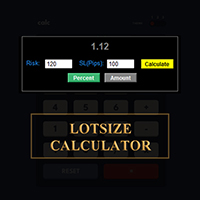
MetaTraderでロットサイズを計算しましょう!
トレーダーの皆さん、こんにちは。リスク管理重視のトレーダーですか?もしそうなら、これはまさにあなたのためのツールです。Ibrahimと申します。口座残高に対するリスク率に基づいてロットサイズを計算できるツールを開発しました。このツールは、リスクを%で指定するのではなく、リスクを負いたい絶対値がある場合にも、ロットサイズを計算するのに役立ちます。例えば、残高から100ドルのリスクを負いたいと指定できます。
MT4バージョン: https://www.mql5.com/en/market/product/155026
無料ですので、ぜひお試しください。コメント欄で、今後コミュニティ向けに開発してほしいツールや、今後追加してほしいツールがあれば教えてください。
ハッピートレーディング、ハッピーオートメーション!
FREE

ROSSI CAMPOS TRAILING STOP AUTO EA - あなたの利益を守るインテリジェントガーディアン! なぜ作られたのか?
効率的なトレーリングストップがないために利益が失われることが何度もありました。既存のソリューションは複雑すぎたり、重かったり、信頼性に欠けていました。そこで、軽量で正確、そして信頼できるアシスタントを作ることにしました — 手間なく自動で利益を守ってくれるものを。 使い方は?(プログラマー以外向け) 設定項目: 初期ストップロスとテイクプロフィット — 基本的な保護として トリガー — いくつ利益が出たらトレーリングストップを開始するか ステップ — 価格に合わせてストップロスが動く幅 市場がトリガーに達すると、EA が自動的にストップロスを調整し、利益を確保しつつリスクを低減します。まるで 24 時間 365 日そばにいるプロのようです! ユニークな特徴: 軽量 & 安定 — フリーズや衝突なし 直感的な設定 — フィールドを入力するだけ! 高精度 — リアルタイムのティックに基づく計算 汎用性 — どんな資産・時間足にも対応 完全自動 —

Here is the Japanese translation, maintaining the exact format and including the English terms in parentheses, as requested: 決済機能付き平均エントリー価格EA (Entry Price Averages EA with Close Orders) ユーザーへの注意点 — あなたに適したツールを選択してください: * 視覚的な平均価格表示 (visual average price display) のみが必要な場合は、弊社の 平均エントリー価格 MT5 (Entry Price Averages MT5) をご利用ください(すでにチャート上にエキスパート (expert) がいる場合)。 * インタラクティブなコントロール (interactive controls) とチャートから直接注文を管理/決済する機能 (manage/close orders directly from the chart) が必要な場合は、この製品をご利用ください。 Mt4

ROSSI CAMPOS ULTRA TRADER EA – あなたの利益を守るインテリジェントガーディアン! なぜ開発されたのか?
市場に出回っている多くのソリューションは複雑で重く、または正しく機能しませんでした。そこで私は、軽量で正確、そして信頼できるシステムを作ることにしました。 独自の特徴: 軽量かつ安定 — フリーズや競合はゼロ。 直感的な設定 — フィールドを入力するだけで準備完了! ミリ単位の精度 — 現在のティックに基づく計算。 汎用性 — どんな銘柄・時間枠でも動作。 完全自動 — 手動での操作は不要。 パフォーマンス:2025年6月3日から7月31日までの期間中、ROSSI CAMPOS ULTRA TRADER EAはバックテストで94%の精度を達成しました。WIN$Nミニ先物契約を取引し、レイテンシは10ms、1契約、マーチンゲールが有効になっています。テストは人工的な調整なしで実際の市場流動性に基づいて実施されました。 注意:ROSSI CAMPOS ULTRA TRADERは世界中のあらゆるティッカーに使用および適応可能ですが、ここで示されているバックテ

Close All Pro MT5 – Fast PnL Control is a powerful trade manager MT5 utility that gives you total control over your trades. With a single click, you can close all MT5 orders, monitor real-time profit and loss, and manage your floating PnL directly from a clean on-chart panel. The tool is lightweight, responsive, and built to help traders save time, reduce emotional stress, and maintain focus. Whether you trade manually or through an EA, this MT5 profit panel provides the visibility and precisio

この EA は主に XAUUSD のスキャルピング用です。
目的 トレード管理から感情を排除 ― ポジションを自動で保護し、利益を確定させ、プレッシャーの下で難しい判断をする必要をなくします。
機能 ️ 自動ストップロス 直近の高値/安値+バッファに基づいて SL を設定 手動配置のストレスなし 自動部分利益確定 2モード: 固定移動:価格が X 動いた後 50% をクローズ R 比率:1.2R の利益目標で 50% をクローズ 勝者を走らせながら利益を確保。
️ ワンクリックボタン すべてクローズ 売り/買い/利益/全て オプション:時間でフィルター(直近 60分) よくある問題を解決 早すぎる利益確定 神経質なストップ移動 感情的な判断 一貫性のないリスク管理 ️ キー設定 振り返り:20分(SL 設定用) バッファ:0.2 ピップ 追加の安全 部分 %:50%(利益確定サイズ) R 比率:1.2R(利益トリガー) 最適対象 感情的な干渉なし

MT5標準では分足以上のタイムフレームしか利用できず、1秒足や5秒足などの超短期チャートは提供されていません。 本ツール「 Seconds Chart Generator 」はティックデータをもとにリアルタイムで秒足チャートを生成し、トレーダーが超短期の値動きを精密に観察できるように設計されたユーティリティEAです。 通常のチャートにアタッチするだけで簡単に利用でき、生成された秒足チャートはカスタムシンボルとして自動的に作成されるため、独立したチャートとして開いて分析することが可能です。 さらに、通常のインジケータも併用できるため、既存の分析手法と組み合わせて活用できます。
注意事項(重要) 本ツールは「秒足データ生成」を行う特殊なEAです。 MQL5標準のデモ版機能ではティックデータの扱いが制限されているため、デモ版では動作しません。 デモ版をチャートに適用しても秒足は生成されませんが、これは不具合ではなく MT5側の仕様 です。 まずは Simple版 で動作を確認頂いてから 、フル版を購入頂ければ幸いです。 Seconds Chart Generator の機能: 1

MT5標準では分足以上のタイムフレームしか利用できず、1秒足や5秒足などの超短期チャートは提供されていません。 本ツール「 Seconds Chart Generator SimpleVer 」はティックデータをもとにリアルタイムで秒足チャートを生成し、トレーダーが超短期の値動きを精密に観察できるように設計されたユーティリティEAです。 通常のチャートにアタッチするだけで簡単に利用でき、生成された秒足チャートはカスタムシンボルとして自動的に作成されるため、独立したチャートとして開いて分析することが可能です。 さらに、通常のインジケータも併用できるため、既存の分析手法と組み合わせて活用できます。 このユーティリティでは1秒足・5秒足・15秒足のチャートをリアルタイムに生成できます。 現在は期間限定で機能制限を撤廃しており、 2026年9月1日までフル機能をご利用いただけます 。 実際のチャート上で秒足を十分に体験できるため、導入前の確認にも最適です。 使ってみて気に入られましたら、 製品版 を購入して頂ければ幸いです。 SimpleVer の機能: 1秒足・5秒足・15秒足チャートを
FREE

Product name BVCandleStream
##概要 スキャルピングおよびプライスアクション分析のために、カスタムのティックベースシンボル(等ティックバー)を自動生成するバックグラウンドサービスです。
標準シンボルの生ティックを、1本あたりのティック数が固定されたカスタムバーに変換し、これらの合成ティックチャートに対して任意の標準MT5インジケーターやEAを適用できるようにします。
主な特長 1. ティックベースのバー生成 開いているチャートのシンボルを監視し、ティックを指定本数( InpTicksPerBar )ごとにまとめたバーを自動生成 Bid / Ask / Mid いずれかの価格基準を選択可能 TickVolumeの表示で、バーの生成程度を目視判定可能 2. 履歴+リアルのシームレス連結 過去ティックをさかのぼってヒストリカルバーを構築。 ヒストリ生成完了後、リアルタイムティックへ即接続し、バーを継続更新。 3. カスタムシンボルによるチャート表示 標準のインジケータが適用可能。
4. マルチチャート対応 MT5 上で開いた複数チャートを自動スキャンし、対象シン
FREE

Crystal Trade Manager – Advanced MT5 Risk and Trade Control Utility Overview
Crystal Trade Manager (CTM) is a professional MetaTrader 5 utility designed for risk management, trade automation, and instant execution control.
It provides traders with an integrated system for protecting equity, managing daily drawdowns, controlling lot sizes, and applying automation features such as automatic SL/TP, break-even, and trailing stop. The tool is suitable for manual traders, prop-firm challenge particip

The difference between you and a funded trader is rarely the strategy. It is one single oversized trade. ProRiskManager makes that trade technically impossible. Most challenges are not lost to bad strategies. They are lost to one moment. One miscalculated lot size. One revenge trade after a losing streak. One news candle through your daily loss limit. Industry data shows that only a small fraction of purchased prop firm challenges ever reach a funded account, and a large share of the failures e

https://youtu.be/P8x0ZxYflic --- ## **MASANIELLO PRO EA - Professional Money Management Trading System** ### **DESCRIPTION FOR MQL5 MARKETPLACE:** **Masaniello Pro EA** is a professional-grade Expert Advisor that combines the legendary Masaniello money management system with advanced visual trading tools. Perfect for traders of all levels who want to automate risk management and execute trades with precision. ### **KEY FEATURES:** ** Masaniello Money Management System** - Automatic bet progres

Manual Grid Pro – Total Control, Absolute Precision Manual Grid Pro is an advanced tool designed for traders who want to master grid trading with manual, semi-automatic, or fully automated control , combining flexibility, full customization, and intelligent risk management . This EA allows you to trade major or secondary currency pairs in convergent or divergent mode , using limit or stop orders , with fully adjustable parameters to fit any trading style or strategy. ️ Main Features Smart

TimeFrame_Matcher is a kind of Tactical Timer. Description (RU): Sharp spikes in volatility and liquidity in the market are often tied to a specific time—the closing of higher candlesticks (xx:00, xx:30, H4, H1, etc.). At these moments, traders working on different timeframes simultaneously review their positions.
For a day trader, being caught off guard by such a "junction" means uncontrollable risk.
TimeFrame_Matcher is a professional attention management tool. It doesn't predict the direct
Triple TP is an expert advisor to dfine partial take profit values on three levels and (if you want) a stop loss for every trade. The settings are very simple. The EA works with inside stops. All values are hidden (not visible for your broker). With the Triple TP expert advisor you can manage manual trades and trades from other expert advisors too. The information display will show you the Average True Range (ATR) for the current timeframe in pips and the current spread. Define yourself in adva

Boost Your Trading with the Trade AST PRO Imagine having a personal trading assistant that transforms how you trade. With our EA, success is just one click away: Drag & Drop Smart Setup Place entry, SL and TP by simply dragging lines on the chart Automatic real-time risk and volume calculations Instant adaptation to every market move Lightning-Fast Execution Direct BUY/SELL buttons on the chart MARKET mode for instant entry PENDING mode for planned trades Auto Mobile Mirror Co
FREE

ChrisFX AUTOBOT – Smart Semi-Automatic Control ChrisFX AUTOBOT is a semi-automatic Expert Advisor designed for active traders who want to stay in control while benefiting from automated risk management.
It features an automatic BreakEven system and smart partial close management , offering the perfect balance between manual decision and algorithmic precision. Main Features BUY / SELL buttons directly on the chart Automatic BreakEven after X points (fully configurable) Automatic partial close (50
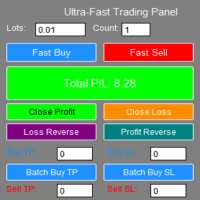
**"Fast Trading Panel 1.0"** is a highly efficient trading tool specifically designed for the MT5 platform. It integrates rapid order placement, intelligent closing, and batch management to provide traders with an ultimate operating experience and professional risk management capabilities.
- **One-Click Fast Ordering**: Supports custom lot sizes and batch orders, allowing instant buying and selling. - **Real-Time Parameter Adjustment**: Trading parameters take effect immediately without reload

=== Attention ===== before stating to use this project please watch the video.
this is the first step of all-in-one project which will be updated day by day. This version (1.01) will be for Trade - Entry. you can have Market and pending orders - lot size - take profit and stop loss. Take profit and stop loss have 4 different type which is point - money - percent - price and we have RR for take profit. You can calculate lot size based on points and money. you can have visual stoploss and takepr

Close Trade A simple, fast, and practical tool for managing and closing trades in MetaTrader
In the trading world, there are countless methods and strategies for opening and closing positions. Sometimes, due to volatile market conditions or multiple open trades, you need a tool that allows you to close all or specific trades instantly and efficiently. Close Trade is designed precisely for that, a lightweight, reliable, and easy-to-use tool for complete trade and order management in MetaTrader.
FREE

Autogrids Light – Smart Grid Trading EA for Hedge Accounts Autogrids Light carries the unmistakable DNA of the original Autogrids, preserving its powerful logic and precision while delivering a lighter, more streamlined version. Focused exclusively on the Spot Grid strategy, Autogrids Light dynamically constructs a customizable grid of buy and sell orders around a reference price, automatically placing pending orders according to user-defined distances, volumes, and number of levels. Every o

Forex EA Manager - Professional Position Management Tool Overview Forex EA Manager is a sophisticated MetaTrader 5 Expert Advisor designed to provide professional position management capabilities for forex traders. This EA focuses on risk management and trade optimization through advanced order management features. Key Features ️ Risk Management Automated Stop Loss & Take Profit : Configurable SL/TP levels with pip-based calculation Flexible TP/SL Control : Enable/disable functionality b

Tool Auto Modify SLTP – Protect Your Trades, Optimize Your Strategy In trading, risk is always present. Just one forgotten SL/TP can turn a promising trade into a loss. Even experienced traders occasionally make mistakes. That’s why Tool Auto Modify SLTP was created – to keep you protected and let you focus on your strategy. Key Features: Manage Orders for All Symbols: Monitor and adjust SL/TP for all your trading pairs. Three Flexible Risk Modes: Point-Based: Set fixed SL/TP distances. Account

Tired of fumbling with lot size calculations and manually managing every trade? The Visual Risk Manager (VRM) is a professional-grade trading panel designed to streamline your trading and enforce discipline. This Expert Advisor is not a strategy; it's a powerful utility that allows you to manage your risk and execute trades with unparalleled speed and precision, directly from your chart. Why You Need the Visual Risk Manager Stop letting emotions and guesswork control your trading. VRM ensures t

1.Multi-horizon telemetry: calculates profit, equity drawdown, open positions, and positions opened today for each period, feeding both the report tab and the risk engine.
2.Draggable on-chart console with twin tabs—Report for at-a-glance P/L & drawdown plus the Unlock Trading button, and Risk Manager for editing thresholds, timeouts, and toggles without opening MetaTrader dialogs.
3.Fully configurable rule stack: every limit offers Alert, Push, Email, Close Positions, Close Orders, Lock Tr

【先着10名限定セール】特別価格: $30 (通常: $40) 残り: 10枠 認知度向上のため、先着10名様に限り割引価格で提供します。
「見たい時間」を簡単に、一瞬で。マルチタイムフレーム分析に、究極の同期を。
上位足で注目した時間ポイントが、下位足ではどこにあるのか。
何度もスクロールして探し直す必要はもうありません。 単一チャートはもちろん、複数チャートを同期させて、狙った時間ポイントへ高精度に一斉フォーカス。
「探すストレス」をゼロにし、分析精度を極限まで高めます。
あなたのチャート分析を劇的に変える、フォーカス特化型ツールです。 製品概要 【選べる3つのフォーカス・モード】 Single Line:注目する1つの時間ポイントへ、ワンクリックでフォーカス移動 Multi Lines:複数の時間ポイントを設定し、順番にフォーカス移動 SnglSync :複数チャートを同期させ、1つの時間ポイントへ一斉フォーカス 【主な活用メリット】 瞬時の復帰:どれだけチャートを動かしても、ズームや時間足を変更しても、ワンクリックで元の注目ポイントへ迷わずフォーカス移動できます。 検証
Trailing Stop Utility PRO – マルチモード・マルチシンボルの高度なトレーリング管理ツール バグや不具合を見つけた場合はお気軽にご連絡ください。
皆様のフィードバックはツール改善のために非常に重要です。 概要 Trailing Stop Utility PRO は、複数シンボルや複数時間足に対応した高機能なトレーリングストップ管理ツールです。
軽量で安定しており、すべての MT5 バージョンに対応します。 手動取引、EA取引のどちらにも対応し、Percent・Pips・ATR の3モードに加え、シンボル別/マジックナンバー別プロファイル、アダプティブATR、エクイティロックを備えています。 主な機能 1. 複数のトレーリングモード Percent Mode – 価格のパーセンテージで距離を設定
Pips Mode – 固定ピップス
ATR Mode – ATR に基づくボラティリティ対応トレーリング 2. シンボル・Magic Number プロファイル 各シンボル、各EA用に個別設定可能。
上書き設定やワイルドカードにも対応。 3. アダプティブ ATR 高速
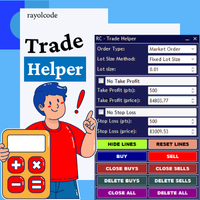
RC Trade Helperは、マニュアルトレーダー向けに設計された包括的なトレーディングアシスタントです。このアプリケーションは、チャート上で直接、迅速な注文実行、高度なリスク管理、効率的なトレード管理を行うための一連の視覚的ツールを提供します。 注意:購入前に、デモ口座でアプリケーションをテストできます。この商品はストラテジーテスターでは動作しません。 トレード操作 ワンクリックでトレードの実行と管理が可能: チャート上で視覚的なレベル確認により、成行注文と待機注文(ストップ、リミット)を発注。 すべてのポジションを決済、またはすべての待機注文を削除。 買いポジション、売りポジション、買い待機注文、売り待機注文の選択的な決済。 すべてのトレードライン(エントリー、ストップロス、テイクプロフィット)をチャート上のデフォルト位置にリセット。 チャートワークスペースを整理するため、すべてのトレードラインを非表示または表示。 トレードラインをロックして誤った移動を防止、またはトレード設定を反転。 ポジションサイジングとリスク管理 複数のトレードボリューム計算方法を提供: 固定ロットサイズ

FJUNIVERSE | MT5 ボラティリティ&最小ロットスナップショットツール ワンクリックで強力なスキャナーが、マーケットウォッチ内の全銘柄の実リスクとボラティリティを即座に明らかにします — 現在のチャート時間枠を使用。 このスクリプトは、ブローカー定義の最小ロットでのUSDリスク額を正確に計算し、読み込まれた全ローソク足に基づく完全なボラティリティプロファイルを生成します。結果はクリーンなCSVファイルに保存され、MetaTraderジャーナルにバー数付きで出力されます。 主な機能: MINPRICEを計算:価格が0まで下落した場合のリスク( 最小ロット × Ask × 契約サイズ ) SNAPを表示:現在のAsk価格(完全な桁数) MINLOTを表示:ブローカーが許可する最小取引ロット すべての利用可能なバーでボラティリティを%で計算(常に正の値): AVGD 平均日次レンジ % ( |H-L|/O ) AVGL 平均上昇幅 % ( |H-O|/O ) AVGS 平均下落幅 % ( |L-O|/O ) MINL 最小非ゼロ上昇幅 %(フラットキャンドル除外) MINS 最小

Auto SL/TP Manager (自動SL/TPマネージャー) 手動トレードを二度と無防備な状態にしないでください! 急いでポジションを建てて、ストップロス (SL) やテイクプロフィット (TP) の設定を忘れたことはありませんか?「Auto SL/TP Manager」は、あなたにとって不可欠なセーフティネットです。 このエキスパートアドバイザー (EA) は、あなたのアカウントを24時間365日監視し、SL/TPが設定されていないオープンポジションに対して、あらかじめ定義されたリスク (SL) と利益 (TP) のレベルを自動的に適用します。 これは、 手動トレーダー 、 スキャルパー 、またはモバイルデバイスから開いたトレードであっても、 すべて のトレードが自分の戦略に従って確実に保護されるようにしたいすべての人にとって完璧なツールです。 主な特徴 完全自動化 : 未設定のオープンポジションを常時スキャンし、SL/TPを適用します。 高度な設定が可能 : ストップロスとテイクプロフィットをPips単位で簡単に定義できます (例: 5.0 = 50ポイント)。 強力なフィ

Momentum Candle Alert — マーケットメーカーの動きを捉える マーケットメーカーの動きを見逃さないでください!
Momentum Candle Alert は、強いモメンタムキャンドルをリアルタイムで検出し、市場の重要な動きを簡単に把握できます。 使い方:
アラートをチャートに追加し、希望の時間足を選択して、通知したいポイント数またはドルの変動幅を設定します。 主な特徴: 価格変動をリアルタイムで監視。 ローソク足のサイズが設定した閾値(ポイントまたはドル)を超えたときに自動通知。 3つのモード: 買いのみ、売りのみ、または両方 。 デフォルトモードは 買いのみ で、簡単に変更可能。 軽量・高速・リソース効率が高い。 チャートを見続けなくてもモメンタムを把握可能。 シンプルで実用的なツールを求めるトレーダーに最適です。

Order Filled Sound Free for now, if useful for you, leave 5 stars comment. Will be free for live!
Order Filled Sound automatically plays a notification whenever an order is executed — including Take Profit (TP) and Stop Loss (SL). You can easily customize the sound in the EA properties or replace it with your own sound file ( *.wav ).
To use your own sound, simply copy it into the following folder:
C:\Program Files\MetaTrader\Sounds This tool ensures you never miss an important trade event aga
FREE
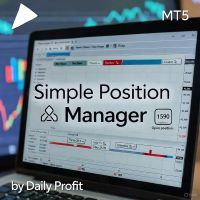
Simple Position Manager is a professional-grade MT5 script designed for efficient trade management. This versatile tool allows traders to quickly apply Take Profit, Stop Loss, and Breakeven settings across multiple open positions with precision and reliability. Key Features Multi-Position Management Apply TP/SL to all open positions of the current symbol simultaneously Intelligent position filtering by symbol Batch modification capabilities Smart Breakeven Technology Automated breakeven tri
FREE

Keep your MetaTrader 5 charts alive, updated, and always in sync — automatically.
The MT5 Auto Refresh Utility is a smart, zero-lag chart updater designed for traders who want real-time accuracy across every open chart. Whether you use complex dashboards, multi-timeframe systems, or long-running analysis setups, this utility ensures your charts stay active and refreshed without manual clicks or chart reloading. Why You’ll Love It Automatic Chart Refresh
Refreshes your MT5 chart at a fixed int
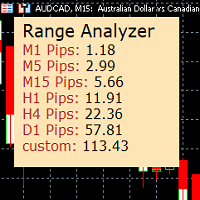
Range Analyzer calculates the Average True Range (ATR) values for different timeframes in pips to give a fast and simple overview about the volatility of the chosen symbol.
Settings are very easy:
bars for calculation: Choose the number of bars for calculation or use the default value (14 periods).
from bar: Choose the youngest bar to start the calculation or use the default setting (0 = current bar). custon timeframe: Choose another timeframe.
You can use it for forex, crypto, indices, comm
FREE

Apeiron Edge Alerts - Advanced Price Level Alert System Overview Apeiron Edge Alerts is a powerful and intuitive alert management tool designed for active traders who need reliable notifications when price reaches critical levels. Track unlimited price levels across multiple timeframes with customizable alert settings, visual feedback, and persistent session management. Key Features Flexible Alert Creation Draw Mode : Click anywhere on the chart to create instant horizontal line alerts Make M

Guardian Equity PropFirm EA for MetaTrader 5 Guardian Equity PropFirm is an Expert Advisor designed to automatically enforce daily and monthly loss limits. It is especially useful for accounts subject to strict risk management rules, such as those required by proprietary trading firms. The EA continuously monitors the account and performs automated actions if predefined thresholds are exceeded. Key Features Daily loss control: Set a maximum daily loss percentage (e.g., 4%). Monthly loss c

King ElChart Telegram Bridge A professional bridge between MetaTrader and Telegram. It can send and receive trading signals instantly and manage trades automatically. FEATURES • Two modes: Sender and Receiver • Works on any symbol or timeframe • Fast and lightweight • Easy setup and real-time status display
NOTE After purchase, please contact me via MQL5 private messages to receive the bridge package and assistance with setup.

HotKey Trade: Invisible and Fast Execution It is a minimalist order executor designed for scalpers and price action traders. It eliminates cumbersome panels and operates at maximum speed using only your keyboard.
Key Points:
100% Clean Chart: No panels or buttons blocking your view of the price. Instant Execution: Fires orders to the market without menus or clicks. Dynamic Lot Management: Change your volume and view it only when you need it Quick Commands:
[ C ] – Buy (BUY) [ V ] – Sell (SELL

Script Name: Close All Positions Language: MQL5 Type: Utility Script Primary Function: Instantly close all open positions on the current trading account Purpose The “Close All Positions” script is a lightweight and efficient tool designed for traders using MetaTrader 5. Its main purpose is to help users quickly exit all active trades with a single click, especially during volatile market conditions or when risk management requires immediate action. Instead of manually closing each position on
FREE

The free trade manager — simple but effective.
Quickly open positions with preset take profit and stop loss levels.
Set everything to breakeven or close all trades with one click. Get plenty of information on your chart about your account, trades, and profit/loss.
It speaks for itself — that’s how simple this manager is to use. Check out our other EAs and our Telegram for more information!
By traders, for traders!
FREE

AutoLotEqualizer – Smart Position Balancing Tool AutoLotEqualizer is a precision trade management utility designed to keep your total BUY and SELL volumes balanced automatically.
It detects differences between your open BUY and SELL positions and opens compensating trades — ensuring both sides stay equal in exposure.
This helps grid, hedge, and basket systems maintain symmetry and control over total position risk — all while saving you time and manual effort. ️ Key Features Automatic Lot Ba
FREE

EA Info Display Master Stop clicking through charts to find your EA configurations! Get a complete overview of all running Expert Advisors with their symbols and magic numbers in seconds. Managing multiple EAs across different symbols? Monitoring performance on FX Blue or other platforms? This tool instantly displays: All running EA names Their symbols and magic numbers Account details (number, broker, currency) Direct FX Blue statistics links (other provider will follow! Tell me what you need)

Colors schemes powerful MetaTrader 5 script designed for traders who value speed and a personalized trading environment. With a single click, you can instantly transform your chart's appearance using one of several professional, pre-designed color schemes, including popular styles like ICT/SMC. How to Use: In your MetaTrader 5 terminal, open the Navigator window (Ctrl+N). Find the Colors schemes script under the "Scripts" section. Drag and drop the script onto the chart you want to customize. A

The follow-up feature allows you to automatically open layers.
You can configure it to open up to x layers with three different take profits. You can also set the take profits as percentages. For safer trading, you can enable the trailing option — either starting from the take profit or after a certain number of pips. You can use or test it for free — visit our Telegram and ask about the available options.
We stand behind our products and always strive for improvement.
Free use is also available

1. Brief Description of Gina Panel Code Functionality for End User The "Gina Panel" is a customizable trading dashboard Expert Advisor (EA) for MetaTrader 5 (MT5). It provides a graphical user interface (GUI) overlay on your chart to simplify trading and account management. Key functionalities include: Account Monitoring : Displays real-time balance, equity, profit/loss, margin levels, and net positions in a compact panel. Trade Execution : Quick buttons for buying/selling at market, setting lot
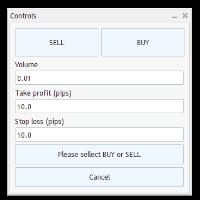
Trade Panel – Smart Order Execution Tool for MetaTrader 5 Trade Panel is a lightweight and intuitive trading assistant designed to simplify manual order execution in MetaTrader 5. It allows traders to quickly place BUY or SELL orders with custom lot size, stop loss, and take profit values — all managed through a clean, responsive interface. Key Features: Fast order placement with one-click confirmation Real-time visualization of Stop Loss and Take Profit lines Editable fields for lot size and pi
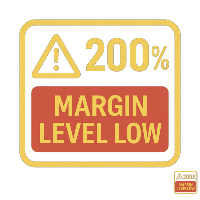
Margin Level Monitor EA Stay ahead of margin calls with real-time alerts and visual feedback. This Expert Advisor is designed for traders who prioritize risk management. It continuously monitors your account’s margin level and triggers alerts when it drops below a customizable threshold (default: 200%). Whether you're trading manually or using other EAs, this tool keeps you informed and protected. Key Features: • Continuous Monitoring: Checks your margin level every few seconds. • Mult

General Overview This Expert Advisor (EA) is a semi-automatic trading assistant for MetaTrader 5 that provides a graphical user interface (GUI) panel directly on the chart.
It allows traders to quickly place pending orders (Buy Limit, Sell Limit, Buy Stop, Sell Stop), set Stop Loss (SL) and Take Profit (TP) levels for all positions, close all open trades, and delete pending orders. Key Features Interactive Control Panel:
Displays input boxes, buttons, and labels on the chart.
You can manu

GUARDIAN EA PRO - SMART ACCOUNT PROTECTION "Don't let losses get out of control - Let Guardian protect you 24/7!" KEY FEATURES SMART ALERT SYSTEM Step-by-step alerts by profit/loss percentage (5%, 10%, 15%...) Real-time notifications via Telegram & Push Notifications Customizable intervals between alerts EMERGENCY PROTECTION Auto close all positions when reaching maximum loss threshold Drawdown protection - Prevent deep losses Trading time limits - Safe automatic

Sniper Utility Rimani sempre aggiornato sui tuoi trade, ovunque tu sia. Sniper Utility invia notifiche immediate ogni volta che uno dei tuoi ordini raggiunge il Take Profit o lo Stop Loss .
Perfetta per trader attivi che desiderano monitorare le proprie operazioni senza dover controllare costantemente il terminale. ️ Funzionalità principali Notifica istantanea alla chiusura dell’ordine (TP o SL) Compatibile con notifiche push su dispositivi mobili Supporto per ordini manuali, EA e p

## ️ Descrizione
**Margin Alert Notifier** è una utility che monitora in tempo reale il livello di **margine** del tuo conto di trading e ti **avvisa immediatamente** quando scende sotto una soglia definita. Ti aiuta a prevenire situazioni di *margin call* o *stop-out*, mantenendo il controllo del rischio in ogni momento.
---
## Funzionalità principali
- Avviso automatico quando il **Margin Level (%)** scende sotto la soglia impostata. - Messaggio personalizzabile (puoi inseri

**Sync MT5 – リアルタイムマルチチャート分析マネージャー**
MT5プラットフォームをプロフェッショナルな分析ステーションに変革します。Syncは、複数のウィンドウ間でチャート、オブジェクト、クロスヘアを同期する包括的なツールであり、これまでにない精度と効率で取引できるようになります。
**主な機能**
1. **スマートチャート同期** - 複数のチャート間でシンボルと時間枠をワンクリックで同期。 - グループシステム – 戦略や資産ごとにチャートを整理。 - 不必要な更新を防ぐ調整可能な感度。
2. **高度なクロスヘア(デュアル軸)** - グループ内のすべてのチャートで同期されたクロスヘア。 - ローカル時間またはサーバー時間での表示。 - 各チャートでクロスヘアポイントへの自動ナビゲーション。 - ESCキーによる迅速な有効化/無効化。
3. **完全なオブジェクト管理** - チャート間でのライン、四角形、テキスト、矢印の自動同期。 - スクロールと検索機能付き管理パネル。 - 作成された最

パーシャルクローズマネージャー – 取引量を自動調整する便利ツール パーシャルクローズマネージャーは、MetaTrader 5上でポジションを部分的に決済するための強力なツールです。取引中のリスク管理をより柔軟に行うことができ、利益の一部を確保しながら残りのポジションを伸ばすといった戦略を簡単に実現します。手動入力を減らし、スムーズな操作性と高い精度を両立しています。 主な機能: 部分決済機能: クリック一つで保有中のポジションの一部を決済可能。スキャルピングからスイングトレードまで幅広く対応します。 自動ボリューム計算: ツールが自動的に決済ロット数を計算し、入力ミスを防ぎつつスピーディに実行。 複数注文対応: 同一銘柄の複数ポジションに対して同時に部分決済を適用でき、時間の節約になります。 ドラッグ移動可能なテーブル: テーブルヘッダーをドラッグして、チャート上の好きな位置に自由に配置可能。 パーシャルクローズマネージャーは、資金管理やポジション制御をよりスマートに行いたいトレーダーにとって、欠かせないプロフェッショナル向けツールです。

Anti Revenge Trading Police Bot v1.80 (Revenge Trading Protector) 開発元: Mindfultradeness
復讐トレードのサイクルに囚われていると感じますか?毎回の損失が再入場を誘惑しますか?あなたのそばに立つガーディアン、Anti-Revenge Police Botを想像してください。これは復讐トレードを克服する究極のツールです!この革新的なユーティリティは、あなたのあらゆる動きを見守り、閉じた損失を検出し、カスタマイズ可能なクールダウンを起動して毒性衝動を止めます。リアルタイム介入により、すべてのポジションと保留注文を閉じ、希望に満ちたマインドフルトレーディングの旅へと導きます。どう働くか、共に設定を進めましょう!
主な機能と利点: - **リアルタイム多言語 HUD with プログレスバーとカウントダウン:** あなたの言語で動的な表示を即座に確認し、取引の明確さを提供します。 - **Anti-Revenge Police:オープンポジションを閉じ、保留注文を削除:** 衝動的な再入場を防ぎ、安心感
FREE

Kalifx Trade Manager is a smart on-chart trading and risk-management panel for MetaTrader 5. It replaces manual order tickets and spreadsheet risk math with a compact, draggable panel that lets you place, size, and manage trades directly from the chart — including automatic breakeven, trailing stops, and a 3-level partial close (multi-TP) system with draggable on-chart lines. Built for discretionary traders who want the speed of a one-click panel with the discipline of automated risk rules runni

AZ Trade Recovery Assistant MT5 combines manual trading flexibility with intelligent automated management.This advanced on-chart panel isn’t just for trade execution — it’s a complete trade management assistant. You can open or close positions instantly, adjust lot size, manage trailing stops, and modify Take Profit or Stop Loss — all directly from the panel. It’s built for traders who want full control of their trades with smart automation running in the background. What truly makes this assist

Operative Management Pro – Advanced Trading Utility Operative Management Pro is a smart visual tool for traders who want to analyze and simulate their trades before placing them on the market. This panel displays in real-time the most important parameters of the current symbol: Current price and minimum lot size Required margin Spread cost in USD and pips Take Profit and Stop Loss value in USD Automatic risk and reward calculation With just a click on the chart, you can simulate BUY or SELL t

K-line Terminator - a countdown tool that accurately grasps every second Core Summary: Still anxious about not knowing when the current candlestick will end? 'Candlestick Terminator' is an indispensable tool in your trading toolbox! It utilizes a clear and intuitive countdown timer to display the precise time remaining for the currently active candlestick in real-time, helping you avoid making hasty decisions during the chaotic moments of candlestick transitions, thus allowing you to enter, exit
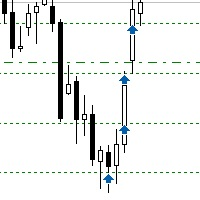
Sometimes the markets are in such a trending phase that it is impossible not to notice and it is enough to simply buy with the trend. 1) So, we scroll through the charts of different instruments, and see a good entry point, so let's specify the desired price for the first order in the Price_for_First_Order parameter and the direction in the Trend_Direction parameter, this is already enough for a good deal. (If Price_for_First_Order=0, the position will open immediately at the market price.) 2) T

Binance Copier allows to seamlessly and easily copy trades between MT5 and Binance Futures! The tool's main feature is to replicate trades and all available orders between MetaTrader 5 and Binance that can be applied to both Expert Advisors and manually opened ones.
Before purchase please familiarize with comparison between MT5 to Binance and Binance Copier Key Features: Bidirectional Copying - MT5 → Binance (Master Mode): Copy your MT5 trades to Binance - Binance → MT5 (Slave Mode): Mirror Bi

Overview MAVIS Trader is a powerful one-click trading panel designed for traders who value speed, clarity, and precise control.
It lets you open multiple Buy/Sell positions instantly, automatically synchronize SL/TP levels across all open trades, and close every position on the symbol with a single click.
Perfect for scalpers, grid traders, and anyone who needs consistent, mirrored risk management without manual editing Key Features One-Click Buy/Sell: Open several trades at once with your

Heartbeat Agent is a cross-platform utility for monitoring the status of your trading terminal, compatible with both Windows and Linux. This tool sends regular GET requests to a specified URL, allowing you to monitor the terminal's performance and receive real-time updates on its status. If the connection to the terminal is lost for any reason, you will be immediately aware and can take the necessary actions. Key Features of Heartbeat Agent: Cross-Platform Compatibility: Heartbeat Agent supp
FREE

Description SilverEdge Trade Console is a fast, layer-based trading console for MT5 that lets you place, manage, and exit trades in a few keystrokes. It combines one-tap market orders, guided pending orders, per-layer TP/SL control, and a built-in break-even/trailing engine—wrapped in a clean dashboard that docks anywhere on your chart. Designed for scalpers and intraday traders who need speed, consistency, and clear logs. Features Layer-Based Workflow (1–9): Assign and work within layers to sep

Selam arkadaşlar özellikle gold scalp yaparken zamana ve reflekse ne kadar ihtiyacımız olduğunu biliyorsunuz.
Bu sebeple ben kendime scalp yaparken bana yardımcı olacak buttonlar hazırladım.
ben gold scalp yaparken : 3 .çeşit Sell
3 .çeşit buy close sell close buy
açık emirleri kapat hepsini kapat
şeklinde kendime butonlar hazırladım. ve çok faydasını gördüm.
bütün butonların renklerini lot değerlerini isimlerini değiştirebililrsinz.
kesinnikle çok seveceğinize eminim
bol kazançlar.
FREE

Toma el Control Absoluto de Tus Operaciones ¿Cansado de calcular manualmente el tamaño de tu posición o de sudar frío esperando a que el precio toque tu stop loss? La gestión del riesgo es la línea que separa a los traders consistentes del resto. No dejes tu capital en manos de la improvisación. Presentamos la Calculadora de Posición y Riesgo , tu nueva aliada esencial para operar con precisión y disciplina profesional. Con esta poderosa herramienta, tú: Maximiza tu Potencial: Calcul
FREE

️ EquityShield is your automated risk management guardian for MetaTrader 5. If you've ever exceeded your daily loss limit, struggled to enforce your own trading rules during volatile markets, or wanted to automatically lock in profits when you hit your targets, EquityShield is built for you. This is not a trading strategy - it's a safety system that watches your account 24/7, automatically closes positions when your risk limits are breached, and helps you maintain consistent trading discipline

Product Overview Trade with Natural Language, Let AI Execute Fully. This is a revolutionary MT5 trading program that allows you to describe trading strategies directly in natural language. AI will fully understand and automatically execute all trading operations. No programming knowledge required - simply describe your trading ideas, and the system will fully manage your trading account. It executes your strategy with creativity and optimizes trading strategies on its own! Contact me for a 15-d
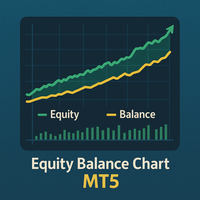
Equity Balance Chart (Indicator Description) This is an advanced MQL5 indicator designed to track and display an account's performance directly on the chart. It plots the account's Equity (in lime green) and Balance (in orange) as two separate lines in a sub-window. Its two primary features are: Persistent History: The indicator saves the equity and balance data from each bar to a history file. When you restart MetaTrader 5 or reload the indicator, it automatically loads this file to redraw the
FREE
MetaTraderマーケットは、履歴データを使ったテストと最適化のための無料のデモ自動売買ロボットをダウンロードできる唯一のストアです。
アプリ概要と他のカスタマーからのレビューをご覧になり、ターミナルにダウンロードし、購入する前に自動売買ロボットをテストしてください。完全に無料でアプリをテストできるのはMetaTraderマーケットだけです。

取引の機会を逃しています。
- 無料取引アプリ
- 8千を超えるシグナルをコピー
- 金融ニュースで金融マーケットを探索