 MetaTrader 5
 エキスパート
 インディケータ
 ライブラリ
ライブラリ
 ユーティリティ
 ウィジェット
 ルール
ルール
YouTubeにあるマーケットチュートリアルビデオをご覧ください
ロボットや指標を購入する
仮想ホスティングで
EAを実行
EAを実行
ロボットや指標を購入前にテストする
マーケットで収入を得る
販売のためにプロダクトをプレゼンテーションする方法
MetaTrader 5のためのテクニカル指標 - 63
 テクニカル指標からのシグナルは、株式および外国為替市場での取引の開始と終了に重要な役割を果たします。指標の本質は、将来の価格変動を予測することを目的とした金融銘柄価格の数学的変換です。
テクニカル指標をテストして、市場の動きとそれからの利益をより正確に予測します。
テクニカル指標からのシグナルは、株式および外国為替市場での取引の開始と終了に重要な役割を果たします。指標の本質は、将来の価格変動を予測することを目的とした金融銘柄価格の数学的変換です。
テクニカル指標をテストして、市場の動きとそれからの利益をより正確に予測します。 
Multi ATR Dashboard
ATRに基づく多通貨ボラティリティスキャナー。すべての時間枠で最大12の銘柄を同時に監視し、すべてがチャート上の1つのパネルに表示されます。
対象者
チャートを切り替えることなく、現在ボラティリティが加速しているか、または収束しているかを確認する必要があるトレーダー向け。このパネルは、市場の全体像を一目で提供します。
仕組み
チャート上にテーブルが表示されます。縦軸に銘柄、横軸に時間枠。各セルには現在のATR値が表示され、銘柄自身の平均ボラティリティからの偏差に応じて色分けされます。
赤 — ボラティリティの急増、通常よりも強い動き。色が明るいほど、偏差が強い。 青 — 異常な静けさ、通常よりも弱い動き。色が明るいほど、圧縮が深い。 灰色 — ボラティリティが通常の範囲内。 複数の時間枠で同じ銘柄が同じ方向を示している場合 — これは分析の好機です。
パネルの機能
パネルはCanvasを介して描画されており、ちらつきやラグがありません。3つの配色スキーム:ダーク、ミディアム、ライト。フォントサイズは調整可能です。パネルはマウスで
FREE

http://www.tradepositive.lat
ALGO Smart Flow Structure Indicator The ALGO Smart Flow Structure Indicator is designed for serious traders who use objective Market structure. Forget noise and slow indicators; this tool provides you with a crystal-clear, unambiguous view of structural breakouts across all timeframes. Based on the rigorous rules of the ALGO Smart Flow methodology, the indicator filters out internal structure and only shows you the Major Structural Points (Swing Points) , ensuri
FREE
This indicator demonstrates the probable dynamic support and resistance levels of EMA, Ichimoku lines, and Key OHLC levels for different timeframes on one chart. This can drastically reduce the time and effort needed for switching between different timeframes.
EMA and Ichimoku Levels are drawn for the M1, M5, M15, M30, H1, H4, and D1 timeframes, and the Key OHLC levels of the last periods are drawn for the H4, D1, W1, and MN1 timeframes.
FREE
Scalp using the behavior of a short moving average, the indicator gives the slope and identifies the "hyper" moments.
Operational advice:
Use M1 chart. Period 20 : open buy after two rising lows; sell after two max downhill; avoid countertrend openings; when the line goes flat put a stop at the opening price. Avoid actions in low volatility timeslots. When the curve that draws the min / max is very flat, it is better to postpone at least 15'.
Period 50 : matches the trend, when it is at
FREE

Finally, a dashboard that cuts through the noise and shows what actually matters. – Displays All Symbols In Your Market Watch List (Updates in real time) This advanced Multi-Timeframe ATR & Volume Dashboard gives traders a crystal-clear view of market volatility and liquidity across all symbols and timeframes in one glance . Real-Time ATR & Volume Data – See exact volatility (ATR) and trading activity (Volume) for M1 to MN1
Smart Grouping – Automatically classifies instruments (Forex, In
FREE

We have all seen a currency pair enter the overbought or oversold territory and stay there for long periods of time. What this indicator does is gives you the emphasis. So if you are looking for reversals then you may want to take notice when oversold territory is entered into with a bullish engulfing candle or if the trend is your thing then check for bearish engulfing candles while entering oversold. This indicator will show a downward arrow when it detects a bearish engulfing candle while cro
FREE

What is this indicator?
このFX検証ソフトは MT5でリアルトレードのように過去検証するためのインジケーター です。 共通の垂直線を移動するごとに、 全てのチャートの表示位置を共通の垂直線を基準に同期します 。 チャートモードを切り替えれば、 リアルトレードのように過去検証することも、チャート全体を見て過去検証することも可能 です。
How to set up
1. 対象の通貨ペアのチャートを過去方向に最後までスクロールして ヒストリカルデータを全てダウンロード します。 2. このインジケーターを各チャートの メインウィンドウにインストール します。 3. このインジケーターのプロパティ画面のインプットタブで 各パラメーターをカスタマイズ します。
How to use
1. 共通の垂直線を同期したい位置のローソク足に重ねて チャート位置を同期 します。 2. 必要に応じて チャートモードを変更 します。 3. 各チャートを比較して チャートパターンを検証 します。
Unique objects Common Thread : 各チャートの位置を同期

The Smart Trend Tracker (OTT) is a technical analysis tool designed to help traders identify the direction and strength of a market trend. This indicator functions as an optimized moving average that adapts to market volatility, thereby providing dynamic support and resistance levels. The primary goal of the OTT is to smooth out price action and offer visual cues about potential changes in the trend. Core Components of the Indicator When you add the indicator to your chart, you will see two main
FREE

Tired of cluttering your chart with multiple EMA indicators? Multi EMA lets you plot 5 Exponential Moving Averages from a single indicator, keeping your chart clean and your navigator organized. Key Features 5 independent EMAs with fully customizable periods Enable/Disable each EMA individually — use only what you need 12 source price options including standard and advanced calculations: Close, Open, High, Low (H + L) / 2, (H + L + C) / 3, (H + L + C + C) / 4 (O + H + L + C) / 4, (O +
FREE

Lazyyy Hotkeys & Period Separators Lazyyy Hotkeys & Period Separators is a lightweight productivity tool designed to speed up your chart navigation and improve market structure visualization in MetaTrader 5. It combines custom keyboard shortcuts with automatic period separators , helping traders stay focused, organized, and efficient during analysis. Key Features ️ Custom Hotkeys for Timeframes Instantly switch between timeframes using your keyboard: M1 → MN (fully customizable keys) No mo
FREE
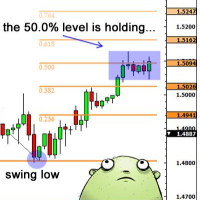
Necessary for traders: tools and indicators Waves automatically calculate indicators, channel trend trading Perfect trend-wave automatic calculation channel calculation , MT4 Perfect trend-wave automatic calculation channel calculation , MT5 Local Trading copying Easy And Fast Copy , MT4 Easy And Fast Copy , MT5 Local Trading copying For DEMO Easy And Fast Copy , MT4 DEMO Easy And Fast Copy , MT5 DEMO Fibo: from KTrade 1. Automatically calculate and analyze the band. -> Get the desired band 2.
FREE

Lumen Chart Panel — a clean market panel for MetaTrader 5
Lumen Chart Panel puts your essential market context in one tidy panel on the chart: the countdown to the next candle, the current spread, the active trading session, server time, and the day's range with the live price inside it. No more crowding your chart with several small indicators or switching between terminal tabs to check the same things every day.
It is read-only — it shows information and nothing else. It places no trades, s
FREE
This indicator is EXCLUSIVELY to be used on the Brazilian stock exchange "B3". It automatically calculates the yesterday's Settlement Price (Ajuste) of the Symbol "DOL". It uses a mathematical calculation over the ticks received from the borker server, it DOES NOT access external sources (websites, HTTP connections, etc) so it is safe and totally reliable! For practical purposes and to maintain the longevity of the indicator it was added in the Parameters the ability to control the Time Range in
FREE

SessionRange-MT5-Ind is an indicator for MetaTrader 5 that builds a High/Low/Middle channel based on the given trading session. Indicator : Defines the session range - builds a channel based on a given high/low window Draws three lines : SessionTop (blue) — maximum session SessionMiddle (grey) — channel center SessionBottom (orange) — minumum session Session mode (Mode) : `Previous Day` — for classical PDH/PDL (previous day range) `Current Day` — to display the current day’s session
FREE

The MultiTimeframe Volume Zones Indicator is a powerful tool designed to provide traders with comprehensive insights into market dynamics. It combines several essential features, including volume analysis, Dow Zones, buy and sell arrows, candle timer, and market movement across different time frames. This all-in-one indicator equips traders with valuable information to make informed trading decisions. Key Features: Volume Analysis: Gain a deep understanding of market sentiment and strength by an
FREE

This indicator is designed according to the combination of WPR and Stoch indicators, when WPR goes up and Stoc goes up quickly too, the price may meet strong resistance, many times short order will take profit, but if the price break through it, Long positions are more likely to be profitable, and the reverse held true as well. You can adjust the parameters of WPR and Stoc to Adapt the symbol you operate. Click here to look the advanced edition: https://www.mql5.com/en/market/pro
FREE

Ritz Smart Trend Adaptive Finder – Auto-Detect Dynamic Trend Channels A powerful trend detection indicator that adaptively analyzes price structure using dynamic ATR and statistical filters to discover the most significant trend channels on any timeframe and symbol. This tool automatically finds the most relevant period and slope for price movement and draws upper/lower channel zones, midline (mean), and trend support/resistance. Suitable for trend-following, breakout, and mean-reversion strateg
FREE

HiperCube Market Profile ! Discount code for 20% off at Darwinex Zero: DWZ2328770MGM_20 A Market Profile is a graphical representation that combines price and time information in the form of a distribution . It displays price information on the vertical scale (y-axis) and volume information on the horizontal scale (x-axis). This chart type provides insights into market activity, allowing traders to visualize and evaluate fair market value in real-time.
Features: Custom Colors Custom Chart Cl
FREE

The indicator highlights the points that a professional trader sees in ordinary indicators. VisualVol visually displays different volatility indicators on a single scale and a common align. Highlights the excess of volume indicators in color. At the same time, Tick and Real Volume, Actual range, ATR, candle size and return (open-close difference) can be displayed. Thanks to VisualVol, you will see the market periods and the right time for different trading operations. This version is intended f
FREE

Trend Quality Filter Market Structure Overview Identify high-quality market conditions and avoid low-probability phases.
This trend indicator acts as a market filter, helping you focus on strong trends while filtering out unstable market behavior . What this indicator does This trend indicator analyzes market structure and trend strength to classify current market conditions into clear and easy-to-understand phases. Instead of generating signals, it works as a market filter, helping trader
FREE

CombinerPRO は、MetaTrader 5用に設計された高度なインジケーターで、バイナリーオプション、OTC市場、シンセティックアセット、仮想通貨、FXトレードを行うトレーダー向けに最適化されています。複数のテクニカルフィルターを組み合わせて正確なCALLおよびPUTシグナルを生成し、外部インジケーターとの統合にも対応。リアルタイム統計パネルとバックテスト機能を備え、意思決定を最適化し、戦略の精度を向上させます。
主な特徴 ️ 複数のフィルターによるシグナル生成: 移動平均、RSI、ADX、ATR、ローソク足サイズフィルターを組み合わせて正確なCALLおよびPUTシグナルを生成。 ️ 外部インジケーター対応: iCustom を介して最大2つのカスタムインジケーターを統合可能。 ️ リアルタイム統計パネル: 勝率、エラー数、最大6段階までのマーチンゲール戦略の効果を表示。 ️ ヒストリカルバックテスト: 過去のローソク足を指定数スキャンして戦略を評価可能。 ️ エントリー間隔コントロール: シグナル間の最小時間を設定し、エントリーの過剰化を防止。 ️ 多市場対応

Here's the Japanese translation with all formatting and links preserved: 特別オファー: 全ツール 、各わずか $30! 新しいツールは最初の1週間、または最初の3回の購入に限り $30 でご提供します!
MQL5 トレーディングツールチャンネル:私の MQL5 チャンネルに参加して最新情報をご確認ください Quadra Zone Entries は、8期間 EMA リボン、ATR ベースのトレードゾーン、マルチシンボルスクリーナー、マルチタイムフレームトレンドダッシュボードを一つの自己完結型ツールに統合した多機能 MT5 インジケーターです。チャートを切り替えたり個別のインジケーターを実行したりすることなく、エントリーシグナルと広範な市場コンテキストを求めるトレーダーのために設計されています。リボンはトレンド方向を一目で識別でき、ATR ゾーンは各シグナルに対して客観的なエントリー・ストップロス・目標レベルを提供します。スクリーナーとダッシュボードは、その情報を9つのシンボルと5つのタイムフレームに同時に拡張しま

คำอธิบายอินดิเคเตอร์ Ichimoku Future Cloud Focus PRO – รุ่นโซนรายการ อินดิเคเตอร์นี้พัฒนาจาก Ichimoku ปกติ แต่เพิ่ม "โซนเข้าออเดอร์ (Entry Zone)" + "การมอง Cloud ล่วงหน้า" เพื่อให้ตัดสินใจง่ายขึ้น โครงสร้างหลัก 1. Tenkan (เส้นฟ้า) เส้นเร็ว → บอกโมเมนตัมสั้น ใช้ดูจังหวะ “เริ่มขยับ” 2. Kijun (เส้นทอง) เส้นหลัก → แนวโน้มจริง ใช้เป็น “ฐานเข้าออเดอร์ / รีเทส” 3. Future Cloud (เมฆล่วงหน้า) สีเขียว = แนวโน้มขึ้น สีแดง = แนวโน้มลง ใช้ดู “อนาคตของเทรนด์” (ล่วงหน้า 26 แท่ง) จุดขายหลักของตัวนี้คือ
FREE
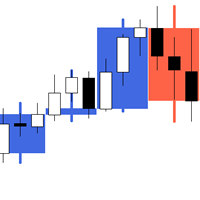
The indicator My Big Bars can show bars (candles) of a higher timeframe. If you open an H1 (1 hour) chart, the indicator puts underneath a chart of H3, H4, H6 and so on. The following higher timeframes can be applied: M3, M5, M10, M15, M30, H1, H3, H4, H6, H8, H12, D1, W1 and MN. The indicator chooses only those higher timeframes which are multiple of the current timeframe. If you open an M2 chart (2 minutes), the higher timeframes exclude M3, M5 and M15. There are 2 handy buttons in the lower r
FREE

Zigzag Indicator For RSI, To easily identify the highs and lows of the rsi signal. It is easier to observe divergent and convergent signals. Default setting: InpRsi =14 //Rsi Period InpDepth =12; // Depth InpDeviation =5; // Deviation InpBackstep =3; // Back Step
If you want open Exness account try this link : https://one.exness-track.com/a/teg5teg5 Dev buy taphu: Ha Van Tan - hatatrata - Trader's profile - MQL5 community Email: tan.ha@outlook.com
FREE

The idea behind this indicator is to find all currency pairs that are over-bought or over-sold according to the RSI indicator at one go.
The RSI uses the default period of 14 (this can be changed in the settings) and scans all symbols to find the RSI level you will have specified. Once currency pairs that meet the specification are found, the indicator will open those charts for you incase those charts aren't open and proceed to write the full list of currencies on the experts tab.
FREE

Rojeryo ATR Scalper Widget is a lightweight MetaTrader 5 indicator that displays an ATR-based risk widget directly on the chart.
The indicator shows the current ATR value and calculates estimated Stop Loss and Take Profit distances using the selected ATR multiplier and Risk/Reward ratio.
It is designed for traders who want a simple on-chart risk reference without opening additional windows.
Main Features
- ATR value display - Configurable ATR timeframe - Configurable ATR period - Estimated
FREE

A0 Break Quality is a free educational indicator for traders who want to understand how price interacts with support and resistance instead of following an unexplained buy or sell arrow.
The indicator evaluates confirmed swing levels using closed candles. It separates a simple touch from a wick sweep, a weak close, a body break, follow-through, a retest hold and a failed break. The chart panel explains the latest state in plain English and shows the currently tracked support and resistance.
M
FREE

Zakir Market Structure (Free)
Professional trader utilities. Minimal design. Maximum clarity.
Short Description: Lightweight MT5 market structure indicator that automatically displays daily, weekly, and monthly separators with intelligent timeframe filtering, automatic cleanup, and optimized performance.
Details Zakir Market Structure is a lightweight MetaTrader 5 utility indicator designed to improve chart readability by automatically displaying daily, weekly, and monthly market structure se
FREE
VWAP Indicator, the short form of Volume Weighted Average Price, is similar to a moving average but takes into consideration the tick volume of the candles. The indicator calculates the moving average multiplying the price of each candle for the tick volume in the candle. Said calculation weighs with more significance price where more transactions were made.
Features: Visual styling customizable Period customizable Ease of use
FREE
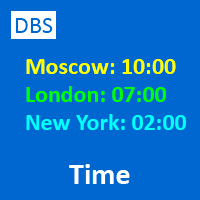
A small utility displays the time in five time zones. You can customize the display of one to five time zones. For each time it is configured: show or not; name; time offset from GMT; color; In general settings, you can change: date / time format ("hh: mi", "hh: mi: ss", "yyyy.mm.dd hh: mi", "yyyy.mm.dd hh: mi: ss") font name; font size; offset from the left edge of the chart; offset from the top edge of the chart;
FREE

RSI 2-Level Scanner MT5 Multi-Symbol RSI Reversal Scanner with Clickable Chart Navigation Added the option to scan Market Watch or a custom list, as well as an option to open the chart in different views.
RSI 2-Level Scanner is a practical MetaTrader 5 tool for monitoring multiple symbols at the same time and detecting potential RSI reversal setups. Unlike a standard RSI scanner that only shows overbought or oversold values, this indicator uses a two-level confirmation system . For a LONG setup
FREE
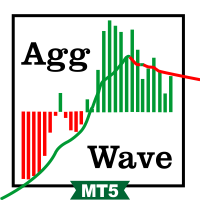
This indicator sums up the difference between the sells aggression and the buys aggression that occurred in each Candle, graphically plotting the waves of accumulation of the aggression volumes. Through these waves an exponential average is calculated that indicates the direction of the business flow.
Note: This indicator DOES NOT WORK for Brokers and/or Markets WITHOUT the type of aggression (BUY or SELL). Be sure to try our Professional version with configurable features and alerts: Agre
FREE

A clean, information-dense dashboard that sits on your chart and answers the five questions every trader should ask before pulling the trigger:
1) What am I looking at? — Symbol, timeframe, live spread in points and pips.
2) When am I trading? — Active forex session with overlap detection, candle countdown timer, broker server time (auto-detected UTC offset, DST-proof), and your local time.
3) How much should this move? — 5 configurable ATR multiplier rows for quick SL/TP sizing, plus Daily,
FREE
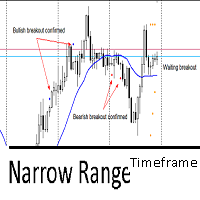
This indicator utilizes the Narrow Range 7 concept . This concept says that if the seventh candle is the one with the smallest range, that is, the smallest difference between maximum and minimum of all 7 candles. The indicator marks this candle with two markers and waits for a breakout to happens in the next 6 candles. It's called "timeframe" because if in the next 6 candles the breakout not happens, it will remove all marks on candle. If it exceeds 7 times the timeframe, it also will remove the
FREE

รองรับโครงสร้างตลาดอัจฉริยะ AI PRO MT5 ไอดิเคเตอร์นี้รวม 3 ส่วนหลัก: โครงสร้างตลาด → HH / HL / LH / LL สัญญาณรูปแบบ → 2B / 123 / ตัดและทดสอบใหม่ AI Forecast (NN) → ทิศทาง + กรองสัญญาณ วิธีใช้งานจริง (เข้าใจง่าย) 1. ดูโครงสร้างตลาด (ตัวหลัก) HH + HL ต่อเนื่อง → เทรนขึ้น (หาจังหวะ ซื้อ) LH + LL ต่อเนื่อง → เทรนลง (หาจังหวะขาย) ใช้เป็น “ในหลัก” ก่อนที่จะดูสัญญาณ 2. ใช้รูปแบบการป้อนเข้า 2B ( กลับตัว) 2B บน → ขาย 2B ล่าง → ซื้อ
ใช้ตอน “ตลาดเริ่มกลับ” แพทเทิร์น 123 เบรกจุด 2 → เข้าเ
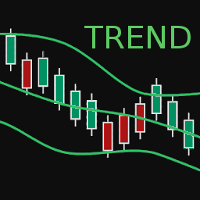
BBTrend is a relatively new indicator developed by John Bollinger to work with Bollinger Bands. It is one of only a few indicators that can signal both strength and direction making it a very valuable tool for traders.
Calculations The calculations are fairly simple. The default periods of 20 and 50 are shown, but these can be changed through the parameters. Lower = MathAbs(lowerBB(20) - lowerBB(50)) Upper = MathAbs(upperBB(20) - upperBB(50)) BBTrend = (lower - upper) / middleBB(20)
Interpret
FREE

Anchored Volume Profile Pro — Heatmap & Delta Edition The most complete Anchored Volume Profile indicator for MetaTrader 5. Drag two vertical lines to define any time range — the indicator instantly renders a full volume profile with heatmap coloring, delta analysis, POC/VAH/VAL levels, HVN/LVN detection, and a live statistics panel. Key Features Fully Anchored & Interactive Simply drag the Start and End vertical lines to any position on the chart. The profile redraws automatically in real ti

TPB – トレンドプルバック行動 価格 : $0 プラットフォーム : MetaTrader 5 タイプ : 市場環境インジケーター(非自動売買) 概要 このインジケーターは、 GomerAI Market Research Framework の一部であり、市場構造と取引環境を分析するために設計された分析ツール群に属しています。 各インジケーターは市場行動の特定の側面に焦点を当て、トレーダーや自動売買システムが現在の市場状況をより深く理解できるよう支援します。 TPB (トレンドプルバック行動)は、確立されたトレンドの中で価格がどのように押しや戻りを形成するかを評価します。このインジケーターは売買シグナルを生成するのではなく、トレンドが続いている間に発生するプルバックの質と構造を分析します。その目的は、価格修正がトレンド継続と整合した秩序ある形を保っているのか、それとも不安定さや不規則な動き、構造的な崩れを示し始めているのかを見極めることにあります。 構造的に整ったプルバックは、健全なトレンド相場の特徴であることが多くあります。修正が制御され、過度にならず、全体の流れに対して自然で
FREE

ALFA REVERSAL PRO I built ALFA REVERSAL PRO for traders who want clean reversal signals without filling the chart with unnecessary tools. The indicator displays BUY and SELL arrows when valid reversal conditions are confirmed. It can also show possible exit signals, send alerts, and calculate optional Stop Loss and Take Profit guides. ALFA REVERSAL PRO does not trade automatically. It is designed to support your own analysis and trading decisions. Download the user manual here , contact me for a

BinaWin NoTouch is an indicator that sends an alert signal when the trade is in the right position to wait for the breakdown of a side market.
It is specially designed to trade under the “No Touch” strategy of the Binary.Com platform with synthetic indexes N.10, N.25, N.50, N.75 and N.100
Similarly, trading can be done with the conventional CALL and PUT strategy of any Binary Options platform.
Requirements to use the indicator:
1. Have an account at Binary.Com
2. Configure the Binary.Com d
FREE

Indicator that uses ATR and standard deviation to calculate the current trend. It has the top and bottom line. The top line is shown when it is high, and the bottom line when it is low. The indicator does not draw a trend line or show the trend for the day, or for a certain period. It has the function of indicating the current trend, and may indicate a reversal.
use it with caution and at your own risk.
FREE

CANDLESTICK_MT5
A very interesting indicator of candlestick patterns, converted from the free version of the CANDLESTICK indicator for the MetaTrader4 terminal to the version for the MetaTrader5 terminal. In addition to candlestick patterns, it draws support and resistance lines, which are perfectly worked out by the price on the chart. It can work on any timeframe. Has simple settings. When converting, the logic of work and the design of the original CANDLESTICK indicator for the MT4 terminal
FREE
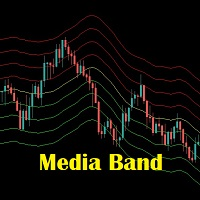
Media Band é um indicador que projeta 8 bandas paralelas a uma media movel de referencia. Podendo auxiliar na visualização da volatilidade do mercado financeiro. Este indicador foi inspirado na necessidade de avaliar melhor uma boa oportunidade de compra e venda dos ativos de acordo com o "seu" operacional. Não pode ser utilizado como recomendação e sim a fins de estudos do Mercado Financeiro.
FREE
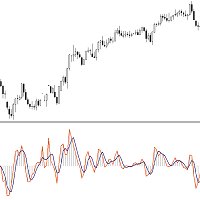
This Indicator is based on Mr. Dan Valcu ideas.
Bodies of candles(open-close) are the main component used to indicate and assess trend direction, strength, and reversals.
The indicator measures difference between Heikin Ashi close and open.
Measuring the height of candle bodies leads to extreme values that point to trend slowdowns. Thus quantifies Heikin Ashi to get earlier signals.
I used this indicator on Heiken Ashi charts but, it's possible to choose to calculate Body size based on Heik
FREE

READ THE MARKET BEFORE YOU TRADE IT.
A setup means nothing if the market conditions behind it are wrong.
NOSTROMO MARKET ANALYZER is a professional Market Conditions Indicator for MT5 built to tell you what kind of market you are dealing with before capital is committed.
One premium HUD. Immediate context. No noise.
KNOW THE ENVIRONMENT.
MARKET PULSE QUIET · ACTIVE · EXPANDING · EXTREME
OPERATIVE STATE MARKET CLOSED · STANDBY · SELECTIVE · OPERATIVE · HIGH INTENSITY · CAUTION
GLOBAL SES
FREE
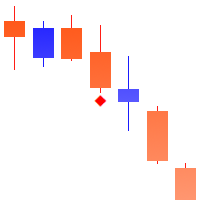
慣性のポイントは、価格変動の慣性を計算するという考えに基づいて、価格の動きの臨界点を検出するための強力なツールです。
_________________________________
インジケータ信号の使用方法:
この指標は、新しい価格バーが表示された後に信号を生成します。 価格が指定された方向の臨界点を突破した後、生成された信号を使用することをお勧めします。 インジケーターは信号を再描画しません。
_________________________________
インジケータパラメータは、信号の矢印の表示スタイルを変更することを示唆しています。 計算に使用されるパラメータを変更することは提供されていません-これは私の製品の哲学によるものです:安定性と客観性。
_________________________________
ご質問やご提案のいずれかが歓迎されており、プライベートメッセージで送信することができます
_________________________________
興味のあるすべての人に事前に感謝し、市場を征服することに幸運を祈っています!
FREE
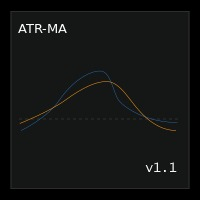
ATR Moving Average draws a moving average of the standard Average True Range( ATR ) in the same window.
Settings Name Description ATR period
Set Price per iod for ATR calculation
ATR level Set ATR value for thresholding( only whole number, ignore leading zeros e.g. 0.00089 = 89 ) MA Period Set moving Average Period MA Method Set moving average method( Simple, Exponential, Smoothed and Linear Weighted ) MA Shift
Set moving average shift
Enable Alerts ? Generate Alert when ATR crosses Moving
FREE

OrderFlow Structure SMC Indicator
A market structure indicator that doesn't just tell you where structure broke. It tells you whether to trust the break. Built for MetaTrader 5. The first SMC indicator to combine dual-track structure detection, two-stage liquidity sweep confirmation, and academic-grade order flow analysis on a single chart.
Who this is for Discretionary SMC traders who are tired of false BoS breaks and painted sweeps. Quant-minded traders who want order flow context that isn't

AP Day-Week-Month High-Low overlay that draws the prior Day, Week, and Month highs/lows on any chart. Great for session planning, confluence, and alerting when price comes back to important swing levels. What it does Plots 6 lines: Day High/Low , Week High/Low , Month High/Low (from the previous completed sessions). Touch/near alerts when price reaches a selected line (with a user-set tolerance). Works on any symbol and timeframe. Zero external libraries. How to use Drop it on the chart you trad
FREE

Triple Crox Strategy v4.10 Triple Crox Strategy v4.10 Professional MetaTrader 5 Indicator 13 Patterns • Fibonacci • CLUSTER ML • Multi-Filter 1. Overview Advanced MT5 indicator combining 13 Pattern Detection , Fibonacci Analysis , CLUSTER Machine Learning and Multi-Filter system for precise signals on Forex, indices, commodities, crypto. 5-step pipeline: indicators → filter → patterns → signals → levels. 2. Trading Setup Heikin-Ashi colored bars. Buy/Sell arrows with Entry, TP1(1x ATR), TP2(2x
SMC Trend Momentum – Adaptive Trend and Momentum Oscillator SMC Trend Momentum is a momentum oscillator plotted in a separate window.
The indicator combines a Donchian position bias with a ZigZag leg normalization and transforms this into a smoothed, color‑coded histogram for assessing trend direction and momentum changes. Optionally, a higher timeframe filter can be applied. The indicator is designed to be flexible for different trading styles (short‑term, swing, indices, FX) using ready‑to‑u
FREE

Dynamic Indicator --> YKL_DinDX Dynamic Indicator that creates a Band based on the distance from moving average specified by the user. The indicator considers the period entered by the user in order to calculate the average distance from moving average, creating an upper band and a lower band. This indicator is utilized by EA YKL_Scalper, version 2.0 or superior.
FREE

Smart SR Levels Support and Resistance - Professional Strength-Based Support & Resistance Indicator MT5
Key Features: • Automatic detection of significant Support and Resistance levels • Line thickness based on level strength (number of touches + volume factor) • Custom colours for Support and Resistance • Multi-timeframe support • Clean background lines (no overlap with candles) • Labels showing S/R type and strength value
Perfect for price action traders, supply-demand zones, and institutio
FREE

We all know that the start of an H4 candle can be 'shifted' depending on the broker. I wrote an indicator that draws candles "shifted" to the desired value. Plus, it draws H4 candles on smaller timeframes too. Works on timeframes up to H4, allowing for a clear comparison with the broker's results. There's a separate option to customize the candlestick body and outline fill. You can also customize the drawing for a specific period on history.
FREE
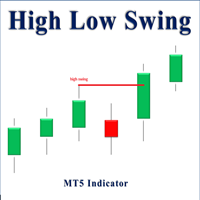
High Low Swing (HLS) Indicator
The HLS indicator is a technical analysis tool designed to identify swing highs and lows in the market, aiding swing traders in making informed decisions. It offers an adjustable "degree" parameter, allowing you to customize the sensitivity to strong price movements based on current market conditions.
Features:
• Clear Buy/Sell Signals: The indicator plots signals directly on the chart, simplifying trade identification.
• Adjustable Swing Strength: The "degr
FREE

Check out the detailed blogpost with screenshots: https://www.mql5.com/en/blogs/post/771285
Features All trades in one subwindow — Every open BUY and SELL order gets its own mini candlestick chart, no matter what symbol it belongs to. Smart price scaling — EURUSD and BTCUSD look the same size. The indicator uses ATR normalization so every trade is equally readable. Live candle updates — The latest candle reflects the real-time Bid price, not just the last close. Entry, SL & TP lines — See exact
FREE

RSIBandsTREND is a custom trend-focused indicator that enhances the classic RSI approach by visualizing dynamic upper and lower bands based on RSI calculations.
It plots three clean bands (upper, lower, and midline) directly on the chart, helping traders identify overbought and oversold zones with precision. Features: Three-band system: upper, lower, and center RSI lines EMA-smoothed RSI band calculation Clear trend zone visualization on chart Works on all timeframes (M1 to Monthly) Fully opt
FREE

The Carry Trade Monitor is a chart indicator for MetaTrader 5 that automatically scans all symbols in the Market Watch and ranks every swap-paying pair by annualised carry yield, displayed as a live on-chart panel. No configuration is required — attach to any chart and it runs immediately. Carry yield calculations read directly from the broker's own swap specifications via the MT5 symbol feed. There is no external data source, no URL permission required, and no dependency on third-party rate dat
FREE

SMC Order Blocks + FVG — Professional Smart Money Concept Indicator
Unlock institutional trading insights with this professional-grade Smart Money Concept indicator. Automatically detect Order Blocks and Fair Value Gaps used by banks and hedge funds.
KEY FEATURES:
ORDER BLOCKS DETECTION • Automatic bullish and bearish Order Block identification • Based on price action and impulse strength analysis • Real-time mitigation tracking • Customizable imp

Heikin Ashi Candlestick Indicator for MT5 This custom Heikin Ashi indicator provides a smooth visual representation of market trends by filtering out short-term noise, making it easier to identify potential reversals and trend continuations. Unlike regular candlesticks, Heikin Ashi candles are calculated using averages, resulting in more stable and readable chart patterns. Key Features: Clear and smoothed visualization of price action. Compatible with all timeframes and instruments. Lightwe

This indicator is based on the Moving Average indicator. It helps the user identifying whether to buy or sell. It comes with an alert that will sound whenever a new signal appears. It also features an email facility. Your email address and SMTP Server settings should be specified in the settings window of the "Mailbox" tab in your MetaTrader 5. Blue arrow up = Buy. Red arrow down = Sell. Line = Trailing Stop. You can use one of my Trailing Stop products that automatically move the Stop Loss and
FREE
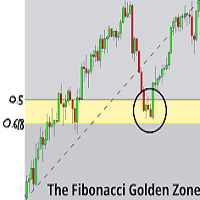
Overview
Fibonacci Optimal Entry Zone [OTE] is a high-precision market structure tool designed to help traders identify ideal entry zones during trending markets. Built on the principles of Smart Money Concepts (SMC) and Fibonacci retracements, this indicator highlights key areas where price is most likely to react — specifically within the "Golden Zone" (between the 50% and 61.8% retracement). Figure 1 It tracks structural pivot shifts (CHoCH) and dynamically adjusts Fibonacci levels bas

https://www.mql5.com/en/market/product/174770
Destek ve Direnç Göstergesi Pro - Kullanım Kılavuzu Bu araç, MetaTrader 5 üzerinde çalışan, fiyatın destek ve direnç seviyelerine yakınlığını anında takip eden, trend yönünü (EMA) gösteren ve bir fırsat ortaya çıktığında hem bilgisayarınıza hem de cep telefonunuza bildirim gönderen gelişmiş bir analiz panelidir. 1. MetaTrader 5'e Ekleme (Kurulum) Sol taraftaki Gezgin penceresini açın (Ctrl + N). Göstergeyi Göstergeler sekmesi altında bulabilirsini
FREE

FVG+BOS EA is a smart trading tool that visually highlights Fair Value Gaps (FVG) and Break of Structure (BOS) directly on the chart. It helps traders easily identify potential Points of Interest (POI) for high-probability trade setups. The EA also displays the active market sessions — London, New York, and Tokyo — to help users align trades with key trading hours.
FREE
FractalEfficiencyIndicator A ratio between 0 and 1 with the higher values representing a more efficient or trending market, It is used in the calculation of Perry J. Kaufman Adaptive Moving Average (KAMA), dividing the price change over a period by the absolute sum of the price movements that occurred to achieve that change. The Fractal Efficiency or also known as Efficiency Ratio was first published by Perry J. Kaufman in his book ‘Smarter Trading‘. This is mostly considered a filter for v
FREE

主要城市的时间。北京时间、东京时间、悉尼时间、惠灵顿时间、纽约时间、法兰克福时间、伦敦时间、迪拜时间。 城市时间可选择开启或者关闭。 点差变色提醒。设置点差提醒点数,例如,设置100点,点差大于100点,文字会变红色。 Time in major cities. Beijing time, Tokyo time, Sydney time, Wellington time, New York time, Frankfurt time, London time, Dubai time. City time can be turned on or off. Dot difference color change reminder. Set the point difference reminder points. For example, set 100 points. If the point difference is greater than 100 points, the text will turn red.
FREE

Fair Value Gaps (FVG) and Liquidity Voids are price ranges you can exploit for better entries and exits on your trades. They're similar concepts, so let's look at them from the top and break it down. Think of FVG and Liquidity voids as soft-spots in the market. They are paths of least resistance. That doesn't mean price will go through them, but price could go through them more easily.
To find and locate it is easy but tidiest to repeat the same thing all over again. This helps to boost your t
FREE

Please leave a review, if you like this.
Need Trade Assistant? Trade Panel Pro MT 5 Floating Market Monitor is a lightweight utility indicator for MetaTrader 5 that displays important account, symbol, and market information directly on the chart in a clean and customizable floating panel. The indicator is designed to help traders monitor essential trading information without opening multiple windows or adding several indicators to the chart. It can be used on any supported MetaTrader 5 symbol,
FREE

A tool for creating Bill Williams indicators Our tool provides the ability to set Bill Williams indicators on a chart with a mouse click. - The Awesome Oscillator (AO) indicator helps to assess the driving force of the trend. - Alligator indicator — determines the current state of the trend and possible entry and exit points. - Fractals indicator — helps to identify significant levels - Accelerator Oscillator (AC) indicator — shows the change in trend acceleration. - Market Facilitation Index
FREE
MetaTraderマーケットは、履歴データを使ったテストと最適化のための無料のデモ自動売買ロボットをダウンロードできる唯一のストアです。
アプリ概要と他のカスタマーからのレビューをご覧になり、ターミナルにダウンロードし、購入する前に自動売買ロボットをテストしてください。完全に無料でアプリをテストできるのはMetaTraderマーケットだけです。

取引の機会を逃しています。
- 無料取引アプリ
- 8千を超えるシグナルをコピー
- 金融ニュースで金融マーケットを探索