 MetaTrader 5
 エキスパート
 インディケータ
 ライブラリ
ライブラリ
 ユーティリティ
 ウィジェット
 ルール
ルール
YouTubeにあるマーケットチュートリアルビデオをご覧ください
ロボットや指標を購入する
仮想ホスティングで
EAを実行
EAを実行
ロボットや指標を購入前にテストする
マーケットで収入を得る
販売のためにプロダクトをプレゼンテーションする方法
MetaTrader 4のためのエキスパートアドバイザーとインディケータ - 79
 自動売買ロボットは市場取引を自動的に実行しますが、インジケータを使用すると、相場をより適切に分析し、価格行動を予測できます。
これらのアプリケーションを使用すると、より多くの機会を獲得しながら、より多くの情報に基づいた方法でMetaTrader4で取引を実行できるようになります。
自動売買ロボットは市場取引を自動的に実行しますが、インジケータを使用すると、相場をより適切に分析し、価格行動を予測できます。
これらのアプリケーションを使用すると、より多くの機会を獲得しながら、より多くの情報に基づいた方法でMetaTrader4で取引を実行できるようになります。 
ForexBob 1 Click Button is very impresive forex tool for scalpers: 1. Helpful in Closing multiple trades in just Single Click. 2. Scalper can benefits the most who always eager to close multiple trades in averaging and lock the profits fast. 3. It helps to avoid latency and so profits can be locked where we need. 4. Easy to Install, same as we install any expert advisor. 5. Speed of closing trades depends on your broker's server speed.
If you find any improvements we are open to your feedback
FREE
A script for group removal of orders of a given type. To delete, drag the script onto the chart and in the pop-up window select the type of orders to be deleted and click OK. Settings
Types of orders to delete - order types to be deleted or closed ALL_PENDING - OP_BUYLIMIT, OP_SELLLIMIT, OP_BUYSTOP, OP_SELLSTOP ALL_LIMIT - OP_BUYLIMIT, OP_SELLLIMIT ALL_STOP - OP_BUYSTOP, OP_SELLSTOP ALL_MARKET - OP_BUY, OP_SELL ALL_LIMIT_BUY - OP_BUYLIMIT ALL_LIMIT_SELL - OP_SELLLIMIT ALL_STOP_BUY - OP_BUYSTOP A
FREE

The indicator shows support and resistance levels as horizontal lines. It shows the highs and lows of former days, weeks and month in every chart.
How to work with support and resistance levels show the EA Limit Scalper and the Universal Moving Average Expert Advisor (UniMA EA) .
When the tip of the coursor is on a line (mouseover) it shows the real value of the level and which high or low is shown, see explanation below.
The indicator must be installed like an expert advisor ! To se
FREE

This is a free version of our Great tool with limited functions. The ChartChanger is a great utility tool to reduce the number of open charts on your terminal. There is three section to it: Symbols, Time frames and Templates. You need only one chart to be open and still you can scroll up to multiple ones. Symbols: With the push of a button you can change from one symbol to another, and your applied indicators will stay on the next chart. For the symbols there is an auto detection mode, or you ca
FREE

This indicator continuously, smoothly changes the color of candlestick edges and bodies, as well as the color of volumes in real time like a lamp. The indicator is easy to use. The palette of colors is diverse. This product is a graphical solution, so it is difficult to describe what it does by text, it is easier to see by downloading it, besides the product is free. The indicator is suitable for bloggers who want to create a beautiful picture of a chart for video editing or traders who want to
FREE

Lord Info は、META TRADER 4 プラットフォーム上の金融市場の指標です。
Lord Info は、プラットフォーム上の任意の株式/通貨ペアに配置できます。
Lord Info は、過去 (10) 日間または設定可能な ATR レポートを表示して、ペアの基本ボラティリティとその結果を確認できます。
アベレージ トゥルー レンジ (ATR) は、テクニカル分析で使用される市場のボラティリティの指標です。 これは通常、一連のリアルレンジ指標からの 14 日間の単純移動平均から導出されます。 ATR はもともと商品市場で使用するために開発されましたが、その後あらゆる種類の証券に適用されています。
Lord Info は、Hi-Low (高値/安値)、日次、ローソク足の電流、および最後のローソク足を表示します。
操作の長短の切り替え。
分析パフォーマンスを得るために、ストップレベルを簡素化およびカスタマイズしました。
Lord Oscilator、自動タイムフレーム識別: M1、M5、M15、M30、H1、H4、D1、パーソナライズされたインジケーター (有料
FREE

Moving Average Convergence Divergence (MACD) Signal Input parameters: signal mode: set it to true if you want to plug it into STAT (Signal Tester and Trader) arrow shift: distance between fast EMA line to arrow on chart standard entry mode for MACD fast EMA period slow EMA period MACD period MACD price method Standard Entry mode: buy when slow EMA cross and close above fast EMA while above the 0 line sell when fast EMA cross and close above slow EMA while below 0 line You can find the best set
FREE

TREND MATE is an useful indicator that will support your decision to trade according to the current trend. It is possible to configure alert and push notification to receive when entering to first candle for bull / bear trend. If you want to use this indicator for a EA, use the function iCustom as follows:
DOWNTREND : iCustom(NULL,0,"Trend_Mate",0,0) . If downtrend result is "1", otherwise is "0".
UPTREND : iCustom(NULL,0,"Trend_Mate",1,0) . If uptrend result is "1", otherwise is "0".
For an
FREE

Narcis Trader is an expert designed for managing trades and facilitating trading. Attention, the application does not work in the strategy tester. Download Real
Its features include: Determining the trade volume based on the selected trader's risk. Setting specific and fixed stop-loss and take-profit levels. Defining the take-profit level based on the specified risk-to-reward ratio (r/r). Entering trades using static and dynamic lines based on the predetermined risk. Position closure management
FREE

Alert Relay Helper (EA) – MT5 & MT4
Encrypted bridge that forwards indicator alerts to external messengers * in real-time. Plug-and-play utility – simply attach it to one chart. Zero trading functions – does not open, modify or close orders. End-to-end AES-256 encryption – only custom indicators that support the same key can broadcast messages (e.g. VWAP Ultimate Pro v1.20+). Multi-platform – MT5 build 4150+, MT4 build 1380+. Before you turn it on : Open Tools > Options >
FREE
Overview The M.O.D.E stands for Multiple Oscillator Divergence Exit . It is an MT4 indicator that checks for divergence between price and multiple oscillators. The purpose is to help traders observe potential weakening in the current price movement when price and oscillator behavior disagree. The indicator was originally designed as an exit and warning tool, but traders may also use it as a divergence reference within their own analysis process. Key Features Checks divergence across multiple osc
FREE

This indicator draws lines based on the standard Fractals indicator. Once a fractal is broken up or down, the indicator generates an alert, sends an email notification and a push message to your mobile phone.
User Inputs History - the number of bars in history for calculation. Color Up Fractal - the color of the upper fractal line. Color Down Fractal - the color of the lower fractal line. Width - the line width. Alerts - alert. EmailAlerts - email notification. NotificationAlert - push notifica
FREE

Watch a few videos in the playlist, turn on subtitles, and select a translation into your language. MOPS ( Managing Open PositionS ) is an expert advisor for managing open trades. Its key features include sending notifications to Telegram and automatically closing all positions when specified virtual take-profit and stop-loss levels are reached for all currency pairs, a specific pair, or a "magic number." The advisor not only sends sound alerts and push notifications to the mobile app but also
FREE

ストラテジーテスターでの効率的なテストと分析を可能にする再生スピード調整ツールです。 ストラテジーテスターの操作性を向上させ、トレード戦略の開発や評価を効率化する手段としてご活用いただけます。
ツールの特徴: 再生スピード管理:ユーザーは、ストラテジーテスターの再生速度を自由に変更できますので、早送り、倍速再生だけでなく、希望の場所で一時停止することも可能です。 1バー、1ティックづつ進む:ユーザーは「次のバーへ進む」ボタンを使用して、1バーずつ進むことができます。また、より詳細な分析のために1ティック単位での進行も可能です。 時間足と通貨ペアの同期:「 Practice Simulator Sync (無料)」と一緒に使うことで、異なる時間足や通貨ペアと同期して再生する機能も備えています。これにより、MTFや異なる通貨の状況を同時に見ることができます。 自動一時停止:毎日一定の時間(例えばマーケットオープンなど)で停止し、そこからの動きを分析することができます。日々のトレードスケジュールを加味したタイミングで止めることができます。 インディケーターの追加:MT4に標準で入っているイ
FREE

This is an expanded version of my Daily Sacrifice EA that closes old losing trades at the expense of a portion of your profits. This helps to slowly work away drawdown and accelerate the closure of martingale grids
*** Pro Features *** Include/Exclude symbols. These fields are empty by default, but if populated allow you to include only specific symbols or alternatively exclude specific symbols Execute on an hourly interval. Allows the EA to be ran every so many hours rather than on a fixed
FREE

Smart Lot-Size Calculator And Trade Assistant for Mobile Trading Overview: This is the tool every trader in the market must have no matter if you are scalper, swing traders, day trader, or long term trader. This On-The-Go trading tool will help you stay disciplined and also stay free from daily trade management chores, Most traders face common problems like 1. Calculation of proper lot-size of a position to take controlled risk 2. Managing every trade and trailing stop-loss if trades goes in
FREE

Handle orders for different magic -1 for all magic, 0 for manual orders, 1-XXXXXX for EAs For example, if you want to control orders from EA with magic 3333, your manual orders, type 0;3333 Close on exact time, example. close order every XX:15 --> Close all on 00:15, Close all on 11:15, Close all on 12:15... Close on Loss, close the loss for single order, close the loss for the whole magic number.
Parameters Description (-1 for all magic)(0 for manual orders)
List of the magic to check - 0;1;2
FREE

Who needs this tool? 1-If you are a Martingale Trader, You need to look at this tool
2-If you are a Trend price channel Trader, you need to look at this tool Smarty Semi Automated EA This tool is a great help for scalpers who use grid or martingale. It is a next-generation smart trading tool. You adjust its trading parameter then you push a button to do all trading for you. However, it is a semi-automated EA so It does not start orders by its own. How it is working? The tool was designed to
FREE
MSP_Bridge は、AI Grok 4 を RiskKILLER AI Navigator に接続する無料ユーティリティです。これは、AI に基づくマルチタイムフレームの 市場方向性&戦略アシスタント です。
このバンドルは、 あなたの取引スタイルに合わせて調整された、AI 駆動のトレンド、センチメント、マクロ分析による機関レベルの洞察を得るのに役立ちます。
RiskKILLER AI Navigator [ MT5 - MT4 ]
取引のパフォーマンスは、プロのように市場を理解することにかかっています。それを提供するのが、 RiskKILLER_AI Navigator です: MQL5では利用できないAI駆動のトレンド、センチメント、マクロ分析により、あなたの取引スタイルに合わせた機関級の洞察を獲得できます。
実装方法
ダウンロードして、以下の指示に従ってください。
問題が発生した場合は、お気軽にプライベートメッセージをお送りください。ご対応いたします。
FREE

BillWill 指標は、本から取られた資料に基づいています:ビルウィリアムズ。取引の混乱。利益を最大化するための専門技術。 各バーの上部にあるインジケーターの読み取り値は、バーの3分の1に対する始値と終値の位置に基づいて計算されます。バーは3つの部分に分かれており、バーの下3分の1が3番、バーの中央3分の1が2番、バーの上3分の1が1番です。インジケーターの読みの最初の桁は、バーの3分の1に対する始値の位置であり、2番目の桁は、バーの3分の1に対する終値の位置です。 各バーの下部にあるインジケーターの読み取り値は、前のバーの極値に対するバーの中央の位置として計算されます。
インジケーターの読み取りの定義 1-1始値と終値はバーの上3分の1にあります 2-2始値と終値はバーの中央3分の1にあります 3-3始値と終値はバーの下3分の1にあります 3-1始値はバーの下3分の1で、終値はバーの上3分の1です。 2-1始値はバーの中央3分の1で、終値はバーの上3分の1です。 3-2始値はバーの下3分の1で、終値はバーの中央3分の1です。 1-3始値はバーの上3分の1にあり、終値はバーの下
FREE

スクリプトは、利益が5ピップスを超えるすべてのポジションを閉じます。 すべてのペアのすべてのオープンポジションをチェックします(任意のチャートで実行できます)。 端末で「アルゴリズム取引」モードを有効にする必要があります。
早く閉じる必要のあるオープンポジションが多い場合に効果的です。
スクリプトは、トレーリングストップまたはアドバイザを置き換えるものではありません。 スクリプトは、すべての未決済取引をチェックし、起動時に条件(利益が5ピップスを超える)を満たす取引を1回閉じます。
その後の新しい収益性の高いポジションのクローズについては、スクリプトを最初から実行する必要があります。
バージョン1.3での変更点:
1.-スクリプトは、大きな利益から小さな利益(ピップ単位)までポジションをクローズします。
2.-ポジションを閉じるための利益のサイズを選択できます(デフォルトは5ピップです)。
1ペアのポジションを閉じるためのバージョン-https://www.mql5.com/en/market/product/56270
mt5のバージョン-https://ww
FREE
ScoutFX Panel is created to make manual trading and decision making process easier for the traders who prefer manual trading. This trading panel will help you to make a market entry decision by displaying the majority of trades statistics. Using this data, trader can easily determine the market entry direction or to make corrections for used trading strategy based on statistics.
ScoutFX Panel notifies the trader about reached percent of sell or buy overtake for each instrument, via voice noti
FREE

Automation for setting up Stop Loss, Take Profit and Trailing Positions can be opened with all platforms MetaTrader 4 MetaTrader Android MetaTrader iOS MT4 Web Trader The Expert Advisor will arrange Trailing of trades Market Execution Pending Order (Buy Stop, But Limit, Sell Stop, Sell Limit)
Input Parameters (all in pips) Take Profit - take profit value. Stop Loss - stop loss value. Trailing Start - trailing start. Trailing Step - trailing step/stop. Lock Start - lock start (first time trailin
FREE

iMACD in iMA is indicator to change color in iMA if iMACD is upper of zero (up trend) or lower of zero (down trend). It is a useful tool to track when the upside and the downside iMACD on iMA.
You can to get source code from here .
Parameters MA_Periods — Period for iMA. MA_Method — Method for iMA. MACD_FastEMA — Fast EMA for MACD. MACD_SlowEMA — Slow EMA for MACD. MACD_SignalSMA — SMA signal for MACD. MACD_ApliedPrice — Price used for MACD. BarsCount — How many bars will show the line. Revers
FREE

We provide indicators tailored to better meet your trading requirements. >> MT Sideway Filter <<
MT Focus Session : Focused on monitoring session times, the MT Focus Session indicator emphasizes market activity from opening to close, with a preference for the high-volume periods between the London Open and the U.S. Close.
TRADE: Forex
TIME FRAME: M5 M15 M30 H1
SYMBOL PAIR: All Symbol
SETTINGS:
FOCUS SESSION
Open Session Time: Start time of the session you are interested.
FREE

即時のDiscord通知。チャート上で直接価格レベルを設定し、価格がそれを通過したときにメッセージを受け取ります。レベルの追加はワンクリックで行えます。マウスでラインをドラッグして、希望する価格レベルを正確に設定できます。 便利なコントロールパネル: すべてのアクティブなアラートはリストに表示されます
ラインをドラッグしてレベルを編集できます
不要なアラートはワンクリックで削除、または「Clear All Alerts」で一括削除できます
アラートは発動後に自動的に削除されます
チャート上のアラートラインを非表示にするオプション
カスタム通知テキストのサポート(例:crossed、reached、touched)
Dark/Lightモード対応 動作方法: Add Alert をクリック
チャートに価格レベルのラインが表示されます
希望する価格レベルに移動します
価格がそのレベルを通過すると - Discordでメッセージを受け取ります 簡単な設定: Discordでテキストチャンネルを作成し、そのWebhook URLをコピーします。
MetaTrader 4 → Tools → O
FREE

This indicator was modified according to the 'Way Of The Turtle'. The ATR indicator can be used as a reference to set stop-loss or take-profit, and also can be used to confirm the daily price range (also applicable to other cycles).
Calculation The true range value is calculated as follows: TR = MAX(H-L, H-PDC, PDC-L) Among them: H = Highest price of the current bar L = Lowest price of the current bar PDC = Close price of the previous bar The average true range in 'Way Of The Turtle' is calcula
FREE

Simple. Informative. Instantly Visible on Your Chart. Alwinson Active Trades Info (MT4 Version) is a lightweight indicator that displays a summary of currently open positions directly on the chart. It removes the need to switch to the Terminal window to check which symbols are active and what volume is involved. An MT5 version of this indicator is also available among my products.
Key Features: Lists all symbols that currently have open positions in the trading account. Shows the dominant pos
FREE

If you can not create a background image for yourself (photo size and format must be changed), let me know. I make your photo for free. Otherwise, you can read the help file . A tool for chart management You can change the background image You can change the background color Change the color of the candles Volume colors, line charts and everything else You can also enable and disable some items Read the help file for more information
Settings:
Save Changes After Remove Tool
Back Ground Photo
FREE

This indicator was modified according to the 'Way Of The Turtle'. It generates a channel based on the opening price and ATR values of the current bar. Turtle ATR Channel can be used to help identify overbought and oversold conditions in a market.
Calculation upper channel = Open + r1*ATR lower channel = Open - r2*ATR Among them: Open is the opening price of the current bar. ATR is the ATR value of the current bar. r1, r2 are the ATR ratios.
Input Parameters ATR Period - set the period of the A
FREE

You can send MetaTrader screenshot easily to your identified telegram channel via press the send button that on the chart. TelegramBotToken: Telegram API credentials. You can create API credentials on my.telegram.org web page ChatId: Your telegram chatId. Secreenshots will be sending this channel - Please do not press the button repeatedly. This may cause your bot or ip address to be blocked. - You have to add telegram api address ( https://api.telegram.org ) in Option > Expert Advisors > Allow
FREE
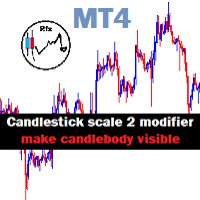
Candlestick Mod rapat.
Chart Candlesticks will stick together. make it look neat and tidy Switch between Candlestick and Line chart fixed. Instruction.
If you don't like the candles colors, you can do so by changing color. read below:
-Colors must be changed in the indicator setting.
-It won't change through the Chart properties to modify.
-After changing the color, save it as template so it wont change the colors to default value.
FREE

The StochasticDivergence is a custom indicator for the MetaTrader 4 (MT4) platform, designed to analyze the divergence between the Stochastic Oscillator (%K line) values of two currency pairs. It compares the Stochastic %K of the chart’s symbol (first symbol) with a user-defined second symbol, displaying both %K values and their absolute difference (divergence) in a separate subwindow. The indicator provides visual and alert-based feedback to highlight significant divergence levels, with custo
FREE

Tired of manually adjusting stops? This powerful EA automatically secures your profits with dynamic trailing stops, protecting gains while letting winners run. No trade openings – just effortless risk management for your existing positions. Why Traders Love This EA Never Miss Profits Again Auto-locks gains as price moves in your favor. Eliminates emotional decisions – sticks to your predefined rules. Three Smart Trailing Modes Choose the method that fits your strategy: F
FREE

Alfa for MT4: あなたのスマートトレード指揮センター 面倒な操作にさようなら。意思決定に集中しましょう。 複数のチャートウィンドウを行き来するのに疲れていませんか?注文管理の煩雑さで機会を逃したり、損失を出したことはありませんか? Alfa はそのために生まれました。これは単なるツールではなく、MT5/MT4プラットフォームに配備されたあなたの トレード指揮センター です。作業を自動化・智能化し、反復作業から解放され、市場の機会を捉えることに集中できるように設計されています。 核心機能:トレードの悩みに直撃 パノラマ的なポジション管理
"全体状況をひと目で把握。ワンクリックで効率的に決済。"
すべての注文とポジションをリアルタイムに集約し、損益状況が一目瞭然。 全決済 、 盈利注文のみ決済 、 損切注文のみ決済 をワンクリックでサポート。相場変動時の素早い対応と利益の確定を強力に支援。 詳細な損益統計
"統計だけでなく、洞察を提供。"
日次、週次、月次、年次など多次元での視覚的レポートで、資金曲線とトレード習慣を明確に表示。データに基づ
FREE
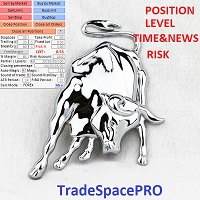
Trade Space PRO Профессиональная торговая панель для MT4. Главное ПРЕИМУЩЕСТВО - все настройки выведены на график символа. Запоминаются автоматически для каждого символа отдельно. Трейдинг/риски/блок контроля новостей и тайминга/панель сигналов . Вся важная информация отображается на панелях. Вам нужно только открыть позицию одним щелчком мыши. Управление открытой позицией так же просто, насколько это возможно: вы можете легко настроить уровни Стоп Лосса (S/L) и Тейк Профита (T/P). В о
FREE
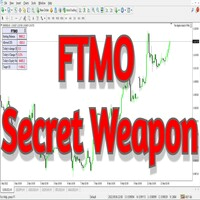
The world of prop firm trading is one filled with tension and excitement in equal measure, and FTMO is definitely the most reputable firm out there. On one hand is the prospect of making huge sums of money and on the other, losing all the money you have invested. The easiest way of the latter scenario occurring is drawdown , and more often than not daily drawdown . It's what keeps us constantly checking our phones, the pain of every traders existence.
What if there was a way of making
FREE

TripleSync Pro FX 是一款专为外汇交易者设计的先进多维度趋势同步指标,融合了价格动量、波动率分析和市场情绪三大核心维度,通过智能算法精准识别市场趋势转折点,帮助交易者在复杂多变的市场环境中做出更明智的决策。 核心功能亮点 三重信号确认系统 - 趋势线(绿线):基于多种指标合成的核心趋势方向指示 - 信号线(蓝线):反映短期市场动量和加速度,捕捉入场时机 - 信号柱状图(金色):直观显示多空力量对比,识别市场情绪变化
智能突破预警系统 - 可自定义阈值:用户可根据交易风格调整多空信号触发阈值 - 突破即时预警:当趋势线突破关键阈值时自动发出弹窗提醒 直观视觉信号 - 强烈交易信号:醒目箭头标识高概率交易机会 - 强度信号:提示潜在入场机会 - 零线参考:清晰的多空分界线,简化决策过程
️ 高度可定制化 - 灵活调整趋势计算周期、信号敏感度和平滑参数 - 独立开关各类信号显示和预警功能 - 支持所有时间周期和货币对,适应不同交易风格
适用场景
- 趋势跟踪:精准捕捉趋势起始点和转折点 - 反转交易:识别市场超买超卖区域的反转机会 - 波段交易:在
FREE

We use Price Action and Japanese Candlesticks at important price zones and standard times to open positions and use Risk/Reward: 1/2 - 0.2%/trade. Recommended symbol: EURUSD, GBPUSD, AUDUSD, USDCAD, USDJPY, GBPJPY, EURJPY. Contact me: Gmail: fifund.cuscare@gmail.com, Facebook , Twitter , Instagram . Product: Metatrader4 , Metatrader5 . Broker references: Exness , ICMarket , FBS .
FREE

SpreadChartOscillator is an indicator that displays the spread line of a symbol in the subwindow of the oscillator. In the parameters it is possible to specify another symbol from which the spread line will be broadcast. If the "Symbol" parameter is left empty, the spread line will be displayed from the current symbol on which the indicator is set. This tool is ideal for traders who want to see the spread dynamics in the oscillator format and use it to protect themselves from entering the market
FREE

Chopar MT4 — Transaction Notification Utility This tool is designed exclusively for broadcasting trading account events to Telegram (@ChoparTradeBot). It does not analyze the market or provide advice; it acts as an information bridge between your MT4 terminal and the messenger. What exactly does this monitor track? Opening and Closing Trades: Records the moment a trade is added to the history. For closed positions, it immediately calculates and displays the final profit. Pending Orders:
FREE
複数の時間枠でATR値を表示するシンプルなダッシュボード。どの時間枠でもクリックする必要はなく、ATRの概要をすばやく確認できます。
ATR期間の値の変更をサポートします。
無料ダウンロード!
すでにStrategyTesterでテストしましたが、何も問題はありません。
何か問題を見つけた場合は、下のコメントをドロップするか、サイトで私に連絡してください:http:// www.thanksmybot.com
メール:gmail@thanksmybot.com
IQ Option Robotなどのソフトウェアで私たちをサポートしていただければ幸いです/そしてMQL4市場でも私たちをサポートしてください>> Forex EA、ForexIndicator。
==============================
別の指標:https:// www.mql5.com/en/market/product/72859 !! お勧め !!
FREE

What is a tool ? Used for monitoring profit summary in your portfolio, by setting profit target. The tool will automatically close all open orders. When the profits meet the target set. How to use Place the tool on any currency pair, any timeframe and set profit target. Easy... Currency Pair : Any Timeframe : Any Input Parameter Summary profit for auto close all orders ($) Meaning : Input your profit target here. Visit my products Target Profit Magic Target Profit All The Profit Tracker Currenc
FREE
ImpulseShield EA is here to say NO to trading decisions made on Impulse
Have you ever placed a trade based on an impulsive decision and regretted your action? What if you could have been able to avoid taking the trade? ImpulseShield is here to help you to only when it is right. The Free Version Only Supports EURUSD, GBPUSD and USDJPY, Here is the Full Version, Just $30 https://www.mql5.com/en/market/product/131505 Key Settings and Their Role
The EA uses the inputs defined earlier to determine
FREE

SYSTEM DESCRIPTION: Cyber Capital TRADE HUB is support software for traders who wish to improve and speed up the opening, closing, and management of trades, as well as their own risk management. The system is developed for MT4 and allows you to open and close positions with fixed or automated lots based on percentage risk in one click. All the features of the dashboard are listed below. In addition to the normal functions of a trading dahsboard there is the ability to open manual trades with th
FREE

Constructor is a convenient tool for creating, (building strategies) testing and applying trading strategies and ideas, as well as testing and using separate indicators and their groups.
Constructor includes opening, closing, deal tracking, averaging and recovery modules, as well as various trading options with and without averaging and martingale. You are able to connect up to 10 different external indicators. Find the detailed instructions in the attached pdf file.
Trading settings
averaging
FREE
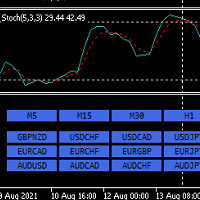
Hello,
This is an easy symbol change panel.
The free version only can change major pairs which are "AUDUSD, EURUSD, GBPUSD, USDCHF, USDCAD, USDJPY, NZDUSD"
The full version can add your symbols.
FULL version here:
https://www.mql5.com/en/market/product/71176?source=Site+Market+MT4+Indicator+New+Rating005
Also, can change the TimeFrame as well.
Symbols must be active on your Market Watch list.
Parameters:
ratio - change the size LineNumber - you can set that how many symbols are displa
FREE

製品名 Smart Bulls (MT4) – SmartView シリーズ 短い説明 MetaTrader プラットフォームで独特なユーザー体験を提供する Bulls インジケーター。以前は利用できなかった高度な機能を提供し、ダブルクリックで設定を開く、削除せずにインジケーターを非表示/表示する、インジケーターウィンドウをチャート全体のサイズで表示するなどの機能を備えています。SmartView Indicators シリーズの残りの部分とシームレスに連携するように設計されています。 概要 SmartView シリーズは、革新的な機能を通じて MetaTrader プラットフォーム上のインジケーターに独特で特徴的なユーザー体験を提供し、インジケーター管理をより速く、より簡単にします。各インジケーターには、チャート上のスマートコントロールパネルが装備されており、基本情報を表示し、すべての重要な機能への迅速なアクセスを提供します。 以前は利用できなかった独自の機能 SmartView シリーズは、インジケーターでの作業をより簡単で迅速にする高度な機能を提供します: ダブルクリックで設定を
FREE
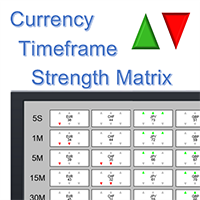
Note: this product is a free limited version of the full featured product Currency Timeframe Strength Matrix . It only includes AUD, CAD, CHF currencies instead of all 8 currencies. It includes only 5S, 1M, 5M time frames instead of all 8 (5S, 1M, 5M, 15M, 30M, 1H, 4H, 1D).
What is it? The Currency TimeFrame Strength Matrix is a simple and comprehensive Forex map that gives a snapshot of what is happening in the Forex market at the very present time. It illustrates the strength and momentum ch
FREE

This is a free trial version of ScalTradeAssist Pro ( https://www.mql5.com/en/market/product/25920 ) You can use all functions of the tool without any restriction except the lot size. (fixed as 0.01)
I hope you'd like it and decide to purchase the professional version :)
Below is the explanation of the ScalTradeAssist Pro.
*If you see that the orders are not being placed, please check your spread setting, this tool watches it and never place orders if the spread is not matching.
ScalTradeAssis
FREE
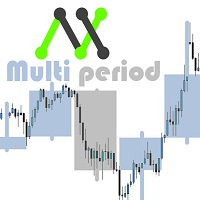
With this customizable indicator you will be able to observe other timeframes besides the usual one. This way you will get to know better the general environment in which the price moves and probably will be better your effectiveness. *It is important that the timeframe in the indicator is greater than that set in Metatrader. I'll share more indicators for free soon. If you have any specific ideas of an indicator that you want to have you can write me a private message directly. Opinions, review
FREE
Bottom Background 4 インジケーターは、設定に応じて、特定の色の下側の背景を現在の価格に設定します。 インジケーター設定の説明: モード-インジケーターの3つの表示オプション:低-最低価格に表示、オープン/クローズ-始値または終値のいずれか低い方に表示、MA-移動平均に表示。 PeriodMA-移動平均期間。 Bottom Background 4 インジケーターは、設定に応じて、特定の色の下側の背景を現在の価格に設定します。 インジケーター設定の説明: モード-インジケーターの3つの表示オプション:低-最低価格に表示、オープン/クローズ-始値または終値のいずれか低い方に表示、MA-移動平均に表示。 PeriodMA-移動平均期間。
FREE

PRO VERSION This free indicator change timeframe of charts(up to 3) at the same time,by clicking a label. If you click the label(shown below),timeframe of charts will change. If you click again,timeframe of charts restore.
You can change the position of the label.
You can change charts up to 3 charts(a paid version enables up to15 charts). You can add second,third timeframe changer label.
This indicator is very useful for speed trading.
There is a more powerful PRO VERSION . The paid versio
FREE

The utility TradeKeeper Lite can show your profits for different periods and bip a sound when you reach a profit target value. Click the tachometer to quickly switch to the next profit period. There are 5 of them: This Day, This Week, This Month, Last 90 Days and All I Made. With the utility TradeKeeper Pro , available at this link , you can also open trades with a magic number and volume of your choice, trail any orders with a simple trail or iSAR-based trail, as well as close any open trades a
FREE
This utility will help you avoid losing money on your trades when your terminal loses connection to the broker or your VPS / computer goes into an update and doesn't open your MetaTrader client automatically after the update. How is this product different from the other disconnect alerts? This one will email you and/or an SMS even when your MetaTrader client gets disconnected from the Internet or doesn't respond! Your client is monitored externally and doesn't rely on its own Internet conn
FREE

This is a script that is made to work in conjunction with the Objects Hide script Re-draw again the objects removed in the chart by the Objects Hide script Just drag and drop over the desired chart when you want to recall the objects deleted by Objects Hide Using this scripts system you can have the option to hide (remove) all graphical objects in the chart and recover them again later. Objects Hide is purchasable here in mql5.com find out more about this on this link. Please watch the demo tuto
FREE

Supports manual bi-directional orders. Once in floating profit, the system automatically executes partial take-profit based on set parameters, moves the stop-loss to the entry price (breakeven), and continues to hold the remaining position. Fully compatible with Teacher Zhang's trading system. Ideal for those with slower reaction times, seniors, beginners, and students in retraining. The full version features fully adjustable parameters.
FREE

Trailing Even is a free complement for the Control adora Expert Adviser. It adds a trailing stop function and changes the exit level that works as stop loss if some price is reached, let's review how to make it work: First of all make sure you have the same language selected both in the Control adora Expert and in this indicator. Change of the exit level that works as stop loss with "BES" and "BEO": This function needs 2 arrows to work: 1 named BES (stands for Break Even Start) place it at the
FREE

This is an indicator that works as a plug-in for Control-adora and lets you set buy limit (bl) or sell limit (sl) orders when a trigger level is reached. This could be useful when you want for example wait until the price breaks support or resistance level and then place a limit order to take advantage of this breakout with a better price. In order to use this indicator, after placing the indicator on the chart with the Control-adora expert working on it, just add 2 Price Labels or trend lines a
FREE
Become a constantly profitable 5-star forex trader!
We offer a few indicators to support you understand and analyse the market! With our strategies you will improve your trading system and bacome an expert...
We have indicators for trend direction, market direction and others.. for multi-time frames and that covers all majors or your favorite trading symbols! Some of them offer a customizable calculation parameters... or Graph features!
See how powerful they are! The are also easy-to-use tr
FREE

Good morning, The following indicator is very useful when managing multiple trades on the same instrument. It allows you to see the average entry price for BUY and SELL trades. If there is an imbalance (as shown in the example photo), the indicator will display the averages of the SELL/BUY trades and a GOLD line that marks the breakeven price (excluding swap and commissions).
FREE

This indicator is the translated version of Kıvanç ÖZBİLGİÇ's PMAX Indicator, developed on the Matriks Data Terminal, into the MQL4 language. It is a trend-following indicator and quite successful. Its usage will be free and unlimited for a lifetime. You can click on my profile to access the MQL5 version of this indicator. You can also get your programming requests for MQL4 and MQL5 languages done at İpek Bilgisayar with an invoiced service. You can reach İpek Bilgisayar at www.ipekbilgisayar.or
FREE
This Expert Advisor is used to send messages from the PCT Multi indicator to Telegram.
The EA has 5 settings: - Channel name: The name of the Telegram channel. - Token: Your bot's Token. - Entries: Entry messages will be sent. - Results: Entry results will be sent. - Alerts: Alerts will be sent.
How to set up: In the Tools -> Options menu, in the "Expert Advisors" tab: - Check the "Allow WebRequest for listed URLs:" option. - Click "add new URL" and add " https://api.telegram.org " (without th
FREE

Simply Parabolic SAR EA is an expert advisor that places orders in favor of the trend changes of the "Parabolic Stop And Reverse" indicator, placing its take profit, stop loss and trailing stop. You can see more of my products here: https://www.mql5.com/en/users/joaquinmetayer/seller
Inputs: Lots TakeProfit in points StopLoss in points TrailingStop distance in points Step PSAR Max PSAR
FREE

Recovery Zone Assistance, as its name says ... It is an assistant, an expert advisor that monitors all the orders for the asset in which it has been placed, no matter if that order was by some other expert advisor or by the trader placed on the Manually, he will start his work after each order that is negative.
This Expert Advisor is based on this sistem on video "Recovery Zone" on https://www.youtube.com/watch?v=DJz4E7VyeSw. See more products on: https://www.mql5.com/en/users/joaquinmetayer/
FREE
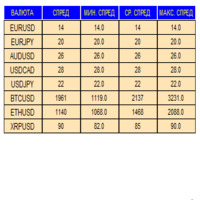
An indicator in the form of a panel for collecting statistics on spreads from a specified list of pairs. It is enough to open one chart and set an indicator to collect statistics for all specified pairs.
After completion of work, the panel writes values to a file, which allows not to interrupt statistics after completion of work.
Input parameters:
-Interval to update the spread for pairs (sec) Allows you to specify how often to collect statistics (allows you to reduce the load) -List of pair
FREE
The technical indicator is a more advanced version of the relative strength index (RSI) that applies moving average convergence-divergence (MACD) principles to a double-smoothed RSI (DS RSI) indicator. The indicator is derived by computing the difference between a double-smoothed RSI and a simple moving average (SMA) of the DS RSI. The indicator's intent is to provide more accurate buy and sell signals than the standard RSI calculation.
The MACD is derived by subtracting the 12-period exponen
FREE

The FX Secretary indicator is a mini assistant for MT-4. His functional duties include - notifying the trader about closing deals with profit or at a loss. In the settings there is only one parameter in which you can change the language of the voice message. So far, the indicator speaks only two languages. In the future, it is possible to expand the functionality with an increase in languages and a set of words. Use for health!
FREE

Delete big amounts of orders, in just a few clicks. Drag the script to any chart to delete open and pending orders, you can delete all the orders from the account or delete a specific order groups, identifying them by magic number. You can modify the parameter MAGICN on the followay way: - Introduce the magic number that was used to place the orders you want to delete, the script will delete all pending and open orders that were placed with that magic number. - Also, introduce 0 (cero) to delete
FREE

FractZigER calculates reversal vertices on the chart and connects them by lines individually for High and Low and complements the chart with lines by bottoms for High and Low in a similar way. Only one parameter is used for setup (ReachBars - number of neighbouring bars for plotting a vertex), as well as one parameter for drawing into history (DRAWs - number of bars in history to be used in calculation). Use the indicator the same way you previously used ZigZags and indicators based on fractals,
FREE
MetaTraderマーケットは自動売買ロボットとテクニカル指標を販売するための最もいい場所です。
魅力的なデザインと説明を備えたMetaTraderプラットフォーム用アプリを開発するだけでいいのです。マーケットでプロダクトをパブリッシュして何百万ものMetaTraderユーザーに提供する方法をご覧ください。

取引の機会を逃しています。
- 無料取引アプリ
- 8千を超えるシグナルをコピー
- 金融ニュースで金融マーケットを探索